Introduction to Rest Assured

HOME

In this tutorial, I’ll explain about API & Rest Assured.

What is API?

API stands for Application Programming Interface. It comprises a set of functions that can be accessed and executed by another software system.  Thus, it serves as an interface between different software systems and establishes their interaction and data exchange. APIs can be used in various contexts, including web development, mobile app development, and software integration. For example, web APIs allow websites to interact with external services, such as third-party payment services or storing the information in a database.

What is API Testing?

In the modern development world, many web applications are designed based on a three-tier architecture model. These are 

  1. Presentation Tier – User Interface (UI
  2. Logic Tier – Business logic is written in this tier. It is also called Business Tier. (API
  3. Data Tier – Here information and data are stored and retrieved from a Database. (DB) Ideally, these three layers (tiers) should not know anything about the platform, technology, and structure of each other.

 We can test UI with GUI testing tools, and we can test logic tier (API) with API testing tools. The logic tier comprises all the business logic, and it has more complexity than the other tiers the test executed on this tier is called API Testing. API Testing tests the logic tier directly and checks expected functionality, reliability, performance, and security.

What is Rest API?

REST is an architectural style that uses simple HTTP calls for inter-machine communication. REST does not contain an additional messaging layer and focuses on design rules for creating stateless services. A client can access the resource using the unique URI and a representation of the resource is returned. With each new resource representation, the client is said to transfer state. While accessing RESTful resources with HTTP protocol, the URL of the resource serves as the resource identifier, and GET, PUT, DELETE, POST and HEAD are the standard HTTP operations to be performed on that resource.

REST API Testing with Rest Assured

What is Rest Assured?

REST Assured is a Java DSL for simplifying the testing of REST-based services built on top of HTTP Builder. It supports POST, GET, PUT, DELETE, OPTIONS, PATCH, and HEAD requests and can be used to validate and verify the response of these requests.

Rest-Assured library also provides the ability to validate the HTTP Responses received from the server. For e.g. we can verify the Status code, Status message, Headers, and even the Body of the response. This makes Rest-Assured a very flexible library that can be used for testing.

REST Assured can be used to test XML as well as JSON-based web services. REST Assured can be integrated with JUnit and TestNG frameworks for writing test cases for our application.

HTTP Methods for REST API Automation Testing

REST API uses five HTTP methods to request a command:

GET: To retrieve the information at a particular URL.

PUT: To update the previous resource or create new information at a particular URL.

PATCH: For partial updates.

POST: It is used to develop a new entity. Moreover, it is also used to send information to the server, such as uploading a file, customer information, etc.

DELETE: To delete all current representations at a specific URL.

HTTP Status Codes

Status codes are the responses given by a server to a client’s request. They are classified into five categories:

  1. 1xx (100 – 199): The response is informational
  2. 2xx (200 – 299): Assures successful response
  3. 3xx (300 – 399): You are required to take further action to fulfill the request
  4. 4xx (400 – 499): There’s a bad syntax and the request cannot be completed
  5. 5xx (500 – 599): The server entirely fails to complete the request

Advantages of Rest Assured

  1. It is an Open source Tool i.e. free.
  2. It requires less coding compared to Apache Http Client.
  3. Easy parsing and validation of response in JSON and XML.
  4. The extraction of values and asserting is quite easy using inbuilt Hemcrest Matchers.
  5. It follows BDD keywords like given(), when(), then() which makes code readable and supports clean coding. This feature is available from version 2.0.
  6. It supports quick assertion for status code and response time.
  7. It supports assertion to Status Code, Response Time, Headers, cookies, Content-Type, etc.
  8. It has a powerful logging mechanism.
  9. It can be easily integrated with other Java libraries like TestNG, JUnit as Test Framework and Extent Report, and Allure Report for reporting purposes.
  10. It provides quite good support for different authentication mechanisms for APIs.
  11. It can be integrated with Selenium-Java to achieve End-to-end automation.
  12. It supports JSONPath and XmlPath which helps in parsing JSON and XML response. Rest Assured integrates both by default.
  13. It can be used to verify JSON Schema using JSON Schema Validation library and XML schema validation
  14. It can be integrated with Build Tools like Maven or Gradle and supports CI/CD also.
  15. It supports multi-part form data and Spring Mock Mvc, Spring Web Test Client, Scala and Kotlin.

How To Send A JSON/XML File As Payload To Request using Rest Assured

HOME

In this tutorial, I will explain to pass a JSON or XML file as a payload to the request. This is needed when the payload is static or there is minimal change in the request payload. This can be done by using the body() method, which accepts “File” as an argument. This is elaborated in Javadoc.

RequestSpecification body(File body)

This specifies file content that’ll be sent with the request. This only works for the POST, PATCH and PUT HTTP methods. Trying to do this for the other HTTP methods will cause an exception to be thrown.

<dependency>
    <groupId>io.rest-assured</groupId>
    <artifactId>rest-assured</artifactId>
    <version>5.5.1</version>
    <scope>test</scope>
</dependency>

Pass JSON file as payload

Step 1 – Create a .json file and write the payload in that. Keep the file in the “src/test/resources” folder.

Step 2 – Create a File in Java using the “File” and pass it to body() method.

import static io.restassured.RestAssured.given;
import static org.hamcrest.Matchers.equalTo;
import java.io.File;
import org.junit.Test;
import io.restassured.http.ContentType;

public class passJsonAsPayload {


    @Test
    public void createUser() {

        // Creating a File instance
        File jsonData = new File("src/test/resources/Payloads/jsondemo.json");

        // GIVEN
        given()
                .baseUri("https://reqres.in")
                .contentType(ContentType.JSON)
                .body(jsonData)

                // WHEN
                .when()
                .post("/api/users")

                // THEN
                .then()
                .assertThat()
                .statusCode(201)
                .body("name", equalTo("Json_Test"))
                .body("job", equalTo("Leader"))
                .log().all();

    }
}

The output of the above program is

Similarly, we can pass an XML as a payload to request. The file passed within the body() method should be of type .xml.

<?xml version="1.0" encoding="utf-8"?>
<soap:Envelope xmlns:soap="http://schemas.xmlsoap.org/soap/envelope/">
    <soap:Body>
        <NumberToWords xmlns="http://www.dataaccess.com/webservicesserver/">
            <ubiNum>500</ubiNum>
        </NumberToWords>
    </soap:Body>
</soap:Envelope>
@Test
    public void getNumber() {

        // Creating a File instance
        File xmlData = new File("src/test/resources/Payloads/xmlDemo.xml");

        // GIVEN
         RestAssured.given()
                .baseUri("https://www.dataaccess.com")
                .header("Content-Type", "text/xml")
                .body(xmlData)

                // WHEN
                .when()
                .post("/webservicesserver/NumberConversion.wso")

                // THEN
                .then()
                .assertThat()
                .statusCode(200)
                 .body("Envelope.Body.NumberToWordsResponse.NumberToWordsResult", equalToCompressingWhiteSpace("five hundred"))
                .log().all();

    }

Congrats. You have learned how to pass a JSON as a payload to the request. Happy Learning !!

Gradle Tutorials

Last Updated On

HOME

Gradle is an open-source build automation tool that is designed to be flexible enough to build almost any type of software.
Gradle runs on the JVM and you must have a Java Development Kit (JDK) installed to use it.
Several major IDEs allow you to import Gradle builds and interact with them: Android Studio, IntelliJ IDEA, Eclipse, and NetBeans.

Installation of Gradle

Chapter 1 How to install Gradle on Windows

Creation of Gradle project

Chapter 1 How to create Java Gradle project in Eclipse
Chapter 2 How to create a Java Gradle project using Command Line
Chapter 3 How to create Gradle project in IntelliJ
Chapter 4 How to create Gradle Java project in IntelliJ using Command Line

Importing of Gradle Project

Chapter 1 How to import Java Gradle project in Eclipse
Chapter 2 How to import Java Gradle project in IntelliJ

Gradle Project in Cucumber

Chapter 1 How To Create Gradle Project with Cucumber to test Rest API
Chapter 2 Run Gradle Cucumber Tests from Command Line
Chapter 3 Gradle Project with Cucumber, Selenium and TestNG
Chapter 4 Gradle Project with Cucumber, Selenium and JUnit4

Gradle Project in Serenity

Chapter 1 Serenity BDD with Gradle and Cucumber for Web Application
Chapter 2 Serenity BDD with Cucumber and Rest Assured in Gradle
Chapter 3 Serenity Emailable Report in Gradle

Gradle Project with Selenium

Chapter 1 How to create Gradle project with Selenium and TestNG
Chapter 2 How to create Gradle project with Selenium and JUnit4
Chapter 3 Gradle – Integration of Selenium and JUnit5

Gradle Project in Rest API

Chapter 1 Setup Basic REST Assured Gradle Project In Eclipse IDE

Allure Reports for Gradle Project

Chapter 1 Gradle – Allure Report for Selenium and TestNG
Chapter 2 Gradle – Allure Report for Selenium and JUnit4
Chapter 3 Gradle – Allure Report for Cucumber, Selenium and TestNG

Extent Reports for Gradle Project

Chapter 1 Gradle – Extent Report Version 5 for Cucumber, Selenium, and TestNG

Gradle with Jenkins

Chapter 1 Integrate Gradle project with Jenkins
Chapter 2 How to create Jenkins pipeline for Gradle project

Integration of Allure Report with Rest Assured and JUnit4

HOME

In the previous tutorial, I explained the Allure Report with Cucumber, Selenium and JUnit4. In this tutorial, I will explain how to Integrate Allure Report with Rest Assured and JUnit4.

The below example covers the implementation of Allure Report for Rest API using Rest Assured, JUnit4, Java, and Maven.

Prerequisite

  1. Java 11 or above installed
  2. Maven installed
  3. Eclipse or IntelliJ installed
  4. Allure installed

Dependency List:

  1. Java 17
  2. Maven – 3.9.6
  3. Allure Maven – 2.12.0
  4. Rest Assured – 5.3.4
  5. Allure Rest Assured – 2.25.0
  6. Allure JUnit4 – 2.25.0
  7. Aspectj – 1.9.21
  8. JUnit – 4.13.2

Implementation Steps

Step 1 – Update Properties section in Maven pom.xml

<properties>
        <rest-assured.version>5.4.0</rest-assured.version>
        <junit.version>4.13.2</junit.version>
        <json.version>20231013</json.version>
        <hamcrest.version>1.3</hamcrest.version>
        <allure.maven.version>2.12.0</allure.maven.version>
        <allure.junit.version>2.25.0</allure.junit.version>
        <allure.rest.assured.version>2.25.0</allure.rest.assured.version>
        <maven.compiler.plugin.version>3.12.1</maven.compiler.plugin.version>
        <maven.surefire.plugin.version>3.2.3</maven.surefire.plugin.version>
        <maven.compiler.source>17</maven.compiler.source>
        <maven.compiler.target>17</maven.compiler.target>
        <aspectj.version>1.9.21</aspectj.version>
</properties>

Step 2 – Add the Allure-Rest Assured dependency

<!--Allure Reporting Dependency-->   
<dependency>
    <groupId>io.qameta.allure</groupId>
    <artifactId>allure-rest-assured</artifactId>
    <version>${allure.rest-assured.version}</version>
</dependency>

Add other dependencies like Rest Assured and Allure-JUnit4 dependencies in POM.xml

<dependencies>

        <!-- Rest-Assured Dependency -->
        <dependency>
            <groupId>io.rest-assured</groupId>
            <artifactId>rest-assured</artifactId>
            <version>${rest-assured.version}</version>
            <scope>test</scope>
        </dependency>

        <!-- JUnit4 Dependency -->
        <dependency>
            <groupId>junit</groupId>
            <artifactId>junit</artifactId>
            <version>${junit.version}</version>
            <scope>test</scope>
        </dependency>

        <!-- JSON Dependency -->
        <dependency>
            <groupId>org.json</groupId>
            <artifactId>json</artifactId>
            <version>${json.version}</version>
        </dependency>

        <!-- Allure JUnit Dependency -->
        <dependency>
            <groupId>io.qameta.allure</groupId>
            <artifactId>allure-junit4</artifactId>
            <version>${allure.junit.version}</version>
        </dependency>

        <!-- Allure Rest-assured Dependency-->
        <dependency>
            <groupId>io.qameta.allure</groupId>
            <artifactId>allure-rest-assured</artifactId>
            <version>${allure.rest.assured.version}</version>
        </dependency>

    </dependencies>

Step 3 – Update the Build Section of pom.xml in Allure Report Project

<build>
        <plugins>

            <plugin>
                <groupId>org.apache.maven.plugins</groupId>
                <artifactId>maven-compiler-plugin</artifactId>
                <version>${maven.compiler.plugin.version}</version>
                <configuration>
                    <source>${maven.compiler.source}</source>
                    <target>${maven.compiler.target}</target>
                </configuration>
            </plugin>

            <plugin>
                <groupId>org.apache.maven.plugins</groupId>
                <artifactId>maven-surefire-plugin</artifactId>
                <version>${maven.surefire.plugin.version}</version>
                <configuration>
                    <testFailureIgnore>true</testFailureIgnore>
                    <argLine>
                        -javaagent:"${settings.localRepository}/org/aspectj/aspectjweaver/${aspectj.version}/aspectjweaver-${aspectj.version}.jar"
                    </argLine>
                    <properties>
                        <property>
                            <name>listener</name>
                            <value>io.qameta.allure.junit4.AllureJunit4</value>
                        </property>
                    </properties>
                </configuration>
                <dependencies>
                    <dependency>
                        <groupId>org.aspectj</groupId>
                        <artifactId>aspectjweaver</artifactId>
                        <version>${aspectj.version}</version>
                    </dependency>
                </dependencies>
            </plugin>

            <plugin>
                <groupId>io.qameta.allure</groupId>
                <artifactId>allure-maven</artifactId>
                <version>${allure.maven.version}</version>
                <configuration>
                    <reportVersion>${allure.maven.version}</reportVersion>
                </configuration>
            </plugin>
        </plugins>
    </build>
</project>

Step 4 – Create a Test Code for the testing of REST API under src/test/java

Rest Assured and Allure Report are two popular tools for testing. Rest Assured is used for API testing and Allure Report is used for creating detailed reports about tests. To see our request and response in more detail using these tools, we need to add a line to our Rest Assured tests. This will provide the request and response details in the report.

.filter(new AllureRestAssured())

package org.example;

import io.qameta.allure.*;
import io.qameta.allure.restassured.AllureRestAssured;
import io.restassured.http.ContentType;
import org.json.JSONObject;
import org.junit.Test;

import static io.restassured.RestAssured.given;
import static org.hamcrest.core.IsEqual.equalTo;

@Epic("REST API Regression Testing using JUnit4")
@Feature("Verify CRUID Operations on Employee module")
public class APITests {

    String BaseURL = "https://dummy.restapiexample.com/api";


    @Test
    @Story("GET Request")
    @Severity(SeverityLevel.NORMAL)
    @Description("Test Description : Verify the details of employee of id-2")
    public void getUser() {

        // GIVEN
        given()
                .filter(new AllureRestAssured())

                // WHEN
                .when()
                .get(BaseURL + "/v1/employee/2")

                // THEN
                .then()
                .statusCode(200)
                .statusLine("HTTP/1.1 200 OK")
                // To verify booking id at index 2
                .body("data.employee_name", equalTo("Garrett Winters!"))
                .body("message", equalTo("Successfully! Record has been fetched."));

    }

    @Test
    @Story("POST Request")
    @Severity(SeverityLevel.NORMAL)
    @Description("Test Description : Verify the creation of a new employee")
    public void createUser() {

        JSONObject data = new JSONObject();

        data.put("employee_name", "APITest");
        data.put("employee_salary", "99999");
        data.put("employee_age", "30");

        // GIVEN
        given()
                .filter(new AllureRestAssured())
                .contentType(ContentType.JSON)
                .body(data.toString())

                // WHEN
                .when()
                .post(BaseURL + "/v1/create")

                // THEN
                .then()
                .statusCode(200)
                .body("data.employee_name", equalTo("APITest"))
                .body("message", equalTo("Successfully! Record has been added."));

    }
}

Step 5 – Run the Test and Generate Allure Report

To run the tests, use the below command

mvn clean test

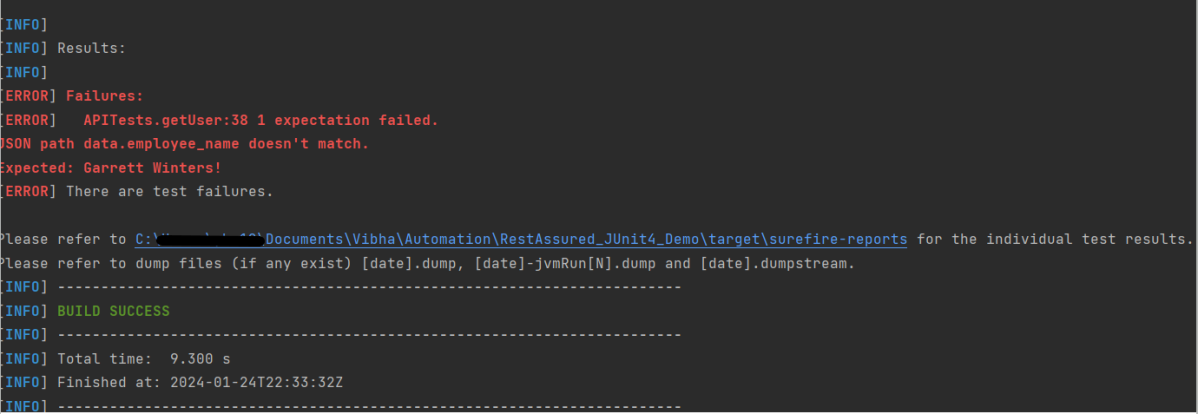
The output of the above program is

This will create allure-results folder with all the test reports. These files will be used to generate Allure Report.

To create Allure Report, use the below command

allure serve

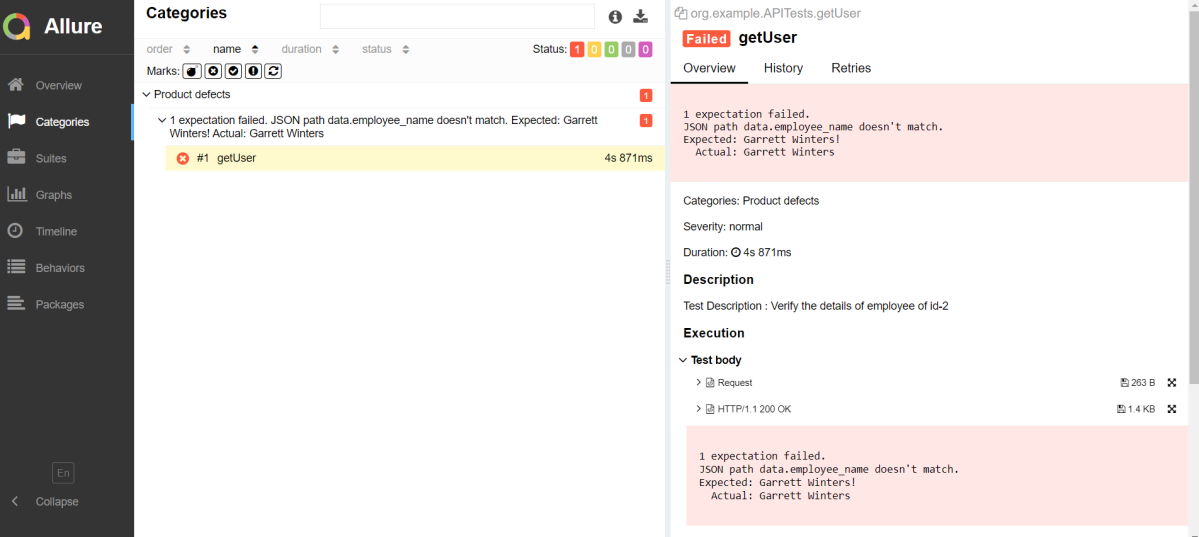
This will generate the beautiful Allure Test Report as shown below.

Allure Report Dashboard

Categories in Allure Report

The categories tab gives you a way to create custom defects classifications to apply for test results. There are two categories of defects – Product Defects (failed tests) and Test Defects (broken tests).

Suites in Allure Report

On the Suites tab a standard structural representation of executed tests, grouped by suites and classes can be found.

View test history

Each time you run the report from the command line with the mvn clean test command, a new result JSON file will get added to the allure-results folder. Allure can use those files to include a historical view of your tests. Let’s give that a try.

To get started, run mvn clean test a few times and watch how the number of files in the allure-reports folder grows.

Now go back to view your report. Select Suites from the left nav, select one of your tests and click Retries in the right pane. You should see the history of test runs for that test:

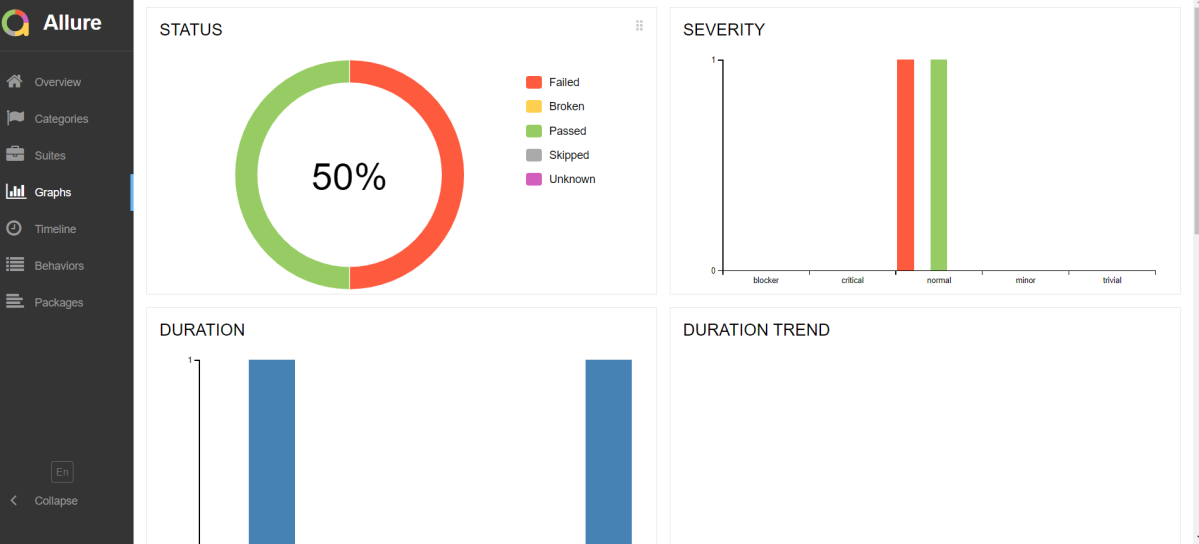
Graphs in Allure Report

Graphs allow you to see different statistics collected from the test data: status breakdown or severity and duration diagrams.

Timeline in Allure Report

Timeline tab visualizes retrospective of tests execution, allure adaptors collect precise timings of tests, and here on this tab, they are arranged accordingly to their sequential or parallel timing structure.

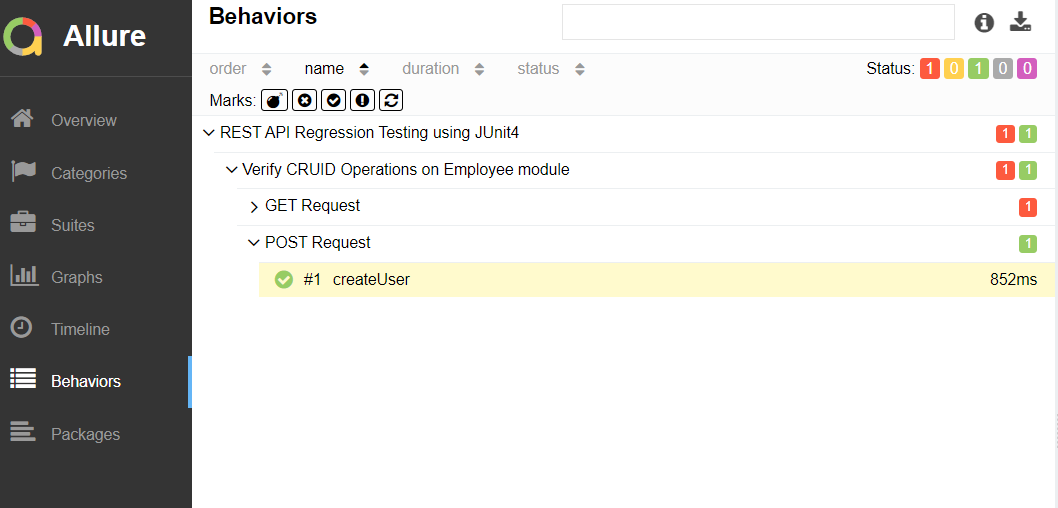
Behaviors of Allure Report

This tab groups test results according to Epic, Feature, and Story tags.

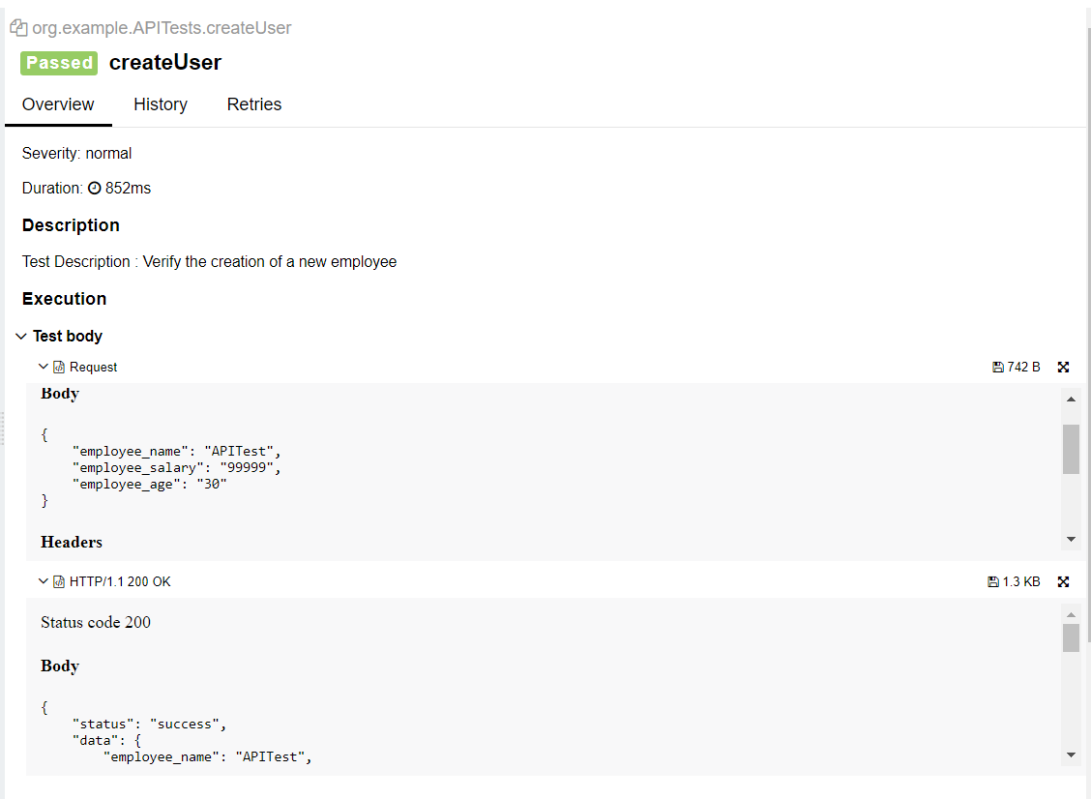
The below image shows the request body sent and the status code of the response, its body, and header provided by API.

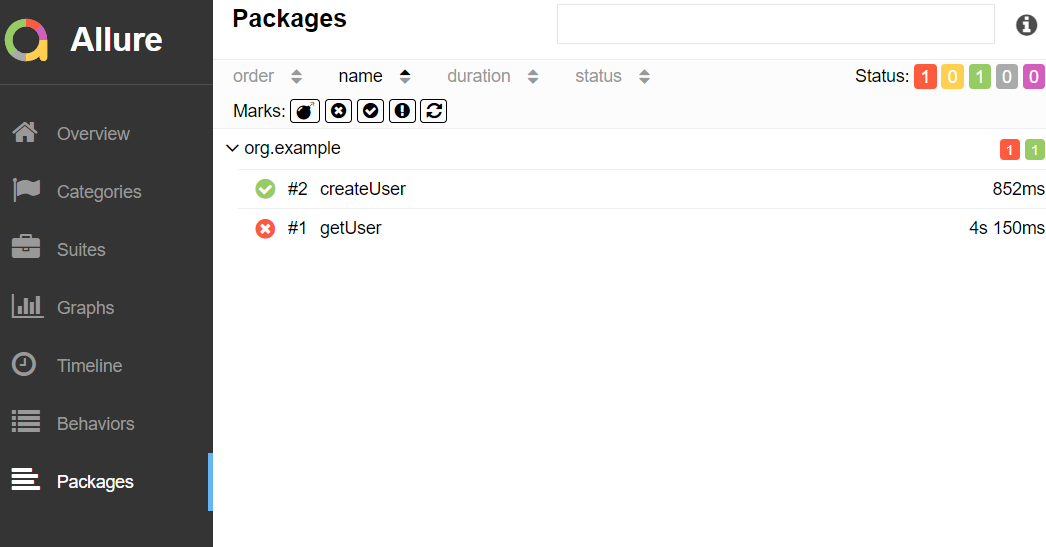
Packages in Allure Report

The packages tab represents a tree-like layout of test results, grouped by different packages.

We are done! Congratulations on making it through this tutorial and hope you found it useful! Happy Learning!!

Integration of REST Assured with JUnit4

HOME

In this tutorial, I’ll create a Test Framework for the testing of REST API using REST Assured and JUnit4 as the test framework.

What is Rest Assured?

Rest Assured enables you to test REST APIs using java libraries and integrates well with Maven/Gradle. REST Assured is a Java library that provides a domain-specific language (DSL) for writing powerful, maintainable tests for RESTful APIs.

What is JUnit?

JUnit is a simple framework to write repeatable tests. It is an instance of the xUnit architecture for unit testing frameworks. JUnit 4 is one of the most popular unit testing frameworks which has a significant role in the test-driven development process.

Dependency List:-

  1. REST Assured – 5.4.0
  2. Java 17
  3. JUnit – 4.13.2
  4. Maven – 3.9.6

Detailed Step Description

Step 1- Download and Install Java

Java needs to be present on the system to run the tests. Click here to know How to install Java. To know if Java is installed or not on your machine, type this command in the command line. This command will show the version of Java installed on your machine.

java -version

Step 2 – Download and setup Eclipse IDE on the system

The Eclipse IDE (integrated development environment) provides strong support for Java developers, which is needed to write Java code. Click here to know How to install Eclipse.

Step 3 – Setup Maven

To build a test framework, we need to add a number of dependencies to the project. It is a very tedious and cumbersome process to add each dependency manually. So, to overcome this problem, we use a build management tool. Maven is a build management tool that is used to define project structure, dependencies, build, and test management. Click here to know How to install Maven.

To know if Maven is already installed or not on your machine, type this command in the command line. This command will show the version of Maven installed on your machine.

mvn -version

Step 4 – Create a new Maven Project

Click here to know How to create a Maven project

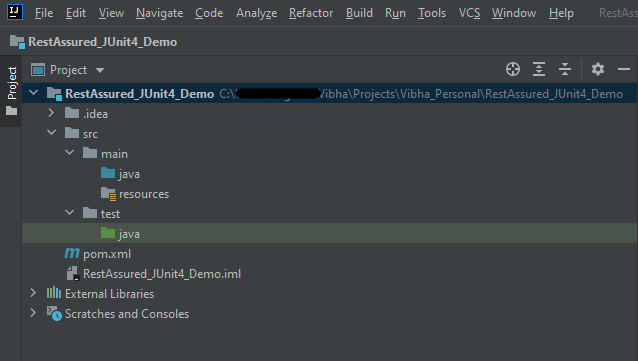
Below is the Maven project structure. Here,

Group Id – com.example
Artifact Id – RestAssured_JUnit4_Demo
Version – 0.0.1-SNAPSHOT
Package – com. example.RestAssured_JUnit4_Demo

Step 5 – Add REST Assured and JUnit4 dependencies to the project

Add the below-mentioned dependencies to the project.

<project xmlns="http://maven.apache.org/POM/4.0.0" xmlns:xsi="http://www.w3.org/2001/XMLSchema-instance"
  xsi:schemaLocation="http://maven.apache.org/POM/4.0.0 http://maven.apache.org/xsd/maven-4.0.0.xsd">
  <modelVersion>4.0.0</modelVersion>

  <groupId>org.example</groupId>
  <artifactId>RestAssured_JUnit4_Demo</artifactId>
  <version>1.0-SNAPSHOT</version>
  <packaging>jar</packaging>

  <name>RestAssured_JUnit4_Demo</name>
  <url>http://maven.apache.org</url>

  <properties>
    <rest-assured.version>5.4.0</rest-assured.version>
    <junit.version>4.13.2</junit.version>
    <json.version>20231013</json.version>
    <hamcrest.version>1.3</hamcrest.version>
    <maven.site.plugin.version>4.0.0-M13</maven.site.plugin.version>
    <maven.compiler.plugin.version>3.12.1</maven.compiler.plugin.version>
    <maven.surefire.plugin.version>3.2.3</maven.surefire.plugin.version>
    <maven.surefire.report.plugin.version>3.2.5</maven.surefire.report.plugin.version>
    <maven.compiler.source>17</maven.compiler.source>
    <maven.compiler.target>17</maven.compiler.target>
  </properties>

  <dependencies>

    <!-- Rest-Assured Dependency -->
    <dependency>
      <groupId>io.rest-assured</groupId>
      <artifactId>rest-assured</artifactId>
      <version>${rest-assured.version}</version>
      <scope>test</scope>
    </dependency>

    <!-- JUnit4 Dependency -->
    <dependency>
      <groupId>junit</groupId>
      <artifactId>junit</artifactId>
      <version>${junit.version}</version>
      <scope>test</scope>
    </dependency>

    <!-- JSON Dependency -->
    <dependency>
      <groupId>org.json</groupId>
      <artifactId>json</artifactId>
      <version>${json.version}</version>
    </dependency>

    <!-- Hamcrest Dependency -->
    <dependency>
      <groupId>org.hamcrest</groupId>
      <artifactId>hamcrest-all</artifactId>
      <version>${hamcrest.version}</version>
      <scope>test</scope>
    </dependency>

  </dependencies>

  <build>
    <plugins>

      <plugin>
        <groupId>org.apache.maven.plugins</groupId>
        <artifactId>maven-site-plugin</artifactId>
        <version>${maven.site.plugin.version}</version>
      </plugin>

      <plugin>
        <groupId>org.apache.maven.plugins</groupId>
        <artifactId>maven-surefire-plugin</artifactId>
        <version>${maven.surefire.plugin.version}</version>
        <configuration>
          <testFailureIgnore>true</testFailureIgnore>
        </configuration>
      </plugin>

      <plugin>
        <groupId>org.apache.maven.plugins</groupId>
        <artifactId>maven-compiler-plugin</artifactId>
        <version>${maven.compiler.plugin.version}</version>
        <configuration>
          <source>${maven.compiler.source}</source>
          <target>${maven.compiler.target}</target>
        </configuration>
      </plugin>
    </plugins>
  </build>

  <reporting>
    <plugins>
      <plugin>
        <groupId>org.apache.maven.plugins</groupId>
        <artifactId>maven-surefire-report-plugin</artifactId>
        <version>${maven.surefire.report.plugin.version}</version>
      </plugin>
    </plugins>
  </reporting>
</project>

Step 6 – Create the TEST file

The tests should be written in src/test/java directory. To know how to create a JSON Request body using JSONObject, please refer to this tutorial.

import io.restassured.http.ContentType;
import org.json.JSONObject;
import org.junit.Test;
import static org.hamcrest.Matchers.equalTo;
import static io.restassured.RestAssured.given;

public class APITests {

    String BaseURL = "https://dummy.restapiexample.com/api";


    @Test
    public void createUser() {

        JSONObject data = new JSONObject();

        data.put("employee_name", "NewUser1");
        data.put("employee_salary", "1000");
        data.put("employee_age", "35");

        // GIVEN
        given()
                .contentType(ContentType.JSON)
                .body(data.toString())

                // WHEN
                .when()
                .post(BaseURL + "/v1/create")

                // THEN
                .then()
                .statusCode(200)
                .body("data.employee_name", equalTo("NewUser1"))
                .body("message", equalTo("Successfully! Record has been added."));

    }

}

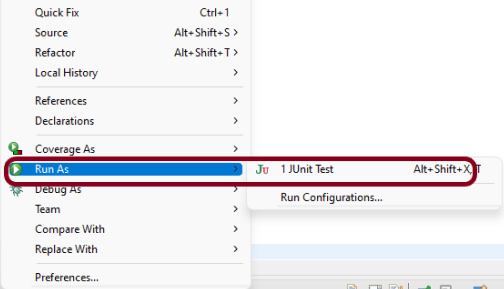
Step 7 – Test Execution through JUnit Test

Go to the Runner class and right-click Run As JUnit Test. The tests will run as JUnit tests. (Eclipse)

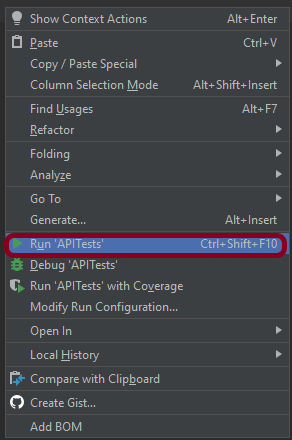
Below is the image to run the tests in IntelliJ.

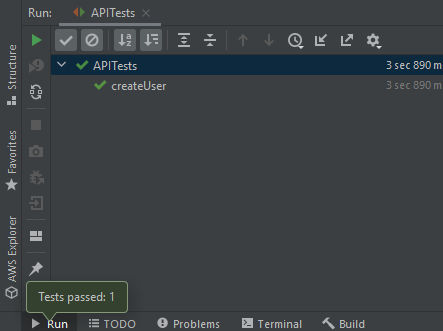
This is how the execution console will look like.

Step 8 – Run the tests from the command line

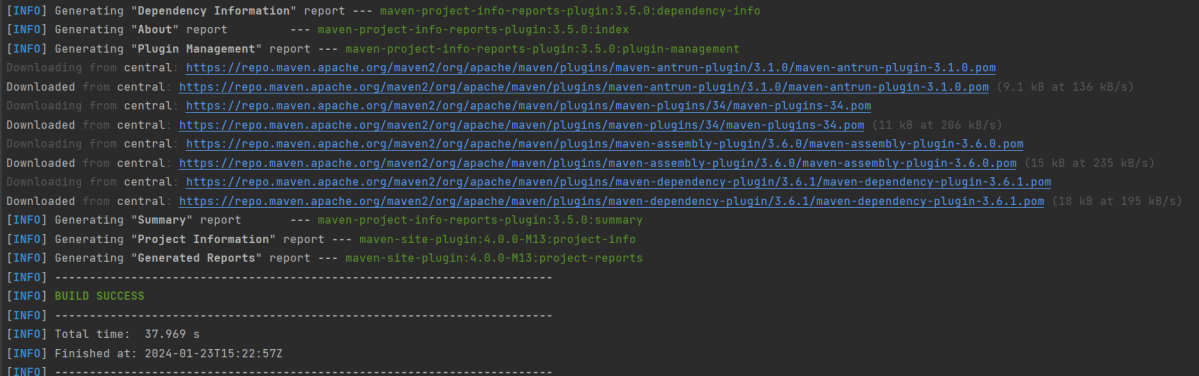
Maven Site Plugin creates a folder – site under the target directory, and the Maven Surefire Report plugin generates the JUnit Reports in the site folder. We need to run the tests through the command line to generate the JUnit Report.

mvn clean test site

The output of the above program is

Step 9 – Report Generation

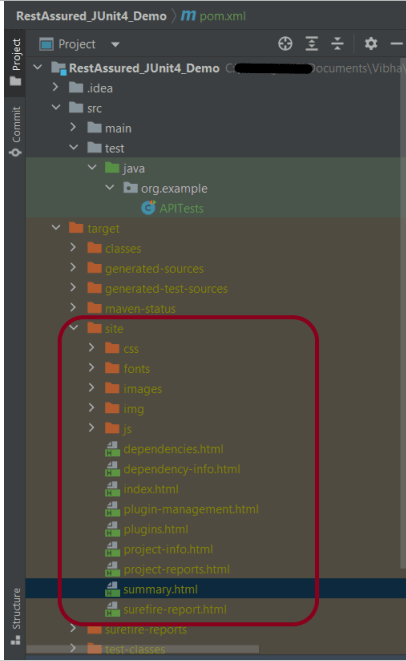
After the test execution, refresh the project, and a new folder with the name site in the target folder will be generated. This folder contains the reports generated by JUnit. The structure of the folder site looks as shown below.

Step 10 – View the Report

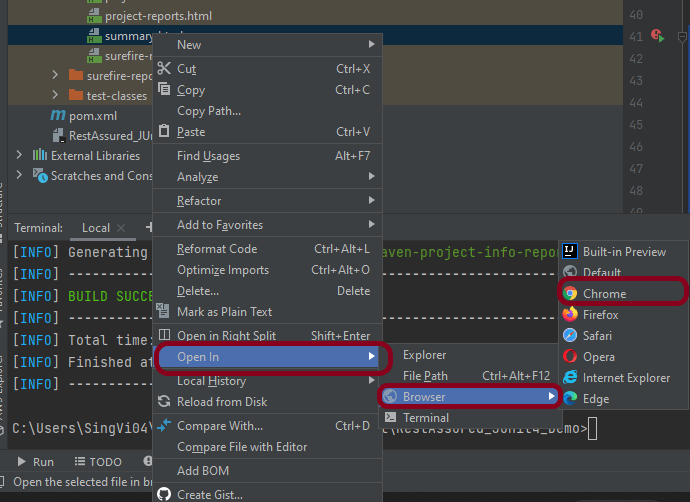
Right-click on the summary.html report and select Open In -> Browser ->Chrome.

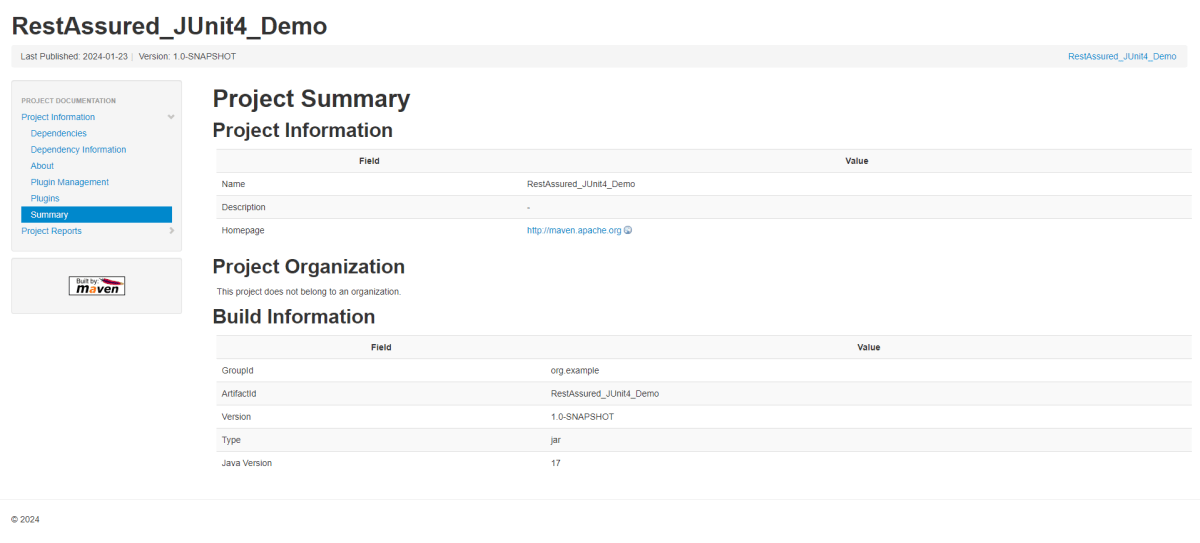
Summary Report

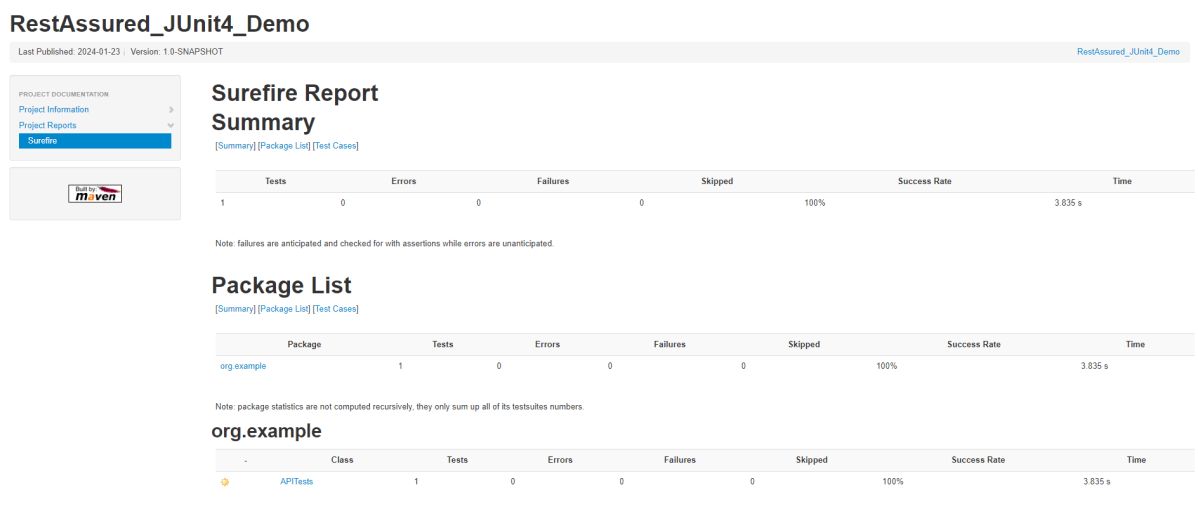
Below is the summary Report.

Surefire Report

Below is an example of a Surefire Report. This report contains a summary of the test execution.

We are done! Congratulations on making it through this tutorial and hope you found it useful! Happy Learning!!

Allure Reports

HOME

Allure Framework is a lightweight, flexible multi-language test report tool that not only displays a very concise representation of what has been tested in a neat web report form, but also allows everyone involved in the development process to extract the most useful information from everyday test execution.

Allure Report for Maven Projects

Chapter 1 What is Allure Report?
Chapter 2 Integration of Allure Report with Selenium and JUnit4
Chapter 3 Integration of Allure Report with Selenium and JUnit5
Chapter 4 Integration of Allure Report with Selenium and TestNG
Chapter 5 Allure Report with Cucumber, Selenium and JUnit4
Chapter 6 Allure Report with Cucumber, Selenium and TestNG
Chapter 7 Integration of Allure Report with Rest Assured and JUnit4
Chapter 8 Integration of Allure Report with Rest Assured and TestNG
Chapter 9 Allure Report for Cucumber7, Selenium, and JUnit5
Chapter 10 Integration of Allure Report with Jenkins

Allure Report for Gradle Projects

Chapter 1 Gradle – Allure Report for Selenium and TestNG
Chapter 2 Gradle – Allure Report for Selenium and JUnit4
Chapter 3 Gradle – Allure Report for Cucumber, Selenium and TestNG

How to blacklist headers in Rest Assured

HOME

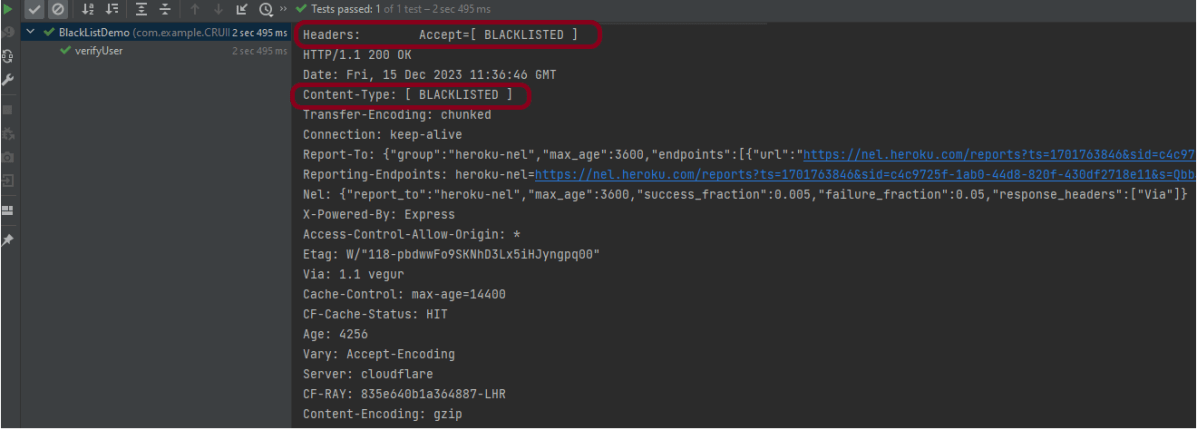
 .config(RestAssured.config().logConfig(LogConfig.logConfig().blacklistHeader("Accept"))).log().headers()

import io.restassured.RestAssured;
import io.restassured.config.LogConfig;
import org.junit.Test;
import java.util.ArrayList;
import java.util.List;
import static io.restassured.RestAssured.given;
import static org.hamcrest.CoreMatchers.equalTo;

public class BlackListDemo {

    @Test
    public void verifyUser() {

        // Given
        given()
                
                .config(RestAssured.config().logConfig(LogConfig.logConfig().blacklistHeader("Accept")))
                .log().headers()

                // When
                .when()
                .get("https://reqres.in/api/users/2")

                // Then
                .then()
                .statusCode(200).statusLine("HTTP/1.1 200 OK")
                .body("data.email", equalTo("janet.weaver@reqres.in"))
                .body("data.first_name", equalTo("Janet"))
                .body("data.last_name", equalTo("Weaver")).log().all();
    }

import io.restassured.RestAssured;
import io.restassured.config.LogConfig;
import org.junit.Test;
import java.util.ArrayList;
import java.util.List;
import static io.restassured.RestAssured.given;
import static org.hamcrest.CoreMatchers.equalTo;

public class BlackListDemo {

    @Test
    public void verifyUser() {

        // Given
        given()

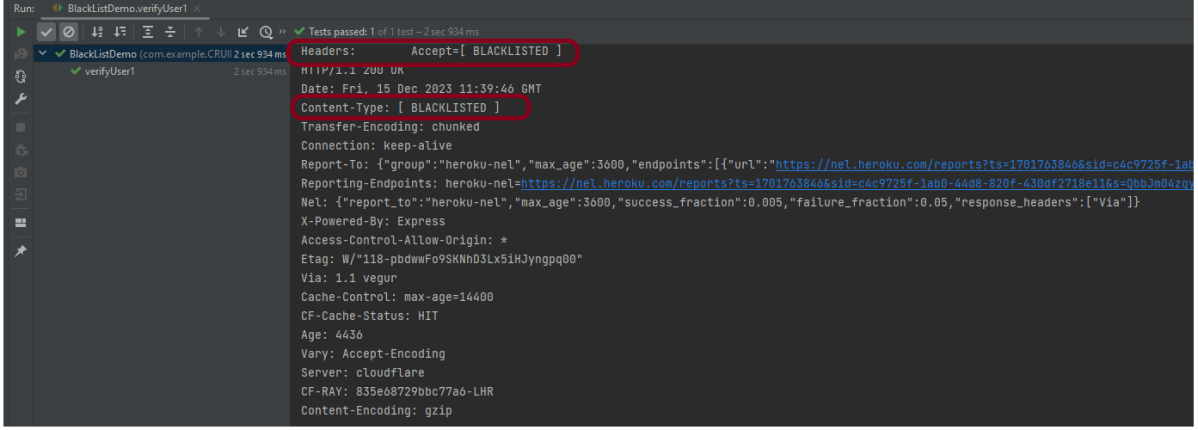
              .config(RestAssured.config().logConfig(LogConfig.logConfig().blacklistHeader("Accept","Content-Type")))
                .log().headers()

                // When
                .when()
                .get("https://reqres.in/api/users/2")

                // Then
                .then()
                .statusCode(200).statusLine("HTTP/1.1 200 OK")
                .body("data.email", equalTo("janet.weaver@reqres.in"))
                .body("data.first_name", equalTo("Janet"))
                .body("data.last_name", equalTo("Weaver")).log().all();
    }

import io.restassured.RestAssured;
import io.restassured.config.LogConfig;
import org.junit.Test;
import java.util.ArrayList;
import java.util.List;
import static io.restassured.RestAssured.given;
import static org.hamcrest.CoreMatchers.equalTo;

public class BlackListDemo {

    @Test
    public void verifyUser1() {

        List headers = new ArrayList<String>();
        headers.add("Accept");
        headers.add("Content-Type");

        // Given
        given()
                .config(RestAssured.config().logConfig(LogConfig.logConfig().blacklistHeader(headers.toArray(new String[0]))))
                .log().headers()

                // When
                .when()
                .get("https://reqres.in/api/users/2")

                // Then
                .then()
                .statusCode(200).statusLine("HTTP/1.1 200 OK")

                // To verify booking id at index 3
                .body("data.email", equalTo("janet.weaver@reqres.in"))
                .body("data.first_name", equalTo("Janet"))
                .body("data.last_name", equalTo("Weaver")).log().all();
    }

}

How to validate JSON body in Rest Assured?

HOME

 <dependency>
      <groupId>io.rest-assured</groupId>
      <artifactId>json-schema-validator</artifactId>
      <version>5.3.2</version>
 </dependency>

{
  "data": {
    "id": 3,
    "email": "emma.wong@reqres.in",
    "first_name": "Emma",
    "last_name": "Wong",
    "avatar": "https://reqres.in/img/faces/3-image.jpg"
  },
  "support": {
    "url": "https://reqres.in/#support-heading",
    "text": "To keep ReqRes free, contributions towards server costs are appreciated!"
  }
}

import static io.restassured.module.jsv.JsonSchemaValidator.

import org.junit.Test;
import java.io.IOException;
import static io.restassured.RestAssured.given;
import static io.restassured.module.jsv.JsonSchemaValidator.matchesJsonSchemaInClasspath;

public class JsonCompare {

    @Test
    public void verifyGreaterResponseTime() throws IOException {

        // Given
        given()

                // When
                .when()
                .get("https://reqres.in/api/users/3")

                // Then
                .then()

                .assertThat()
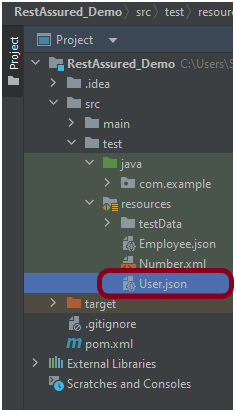
                .body(matchesJsonSchemaInClasspath("User.json"));
    }
}

How to handle HTTP Query Parameters using REST Assured

HOME

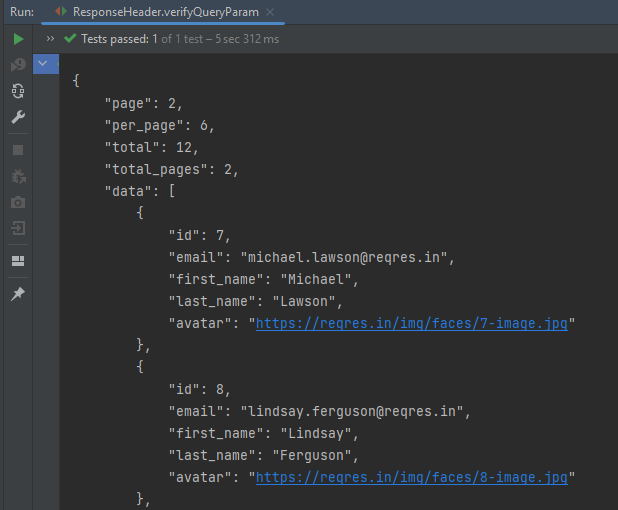
https://reqres.in/api/users?page=2
import org.junit.Test;
import static io.restassured.RestAssured.given;
import static org.hamcrest.CoreMatchers.equalTo;

public class ParamDemo {


    @Test
    public void verifyQueryParam() {

        String endpoint = "https://reqres.in/api/";

        // Given
        given()
                .queryParam("page", "2")

                // When
                .when()
                .get(endpoint + "users/")

                // Then
                .then()

                // To verify the response body
                .body("page", equalTo(2))
                .body("per_page", equalTo(6))
                .body("total_pages", equalTo(2));

    }
}

How to perform multiple assertions in Rest Assured?

HOME

  @Test
   public void verifyHardAssertion() {

      // Given
      given()

              // When
              .when()
              .get("https://reqres.in/api/users/2")

              // Then
              .then()

              // To verify the response body
              .body("data.email", equalTo("janet.weaver@reqres12.in"))
              .body("data.first_name", equalTo("Janet1"))
              .body("data.last_name", equalTo("Weaver"));

    }

 @Test
  public void verifySoftAssertion() {

      // Given
      given()

              // When
              .when()
              .get("https://reqres.in/api/users/2")

              // Then
              .then()

              // To verify the response body
              .body("data.email", equalTo("janet.weaver@reqres12.in"),
                        "data.first_name", equalTo("Janet1"),
                        "data.last_name", equalTo("Weaver"));

    }
}