How to install and setup Robot Framework for Python

HOME

In the previous tutorial, we discussed how the Robot framework actually works. Now we will discuss the Robot framework setup.

To set up the Robot framework, we need multiple components, plugins, etc. Below steps, we need to follow to proceed with the Robot framework.

Implementation Steps

1. Install Python

We are going to use Python for Robot Framework. So, we need to install Python on the system. Please refer to this tutorial to install Python – How to Install Python on Windows 11

Use the below command to verify the presence of Python on the machine.

python --version

2. Install PIP

PIP is a package manager to install modules for python.

PIP gets installed along with python, and you can check the same in the command line as follows:

pip --version

3. Install Robot Framework

We will now use pip – python package manager to install the robot framework and the command for it is as follows:

pip install robotframework

Once the installation is done, you can check the version of the robot framework installed as shown below

robot --version

4. Install Robot framework Selenium Library

Once you have installed robotframework library, you need to install robotframework-seleniumlibrary. To install, you need to use the below command:

pip install robotframework-seleniumlibrary 

5. Install PyCharm IDE

After Python Installation is complete, we need to install one IDE to write the scripting language. Here we will take PyCharm as IDE. Please refer to this tutorial to install PyCharm in your system – How to install PyCharms on Windows 11.

Once PyChram IDE is downloaded, then open the IDE. Create a new project as shown below.

As of now, PyCharm IDE does not contain the robotframework installed in Python. We need to select Robot Python Interpreter.

Go to File ->Settings -> Project: RobotFramework -> Python Interpreter and select the Python Interpreter which has Robot Framework installed.

You can see that once the particular interpreter is selected, it lists all the packages present in it like robotframework, robotframework-seleniumlibrary, selenium, robotframework-pythonlibcore, and so on.

How to add Robot Framework to Python Interpreter?

Click on Add Interpreter and select Virtualenv Environment and select Environment as New. Provide the Location and Base interpreter and click on the “OK” button.

How to install Plugin in PyCharms IDE?

It is suggested to install Hyper RobotFramework Support plugin. This is a Robot Framework plugin for PyCharm. It will highlight the syntax, helps in code completion, explains keyword usage, and many more functionalities.

Go to File ->Settings -> Plugins and type Hyper R and you will see this plugin. Click on the “Install” button to install this plugin.

Now we have understood how to set up the Robot framework in our system environment. Let us run a sample test case in the next tutorial.
Robot Framework Tutorials

HOME

Robot Framework is a generic open-source automation framework. It can be used for test automation and robotic process automation (RPA). RPA is extensively used for Web Application Automation, API Automation, RPA, and Database Testing.

Robot Framework has an easy syntax, utilizing human-readable keywords. Its capabilities can be extended by libraries implemented with Python, Java, or many other programming languages.

Chapter 1 Robot Framework Features – Settings, Libraries, Variables, Keywords, Resources, Reports, Logs
Chapter 2 What are variables in Robot Framework?
Chapter 3 How to handle text box in Robot Framework
Chapter 4 How to handle radio buttons in Robot Framework
Chapter 5 How to handle checkbox in Robot Framework
Chapter 6 How to handle dropdowns in Robot Framework
Chapter 7 How to handle multiple windows in Robot Framework
Chapter 8 How to handle alerts in Robot Framework
Chapter 9 What is Resource File in Robot Framework 
Chapter 10 How to run all the tests from the folder in Robot Framework
Chapter 11 How to implement tagging in Robot Framework
Chapter 12 How to rerun failed tests in Robot Framework
Chapter 13 How to use Drag and Drop in Robot Framework?
Chapter 14 How to set variable values from Runtime command in Robot Framework
Chapter 15 Page Object Model in Robot Framework with Selenium and Python
Chapter 16 Parallel Testing in Robot Framework
Chapter 17 How to write tests in Robot Framework in BDD Format

Data-Driven Testing

Chapter 1 Data-Driven Testing in Robot Framework 
Chapter 2 How to load data from CSV files in the Robot Framework?

API Testing

Chapter 1 How to perform API Testing in Robot Framework using RequestLibrary
Chapter 2 How to Implement Basic Auth in Robot Framework – NEW
Chapter 3 How to pass authorization token in header in Robot Framework – NEW
Chapter 4 Verifying Status Code and Status Line in Robot Framework – NEW

CI/CD

Chapter 1 Run Robot Framework Tests in GitLab CI/CD
Chapter 2How to run Robot Framework in GitHub Actions

Jenkins

Chapter 1 How to integrate Robot Framework with Jenkins
Chapter 2 How to run parameterized Robot Framework tests in Jenkins

What is Robot Framework

HOME

Robot Framework is an open-source, test automation framework for Acceptance Testing and Acceptance Test-driven development.
The Framework uses the keyword-driven approach where small understandable words (either pre-defined or user-defined) are used for writing the scripts.

RPA is extensively used for Web Application Automation, API Automation, RPA, and Database Testing.

This framework consists of all the industry standard Framework features with minimal coding.

Robot Framework has an easy syntax, utilizing human-readable keywords. Its capabilities can be extended by libraries implemented with Python, Java, or many other programming languages.

Robot Framework is used by Juniper Networks, Cisco, Axon, US Naval Research Laboratory, ZYMR, Zilogic, Testmo, Rocla, and many more.

Robot Framework’s test cases are written in text files using a syntax that is similar to natural language. This makes it easy for non-technical stakeholders to understand and review the tests, and for technical users to maintain and extend them over time. The framework also provides detailed test reports and logs, which help you to quickly identify issues and debug your tests.

How to write automated test scripts?

You can easily create automated test scripts with Robot Framework. Keywords are used not only to carry out actions but also to provide assertion mechanisms. They can be subjected to arguments in order to condition their behaviour.

“Open Browser” and “Title Should Be” are two obvious examples of this. There are many test libraries that provide the necessary bits of automation as keywords, so you don’t have to code in Python/Java.

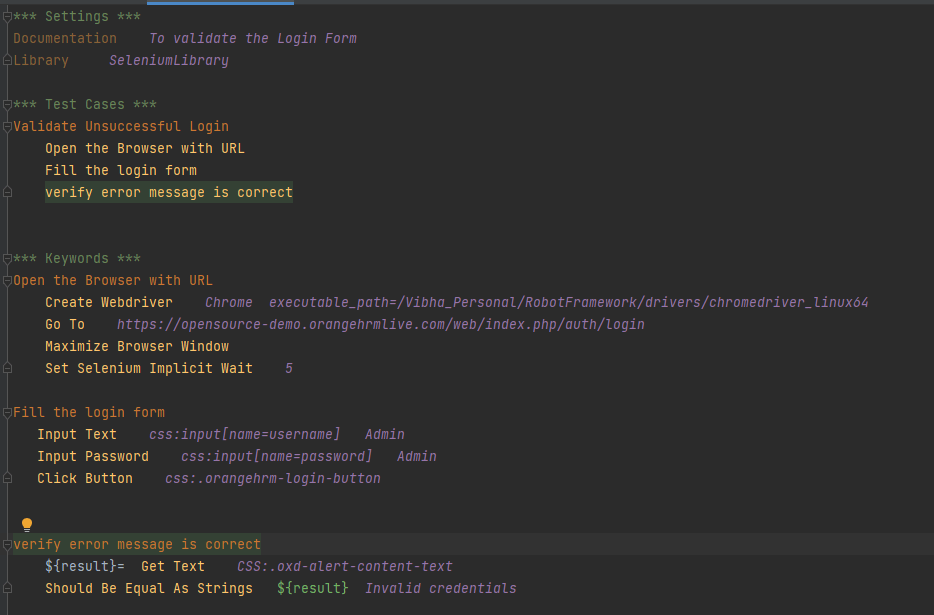
*** Settings ***
Documentation    To validate the Login Form
Library     SeleniumLibrary

*** Test Cases ***
Validate Unsuccessful Login
    Open the Browser with URL
    Fill the login form
    Verify error message is correct


*** Keywords ***
Open the Browser with URL
    Create Webdriver    Chrome  executable_path=/Vibha_Personal/RobotFramework/drivers/chromedriver_linux64
    Go To    https://opensource-demo.orangehrmlive.com/web/index.php/auth/login
    Maximize Browser Window
    Set Selenium Implicit Wait    5

Fill the login form
   Input Text    css:input[name=username]   Admin
   Input Password    css:input[name=password]   Admin
   Click Button    css:.orangehrm-login-button


Verify error message is correct
    ${result}=  Get Text    CSS:.oxd-alert-content-text
    Should Be Equal As Strings   ${result}  Invalid credentials

Features of Robot Framework

  1. Easy-to-read syntax – Robot Framework uses a simple and easy-to-read syntax that is based on keywords and tables, making it easy for both technical and non-technical users to read and write tests.
  2. Cross-platform support – Robot Framework is cross-platform and can be used to test applications on Windows, macOS, and Linux.
  3. Test cases are written using keywords (pre-defined or user-defined) in a tabular format.
  4. Built-in libraries – Robot Framework provides a rich set of built-in libraries for common testing tasks, such as file system operations, database testing, and HTTP requests.
  5. It supports the use of Variables, resource files, and Variable files
  6. Easy integration – Robot Framework can be easily integrated with other tools and libraries, including Selenium, Appium, and REST APIs.
  7. It allows tagging of test cases that come in handy while trying to run either of the Smoke Test Cases, Regression Test Cases, System Test Cases, etc.
  8. Excellent HTML Report – It provides detailed reports and logs of the script’s execution status, which is very useful if the script fails.
  9. Complete Logging of the Test Execution – The elaborate reports and logs are generated after every build execution.
  10. It supports parallel Execution of tests with Thread Safe
  11. Continuous Integration (CI) support – Robot Framework can be easily integrated with CI tools like Jenkins, making it easy to automate the testing process as part of a larger software development lifecycle.

Robot Framework vs. Cucumber

1. The Robot Framework is based on the premise that you can write test cases without having to code because there are numerous libraries available that provide reusable keywords and their underlying code. So, we do need not write code for the business requirements whereas, in the case of Cucumber, we need to write the code for the requirements.

2. Robot covers RPA (Robotic Process Automation); Cucumber doesn’t support.

3. Robot Framework has inbuilt extensive logging, which is missing in Cucumber. Cucumber can use a third-party library like Log4J to implement logging.