Cucumber Tutorials

 HOME

Cucumber Introduction, Installation, and Configuration

Chapter 1  Introduction of Cucumber Testing Tool (BDD Tool)
Chapter 2 How to install Cucumber Eclipse Plugin
Chapter 3 How to setup Cucumber with Eclipse
Chapter 4 Cucumber – What is Gherkin

Cucumber Scenario, Features & Step Definition

Chapter 1 Cucumber – What is Feature File in Cucumber
Chapter 2 Step Definition in Cucumber
Chapter 3 Cucumber – JUnit Test Runner Class

Cucumber – Hooks & Tags

Chapter 1 Hooks in Cucumber
Chapter 2 Tags in Cucumber
Chapter 3 Conditional Hooks in Cucumber
Chapter 4 What is CucumberOptions in Cucumber?
Chapter 5 Background in Cucumber
Chapter 6 Monochrome in Cucumber
Chapter 7 What is Glue in Cucumber?

Cucumber – Data Driven Testing

Chapter 1 Data Driven Testing using Scenario Outline in Cucumber
Chapter 2 DataTables in Cucumber

Cucumber Integration with Selenium – Maven

Chapter 1 Integration of Cucumber with Selenium and JUnit4
Chapter 2 Integration of Cucumber with Selenium and TestNG
Chapter 3 Page Object Model with Selenium, Cucumber and JUnit
Chapter 4 Page Object Model with Selenium, Cucumber, and TestNG
Chapter 5 Integration of Cucumber7 with Selenium and JUnit5
Chapter 6 Run Cucumber7 with JUnit5 Tests from Maven Command Line
Chapter 7 How to rerun failed tests in Cucumber
Chapter 8 How to create Cucumber Report after rerun of failed tests – NEW
Chapter 9 How to rerun failed tests twice in Cucumber – NEW

Cucumber – Command Line Execution

Chapter 1 Run Cucumber Test from Command Line
Chapter 2 Run Gradle Cucumber Tests from Command Line

Cucumber Integration with Rest API

Chapter 1 Rest API Test in Cucumber BDD
Chapter 2 How To Create Gradle Project with Cucumber to test Rest API

Cucumber Integration with SpringBoot

Chapter 1 Integration Testing of Springboot with Cucumber and JUnit4
Chapter 2 Integration Testing of Springboot with Cucumber and TestNG

Cucumber – Reporting

Chapter 1 Cucumber Tutorial – Cucumber Reports
Chapter 2 Cucumber Report Service
Chapter 3 Implemention of ‘Masterthought’ Reports in Cucumber
Chapter 4 Implemention of ‘Masterthought’ Reports in Cucumber with JUnit4

Cucumber Integration with Allure Reports

Chapter 1 Allure Report with Cucumber5, Selenium and JUnit4
Chapter 2 Allure Report with Cucumber5, Selenium and TestNG
Chapter 3 Integration of Allure Report with Rest Assured and JUnit4
Chapter 4 Integration of Allure Report with Rest Assured and TestNG
Chapter 5 Gradle – Allure Report for Selenium and TestNG

Cucumber Integration with Extent Reports

Chapter 1 ExtentReports Version 5 for Cucumber 6 and TestNG
Chapter 2 How to add Screenshot to Cucumber ExtentReports
Chapter 3 ExtentReports Version 5 for Cucumber 6 and JUnit4
Chapter 4 PDF ExtentReport for Cucumber and TestNG
Chapter 5 ExtentReports Version 5 for Cucumber 7 and TestNG
Chapter 6 Extent Reports Version 5 for Cucumber7 and JUnit5

Cucumber – Parallel Execution

Chapter 1 Parallel Testing in Cucumber with JUnit
Chapter 2 Parallel Testing in Cucumber with TestNG
Chapter 3 Dependency Injection in Cucumber using Pico-Container

Step Definition in Cucumber

HOME

The previous tutorial explained the Feature File in Cucumber. This tutorial explains the step definition of the Cucumber.

To start with, please add the below dependencies to the POM.xml, in the case of the Maven project.

<dependencies>
  
   <dependency>
      <groupId>io.cucumber</groupId>
      <artifactId>cucumber-java</artifactId>
      <version>7.18.1</version>
   </dependency>

   <dependency>
      <groupId>io.cucumber</groupId>
      <artifactId>cucumber-junit</artifactId>
      <version>7.18.1</version>
      <scope>test</scope>
    </dependency>
       
   <dependency>
       <groupId>junit</groupId>
       <artifactId>junit</artifactId>
       <version>4.13.2</version>
       <scope>test</scope>
   </dependency>
    
</dependencies>

For the Gradle project, add the below dependencies to build.gradle

implementation 'io.cucumber:cucumber-java:718.1'
testImplementation 'io.cucumber:cucumber-junit:7.18.1'
testImplementation 'junit:junit:4.13.2'

What is a Step Definition?

A Step Definition is a Java method with an expression that links it to one or more Gherkin steps. When Cucumber executes a Gherkin step in a scenario, it will look for a matching step definition to execute.

Cucumber finds the Step Definition file with the help of the Glue code in Cucumber Options.

By storing state in instance variables, a step definition can transfer state to a subsequent step definition.

Step definitions are not associated with a specific feature file or scenario. The name of a step definition’s file, class, or package has no bearing on which Gherkin steps it will match. The formulation of the step definition is the only thing that matters, which means the step definition should only match Gherkin’s steps.

Imagine, we want to test a web application. One of the first steps is Login to the website and then check the various functionalities on the website. We can create a Gherkin step like “I login to the website” and the corresponding step definition of this Gherkin Step. This Gherkin step can be used in multiple feature files, and we don’t need to create the step definition of this Gherkin step for each feature file.

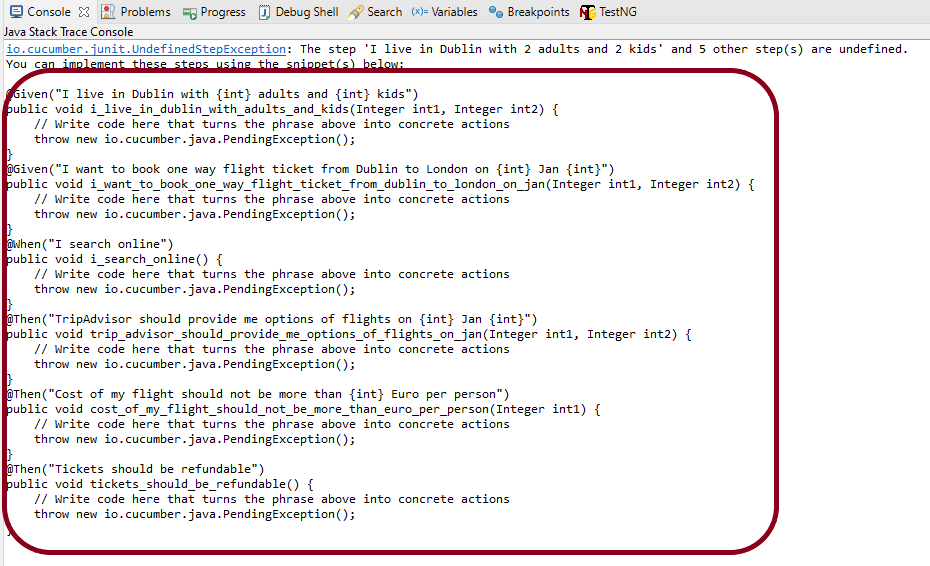
In the previous tutorial, we have seen that when the Feature file is executed without the Step Definition file, the runner shows the missing steps with the snippet in the console.

When a Cucumber encounters a Gherkin step without a matching step definition, it will print a step definition snippet with a matching Cucumber Expression. You can use this as a starting point for new step definitions.

It is very easy to implement all the steps, all you need to do is copy the complete text marked in the above box and paste it into the MyHolidayDefinitions class.

@Given, @When, and @Then are imported from packages:-

import io.cucumber.java.en.Given;
import io.cucumber.java.en.Then;
import io.cucumber.java.en.When;

Feature File

Feature: Book flight ticket 

@BookOneWayFlight
Scenario: Book Flight for one way trip

Given I live in Dublin with 2 adults and 2 kids
And I want to book one way flight ticket from Dublin to London on 22 Jan 2020
When I search online
Then TripAdvisor should provide me options of flights on 22 Jan 2020
And Cost of my flight should not be more than 50 Euro per person
And Tickets should be refundable

Let me create the step definition for the above Feature file

import io.cucumber.java.en.Given;
import io.cucumber.java.en.Then;
import io.cucumber.java.en.When;

public class MyHolidayDefinitions {

	@Given("I live in Dublin with {int} adults and {int} kids")
	public void liveInDublin(Integer int1, Integer int2) {

		System.out.println("I live in Dublin with 2 adults and 2 kids");
	}

	@Given("I want to book one way flight ticket from Dublin to London on {int} Jan {int}")
	public void bookFlightTicket(Integer int1, Integer int2) {

		System.out.println("I want to book one way flight ticket from Dublin to London on 22 Jan 2020");
	}

	@When("I search online")
	public void searchOnline() {

		System.out.println("I search online");
	}

	@Then("TripAdvisor should provide me options of flights on {int} Jan {int}")
	public void tripAdvisor(Integer int1, Integer int2) {

		System.out.println("TripAdvisor should provide me options of flights on 22 Jan 2020");
	}

	@Then("Cost of my flight should not be more than {int} Euro per person")
	public void costOfFlightLimit(Integer int1) {

		System.out.println("Cost of my flight should not be more than 50 Euro per person");
	}

	@Then("Tickets should be refundable")
	public void refundableTickets() {

		System.out.println("Tickets should be refundable");
	}

}

To run the scenarios present in the Feature File, we need TestRunner class. To learn more about the TestRunner class, please refer to this tutorial – Cucumber Tutorial – JUnit Test Runner Class

import org.junit.runner.RunWith;
import io.cucumber.junit.Cucumber;
import io.cucumber.junit.CucumberOptions;

@RunWith(Cucumber.class)
@CucumberOptions(features = "src/test/resources/Features/MyHoliday.feature", 
tags = "@BookOneWayFlight", glue = "com.cucumber.MyCucumberProject.definitions")

public class CucumberRunnerTest {

}

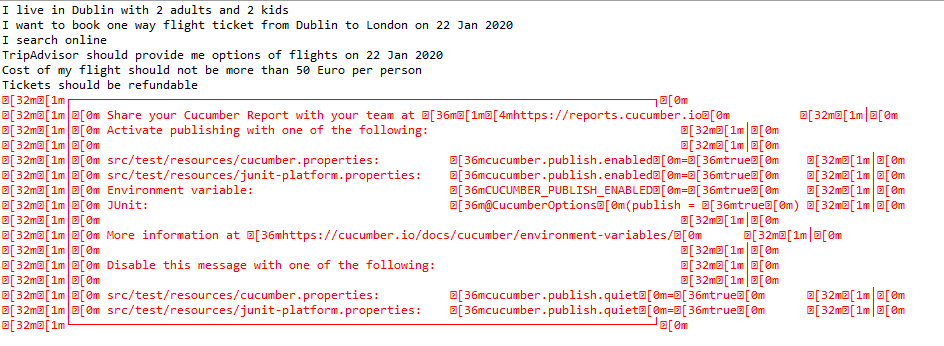
The output of the above program is

Congratulations. We have created the setup definition for the feature file successfully and are able to run it.

Refer to the next tutorials to know the integration of Cucumber with Selenium – Integration of Cucumber with Selenium and JUnit and JUnit4 and Integration of Cucumber with Selenium and TestNG

Happy Learning!!