Java is a general-purpose programming language that is a concurrent, class-based, and object-oriented language. Java follows the concept of “write once and run anywhere (WORA).” This means that compiled Java code can be run on all different platforms that support Java. There’s no need for recompilation.
In this tutorial, you will see the various questions related to Exception Handling.
Example1
1. Find the output of the following program.
public class ExceptionHandlingDemo {

	public static void main(String[] args) {

		try {
			int a[] = new int[5];
			a[5] = 30 / 0;
		} catch (ArithmeticException e) {
			System.out.println("Arithmetic Exception occurs");
		} catch (ArrayIndexOutOfBoundsException e) {
			System.out.println("ArrayIndexOutOfBounds Exception occurs");
		} catch (Exception e) {
			System.out.println("Parent Exception occurs");
		}
		System.out.println("Continue the program..");
	}
}
A. Arithmetic Exception occurs, Continue the program.. B. Continue the program.. C. Parent Exception occurs, Continue the program.. D. Continue the program..
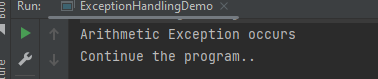
Answer A. Arithmetic Exception occurs, Continue the program..
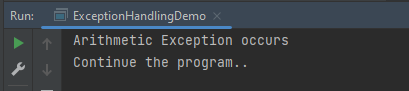
Here, we have multiple catch blocks with different types of exceptions. 30 is divided by 0 which throws ArithmeticException. So, the catch block for ArithmeticException is executed. Once the try-catch block is executed, the program runs in normal flow.
The output of the above program is
Example2
2. Find the output of the following program.
public class ExceptionHandlingDemo {

	public static void main(String[] args) {

		try {
			int a[] = new int[5];
			a[5] = 30 / 15;
		} catch (ArithmeticException e) {
			System.out.println("Arithmetic Exception occurs");
		} catch (ArrayIndexOutOfBoundsException e) {
			System.out.println("ArrayIndexOutOfBounds Exception occurs");
		} catch (Exception e) {
			System.out.println("Parent Exception occurs");
		}
		System.out.println("Continue the program..");
	}
}
A. ArrayIndexOutOfBounds Exception occurs , Continue the program.. B. Continue the program.. C. Parent Exception occurs, Continue the program.. D. ArrayIndexOutOfBounds Exception occurs
Answer A. ArrayIndexOutOfBounds Exception occurs , Continue the program..
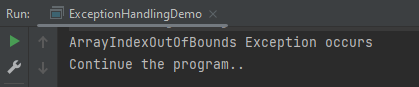
Here, we are trying to access a[5] where index 5 is out of range, which throws ArrayIndexOutOfBoundsException. So, the catch block for ArrayIndexOutOfBoundsException is executed. Once the try-catch block is executed, the program runs in normal flow.
The output of the above program is
Example3
3. Find the output of the following program.
public class ExceptionHandlingDemo {

	public static void main(String[] args) {
		try {
			int a[] = new int[5];

			System.out.println(a[7]);
		} catch (ArithmeticException e) {
			System.out.println("Arithmetic Exception occurs");
		} catch (ArrayIndexOutOfBoundsException e) {
			System.out.println("ArrayIndexOutOfBounds Exception occurs");
		} catch (Exception e) {
			System.out.println("Parent Exception occurs");
		}
		System.out.println("Continue the program..");
	}
}

Output
ArrayIndexOutOfBounds Exception occurs
Continue the program..
A. ArrayIndexOutOfBounds Exception occurs , Continue the program.. B. Continue the program.. C. Parent Exception occurs, Continue the program.. D. ArrayIndexOutOfBounds Exception occurs
Answer A. ArrayIndexOutOfBounds Exception occurs , Continue the program..
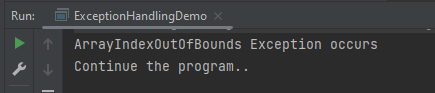
Here, we are trying to access a[7] where index 7 is out of range, which throws ArrayIndexOutOfBoundsException. So, the catch block for ArrayIndexOutOfBoundsException is executed. Once the try-catch block is executed, the program runs in normal flow.
The output of the above program is
Example4
4. Find the output of the following program.
public class ExceptionHandlingDemo {

	public static void main(String[] args) {
		try {
			int a[] = new int[5];
			a[5] = 30 / 0;
			System.out.println(a[10]);
		} catch (ArithmeticException e) {
			System.out.println("Arithmetic Exception occurs");
		} catch (ArrayIndexOutOfBoundsException e) {
			System.out.println("ArrayIndexOutOfBounds Exception occurs");
		} catch (Exception e) {
			System.out.println("Parent Exception occurs");
		}
		System.out.println("Continue the program..");
	}
}
A. Arithmetic Exception occurs , Continue the program.. B. ArrayIndexOutOfBounds Exception occurs , Continue the program.. C. Parent Exception occurs, Continue the program.. D. ArrayIndexOutOfBounds Exception occurs
Answer A. Arithmetic Exception occurs , Continue the program..
Here, the try block contains two exceptions. But at a time only one exception occurs and its corresponding catch block is executed. So, the first exception is 30 divided by 0 which throws an ArithmeticException. So, the catch block for ArithmeticException is executed. Once the corresponding catch block is executed, the program runs in normal flow.
The output of the above program is
Example5
5. Find the output of the following program.
public class ExceptionHandlingDemo {

    public static void main(String[] args) {
        try {
            String name = null;
            System.out.println(name.length());
        } catch (ArithmeticException e) {
            System.out.println("Arithmetic Exception occurs");
        } catch (ArrayIndexOutOfBoundsException e) {
            System.out.println("ArrayIndexOutOfBounds Exception occurs");
        } catch (Exception e) {
            System.out.println("Parent Exception occurs");
        }
        System.out.println("Continue the program..");
    }
}
A. NullPointerException , Continue the program.. B. ArrayIndexOutOfBounds Exception occurs , Continue the program.. C. Parent Exception occurs, Continue the program.. D. ArrayIndexOutOfBounds Exception occurs
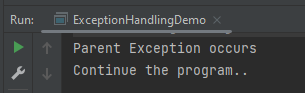
Answer C. Parent Exception occurs, Continue the program..
Here, the try block contains NullPointerException. But, there is no NullPointerException present in any of the catch blocks. In such a case, the catch block containing the parent exception class Exception will be invoked.
The output of the above program is
Example6
6. Find the output of the following program.
public class ExceptionHandlingDemo {

	public static void main(String[] args) {
		try {
			int a[] = new int[5];
			a[5] = 30 / 0;
		} catch (Exception e) {
			System.out.println("common task completed");
		} catch (ArithmeticException e) {
			System.out.println("Arithmetic Exception occurs");
		} catch (ArrayIndexOutOfBoundsException e) {
			System.out.println("ArrayIndexOutOfBounds Exception occurs");
		}
		System.out.println("Continue the program..");
	}
}
A. Continue the program.. B. ArrayIndexOutOfBounds Exception occurs , Continue the program.. C. Parent Exception occurs, Continue the program.. D. Compile Time error
Answer D. Compile Time error
Here, the order of exceptions is not maintained like most specific to general exceptions. The exception is the parent exception, so should be mentioned as the last exception. As a result, there is a compile-time error.
The output of the above program is
Example7
7. Find the output of the following program.
public class ExceptionHandlingDemo {

    public static void main(String args[]) {
        int x = 0;
        int y = 10;
        int z = y/x;
    }
}
Here, ArithmeticException is an unchecked exception that is not checked at a compiled time. So the program compiles fine but throws ArithmeticException.
The output of the above program is
Example8
8. Find the output of the following program.
public class ExceptionHandlingDemo {

    public static void main(String[] args) {
        try {
            int a[] = { 1, 2, 3, 4 };
            for (int i = 1; i <= 4; i++) {
                System.out.println("a[" + i + "]=" + a[i]);
            }
        }

        catch (Exception e) {
            System.out.println("error = " + e);
        }

        catch (ArrayIndexOutOfBoundsException e) {
            System.out.println("ArrayIndexOutOfBounds Exception occured");
        }
    }
}
Here, ArrayIndexOutOfBoundsException has been already caught by the base class Exception. When a subclass exception is mentioned after the base class exception, then an error occurs.
The output of the above program is
Example9
9. Find the output of the following program.
public class Example9 {

	public static void main(String[] args) {
		try {
			int a[] = { 1, 2, 3, 4 };
			for (int i = 1; i <= 4; i++) {
				System.out.println("a[" + i + "]=" + a[i]);
			}
		}

		catch (ArrayIndexOutOfBoundsException e) {
			System.out.println("ArrayIndexOutOfBounds Exception occured");
		}

		catch (Exception e) {
			System.out.println("error = " + e);
		}
	}
}
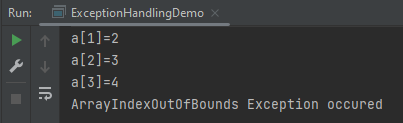
Here, the try block prints a[1] to a[3] and then throws ArrayIndexOutOfBoundsException which is handled by the corresponding catch block.
The output of the above program is
Example10
10. Find the output of the following program.
public class ExceptionHandlingDemo {

	public static void main(String[] args) {

		// outer try block
		try {

			// inner try and catch block 1
			try {
				System.out.println("going to divide by 0");
				int b = 40 / 0;
			}
			catch (ArithmeticException e) {
				System.out.println(e);
			}

			// inner try and catch block 2
			try {
				int a[] = new int[5];

				// assigning the value out of array bounds
				a[5] = 4;
			}
			catch (ArrayIndexOutOfBoundsException e) {
				System.out.println(e);
			}

			System.out.println("No more inner try catch block");
		}

		// catch block of outer try block
		catch (Exception e) {
			System.out.println("Handled the exception of outer try");
		}

		System.out.println("Continue the program..");
	}
}
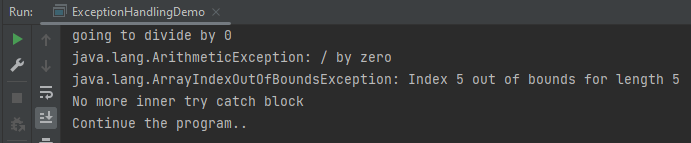
Here, the first inner try-catch block is executed. Then second inner try-catch block is executed and at last outer try-catch block is executed. Post all these, the program runs in normal flow.
The output of the above program is
Example11
11. Find the output of the following program.
public class ExceptionHandlingDemo {

	public static void main(String[] args) {

        // outer try block
        try {

            // inner try block 1
            try {

                // inner try block 2
                try {
                    int x = 25 / 0;
                    System.out.println("Value of x :" + x);
                }

                // to handles ArrayIndexOutOfBoundsException
                catch (ArrayIndexOutOfBoundsException e) {
                    System.out.println("Arithmetic exception");
                    System.out.println(" inner try block 2");
                }
            }

            // to handle ArrayIndexOutOfBoundsException
            catch (ArrayIndexOutOfBoundsException e) {
                System.out.println("Arithmetic exception");
                System.out.println("inner try block 1");
            }
        }

        // to handle ArithmeticException
        catch (ArithmeticException e) {
            System.out.println(e);
            System.out.println("Outer try block");
        } catch (Exception e) {
            System.out.print("Exception");
            System.out.println("Handled in main try block");
        }
    }
}
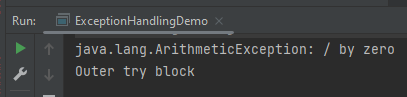
Here, the try block within the nested try block (inner try block 2) does not handle the exception. The control is then transferred to its parent try block (inner try block 1) and it also does not handle the exception, then the control is transferred to the main try block (outer try block) where the appropriate catch block handles the exception.
The output of the above program is
Example12
12. Find the output of the following program.
public class ExceptionHandlingDemo {

	public static void main(String[] args) {

		// outer try block
		try {

			// inner try block 1
			try {

				// inner try block 2
				try {
					int x = 25 / 0;
					System.out.println(x);
				}

				// to handles ArrayIndexOutOfBoundsException
				catch (ArrayIndexOutOfBoundsException e) {
					System.out.println("Arithmetic exception");
					System.out.println(" inner try block 2");
				}
			}

			// to handle ArithmeticException
			catch (ArithmeticException e) {
				System.out.println("Arithmetic exception");
				System.out.println("inner try block 1");
			}
		}

		// to handle ArithmeticException
		catch (ArithmeticException e) {
			System.out.print(e);
			System.out.println("Outer try block");

		} catch (Exception e) {
			System.out.print("Exception");
			System.out.println("Handled in main try block");
		}
	}
}
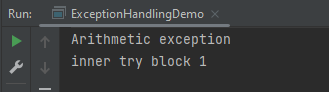
Here, the try block within the nested try block (inner try block 2) does not handle the exception. The control is then transferred to its parent try block (inner try block 1) and it does handle the exception, so the catch block of inner try block 1 handles the exception.
The output of the above program is
Example13
13. Find the output of the following program.
public class ExceptionHandlingDemo {

	public static void main(String[] args) {
		try {
			// below code do not throw any exception
			int data = 25 / 5;
			System.out.println(data);
		}

		// catch won't be executed
		catch (NullPointerException e) {
			System.out.println(e);
		}

		// This is executed whether exception occurs or not
		finally {
			System.out.println("finally block is always executed");
		}

		System.out.println("Continue the Program ..");
	}
}

Output
5
finally block is always executed
Continue the Program ..
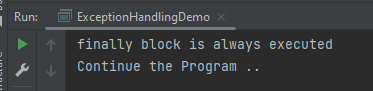
Here, no exception is thrown, so the catch block is not executed. finally block is always executed irrespective the catch block is executed or not.
The output of the above program is
Example14
14. Find the output of the following program.
public class ExceptionHandlingDemo {

	public static void main(String[] args) {
		try {

			System.out.println("Inside the try block");

			// below code throws divide by zero exception
			int data = 25 / 0;
			System.out.println(data);
		}

		catch (NullPointerException e) {
			System.out.println("Exception handled");
			System.out.println(e);
		}

		// executes regardless of exception occurred or not
		finally {
			System.out.println("finally block is always executed");
		}

		System.out.println("Continue the Program ..");
	}
}
Here, the code throws an exception, however, the catch block cannot handle it. Despite this, the finally block is executed after the try block and then the program terminates abnormally.
The output of the above program is
Example15
15. Find the output of the following program.
public class ExceptionHandlingDemo {

	public static void main(String[] args) {

       try {

			System.out.println("Inside try block");

			// below code throws divide by zero exception
			int data = 25 / 0;
			System.out.println(data);
		}

		// handles the Arithmetic Exception
		catch (ArithmeticException e) {
			System.out.println("Exception is handled");
			System.out.println(e);
		}

		// executes regardless of exception occured or not
		finally {
			System.out.println("finally block is always executed");
		}

		System.out.println("Continue the Program ..");
	}
}
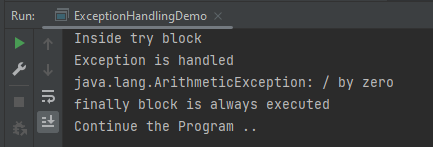
Here, the code throws an exception and the catch block handles the exception. Later the finally block is executed after the try-catch block. Further, the rest of the code is also executed normally.
The output of the above program is
Example16
16. Find the output of the following program.
public class ExceptionHandlingDemo {

	public static void main(String[] args) {
		try {
			int a = 0;
			System.out.println("a = " + a);
			int b = 20 / a;
			System.out.println("b = " + b);
		}

		catch (ArithmeticException e) {
			System.out.println("Divide by zero error");
		}

		finally {
			System.out.println("inside the finally block");
		}
	}
}
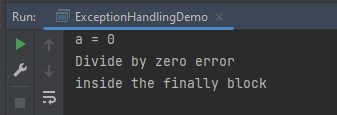
Here, a is printed. Then, 20 is divided by 0, which throws ArithmeticException and control goes inside the catch block. Also, the finally block is always executed whether an exception occurs or not.
The output of the above program is
Example 17
17. Find the output of the following program.
public class ExceptionHandlingDemo {

	public static void main(String[] args) {
		int data = 50 / 0; // may throw exception

		System.out.println("rest of the code");
	}

}
Here, there is no try-catch block. So, the error is thrown.
The output of the above program is
Example 18
18. Find the output of the following program.
public class ExceptionHandlingDemo  {

	public static void main(String[] args) {
		try {
			int data1 = 50 / 0;

		}
		catch (Exception e) {
			// generating the exception in catch block
			String name = null;
			System.out.println(name.length());

		}
		System.out.println("Continue the Program ..");
	}

}

Output
Exception in thread "main" java.lang.NullPointerException
Here, the catch block didn’t contain the exception code. So, enclose the exception code within a try block and use a catch block only to handle the exceptions.
The output of the above program is
Example 19
19. Find the output of the following program.
public class ExceptionHandlingDemo {

	static void checkEligibilty(int age, int marks) {
		if (age < 18 && marks < 90) {
			throw new ArithmeticException("Student is not eligible for admission");
		} else {
			System.out.println("Student Entry is Valid!!");
		}
	}

	public static void main(String[] args) {
		System.out.println("Welcome to the Admission process!!");
		checkEligibilty(17, 80);
		System.out.println("Continue the Program ..");
	}
}
Here, an unchecked exception was thrown and it is not handled, so the program halts.
The output of the above program is
Example 20
20. Find the output of the following program.
public class ExceptionHandlingDemo {

	public static void myMethod(int testnum) throws Exception {
		System.out.println("start - myMethod");
		if (testnum < 100)
			throw new Exception();
		System.out.println("end - myMethod");
		return;
	}

	public static void main(String args[]) {
		int testnum = 90;
		try {
			System.out.println("try - first statement");
			myMethod(testnum);
			System.out.println("try - last statement");
		} catch (Exception ex) {
			System.out.println("An Exception");
		} finally {
			System.out.println("finally");
		}
		System.out.println("Out of try/catch/finally - statement");
	}
}
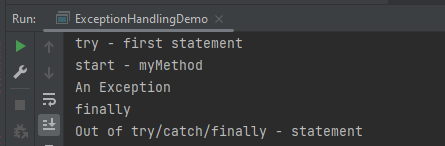
Here, an exception is thrown in the try block, which is handled by the catch block. A finally block is executed, and then the program continues as usual.
The output of the above program is
Example 21
21. Find the output of the following program.
public class ExceptionHandlingDemo {

   public static void main(String args[]) {
      try {
         throw 10;
      }
      catch(int e) {
         System.out.println("Got the  Exception " + e);
      }
  }
}
In Java, only throwable objects (Throwable objects are instances of any subclass of the Throwable class) can be thrown as exceptions. So basic data types can not be thrown at all.
The output of the above program is
Example 22
22. Find the output of the following program.
public class ExceptionHandlingDemo {

	public static void main(String[] args) {

      try {
			throw new Test();
		} catch (Test t) {
			System.out.println("Got the Test Exception");
		} finally {
			System.out.println("Inside finally block ");
		}
	}
}
The output of the above program is
Example 23
23. Find the output of the following program.
class Base extends Exception {
}

class Derived extends Base {
}

 class ExceptionHandlingDemo  {

    public static void main(String[] args) {
        try {

            throw new Derived();
        } catch (Base b) {
            System.out.println("Caught base class exception");
        } catch (Derived d) {
            System.out.println("Caught derived class exception");
        }
    }
}
‘throw’ keyword is used to explicitly throw an exception. Call to method C() throws an exception. Thus, control goes to the catch block of method B() which again throws an exception. Then finally block is always executed even when an exception occurs. Now, control goes to the catch block of method A().
The output of the above program is
Example 25
25. Find the output of the following program.
public class ExceptionHandlingDemo {

	 void m() {
        int data = 50 / 0;
    }

    void n() {
        m();
    }

    void p() {
        try {
            n();
        } catch (Exception e) {
            System.out.println("Exception Handled");
        }
    }

    public static void main(String args[]) {
        ExceptionHandlingDemo obj = new ExceptionHandlingDemo();
        obj.p();
        System.out.println("Continue the program..");
    }
}
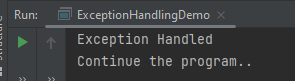
Here, the exception occurs in the m() method where it is not handled, so it is propagated to the previous n() method where it is not handled, again it is propagated to the p() method where the exception is handled.
The output of the above program is
Example 26
26. Find the output of the following program.
public class ExceptionHandlingDemo {

	void m() {
        throw new IOException("device error");// checked exception
    }

    void n() {
        m();
    }

    void p() {
        try {
            n();
        } catch (Exception e) {
            System.out.println("Exception Handled");
        }
    }

    public static void main(String args[]) {
        ExceptionHandlingDemo obj = new ExceptionHandlingDemo();
        obj.p();
        System.out.println("Continue the program..");
    }
}
Here, the exception occurs in the m() method where it is not handled, so it is propagated to the previous n() method where it is not handled, it is propagated to the p() method where the exception is supposed to be handled, but as it is checked Exception which can not be handled by Exception.
The output of the above program is
Example 27
27. Find the output of the following program.
public class ExceptionHandlingDemo {

    void m() {
        throw new ArithmeticException("Arithmetic Exception occured ");
    }

    void n() {
        m();
    }

    void p() {
        try {
            n();
        } catch (Exception e) {
            System.out.println("Exception handled");
        }
    }

    public static void main(String args[]) {
        ExceptionHandlingDemo obj = new ExceptionHandlingDemo();
        obj.p();
        System.out.println("Continue the program..");
    }
}
a) Arithmetic Exception b) Exception Handled, Continue the program.. c) Runtime Exception d) Compile Time Error
Answer b) Exception Handled, Continue the program..
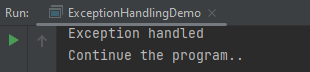
Here, the exception occurs in the m() method – ArithmeticException where it is not handled, so it is propagated to the previous n() method where it is not handled, again it is propagated to the p() method where the exception is handled.
The output of the above program is
Example 28
28. Find the output of the following program.
public class ExceptionHandlingDemo {

	public static void main(String args[]) {
		try {
			int i, sum;
			sum = 10;
			for (i = -1; i < 3; ++i)
				sum = (sum / i);
		} catch (ArithmeticException e) {
			System.out.print("0");
		}
		System.out.print(sum);
	}
}
a) 0 b) -1 c) Runtime Exception d) Compile Time Error
Answer c) Runtime Exception
Here, the value of the variable sum is printed outside of the try block, the sum is declared only in the try block, and outside try block it is undefined.
The output of the above program is
Example 29
29. Find the output of the following program.
public class ExceptionHandlingDemo {

	public static void main(String args[]) {
		try {
			String str = "beginnersbook";
			System.out.println(str.length());
			char c = str.charAt(0);
			c = str.charAt(40);
			System.out.println(c);
		} catch (StringIndexOutOfBoundsException e) {
			System.out.println("StringIndexOutOfBoundsException!!");
		}
	}
}
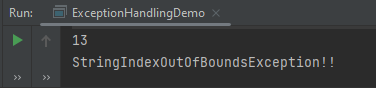
Here, an exception occurred because the referenced index was not present in the String.
The output of the above program is
Example 30
30. Find the output of the following program.
public class ExceptionHandlingDemo {

    public static void main(String[] args) {

            try {
                int num = Integer.parseInt("XYZ");
                System.out.println(num);
            } catch (StringIndexOutOfBoundsException e) {
                System.out.println("String IndexOutOfBounds Exception occurred!!");
            } catch (NumberFormatException e) {
                System.out.println("Number format exception occurred");
            } catch (Exception e) {
                System.out.println("Exception occurred");
            }
        }
    }
a) String IndexOutOfBounds Exception occurred!! b) Number format exception occurred c) Exception occurred d) None
Answer b) Number format exception occurred
Here, an exception is not of type StringIndexOutOfBounds, so moved to the next catch where the exception is handled.
In the previous tutorial, I have explained about thecontrol flow of try catch and finally blocks in Java. In this tutorial, I’ll explain multiple catch exceptions. Java supports multiple catch exceptions, that means a try block can have more than one catch handlers. All catch blocks must be ordered from most specific to most general, i.e. catch for ArithmeticException must come before catch for Exception.
Scenario 1 – In the below example, an array is defined of size 10 and we want to perform an invalid arithmetic operation on element 15 of the array. In this case, we have defined 3 different catch handlers to handle the exception – Arithmetic Exception, ArrayIndexOutOfBounds Exception and Parent Exception. The try block has thrown exception – Arithmetic as the Arithmetic operation is invalid (divide by 0).
public class MultipleCatchDemo1 {

	public static void main(String[] args) {
		try {
			int a[] = new int[10];
			a[15] = 30 / 0;

        } catch (ArithmeticException e) {
			System.out.println("Arithmetic Exception occurs");

        } catch (ArrayIndexOutOfBoundsException e) {
			System.out.println("ArrayIndexOutOfBounds Exception occurs");

        } catch (Exception e) {
			System.out.println("Parent Exception occurs");

        }
		System.out.println("Rest of the program");
	}
}
The output of the above program is
Scenario 2 – In the below example, I’m throwing an exception which is not handled by first catch exception handler.
public class MultipleCatchDemo2 {

	public static void main(String[] args) {

		try {
			int a[] = new int[10];
			System.out.println(a[15]);

		} catch (ArithmeticException e) {
			System.out.println("Arithmetic Exception occurs");

		} catch (ArrayIndexOutOfBoundsException e) {
			System.out.println("ArrayIndexOutOfBounds Exception occurs");

		} catch (Exception e) {
			System.out.println("Parent Exception occurs");

		}
		System.out.println("Rest of the program");
	}
}
The output of the above program is
Scenario 3 – In the below example, I’m throwing an exception which is not handled by any catch exception handler specified in the program. Then, parent exception handler will be invoked.
public class MultipleCatchDemo3 {

	public static void main(String[] args) {
		try {
			int a[] = new int[10];
			System.out.println(a[10]);

		} catch (ArithmeticException e) {
			System.out.println("Arithmetic Exception occurs");

		} catch (NullPointerException e) {
			System.out.println("NullPointer Exception occurs");

		} catch (Exception e) {
			System.out.println("Parent Exception occurs");

		}
		System.out.println("Rest of the program");
	}
}
The output of the above program is
Scenario 4 – In the below example, we do not maintain the order of preference in exceptions (child to parent), then compile time error occurs.
public class MultipleCatchDemo4 {

	public static void main(String[] args) {
		try {
			int a[] = new int[10];
			System.out.println(a[10]);

		} catch (Exception e) {
			System.out.println("Parent Exception occurs");

		} catch (ArithmeticException e) {
			System.out.println("Arithmetic Exception occurs");

		} catch (ArrayIndexOutOfBoundsException e) {
			System.out.println("ArrayIndexOutOfBounds Exception occurs");

		}
		System.out.println("Rest of the program");
	}
}
The output of the above program is
Scenario 5– In the below example, try block has 2 exceptions. It will call the first suitable catch block for the first try statement which has thrown the exception.
public class MultipleCatchDemo5 {

	public static void main(String[] args) {
		try {
			int a[] = new int[10];
			a[15] = 30 / 0;
			System.out.println(a[20]);

		} catch (ArithmeticException e) {
			System.out.println("Arithmetic Exception occurs");

		} catch (ArrayIndexOutOfBoundsException e) {
			System.out.println("ArrayIndexOutOfBounds Exception occurs");

		} catch (Exception e) {
			System.out.println("Parent Exception occurs");

		}
		System.out.println("Rest of the program");
	}
}
The output of the above program is
Similarly, if I interchanged the try statements as shown below the response will also changes.
public class MultipleCatchDemo6 {

	public static void main(String[] args) {
		try {
			int a[] = new int[10];
			System.out.println(a[20]);
			a[15] = 30 / 0;

		} catch (ArithmeticException e) {
			System.out.println("Arithmetic Exception occurs");

		} catch (ArrayIndexOutOfBoundsException e) {
			System.out.println("ArrayIndexOutOfBounds Exception occurs");

		} catch (Exception e) {
			System.out.println("Parent Exception occurs");

		}
		System.out.println("Rest of the program");
	}
}
In this tutorial, I’ll explain about the flow control of try catch and finally blocks in accordance to the exception.
What is try block in Java?
It is used to specify a block where we should place exception code. The try block must be followed by either catch or finally. It means, we can’t use try block alone. If an exception occurs at the particular statement of try block, the rest of the block code will not execute. So, it is recommended not to keeping the code in try block that will not throw an exception.
What is catch block in Java?
It is used to handle the exception by declaring the type of exception within the parameter. It must be preceded by try block which means we can’t use catch block alone. It can be followed by finally block later. You can use multiple catch block with a single try block.
What is finally block in Java?
It is used to execute important statements such as establishing connection, stream, etc. It is always executed whether exception is handled or not.
Syntax of try-catch block
try{
//throw an exception
}catch{ //handle exception }
Syntax of try-catch-finally block
try{
//throw an exception
}catch { //handle exception }
finally { //important code which will always be executed  }
1.Exception occurs in try block and handled in catch block
If a statement in try block throws an exception, then rest of the code of try block is not executed. The control transfers to corresponding catch block. After the execution of code in catch block, the control moves to the rest of the program code to be executed.
public class TryCatchDemo {

	public static void main(String[] args) {
		{
			try {
				String a = null; // null value
				System.out.println(a.length());

				// This will never execute as try block has exception just above this statement
				System.out.println("Inside try block");

				// Exception will be handled in catch block and will execute the statements in
				// catch block
			} catch (NullPointerException e) {
				System.out.println("NullPointer Exception - Exception caught in Catch block");

			}

			// Rest of the program will be executed
			System.out.println("Outside try-catch block");
		}
	}
}

Output
NullPointer Exception - Exception caught in Catch block
Outside try-catch block
2. Exception occurs in try block and handled in catch block and finally block is present
If a statement in try block throws an exception, then rest of the code of try block is not executed. The control transfers to corresponding catch block. After the execution of code in catch block, the control moves to finally block (if present) and then the rest of the program is executed.
public class TryCatchFinallyDemo {

	public static void main(String[] args) {
		{
			try {
				String a = null; // null value
				System.out.println(a.length());

				// This will never execute as try block has exception just above this statement
				System.out.println("Inside try block");

				// Exception will be handled in catch block and will execute the statements in
				// catch block
			} catch (NullPointerException e) {
				System.out.println("NullPointer Exception - Exception caught in Catch block");

				// Statement present in finally block will be executed irrespective whether
				// exception is handled or not
			} finally {
				System.out.println("finally block executed");
			}

			// Rest of the program will be executed
			System.out.println("Outside try-catch block");
		}
	}
}

Output
NullPointer Exception - Exception caught in Catch block
finally block executed
Outside try-catch block
3. Exception occurred in try-block is not handled in catch block without finally block
If a statement in try block throws an exception, then rest of the code of try block is not executed.
public class TryNoCatchDemo {

	public static void main(String[] args) {
		{
			try {
				String a = null; // null value
				System.out.println(a.length());

				// This will never execute as try block has exception just above this statement
				System.out.println("Inside try block");

				// Incorrect Exception
			} catch (IndexOutOfBoundException e) {
				System.out.println("IndexOutOfBound Exception - Exception caught in Catch block");

			}


			// Rest of the program will be executed
			System.out.println("Outside try-catch block");
		}
	}
}

Output
Exception in thread "main" java.lang.Error: Unresolved compilation problem:
	IndexOutOfBoundException cannot be resolved to a type

	at JavaDemo.Exception.TryNoCatchDemo.main(TryNoCatchDemo.java:15)
4. Exception occurred in try-block is not handled in catch block with finally block
public class TryNoCatchFinallyDemo {

	public static void main(String[] args) {
		{
			try {
				String a = null; // null value
				System.out.println(a.length());

				// This will never execute as try block has exception just above this statement
				System.out.println("Inside try block");

				// Incorrect Exception
			} catch (IndexOutOfBoundException e) {
				System.out.println("IndexOutOfBound Exception - Exception caught in Catch block");

			}

			finally {
				System.out.println("finally block executed");
			}

			// Rest of the program will be executed
			System.out.println("Outside try-catch block");
		}
	}
}

Output
Exception in thread "main" java.lang.Error: Unresolved compilation problem:
	IndexOutOfBoundException cannot be resolved to a type

	at JavaDemo.Exception.TryNoCatchDemo.main(TryNoCatchDemo.java:15)
5. Exception doesn’t occur in try-block
If a statement in try block does not throw an exception, then catch block will be never executed and then rest of the program will be executed.
public class NoTryCatchDemo {

	public static void main(String[] args) {
		try {

			String str = "123";

			int num = Integer.parseInt(str);

			// this statement will execute
			// as no any exception is raised by above statement
			System.out.println("Inside try block");

		}

		catch (NumberFormatException ex) {

			System.out.println("catch block executed.");

		}

		System.out.println("Outside try-catch clause");
	}
}

Output
Inside try block
Outside try-catch clause
6. Exception doesn’t occur in try-block with finally block
If a statement in try block does not throw an exception, then catch block will never be executed. But the finally block will be executed and then rest of the program will be executed.
public class NoTryCatchFinallyDemo {

	public static void main(String[] args) {
		try {

			String str = "123";

			int num = Integer.parseInt(str);

			// this statement will execute
			// as no any exception is raised by above statement
			System.out.println("Inside try block");

		}

		catch (NumberFormatException ex) {

			System.out.println("catch block executed");

		} finally {
			System.out.println("finally block executed");
		}

		System.out.println("Outside try-catch clause");
	}
}

Output
Inside try block
finally block executed
Outside try-catch clause
Exceptions in Java are events that disrupt the normal flow of the program’s instructions during runtime. When an exceptional event occurs, an exception object is created, which the runtime system then throws. This exception object contains information about the error, including its type and the state of the program when the error occurred.
Category of Exceptions
Java defines two categories of exceptions – Built-in Exceptions and User-Defined Exception.
Built-in Exceptions
These exceptions are available in Java libraries. There are various types of exceptions which are suitable to specific type of exception situations. Built-in Exceptions are divided into Checked and Unchecked Exceptions.
Checked Exceptions
These are exceptions that are checked at compile-time.
They must be either handled using a try-catch block or declared in the method signature using the `throws` keyword.
Examples include IOException, SQLException, and FileNotFoundException.
UnChecked Exceptions
These are exceptions that are not checked at compile-time but are instead checked at runtime.
Unchecked exceptions are subclasses of RuntimeException. They do not need to be declared or handled explicitly.
Examples include NullPointerException, ArrayIndexOutOfBoundsException, and ArithmeticException.
User-defined or Custom Exceptions
There are several conditions where built-in exceptions in Java is unable to handle certain situations. In such cases, user can create a custom or user defined exception.
In this tutorial, I’ll explain about built-in exceptions.
Types of Exceptions
1. ArithmeticException
It is thrown when an exception has occurred in an arithmetic operation. Below is an example of this exception.
public class ArithmeticExceptionDemo {

	public static void main(String[] args) {
		{
			try {
				int a = 30, b = 0;
				int c = a / b; // cannot divide by zero
				System.out.println("Result = " + c);
			} catch (ArithmeticException e) {
				System.out.println("Can't divide a number by 0");
			}
		}
	}
}
The output of the above program is
2. ArrayIndexOutOfBoundsException
It is thrown when an array has been accessed with an illegal index. The index is either negative or greater than or equal to the size of the array.
public class ArrayIndexOutOfBoundsExceptionDemo {

	public static void main(String[] args) {
		{
			try {
				// Create an array of size 5
				int a[] = new int[5];

				// Access 11th element from array of size 5
				a[10] = 9;
			} catch (ArrayIndexOutOfBoundsException e) {
				System.out.println("Array Index is Out Of Bounds");
			}
		}
	}
}
The output of the above program is
3. StringIndexOutOfBoundsException
It is thrown by String class methods to indicate that an index is either negative or greater than the size of the string.
public class StringOutOfBoundDemo {

	public static void main(String[] args) {
		{
			try {
				String a = "This is testing"; // length is 15
				System.out.println("Length of String :" + a.length());

				char b = a.charAt(20); // accessing 20th element
				System.out.println(b);
			} catch (StringIndexOutOfBoundsException e) {
				System.out.println("StringIndexOutOfBoundsException");
			}
		}
	}
}
The output of the above program is
4. NullPointerException
This exception is thrown when referring to the members of a null object.
public class NullPointerDemo {

	public static void main(String[] args) {
		{
			try {
				String a = null; // null value
				System.out.println(a.length());
			} catch (NullPointerException e) {
				System.out.println("NullPointerException");
			}
		}
	}
}
The output of the above program is
5. NumberFormatException
This exception is thrown when a method can not convert a string into a numeric format.
public class NumberFormatDemo {

	public static void main(String[] args) {
		try {
			// "java" is not a number
			int num = Integer.parseInt("java");

			System.out.println(num);
		} catch (NumberFormatException e) {
			System.out.println("Number format exception");
		}
	}
}
The output of the above program is
6. FileNotFoundException
This Exception is thrown when a file is not accessible or does not open.
import java.io.File;
import java.io.FileNotFoundException;
import java.io.FileReader;

public class FileNotFoundDemo {

	public static void main(String[] args) {
		try {

			// Following file does not exist
			File file = new File("C://demofile.txt");

			FileReader fr = new FileReader(file);
		} catch (FileNotFoundException e) {
			System.out.println("File does not exist");
		}
	}
}
The output of the above program is
7. ClassNotFoundException
This Exception is raised when we try to access a class whose definition is not found.
package JavaDemo;

public class ClassNotFoundExceptionDemo {

	public static void main(String[] args) {
		try {
			Class temp = Class.forName("gfg");
			// Calling the clas gfg which is not present in the
			// current class temp instance of calling class it
			// will throw ClassNotFoundException;
		} catch (ClassNotFoundException e) {
			// block executes when mention exception occur
			System.out.println("Class does not exist check the name of the class");
		}
	}
}
The output of the above program is
8. IOException
It is thrown when an input-output operation failed or interrupted.
It is thrown when accessing a method which is not found.
10. InterruptedException
It is thrown when a thread is waiting , sleeping , or doing some processing , and it is interrupted.
11. NoSuchFieldException
It is thrown when a class does not contain the field (or variable) specified.
12. RuntimeException
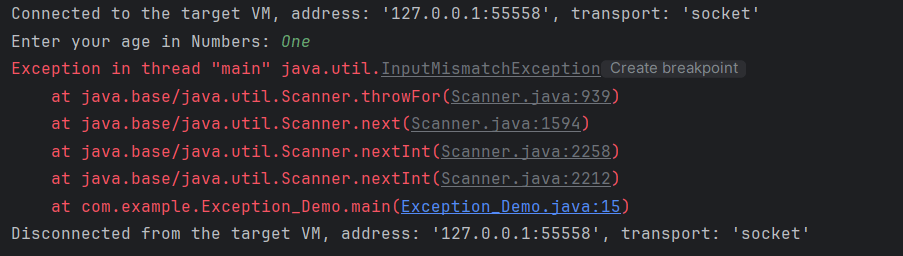
This represents any exception which occurs during runtime. They are ignored during compilation time. Such as logical bugs.
import java.util.Scanner;

public class RunTimeDemo {

	public static void main(String[] args) {
		// Reading user input
		Scanner input_dev = new Scanner(System.in);
		System.out.print("Enter your age in Numbers: ");
		int age1 = input_dev.nextInt();
		if (age1 > 20) {
			System.out.println("You can view the page");
		} else {
			System.out.println("You cannot view the page");
		}
	}
}
The output of the above program is
13. SQLException
This type of exception occurs while executing queries on a database related to the SQL syntax.
14. IllegalArgumentException
It is thrown when an inappropriate and incorrect argument is passed to the method. Suppose, a method does not allow null, but we are providing null as the parametr, then this exception is thrown.
An exception is an unwanted or unexpected event which occurs at the run time of the program, that leads to the disruption of the normal flow of execution of the program.
What is Exception Handling?
Exception Handling is a mechanism to handle runtime errors happen in the program such as ClassNotFoundException, IOException, SQLException, RemoteException, etc, which disruptes the normal execution of the program.
Suppose there are 6 statements in your program and there occurs an exception at statement 3, the rest of the code will not be executed i.e. statement 4 to 6 will not be executed. If we perform exception handling, the rest of the statement will be executed. That is why we use exception handling in Java.
What is the difference between Error and Exception?
Error: An Error indicates serious problem that a reasonable application should not try to catch. Error are used by the Java run-time system(JVM) to indicate errors having to do with the run-time environment itself(JRE) or StackOverflowError or OutOfMemoryError
Exception: Exception indicates conditions that a reasonable application might try to catch. Example of exceptions are IOException, SQLException, etc.
Types of Exceptions
1) Checked Exception The classes which directly inherit Throwable class except RuntimeException and Error are known as checked exceptions e.g. IOException, SQLException etc. Checked exceptions are checked at compile-time.
2) Unchecked Exception The classes which inherit RuntimeException are known as unchecked exceptions e.g. ArithmeticException, NullPointerException, ArrayIndexOutOfBoundsException etc. Unchecked exceptions are not checked at compile-time, but they are checked at runtime.
Hierarchy of Java Exception classes
Keywords used in Exception Handling in Java
1. try keyword – It is used to specify a block where we should place exception code. The try block must be followed by either catch or finally. It means, we can’t use try block alone.
2. catch keyword – It is used to handle the exception. It must be preceded by try block which means we can’t use catch block alone. It can be followed by finally block later.
3. finally keyword – It is used to execute the important code of the program irrespective the exception is handled or not.
4. throw keyword – It is used to throw an exception explicitly in the program inside a function or inside a block of code.
5. throws keyword – It is used to declare exceptions. It doesn’t throw an exception. It specifies that there may occur an exception in the method. It is always used with method signature.
Exception Handling Example in Java
Let’s see an example of exception handling where we can use try-catch block and will not use try-catch statements. Below example shows an exception without try-catch block.
package JavaDemo;

public class ExceptionHandlingDemo {

	static String a = null;

	public static void main(String[] args) {

		System.out.println(a.length());
	}

}

Output
Exception in thread "main" java.lang.NullPointerException
	at JavaDemo.ExceptionHandlingDemo.main(ExceptionHandlingDemo.java:9)
Below example shows an exception with try-catch block.
package JavaDemo;

public class ExceptionHandlingDemo {
	static String a = null;

	public static void main(String[] args) {
		// TODO Auto-generated method stub

		try {
			System.out.println(a.length());
		} catch (NullPointerException e) {
			System.out.println(e);
		}
		System.out.println("Exception is handled");
	}

}

Output
java.lang.NullPointerException
Exception is handled
In the previous tutorial, I have explain about SpringBoot and how to perform Integration testing of SpringBoot Exception Handling. In this tutorial, I will explain about the Integration testing of Testing of SpringBoot Validation for RESTful Services.
What is Validation?
It is necessary that the response recieve from RestFul service should return meaningful information, like certain data type, constraints. If a response returns error message, then we expect it to provide information like clear error message, which field has an error, what is the type of error, proper status code and most importantly should not provide any sensitive information.
To know about all the dependencies neede to test Springboot, please click here.
Below are various Java classes present in a SpringBoot REST Application/API
• SpringBootRestServiceApplication.java – The Spring Boot Application class generated with Spring Initializer. This class acts as the launching point for application.
• pom.xml – Contains all the dependencies needed to build this project.
• Student.java – This is JPA Entity for Student class
• StudentRepository.java – This is JPA Repository for Student. This is created using Spring Data JpaRepository.
• StudentController.java – Spring Rest Controller exposing all services on the student resource.
• CustomizedExceptionHandler.java – This implements global exception handling and customize the responses based on the exception type.
• ErrorDetails.java – Response Bean to use when exceptions are thrown from API.
• StudentNotFoundException.java – Exception thrown from resources when student is not found.
• data.sql – Data is loaded from data.sql into Student table. Spring Boot would execute this script after the tables are created from the entities.
REST request validation annotations
ANNOTATION
USAGE
@AssertFalse
The annotated element must be false.
@AssertTrue
The annotated element must be true.
@DecimalMax
The annotated element must be a number whose value must be lower or equal to the specified maximum.
@DecimalMin
The annotated element must be a number whose value must be higher or equal to the specified minimum.
@Future
The annotated element must be an instant, date or time in the future.
@Max
The annotated element must be a number whose value must be lower or equal to the specified maximum.
@Min
The annotated element must be a number whose value must be higher or equal to the specified minimum.
@Negative
The annotated element must be a strictly negative number.
@NotBlank
The annotated element must not be null and must contain at least one non-whitespace character.
@NotEmpty
The annotated element must not be null nor empty.
@NotNull
The annotated element must not be null.
@Null
The annotated element must be null.
@Pattern
The annotated CharSequence must match the specified regular expression.
@Positive
The annotated element must be a strictly positive number.
@Size
The annotated element size must be between the specified boundaries (included).
Implementing Validation on the Resource
Add @Valid in addition to @RequestBody.
public ResponseEntity<Object> createStudent(@Valid @RequestBody Student student) {
Below is the example of Student.java class. Here, you can see I have used various validations.
Here, Student class is annotated with @Entity, indicating that it is a JPA entity. There is no @Table annotation so entity is mapped to a table named Student .)
Id property is annotated with @Id and also annotated with @GeneratedValue to indicate that the ID should be generated automatically.
@Entity
public class Student {
    @Id
    @GeneratedValue
    private Long id;

    @NotNull
    @Size(min = 4, message = "Name should have atleast 4 characters")
    private String name;

   @NotBlank(message = "passportNumber is mandatory")
   private String passportNumber;

    public Student() {
        super();
    }

    public Student(Long id, String name, String passportNumber) {
        super();
        this.id = id;
        this.name = name;
        this.passportNumber = passportNumber;
    }

    public Long getId() {
        return id;
    }

    public void setId(Long id) {
        this.id = id;
    }

    public String getName() {
        return name;
    }

    public void setName(String name) {
        this.name = name;
    }

    public String getPassportNumber() {
        return passportNumber;
    }

    public void setPassportNumber(String passportNumber) {
        this.passportNumber = passportNumber;
    }
}
We need a @ControllerAdvice to handle validation errors. Below is the snippet of validation error for invalid method arguement.
@ControllerAdvice
@RestController
public class CustomizedResponseEntityExceptionHandler extends ResponseEntityExceptionHandler {

	@Override
	protected ResponseEntity<Object> handleMethodArgumentNotValid(MethodArgumentNotValidException ex,
			HttpHeaders headers, HttpStatus status, WebRequest request) {
		ExceptionResponse exceptionResponse = new ExceptionResponse(new Date(), "Validation Failed",
				ex.getBindingResult().toString());
		return new ResponseEntity(exceptionResponse, HttpStatus.BAD_REQUEST);
	}
}
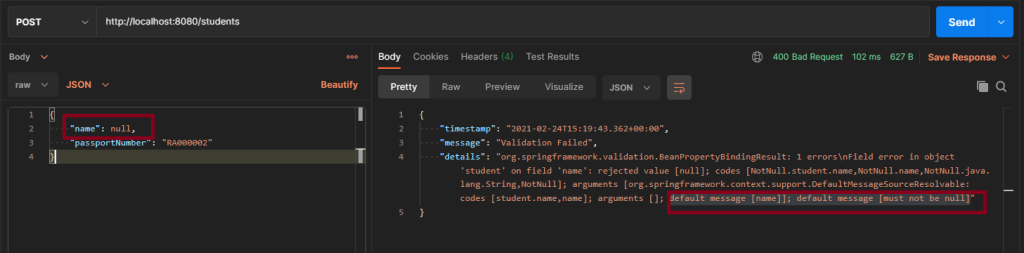
Scenario 1 – Below picture shows how we can execute a POST Request where Name is passed as null using Postman
@NotNull
    private String name;
In the below image, I am trying to create a new Student with name as null.
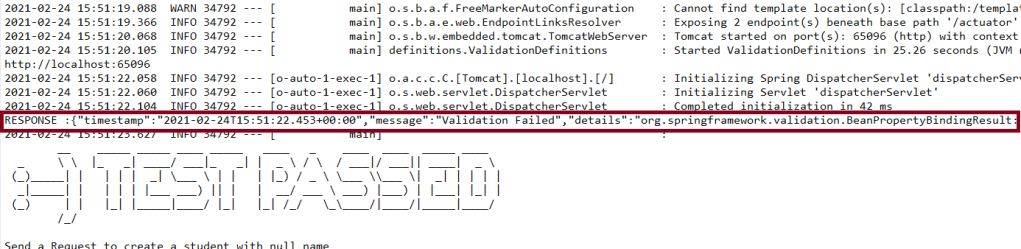
Above scenario can be tested in the below way.
Feature: Validation of  Student Request

  @CreateStudentWithNoName
    Scenario: Send a Request to create a student with no name

    Given I send a request to the URL "/students" to create a user with name as null and passport as "RA000002"
    Then the response will return error message as "Validation Failed" and details contain error detail as "default message [name]]; default message [must not be null]"
Test Code to test above scenario (StepDefinition file)
@SpringBootTest(classes = SpringBootRestServiceApplication.class, webEnvironment = WebEnvironment.RANDOM_PORT)
public class ValidationDefinitions {

	private final static String BASE_URI = "http://localhost";

	@LocalServerPort
	private int port;

	private ValidatableResponse validatableResponse, validatableResponse1;

	private void configureRestAssured() {

		RestAssured.baseURI = BASE_URI;
		RestAssured.port = port;
	}

	protected RequestSpecification getAnonymousRequest() throws NoSuchAlgorithmException {
		configureRestAssured();
		return given();
	}

	@Given("^I send a request to the URL \"([^\"]*)\" to create a user with name as null and passport as \"([^\"]*)\"$")
	public void iSendARequestwithNullName(String endpoint, String passport) throws Throwable {

		Map<String, String> map = new HashMap<>();
		map.put("name", null);
		map.put("passport", passport);

		JSONObject newStudent = new JSONObject(map);

		validatableResponse = getAnonymousRequest().contentType(ContentType.JSON).body(newStudent.toString()).when()
				.post(endpoint).then();
	}

	@Then("^the response will return error message as \"([^\"]*)\" and details contain error detail as \"([^\"]*)\"$")

	public void extractErrorResponse(String message, String details) {

		validatableResponse.assertThat().body("message", equalTo(message)).and().body(containsString(details));
	}
}
To know how to start the springBoot test and web environment. Please refer this link.
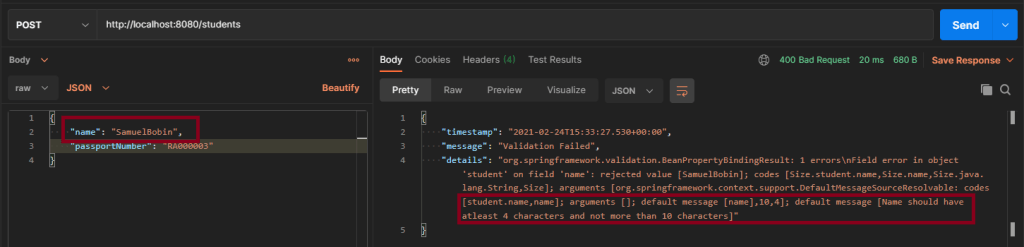
Scenario 2 – Below picture shows how we can execute a POST Request to create a student with Name as length outside the range using Postman
@Size(min = 4, max = 10, message = "Name should have atleast 4 characters and not more than 10 characters")
	private String name;
This means that name should have minimum 4 characters and maximum 10 character. Name not in this range will throw validation error with message as “Name should have atleast 4 characters and not more than 10 characters”
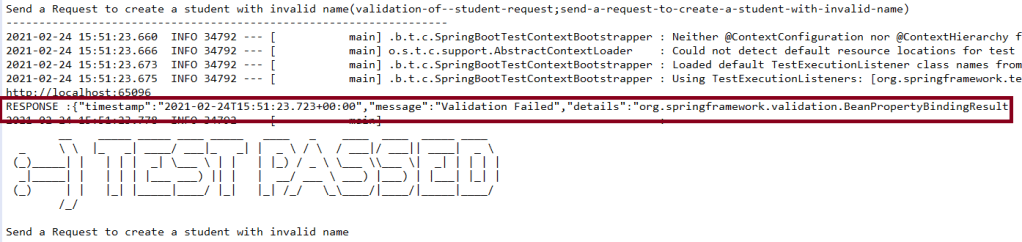
Above scenario can be tested in the below way.
 @CreateStudentWithInvalidName

    Scenario: Send a Request to create a student with invalid name

    Given I send a request to the URL "/students" to create a user with name as "SamuelBobin" and passport as "RA000003"
    Then the response will return error message as "Validation Failed" and details contain error detail as "Name should have atleast 4 characters and not more than 10 characters"
Test Code to test above scenario (StepDefinition file)
@Given("^I send a request to the URL \"([^\"]*)\" to create a user with name as \"([^\"]*)\" and passport as \"([^\"]*)\"$")
	public void iSendARequest(String endpoint, String newName, String passport) throws Throwable {

		Map<String, String> map = new HashMap<>();
		map.put("name", newName);
		map.put("passport", passport);

		JSONObject newStudent = new JSONObject(map);

		validatableResponse = getAnonymousRequest().contentType(ContentType.JSON).body(newStudent.toString()).when()
				.post(endpoint).then();
	}

	@Then("^the response will return error message as \"([^\"]*)\" and details contain error detail as \"([^\"]*)\"$")

	public void extractErrorResponse(String message, String details) {

		validatableResponse.assertThat().body("message", equalTo(message)).and().body(containsString(details));

	}
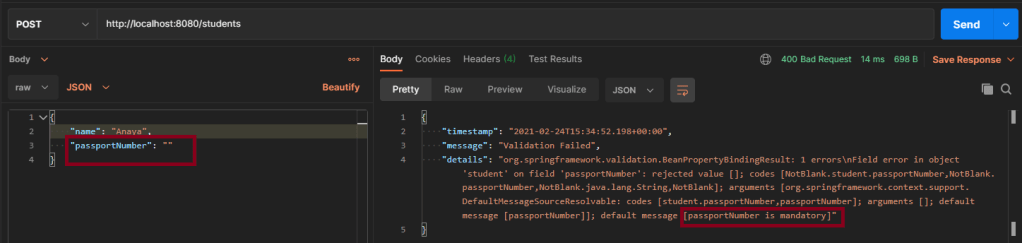
Scenario 3 – Below picture shows how we can execute a POST Request where creating a student with passport as not Blank using Postman
@NotBlank(message = "passportNumber is mandatory")
	private String passportNumber;
@NotBlank is to specify the attribute should not be blank and also a message when a validation error occurs “passportNumber is mandatory”.





























 QA Automation Expert