Serenity BDD with Gradle and Cucumber for Web Application

HOME

In the previous tutorial, I have explained about Integration Testing of SpringBoot Application with Serenity BDD and Cucumber in Maven project. This tutorial describes the creation of the Gradle Java Project to test a web application using Cucumber6 and JUnit4.

In this tutorial, I will explain creating a framework for the testing of Web Applications in Cucumber BDD.

Pre-Requisite

  1. Java 11 installed
  2. Gradle installed
  3. Eclipse or IntelliJ installed

This framework consists of:

  1. Serenity – 2.6.0
  2. Serenity Cucumber – 2.6.0
  3. Java 11
  4. JUnit – 4.13.2
  5. Gradle – 7.2

Steps to setup Gradle Java Project for Web Application using Serenity, Cucumber6 and JUnit4

  1. Download and Install Java on the system
  2. Download and setup Eclipse IDE on the system
  3. Setup Gradle on System and create a new Gradle Project
  4. Update repositories, plugins, and dependencies to the Gradle project
  5. Create a feature file under src/test/resources
  6. Create the Step Definition class or Glue Code for the Test Scenario
  7. Create a Serenity Cucumber Runner class
  8. Create serenity.conf file under src/test/resources
  9. Create serenity.properties file at the root of the project
  10. Run the tests through commandline which generates Serenity Report

Step 1- Download and Install Java

Cucumber and Rest-Assured need Java to be installed on the system to run the tests. Click here to know How to install Java.

Step 2 – Download and setup Eclipse IDE on system

The Eclipse IDE (integrated development environment) provides strong support for Java developers. Click here to know How to install Eclipse.

Step 3 – Setup Gradle

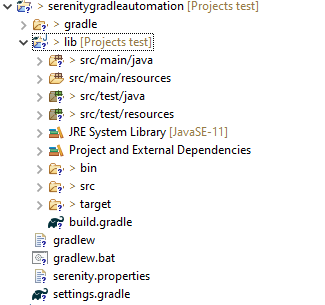
To build a test framework, we need to add several dependencies to the project. This can be achieved by any build Tool. I have used Gradle Build Tool. Click here to know How to install Gradle. Click here to know How to create a Gradle Java project. Below is the structure of the Gradle project.
Step 4 – Update repositories, plugin, and dependencies to the Gradle project

defaultTasks 'clean', 'test', 'aggregate'

repositories {
    mavenLocal()
    jcenter()
}

buildscript {
    repositories {
        mavenLocal()
        jcenter()
    }
    dependencies {
        classpath("net.serenity-bdd:serenity-gradle-plugin:2.4.24")
    }
}

apply plugin: 'java'
apply plugin: 'eclipse'
apply plugin: 'idea'
apply plugin: 'net.serenity-bdd.aggregator'

sourceCompatibility = 11
targetCompatibility = 11

dependencies {
   
    testImplementation 'net.serenity-bdd:serenity-core:2.6.0'
    testImplementation 'net.serenity-bdd:serenity-cucumber6:2.6.0'
    testImplementation 'net.serenity-bdd:serenity-screenplay:2.6.0'
    testImplementation 'net.serenity-bdd:serenity-screenplay-webdriver:2.6.0'
    testImplementation 'junit:junit:4.13.1'
}

test {
    testLogging.showStandardStreams = true
    systemProperties System.getProperties()
}

gradle.startParameter.continueOnFailure = true

test.finalizedBy(aggregate)

Step 5 – Create a feature file under src/test/resources

A Feature File is an entry point to the Cucumber tests. This is a file where you will describe your tests in Descriptive language (Like English). A feature file can contain a scenario or can contain many scenarios in a single feature file. Below is an example of Feature file.

Feature: Login to HRM  

   @ValidCredentials
   Scenario: Login with valid credentials
   
    Given User is on Home page
    When User enters username as "Admin"
    And User enters password as "admin123"
    Then User should be able to login successfully

Step 6 – Create the Step Definition class or Glue Code for the Test Scenario

The steps definition file stores the mapping between each step of the test scenario defined in the feature file with a code of the function to be executed. So, now when Cucumber executes a step of the scenario mentioned in the feature file, it scans the step definition file and figures out which function is to be called.

Create a StepDefinition class for LoginPage.feature

public class LoginPageDefinitions {
 
    @Steps
    StepLoginPage loginPage;
 
    @Steps
    StepDashboardPage dashPage;
 
    @Steps
    StepForgetPasswordPage forgetpasswordPage;
 
    @Given("User is on Home page")
    public void openApplication() {
        loginPage.open();
        System.out.println("Page is opened");
    }
 
    @When("User enters username as {string}")
    public void enterUsername(String userName) {
        System.out.println("Enter Username");
        loginPage.inputUserName(userName);
    }
 
    @When("User enters password as {string}")
    public void enterPassword(String passWord) {
        loginPage.inputPassword(passWord);
 
        loginPage.clickLogin();
    }
 
    @Then("User should be able to login successfully")
    public void clickOnLoginButton() {
        dashPage.loginVerify();
    }
   
}

Serenity Step Libraries integrate smoothly into Cucumber Step Definition files; all you need to do is to annotate a step library variable with the @Steps annotation.  Methods that represent a business task or action (inputUserName()), and that will appear in the reports as a separate step, are annotated with the @Step annotation. Here, I have created two StepClasses – StepLoginPage and StepDashboardPage

public class StepLoginPage extends PageObject {
 
    @Step("Enter Username")
    public void inputUserName(String userName) {
        $(By.name("txtUsername")).sendKeys((userName));
    }
 
    @Step("Enter Password")
    public void inputPassword(String passWord) {
        $(By.name("txtPassword")).sendKeys((passWord));
    }
 
    @Step("Click Submit Button")
    public void clickLogin() {
        $(By.name("Submit")).click();
    } 
 
}

StepDashboardPage

public class StepDashboardPage extends PageObject {
 
    @Step("Successful login")
    public void loginVerify() {
        String dashboardTitle = $(By.id("welcome")).getText();
        assertThat(dashboardTitle, containsString("Welcome"));
    }
}

Step 7 – Create a Serenity Cucumber Runner class

import org.junit.runner.RunWith;

import io.cucumber.junit.CucumberOptions;
import net.serenitybdd.cucumber.CucumberWithSerenity;

@RunWith(CucumberWithSerenity.class)
@CucumberOptions(plugin = {}, features = "lib/src/test/resources/features", glue = "serenitygradleautomation.definitions")

public class CucumberTestSuite {

}

Step 8 – Create serenity.conf file under src/test/resources

Serenity.conf file is used to specify various features like the type of webdriver used, various test environments, run tests in headless mode, and many more options.

webdriver {
    driver = firefox
}
 
 
environments {
  default {
    webdriver.base.url = "https://opensource-demo.orangehrmlive.com/"
  }
  dev {
    webdriver.base.url = "https://opensource-demo.orangehrmlive.com/dev"
  }
  staging {
    webdriver.base.url = "https://opensource-demo.orangehrmlive.com/staging"
  }
  prod {
    webdriver.base.url = "https://opensource-demo.orangehrmlive.com/prod"
  }
}

Step 9 – Create serenity.properties file at the root of the project

serenity.project.name = Serenity and Cucumber Gradle Demo

Step 10 – Run the tests through commandline which generates Serenity Report

Open the command line and go to the location where gradle.build of the project is present and type the below command.

gradle test

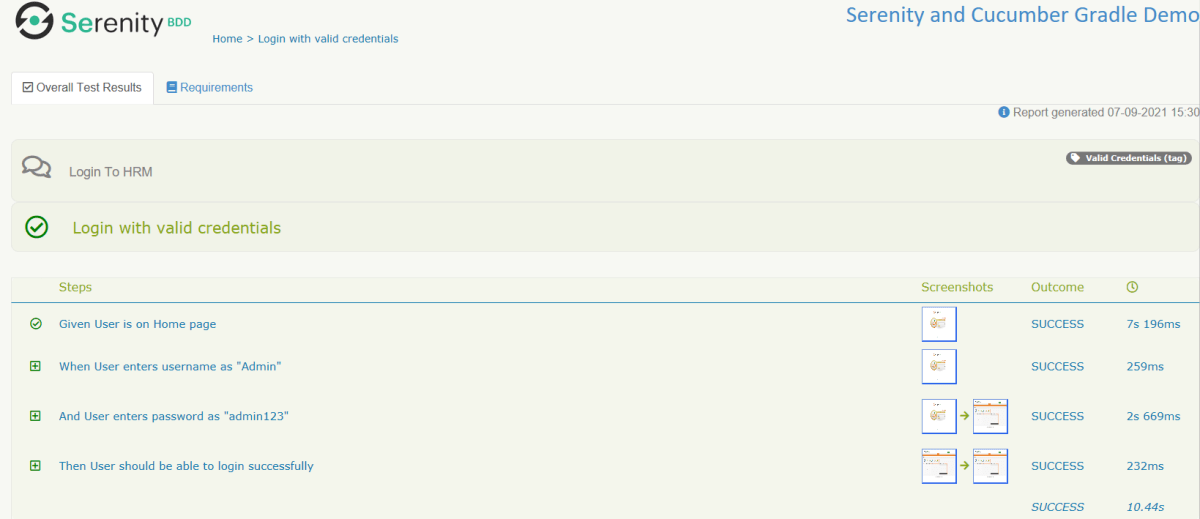
The Serenity report is generated under /lib/target/site/serenity.

Serenity Report

Below is the image of Overall Test Result with steps and screenshots.
That’s it! Congratulations on making it through this tutorial and hope you found it useful! Happy Learning!!
Serenity Emailable HTML Report

HOME

In the previous tutorial, I explained the Generation of Serenity Report (index.html) using Cucumber6 and JUnit. Index.html report that acts both as a test report and living documentation for the product. It has various views like Overall Test Status, Requirement View, Capabilities View, and Features View.

Sometimes it is useful to be able to send a short summary of the test outcomes via email. Serenity allows us to generate a single-page, self-contained HTML summary report, containing an overview of the test results, and a configurable breakdown of the status of different areas of the application. 

Pre-Requisite

  1. Java 11 installed
  2. Maven installed
  3. Eclipse or IntelliJ installed

This framework consists of:

  1. Java 11
  2. Maven – 3.8.1
  3. Serenity – 2.6.0
  4. Serenity Maven – 2.6.0
  5. Serenity Cucumber6 – 2.6.0
  6. JUnit – 4.13.2
  7. Maven Surefire Plugin – 3.0.0-M5
  8. Maven Failsafe Plugin – 3.0.0-M5
  9. Maven Comiler Plugin – 3.8.1

Implementation Steps

  1. Update Properties section in Maven pom.xml
  2. Add repositories and pluginRepository to Maven pom.xml
  3. Add Serenity, Serenity Cucumber and JUnit dependencies to POM.xml
  4. Update Build Section of pom.xml
  5. Create source folder – src/test/resources and features folder within src/test/resources to create test scenarios in Feature file
  6. Create the Step Definition class or Glue Code
  7. Create a Serenity-Cucumber Runner class
  8. Create serenity.conf file under src/test/resources
  9. Create serenity.properties file in the root of the project
  10. Run the tests through commandline which generates Serenity Report

To know about Step 1 to 3, please refer here. These steps are the same for Index.html report and emailable report.

Now, add the below-mentioned plugin. These reports are configured in the Serenity Maven plugin, where you need to do two things. First, you need to add a dependency for the serenity-emailer module in the plugin configuration. Then, you need to tell Serenity to generate the email report when it performs the aggregation task.

<plugin>
    <groupId>net.serenity-bdd.maven.plugins</groupId>
    <artifactId>serenity-maven-plugin</artifactId>
    <version>${serenity.version}</version>
    <dependencies> 
        <dependency>
            <groupId>net.serenity-bdd</groupId>
            <artifactId>serenity-single-page-report</artifactId>
            <version>${serenity.version}</version>
        </dependency>
        <dependency>
            <groupId>net.serenity-bdd</groupId>
            <artifactId>serenity-navigator-report</artifactId>
            <version>${serenity.version}</version>
        </dependency>
    </dependencies>
    <configuration>
        <tags>${tags}</tags>
        <reports>single-page-html,navigator</reports> 
    </configuration>
    <executions>
        <execution>
            <id>serenity-reports</id>
            <phase>post-integration-test</phase>
            <goals>
                <goal>aggregate</goal>
            </goals>
        </execution>
    </executions>
</plugin>

Step 10 – Run the tests through commandline which generates Serenity Report

Open the command line and go to the location where pom.xml of the project is present and type the below command.

mvn verify -Dwebdriver.gecko.driver="C:\\Users\\Vibha\\Software\\geckodriver-v0.26.0-win64\\geckodriver.exe"

I have provided the location of Firefoxdriver through the command line. I believe this is the best way to run the test. We can hard-code the path in the test code or in serenity.conf file. In that case, you don’t need to provide the location of Firefoxdriver through command line. You can use the below command.

mvn verify

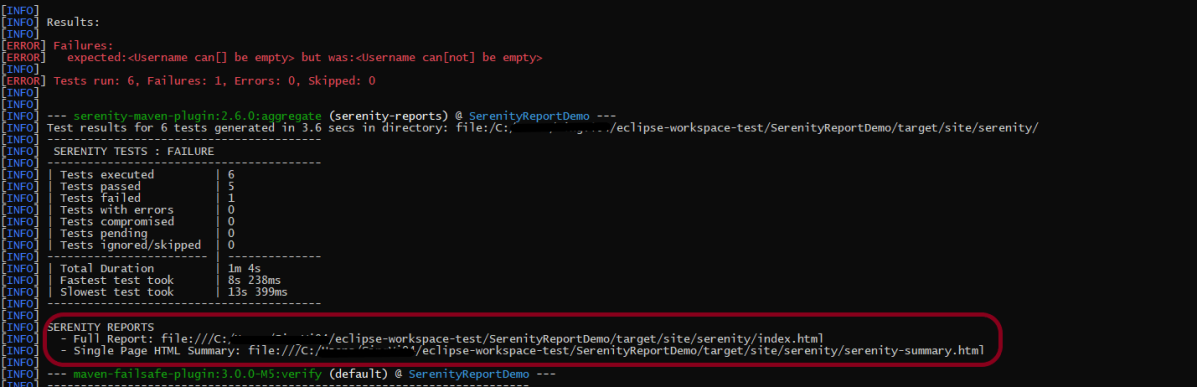
The output of the above program is

This image shows that two different types of reports are generated by Serenity – Full Report (index.html) and Single Page HTML Summary ( serenity-summary.html ).

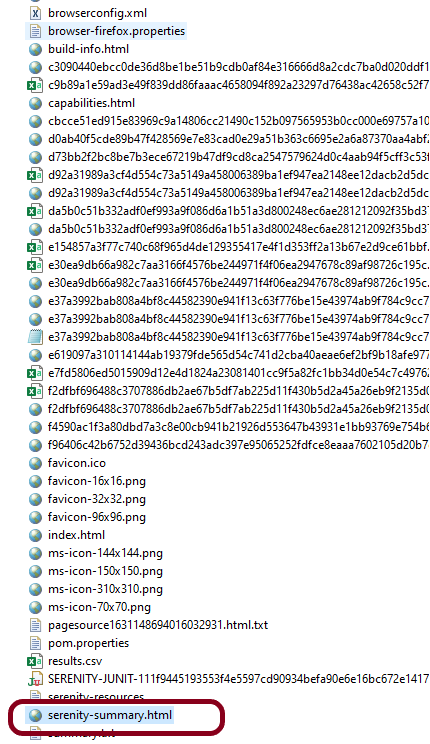
This emailable report is called serenity-summary.html. This is generated under site/serenity/ serenity-summary.html

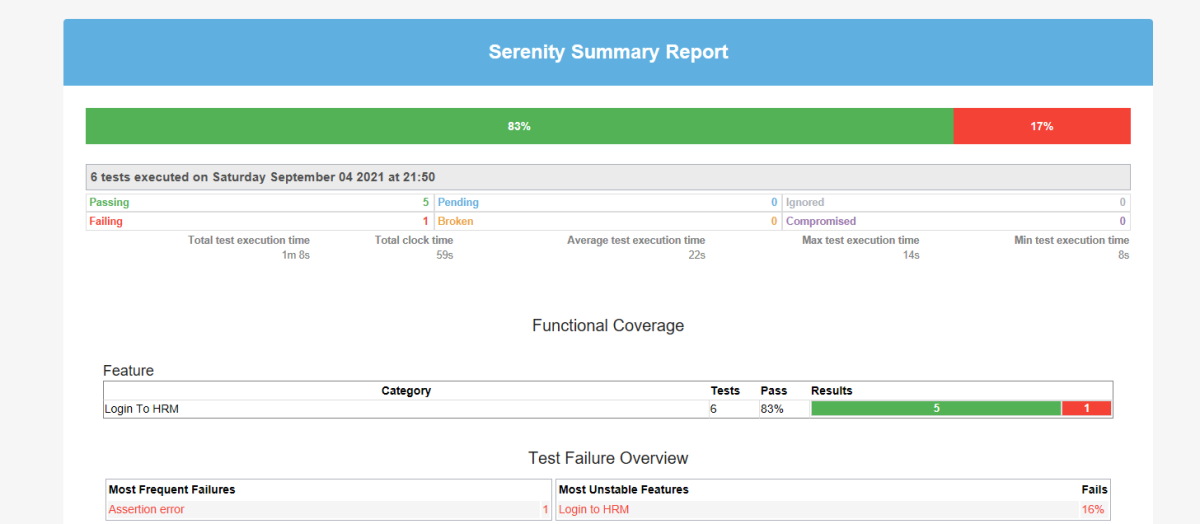
You can see a sample of such a report here:

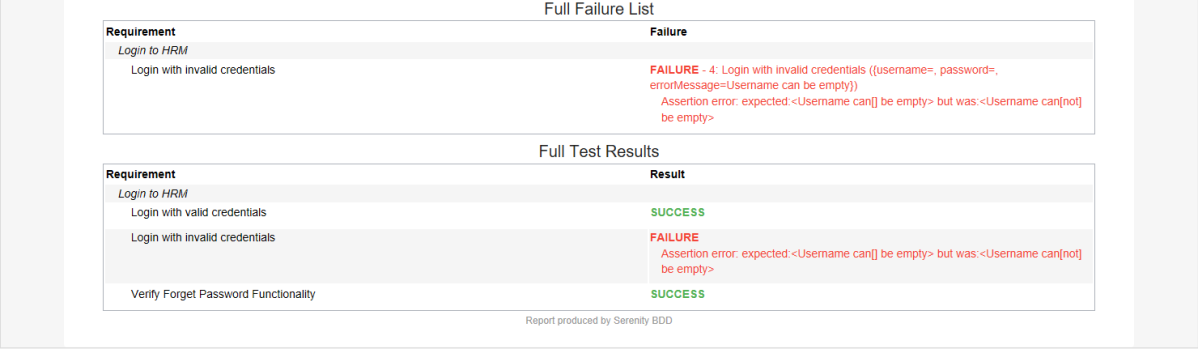
As you can see in the above execution status, out of six tests, one test failed. The same information is displayed in the report.

This report provides a summary of the test execution.

The Functional Coverage section lets us highlight key areas of your application. By default, this section will list test results for each Feature. But we can configure the report to group results by other tags as well.

We are done! Congratulations on making it through this tutorial and hope you found it useful! Happy Learning!!
Testing of SpringBoot REST Application using Serenity BDD and Rest Assured for DELETE Method to delete a Resource

HOME

In the previous tutorial, I explained about the Testing of SpringBoot PUT Method. In this tutorial, I will discuss about the Testing of DELETE method to delete a Resource in SpringBoot application.

To know how you can test a SpringBoot Application in BDD format using Serenity, refer the tutorial related to Serenity BDD with Cucumber for SpringBoot application.

The structure of project and various Java classes present in SpringBoot application and the dependencies need in POM.xml to test springboot framework are mentioned here.

Below is the code of Student Controller which exposes the services of DELETE method of Student resource.

@DeleteMapping("/students/{id}")

@DeleteMapping annotation maps HTTP DELETE requests onto specific handler methods. It is a composed annotation that acts as a shortcut for @RequestMapping(method=RequestMethod.DELETE) .

Code of StudentController.java for DELETE method is below

@DeleteMapping("/students/{id}")
	public void deleteStudent(@PathVariable long id) {
		studentRepository.deleteById(id);
	}

Here, we are deleting the student resource by Id.

Scenario 1- Below picture shows how we can execute a sucessful DELETE Request Method using Postman

Before Deleting a Student Resource with Id 1001

In the below image, it shows all the details of student with Id 1001 and with status code of 201 is returned.

Now, we delete a Student with Id 1001 and the status code returned is 200.

After deleting the resource, again send a request to get the details of student of id 1001 which returns 404 – Not Found status.

Above scenario can be tested in the below way.

Feature: Delete Student  Request

   @DeleteStudent
   Scenario: Send a valid Request to delete a student

    Given I send a request to the URL "/students/1001" to get the detail of user with Id 1001
    When I send a request to the URL "/students/1001" to delete user
    Then the response will return status of 200 
    And I resend the request to the URL "/students/1001" to get status of 404

Test Code to test above scenario (StepDefinition file)

@SpringBootTest(classes = SpringBoot2RestServiceApplication.class, webEnvironment = WebEnvironment.RANDOM_PORT)
public class DeleteStudentsDefinition {

	private final static String BASE_URI = "http://localhost";

	@LocalServerPort
	private int port;

	private ValidatableResponse validatableResponse1, validatableResponse2, validatableResponse3;

	private void configureRestAssured() {

		RestAssured.baseURI = BASE_URI;
		RestAssured.port = port;
	}

	protected RequestSpecification getAnonymousRequest() throws NoSuchAlgorithmException {
		configureRestAssured();
		return given();
	}

	@Given("^I send a request to the URL \"([^\"]*)\" to get the detail of user with Id 1001$")
	public void getRequest(String endpoint) throws Throwable {

		validatableResponse1 = getAnonymousRequest().contentType(ContentType.JSON).body(toString()).when().get(endpoint)
				.then();
	}

	@When("^I send a request to the URL \"([^\"]*)\" to delete user$")
	public void iSendARequest(String endpoint) throws Throwable {

		validatableResponse2 = getAnonymousRequest().contentType(ContentType.JSON).when().delete(endpoint).then();
	}

	@Then("^the response will return status of (\\d+)$")
	public void extractResponseOfValidStudent(int status) throws NoSuchAlgorithmException {
		validatableResponse2.assertThat().statusCode(equalTo(status));
	}

	@And("^I resend the request to the URL \"([^\"]*)\" to get status of (\\d+)$")
	public void reverifyStudent(String endpoint, int status) throws NoSuchAlgorithmException {
		validatableResponse3 = getAnonymousRequest().contentType(ContentType.JSON).body(toString()).when().get(endpoint)
				.then();
		validatableResponse3.assertThat().statusCode(equalTo(status));

   }
}

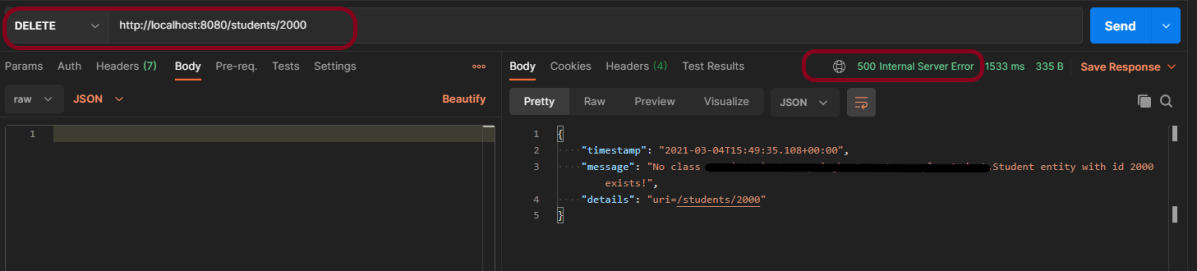
We can test the negative scenario similarly. Send a request with invalid student id, then we will get 500 Internal Server Error.

The next tutorial explains about the Testing of SpringBoot Exception Handling.

Testing of SpringBoot REST Application using Serenity BDD and Rest Assured for PUT Method to update a Resource

HOME

In the previous tutorial, I explained about the Testing of SpringBoot POST Method. In this tutorial, I will discuss about the Testing of PUT method to update a Resource in SpringBoot application.

To know how you can test a SpringBoot Application in BDD format using Serenity, refer the tutorial related to Serenity BDD with Cucumber for SpringBoot application.

The structure of project and various Java classes present in SpringBoot application and the dependencies need in POM.xml to test springboot framework are mentioned here.

Below is the code of Student Controller which exposes the services of PUT method of Student resource.

@PutMapping("/students/{id}")

PutMapping – It is Annotation for mapping HTTP PUT requests onto specific handler methods.

RequestBody – It maps body of the web request to the method parameter.

Code of StudentController.java for PUT method is below

@PutMapping("/students/{id}")
	public ResponseEntity<Object> updateStudent(@Valid @RequestBody Student student, @PathVariable long id) {

		Optional<Student> studentOptional = studentRepository.findById(id);
		if (!studentOptional.isPresent())
			return ResponseEntity.notFound().build();
		student.setId(id);
		studentRepository.save(student);
		return ResponseEntity.noContent().build();
	}

Here, we are checking if the student exists or not before updating the student. If the student does not exist, we return a not found status. Otherwise, we save the student details using studentRepository.save(student) method.

To test a PUT method of springboot application, you should use below code snippet to send a PUT request

Map<String, String> map = new HashMap<>();
   map.put("name", newName);
   map.put("passport", passport);

JSONObject newStudent = new JSONObject(map);
validatableResponse1 = getAnonymousRequest().contentType(ContentType.JSON).body(newStudent.toString()).when()
.put(endpoint).then();

Scenario 1- Below picture shows how we can execute a sucessful PUT Request Method using Postman

Before Updation

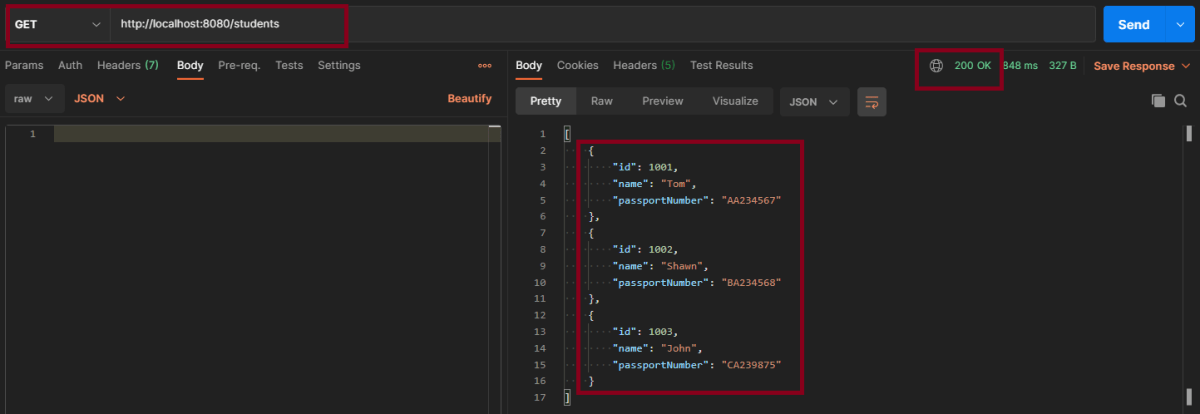
In the below image, details of all students with status code of 201 is returned.

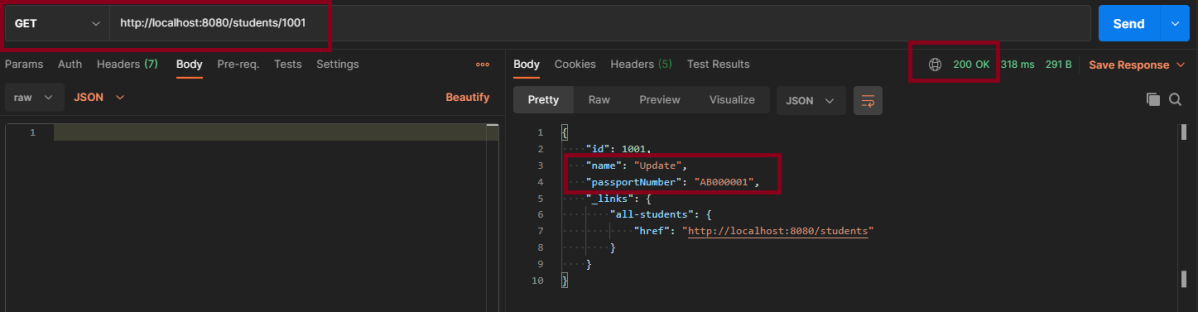
Update Student – Here, I’m updating Student with Id 1001 from name Tom to Update and passport from AA234567 to AB000001

This is the image of updated Student of Id 1001

Above scenario can be tested in the below way.

Feature: Update Student Detail

   @UpdateStudent
   Scenario: Send a valid Request to update a student

    Given I send a request to the URL "/students" to get the detail of all users
    When I send a request to the URL "/students/1001" to update a user with name "Update" and passport as "AB000001"
    Then the response will return status of 204 for update student
    And I send a request to the URL "/students/1001" to get detail of updated student name as "Update"

Test Code to test above scenario (StepDefinition file)

@SpringBootTest(classes = SpringBoot2RestServiceApplication.class, webEnvironment = WebEnvironment.RANDOM_PORT)
public class UpdateStudentDefinitions {

	private final static String BASE_URI = "http://localhost";

	@LocalServerPort
	private int port;

	private ValidatableResponse validatableResponse, validatableResponse1, validatableResponse2;

	private void configureRestAssured() {

		RestAssured.baseURI = BASE_URI;
		RestAssured.port = port;
		
	}

	protected RequestSpecification getAnonymousRequest() throws NoSuchAlgorithmException {
		configureRestAssured();
		return given();
	}

	@Given("^I send a request to the URL \"([^\"]*)\" to get the detail of all users$")
	public void getRequest(String endpoint) throws Throwable {

		validatableResponse = getAnonymousRequest().contentType(ContentType.JSON).body(toString()).when().get(endpoint)
				.then();
	}

	@When("^I send a request to the URL \"([^\"]*)\" to update a user with name \"([^\"]*)\" and passport as \"([^\"]*)\"$")
	public void updateRequest(String endpoint, String newName, String passport) throws Throwable {

		Map<String, String> map = new HashMap<>();
		map.put("name", newName);
		map.put("passport", passport);

		JSONObject newStudent = new JSONObject(map);

		validatableResponse1 = getAnonymousRequest().contentType(ContentType.JSON).body(newStudent.toString()).when()
				.put(endpoint).then();
	}

	@Then("^the response will return status of (\\d+) for update student$")
	public void extractResponse(int status) {

		validatableResponse1.assertThat().statusCode(equalTo(status));
	}

	@And("^I send a request to the URL \"([^\"]*)\" to get detail of updated student name as \"([^\"]*)\"$")
	public void extractUpdatedResponse(String endpoint, String newName) throws NoSuchAlgorithmException {

		validatableResponse2 = getAnonymousRequest().contentType(ContentType.JSON).when().get(endpoint).then();
		validatableResponse2.assertThat().body("name", equalTo(newName));
	}

Scenario 2- Below picture shows how we can execute a unsucessful PUT Request Method using Postman

In the above image, I am trying to update the name of invalid student id 1000, so the response returns the status of 404.

This can be tested by using above step definition.

To know about all the dependencies we need to add to pom.xml to run the SpringBoot Test, refer the tutorial about Testing of SpringBoot REST Application using Serenity BDD and Rest Assured for GET Method.

The next tutorial explains about the Testing of DELETE method in SpringBoot Application.

Testing of SpringBoot Exception Handling

HOME

In the previous tutorial, I explained about the Testing of SpringBoot POST Method. In this tutorial, I will discuss the Testing of Exceptions in the SpringBoot application.

Response Statuses for Errors

The most commonly used error codes in SpringBoot Application are:-

  • 404 – RESOURCE NOT FOUND
  • 400 – BAD REQUEST
  • 401 – UNAUTHORIZED
  • 415 – UNSUPPORTED TYPE – Representation not supported for the resource
  • 500 – SERVER ERROR

Default Exception Handling with Spring Boot

Spring Boot provides a good default implementation for exception handling for RESTful Services.

This is the response when you try getting details of a non-existing student. You can see that the response status is 500 – Internal Server Error.

Customizing Exception Handling with Spring Boot

There are 2 most commonly used annotations used in Error Handling – @ExceptionHandler and @ControllerAdvice.

What is ExceptionHandler?

The @ExceptionHandler is an annotation used to handle the specific exceptions and send the custom responses to the client.

@ExceptionHandler(StudentNotFoundException.class)


What is ControllerAdvice?

A controller advice allows you to use exactly the same exception-handling techniques but apply them across the whole application, not just to an individual controller.

A combination of Spring and Spring Boot provides multiple options to customize responses for errors.

@ControllerAdvice
@RestController
public class CustomizedResponseEntityExceptionHandler extends ResponseEntityExceptionHandler {

You can specify the Response Status for a specific exception along with the definition of the Exception with the ‘@ResponseStatus’ annotation.

@ResponseStatus(HttpStatus.NOT_FOUND)

I have defined the StudentNotFoundExceptionclass. This Exception will be thrown by the controller when no resource i.e. Student to be returned in our case is found with HTTP Status of NOT_FOUND (404).

import org.springframework.http.HttpStatus;
import org.springframework.web.bind.annotation.ResponseStatus;

@ResponseStatus(HttpStatus.NOT_FOUND)
public class StudentNotFoundException extends RuntimeException {

	public StudentNotFoundException(String exception) {
		super(exception);
	}
}

Now the response will be 404 – Not Found

{
    "timestamp": "2021-02-22T15:56:59.494+00:00",
    "status": 404,
    "error": "Not Found",
    "trace": "StudentNotFoundException: id-100,
    "message": "id-100",
    "path": "/students/100"
}

Customizing Error Response Structure

The default error response provided by Spring Boot contains all the details that are typically needed.

However, you might want to create a framework-independent response structure for your organization. In that case, you can define a specific error response structure.

import java.util.Date;

public class ExceptionResponse {
	private Date timestamp;
	private String message;
	private String details;

	public ExceptionResponse(Date timestamp, String message, String details) {
		super();
		this.timestamp = timestamp;
		this.message = message;
		this.details = details;
	}

	public Date getTimestamp() {
		return timestamp;
	}

	public String getMessage() {
		return message;
	}

	public String getDetails() {
		return details;
	}
}

To use ExceptionResponse to return the error response, let’s define a ControllerAdvice as shown below.

@ControllerAdvice
@RestController
public class CustomizedResponseEntityExceptionHandler extends ResponseEntityExceptionHandler {

	@ExceptionHandler(StudentNotFoundException.class)
	public final ResponseEntity<Object> handleUserNotFoundException(StudentNotFoundException ex, WebRequest request) {
		ExceptionResponse exceptionResponse = new ExceptionResponse(new Date(), ex.getMessage(),
				request.getDescription(false));
		return new ResponseEntity(exceptionResponse, HttpStatus.NOT_FOUND);
	}

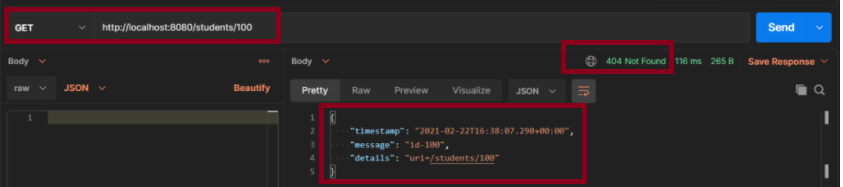
Scenario 1-  How to execute a Get Request Method with an Invalid URL using Postman

The above scenario can be tested in the below way.

Feature: Student Exception

   @InvalidURL
   Scenario: Send a valid Request to create a student

    Given I send a request to the invalid URL "/students/100" to get a student details
    Then the response will return status of 404 and message "id-100"

Test Code to test the above scenario (StepDefinition file)

@SpringBootTest(classes = SpringBootRestServiceApplication.class, webEnvironment = WebEnvironment.RANDOM_PORT)
public class CustomizedErrorsDefinition {

	private final static String BASE_URI = "http://localhost";

	@LocalServerPort
	private int port;

	private ValidatableResponse validatableResponse;

	private void configureRestAssured() {

		RestAssured.baseURI = BASE_URI;
		RestAssured.port = port;
	}

	protected RequestSpecification getAnonymousRequest() throws NoSuchAlgorithmException {
		configureRestAssured();
		return given();
	}

	@Given("^I send a request to the invalid URL \"([^\"]*)\" to get a student details$")
	public void iSendARequest(String endpoint) throws Throwable {

		validatableResponse = getAnonymousRequest().contentType(ContentType.JSON).when().get(endpoint).then();
	}

	@Then("^the response will return status of (\\d+) and message \"([^\"]*)\"$")
	public void extractResponse(int status, String message) {		validatableResponse.assertThat().statusCode(equalTo(status)).body("message", equalTo(message));
	}
}

To know more about SpringBootTest, refer to the tutorial on Integration Testing of SpringBoot.

@SpringBootTest(classes = SpringBootRestServiceApplication.class, webEnvironment = WebEnvironment.RANDOM_PORT)

To know about all the dependencies we need to add to pom.xml to run the SpringBoot Test, refer to the tutorial about Testing of SpringBoot REST Application using Serenity BDD and Rest Assured for GET Method.

To know how you can test a SpringBoot Application in BDD format using Serenity, refer to the tutorial related to Serenity BDD with Cucumber for SpringBoot application.

The next tutorial explains the Testing of SpringBoot Validation for RESTful Services.

Testing of SpringBoot Validation for RESTful Services

HOME

In the previous tutorial, I have explain about SpringBoot and how to perform Integration testing of SpringBoot Exception Handling. In this tutorial, I will explain about the Integration testing of Testing of SpringBoot Validation for RESTful Services.

What is Validation?

It is necessary that the response recieve from RestFul service should return meaningful information, like certain data type, constraints. If a response returns error message, then we expect it to provide information like clear error message, which field has an error, what is the type of error, proper status code and most importantly should not provide any sensitive information.

From SpringBoot 2.3, we also need to explicitly add the spring-boot-starter-validation dependency:

<dependency> 
    <groupId>org.springframework.boot</groupId> 
    <artifactId>spring-boot-starter-validation</artifactId> 
</dependency>

To know about all the dependencies neede to test Springboot, please click here.

Below are various Java classes present in a SpringBoot REST Application/API

SpringBootRestServiceApplication.java – The Spring Boot Application class generated with Spring Initializer. This class acts as the launching point for application.

pom.xml – Contains all the dependencies needed to build this project. 

Student.java – This is JPA Entity for Student class

StudentRepository.java – This is JPA Repository for Student. This is created using Spring Data JpaRepository.

StudentController.java – Spring Rest Controller exposing all services on the student resource.

CustomizedExceptionHandler.java – This implements global exception handling and customize the responses based on the exception type.

ErrorDetails.java – Response Bean to use when exceptions are thrown from API.

StudentNotFoundException.java – Exception thrown from resources when student is not found.

data.sql –  Data is loaded from data.sql into Student table. Spring Boot would execute this script after the tables are created from the entities.

REST request validation annotations

ANNOTATIONUSAGE
@AssertFalseThe annotated element must be false.
@AssertTrueThe annotated element must be true.
@DecimalMaxThe annotated element must be a number whose value must be lower or equal to the specified maximum.
@DecimalMinThe annotated element must be a number whose value must be higher or equal to the specified minimum.
@FutureThe annotated element must be an instant, date or time in the future.
@MaxThe annotated element must be a number whose value must be lower or equal to the specified maximum.
@MinThe annotated element must be a number whose value must be higher or equal to the specified minimum.
@NegativeThe annotated element must be a strictly negative number.
@NotBlankThe annotated element must not be null and must contain at least one non-whitespace character.
@NotEmptyThe annotated element must not be null nor empty.
@NotNullThe annotated element must not be null.
@NullThe annotated element must be null.
@PatternThe annotated CharSequence must match the specified regular expression.
@PositiveThe annotated element must be a strictly positive number.
@SizeThe annotated element size must be between the specified boundaries (included).

Implementing Validation on the Resource

Add @Valid in addition to @RequestBody.

public ResponseEntity<Object> createStudent(@Valid @RequestBody Student student) {

Below is the example of Student.java class. Here, you can see I have used various validations.

Here, Student class is annotated with @Entity, indicating that it is a JPA entity. There is no @Table annotation so entity is mapped to a table named Student .)

Id property is annotated with @Id and also annotated with @GeneratedValue  to indicate that the ID should be generated automatically.

@Entity
public class Student {
    @Id
    @GeneratedValue
    private Long id;
 
    @NotNull
    @Size(min = 4, message = "Name should have atleast 4 characters")
    private String name;
 
   @NotBlank(message = "passportNumber is mandatory") 
   private String passportNumber;
 
    public Student() {
        super();
    }
 
    public Student(Long id, String name, String passportNumber) {
        super();
        this.id = id;
        this.name = name;
        this.passportNumber = passportNumber;
    }
 
    public Long getId() {
        return id;
    }
 
    public void setId(Long id) {
        this.id = id;
    }
 
    public String getName() {
        return name;
    }
 
    public void setName(String name) {
        this.name = name;
    }
 
    public String getPassportNumber() {
        return passportNumber;
    }
 
    public void setPassportNumber(String passportNumber) {
        this.passportNumber = passportNumber;
    }
}

We need a @ControllerAdvice to handle validation errors. Below is the snippet of validation error for invalid method arguement.

@ControllerAdvice
@RestController
public class CustomizedResponseEntityExceptionHandler extends ResponseEntityExceptionHandler {

	@Override
	protected ResponseEntity<Object> handleMethodArgumentNotValid(MethodArgumentNotValidException ex,
			HttpHeaders headers, HttpStatus status, WebRequest request) {
		ExceptionResponse exceptionResponse = new ExceptionResponse(new Date(), "Validation Failed",
				ex.getBindingResult().toString());
		return new ResponseEntity(exceptionResponse, HttpStatus.BAD_REQUEST);
	}
}

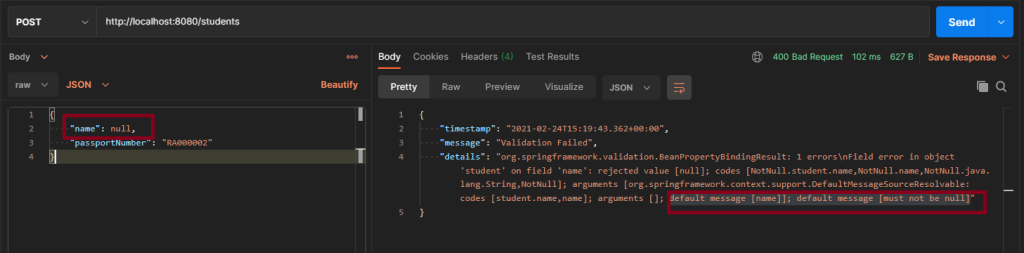
Scenario 1 – Below picture shows how we can execute a POST Request where Name is passed as null using Postman

@NotNull
    private String name;

In the below image, I am trying to create a new Student with name as null.

Above scenario can be tested in the below way.

Feature: Validation of  Student Request

  @CreateStudentWithNoName
    Scenario: Send a Request to create a student with no name

    Given I send a request to the URL "/students" to create a user with name as null and passport as "RA000002"
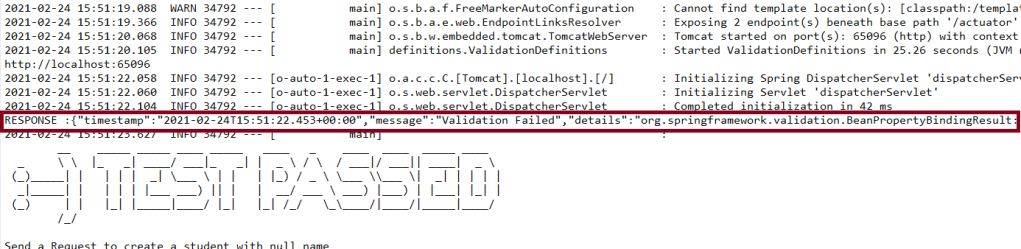
    Then the response will return error message as "Validation Failed" and details contain error detail as "default message [name]]; default message [must not be null]"

Test Code to test above scenario (StepDefinition file)

@SpringBootTest(classes = SpringBootRestServiceApplication.class, webEnvironment = WebEnvironment.RANDOM_PORT)
public class ValidationDefinitions {

	private final static String BASE_URI = "http://localhost";

	@LocalServerPort
	private int port;

	private ValidatableResponse validatableResponse, validatableResponse1;

	private void configureRestAssured() {

		RestAssured.baseURI = BASE_URI;
		RestAssured.port = port;
	}

	protected RequestSpecification getAnonymousRequest() throws NoSuchAlgorithmException {
		configureRestAssured();
		return given();
	}

	@Given("^I send a request to the URL \"([^\"]*)\" to create a user with name as null and passport as \"([^\"]*)\"$")
	public void iSendARequestwithNullName(String endpoint, String passport) throws Throwable {

		Map<String, String> map = new HashMap<>();
		map.put("name", null);
		map.put("passport", passport);

		JSONObject newStudent = new JSONObject(map);

		validatableResponse = getAnonymousRequest().contentType(ContentType.JSON).body(newStudent.toString()).when()
				.post(endpoint).then();
	}

	@Then("^the response will return error message as \"([^\"]*)\" and details contain error detail as \"([^\"]*)\"$")

	public void extractErrorResponse(String message, String details) {

		validatableResponse.assertThat().body("message", equalTo(message)).and().body(containsString(details));
	}
}

To know how to start the springBoot test and web environment. Please refer this link.

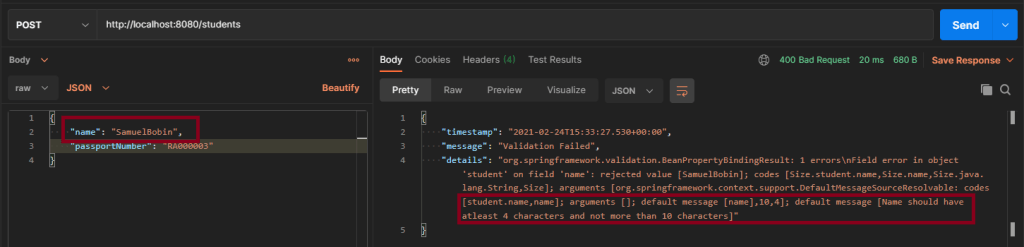
Scenario 2 – Below picture shows how we can execute a POST Request to create a student with Name as length outside the range using Postman

@Size(min = 4, max = 10, message = "Name should have atleast 4 characters and not more than 10 characters")
	private String name;

This means that name should have minimum 4 characters and maximum 10 character. Name not in this range will throw validation error with message as “Name should have atleast 4 characters and not more than 10 characters”

Above scenario can be tested in the below way.

 @CreateStudentWithInvalidName
   
    Scenario: Send a Request to create a student with invalid name

    Given I send a request to the URL "/students" to create a user with name as "SamuelBobin" and passport as "RA000003"
    Then the response will return error message as "Validation Failed" and details contain error detail as "Name should have atleast 4 characters and not more than 10 characters"

Test Code to test above scenario (StepDefinition file)

@Given("^I send a request to the URL \"([^\"]*)\" to create a user with name as \"([^\"]*)\" and passport as \"([^\"]*)\"$")
	public void iSendARequest(String endpoint, String newName, String passport) throws Throwable {

		Map<String, String> map = new HashMap<>();
		map.put("name", newName);
		map.put("passport", passport);

		JSONObject newStudent = new JSONObject(map);

		validatableResponse = getAnonymousRequest().contentType(ContentType.JSON).body(newStudent.toString()).when()
				.post(endpoint).then();
	}

	@Then("^the response will return error message as \"([^\"]*)\" and details contain error detail as \"([^\"]*)\"$")

	public void extractErrorResponse(String message, String details) {

		validatableResponse.assertThat().body("message", equalTo(message)).and().body(containsString(details));

	}

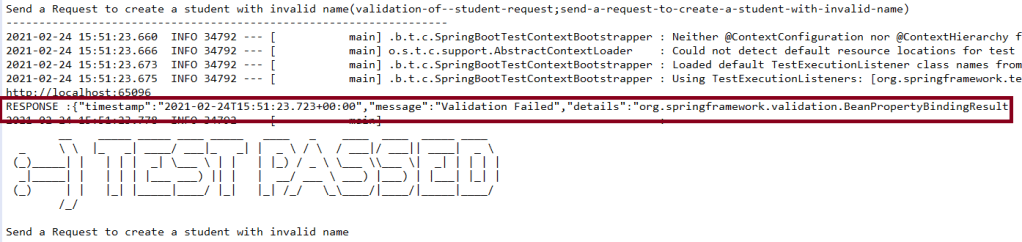
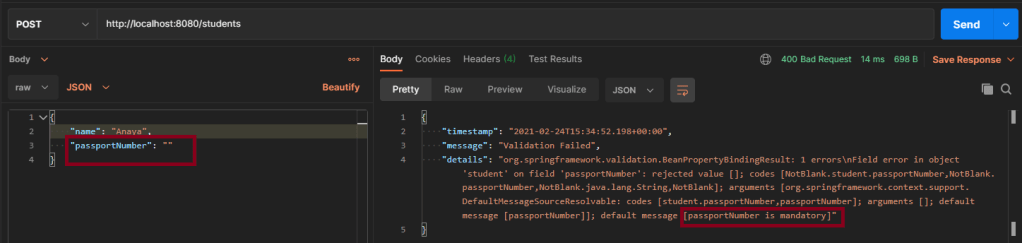
Scenario 3 – Below picture shows how we can execute a POST Request where creating a student with passport as not Blank using Postman

@NotBlank(message = "passportNumber is mandatory")
	private String passportNumber;

@NotBlank is to specify the attribute should not be blank and also a message when a validation error occurs “passportNumber is mandatory”.

This scenario can be tested as shown above.

Testing of SpringBoot REST Application using Serenity BDD and Rest Assured for POST Method to create a Resource

HOME

In the previous tutorial, I explained about the Testing of SpringBoot GET Method. In this tutorial, I will discuss about the Testing of POST method which create Resource in SpringBoot application.

First, let us see what are RequestBody and PathMapping annotations which are commonly used assnotations for POST Method

1. What is RequestBody

The @RequestBody annotation maps body of the web request to the method parameter. The body of the request is passed through an HttpMessageConverter to resolve the method argument depending on the content type of the request.

public ResponseEntity<Object> createStudent(@Valid @RequestBody Student student) {

2. What is PathMapping

The @PathMapping annotation is the specialized version of the @RequestMapping annotation which acts as a shortcut for @RequestMapping(method=RequestMethod=POST).

Here, we will use @PostMapping. It is annotation for mapping HTTP POST requests onto specific handler.

@PostMapping is a composed annotation that acts as a shortcut for @RequestMapping(method=RequestMethod.POST)

@PostMapping("/students")

The dependencies need in POM.xml to test springboot framework is mentioned here.

Code of StudentController.java is below

@PostMapping("/students")
	public ResponseEntity<Object> createStudent(@Valid @RequestBody Student student) {
		Student savedStudent = studentRepository.save(student);

		URI location = ServletUriComponentsBuilder.fromCurrentRequest().path("/{id}")
				.buildAndExpand(savedStudent.getId()).toUri();

		return ResponseEntity.created(location).build();
}

ResponseEntity.created(location).build(): Return a status of created. Also return the location of created resource as a Response Header.

Code of Student.java is below

@Entity
public class Student {
	@Id
	@GeneratedValue
	private Long id;

	@NotNull
	@Size(min = 4, message = "Name should have atleast 4 characters")
	private String name;

	private String passportNumber;

	public Student() {
		super();
	}

	public Student(Long id, String name, String passportNumber) {
		super();
		this.id = id;
		this.name = name;
		this.passportNumber = passportNumber;
	}

	public Long getId() {
		return id;
	}

	public void setId(Long id) {
		this.id = id;
	}

	public String getName() {
		return name;
	}

	public void setName(String name) {
		this.name = name;
	}

	public String getPassportNumber() {
		return passportNumber;
	}

	public void setPassportNumber(String passportNumber) {
		this.passportNumber = passportNumber;
	}
}

This is the Student entity. Each entity must have at least two annotations defined: @Entity and @Id. The @Entity annotation specifies that the class is an entity and is mapped to a database table. The  @Table annotation specifies the name of the database table to be used for mapping. The @Id annotation specifies the primary key of an entity and the @GeneratedValue provides for the specification of generation strategies for the values of primary keys.

Here, Student class is annotated with @Entity, indicating that it is a JPA entity. (Because no @Table annotation exists, it is assumed that this entity is mapped to a table named Student .)

The Student  object’s id property is annotated with @Id so that JPA recognizes it as the object’s ID. The id property is also annotated with @GeneratedValue  to indicate that the ID should be generated automatically.

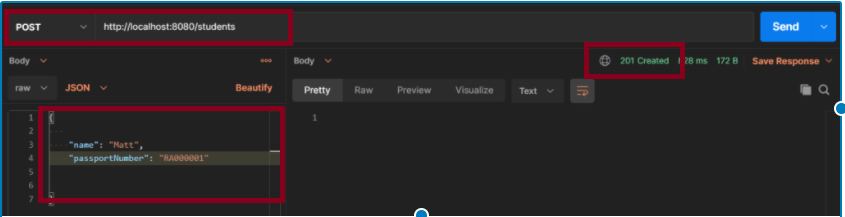
Scenario 1- Below picture shows how we can execute a sucessful POST Request Method on a Resource using Postman

In the below image, a new Student with name “Mat” is created and the status code returned is 201.

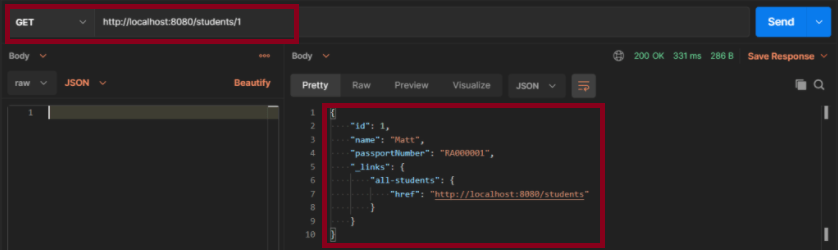
In the below image, I’m checking if the new user is created with name “Matt”. As id is auto genertaed, so the ID generation starts from 1.

Above scenario can be tested in the below way.

Feature: Create Student Request

   @CreateStudent
   Scenario: Send a valid Request to create a student

     Given I send a request to the URL "/students" to create a user with name "Matt" and passport as "RA000001"
    Then the response will return status of 201 for new student
    And I send a request to the URL "/students/1" to get detail of new student name as "Matt"

Test Code to test above scenario (StepDefinition file)

@SpringBootTest(classes = SpringBoot2RestServiceApplication.class, webEnvironment = WebEnvironment.RANDOM_PORT)
public class CreateStudentDefinition {

	private final static String BASE_URI = "http://localhost";

	@LocalServerPort
	private int port;

	private ValidatableResponse validatableResponse, validatableResponse1;

	private void configureRestAssured() {

		RestAssured.baseURI = BASE_URI;
		RestAssured.port = port;	
	}

	protected RequestSpecification getAnonymousRequest() throws NoSuchAlgorithmException {
		configureRestAssured();
		return given();
	}

	@Given("^I send a request to the URL \"([^\"]*)\" to create a user with name \"([^\"]*)\" and passport as \"([^\"]*)\"$")
	public void iSendARequest(String endpoint, String newName, String passport) throws Throwable {

		JSONObject newStudent = new JSONObject();

		newStudent.put("name", newName);
		newStudent.put("passport", passport);

		validatableResponse = getAnonymousRequest().contentType(ContentType.JSON).body(newStudent.toString()).when()
				.post(endpoint).then();
	}

	@Then("^the response will return status of (\\d+) for new student$")
	public void extractResponseOfNewStudent(int status) {

		validatableResponse.assertThat().statusCode(equalTo(status));
	}

	@And("^I send a request to the URL \"([^\"]*)\" to get detail of new student name as \"([^\"]*)\"$")
	public void extractResponseOfNewStudent(String endpoint, String newName) throws NoSuchAlgorithmException {

		validatableResponse1 = getAnonymousRequest().contentType(ContentType.JSON).when().get(endpoint).then();	
		validatableResponse1.assertThat().body("name", equalTo(newName));

	}

Here, I have used JSONObject from org.json to create the JSON directly. I use the put() method and supply the key and value as an argument.

JSONObject newStudent = new JSONObject();

		newStudent.put("name", newName);
		newStudent.put("passport", passport);

There is another way to create a JSON using Map. Here we construct a custom Map and then pass it as an argument to JSONObject‘s constructor.

Map<String, String> map = new HashMap<>();
		map.put("name", newName);
		map.put("passport", passport);

		JSONObject newStudent  = new JSONObject(map);

For assertion purpose, we use Hamcrest Matchers. Hamcrest is a framework for software tests. Hamcrest allows checking for conditions in your code via existing matchers classes. It also allows you to define your custom matcher implementations.

import static org.hamcrest.Matchers.containsString;
import static org.hamcrest.Matchers.equalTo;

The next tutorial explains about the Testing of PUT method in SpringBoot Application.

Testing of SpringBoot REST Application using Serenity BDD and Rest Assured for GET Method

 HOME

In the previous tutorial, I have explain about SpringBoot and how to perform Integration testing of SpringBoot Application in BDD format using Serenity BDD and Cucumber. In this tutorial, I will explain about the Integration testing of SpringBoot Application for GET method.

Spring Boot is an open-source micro framework which provides Java developers with a platform to get started with an auto configurable production-grade Spring application. 

In this tutorial, lets see a SpringBoot  REST Application and how it can be tested with the help of Rest Assured and Serenity

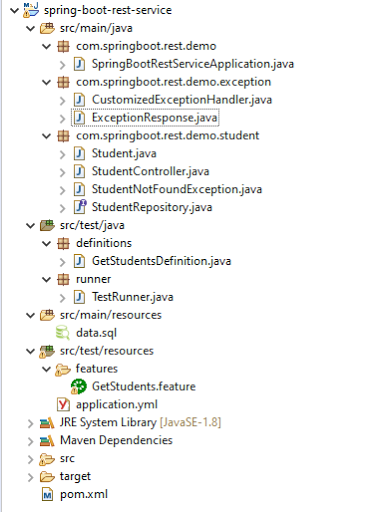
Below is the structure of a SpringBoot  application project

Below are various Java classes present in a SpringBoot REST Application/API

  • SpringBootRestServiceApplication.java – The Spring Boot Application class generated with Spring Initializer. This class acts as the launching point for application.
  • pom.xml – Contains all the dependencies needed to build this project. 
  • Student.java – This is JPA Entity for Student class
  • StudentRepository.java – This is JPA Repository for Student. This is created using Spring Data JpaRepository.
  • StudentController.java – Spring Rest Controller exposing all services on the student resource.
  • CustomizedExceptionHandler.java – This implements global exception handling and customize the responses based on the exception type.
  • ErrorDetails.java – Response Bean to use when exceptions are thrown from API.
  • StudentNotFoundException.java – Exception thrown from resources when student is not found.
  • data.sql –  Data is loaded from data.sql into Student table. Spring Boot would execute this script after the tables are created from the entities.

HTTP also defines standard response codes.

  • 200 – SUCESS
  • 404 – RESOURCE NOT FOUND
  • 400 – BAD REQUEST
  • 201 – CREATED
  • 401 – UNAUTHORIZED
  • 415 – UNSUPPORTED TYPE – Representation not supported for the resource
  • 500 – SERVER ERROR 

Let’s consider a few HTTP Methods:

  • GET : Should not update anything. Should return same result in multiple calls.

Possible Return Codes 200 (OK) + 404 (NOT FOUND) +400 (BAD REQUEST) 

  • POST : Should create a new resource. Ideally return JSON with link to newly created resource. Same return codes as get possible. In addition – Return code 201 (CREATED) can be used.
  • PUT : Update a known resource. ex: update client details. Possible Return Codes : 200(OK) + 404 (NOT FOUND) +400 (BAD REQUEST) 
  • DELETE : Used to delete a resource. Possible Return Codes : 200(OK).

We will create a Student Resource exposing three services using proper URIs and HTTP methods:

  • Retrieve all Students – @GetMapping(“/students”)
  • Get details of specific student – @GetMapping(“/students/{id}”)
  • Delete a student – @DeleteMapping(“/students/{id}”)
  • Create a new student – @PostMapping(“/students”)
  • Update student details – @PutMapping(“/students/{id}”)

To Test a SpringBoot Application for GET Method, we are using Rest Assured with Serenity BDD. Below mentioned dependencies are added in POM.xml

<dependency>
   <groupId>org.springframework.boot</groupId>
   <artifactId>spring-boot-starter-test</artifactId>
   <scope>test</scope>
</dependency>

<dependency>
   <groupId>org.springframework.security</groupId>
   <artifactId>spring-security-test</artifactId>
   <scope>test</scope>
</dependency>

<dependency>
   <groupId>net.serenity-bdd</groupId>
   <artifactId>serenity-core</artifactId>
   <version>2.2.0version>
   <scope>test</scope>
</dependency>

<dependency>
   <groupId>net.serenity-bdd</groupId>
   <artifactId>serenity-spring</artifactId>
   <version>2.2.0</version>
   <scope>test</scope>
</dependency>

<dependency>
   <groupId>net.serenity-bdd</groupId>
   <artifactId>serenity-cucumber5</artifactId>
   <version>2.2.0</version>
   <scope>test</scope>
</dependency>

<dependency>
   <groupId>net.serenity-bdd</groupId>
   <artifactId>serenity-rest-assured</artifactId>
   <version>2.2.0</version>
</dependency>
     
<dependency>
   <groupId>net.serenity-bdd</groupId>
  <artifactId>serenity-screenplay-rest</artifactId>
   <version>2.2.0</version>
   <scope>test</scope>
</dependency>

First, let us see what are @RestController, @AutoWired, @GetMapping and @PathVariable annotations.

1. @RestController

SpringBoot RestController annotation is use to create RESTful web services using Spring MVC. Spring RestController takes care of mapping request data to the request defined handles method.

2. @Autowired

The Spring framework enables automatic dependency injection. In other words, by declaring all the bean dependencies in a Spring configuration file, Spring container can autowire relationships between collaborating beans. This is called Spring bean autowiring. To know more about Autowired, you can refer this tutorial.

3. @GetMapping

It is annotation for mapping HTTP GET requests onto specific handler methods.
Specifically, @GetMapping is a composed annotation that acts as a shortcut for @RequestMapping(method = RequestMethod.GET)

4. @PathVariable

This annotation can be used to handle template variables in the request URI mapping, and use them as method parameters.
In this example, we use @PathVariable annotation to extract the templated part of the URI represented by the variable {id}.

A simple GET request to /students/{id} will invoke retrieveStudent with the extracted id value

http://localhost:8080/students/1001

Code of StudentController.java is below

@RestController
public class StudentController {

     @Autowired
     private StudentRepository studentRepository;

     @GetMapping("/students")
     public List retrieveAllStudents() {
           return studentRepository.findAll();
     }

     @GetMapping("/students/{id}")
     public EntityModel retrieveStudent(@PathVariable long id) {
           Optional student = studentRepository.findById(id);
           if (!student.isPresent())
                throw new StudentNotFoundException("id-" + id);
           EntityModel resource = EntityModel.of(student.get());

           WebMvcLinkBuilder linkTo = linkTo(methodOn(this.getClass()).retrieveAllStudents());
           resource.add(linkTo.withRel("all-students"));
           return resource;
     }

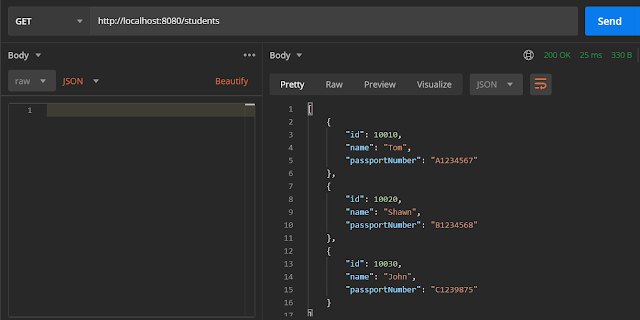
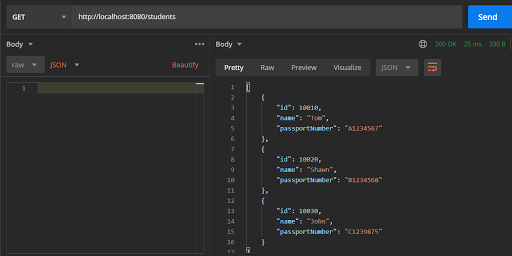
Scenario 1- Below picture shows how we can execute a Get Request Method on a Resource using Postman

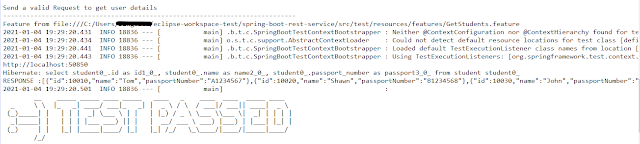
Above scenario can be tested in the below way.

@ReceiveUserDetails
 Scenario Outline: Send a valid Request to get user details
  Given I send a request to the URL "/students" to get user details
  Then the response will return status 200 and id and names and passport_no 
    
Examples:
    |studentID    |studentNames  |studentPassportNo|
    |10010        |Tom           |A1234567         |
    |10020        |Shawn         |B1234568         |
    |10030        |John          |C1239875         |

Test Code to test above scenario (StepDefinition file)

@SpringBootTest(classes = com.springboot.rest.demo.SpringBootRestServiceApplication.class, webEnvironment = WebEnvironment.RANDOM_PORT)

public class GetStudentsDefinition {
 
     private final static String BASE_URI = "http://localhost";
     
     @LocalServerPort
     private int port;
     
     private ValidatableResponse validatableResponse;
 
     private void configureRestAssured() {
           RestAssured.baseURI = BASE_URI;
           RestAssured.port = port;
     }
 
     protected RequestSpecification getAnonymousRequest() throws NoSuchAlgorithmException {
           configureRestAssured();
           return given();
     }
 
     @Given("^I send a request to the URL \"([^\"]*)\" to get user details$")
     public void iSendARequest(String endpoint) throws Throwable {
           validatableResponse = getAnonymousRequest().contentType(ContentType.JSON)
    .when().get(endpoint).then();       
     }
 
     @Then("^the response will return status (\\d+) and id (.*) and names (.*) and passport_no (.*)$")
     public void extractResponse(int status, String id, String studentName, 
     String passportNo) {
     validatableResponse.assertThat().statusCode(equalTo(status)).body(containsString(id))
                     .body(containsString(studentName)).body(containsString(passportNo));
 
     }

1. The @SpringBootTest annotation tells Spring Boot to look for a main configuration class (one with @SpringBootApplication, for instance) and use that to start a Spring application context.

2. WebEnvironment.RANDOM_PORT is used to create run the application at some random server port.

3. For assertion purpose, we use Hamcrest Matchers. Hamcrest is a framework for software tests. Hamcrest allows checking for conditions in your code via existing matchers classes. It also allows you to define your custom matcher implementations.

import static org.hamcrest.Matchers.containsString;
import static org.hamcrest.Matchers.equalTo;

4. @LocalServerPort gets the reference of port where the server has started. It helps in building the actual request URIs to mimic real client interactions.

5. ContentType.JSON is imported fromrestassured as well as ValidatableResponse

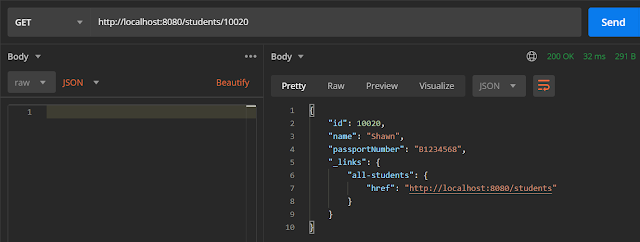
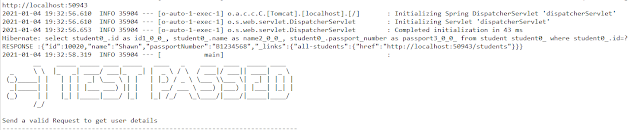
Scenario 2- Below picture shows how we can execute a Get Request Method to get detail of a specific Student. Here, we want details of student of Id 10020

@ReceiveAUserDetail
   Scenario: Send a valid Request to get user details
    Given I send a request to the URL "/students/10020" to get user detail of a specific user
    Then the response will return status 200 and name "Shawn"

Test Code to test above scenario (StepDefinition file)

@Given("^I send a request to the URL \"([^\"]*)\" to get user detail of a specific user$")
     public void sendRequestForSpecificUser(String endpoint) throws Throwable {
           validatableResponse = getAnonymousRequest().contentType(ContentType.JSON).when().get(endpoint).then();
           System.out.println("RESPONSE :" + validatableResponse.extract().asString());
     }
 
     @Then("^the response will return status (\\d+) and name \"([^\"]*)\"$")
     public void extractResponseOfSpecificUser(int status, String name) {
          validatableResponse.assertThat().statusCode(equalTo(status)).body("name", equalTo(name));
     }

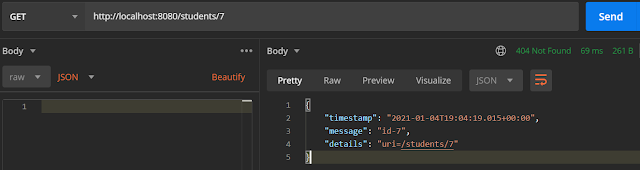
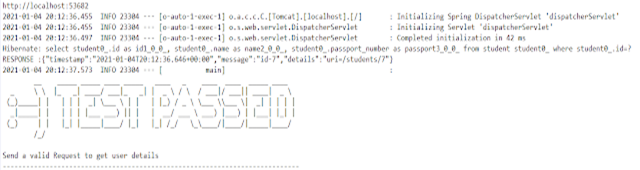
Scenario 3- Below picture shows how we can execute a Get Request Method for incorrect Student

@IncorrectUserId
   Scenario: Send a valid Request to get user details
    Given I send a request to the URL "/students/7" to get user detail of a specific user
    Then the response will return status 404 and message "id-7"

Test Code to test above scenario (StepDefinition file)

@Given("^I send a request to the URL \"([^\"]*)\" to get user detail of a specific user$")
     public void sendRequestForSpecificUser(String endpoint) throws Throwable {
           validatableResponse = getAnonymousRequest().contentType(ContentType.JSON).when().get(endpoint).then();
           System.out.println("RESPONSE :" + validatableResponse.extract().asString()); 
     }
 
     @Then("^the response will return status (\\d+) and message \"([^\"]*)\"$")
     public void extractResponseOfInvalidUser(int status, String message) {
         validatableResponse.assertThat().statusCode(equalTo(status)).body("message", equalTo(message));
 
     }

The next tutorial explains about the Testing of POST method in SpringBoot Application.