In the last tutorial, I explained How to test POST Request using Rest Assured. In this tutorial, I will automate a PATCH Request using Rest Assured. I will verify the status code, line of Status, and content of the Response.
To set up a basic Rest Assured Maven Project, click here and Gradle project, click here.
Add the below-mentioned dependencies to the pom.xml.
The HTTP PATCH request method applies partial modifications to a resource.
Difference between PUT and PATCH Method
PUT is a method of modifying resources where the client sends data that updates the entire resource.
PATCH is a method of modifying resources where the client sends partial data that is to be updated without modifying the entire data.
Below are the steps to test a PATCH Request using Rest Assured:
The steps to test the PATCH request are similar to the PUT request.
Below is the example for the test to PATCH method. (Non BDD)
import io.restassured.RestAssured;
import io.restassured.http.ContentType;
import io.restassured.response.Response;
import io.restassured.response.ValidatableResponse;
import io.restassured.specification.RequestSpecification;
import org.junit.Test;
import static org.hamcrest.CoreMatchers.equalTo;

public class Patch_NonBDDDemo {

    RequestSpecification requestSpecification;
    Response response;
    ValidatableResponse validatableResponse;

    @Test
    public void updateUser() {

        String jsonString = "{\"name\": \"William\"}";

        RestAssured.baseURI = "https://reqres.in/api/users/2";

        // Create a request specification
        requestSpecification = RestAssured.given();

        // Setting content type to specify format in which request payload will be sent.
        requestSpecification.contentType(ContentType.JSON);

        // Adding body as string
        requestSpecification.body(jsonString);

        // Calling PATCH method
        response = requestSpecification.patch();

        // Let's print response body.
        String responseString = response.prettyPrint();

        /*
         * To perform validation on response, we need to get ValidatableResponse type of
         * response
         */
        validatableResponse = response.then();

        // Get status code
        validatableResponse.statusCode(200);

        // It will check if status line is as expected
        validatableResponse.statusLine("HTTP/1.1 200 OK");

        // Check response - name attribute
        validatableResponse.body("name", equalTo("William"));

    }
}
In the last tutorial, I explained How to test PUT Request using Rest Assured. In this tutorial, I will automate a DELETE Request using Rest Assured. I will verify the status code, line of Status, and content of the Response.
To set up a basic Rest Assured Maven Project, click here and Gradle project, click here.
Add the below-mentioned dependencies to the pom.xml.
An HTTP DELETE method is used to delete an existing resource from the collection of resources. The DELETE method requests the origin server to delete the resource identified by the Request-URI. On successful deletion of a resource, it returns 200 (OK) and 204 (No Content) status codes. It may return as 202 (Accepted) status code if the request is queued. To learn more about Rest API, please click here.
Below are the steps to test a DELETE Request using Rest Assured:
The steps to test the DELETE request are similar to any API request like GET, POST, or PUT. To know about the steps and various imports used in the below example in detail, please refer to the tutorial for POST Request.
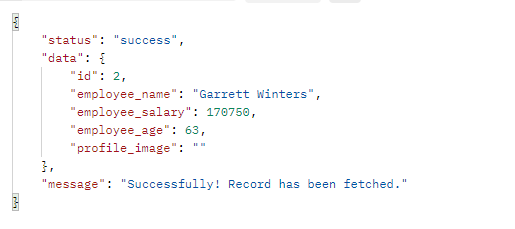
Let’s see the existing details of an Employee ID 3 using Postman:
Let’s write DELETE request in REST Assured in Non BDD Format for id 3:-
import io.restassured.RestAssured;
import io.restassured.response.Response;
import io.restassured.response.ValidatableResponse;
import io.restassured.specification.RequestSpecification;
import org.junit.Test;
import static org.hamcrest.CoreMatchers.equalTo;

public class Delete_NonBddDemo {

    RequestSpecification requestSpecification;
    Response response;
    ValidatableResponse validatableResponse;

    @Test
    public void deleteUser() {

        RestAssured.baseURI = "https://dummy.restapiexample.com/api";

        // Create a request specification
        requestSpecification = RestAssured.given();

        // Calling DELETE method
        response = requestSpecification.delete("/v1/delete/3");

        // Let's print response body.
        String resString = response.prettyPrint();

        /*
         * To perform validation on response, we need to get ValidatableResponse type of
         * response
         */
        validatableResponse = response.then();

        // Get status code
        validatableResponse.statusCode(200);

        // It will check if status line is as expected
        validatableResponse.statusLine("HTTP/1.1 200 OK");

        // Check response - message attribute
        validatableResponse.body("message", equalTo("Successfully! Record has been deleted"));

    }
}
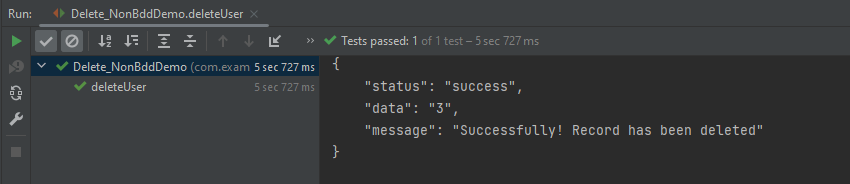
The output of the above program is
Let’s write DELETE request in REST Assured in BDD Format:–
import io.restassured.http.ContentType;
import io.restassured.response.ValidatableResponse;
import org.junit.Test;
import static io.restassured.RestAssured.given;
import static org.hamcrest.CoreMatchers.equalTo;

public class Delete_BDDDemo {

    ValidatableResponse validatableResponse;

    @Test
    public void deleteUser() {

        validatableResponse = given()
                .baseUri("https://dummy.restapiexample.com/api/v1/delete/3")
                .contentType(ContentType.JSON)
                .when()
                .delete()
                .then()
                .assertThat().statusCode(200)
                .body("message", equalTo("Successfully! Record has been deleted"));

        System.out.println("Response :" + validatableResponse.extract().asPrettyString());

    }

}
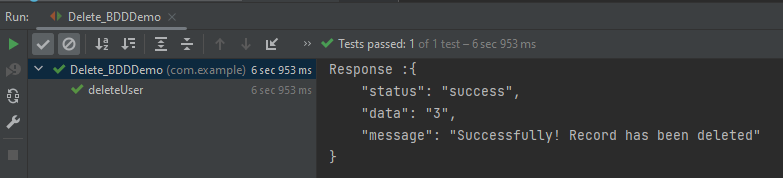
The output of the above program is
Explanation:
1. GIVEN: Specifies the initial conditions or setup for the test.
In the last tutorial, I explained How to test POST Request using Rest Assured. In this tutorial, I will automate a PUT Request using Rest Assured. I will verify the status code, line of Status, and content of the Response.
To set up a basic Rest Assured Maven Project, click here and Gradle project, click here.
Add the below-mentioned dependencies to the pom.xml.
The HTTP PUT API is primarily used to update existing resources. If the resource does not exist, then API may decide to create a new resource or not (Depending on API development). If a new resource has been created by the PUT API, the origin server MUST inform the user agent via the HTTP response code 201 (Created) response, and if an existing resource is modified, either the 200 (OK) or 204 (No Content) response codes SHOULD be sent to indicate successful completion of the request. To learn more about Rest API, please click here.
Below are the steps to test a PUT Request using Rest Assured:
The steps to test the PUT request are similar to the POST request. The only difference is that in POST we send a request to create a new resource, whereas here we have a resource and I will update the detail of the already existing resource. To know about the steps and various imports used in the below example, please refer to the tutorial for POST Request.
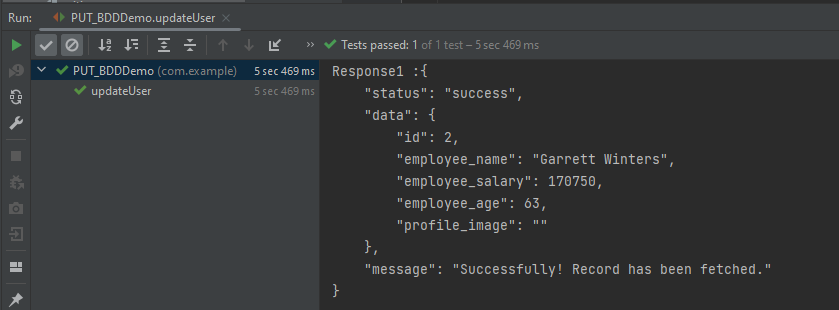
Below is the response received for Employee with id 2.
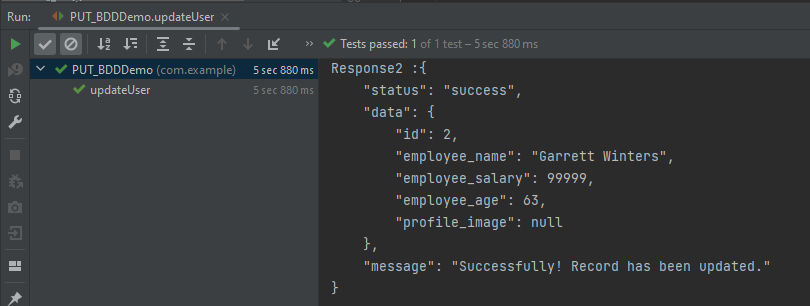
I want to change the employee_salary to 99999. Below is the example for the test to update employee_salary.
import io.restassured.RestAssured;
import io.restassured.http.ContentType;
import io.restassured.response.Response;
import io.restassured.response.ValidatableResponse;
import io.restassured.specification.RequestSpecification;
import org.junit.Test;
import static org.hamcrest.CoreMatchers.equalTo;

public class PUT_NonBDDDemo {

    RequestSpecification requestSpecification;
    Response response;
    ValidatableResponse validatableResponse;

    @Test
    public void updateUser() {

        String jsonString = "{\"id\": 2,\r\n"
                + "        \"employee_name\": \"Garrett Winters\",\r\n"
                + "        \"employee_salary\": 99999,\r\n"
                + "        \"employee_age\": 63,\r\n"
                + "        \"profile_image\": \"\"}";

        RestAssured.baseURI = "https://dummy.restapiexample.com/api/v1/update/2";

        // Create a request specification
        requestSpecification = RestAssured.given();

        // Setting content type to specify format in which request payload will be sent.
        requestSpecification.contentType(ContentType.JSON);

        // Adding body as string
        requestSpecification.body(jsonString);

        // Calling PUT method
        response = requestSpecification.put();

        // Let's print response body.
        String responseString = response.prettyPrint();

        /*
         * To perform validation on response, we need to get ValidatableResponse type of
         * response
         */
        validatableResponse = response.then();

        // Get status code
        validatableResponse.statusCode(200);

        // It will check if status line is as expected
        validatableResponse.statusLine("HTTP/1.1 200 OK");

        // Check response - name attribute
        validatableResponse.body("data.employee_salary", equalTo(99999));

        // Check response - message attribute
        validatableResponse.body("message", equalTo("Successfully! Record has been updated."));

    }
}
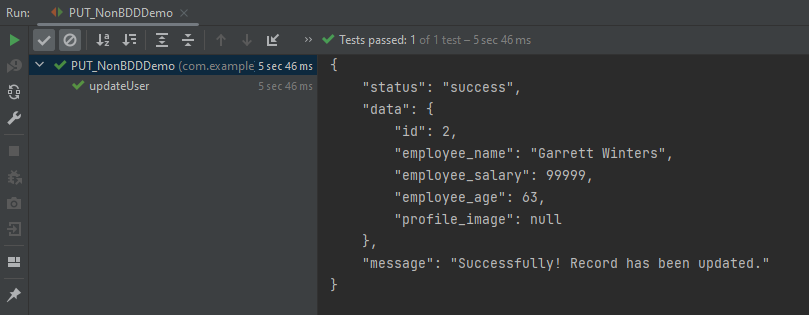
The output of the above program is
Now, let us convert the same test into BDD format. In the below example, in the first part, we have retrieved the details of the employee with ID 2, and in the second part, we have updated the value of employee_salary to 99999.
import io.restassured.http.ContentType;
import io.restassured.response.Response;
import io.restassured.response.ValidatableResponse;
import io.restassured.specification.RequestSpecification;
import org.junit.Test;
import static io.restassured.RestAssured.given;
import static org.hamcrest.CoreMatchers.equalTo;

public class PUT_BDDDemo {

    RequestSpecification requestSpecification;
    Response response;
    ValidatableResponse validatableResponse, validatableResponse1;

    @Test
    public void updateUser() {

        // To get the detail of employee with id 2
        validatableResponse = given()
                .baseUri("https://dummy.restapiexample.com/api/v1/employee/2")
                .contentType(ContentType.JSON)
                .when()
                .get()
                .then()
                .assertThat().statusCode(200);

        System.out.println("Response1 :" + validatableResponse.extract().asPrettyString());

        String jsonString = "{\"id\": 2,\r\n"
                + "        \"employee_name\": \"Garrett Winters\",\r\n"
                + "        \"employee_salary\": 99999,\r\n"
                + "        \"employee_age\": 63,\r\n"
                + "        \"profile_image\": \"\"}";

        // Update employee_salary
        validatableResponse1 = given()
                .baseUri("https://dummy.restapiexample.com/api/v1/update/2")
                .contentType(ContentType.JSON)
                .body(jsonString)
                .when()
                .put()
                .then()
                .assertThat().statusCode(200)
                .body("data.employee_salary", equalTo(99999))
                .body("message", equalTo("Successfully! Record has been updated."));

        System.out.println("Response2 :" + validatableResponse1.extract().asPrettyString());

    }

}
The output of the above program is
Congratulations on making it through this tutorial and hope you found it useful! Happy Learning!! Cheers!!
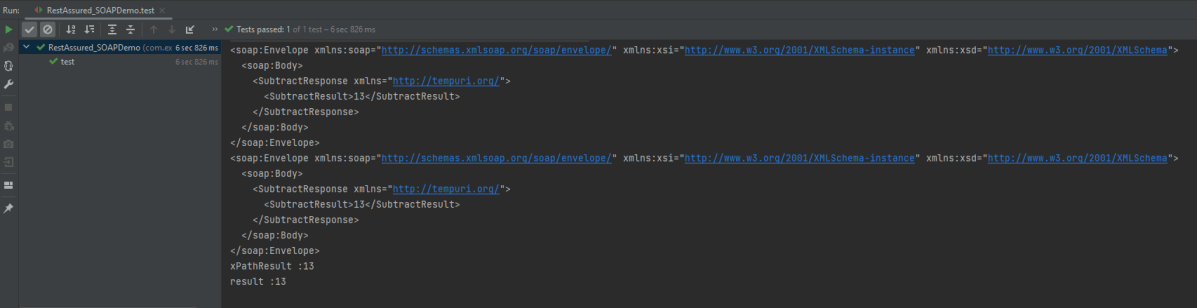
In this tutorial, I will test a SOAP Service using Rest Assured. I will verify the status code, line of Status, and content of the Response. To set up a basic Rest Assured Maven Project, click here and Gradle project, click here.
Add the below-mentioned dependencies to the pom.xml.
SOAP is an XML-based protocol for accessing web services over HTTP. It has some specifications that could be used across all applications.
SOAP messages are XML documents that are comprised of the following three basic building blocks:
The SOAP Envelope encapsulates all the data in a message and identifies the XML document as a SOAP message.
The Header element contains additional information about the SOAP message. This information could be authentication credentials, for example, which are used by the calling application.
The Body element includes the details of the actual message that needs to be sent from the web service to the calling application. This data includes call and response information.
Implementation Steps:
Step 1 – I have created an XML file for the soap request body in the project resource folder. “Number.xml” is the name of the file.
Step 2 – Specify the base URL to the RESTful web service using the RestAssuredclass.
RestAssured.baseURI = "http://www.dneonline.com";
Step 3 – The response to a request made by REST Assured.
Response response = given()
Response is imported from package:
import io.restassured.response.Response;
Step 4 – Set the content type to specify the format in which the request payload will be sent to the server. Here, the Content-Type is “text/xml; charset=utf-8”.
A Request Body is created by using the below snippet:
requestBody = new File(getClass().getClassLoader().getResource("Number.xml").getFile());
Step 6 – Send the POST request to the server and receive the response of the request made by REST Assured. This response contains every detail returned by hitting request i.e. response body, response headers, status code, status lines, cookies, etc. The response is imported from package:
import io.restassured.response.Response;
Step 7 – To validate a response like status code or value, we have used the below code
An assertion is a way to verify that the expected result and the actual result match or not in the test case. A test is considered successful ONLY if it is completed without throwing any exceptions. If the current value and the expected value match then the assertion passes and when the assertion passes nothing happens. But when an assertion fails, it will fail the test case.
There are various ways to perform assertions in API Testing. For API Testing, we are using Rest Assured, which uses either Hamcrest or JUnit assertions. We are going to discuss Hamcrest Assertions here.
What is Hamcrest?
Hamcrest is a framework for writing matcher objects, allowing ‘match’ rules to be defined declaratively. We do not need to add Hamcrest dependency explicitly as the Rest-Assured 4.3.3 version includes itself. To learn more about Hamcrest, please refer to this link.
We need to add the below dependency to use Hamcrest in the project. Please use the latest version from here
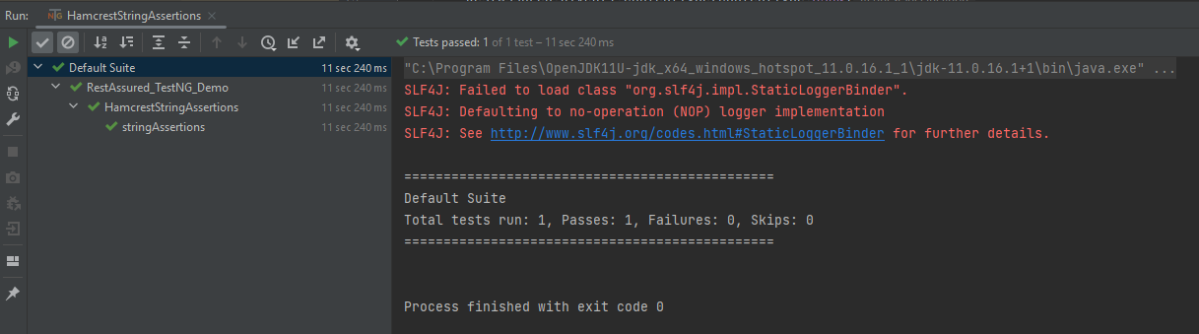
equalTo – It checks whether the extracted string from JSON is equal to the expected string.
equalToIgnoringCase – It checks if the extracted string from JSON matches the expected string. The comparison does not consider case (small or capital).
equalToIgnoringWhiteSpace – It checks if the extracted string from JSON matches the expected string. It takes into account the white spaces.
containsString– It checks whether the extracted string from JSON contains the expected string as a substring.
startsWith– It checks whether the extracted string from JSON is starting with a given string or character.
endsWith – It checks whether the extracted string from JSON is ending with a given string or character.
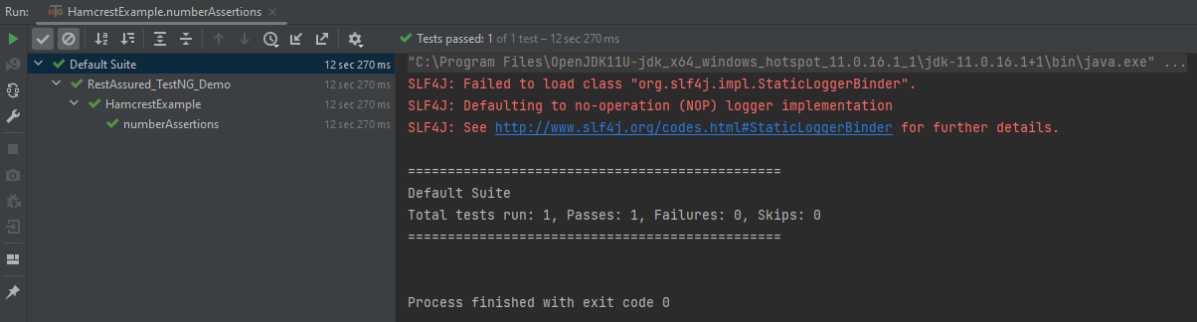
Below assertions are imported from the package shown below:-
Below are examples to show the use of collection-related assertions.
import io.restassured.RestAssured;
import io.restassured.http.ContentType;
import org.testng.annotations.Test;
import static org.hamcrest.Matchers.is;
import static org.hamcrest.Matchers.nullValue;

public class HamcrestNullAssertion {

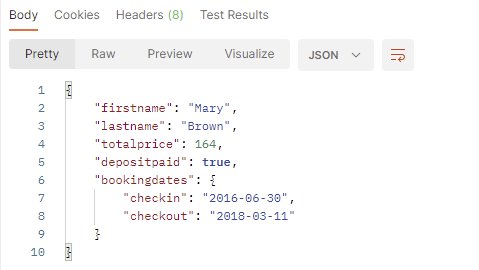
   public String endpoint = "https://restful-booker.herokuapp.com/booking/1";

    @Test
    public void nullAssertion() {
        RestAssured.given().contentType(ContentType.JSON)
                .when().get(endpoint)
                .then().body("totalprice1", is(nullValue()));
    }
}
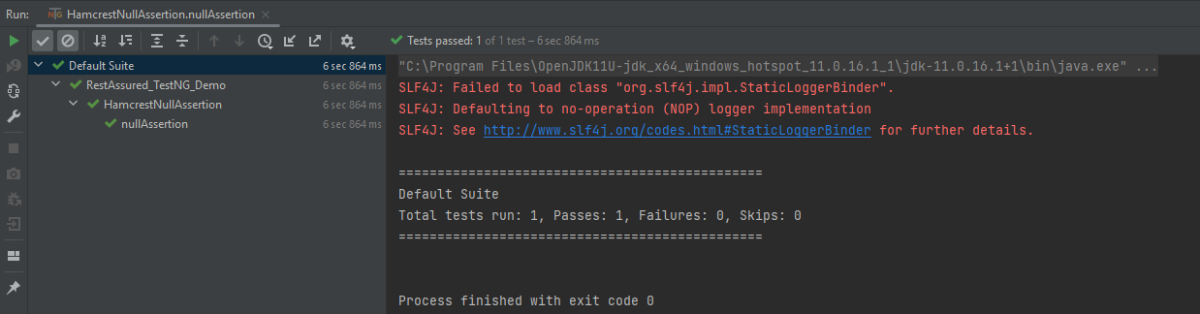
The output of the above program is
hasKey
It checks whether the extracted map has an expected key.
import io.restassured.RestAssured;
import io.restassured.http.ContentType;
import org.testng.annotations.Test;
import static org.hamcrest.Matchers.hasKey;

public class HamcrestHasKeyAssertion {

    public String endpoint = "https://restful-booker.herokuapp.com/booking/1";

    @Test
    public void collectionAssertions() {

        RestAssured.given().contentType(ContentType.JSON)
                .when().get(endpoint)
                .then().body("bookingdates",hasKey("checkin"));

    }
}
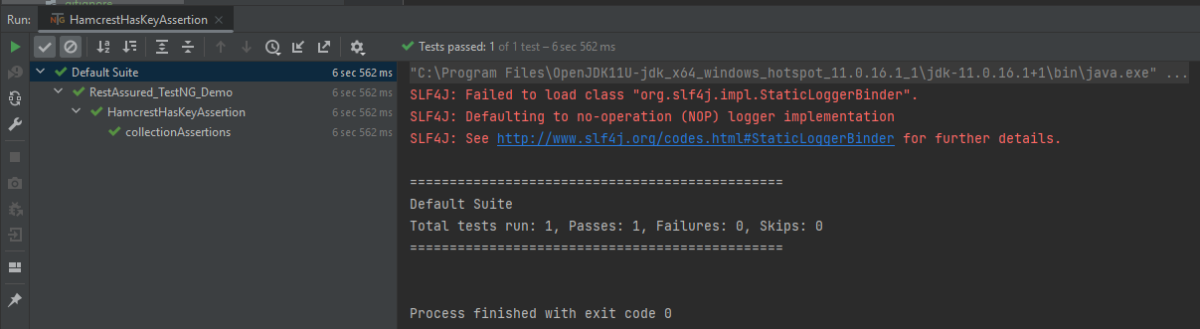
The output of the above program is
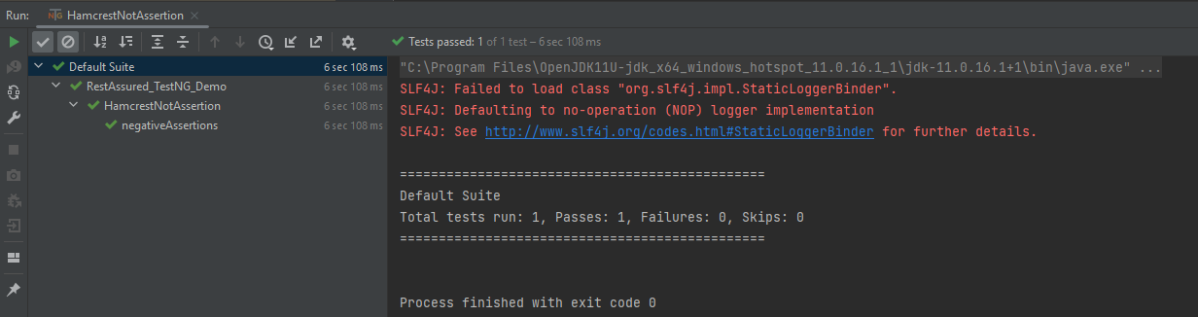
Not Assertion
The not assertion inverts the meaning of the other assertions. For example, if you want to perform negative assertions, then we can use any assertions with NOT.
The below assertion is imported from the package shown below:-
Below are examples to show the use of negative assertions.
import static org.hamcrest.Matchers.equalTo;
import static org.hamcrest.Matchers.not;
import io.restassured.RestAssured;
import io.restassured.http.ContentType;
import org.testng.annotations.Test;
public class HamcrestNotAssertion {
public String endpoint = "https://restful-booker.herokuapp.com/booking/1";
@Test
public void negativeAssertions() {
RestAssured.given().contentType(ContentType.JSON)
.when().get(endpoint)
.then().body("totalprice",not(equalTo(874)));
}
}
The output of the above program is
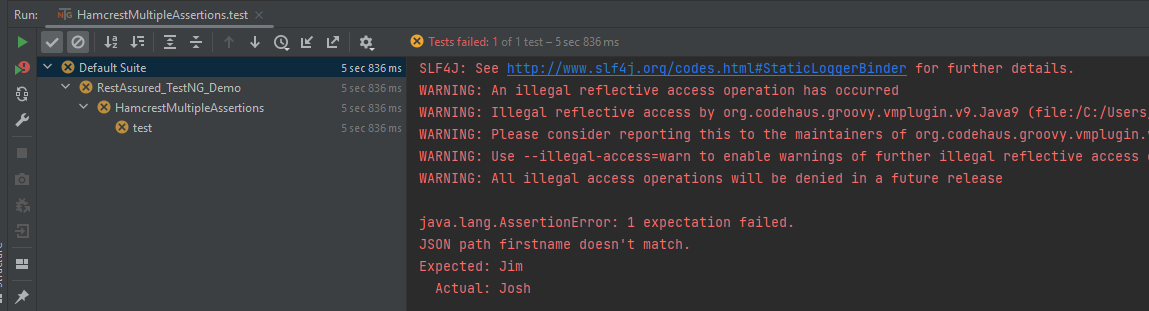
Multiple Assert Statements
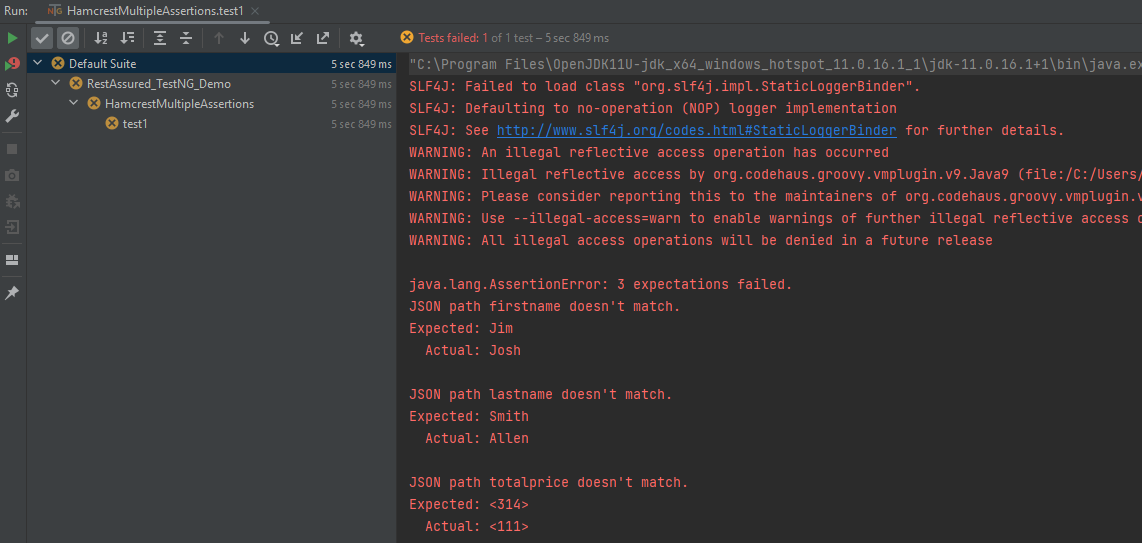
In the below example, all 3 assertions will fail. It will only execute the first assertion. If the first assertion fails, then other assertions will not be executed.
import io.restassured.RestAssured;
import io.restassured.http.ContentType;
import org.testng.annotations.Test;
import static org.hamcrest.Matchers.equalTo;

public class HamcrestMultipleAssertions {

    public String endpoint = "https://restful-booker.herokuapp.com/booking/1";

    @Test
    public void test1() {
        RestAssured.given().contentType(ContentType.JSON)
                .when().get(endpoint).then()
                .body("firstname", equalTo("Jim"), // will fail
                        "lastname", equalTo("Smith"), // will fail
                        "totalprice", equalTo(314)); // will fail
    }

}
The output of the above program is
To execute all the assertions in the test case, combine them into a single body. This should be done just like it is shown below. You can see that all the assertions failed, and they are shown in the response.
import io.restassured.RestAssured;
import io.restassured.http.ContentType;
import org.testng.annotations.Test;
import static org.hamcrest.Matchers.equalTo;

public class HamcrestMultipleAssertions {

    public String endpoint = "https://restful-booker.herokuapp.com/booking/1";

    @Test
    public void test1() {
        RestAssured.given().contentType(ContentType.JSON)
                .when().get(endpoint).then()
                .body("firstname", equalTo("Jim"), // will fail
                        "lastname", equalTo("Smith"), // will fail
                        "totalprice", equalTo(314)); // will fail
    }

}
The output of the above program is
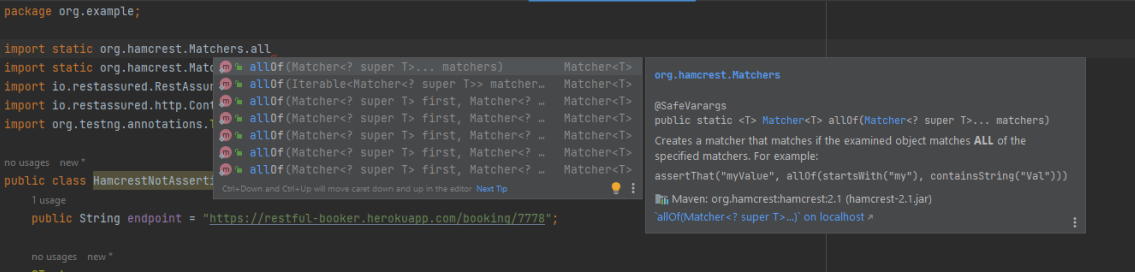
I have tried to show the use of a few of the most commonly used assertion methods. There are many more methods available in Hamcrest package. To know about other methods, write import static org.hamcrest.Matchers and add (.) at the end, it will show the list of all the methods available in Hamcrest.
To know more details related to Hamcrest assertion, you can refer the official website – Hamcrest
Points to Remember:
Hamcrest is commonly used in JUnit, RestAssured, and Mockito for API and unit testing
It offers a variety of matchers for different data types, such as: Numbers: greaterThan(), lessThan(), Strings: containsString(), startsWith(), endsWith()
You can combine multiple matchers using logical operators: assertThat(score, allOf(greaterThan(50), lessThan(100)))
Encourages fluent and expressive test writing with assertThat() instead of assertEquals()
We are done! Congratulations on making it through this tutorial and hope you found it useful! Happy Learning!!
In the last tutorial, I explained How to test GET Request using Rest Assured. In this tutorial, I will automate a POST Request using Rest Assured. I will verify the status code, line of Status, and content of the Response. To set up a basic Rest Assured Maven Project, click here and Gradle project, click here.
Add the below-mentioned dependencies to the pom.xml. The latest dependency can be downloaded from here.
An HTTP POST method is used to create a new resource in the collection of resources. The request body is passed as a JSON/XML or in a different format. If a resource is created successfully by the endpoint or server, it returns a status code 201(Created). It also provides a Location header with a link to the newly-created resource with the 201 HTTP status. It may return 200 (OK) and 204 (No Content) status code as well, based on how the API is developed.
POST is neither safe nor idempotent. It is therefore recommended for non-idempotent resource requests. Making two identical POST requests will most result in two resources containing the same information.
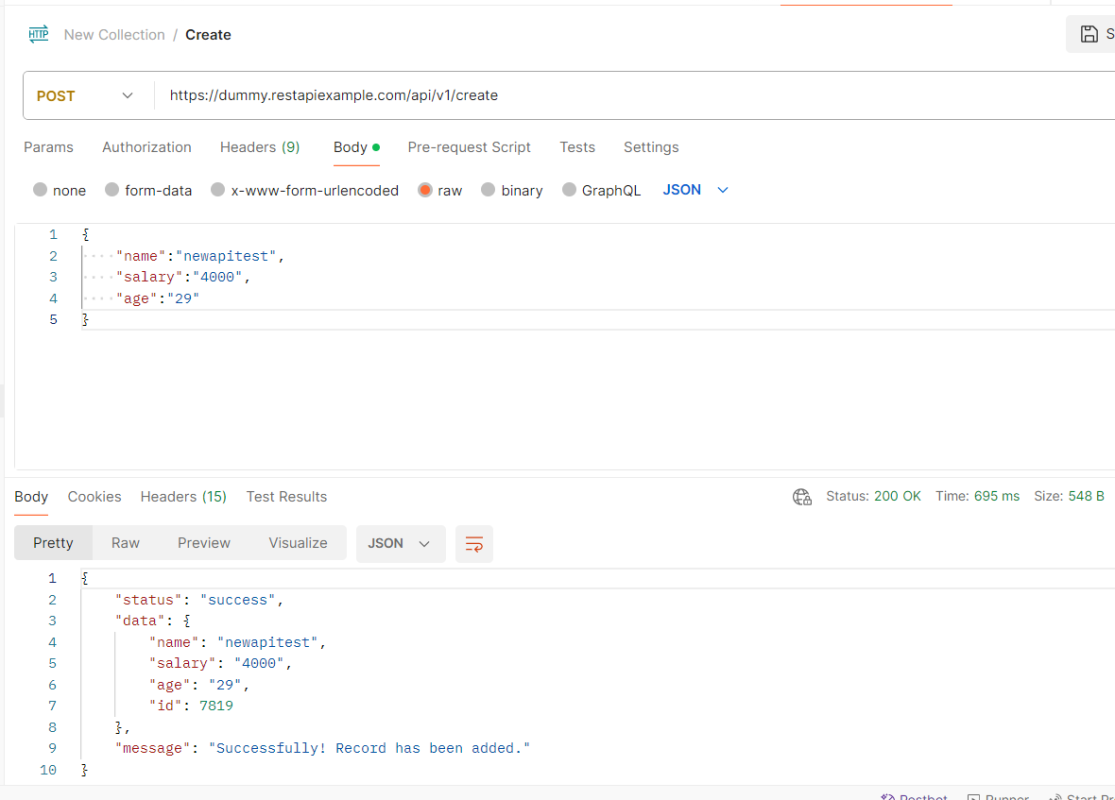
Below is an example of a Request performing POST operation in Postman.
Below are the steps to test a POST Request using Rest Assured:
Step 1 – Specify the base URL to the RESTful web service using the RestAssuredclass.
Step 2 – Every Request in the Rest-Assured library is represented by an interface called RequestSpecification. This interface allows modifying the request, like adding headers or adding authentication details. Use the RestAssuredclass to generate a RequestSpecification.
contentTypeis imported from restassured.http package:
import io.restassured.http.ContentType;
Step 4 – Pass Request Body as String.
requestSpecification.body(jsonString);
Step 5 – Send the POST request to the server. Then receive the response of the request made by REST Assured. This response contains every detail returned by hitting request i.e. response body, response headers, status code, status lines, cookies, etc. The response is imported from package:
import io.restassured.response.Response;
Step 6 – To validate a response like status code or value, we need to get the reference of type ValidatableResponse.
ValidatableResponse is an interface. A validatable response to a request made by, REST Assured. ValidatableResponse is imported from package:
PrettyPrint() – It prints the response body if possible and returns it as a string. Pretty printing is possible for content-types JSON, XML, and HTML.
Below is the example of testing a POST request in Non-BDD format. I have used ValidatableResponse for the assertion of status. It is also used for the status line and body of the Response.
import io.restassured.RestAssured;
import io.restassured.http.ContentType;
import io.restassured.response.Response;
import io.restassured.response.ValidatableResponse;
import io.restassured.specification.RequestSpecification;
import org.junit.Test;
import static org.hamcrest.CoreMatchers.equalTo;

public class POST_NonBDDDemo {

    RequestSpecification requestSpecification;
    Response response;
    ValidatableResponse validatableResponse;

    @Test
    public void verifyStatusCode() {

        String jsonString = "{\"name\":\"newapitest\",\"salary\":\"4000\",\"age\":\"29\"}";

        RestAssured.baseURI = "https://dummy.restapiexample.com/api/v1/create";

        // Create a request specification
        requestSpecification = RestAssured.given();

        // Setting content type to specify format in which request payload will be sent.
        requestSpecification.contentType(ContentType.JSON);

        // Adding body as string
        requestSpecification.body(jsonString);

        // Calling POST method
        response = requestSpecification.post();

        // Let's print response body.
        String responseString = response.prettyPrint();

        /*
         * To perform validation on response, we need to get ValidatableResponse type of
         * response
         */
        validatableResponse = response.then();

        // Check status code
        validatableResponse.statusCode(200);

        // It will check if status line is as expected
        validatableResponse.statusLine("HTTP/1.1 200 OK");

        // Check response body - name attribute
        validatableResponse.body("data.name", equalTo("newapitest"));

        // Check response body - message attribute
        validatableResponse.body("message", equalTo("Successfully! Record has been added."));

    }
}
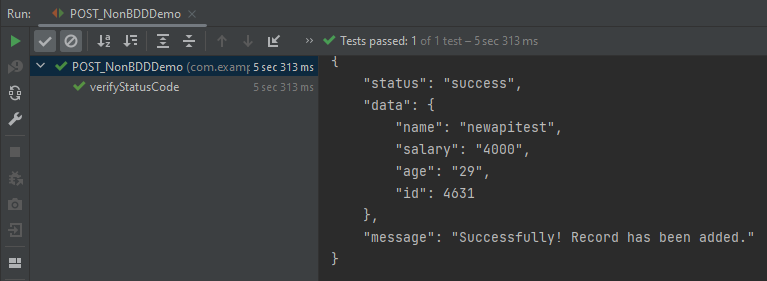
The below image shows the test result of the above test.
Test implemented in BDD Format
1. equalTois used for assertion, and is imported from a static hamcrest package:
import static org.hamcrest.Matchers.equalTo;
2. givenis a static import from package:
import static io.restassured.RestAssured.given;
Below is an example of a BDD Test.
import io.restassured.http.ContentType;
import io.restassured.response.ValidatableResponse;
import org.junit.Test;
import static io.restassured.RestAssured.given;
import static org.hamcrest.CoreMatchers.equalTo;

public class POST_BDDDemo {

    ValidatableResponse validatableResponse;

    @Test
    public void createUser() {

        String json = "{\"name\":\"apitest\",\"salary\":\"5000\",\"age\":\"30\"}";

        // GIVEN
        validatableResponse = given()
                .baseUri("https://dummy.restapiexample.com/api")
                .contentType(ContentType.JSON)
                .body(json)

                // WHEN
                .when()
                .post("/v1/create")

                // THEN
                .then()
                .assertThat().statusCode(200).body("data.name", equalTo("apitest"))
                .body("message", equalTo("Successfully! Record has been added."));

        System.out.println("Response :" + validatableResponse.extract().asPrettyString());
    }

}
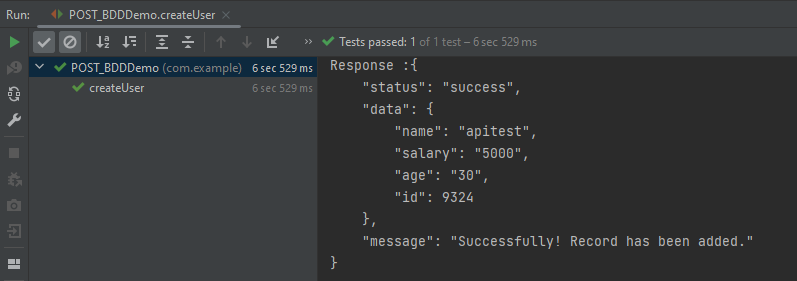
The below image shows the test result of the above test.
Explanation:
1. This string represents the JSON payload that will be sent in the body of the POST request. It includes fields like name, salary, and age.
In the last tutorial, I explained the Setup of the REST Assured Maven Project In Eclipse IDE. In this tutorial, I will automate a GET Request. I will verify the status code, line of Status, and content of the Response.
RestAssured is a class that consists of many static fields and methods. It supports POST, GET, PUT, DELETE, HEAD, PATCH, and OPTIONS requests and verifies the response to these requests.
Add the below-mentioned dependencies to the pom.xml.
Step 2 – Every Request in the Rest-Assured library is represented by an interface called RequestSpecification. This interface allows modification of the request, like adding headers or adding authentication details.
requestSpecification = RestAssured.given();
RequestSpecification is imported from the package:
Step 3 – Send the request to the server and receive the response to the request made by REST Assured. This response contains every detail returned by hitting request i.e. response body, response headers, status code, status lines, cookies, etc.
response = requestSpecification.get();
The response is imported from package:
import io.restassured.response.Response;
Step 4 – To validate a response like status code or value, we need to acquire a reference. This reference should be of type ValidatableResponse. ValidatableResponse is an interface. A validatable response to a request made by, REST Assured. ValidatableResponse is imported from the package:
PrettyPrint() – It prints the response body if possible and returns it as a string. Pretty printing is possible for content-types JSON, XML, and HTML.
Below is an example of creating a test in Non-BDD format. I have used ValidatableResponse for the assertion of the status. It is also used for the status line of the Response.
import io.restassured.RestAssured;
import io.restassured.response.Response;
import io.restassured.response.ValidatableResponse;
import io.restassured.specification.RequestSpecification;
import org.junit.Test;
public class Get_NonBDDDemo {
RequestSpecification requestSpecification;
Response response;
ValidatableResponse validatableResponse;
@Test
public void verifyStatusCode() {
RestAssured.baseURI = "http://dummy.restapiexample.com/api/v1/employees";
// Create a request specification
requestSpecification = RestAssured.given();
// Calling GET method
response = requestSpecification.get();
// Let's print response body.
String resString = response.prettyPrint();
System.out.println("Response Details : " + resString);
/*
* To perform validation on response, we need to get ValidatableResponse type of
* response
*/
validatableResponse = response.then();
// Get status code
validatableResponse.statusCode(200);
// Check status line is as expected
validatableResponse.statusLine("HTTP/1.1 200 OK");
}
}
The output of the above program is
If you don’t want to use ValidatableResponse for the assertion, you can use Response from io.restassured .response to get the status code and status line, which are asserted using JUnit.Assert.
import io.restassured.RestAssured;
import io.restassured.response.Response;
import io.restassured.response.ValidatableResponse;
import io.restassured.specification.RequestSpecification;
import org.junit.Assert;
import org.junit.Test;
public class Get_NonBDDResponseDemo {
RequestSpecification requestSpecification;
Response response;
@Test
public void verifyStatusCode() {
RestAssured.baseURI = "http://dummy.restapiexample.com/api/v1/employees";
// Create a request specification
requestSpecification = RestAssured.given();
// Calling GET method
response = requestSpecification.get();
// Let's print response body.
String resString = response.prettyPrint();
System.out.println("Response Details : " + resString);
// Get status line
String statusLine = response.getStatusLine();
Assert.assertEquals(statusLine, "HTTP/1.1 200 OK");
// Get status code
int statusCode = response.getStatusCode();
Assert.assertEquals(statusCode, 200);
}
}
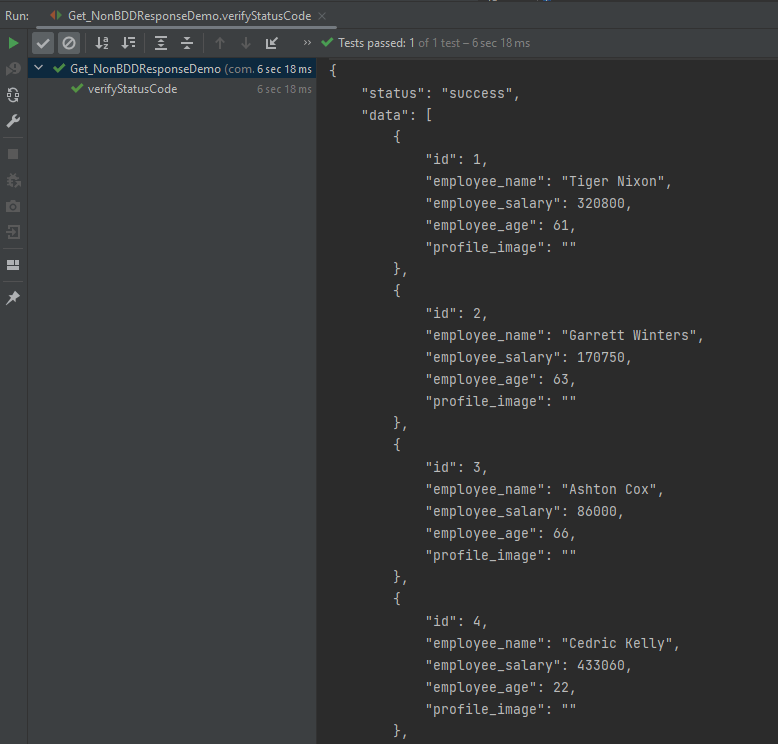
The output of the above program is
Below is an example of a specific user in GET Request in Postman.
Below is the test implemented in BDD Format. In this test, I am asserting the data of Employee of Id 2. I have validated the name of the employee as well as the response message.
1. equalTo is used for assertion, andis imported from a static hamcrest package:
import static org.hamcrest.Matchers.equalTo;
2. givenis a static import from package:
import static io.restassured.RestAssured.given;
Let us see this with an example.
import org.junit.Test;
import static io.restassured.RestAssured.given;
import static org.hamcrest.CoreMatchers.equalTo;
public class Get_BDDDemo {
@Test
public void verifyUser() {
// Given
given()
// When
.when()
.get("http://dummy.restapiexample.com/api/v1/employee/2")
// Then
.then()
.statusCode(200).statusLine("HTTP/1.1 200 OK")
// To verify booking id at index 3
.body("data.employee_name", equalTo("Garrett Winters"))
.body("message", equalTo("Successfully! Record has been fetched."));
}
}
The output of the above program is
Explanation
1.This is the preconditionblock. It is used to specify headers, parameters, authentication, etc. In this example, it’s empty, meaning no special setup is needed for this GET request.
given
2. It performs a GET request to the given URL. It is trying to get the employee with id = 2.
Rest–Assuredis a Java-based library that is used to test RESTful Web Services. REST-assured was designed to simplify the testing and validation of REST APIs. It takes influence from testing techniques used in dynamic languages such as Ruby and Groovy.
Rest Assured enables you to test REST APIs using Java libraries and integrates well with Maven/Gradle. REST Assured is a Java library that provides a domain-specific language (DSL) for writing powerful, maintainable tests for RESTful APIs.
What is JUnit5?
JUnit 5 is the next generation of JUnit. JUnit 5 is composed of several different modules from three different sub-projects.
Java needs to be present on the system to run the tests. Click here to know How to install Java. To know if Java is installed or not on your machine, type this command in the command line. This command will show the version of Java installed on your machine.
java -version
Step 2 – Download and setup Eclipse IDE on the system
The Eclipse IDE (integrated development environment) provides strong support for Java developers, which is needed to write Java code. Click here to learn How to install Eclipse.
Step 3 – Setup Maven
To build a test framework, we need to add a number of dependencies to the project. It is a very tedious and cumbersome process to add each dependency manually. So, to overcome this problem, we use a build management tool. Maven is a build management tool that is used to define project structure, dependencies, build, and test management. Click here to learn How to install Maven.
To know if Maven is already installed or not on your machine, type this command in the command line. This command will show the version of Maven installed on your machine.
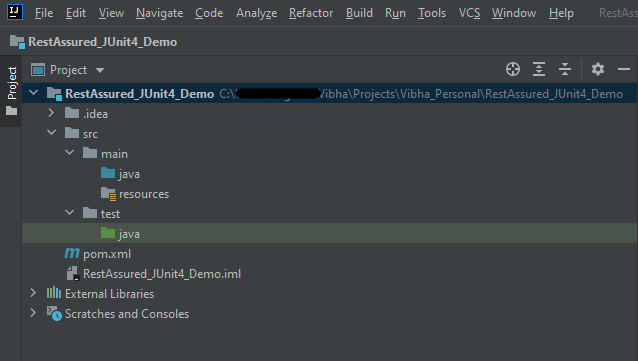
The tests should be written in src/test/java directory. To learn how to create a JSON Request body using JSONObject, please refer to this tutorial.
import io.restassured.http.ContentType;
import org.json.JSONObject;
import org.junit.jupiter.api.Test;
import static io.restassured.RestAssured.given;
import static org.hamcrest.Matchers.equalTo;
public class APITests {
String BaseURL = "https://reqres.in/api";
@Test
public void createUser() {
JSONObject data = new JSONObject();
data.put("name", "NewUser1");
data.put("job", "Testing");
// GIVEN
given()
.contentType(ContentType.JSON)
.body(data.toString())
// WHEN
.when()
.post(BaseURL + "/users")
// THEN
.then()
.statusCode(201)
.body("name", equalTo("NewUser1"))
.body("job", equalTo("Testing"))
.log().all();
}
@Test
public void getUser() { //Failed Test
// GIVEN
given()
.contentType(ContentType.JSON)
// WHEN
.when()
.get(BaseURL + "/users/2")
// THEN
.then()
.statusCode(200)
.body("data.first_name", equalTo("Janet1"))
.log().all();
}
}
Step 7 – Test Execution through JUnit Test
Go to the Runner class and right-click Run As JUnit Test. The tests will run as JUnit tests.
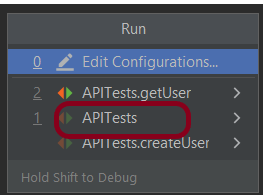
Below is the image to run the tests in IntelliJ.
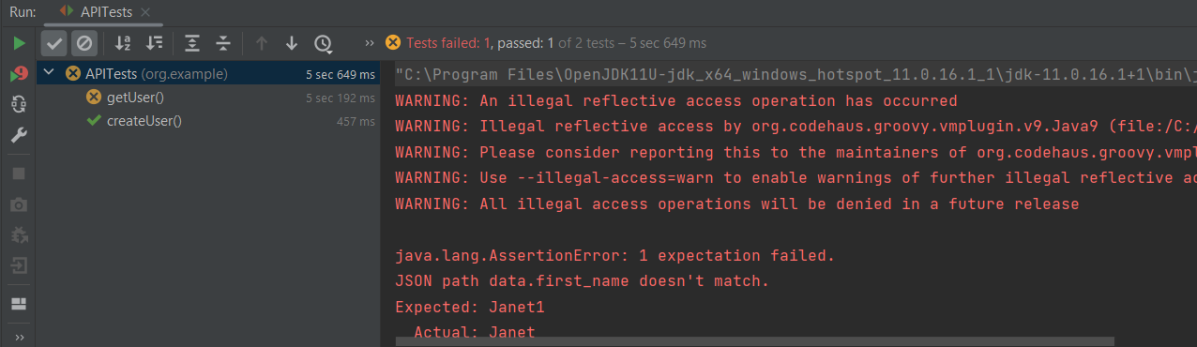
This is how the execution console will look like.
Step 8 – Run the tests from the command line
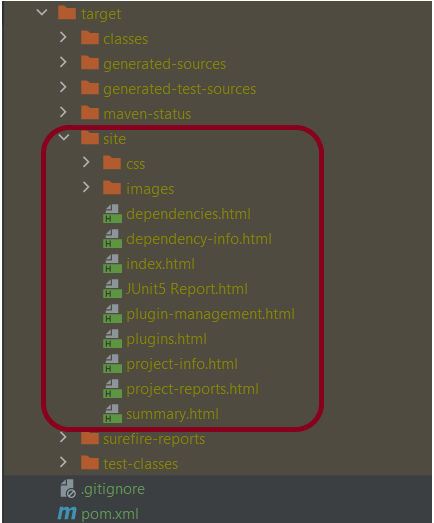
Maven Site Plugin creates a folder – site under the target directory, and the Maven Surefire Report plugin generates the JUnit Reports in the site folder. We need to run the tests through the command line to generate the JUnit Report.
mvn clean test site
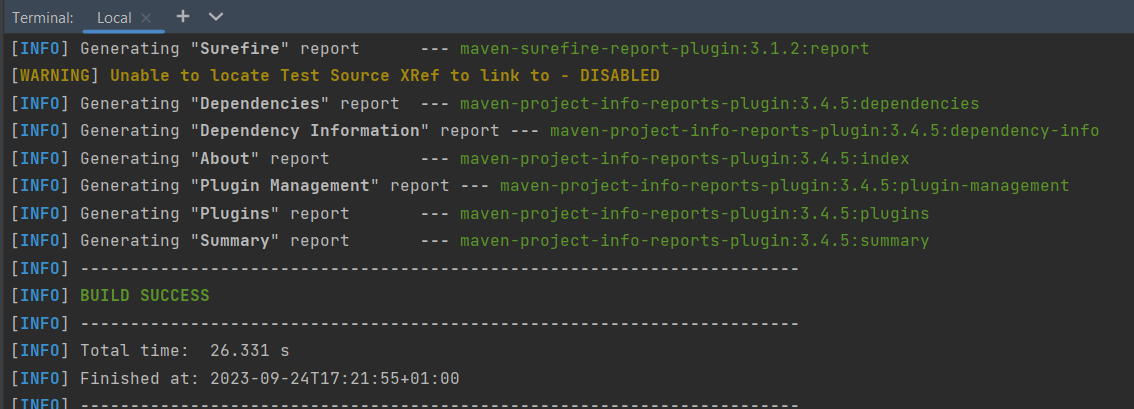
The output of the above program is
Step 9 – Report Generation
After the test execution, refresh the project, and a new folder with the name site in the target folder will be generated. This folder contains the reports generated by JUnit. The structure of the folder site looks as shown below.
View the Report
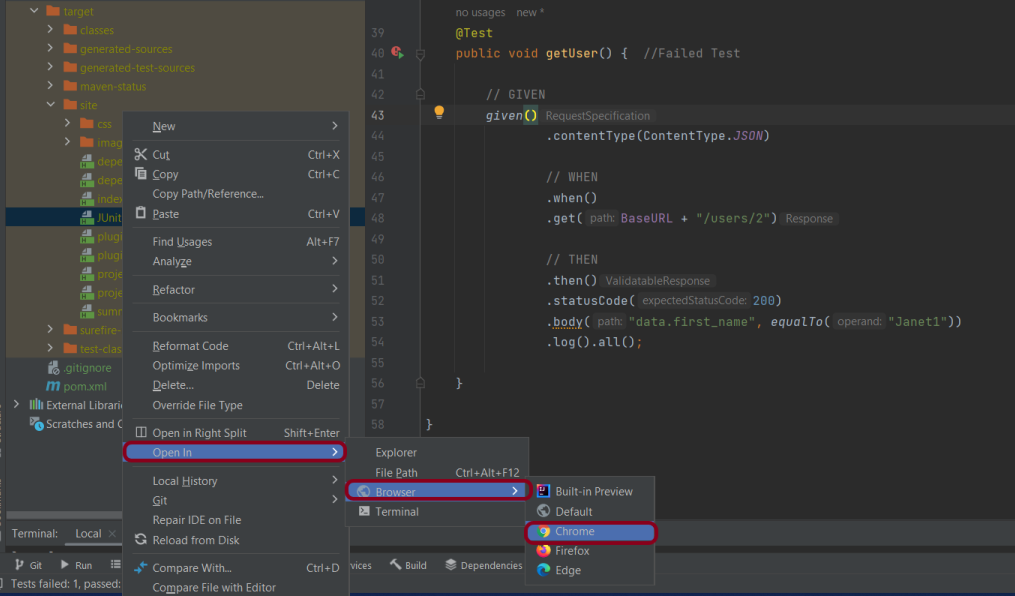
Right-click on the Junit5 Report.html and select Open In -> Browser ->Chrome.
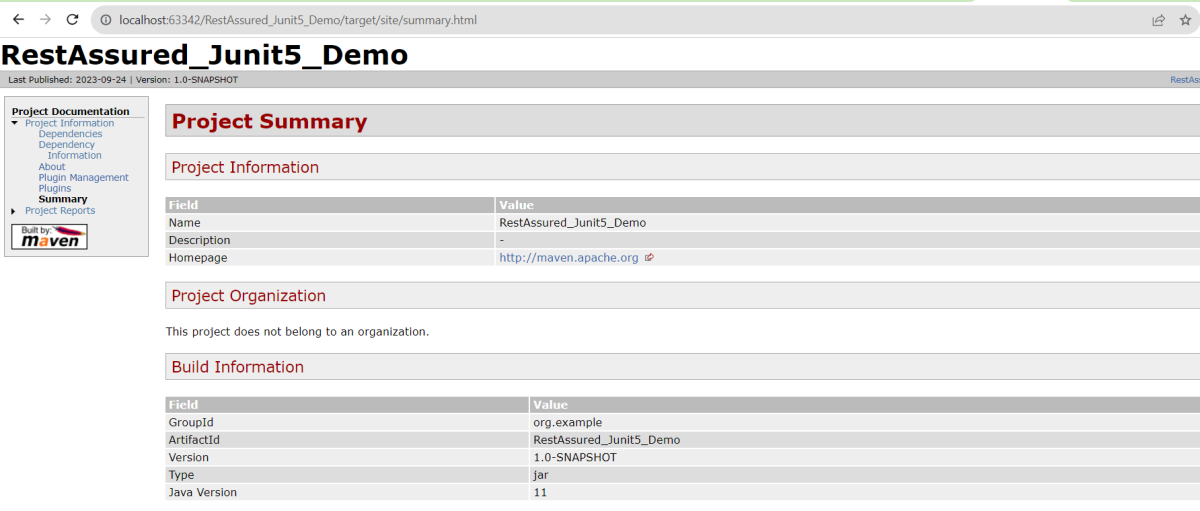
Summary Report
Below is the summary Report.
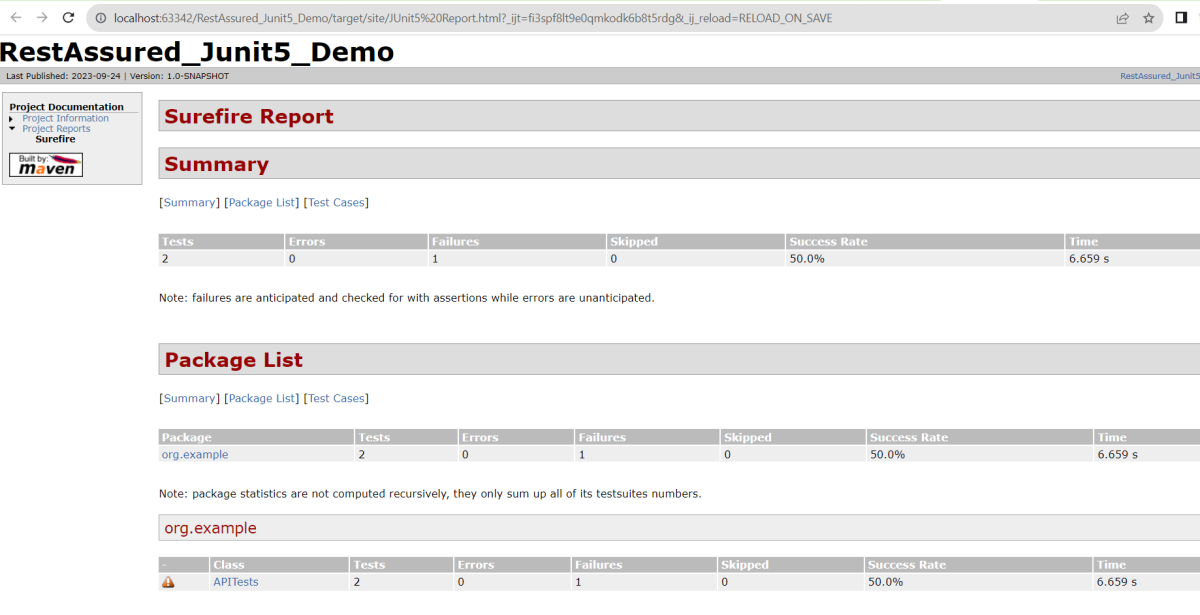
Surefire Report
Below is an example of a Surefire Report. This report contains a summary of the test execution.
We are done! Congratulations on making it through this tutorial and hope you found it useful! Happy Learning!!
Logging plays an important role in understanding the behaviour of the test. When we are testing an API, it is good to know how the APIs are behaving. We should understand how the request is made and how we received the response from the API. It’s important to check what the headers look like. We also need to see what the body looks like. Additionally, verify what parameters we are providing to the request. All of this helps us debug the test code. It helps us identify the reason for the failure of the test.
REST Assured, provide support to a different type of logging as shown below:-
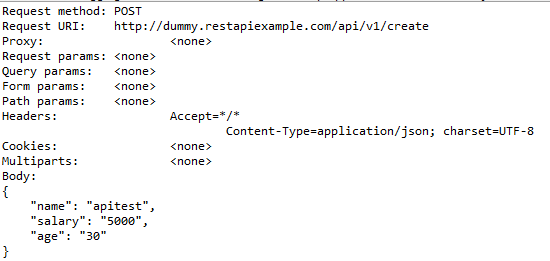
To log all request specification details including parameters, headers, and body of the request, log().all() needs to be added to post given() section.
import org.testng.annotations.Test;
import io.restassured.http.ContentType;
import static io.restassured.RestAssured.*;
import static org.hamcrest.Matchers.equalTo;
public class RestTests {
@Test
public void requestLoggingDemo() {
String json = "{\"name\":\"apitest\",\"salary\":\"5000\",\"age\":\"30\"}";
// GIVEN
given()
.log().all()
.baseUri("https://dummy.restapiexample.com/api")
.contentType(ContentType.JSON)
.body(json)
// WHEN
.when()
.post("/v1/create")
// THEN
.then()
.assertThat()
.statusCode(200)
.body("data.name", equalTo("apitest"))
.body("message", equalTo("Successfully! Record has been added."));
}
}
The output of the above program is
Other different request logging options are:-
given().log().params(). .. // Log only the parameters of the request
given().log().body(). .. // Log only the request body
given().log().headers(). .. // Log only the request headers
given().log().cookies(). .. // Log only the request cookies
given().log().method(). .. // Log only the request method
given().log().path(). .. // Log only the request path
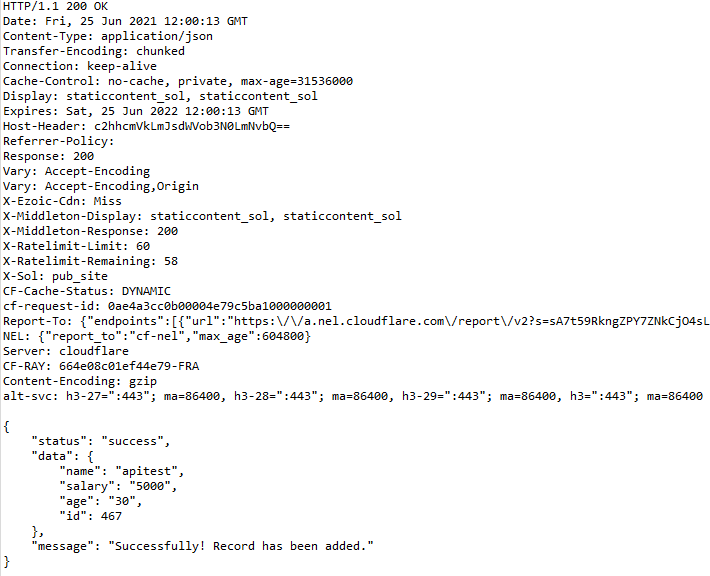
Response Logging
If you want to print the response body regardless of the status code, you can do
get("/x").then().log().body()..
This will print the response body regardless of an error occurring.
import org.testng.annotations.Test;
import io.restassured.http.ContentType;
import static io.restassured.RestAssured.*;
import static org.hamcrest.Matchers.equalTo;
public class RestTests {
@Test
public void responseLoggingDemo() {
String json = "{\"name\":\"apitest\",\"salary\":\"5000\",\"age\":\"30\"}";
// GIVEN
given()
.baseUri("https://dummy.restapiexample.com/api")
.contentType(ContentType.JSON)
.body(json)
// WHEN
.when()
.post("/v1/create")
// THEN
.then()
.log().all()
.statusCode(200)
.body("data.name", equalTo("apitest"))
.body("message", equalTo("Successfully! Record has been added."));
}
}
The output of the above program is
Conditional Logging
What if you want to perform logging conditionally? For example, log in if validation fails and the status code is equal to 200. Also, log in if the server returns a status code >=400.
.then().log().ifStatusCodeIsEqualTo(302). .. // Only log if the status code is equal to 302
.then().log().ifStatusCodeMatches(matcher). .. // Only log if the status code matches the supplied Hamcrest matcher
Let us create an example of conditional logging.
import org.testng.annotations.Test;
import io.restassured.http.ContentType;
import static io.restassured.RestAssured.*;
import static org.hamcrest.Matchers.equalTo;
public class RestTests {
@Test
public void conditionalResponseLoggingDemo() {
String json = "{\"name\":\"apitest\",\"salary\":\"5000\",\"age\":\"30\"}";
// GIVEN
given()
.baseUri("https://dummy.restapiexample.com/api")
.contentType(ContentType.JSON)
.body(json)
// WHEN
.when()
.post("/v1/create")
// THEN
.then()
.log().ifStatusCodeIsEqualTo(200)
.assertThat().statusCode(200)
.body("data.name", equalTo("apitest"))
.body("message", equalTo("Successfully! Record has been added."));
}
}
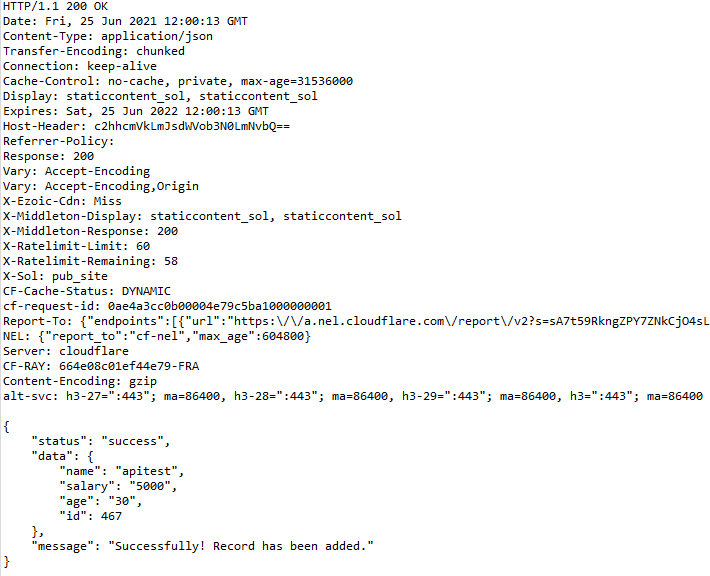
The output of the above program is
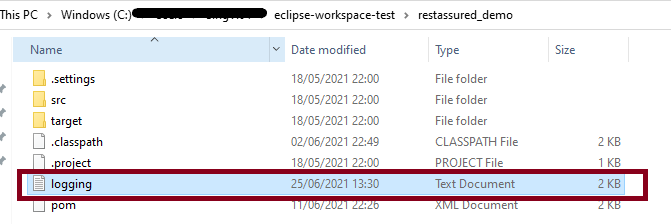
Logging to a text file with Rest Assured
We will see how we can log all the request and response data to a txt file using Rest Assured.
Create a PrintStream object. You have to provide an object of FileOutputStream() to the PrintStream() constructor. Provide the path to the logging.txt file in FileOutputStream().
REST Assured gives us a filter() method, this filter method accepts RequestLoggingFilter and ResponseLoggingFilter. They have two methods, logRequestTo() and logResponseTo() methods respectively. These methods expect a Stream.
Pass the log stream we created to these methods.
import org.testng.annotations.Test;
import io.restassured.filter.log.RequestLoggingFilter;
import io.restassured.filter.log.ResponseLoggingFilter;
import io.restassured.http.ContentType;
import static io.restassured.RestAssured.*;
import static org.hamcrest.Matchers.equalTo;
import java.io.FileNotFoundException;
import java.io.FileOutputStream;
import java.io.PrintStream;
public class RestTests {
@Test
public void responsetoFileDemo() throws FileNotFoundException {
PrintStream log = new PrintStream(new FileOutputStream("logging.txt"));
String json = "{\"name\":\"apitest\",\"salary\":\"5000\",\"age\":\"30\"}";
// GIVEN
given()
.baseUri("https://dummy.restapiexample.com/api")
.contentType(ContentType.JSON)
.body(json)
.filter(RequestLoggingFilter.logRequestTo(log))
.filter(ResponseLoggingFilter.logResponseTo(log))
// WHEN
.when()
.post("/v1/create")
// THEN
.then()
.log().ifStatusCodeIsEqualTo(200)
.assertThat().statusCode(200)
.body("data.name", equalTo("apitest"))
.body("message", equalTo("Successfully! Record has been added."));
}
}
The output of the above program is
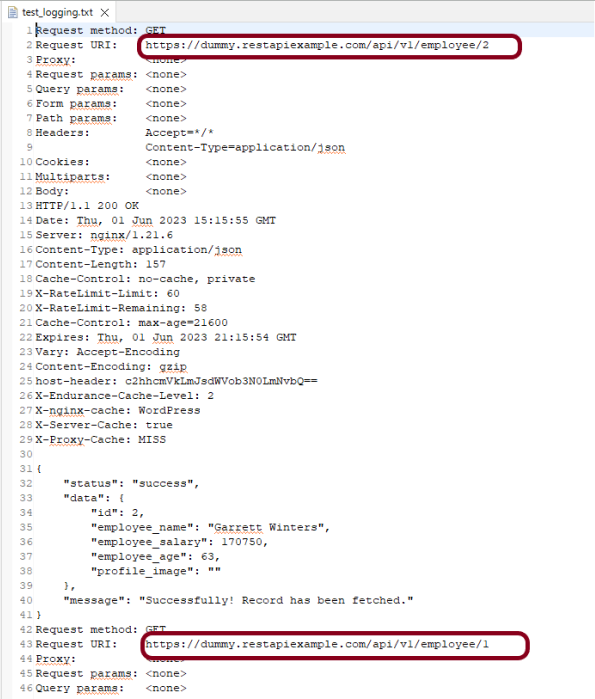
Mostly we have more than 1 test, and we want to save the log of all the tests in the text file. We can create a @BeforeClass method, and this class contains the code to create the file and append the data to that file.
import org.testng.annotations.BeforeClass;
import org.testng.annotations.Test;
import io.restassured.filter.log.RequestLoggingFilter;
import io.restassured.filter.log.ResponseLoggingFilter;
import io.restassured.http.ContentType;
import static io.restassured.RestAssured.*;
import static org.hamcrest.Matchers.equalTo;
public class LogTest {
public PrintStream log ;
RequestLoggingFilter requestLoggingFilter;
ResponseLoggingFilter responseLoggingFilter;
@BeforeClass
public void init() throws FileNotFoundException {
log = new PrintStream(new FileOutputStream("test_logging.txt"),true);
requestLoggingFilter = new RequestLoggingFilter(log);
responseLoggingFilter = new ResponseLoggingFilter(log);
}
@Test
public void test1() {
// Given
given()
.contentType(ContentType.JSON)
. filters(requestLoggingFilter,responseLoggingFilter)
.when()
.get("https://dummy.restapiexample.com/api/v1/employee/2")
.then()
.log().ifStatusCodeIsEqualTo(200)
.assertThat().statusCode(200).statusLine("HTTP/1.1 200 OK")
// To verify booking id at index 2
.body("data.employee_name", equalTo("Garrett Winters"))
.body("message", equalTo("Successfully! Record has been fetched."));
}
@Test
public void test2() {
// Given
given()
.contentType(ContentType.JSON)
. filters(requestLoggingFilter,responseLoggingFilter)
.when()
.get("https://dummy.restapiexample.com/api/v1/employee/1")
.then()
.log().ifStatusCodeIsEqualTo(200)
.assertThat().statusCode(200).statusLine("HTTP/1.1 200 OK")
// To verify booking id at index 1
.body("data.employee_name", equalTo("Tiger Nixon"))
.body("message", equalTo("Successfully! Record has been fetched."));
}
@Test
public void test3() throws FileNotFoundException {
String json = "{\"name\":\"apitest\",\"salary\":\"5000\",\"age\":\"30\"}";
// GIVEN
given()
.baseUri("https://dummy.restapiexample.com/api")
.contentType(ContentType.JSON)
.body(json)
.filters(requestLoggingFilter,responseLoggingFilter)
// WHEN
.when()
.post("/v1/create")
// THEN
.then()
.log().ifStatusCodeIsEqualTo(200)
.assertThat().statusCode(200)
.body("data.name", equalTo("apitest"))
.body("message", equalTo("Successfully! Record has been added."));
}
}
The below file shows that the log for multiple requests is saved here.
Congratulations on making it through this tutorial and hope you found it useful! Happy Learning!!










 QA Automation Expert