In Java, a properties file is a simple text-based file used to store configuration or settings in key-value pairs. It provides a convenient way to externalize application-specific parameters that can be easily modified without modifying the source code.
Properties File is always storing information about the configuration parameters such as project configuration data such as URL, username, password, and project settings config like browser name, environment, and so on.
Properties files have a “.properties” extension.
Why do we need Properties File?
Properties files provide a convenient way to store configuration settings or parameters that can be easily modified without modifying the source code. It is not always a best practice to store the values as hard coded in the project.
With properties files, you can have different versions of the file tailored for specific environments (e.g., development, testing, production). Each environment can have its own set of configurations while sharing common structure and keys.
How to read data in a Properties File?
Steps to implement:
Let us create a properties file (name it as config.properties)
Add configuration data to the properties file.
Create a java class to read the config file (name it as ConfigFileReader)
1.Create a Property File
Create a text file with the “.properties“ extension and define key-value pairs in it. For example, create a file named “config.properties”.
2. Add configuration data to the properties file.
We have added the configuration data to the property file in key-value pairs :
FileInputStream: This class is used to read data from a file in the form of a sequence of bytes.load Method: The load method of the Properties class is used to read a properties file from an input stream.
The output of the above execution is
Congratulations on making it through this tutorial and hope you found it useful! Happy Learning!! Cheers!!
Are you familiar with Cucumber and want to test your understanding? This post contains 25 useful Cucumber multiple-choice questions (quiz) to self-test your knowledge of Cucumber.
You can find the questions for the below-mentioned answers in this post –
Are you familiar with Cucumber and want to test your understanding? This post has 25 useful Cucumber multiple-choice questions (quiz) to self-test your knowledge of Cucumber.
Scenario Outline: Login to Home Page
  Given user is logged in
  When user clicks <link>
  Then user will be logged out

  @mobile
  Examples:
    | link                   |
    |  mobile logout |

  @desktop
  Examples:
    | link                    |
    | desktop logout |
1) b) Selenium is the open-source test automated tool to test web-based UI which supports many different languages like Java, Python, Perl, PHP, Ruby, and C#.
2) a) Interface
WebDriver is an interface in Selenium which provides a simple interface to interact with and test web applications. It encompasses several implementations like ChromeDriver, FirefoxDriver, and others, each corresponding to different web browsers.
3) e) WebElement
WebElement is not considered a standalone component of Selenium; instead, it is an interface within Selenium WebDriver used to represent elements on a web page.
4) b) ASP
5) b) Compilation error- Cannot instantiate the type WebDriver
In Selenium, WebDriveris an interface, and you cannot instantiate an interface directly. You need to create an instance of a class that implements the WebDriverinterface, such as ChromeDriver, FirefoxDriver, etc.
WebDriver driver = new ChromeDriver();
6) c) Chromedriver
To run Selenium WebDriver scripts on the Chrome browser, we use ChromeDriver.
// Initialize ChromeDriver
WebDriver driver = new ChromeDriver();
7) d) i, ii, iii
8) a) thread.sleep();
It can be used to pause the execution in Java (and consequently in Selenium tests) for a specified duration, it is not considered a Selenium-specific wait mechanism.
11) b) driver.close() closes the current window and d) driver.quit() closes every associated window with this driver and quits the driver
12) b) //tag-name[@attribute=’attribute value’]
13) a) isDisplayed()
It returns true if the element is visible and false if it is not.
14) b) isEnabled()
It returns true if the element is enabled and false if it is not.
15) b) StaleElementReferenceException
This exception is thrown when a web element that was previously located is no longer present in the DOM (Document Object Model). If the web page is refreshed or modified after locating an element, the reference to that element may become stale, leading to this exception.
16) b) .*
17) a) WebElement element = driver.findElement(By.xpath(“//*[contains(text(), ‘ QAAutomation’)]”));
i. navigate().to("url") - driver.navigate().to("https://www.qaautomation.expert");
ii. open("url") - driver.get("https://www.qaautomation.expert");
20) a) sendKeys() is used to enter the text inthe textbox.
// Locate the text box element
WebElement textBox = driver.findElement(By.id("textboxId"));

// Enter text into the text box
textBox.sendKeys("Sample text");
Cucumber is not an API automation tool, but it works well with other API automation tools.
There are 2 most commonly used Automation Tools for JVM to test API – Rest-Assured and Karate. In this tutorial, I will use RestAssured with Cucumber and TestNG for API Testing.
REST Assured is a Java library that provides a domain-specific language (DSL) for writing powerful, maintainable tests for RESTful APIs. REST Assured can be used easily in combination with existing unit testing frameworks, such as JUnit and TestNG. Rest assured, no matter how complex the JSON structures are, Rest Assured has methods to retrieve data from almost every part of the request and response.
What is Cucumber?
Cucumber is one such open-source tool, which supports Behaviour Driven Development(BDD). In simple words, Cucumber can be defined as a testing framework, driven by plain English. It serves as documentation, automated tests, and development aid – all in one.
Each scenario is a set of steps that the Cucumber must complete. Cucumber validates the software’s compliance with the specification and generates a report indicating success or failure for each scenario.
The cucumber must adhere to some basic syntax rules known as Gherkin to comprehend the scenarios.
In this tutorial, I will explain creating a framework for the testing of Rest API in Cucumber BDD.
Dependency List
Cucumber – 7.18.0
Java 17
TestNG – 7.10.2
Maven – 3.9.6
Rest Assured – 5.4.0
Maven Compiler – 3.13.0
Maven Surefire – 3.2.5
Project Structure
Implementation Steps
Step 1 – Download and Install Java
Cucumber and Rest-Assured need Java to be installed on the system to run the tests. Click here to learn How to install Java.
Step 2 – Download and setup Eclipse IDE on the system
The Eclipse IDE (integrated development environment) provides strong support for Java developers. Click here to learn How to install Eclipse.
Step 3 – Setup Maven
To build a test framework, we need to add several dependencies to the project. Click here to learn How to install Maven.
Step 4 – Create a new Maven Project
File -> New Project-> Maven-> Maven project-> Next -> Enter Group ID & Artifact ID -> Finish
Step 5 – Install the Cucumber Eclipse plugin for the Eclipse project(Eclipse Only)
The Cucumber plugin is an Eclipse plugin that allows Eclipse to understand the Gherkin syntax. Cucumber Eclipse Plugin highlights the keywords present in the Feature File. To install Cucumber Eclipse Plugin, please refer to this tutorial – How to install Cucumber Eclipse Plugin.
Step 6 – Create source folder src/test/resources
Create source folder src/test/resources to create test scenarios in the Feature file.
A new Maven Project is created with 2 folders – src/main/java and src/test/java. To create test scenarios, we need a new source folder called – src/test/resources. To create this folder, right-click on your Maven project ->select New ->Java, and then Source Folder.
Mention the source folder name as src/test/resources and click the Next button. This will create a source folder under your new Maven project.
Step 7 – Add dependencies to the project
Add Rest Assured, Cucumber, and TestNG dependencies in the pom.xml/build.gradle. REST Assured includes JsonPath and XmlPath as transitive dependencies.
Step 8 – Add Maven Compiler Plugin and Surefire Plugin
The compiler plugin is used to compile the source code of a Maven project. This plugin has two goals, which are already bound to specific phases of the default lifecycle:
Step 9 – Create a feature file under src/test/resources
Create a folder with name features. Now, create the feature file in this folder. The feature file should be saved with the extension .feature. This feature file contains the test scenarios created to test the application. The Test Scenarios are written in Gherkins language in the format of Given, When, Then, And, But.
Below is an example of a Test Scenario where we are using the GET method to get the information from the API.
Feature: Validation of get method

  @GetUserDetails
  Scenario Outline: Send a valid Request to get user details

    Given I send a request to the URL to get user details
    Then the response will return status <statusCode> and id <id> and email "<employee_email>" and first name "<employee_firstname>" and last name "<employee_lastname>"

    Examples:
    | statusCode | id  | employee_email          | employee_firstname | employee_lastname |
    | 200        | 2   | janet.weaver@reqres.in  | Janet              | Weaver            |
Step 10 – Create the Step Definition class or Glue Code
StepDefinition acts as an intermediate to your runner and feature file. It stores the mapping between each step of the scenario in the Feature file. So when you run the scenario, it will scan the step definition file to check the matched glue or test code.
import io.cucumber.java.en.Given;
import io.cucumber.java.en.Then;
import io.restassured.http.ContentType;
import io.restassured.response.ValidatableResponse;

import static io.restassured.RestAssured.given;
import static org.hamcrest.Matchers.equalTo;

public class APIDemoDefinitions {

    private ValidatableResponse validatableResponse;
    private String endpoint = "https://reqres.in/api/users/2";

    @Given("I send a request to the URL to get user details")
    public void sendRequest(){
        validatableResponse = given().contentType(ContentType.JSON)
                .when().get(endpoint).then();

        System.out.println("Response :"+validatableResponse.extract().asPrettyString());
    }

    @Then("the response will return status {int} and id {int} and email {string} and first name {string} and last name {string}")
    public void verifyStatus(int expectedStatusCode, int expectedId, String expectedEmail, String expectedFirstName, String expectedLastName){

        validatableResponse.assertThat().statusCode(expectedStatusCode).body("data.id",equalTo(expectedId)).and()
                .body("data.email",equalTo(expectedEmail)).body("data.first_name",equalTo(expectedFirstName))
                .body("data.last_name",equalTo(expectedLastName));

    }
}
To use REST assured effectively it’s recommended to statically import methods from the following classes:
A runner will help us run the feature file and act as an interlink between the feature file and the StepDefinition Class.
import io.cucumber.testng.AbstractTestNGCucumberTests;
import io.cucumber.testng.CucumberOptions;

@CucumberOptions(tags = "", features = {"src/test/resources/features"}, glue = {"com.example.stepdefinitions"},
        plugin = {})
public class CucumberRunnerTests extends AbstractTestNGCucumberTests {

}
Note:- The name of the Runner class should end with Test otherwise we can’t run the tests using Command-Line.
Step 12 – Create a testng.xml file
Create a testng.xml at the root of the project.
<?xml version="1.0" encoding="UTF-8"?>
<!DOCTYPE suite SYSTEM "https://testng.org/testng-1.0.dtd">
<suite name="Suite">
    <test  name="Rest Assured, Cucumber with TestNG Test">
        <classes>
            <class name="com.example.runner.CucumberRunnerTests"/>
        </classes>
    </test> <!-- Test -->
</suite> <!-- Suite -->
Step 13 – Run the tests from TestNG
You can execute the test script by right-clicking on TestRunner class -> Run As TestNG (Eclipse).
You can execute the test script by right-clicking on TestRunner class -> Run CucumberRunnerTests (IntelliJ).
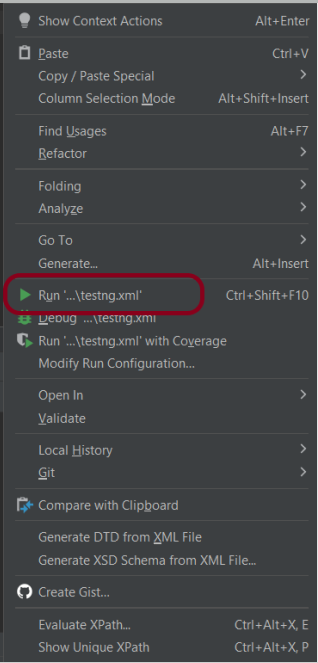
Step 14 – Run the tests from the testng.xml
Right-click on the testng.xml. Click on Run’...\testng.xml’.
Step 15 – TestNG Report Generation
TestNG generates various types of reports under the test-output or target folder like emailable-report.html, index.html, and testng-results.xml.
We are interested in the ‘emailable-report.html’ report. Open “emailable-report.html“, as this is an HTML report, and open it with the browser. The below image shows emailable-report.html.
emailable-report.html
Index.html
TestNG also produces “index.html” report, and it resides under the test-output folder. The below image shows the index.html report.
Step 16 – Run the tests from the Command Line
Run the below command in the command prompt to run the tests and to get the test execution report.
mvn clean test
The output of the above program is
Step 17 – Cucumber Report Generation
To get Cucumber Test Reports, add cucumber.properties under src/test/resources and add the below instruction in the file.
Many REST API endpoints require authentication to return the response. To authenticate the request, we will need to provide an authentication token with the required scopes or permissions. First, we need to generate an access token. Then, we pass it to the second request to get the desired response.
What is an Access Token?
An access token is a credential that is used to authenticate and authorize requests made to an API. It proves the user’s identity and permissions. This allows them to access protected resources or perform specific actions within the API.
Access tokens are usually represented as strings of characters (e.g., alphanumeric) that are generated by the server and provided to clients upon successful authentication. Access tokens often have an expiration time associated with them, after which they become invalid. This helps ensure security by limiting their lifespan.
Using access tokens helps ensure secure communication between clients and servers by preventing unauthorized access to protected resources. Without a valid access token, requests may be rejected or limited in their scope.
Access tokens enable stateless communication between client and server. This means that each request contains all necessary authentication and authorization information within itself. This eliminates the need for servers to store session-related data, improving scalability and reducing overhead.
Let us create a class that will generate the access token.
In the above example, a token is generated as shown below.
It is a JSON Response. We need only the token part and not the {“access_token”} part. So we have used the below command to extract the token part only.
JsonPath jsonPath = new JsonPath(token);
accessToken = jsonPath.getString("access_token");
What is Oauth2()?
OAuth 2.0 (Open Authorization 2.0) is an industry-standard protocol for authorization and delegation of access to protected resources on the web. It allows users to securely grant limited access to their resources hosted on one website or application. This site is called the “resource server.” The access is given to another website or application, which is called the “client.”
Below is a test. We are passing the token generated in the previous request for authentication. This token is used in another request with oauth2().
AccessToken_Example
import java.io.IOException;

public class AccessToken_Example extends AbstractHelper {

    Response response;

   @Test
    public void testRequest() throws IOException {

        response = RestAssured.given()
                .auth().oauth2(generateToken())
                .when().get("https://localhost/8080/coreid").then()
                .extract()
                .response();

        System.out.println("Response :" + response.asString());
        int statusCode = response.getStatusCode();

        Assert.assertEquals(200,statusCode);
    }
}
The output of the above program is
Summary:
1. Access tokens are obtained through an authentication process. This may include logging in with a username and password or using a third-party authentication service like OAuth. 2. Once authenticated, the access token contains information about the user’s permissions and privileges within the system. Use this access token and pass it to another request to get the required response.
Allure Framework is a flexible lightweight multi-language test report tool that not only shows a very concise representation of what has been tested in a neat web report form but allows everyone participating in the development process to extract the maximum useful information from the everyday execution of tests.
How Allure Report is generated?
Allure is based on standard xUnit results output but adds some supplementary data. Any report is generated in two steps. During test execution (first step), a small library called adapter attached to the testing framework saves information about executed tests to XML files. We already provide adapters for popular Java, PHP, Ruby, Python, Scala, and C# test frameworks. During report generation (second step), the XML files are transformed into an HTML report. This can be done with a command line tool, a plugin for CI, or a build tool.
Similarly, when we run our tests, every popular test framework generates junit-style XML report or testng style which will be used by Allure to generate HTML report.
In the below example, we use the maven surefire plugin which automatically generates xml test reports and stores them in target/surefire-reports. And these XML files are transformed into an HTML report by Allure.
Allure reports have provided adapters for Java, PHP, Ruby, Python, Scala, and C# test frameworks.
Allure report has the below-mentioned annotation.
@Epic @Features @Stories/@Story
We can add Epic, Feature, and Stories annotations to the test to describe the behaviour of the test.
@Severity(SeverityLevel.BLOCKER) – @Severity annotation is used in order to prioritize test methods by severity.
@Description(“Regression Testing”)– We can add a detailed description for each test method. To add such a description, use the @Description annotation.
@Step – In order to define steps in Java code, you need to annotate the respective methods with @Step annotation. When not specified, the step name is equal to the annotated method name.
@Attachment– An attachment in Java code is simply a method annotated with@Attachment that returns either a String or byte[], which should be added to the report.
@Link – We can link the tests to Defect Tracker or JIRA Ticket.
Below is an example that shows how to use various Allure Annotations in the Test.
@Epic("Web Application Regression Testing")
@Feature("Login Page Tests")
@Listeners(TestExecutionListener.class)
public class LoginTests extends BaseTest {

	LoginPage objLogin;
	DashboardPage objDashboardPage;

	@Severity(SeverityLevel.NORMAL)
	@Test(priority = 0, description = "Verify Login Page")
	@Description("Test Description : Verify the title of Login Page")
	@Story("Title of Login Page")
	public void verifyLoginPage() {

		// Create Login Page object
		objLogin = new LoginPage(driver);

		// Verify login page text
		objLogin.verifyPageTitle();
	}
}
Install Allure
For Windows, Allure is available from the Scoop command line installer.
The previous tutorial has shown the various parameterized tests in JUnit5. This tutorial shows how to run a Selenium test multiple times with a different set of data. This helps to reduce the duplication of code. This is a very common scenario in any testing. Imagine, we want to test the requirement for a login page that uses a username and password to log in to the application. Username and password must satisfy some conditions like username can be only alphabets and no numeric and special characters. There could be multiple sets of data that can be used to test this requirement.
Prerequisite:
Selenium – 4.21.0
Maven – 3.9.6
Java 17
JUnit Jupiter Engine – 5.11.0-M2
JUnit Jupiter API – 5.11.0-M2
JUnit5 provides a lot of ways to parameterize a test –@ValueSource, @EnumSource, @MethodSource, @CsvSource, @CsvFileSource, and @ArgumentsSource.
Let us see an example where the test is not parameterized. In the below example, we want to verify the different error messages generated by passing incorrect values to username and password.
This is the base class – Login, which contains the test method that uses a different set of test data.
package com.example.parameterized;

import org.openqa.selenium.WebDriver;
import org.openqa.selenium.WebElement;
import org.openqa.selenium.support.FindBy;
import org.openqa.selenium.support.PageFactory;

public class LoginPage {

    WebDriver driver ;

    @FindBy(name="username")
    WebElement username;

    @FindBy(name="password")
    WebElement password;

    @FindBy(xpath="//*[@class='oxd-form']/div[3]/button")
    WebElement loginButton;

    @FindBy(xpath="//*[@class='orangehrm-login-error']/div[1]/div[1]/p")
    WebElement actualErrorMessage;


    public LoginPage(WebDriver driver) {

        this.driver = driver;

        // This initElements method will create all WebElements
        PageFactory.initElements(driver, this);
    }

    public void setUserName(String strUserName) {
        username.sendKeys(strUserName);
    }

    // Set password in password textbox
    public void setPassword(String strPassword) {
        password.sendKeys(strPassword);
    }

    // Click on login button
    public void clickLogin() {
        loginButton.click();
    }

    // Get the error message
    public String getErrorMessage() {
        return actualErrorMessage.getText();
    }

    public void login(String strUserName, String strPasword) {

        // Fill user name
        this.setUserName(strUserName);

        // Fill password
        this.setPassword(strPasword);

        // Click Login button
        this.clickLogin();
    }

}
The example below shows 4 tests using a common test with 4 different sets of data.
There are multiple ways to parameterize the test. To start with:
Replace the @Test annotation with the @ParameterizedTest annotation provided by the JUnit5 framework.
Add parameters to the loginTest() method. In this example, we will add a username and a password parameter.
Add the parameters source. In this example, we will use the @CsvFileSource annotation.
To know all the different types of parameterization methods, please refer to this tutorial. This tutorial will show the 2 most common ways to parameterize tests in JUnit5.
1.@CsvSource
@CsvSource allows us to express argument lists as comma-separated values (i.e., CSV String literals). Each string provided via the value attribute in @CsvSource represents a CSV record and results in one invocation of the parameterized test. An empty, quoted value (”) results in an empty String. This can be seen in the example below.
@CsvFileSource lets us use comma-separated value (CSV) files from the classpath or the local file system.
We can see in the example below that we have skipped the first line from the credentials.csv file as it is the heading of the file. invalidCredentials() method got 4 different set of the test data from CSV file using parameterization. JUnit5 ignores the headers via the numLinesToSkip attribute.
In this example, will retrieve the data from CSV. This CSV file is placed under src/test/resources. Below is an example of the credentials.csv file.
In @CsvFileSource, an empty, quoted value (“”) results in an empty String in JUnit5.
In JUnit5, JUnit Jupiter provides the ability to repeat a test a specified number of times by annotating a method with @RepeatedTest. We can specify the repetition frequency as a parameter to the @RepeatedTest annotation.
When do we use the Repeated Test?
Imagine, we are testing an online shopping website. In the process of placing an order, we need to pay for the product. But the payment gateway is a third-party service, and we cannot control the connectivity between our website and the payment gateway. We know that clicking on the ‘Payment’ link sometime shows “Exception: Page cannot be displayed”. This is an intermittent issue. So, we don’t want to fail the test if this payment link does not work. We can configure it to click this payment link multiple times, before marking the test case failed. Here comes the Repeated Test in the picture.
A few points to keep in mind for @RepeatedTest are as follows:
The methods annotated with @RepeatedTest cannot be static, otherwise, the test cannot be found.
The methods annotated with @RepeatedTest cannot be private, otherwise, the test cannot be found.
The return type of the method annotated with @RepeatedTest must be void only, otherwise, the test cannot be found.
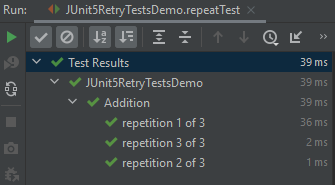
The below example will run the test 5 times.
 @DisplayName("Addition")
 @RepeatedTest(3)
 void repeatTest(){
    int a = 4;
    int b = 6;
    assertEquals(10, a+b,"Incorrect sum of numbers");
 }
The output of the above test:
Each invocation of a repeated test behaves like the execution of a regular @Test method, with full support for the same lifecycle callbacks and extensions.
It means that @BeforeEach and @AfterEach annotated lifecycle methods will be invoked for each invocationof the test.
@BeforeEach annotation is used to signal that the annotated method should be executed before each invocation of the @Test, @RepeatedTest, @ParameterizedTest, or @TestFactory method in the current class. This is the replacement of the @Before Method in JUnit4.
TestInfois used to inject information about the current test or container into @Test, @RepeatedTest, @ParameterizedTest, @TestFactory, @BeforeEach, @AfterEach, @BeforeAll, and @AfterAll methods. If a method parameter is of type TestInfo, JUnit will supply an instance of TestInfo corresponding to the current test or container as the value for the parameter.
RepetitionInfois used to inject information about the current repetition of a repeated test into the @RepeatedTest, @BeforeEach, and @AfterEach methods. If a method parameter is of type RepetitionInfo, JUnit will supply an instance of RepetitionInfo corresponding to the current repeated test as the value for the parameter.
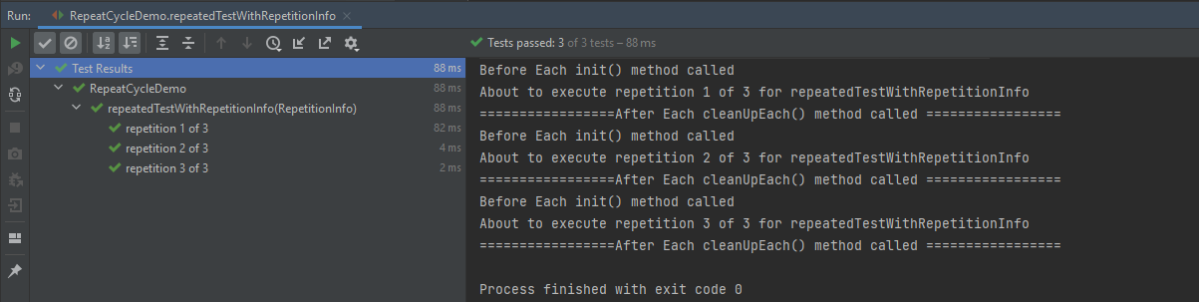
In the below example, @BeforeEach will get executed before each repetition of each repeated test. By having the TestInfo and RepetitionInfo injected into the method, we see that it’s possible to obtain information about the currently executing repeated test.
import org.junit.jupiter.api.*;
import static org.junit.jupiter.api.Assertions.*;

public class RepeatCycleDemo {

    @BeforeEach
    void init(TestInfo testInfo, RepetitionInfo repetitionInfo) {
      System.out.println("Before Each init() method called");
      int currentRepetition = repetitionInfo.getCurrentRepetition();
      int totalRepetitions = repetitionInfo.getTotalRepetitions();
      String methodName = testInfo.getTestMethod().get().getName();
      System.out.println(String.format("About to execute repetition %d of %d for %s", currentRepetition, totalRepetitions, methodName));
     }

    @RepeatedTest(3)
    void repeatedTestWithRepetitionInfo(RepetitionInfo repetitionInfo) {
      int a = 4;
      int b = 6;
      assertEquals(10, a+b, repetitionInfo.getTotalRepetitions());
    }

    @AfterEach
    public void cleanUpEach(){
      System.out.println("=================After Each cleanUpEach() method called =================");
    }
}
The output of the above test:
Custom Display Name
In addition to specifying the number of repetitions, a custom display name can be configured for each repetition via the name attribute of the @RepeatedTest annotation.
The display name can be a pattern composed of a combination of static text and dynamic placeholders. The following placeholders are currently supported.
{displayName}: display name of the @RepeatedTest method
{currentRepetition}: the current repetition count
{totalRepetitions}: the total number of repetitions
    @BeforeEach
    void init(TestInfo testInfo, RepetitionInfo repetitionInfo) {
        System.out.println("Before Each init() method called");
        int currentRepetition = repetitionInfo.getCurrentRepetition();
        int totalRepetitions = repetitionInfo.getTotalRepetitions();
        String methodName = testInfo.getTestMethod().get().getName();
        System.out.println(String.format("About to execute repetition %d of %d for %s", //
                currentRepetition, totalRepetitions, methodName));
    }

   //Custom Display
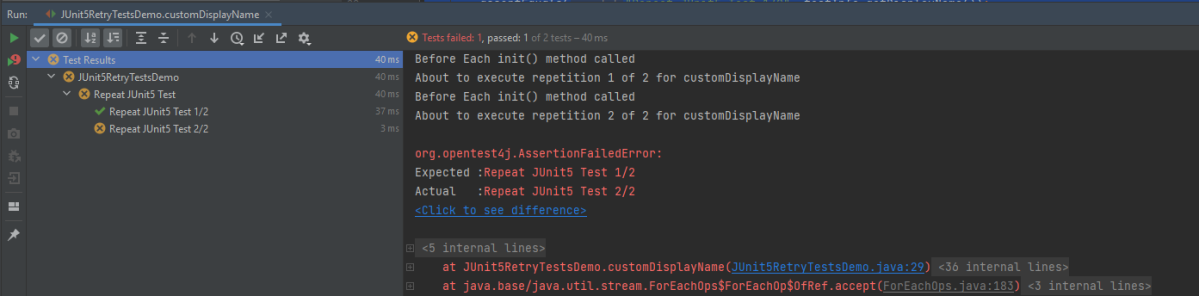
    @RepeatedTest(value = 2, name = "{displayName} {currentRepetition}/{totalRepetitions}")
    @DisplayName("Repeat JUnit5 Test")
    void customDisplayName(TestInfo testInfo) {
        assertEquals("Repeat JUnit5 Test 1/2", testInfo.getDisplayName());
    }
The output of the above test:
The default display name for a given repetition is generated based on the following pattern: “repetition {currentRepetition} of {totalRepetitions}”. Thus, the display names for individual repetitions of the previous repeatedTest() example would be repetition 1 of 10, and repetition 2 of 10.
We can use one of two predefined formats for displaying the name – LONG_DISPLAY_NAME and SHORT_DISPLAY_NAME. The latter is the default format if none is specified.
RepeatedTest.LONG_DISPLAY_NAME – {displayName} :: repetition {currentRepetition} of {totalRepetitions}
RepeatedTest.SHORT_DISPLAY_NAME – repetition {currentRepetition} of {totalRepetitions}
In this case, the name is displayed as Multiplication repetition 1 of 3, repetition 2 of 3, and soon.
The output of the above test:
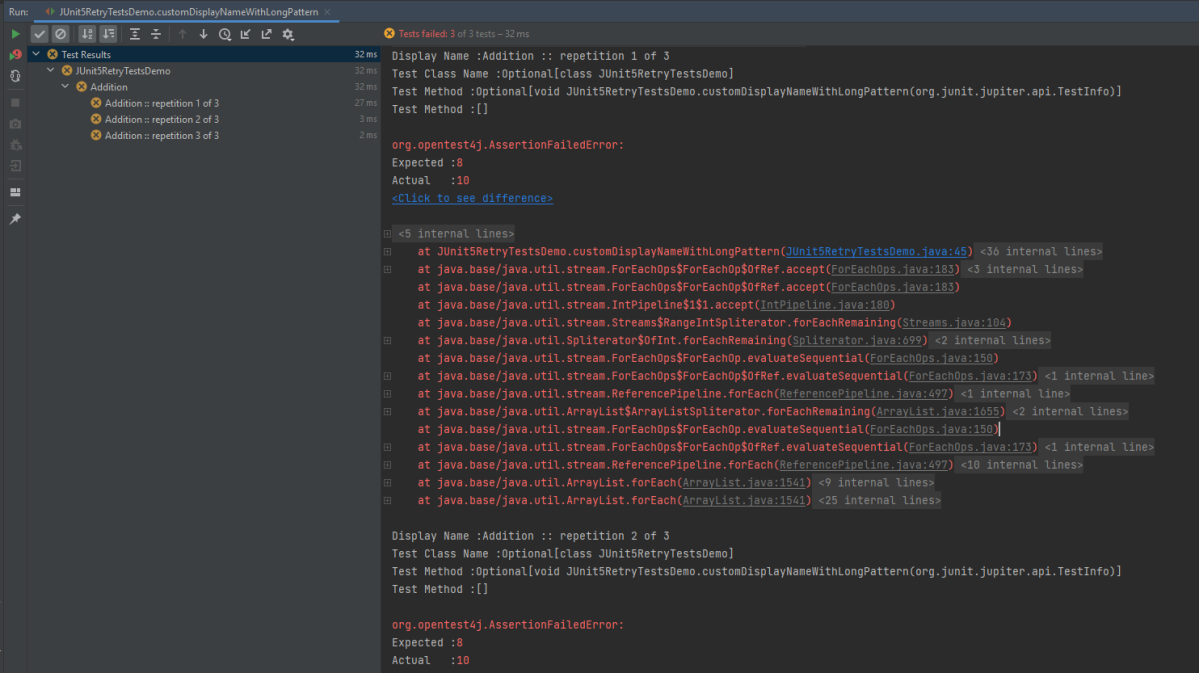
Below is an example of LONG_DISPLAY_NAME
  @RepeatedTest(value = 3, name = RepeatedTest.LONG_DISPLAY_NAME)
    @DisplayName("Addition")
    void customDisplayNameWithLongPattern(TestInfo testInfo) {
        System.out.println("Display Name :"+ testInfo.getDisplayName());
        System.out.println("Test Class Name :"+ testInfo.getTestClass());
        System.out.println("Test Method :"+ testInfo.getTestMethod());
        assertEquals(8, 3+7);
    }
The output of the above test:
As we can see in the example, we have used @DisplayName(“Addition”), but as it is name = RepeatedTest.LONG_DISPLAY_NAME, so the name of the tests are now Addition :: repetition 1 of 3, Addition :: repetition 2 of 3 and soon.
Congratulations. We are able to execute the tests multiple times by using the @RepeatedTest annotation. Happy Learning!!











 QA Automation Expert