How to compare ArrayLists – containsAll method?

HOME

package com.example;

import java.util.ArrayList;
import java.util.Arrays;

public class ContainsAll_ArrayList {

    public static void main(String[] args) {

        ArrayList<String> list1 = new ArrayList<String>();

        list1.add("Java");
        list1.add("Python");
        list1.add("PHP");
        list1.add("JavaScript");
        list1.add("Ruby");


        ArrayList<String> list2 = new ArrayList<>(Arrays.asList("Python", "Ruby"));
        ArrayList<String> list3 = new ArrayList<>(Arrays.asList("Python", "Java", "Ruby", "PHP", "JavaScript"));

        System.out.println("ArrayList1:" + list1);
        System.out.println("ArrayList2:" + list2);

        // check if ArrayList 1 contains ArrayList 2 (ArrayList 2 is subset of ArrayList 1)
        System.out.println("Check arrayList1 containsAll arrayList2 :" + list1.containsAll(list2));

        // check if ArrayList 2 contains ArrayList 1 (ArrayList 2 is subset of ArrayList 1)
        System.out.println("Check arrayList1 containsAll arrayList2 :" + list2.containsAll(list1));

        // check if ArrayList 1 contains ArrayList 3 (different sequence)
        System.out.println("Check arrayList1 containsAll arrayList3 :" + list1.containsAll(list3));

        }
}

list1.containsAll(list2));
list2.containsAll(list1));
list1.containsAll(list3));

How to compare ArrayLists – contains?

HOME

import java.util.ArrayList;
import java.util.Arrays;

public class Compare_ArrayList {

    public static void main(String[] args) {

        ArrayList<String> list1 = new ArrayList<String>();

        list1.add("Java");
        list1.add("Python");
        list1.add("PHP");
        list1.add("JavaScript");
        list1.add("Ruby");

        ArrayList<String> list2 = new ArrayList<>(Arrays.asList("Python", "Ruby"));

        System.out.println("ArrayList1:" + list1);
        System.out.println("ArrayList2:" + list2);

        System.out.println("Check PHP is present in arrayList1 :" + list1.contains("PHP"));
        System.out.println("Check Cobol is present in arrayList1 :" + list1.contains("Cobol"));
        System.out.println("Compare 2 arrayList using contains: " + list1.contains(list2));

        }
}

import java.util.ArrayList;
import java.util.Arrays;

public class Compare_ArrayList {

    public static void main(String[] args) {

        ArrayList<String> list1 = new ArrayList<String>();

        list1.add("Java");
        list1.add("Python");
        list1.add("PHP");
        list1.add("JavaScript");
        list1.add("Ruby");

        ArrayList<String> list3 = new ArrayList<>(Arrays.asList("Python", "Java", "Ruby", "PHP", "JavaScript"));

        System.out.println("ArrayList1:" + list1);
        System.out.println("ArrayList2:" + list2);
        System.out.println("Compare 2 arrayList using contains with different sequence: " + list1.contains(list3));
        }
}

ArrayList in Java

HOME

  1. What is the difference between Array and ArrayList?
  2. How to create an ArrayList?
  3. How to add elements to an ArrayList?
  4. How to remove elements from ArrayList?
  5. ArrayList SizeMethod
  6. Method to iterate through ArrayList

import java.util.ArrayList; // import the ArrayList class
ArrayListCompanies = new ArrayList(); // Create an ArrayList object


1) To add the element at the end of the List. 

Companies.add("Samsung");

2) To add the element at the specified location in ArrayList, we can specify the index in the add method like this.

Companies.add(2,"Microsoft");

4) How to remove elements from ArrayList?


1) To remove the element with name. 

Companies.remove("MI");

2) To remove the element at the specified location in ArrayList, we can specify the index in the remove method. 

Companies.remove(1);

5) ArrayList SizeMethod

To find out how many elements an ArrayList have, use the size() method. 

Companies.size();

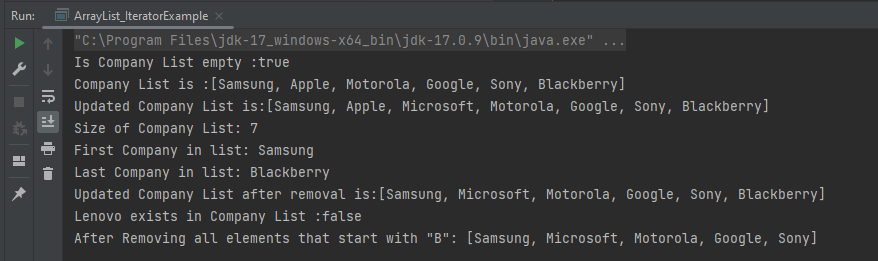
Let me show how to add and remove elements from an ArrayList with the help of an example.

package com.example.definitions;

import java.util.ArrayList;
import java.util.function.Predicate;

public class ArrayList_IteratorExample {

    public static void main(String[] args) {

        //Create ArrayList of String
        ArrayList<String> Companies = new ArrayList();

        // Check if an ArrayList is empty
        System.out.println("Is Company List empty :"+Companies.isEmpty());

        // Adding new elements to the ArrayList
        Companies.add("Samsung");
        Companies.add("Apple");
        Companies.add("Motorola");
        Companies.add("Google");
        Companies.add("Sony");
        Companies.add("Blackberry");
        System.out.println("Company List is :"+Companies);

        // Adding an element at a particular index in an ArrayList
        Companies.add(2,"Microsoft");
        System.out.println("Updated Company List is:"+Companies);

        // Find the size of an ArrayList
        System.out.println("Size of Company List: "+Companies.size());

        // Retrieve the element at a given index
        System.out.println("First Company in list: "+Companies.get(0));

        // Retrieve the last element from ArrayList
        String LastCompany = Companies.get(Companies.size()-1);
        System.out.println("Last Company in list: "+LastCompany);

        // Remove the element
        Companies.remove("MI");

        // Remove the element at index '1'
        Companies.remove(1);
        System.out.println("Updated Company List after removal is:"+Companies);

        // Remove first occurrence of the given element from the ArrayList
        // (The remove() method returns false if the element does not exist in the ArrayList)
        boolean isRemoved = Companies.remove("Lenovo");
        System.out.println("Lenovo exists in Company List :"+isRemoved);

        // Remove all the elements that satisfy the given predicate
        Predicate<String> newCompanies = company -> company.startsWith("B");
        Companies.removeIf(newCompanies);

        System.out.println("After Removing all elements that start with \"B\": " + Companies);
    }
}

6) Method to iterate through ArrayList

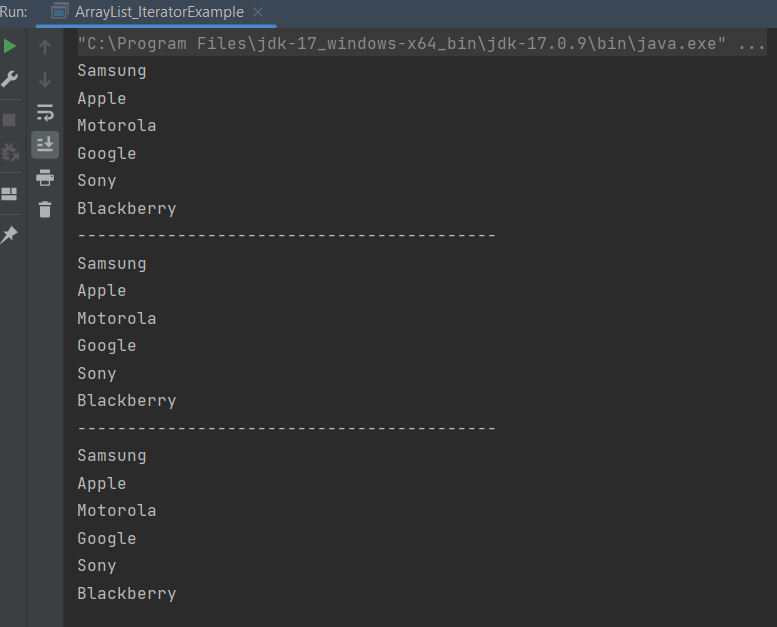
There are various methods to iterate through ArrayList. We will discuss few of the methods.
1) Iterator interface
2) For -each loop
3) For loop
4) While loop

package com.example.definitions;

import java.util.ArrayList;

public class ArrayList_IteratorExample {

    public static void main(String[] args) {

        //Creating arraylist
        ArrayList<String> Companies = new ArrayList();

        // Adding new elements to the ArrayList
        Companies.add("Samsung");
        Companies.add("Apple");
        Companies.add("Motorola");
        Companies.add("Google");
        Companies.add("Sony");
        Companies.add("Blackberry");

        //Traversing list through Iterator
        for(String a:Companies)
            System.out.println(a);
        System.out.println("------------------------------------------");

        //Traversing list through for loop
        for(int i=0;i<Companies.size();i++)
        {
            System.out.println(Companies.get(i));
        }
        System.out.println("------------------------------------------");

        // Traversing list through For-Each loop
        for(String a:Companies)
            System.out.println(a);
    }
}

Java Tutorials

Java is a general-purpose programming language that is a concurrent, class-based, and object-oriented language. Java follows the concept of “write once and run anywhere (WORA).” This means that compiled Java code can be run on all different platforms that support Java. There’s no need for recompilation.

Eclipse IDE

Chapter 1 How to Download and Install Eclipse IDE
Chapter 2 How to Clone a project from GitLab using Eclipse
Chapter 3 How to Export Eclipse projects to GitLab

IntelliJ IDE

Chapter 1 How to install IntelliJ on Windows
Chapter 2 How to create a Java project in IntelliJ
Chapter 3 How to Clone a project from GitLab using IntelliJ
Chapter 4 How to Export IntelliJ project to GitLab

Basics of Java

Chapter 1 How to Download & Install Java JDK 11 in Windows
Chapter 2 Data Types and Operators in Java
Chapter 3 Decision Making in Java – If, If Else, Switch, Break, Continue
Chapter 4 Loop Control Statements in Java – For, While, Do While, Enhanched For Loop
Chapter 5 String Manipulation
Chapter 6 Difference between == and equals() method in Java
Chapter 7 Arrays in Java
Chapter 8 Java Access Modifiers: Explained with Examples
Chapter 9 ArrayList in Java
Chapter 10 How to compare ArrayLists – contains?
Chapter 11 How to compare ArrayLists – containsAll method?
Chapter 12 Methods in Java
Chapter 13 Method Overloading in Java
Chapter 14 Constructors in Java   
Chapter 15 This Keyword in Java   
Chapter 16 Static Keyword – Static Variable and Static Method in Java
Chapter 17 Difference between Static Method and Non-Static Method
Chapter 18 How to use Java Lambda expression to create thread via Runnable function
Chapter 19 runAsync and supplyAsync in ComputableFuture in Java8
Chapter 20 HashMap in Java
Chapter 21 LinkedHashMap in Java
Chapter 22 Iterators in Java

OOPs Concepts

Chapter 1 Class and Object in Java
Chapter 2 Inheritance in Java
Chapter 3 Encapsulation in Java
Chapter 4 Polymorphism in Java
Chapter 5 Abstraction in Java
Chapter 6 Interface in Java
Chapter 7 Difference between Abstract Class and Interface

Exceptions in Java

Chapter 1 Exception Handling in Java
Chapter 2 Java Exceptions Tutorial: Built-in and User-defined Exceptions
Chapter 3 Flow control in try catch finally in Java
Chapter 4 Multiple Catch Exceptions
Chapter 5 Throw in Java
Chapter 6 Throws in Java

Data Handling (Excel Manipulation)

Chapter 1 How to download and install Apache POI
Chapter 2 Reading Excel Data with Apache POI in Java
Chapter 3 How to Write Data to Excel File in Java using Apache POI
Chapter 4 How to update existing excel in Java
Chapter 5 Java Excel Tutorial: Creating Excel with Formulas Using Apache POI
Chapter 6 Change Font Style in Excel with Apache POI – NEW

Multiple Choice Questions

Chapter 1 Multiple questions on Exception Handling in Java

Java Library

Chapter 1 AssertJ – Fluent Assertions in Java

Arrays in Java

HOME

 1256661589473369

ArrayDataType[] ArrayName;
String[] days;

Creating an Array

 You can create array by using new operator.

arrayRefVar = new dataType[arraySize];

Declaring an array variable, creating an array, and assigning the reference of the array to the variable can be combine in one statement, as shown below:

 dataType[] arrayRefVar = new dataType[arraySize];

Alternatively, you can create arrays as follows:

dataType[] arrayRefVar = {value0, value1, ..., valuek}; 

The array elements are access through the index.

Array indices are 0-based; that is, they start from 0 to arrayRefVar.length-1.

Assigning values to an Array

How to initialize an array during declaration.

ArrayType [] ArrayName = New ArrayType [Size of an Array];

String[] Days = new String[6];
Days[0] = "Monday";
Days[1]="Tuesday";
Days[2]="Wednesday";
Days[3]="Thursday";
Days[4]="Friday";
Days[5]="Saturday";
Days[6]="Sunday";

Another way

String[] Days =  {"Monday","Tuesday","Wednesday","Thursday","Friday","Saturday","Sunday"}

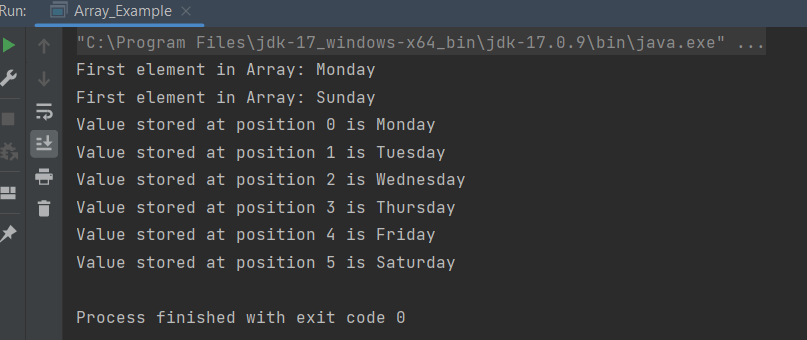
public class Array_Example {

    public static void main(String[] args) {

        String[] Days= {"Monday","Tuesday","Wednesday","Thursday","Friday","Saturday","Sunday"};

        //Length of Array
        int len=Days.length;

        //Access first element
        System.out.println("First element in Array: "+Days[0]);

        //Last element
        System.out.println("First element in Array: "+Days[len-1]);

        //Print values
        for(int i=0;i<len-1;i++)
        {
            System.out.println("Value stored at position "+i+" is "+Days[i]);
        }
    }
}

Passing an Array to a Method

Array can be passed easily to a method as parameters, just as if we pass integers and strings to methods.

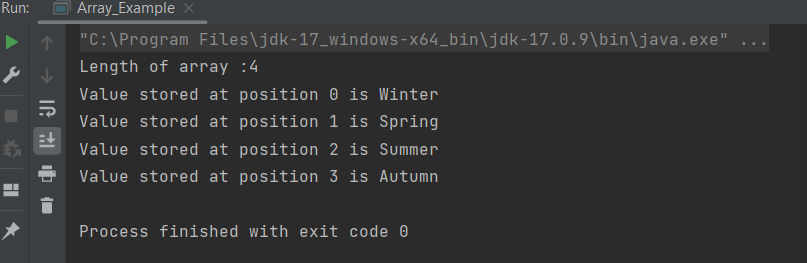
Below is an example of passing array to a method. 

public class Array_Example {

    public static void main(String[] args) {

        String[] Days= {"Winter","Spring","Summer","Autumn"};

        //Pass array as method
        print_arrays(Days);
    }

    public static void print_arrays(String[]array) {
        int len=array.length;
        System.out.println("Length of array :" + len);

        //Print values
        for(int i=0;i<=len-1;i++)
        {
            System.out.println("Value stored at position "+i+" is "+array[i]);
        }
    }
}


Multi Dimensional Arrays

It is also possible to create an array of arrays known as multidimensional array. For example,

    int[][] a = new int[3][4];

    int[][] a = {  {1, 2, 3},{4, 5, 6, 9},{7}};  

 Column1Column 2Column 3Column 4
Row 11         a[0][0]2     a[0][1]3        a[0][2]  a[0][3]
Row 24                a[1][0]5     a[1][1]6      a[1][2]9     a[1][3]
Row 37                a[2][0] a[2][1]  a[2][2] a[2][3]
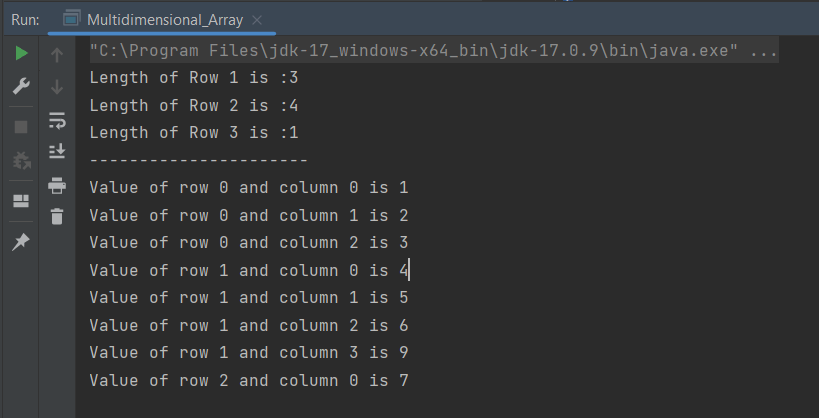
public class Multidimensional_Array {

    public static void main(String[] args) {

        int a[][] = {{1,2,3},
                {4,5,6,9},
                {7}};

        //print length of columns
        System.out.println("Length of Row 1 is :"+a[0].length);
        System.out.println("Length of Row 2 is :"+a[1].length);
        System.out.println("Length of Row 3 is :"+a[2].length);
        System.out.println("----------------------");

        //Print all elements of array
        for (int i=0;i<a.length;i++)
        {
            for (int j=0;j<a[i].length;j++)
            {
                System.out.println("Value of row " + i + " and column " + j + " is " + a[i][j]);
            }
        }
    }
}

What is the difference between array and string?

  • Arrays can have any data type of any length while strings are usually ASCII characters that are terminated with a null character ‘\0’.
  • An array of characters is mutable, in other words, you can replace a character in an array of characters by overwriting the memory location for that character.
  • A String is not mutable, in other words, to “replace” a character in a String, you must build a new String with the desired character in place (copying the non-changing parts from the old String).                
  • All string literals are stored in the String constant pool. They remain in the pool until they became eligible for the garbage collection, while a Character array is stored in heap memory.                                               
  • Character array is preferred over string for storing passwords in java. As string is immutable, it makes string vulnerable for storing passwords, as we cannot get rid of passwords after use until garbage collector collects it.