Update Specific Values in Java Properties File: Step-by-Step Guide

HOME

We want to replace the password from Admin to Admin123.

 Properties properties = new Properties();

 FileInputStream fileInputStream = new FileInputStream("src/test/resources/userCreated.properties");
 properties.load(fileInputStream);

properties.setProperty("password", "Admin123");

FileOutputStream fileOutputStream = new FileOutputStream("src/test/resources/userCreated.properties");

// store() method is used to write the properties into properties file
properties.store(fileOutputStream, "File is modified");
package org.example;

import java.io.FileInputStream;
import java.io.FileOutputStream;
import java.io.IOException;
import java.util.Properties;

public class ModifyPropertiesExample {

    public static void main(String args[]) {

        // Creating properties files from Java program
        Properties properties = new Properties();

        try {
            FileInputStream fileInputStream = new FileInputStream("src/test/resources/userCreated.properties");
            properties.load(fileInputStream);
        } catch (IOException ex) {
            ex.printStackTrace();
        }

        properties.setProperty("password", "Admin123");
        try {
            FileOutputStream fileOutputStream = new FileOutputStream("src/test/resources/userCreated.properties");

            // store() method is used to write the properties into properties file
            properties.store(fileOutputStream, "File is modified");

            fileOutputStream.close();
        } catch (IOException ex) {
            ex.printStackTrace();
        }
    }
}

Java Properties: Storing and Writing Data in XML Format

HOME

Properties properties = new Properties();
properties.setProperty("username", "Vibha");
properties.setProperty("password", "XML");
 FileOutputStream fileOutputStream = new FileOutputStream("src/test/resources/userCreatedXML.xml");

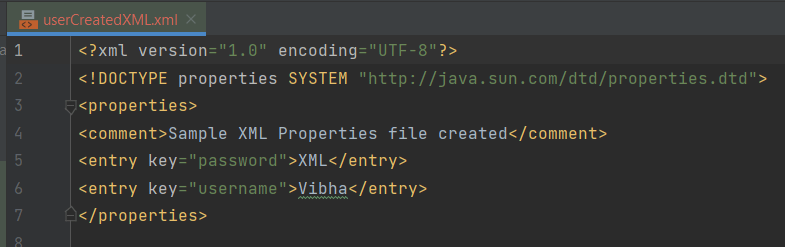
properties.storeToXML(fileOutputStream, "Sample XML Properties file created");
package org.example;

import java.io.FileInputStream;
import java.io.FileOutputStream;
import java.io.IOException;
import java.util.Properties;

public class WritePropertiesXMLExample {

    public static void main(String args[]) {

        Properties properties = new Properties();
        properties.setProperty("username", "Vibha");
        properties.setProperty("password", "XML");

        try {
            // userCreated.properties is created at the mentioned path
            FileOutputStream fileOutputStream = new FileOutputStream("src/test/resources/userCreatedXML.xml");

            // storeToXML() method is used to write the properties into properties xml file
            properties.storeToXML(fileOutputStream, "Sample XML Properties file created");
            fileOutputStream.close();
        } catch (IOException ex) {
            ex.printStackTrace();
        }
    }
}

How to Create and Modify Properties File in Java

HOME

package org.example;

import java.io.FileNotFoundException;
import java.io.FileOutputStream;
import java.io.IOException;
import java.util.Properties;

public class WritePropertiesExample {

    public static void main(String args[]) {

        // Creating properties files from Java program
        Properties properties = new Properties();

        try {
            // userCreated.properties is created at the mentioned path
            FileOutputStream fileOutputStream = new FileOutputStream("src/test/resources/userCreated.properties");

            properties.setProperty("username", "Vibha");
            properties.setProperty("password", "Admin");

            // store() method is used to write the properties into properties file
            properties.store(fileOutputStream, "Sample way of creating Properties file from Java program");

            fileOutputStream.close();
        } catch (IOException ex) {
            ex.printStackTrace();
        }
    }
}

How to read property file in Java

HOME

database.baseUrl = https://localhost
database.port = 8080
database.username = admin
database.password = Admin123
import java.io.FileInputStream;
import java.io.IOException;
import java.io.InputStream;
import java.util.Properties;

public class ReadPropertiesExample {

    public static void main(String[] args) {

        Properties properties = new Properties();
        try {
            InputStream inputStream = new FileInputStream("src/test/resources/config.properties");

            // Load the properties file
            properties.load(inputStream);

            // Access properties
            String dbUrl = properties.getProperty("database.baseUrl");
            String dbPort = properties.getProperty("database.port");
            String dbUser = properties.getProperty("database.username");
            String dbPassword = properties.getProperty("database.password");

            // Print properties to verify
            System.out.println("Database URL: " + dbUrl);
            System.out.println("Database Port: " + dbPort);
            System.out.println("Database User: " + dbUser);
            System.out.println("Database Password: " + dbPassword);

        } catch (IOException ex) {
            ex.printStackTrace();
        }
    }
}

How to compare ArrayLists – containsAll method?

HOME

package com.example;

import java.util.ArrayList;
import java.util.Arrays;

public class ContainsAll_ArrayList {

    public static void main(String[] args) {

        ArrayList<String> list1 = new ArrayList<String>();

        list1.add("Java");
        list1.add("Python");
        list1.add("PHP");
        list1.add("JavaScript");
        list1.add("Ruby");


        ArrayList<String> list2 = new ArrayList<>(Arrays.asList("Python", "Ruby"));
        ArrayList<String> list3 = new ArrayList<>(Arrays.asList("Python", "Java", "Ruby", "PHP", "JavaScript"));

        System.out.println("ArrayList1:" + list1);
        System.out.println("ArrayList2:" + list2);

        // check if ArrayList 1 contains ArrayList 2 (ArrayList 2 is subset of ArrayList 1)
        System.out.println("Check arrayList1 containsAll arrayList2 :" + list1.containsAll(list2));

        // check if ArrayList 2 contains ArrayList 1 (ArrayList 2 is subset of ArrayList 1)
        System.out.println("Check arrayList1 containsAll arrayList2 :" + list2.containsAll(list1));

        // check if ArrayList 1 contains ArrayList 3 (different sequence)
        System.out.println("Check arrayList1 containsAll arrayList3 :" + list1.containsAll(list3));

        }
}

list1.containsAll(list2));
list2.containsAll(list1));
list1.containsAll(list3));

How to compare ArrayLists – contains?

HOME

import java.util.ArrayList;
import java.util.Arrays;

public class Compare_ArrayList {

    public static void main(String[] args) {

        ArrayList<String> list1 = new ArrayList<String>();

        list1.add("Java");
        list1.add("Python");
        list1.add("PHP");
        list1.add("JavaScript");
        list1.add("Ruby");

        ArrayList<String> list2 = new ArrayList<>(Arrays.asList("Python", "Ruby"));

        System.out.println("ArrayList1:" + list1);
        System.out.println("ArrayList2:" + list2);

        System.out.println("Check PHP is present in arrayList1 :" + list1.contains("PHP"));
        System.out.println("Check Cobol is present in arrayList1 :" + list1.contains("Cobol"));
        System.out.println("Compare 2 arrayList using contains: " + list1.contains(list2));

        }
}

import java.util.ArrayList;
import java.util.Arrays;

public class Compare_ArrayList {

    public static void main(String[] args) {

        ArrayList<String> list1 = new ArrayList<String>();

        list1.add("Java");
        list1.add("Python");
        list1.add("PHP");
        list1.add("JavaScript");
        list1.add("Ruby");

        ArrayList<String> list3 = new ArrayList<>(Arrays.asList("Python", "Java", "Ruby", "PHP", "JavaScript"));

        System.out.println("ArrayList1:" + list1);
        System.out.println("ArrayList2:" + list2);
        System.out.println("Compare 2 arrayList using contains with different sequence: " + list1.contains(list3));
        }
}

Polymorphism in Java

HOME

In this tutorial, I’ll explain about Polymorphism in Java. It is one of the four concepts of OOPs. It is a concept where we can perform a single action in multiple ways. Poly means many and morphs means form. Polymorphism allows us to define one interface and have multiple implementations. An example of polymorphism is that there are different forms of communication like calls, SMS, picture messages, etc.

There are 2 types of polymorphism:-

  1. Method Overloading in Java – This is an example of compile time (or static polymorphism)
  2. Method Overriding in Java – This is an example of runtime time (or dynamic polymorphism)

Complie Time Polymorphism

It is also known as static polymorphism. Method Overloading is an example of static polymorphism. It is a feature that allows a class to have more than one method having the same name if their argument lists are different. Error if any occur, resolved during compile time.

Below is an example of static polymorphism.

public class Calculation {

	void sum(int a, int b) {
		System.out.println("Sum of 2 numbers :" + (a + b));
	}

	void sum(int x, int y, int z) {
		System.out.println("Sum of 3 numbers :" + (x + y + z));
	}

}
public class PolymorphismTest {

	public static void main(String[] args) {

		Calculation cal = new Calculation();
		cal.sum(10, 5);
		cal.sum(2, 6, 4);

	}
}

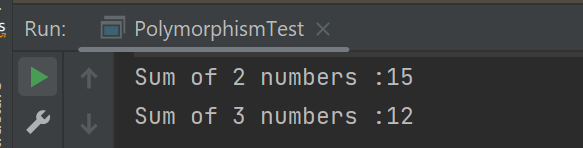
The output of the above program is

Dynamic Polymorphism

It is also known as Dynamic Method Dispatch. In this, the call to the overridden method happens at the runtime. This type of polymorphism is achieved by Method Overriding. Declaring a method in sub class that is already present in the parent class is known as method overriding. 

Below is an example of dynamic polymorphism

Parent Class

public class Bank {

	 //Overridden method
	public void getRateOfInterest() {

		System.out.println("getRateOfInterest() method of parent class");
		System.out.println("Interest Rate of Bank :" + 0);

	}
}

Child 1 Class

public class BOI extends Bank {

    // Overriding method
	public void getRateOfInterest() {

		System.out.println("getRateOfInterest() method of child 1 class");
		System.out.println("Interest Rate of BOI Bank :" + 4.1);

	}

}

Child 2 Class

public class BoFA extends Bank {

    // Overriding method
	public void getRateOfInterest() {

		System.out.println("getRateOfInterest() method of child 2 class");
		System.out.println("Interest Rate of BofA Bank :" + 3.2);

	}

}

Child 3 Class

public class SBI extends Bank {

	// Overriding method
	public void getRateOfInterest() {

		System.out.println("getRateOfInterest() method of child 3 class");
		System.out.println("Interest Rate of SBI Bank :" + 5.3);

	}
}

Test Class

public class StaticPolTest {

	public static void main(String[] args) {

		Bank bank1 = new Bank();
		bank1.getRateOfInterest();

		BOI bank2 = new BOI();
		bank2.getRateOfInterest();

		BofA bank3 = new BofA();
		bank3.getRateOfInterest();

		SBI bank4 = new SBI();
		bank4.getRateOfInterest();
	}

}

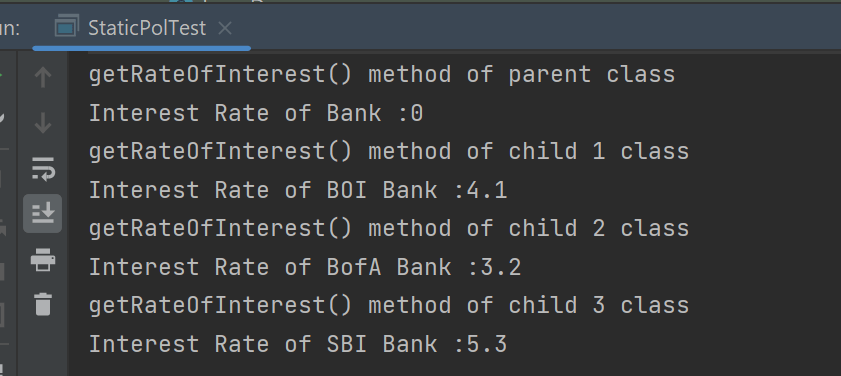
The output of the above program is

Points to note for Method Overriding:-

  1. The argument list of the overriding method (method of subclass) must match the overridden method (the method of parent class). The data types of the arguments and their sequence should exactly match.
  2. The access Modifier of the overriding method (method of a subclass) cannot be more restrictive than the overridden method of the parent class. 

Suppose, I have changed the access modifier of SBI class from public to protected and then run the StaticPolTest program. In that case, I’ll get a compile-time error.

getRateOfInterest() method of parent class
Interest Rate of Bank :0
getRateOfInterest() method of child 1 class
Interest Rate of BOI Bank :4.1
getRateOfInterest() method of child 2 class
Interest Rate of BofA Bank :3.2
Exception in thread "main" java.lang.Error: Unresolved compilation problem: 
	Cannot reduce the visibility of the inherited method from Bank

	at JavaDemo.Polymorphism.SBI.getRateOfInterest(SBI.java:6)
	at JavaDemo.Polymorphism.StaticPolTest.main(StaticPolTest.java:17)

Static Keyword – Static Variable and Static Method in Java

HOME

public class Student {

    int rollNo;
    String name;
    static String college = "Trinity"; // Static Variable

    Student(int r, String n) // Constructor
    {
        rollNo = r;
        name = n;
    }

    void displayInformation() {
        System.out.println("Roll_No: " + rollNo + ", Name: " + name + ", College: " + college);
    }

    public static void main(String[] args) {

        Student S1 = new Student(111, "Tom");
        Student S2 = new Student(222, "Terry");
        S1.displayInformation();
        S2.displayInformation();
    }
}

What is the Static Method

If any method is declared static, then it is called a static method. A static method belongs to the class not to the object of the class. 

A static method can be accessed without creating the object of the class.

The static method can access data members and can change their value of it.

public class Student {

    int rollNo;
    String name;
    static String college = "Trinity"; // Static Variable

    Student(int r, String n) // Constructor
    {
        rollNo = r;
        name = n;
    }

    static void change() {
        college = "CITM";
    }


    void displayInformation() {
        System.out.println("Roll_No: " + rollNo + ", Name: " + name + ", College: " + college);
    }

    public static void main(String[] args) {
        change();    // Calling Static method
        Student S1 = new Student(111, "Tom");
        Student S2 = new Student(222, "Terry");
        S1.displayInformation();
        S2.displayInformation();
    }

ArrayList in Java

HOME

  1. What is the difference between Array and ArrayList?
  2. How to create an ArrayList?
  3. How to add elements to an ArrayList?
  4. How to remove elements from ArrayList?
  5. ArrayList SizeMethod
  6. Method to iterate through ArrayList

import java.util.ArrayList; // import the ArrayList class
ArrayListCompanies = new ArrayList(); // Create an ArrayList object


1) To add the element at the end of the List. 

Companies.add("Samsung");

2) To add the element at the specified location in ArrayList, we can specify the index in the add method like this.

Companies.add(2,"Microsoft");

4) How to remove elements from ArrayList?


1) To remove the element with name. 

Companies.remove("MI");

2) To remove the element at the specified location in ArrayList, we can specify the index in the remove method. 

Companies.remove(1);

5) ArrayList SizeMethod

To find out how many elements an ArrayList have, use the size() method. 

Companies.size();

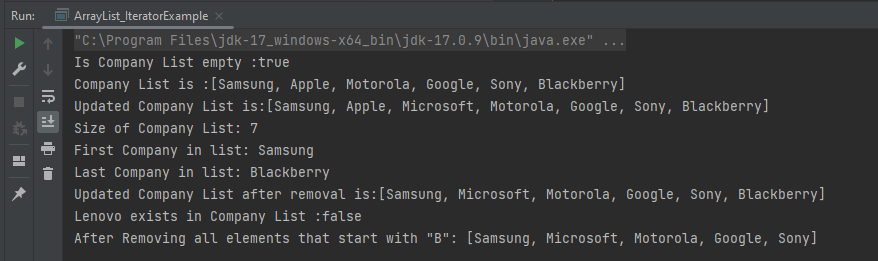
Let me show how to add and remove elements from an ArrayList with the help of an example.

package com.example.definitions;

import java.util.ArrayList;
import java.util.function.Predicate;

public class ArrayList_IteratorExample {

    public static void main(String[] args) {

        //Create ArrayList of String
        ArrayList<String> Companies = new ArrayList();

        // Check if an ArrayList is empty
        System.out.println("Is Company List empty :"+Companies.isEmpty());

        // Adding new elements to the ArrayList
        Companies.add("Samsung");
        Companies.add("Apple");
        Companies.add("Motorola");
        Companies.add("Google");
        Companies.add("Sony");
        Companies.add("Blackberry");
        System.out.println("Company List is :"+Companies);

        // Adding an element at a particular index in an ArrayList
        Companies.add(2,"Microsoft");
        System.out.println("Updated Company List is:"+Companies);

        // Find the size of an ArrayList
        System.out.println("Size of Company List: "+Companies.size());

        // Retrieve the element at a given index
        System.out.println("First Company in list: "+Companies.get(0));

        // Retrieve the last element from ArrayList
        String LastCompany = Companies.get(Companies.size()-1);
        System.out.println("Last Company in list: "+LastCompany);

        // Remove the element
        Companies.remove("MI");

        // Remove the element at index '1'
        Companies.remove(1);
        System.out.println("Updated Company List after removal is:"+Companies);

        // Remove first occurrence of the given element from the ArrayList
        // (The remove() method returns false if the element does not exist in the ArrayList)
        boolean isRemoved = Companies.remove("Lenovo");
        System.out.println("Lenovo exists in Company List :"+isRemoved);

        // Remove all the elements that satisfy the given predicate
        Predicate<String> newCompanies = company -> company.startsWith("B");
        Companies.removeIf(newCompanies);

        System.out.println("After Removing all elements that start with \"B\": " + Companies);
    }
}

6) Method to iterate through ArrayList

There are various methods to iterate through ArrayList. We will discuss few of the methods.
1) Iterator interface
2) For -each loop
3) For loop
4) While loop

package com.example.definitions;

import java.util.ArrayList;

public class ArrayList_IteratorExample {

    public static void main(String[] args) {

        //Creating arraylist
        ArrayList<String> Companies = new ArrayList();

        // Adding new elements to the ArrayList
        Companies.add("Samsung");
        Companies.add("Apple");
        Companies.add("Motorola");
        Companies.add("Google");
        Companies.add("Sony");
        Companies.add("Blackberry");

        //Traversing list through Iterator
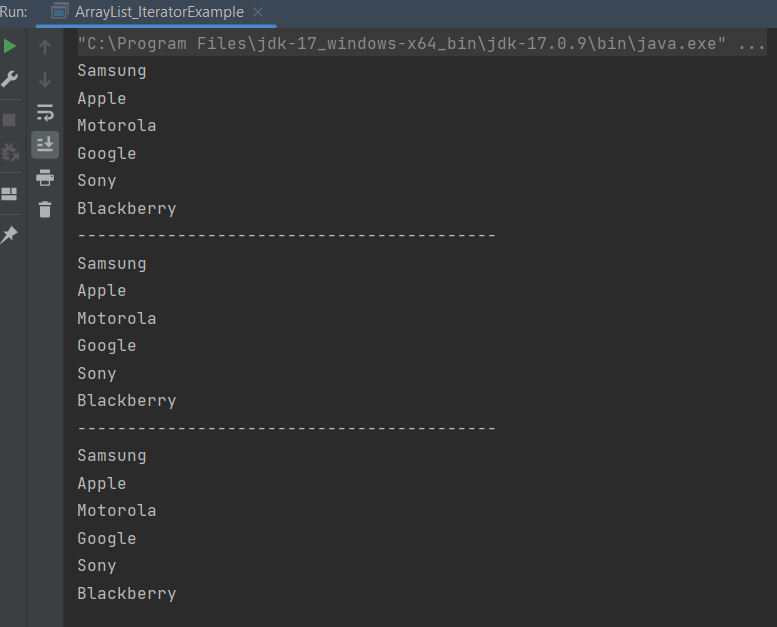
        for(String a:Companies)
            System.out.println(a);
        System.out.println("------------------------------------------");

        //Traversing list through for loop
        for(int i=0;i<Companies.size();i++)
        {
            System.out.println(Companies.get(i));
        }
        System.out.println("------------------------------------------");

        // Traversing list through For-Each loop
        for(String a:Companies)
            System.out.println(a);
    }
}

Java Tutorials

Java is a general-purpose programming language that is a concurrent, class-based, and object-oriented language. Java follows the concept of “write once and run anywhere (WORA).” This means that compiled Java code can be run on all different platforms that support Java. There’s no need for recompilation.

Eclipse IDE

Chapter 1 How to Download and Install Eclipse IDE
Chapter 2 How to Clone a project from GitLab using Eclipse
Chapter 3 How to Export Eclipse projects to GitLab

IntelliJ IDE

Chapter 1 How to install IntelliJ on Windows
Chapter 2 How to create a Java project in IntelliJ
Chapter 3 How to Clone a project from GitLab using IntelliJ
Chapter 4 How to Export IntelliJ project to GitLab

Basics of Java

Chapter 1 How to Download & Install Java JDK 11 in Windows
Chapter 2 Data Types and Operators in Java
Chapter 3 Decision Making in Java – If, If Else, Switch, Break, Continue
Chapter 4 Loop Control Statements in Java – For, While, Do While, Enhanched For Loop
Chapter 5 String Manipulation
Chapter 6 Difference between == and equals() method in Java
Chapter 7 Arrays in Java
Chapter 8 Java Access Modifiers: Explained with Examples
Chapter 9 ArrayList in Java
Chapter 10 How to compare ArrayLists – contains?
Chapter 11 How to compare ArrayLists – containsAll method?
Chapter 12 Methods in Java
Chapter 13 Method Overloading in Java
Chapter 14 Constructors in Java   
Chapter 15 This Keyword in Java   
Chapter 16 Static Keyword – Static Variable and Static Method in Java
Chapter 17 Difference between Static Method and Non-Static Method
Chapter 18 How to use Java Lambda expression to create thread via Runnable function
Chapter 19 runAsync and supplyAsync in ComputableFuture in Java8
Chapter 20 HashMap in Java
Chapter 21 LinkedHashMap in Java
Chapter 22 Iterators in Java

OOPs Concepts

Chapter 1 Class and Object in Java
Chapter 2 Inheritance in Java
Chapter 3 Encapsulation in Java
Chapter 4 Polymorphism in Java
Chapter 5 Abstraction in Java
Chapter 6 Interface in Java
Chapter 7 Difference between Abstract Class and Interface

Exceptions in Java

Chapter 1 Exception Handling in Java
Chapter 2 Java Exceptions Tutorial: Built-in and User-defined Exceptions
Chapter 3 Flow control in try catch finally in Java
Chapter 4 Multiple Catch Exceptions
Chapter 5 Throw in Java
Chapter 6 Throws in Java

Data Handling (Excel Manipulation)

Chapter 1 How to download and install Apache POI
Chapter 2 Reading Excel Data with Apache POI in Java
Chapter 3 How to Write Data to Excel File in Java using Apache POI
Chapter 4 How to update existing excel in Java
Chapter 5 Java Excel Tutorial: Creating Excel with Formulas Using Apache POI
Chapter 6 Change Font Style in Excel with Apache POI – NEW

Multiple Choice Questions

Chapter 1 Multiple questions on Exception Handling in Java

Java Library

Chapter 1 AssertJ – Fluent Assertions in Java