In this tutorial I will explain the steps to delete a directory in Java.
The delete() method of the File class deletes the files and empty directory represented by the current File object. If a directory is not empty or has files, then it can’t be deleted directly. First, empty the directory, then delete the folder.
Suppose there exists a directory with path Desktop\Test. The next image displays the files and directories present inside Test folder. The Test directory has folders Demo_1, Demo_2, and Demo_3.
The next java programs illustrate how to delete a directory. This example uses a recursive method to delete the directory and all its contents, including subdirectories.
package org.example;

import java.io.File;

public class DeleteDirectoryDemo {

    public static void main(String[] args) {

        String directoryPath = "C:\\Users\\Vibha\\Desktop\\Test";

        //Create a file object for the directory
        File directory = new File(directoryPath);

        if(directory.exists()&& directory.isDirectory()) {
            boolean successful = deleteDirectory(directory);
            if (successful) {
                System.out.println("Directory deleted :" + directoryPath);
            } else {
                System.out.println("Failed to delete Directory :" + directoryPath);
            }
        } else {
            System.out.println("Directory does not exists :" + directoryPath);

            }
        }

        private static boolean deleteDirectory(File directory) {
            File[] allContents = directory.listFiles();

            if (allContents != null) {
                for (File file : allContents) {
                    deleteDirectory(file);
                    System.out.println("File deleted :" + file);
                }
            }
            return directory.delete();
        }
    }
Explanation
Step 1 – Check if the directory exists.
if(directory.exists()&& directory.isDirectory())
Step 2 – List files in the directory.
File[] allContents = directory.listFiles();
Step 3 – Delete files and subdirectories recursively
In this tutorial, we will discuss how to validate the HTTP response status code, status like, header, body and Content Type using REST Assured. Every HTTP Response received from a server in response to an HTTP request sent by the client has a status code.
Verifying HTTP Response Status Code with Rest Assured
A response code indicating the status of the request (e.g., 200 OK, 404 Not Found). The status code that the server returns tells us whether the request was successful or not. If the request was successful, the server sends the status code in the range of 200-299. If the request was not successful, then the status code other than the range is returned.
The getStatusCode() method returns an integer and then we can verify its value.
Below is an example.
@Test
    public void verifyStatusCode() {

        String BaseURL = "https://dummy.restapiexample.com/api";

        // GIVEN
       Response response =  given()

                // WHEN
                .when()
                .get("https://reqres.in/api/users/2")

                // THEN
                .then()
               .extract().response();

       int actualStatusCode = response.getStatusCode();
       System.out.println("Status Code : " + actualStatusCode);

        Assert.assertEquals(200, actualStatusCode);

    }
The output of the above program is
Verifying HTTP Response Status Line with Rest Assured
The getStatusLine() method returns a string and then we can verify its value.
 @Test
    public void verifyStatusLine() {

        // GIVEN
        Response response =  given()

                // WHEN
                .when()
                .get("https://reqres.in/api/users/2")

                // THEN
                .then()
                .extract().response();

        String actualStatusLine = response.getStatusLine();
        System.out.println("Status Line : " + actualStatusLine);

        Assert.assertEquals("HTTP/1.1 200 OK", actualStatusLine);

    }
The output of the above program is
Verifying HTTP Response Body with Rest Assured
In the below example, we are obtaining the body content of the HTTP response using the getBody().
XML Path Language(XPath) is a query language for selecting nodes from an XML document. XPath provides a syntax for navigating through elements and attributes in an XML document. Paths can be absolute or relative:
Absolute paths starts from the root node, using a single slash (/) e.g., “//rootelement”.
Relative paths start from the current context node, using the double slashes (//) e.g., “//element”.
What is XmlPath in Rest Assured?
XmlPath is a utility that allows us to parse and query XML responses. XmlPath is analogous to JsonPath, but it is specifically designed for handling the XML data.
Add the below mentioned dependency to the pom.xml.
In this tutorial we’re going to talk about parameterizing the REST Assured tests.
What is Parameterization?
Parameterization refers to the process of passing different set of data to the same code. This allows you to verify that the code behaves as expected for various inputs without writing multiple test cases. It enhances the coverage of the test suite by testing the functionality with different data sets and helps identify edge cases or potential bugs that could occur with different input values.
We are using junit4-dataprovider dependency here.
<!-- Data Provider -->
 <dependency>
      <groupId>com.tngtech.junit.dataprovider</groupId>
      <artifactId>junit4-dataprovider</artifactId>
      <version>${junit.dataprovider.version}</version>
      <scope>test</scope>
</dependency>
The first step is to create a test data collection, which is a collection of input and expected outcome values that we want to feed to our test.
@RunWith(DataProviderRunner.class): This annotation tells JUnit to run the tests in this class using the DataProviderRunner, which allows the use of the @DataProvider annotation for parameterized tests
@RunWith(DataProviderRunner.class)
@DataProvider: This annotation marks the method responseData as a provider of test data. The method returns a 2D array of objects (Object[][]), where each inner array represents a set of parameters for a single test run. The responseData method provides four sets of parameters: an ID, a first name, and a last name.
This code defines a parameterized test that verifies the first name and last name of users returned by the API https://reqres.in/api/users/{id} for given user IDs. The test runs multiple times, once for each set of parameters provided by the responseData method. The RestAssured library is used to perform the API requests and assertions.
The output of the above program is
Congratulations on making it through this tutorial and hope you found it useful! Happy Learning!! Cheers!!
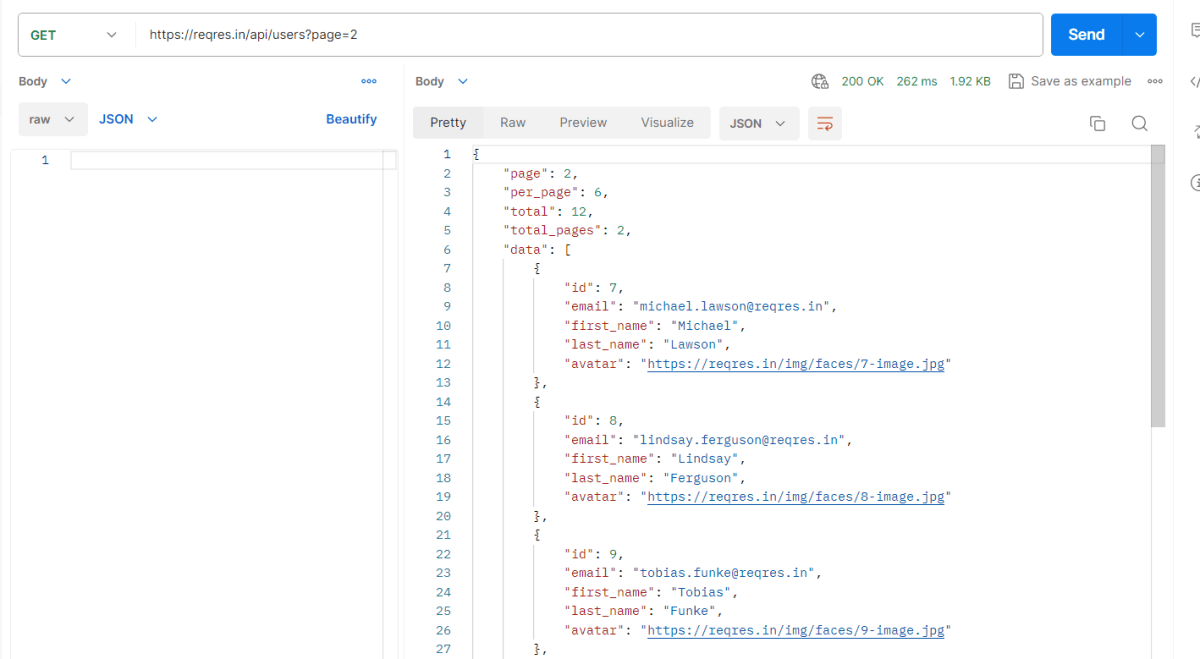
Query parameters are a way to pass information to an API flexibly and simply. They are added to the end of the API endpoint URL as a series of key-value pairs. To append query params to the end of a URL, a ‘?’ Is added followed immediately by a query parameter.
Prerequisite:
Python is installed on the machine
PIP is installed on the machine
PyCharm or other Python Editor is installed on the machine
Asynchronous request is where the client continues execution after initiating the request and processes the result whenever the AppServer makes it available.
The primary use case for Asynchronous HTTP is where the client polls the server for a delayed response. A common example isan AJAX chat client that pushes/pulls from both the client and the server. In this scenario, the client blocks a long period of time on the server’s socket while waiting for a new message.
Async is multi-thread, which means operations or programs can run in parallel. Sync is a single-thread, so only one operation or program will run at a time. Async is non-blocking, which means it will send multiple requests to a server.
We need to add the below mentioned dependency to pom.xml to test the async requests.
Database testing is an essential aspect of software testing that focuses on verifying the correctness, reliability, and performance of the database components of an application. Database testing automation eliminates manual efforts involved in executing repetitive and time-consuming tasks, such as data setup, data validation, and query optimization. This article will teach us how to insert a new row in the table in Microsoft SQL Server by establishing a Java connection
Why do we need to connect to databases in automation?
To get test data – If the database is automated, test data may be immediately retrieved and processed using a test automation script. To verify the result – To confirm the outcome, we may use automation to cross-check the front-end result to the database’s back-end record. To delete test data created – It is best practice in automation to remove test data that has been created. To do this, we use database automation and immediately execute the delete query. To update certain data – Update queries can be used to update test data per the requirements of the test script.
Before inserting a new row in the table
After inserting a row
Connecting to SQL Server in Java
Get a connection to Database
Create a statement object
Execute the SQL query
Process the Result Set
Get a connection to Database
Need a connection string in the form of a JDBC URL
Pass in the SQL query. Here, we want to insert data, so we need to use executeUpdate.
executeUpdate – Executes the given SQL statement, which may be an INSERT, UPDATE, or DELETE statement or an SQL statement that returns nothing, such as an SQL DDL statement. This method cannot be called on a PreparedStatement or CallableStatement.
 int rowAffected = stmt.executeUpdate(
                    "insert into employees (last_name, first_name, email, department,salary) values ('Singh', 'Vibha','vibha.test@gmail.com', 'QA', 85000)");
Process the resultSet
Result Set is initially placed before the first row. Method: Result.next() -moves forward one row returns true if there are more rows to process Looping through the result set.
DriverManager helps to connect an application based on the database connection string JDBC API is defined by package – java.sql and javax.sql
In the previous tutorial, we discussed How to disable Test Cases using TestNG. In this tutorial, we will see how we can create a dependency between Selenium Test Cases using TestNG.
Imagine there is a situation in which a test case can only be executed if a particular test case executes successfully. This can be achieved in TestNG by dependsOnMethod().
Below is an example.
To Run the TestNG program, right-click on the Java Program – here it is TestNGMethodDependencyDemo, select Run As TestNG Test(Eclipse).
Below is an example of dependsOnMethod() method.
import org.testng.annotations.Test;

public class TestNGMethodDependencyDemo {

    @Test
    public static void FirstTest() {
        System.out.println("This is Test Case 1");
    }

    @Test(dependsOnMethods = "FirstTest")
    public static void SecondTest() {
        System.out.println("This is Test Case 2 and will be executed after Test Case 1 successfully executed");
    }

    @Test
    public static void ThirdTest() {
        System.out.println("This is Test Case 3");
    }

    @Test
    public static void FourthTest() {
        System.out.println("This is Test Case 4");
    }
}
The output of the above program is
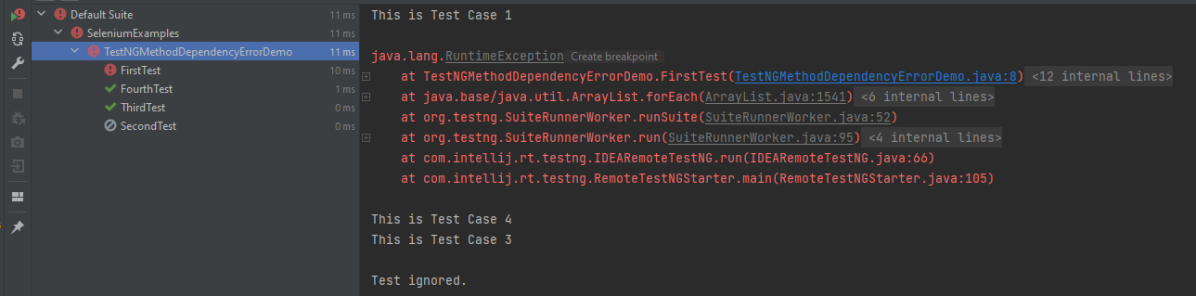
In the below scenario, Test Case 2 is dependent on Test CASE 1. If Test Case 1 fails, then Test Case 2 will skip.
package TestNGDemo;

import org.testng.annotations.Test;
public class TestNGMethodDependencyErrorDemo {

      @Test
      public static void FirstTest() {
            System.out.println("This is Test Case 1");
            throw new RuntimeException();
      }

      @Test(dependsOnMethods = "FirstTest")
      public static void SecondTest() {
          System.out.println("This is Test Case 2 and will be executed after Test Case 1 sucessfully executed");
     }

     @Test
     public static void ThirdTest() {
          System.out.println("This is Test Case 3");
     }

      @Test
      public static void FourthTest() {
            System.out.println("This is Test Case 4");
    }
}
The output of the above program is
We are done. Congratulations on making it through this tutorial and hope you found it useful!
TestNG is a testing framework inspired by JUnit and NUnit but introduces some new functionalities that make it more powerful and easier to use. The software testers to efficiently run the automated test scripts created in Selenium Webdriver use TestNG. Its full form is the “Testing New Generation” framework. It is used mostly to assert the results in an Automated Script as well as generate reports for test execution.
Follow the below steps to install TestNG on Eclipse:
Launch Eclipse go to the Help option present at the top and select –“Install New Software”.
A dialog box will appear, click on the Add button
A new dialog box will appear. Mention the Name as TestNG and the location as “http://beust.com/eclipse/” and click on the Add button.
Check the TestNG checkbox and click on the “Next” action button. The installation will start and the Eclipse will restart after installation.
To verify if TestNG is installed successfully or not, go to Window, select Show View, and then Other. Select Java and see within the Java folder, you will see TestNG. This shows that TestNG is successfully installed on the machine
Right-click on the project in Eclipse -> Select build path -> Configure Build Path.
Select the library tab -> Click on Add library button -> Select TestNG-> Click on Next -> Click on Finish and Apply and close.
6. It allows for cross-browser testing which means a web application tests on different browsers and operating systems. Here, mention different browser names in the parameter.
<parameter name="browser" value="Edge" />
7. It helps to integrate the TestNG framework in CI/CD pipelines such as GitLab, GitHub, Jenkins.
5. What are the types of Asserts in TestNG?
There are two types of assert in TestNG – Hard Assert and Soft Assert.
Hard Assert: Hard Assert is the normal assert that is used to do validations in the TestNG class.
We have to use the Assert class for hard assert as follows:
6. What is TestNG Assert and list out some common Assertions supported by TestNG?
TestNG Asserts help us to verify the condition of the test in the middle of the test run. Based on the TestNG Assertions, we will consider a successful test only if it completed the test run without throwing any exception. Some of the common assertions supported by TestNG are:
Groups are specified in your testng.xml file and can be found either under the <test> or <suite> tag. Groups specified in the <suite> tag apply to all the <test> tags underneath.
import org.testng.annotations.Test;

public class TestNGGroupDemo {

    @Test(alwaysRun = true, groups = { "e2etest", "integerationtest" })
    public void testPrintMessage() {
        System.out.println("This method is run by both e2e and integeration test");
    }

    @Test(alwaysRun = true, groups = { "e2etest" })
    public void testE2EMessage() {
        System.out.println("This method is run by e2e test");
    }

    @Test(alwaysRun = true, groups = { "integerationtest" })
    public void testingIntegrationMessage() {
        System.out.println("This method is run by integeration test");
    }

    @Test(alwaysRun = true, groups = { "acceptancetest" })
    public void testingAcceptanceMessage() {
        System.out.println("This method is run by Acceptance test");
    }

    @Test(alwaysRun = true, groups = { "e2etest", "acceptancetest" })
    public void testE2EAndAcceptanceMessage() {
        System.out.println("This method is run by both e2e and acceptance test");
    }

    @Test(alwaysRun = true, groups = { "e2etest", "integerationtest", "acceptancetest" })
    public void testE2EAndAcceptanceAndIntegrationMessage() {
        System.out.println("This method is run by e2e, integration and acceptance test");
    }

}
TestNG.xml
<?xml version = "1.0" encoding = "UTF-8"?>
<!DOCTYPE suite SYSTEM "http://testng.org/testng-1.0.dtd" >
<suite name = "TestNG Demo">
    <test name = "TestNG Grouping">
        <groups>
            <run>
                <include name = "e2etest" />
            </run>
        </groups>
        <classes>
            <class name = "TestNGGroupDemo" />
        </classes>
    </test>
</suite>
We use priority attribute to the @Test annotations. If no priority is assigned to a Test Case, then the annotated test methods are, executed as per the alphabetical order of the tests
import org.testng.annotations.Test;

public class TestNGPriorityDemo {

    @Test(priority = 3)
    public static void FirstTest() {
        System.out.println("This is Test Case 1, but after priority Test Case 3");
    }


    @Test(priority = 4)
    public static void SecondTest() {
        System.out.println("This is Test Case 2, but after priority Test Case 4");
    }


    @Test(priority = 2)
    public static void ThirdTest() {
        System.out.println("This is Test Case 3, but after priority Test Case 2");
    }


    @Test(priority = 1)
    public static void FourthTest() {
        System.out.println("This is Test Case 4, but after priority Test Case 1");
    }
}
9. How can we make one test method dependent on others using TestNG?
Using the dependsOnMethods parameter inside @Test annotation in TestNG we can make one test method run only after the successful execution of the dependent test method. Dependencyis a feature in TestNG that allows a test method to depend on a single or a group of test methods. Method dependency only works if the “depend-on-method” is part of the same class or any of the inherited base classes (i.e. while extending a class)
         @Test
            public static void FirstTest() {
                        System.out.println("This is Test Case 1");
            }

          @Test(dependsOnMethods = "FirstTest")
             public static void SecondTest() {
                        System.out.println("This is Test Case 2 and will be executed after Test Case 1 sucessfully executed");
            }

           @Test
           public static void ThirdTest() {
                       System.out.println("This is Test Case 3");
             }

           @Test
             public static void FourthTest() {
                            System.out.println("This is Test Case 4");
         }
}
11. How do you exclude a group from the test execution cycle?
Excluding a group in TestNG denotes that this particular group refrains from running during the execution, and TestNG will ignore it. Additionally, the name of the group that we want to exclude is defined in the XML file by the following syntax:
<?xml version = "1.0"encoding = "UTF-8"?>
<!DOCTYPE suite SYSTEM "http://testng.org/testng-1.0.dtd">
<suite name = "Suite1">
   <test name = "Test Demo">
      <groups>
         <run>
            <exclude name = "e2etest"/>
         </run>
      </groups>
      <classes>
         <class name = "com.selenium.testng.TestNGDemo.TestNGGroupDemo"/>
      </classes>
   </test>
</suite>
By putting our group “e2etest” inside the exclude tag, we are requesting TestNG to ignore the test cases under the group “e2etest”.
12. How to run test cases in parallel using TestNG?
In testng.xml, if we set the ‘parallel’ attribute on the tag to ‘methods’, testNG will run all the ‘@Test’ methods in the tag in a separate thread.
The parallel attribute of suite tag can accept four values:
tests – All the test cases inside tag of testng.xml file will run parallel classes – All the test cases inside a java class will run parallel methods – All the methods with @Test annotation will execute parallel instances – Test cases in same instance will execute in parallel but two methods of two different instances will run in a different thread.
13. What is the use of @Listener annotation in TestNG?
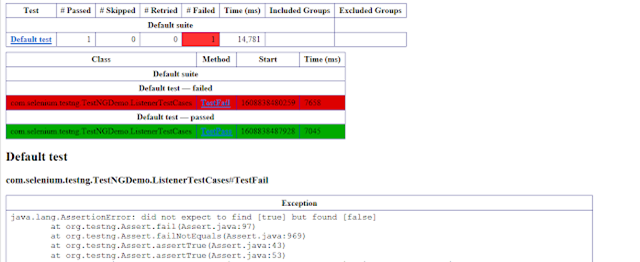
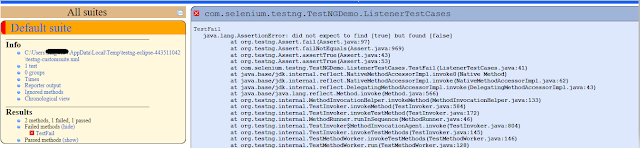
A listener is defined as an interface that modifies the default TestNG’s behavior. It allows customizing TestNG reports or logs. There are many types of TestNG listeners available. Here are a few listeners:
20. How to pass the parameter in the test case through testng.xml file?
TestNG can pass different test data to a test case as arguments which is called parametrization
@Parameters("value")
TestNG.xml looks like this as shown below. Here, the parameter name is the browser name value for the browser is “Chrome”. So, this “Chrome” value is passed to Test as a parameter, and as a result a Google Chrome browser opens.
<?xml version = "1.0" encoding = "UTF-8"?>
<!DOCTYPE suite SYSTEM "http://testng.org/testng-1.0.dtd" >
<suite name = "TestSuite">
  <test name="ChromeTest">
<parameter name="browser" value="Chrome" />
<classes>
<class name="com.selenium.testng.TestNGDemo.TestNGParameterizationDemo">
</class>
</classes>
</test>
</suite>
TestNG provides several features like prioritizing the test cases, grouping the test cases, skipping the test cases, defining dependencies between test cases, and so on. The previous tutorial has explained the parameters in TestNG.
In this tutorial, we will see how the test cases can be prioritized using TestNG. If no priority is assigned to a Test Case, then the annotated test methods are executed as per the alphabetical order of the tests.
Below is an example
import org.testng.annotations.Test;

public class TestNGPriorityDemo {


     @Test
     public static void FirstTest() {
           System.out.println("This is Test Case 1");
     }

     @Test
     public static void SecondTest() {
           System.out.println("This is Test Case 2");
     }

     @Test
     public static void ThirdTest() {
           System.out.println("This is Test Case 3");
     }

     @Test
     public static void FourthTest() {
           System.out.println("This is Test Case 4");
     }
}
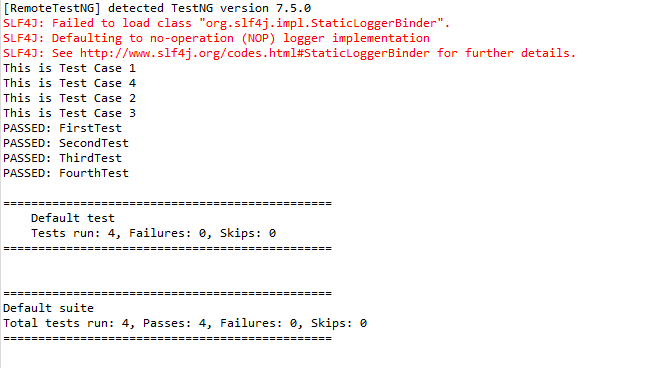
The output of the above program is
In the above example, FirstTest and FourthTest have the highest preference as per the alphabetical order. F comes before S and T. FirstTest is executed before Fourth because preference of I is higher than O.
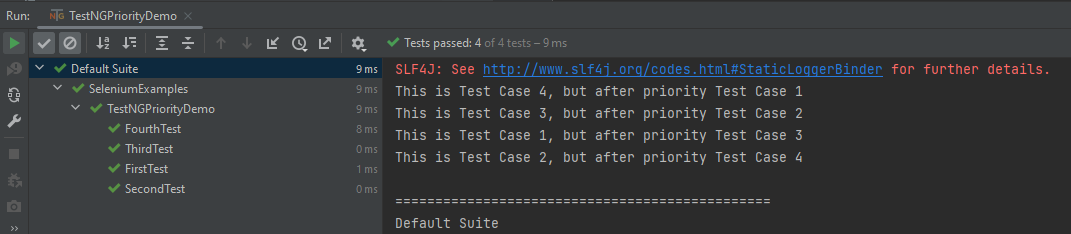
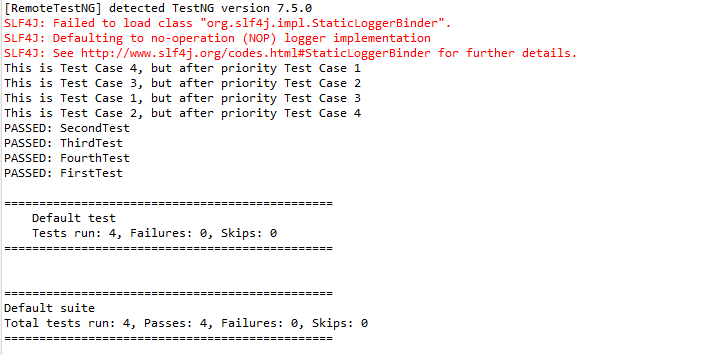
The methods can be prioritized by assigning a number to the annotated test cases. The smaller the number, the higher the priority. Priority can be assigned as parameters while defining the test cases. In the below example, we have assigned priority to test cases, and now they are executed as per the priority. The Test Case with priority = 1 has the highest precedence. It overrides the rule of executing test cases by alphabetical order.
To Run the TestNG program, right-click on the program, select Run As TestNG Test.
import org.testng.annotations.Test;

public class TestNGPriorityDemo {


     @Test(priority = 3)
     public static void FirstTest() {
           System.out.println("This is Test Case 1, but after priority Test Case 3");
     }


     @Test(priority = 4)
     public static void SecondTest() {
           System.out.println("This is Test Case 2, but after priority Test Case 4");
     }


     @Test(priority = 2)
     public static void ThirdTest() {
           System.out.println("This is Test Case 3, but after priority Test Case 2");
     }


     @Test(priority = 1)
     public static void FourthTest() {
          System.out.println("This is Test Case 4, but after priority Test Case 1");
     }
}
The output of the above program is
We are done. Congratulations on making it through this tutorial and hope you found it useful!








 QA Automation Expert