DataProviders in TestNG

HOME

In the last tutorial, I have explain the Parameters in TestNG which passes different test data to the test case as arguments. Similar to TestNG Parameters, DataProviders are a means to pass data to test scripts in TestNG. In this tutorial, I will explain about the DataProviders in TestNG.

What is DataProvider in TestNG?

The DataProvider in TestNG is another way to pass the parameters in the test function, the other one being TestNG parameters. Using DataProvider in TestNG, we can easily inject multiple values into the same test case. It comes inbuilt in TestNG and is popularly used in data-driven frameworks.

Syntax of DataProvider

@DataProvider (name = "name_of_dataprovider")
public Object[][] dpMethod() {
    return new Object [][] { values}
}
  •  A Data Provider is a method on the class that returns an array of array of objects.  This method is annotated with @DataProvider
  • A @Test method specifies its Data Provider with the dataProvider attribute. This name must correspond to a method on the same class annotated with @DataProvider(name=”…”) with a matching name.
  • TestNG dataprovider returns a 2d list of objects..An array of array of objects (Object[][]) where the first dimension’s size is the number of times the test method will be invoked and the second dimension size contains an array of objects that must be compatible with the parameter types of the test method.
  • DataProviders are not declared on top of the functions like TestNG parameters but have a method of their own, which in regular speaking terms called a dataprovider method. For example, dpMethod here.
  • The dataprovider name calls the dataprovider method, and if there is no name specified by the tester, then the dataprovider method is the default name used in the receiving @Test case.
  • Data providers can run in parallel with the attribute parallel.

Below is the basic example of using DataProvider in TestNG.

import org.openqa.selenium.By;
import org.openqa.selenium.Keys;
import org.openqa.selenium.WebDriver;
import org.openqa.selenium.WebElement;
import org.openqa.selenium.chrome.ChromeDriver;
import org.openqa.selenium.chrome.ChromeOptions;
import org.testng.annotations.AfterMethod;
import org.testng.annotations.BeforeMethod;
import org.testng.annotations.DataProvider;
import org.testng.annotations.Test;

public class DataProvider_Demo {

    WebDriver driver;

    @DataProvider(name = "testData")
    public Object[][] dataProvFunc() {
        return new Object[][] { { "Selenium" }, { "TestNG" } };
    }

    @BeforeMethod
    public void setUp() {

        System.out.println("Start the test");
        ChromeOptions options = new ChromeOptions();
        options.addArguments("--start-maximized");
        driver = new ChromeDriver(options);
        driver.get("https://www.bing.com/");
        
    }

    // Passing the dataProvider to the test method through @Test annotation
    @Test(dataProvider = "testData")
    public void search(String keyWord) {
        WebElement txtBox = driver.findElement(By.id("sb_form_q"));
        txtBox.sendKeys(keyWord);
        System.out.println("Keyword entered is : " + keyWord);
        txtBox.sendKeys(Keys.ENTER);
        System.out.println("Search result is displayed.");
    }

    @AfterMethod
    public void burnDown() {
        driver.quit();

        System.out.println("End the test");
    }

}

In the above example, I am passing two search keywords, viz “Selenium” and “TestNG” to the test method using the DataProvider method. You can run the code and check the output.

Here, Test is executed with two values, but we have run the test only once.

Inheriting DataProvider in TestNG

It is messy to have supporting methods like DataProvider and test code in one class. It is always preferred to declare the test case in one class and define TestNG parameters like DataProviders in another class. By default, the data provider will be looked for in the current test class or one of its base classes. If you want to put your data provider in a different class, it needs to be a static method or a class with a non-arg constructor, and you specify the class where it can be found in the dataProviderClass attribute.

Let us create separate classes for the DataProvider method and the test method, as shown below:

DataProvider Class

public class DPDemo {

	@DataProvider(name = "testData")
	public Object[][] dataProvFunc() {
		return new Object[][] { 
          { "Selenium" }, { "TestNG" }, { "Automation" } };
	}
}

We can see that all we did was create a DataProvider method in a Class and create a new class for Test Code.

import org.openqa.selenium.By;
import org.openqa.selenium.Keys;
import org.openqa.selenium.WebDriver;
import org.openqa.selenium.WebElement;
import org.openqa.selenium.chrome.ChromeDriver;
import org.openqa.selenium.chrome.ChromeOptions;
import org.testng.annotations.AfterMethod;
import org.testng.annotations.BeforeMethod;
import org.testng.annotations.Test;

public class DataProviderInheritance_Demo {

    WebDriver driver;

    @BeforeMethod
    public void setUp() {

        System.out.println("Start the test");
        ChromeOptions options = new ChromeOptions();
        options.addArguments("--start-maximized");
        driver = new ChromeDriver(options);
        driver.get("https://www.bing.com/");

    }

    // Passing the dataProvider to the test method through @Test annotation
    @Test(dataProvider = "testData", dataProviderClass = DPDemo.class)
    public void search(String keyWord) {
        WebElement txtBox = driver.findElement(By.id("sb_form_q"));
        txtBox.sendKeys(keyWord);
        System.out.println("Keyword entered is : " + keyWord);
        txtBox.sendKeys(Keys.ENTER);
        System.out.println("Search result is displayed.");
    }

    @AfterMethod
    public void burnDown() {
        driver.quit();
        System.out.println("End the test");
    }

}

As you can see, to handle the inheritance, all we did was add an attribute to the test method (highlighted above), which specifies the class that has the DataProvider method. 

Passing Multiple Parameter Values in TestNG DataProviders

Passing multiple values is pretty similar to passing numerous parameters. The only difference is that we will pass various values to a single parameter so that a string of input(s) is sent in one go.

Let us quickly understand this concept with the help of the code as shown below.

DataProvider Class

public class DPDemo {

	@DataProvider(name = "testData")
	public Object[][] dataProvFunc() {
		return new Object[][] { { "Automation Tester", "2-5 years" }, { "Performance Tester", "3+ years" },
				{ "DevOps", "5+ years" } };
	}
}

Test Code – DataProviderInheritanceDemo

import org.openqa.selenium.By;
import org.openqa.selenium.Keys;
import org.openqa.selenium.WebDriver;
import org.openqa.selenium.WebElement;
import org.openqa.selenium.chrome.ChromeDriver;
import org.openqa.selenium.chrome.ChromeOptions;
import org.testng.annotations.AfterMethod;
import org.testng.annotations.BeforeMethod;
import org.testng.annotations.Test;

public class DataProviderInheritanceDemo {

    WebDriver driver;

    @BeforeMethod
    public void setUp() {

        System.out.println("Start the test");
        ChromeOptions options = new ChromeOptions();
        options.addArguments("--start-maximized");
        driver = new ChromeDriver(options);
        driver.get("https://www.bing.com/");

    }

    // Passing the dataProvider to the test method through @Test annotation
    @Test(dataProvider = "testData", dataProviderClass = DPDemo.class)
    public void search(String keyWord1, String keyWord2) {

        WebElement txtBox = driver.findElement(By.id("sb_form_q"));
        txtBox.sendKeys(keyWord1, keyWord2);
        System.out.println("Keyword entered is : " + keyWord1 + " " + keyWord2);
        txtBox.sendKeys(Keys.ENTER);
        System.out.println("Search result is displayed.");
    }

    @AfterMethod
    public void burnDown() {
        driver.quit();
        System.out.println("End the test");
    }
}

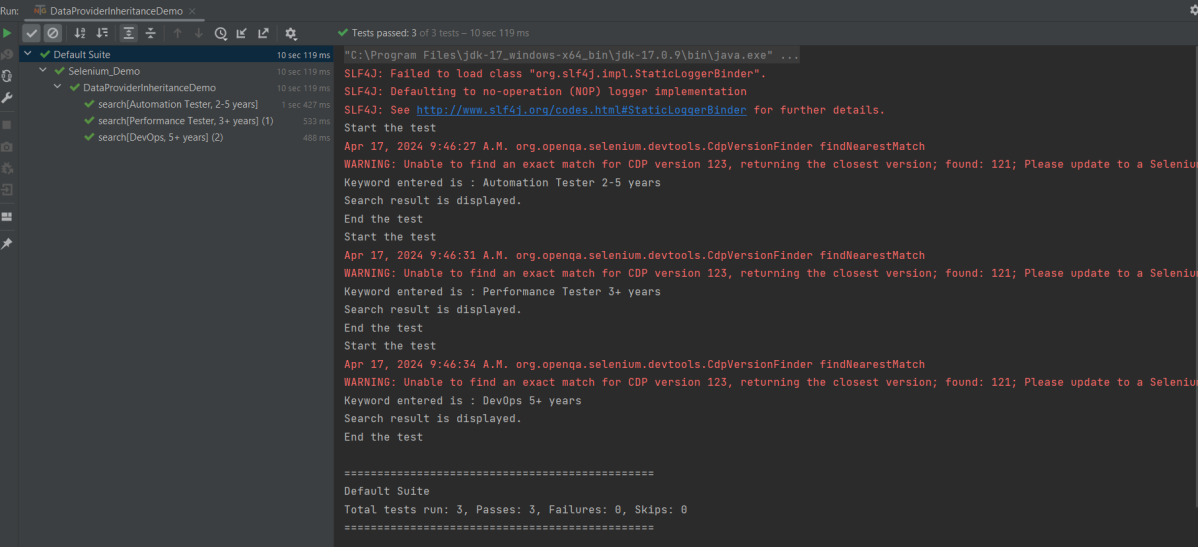
Run the test script, and you will see both the values for the TestNG parameters being passed in one go.

We are done! Congratulations on making it through this tutorial and hope you found it useful! Happy Learning!!

TestNG Tutorials

HOME

Chapter 1 TestNG Annotations
Chapter 2 Assertions in TestNG
Chapter 3 Hard Assert and Soft Assert
Chapter 4 How to create and run TestNG.xml of a TestNG class
Chapter 5 How to pass Parameters in TestNG
Chapter 6 Prioritizing Test Cases in TestNG: Complete Guide
Chapter 7 How to disable Selenium Test Cases using TestNG Feature – @Ignore
Chapter 8 How to Use dependsOnMethods() in TestNG for Selenium Test Case Dependency
Chapter 9 How to group Tests in Selenium
Chapter 10 InvocationCount in TestNG
Chapter 11 How to run Parallel Tests in Selenium with TestNG
Chapter 12 Cross Browser Testing using Selenium and TestNG
Chapter 13 Screenshot of Failed Test Cases in Selenium WebDriver
Chapter 14 TestNG Listeners in Selenium
Chapter 15 How to Retry failed tests in TestNG – IRetryAnalyzer
Chapter 16 DataProviders in TestNG
Chapter 17 DataProvider in TestNG using Excel
Chapter 18 Parallel testing of DataProviders in TestNG
Chapter 19 TestNG Interview Questions

Category 4: Test Framework

Chapter 1 Integration of REST Assured with TestNG
Chapter 2 Integration of Cucumber with Selenium and TestNG
Chapter 3 Integration Testing of Springboot with Cucumber and TestNG

Gradle

Chapter 1 How to create Gradle project with Selenium and TestNG
Chapter 2 Gradle Project with Cucumber, Selenium and TestNG

Category 5: Reporting with TestNG

Chapter 1 Gradle – Allure Report for Selenium and TestNG
Chapter 2 Gradle – Allure Report for Cucumber, Selenium and TestNG
Chapter 3 Integration of Allure Report with Rest Assured and TestNG
Chapter 4 Gradle – Allure Report for Selenium and TestNG

ExtentReports with TestNG

Chapter 1 ExtentReports Version 5 for Cucumber 6 and TestNG
Chapter 2 PDF ExtentReport for Cucumber and TestNG
Chapter 3 ExtentReports Version 5 for Cucumber 7 and TestNG

Parallel testing of DataProviders in TestNG

HOME

The previous tutorial has explained the DataProviders in TestNG. The DataProvider in TestNG is a way to pass the parameters in the test functions. Using DataProvider in TestNG, we can easily inject multiple values into the same test case. It comes inbuilt into TestNG and is popularly used in data-driven frameworks.

 It is an option for the parallel execution of tests in TestNG. 

It is advisable to create 2 classes – one class contains the Test cases and another class defines TestNG parameters – DataProviders.

Let us create a class for the DataProvider method with all the Test Data as shown below:

import org.testng.annotations.DataProvider;

public class DataProviderDemo {	
	
	 @DataProvider(name = "testData", parallel=true)
	 public Object[][] dataProvFunc() {
	       return new Object[][] {           
	    	   {"","","Username cannot be empty"},    	  
	    	   {"","Test","Username cannot be empty"},
	    	   {"$%1234","2345%$","Invalid credentials"}          
	    	 };
	    }
	}

An extra parameter “parallel” is required to initiate parallel execution in TestNG using the data provider.

Below is the test which uses the parameter from the data provider and runs the tests parallelly.

A new ThreadLocal is instantiated for each test class, since it’s in the BeforeClass annotation.

private static final ThreadLocal<WebDriver> WEB_DRIVER_THREAD_LOCAL = new ThreadLocal<WebDriver>();

Below is the complete test code:

import org.openqa.selenium.By;
import org.openqa.selenium.WebDriver;
import org.openqa.selenium.chrome.ChromeDriver;
import org.testng.Assert;
import org.testng.annotations.AfterMethod;
import org.testng.annotations.BeforeMethod;
import org.testng.annotations.Test;

public class DataProviderParallelTests {
	
	public WebDriver driver;
	private static final ThreadLocal<WebDriver> WEBDRIVER_THREADLOCAL = new ThreadLocal<WebDriver>();
	
	 @BeforeMethod
    public void setUp(){

        System.setProperty("webdriver.chrome.driver",
                "C:\\Users\\Vibha\\Software\\chromedriver\\chromedriver.exe");
        driver = new ChromeDriver();
        WEBDRIVER_THREADLOCAL.set(driver);
        System.out.println("Before method Thread Id:" + Thread.currentThread().getId());
        
    }
	
	@Test(dataProvider = "testData", dataProviderClass = DataProviderDemo.class)
    public void invalidLoginTest(String username, String password, String errorMessage) throws InterruptedException {
		     
	    driver = WEBDRIVER_THREADLOCAL.get();
	    driver.manage().window().maximize();
        driver.get("https://opensource-demo.orangehrmlive.com/");
     
        Thread.sleep(2000);
        driver.findElement(By.name("txtUsername")).sendKeys(username);
        System.out.println("Username :" + username);
        
        Thread.sleep(2000);
        driver.findElement(By.name("txtPassword")).sendKeys(password);
        System.out.println("password :" + password);
        
        Thread.sleep(2000);
        String expectedError = driver.findElement(By.id("spanMessage")).getText();
        System.out.println("Error Message :" + expectedError);
        Assert.assertTrue(expectedError.contains(errorMessage));

    }
		 
	@AfterMethod
	public void tear_down() {
		 
		 WebDriver driver = WEBDRIVER_THREADLOCAL.get();
		 System.out.println("After method Thread Id:" + Thread.currentThread().getId());
	        if (driver != null) {
	            driver.quit();
	     }
    }	
}

testng.xml

<?xml version="1.0" encoding="UTF-8"?>
<!DOCTYPE suite SYSTEM "https://testng.org/testng-1.0.dtd">
<suite name="Suite" thread-count="2" data-provider-thread-count="2">
  <test name="Test">
    <classes>
      <class name="DataProvider.DataProviderParallelTests"/>
    </classes>
  </test> <!-- Test -->
</suite> <!-- Suite -->

In this file, the data-provider-thread-count is set to 2, then two browsers will be opened, and the first two tests will run from the list. 

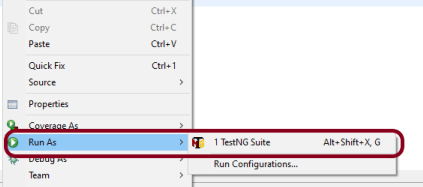
Run the test script from testng.xml, Right-Click on the XML, and select Run As ->TestNG Suite.

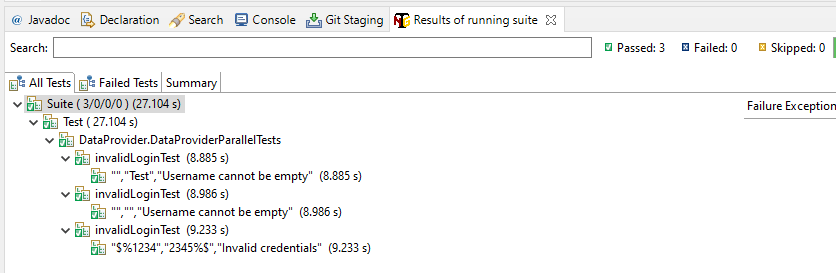
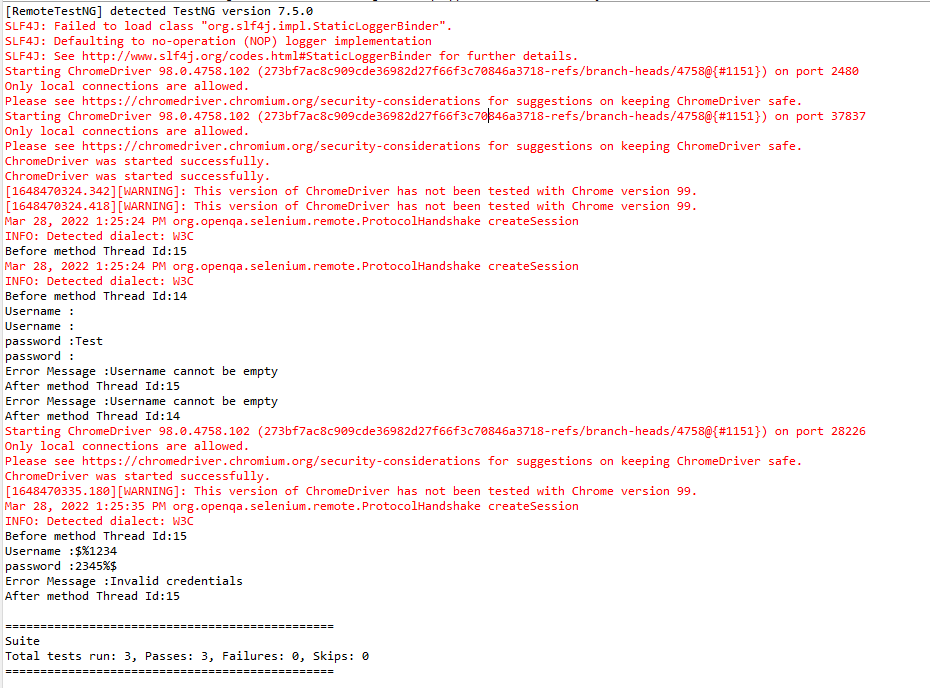
The execution status shown below shows that 2 threads are active at a time, which execute 2 sets of data provider parameters – Thread 14 and Thread 15. Once the tests are finished for Thread 14 and Thread 15, they are closed and a new Thread 15 is again initiated to start the test execution of the 3rd parameter.

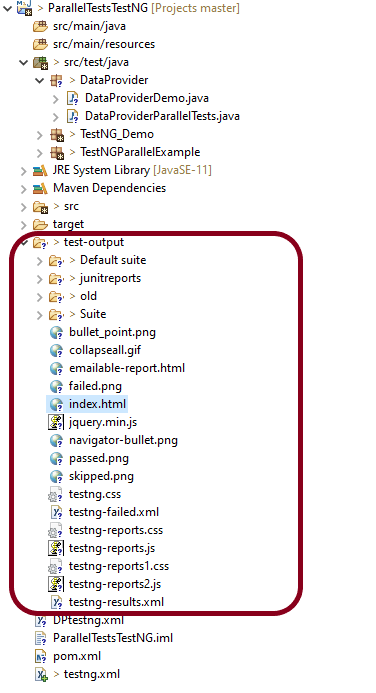
TestNG generates multiple test reports under the folder test-output. We are mainly concerned about 2 reports – emailable-report.html and index.html.

Emailable-report.html

Emailable reports are a type of summary report that one can transfer to other people in the team through any medium. 

Index.html

Index report contains the index-like structure of different parts of the report, such as failed tests, test files, passed tests, etc. We can divide this report into two parts. The left part contains the index, and this is the reason it is called an index report, while the right part contains the explored content of that index.

We are done! Congratulations on making it through this tutorial and hope you found it useful! Happy Learning!!
DataProvider in TestNG using Excel

HOME

In the previous tutorial, I explained the DataProvider in TestNG without using Excel. In this tutorial, I will explain the use of Excel in DataProvider for TestNG.

I have created an Excel – SearchInBing.xlsx and placed it on the Desktop. You can create a Test Data folder in your project and place the Excel file within it. So, my datasheet looks like the below:

Next, we will create a DataProvider method that will use another method to read the Excel file & create a 2D object from the row & column values of the Excel and return the same value, so that our test script can use it. The code for it would look like the below:

import org.apache.poi.ss.usermodel.Cell;
import org.testng.annotations.DataProvider;

import java.io.FileInputStream;
import java.io.IOException;

import org.apache.poi.xssf.usermodel.XSSFRow;
import org.apache.poi.xssf.usermodel.XSSFSheet;
import org.apache.poi.xssf.usermodel.XSSFWorkbook;

public class ExcelDataProvider {

    @DataProvider(name = "excelData")
    public Object[][] excelDataProvider() throws IOException {

        // We are creating an object from the excel sheet data by calling a method that
        // reads data from the excel stored locally in our system
        Object[][] arrObj = getExcelData(
                C:\\Users\\Vibha\\Desktop\\SearchInBing.xlsx","Details");
        return arrObj;
}

    // This method handles the excel - opens it and reads the data from the
    // respective cells using a for-loop & returns it in the form of a string array
    public String[][] getExcelData(String fileName, String sheetName) throws IOException {
        String[][] data = null;
        try {

            FileInputStream fis = new FileInputStream(fileName);
            XSSFWorkbook workbook = new XSSFWorkbook(fis);
            XSSFSheet sheet = workbook.getSheet(sheetName);
            XSSFRow row = sheet.getRow(0);
            int noOfRows = sheet.getPhysicalNumberOfRows();
            int noOfCols = row.getLastCellNum();
            Cell cell;
            data = new String[noOfRows - 1][noOfCols];

            for (int i = 1; i < noOfRows; i++) {
                for (int j = 0; j < noOfCols; j++) {
                    row = sheet.getRow(i);
                    cell = row.getCell(j);
                    data[i - 1][j] = cell.getStringCellValue();
                }
            }
        } catch (Exception e) {
            System.out.println("The exception is: " + e.getMessage());
        }
        return data;
    }
}

Now, create a class that contains the test code. By default, the data provider will be looked for in the current test class or one of its base classes. If you want to put your data provider in a different class, it needs to be a static method or a class with a no-arg constructor, and you specify the class where it can be found in the data provider class attribute.

import io.github.bonigarcia.wdm.WebDriverManager;
import org.openqa.selenium.By;
import org.openqa.selenium.Keys;
import org.openqa.selenium.WebDriver;
import org.openqa.selenium.WebElement;
import org.openqa.selenium.chrome.ChromeDriver;
import org.testng.Assert;
import org.testng.annotations.AfterMethod;
import org.testng.annotations.BeforeMethod;
import org.testng.annotations.Test;

public class DataProviderWithExcelDemo {
    
  WebDriver driver;

   @BeforeMethod
    public void setUp() {
        System.out.println("Start test");
        WebDriverManager.chromedriver().setup();
        driver = new ChromeDriver();
        driver.get("https://www.bing.com");
        driver.manage().window().maximize();

    }

    @Test(dataProvider = "excelData", dataProviderClass = ExcelDataProvider.class)
    public void search(String keyWord1, String keyWord2) {

        WebElement txtBox = driver.findElement(By.id("sb_form_q"));
        txtBox.sendKeys(keyWord1, " ", keyWord2);
        System.out.println("Keyword entered is : " + keyWord1 + " " + keyWord2);
        txtBox.sendKeys(Keys.ENTER);
        System.out.println("Search results are displayed.");
        System.out.println("RESULT: "+ driver.getTitle());
        Assert.assertTrue(driver.getPageSource().contains(keyWord1));
    }

    @AfterMethod
    public void burnDown() {
        driver.quit();
    }

}

To run the code, right-click and Select – TestNG Test.

The Execution status will look like this, as shown below:

This test execution generates reports under the test-output folder.

We are concerned about two reports – index.html and emailable-report.html.

Below is the image of emailable-report.html.

Below is the image of index.html.

See how easy it is to read data from Excel and use it in the Test Code using DataProvider.

I hope you have enjoyed this tutorial. Happy Learning!!