SQL Multiple Choice Questions – MCQ1

HOME

Answer


Answer


Answer


Answer


Answer


Answer


DROP TABLE Student;

Answer


Answer


Answer


Answer


Answer


Answer


Answer


Answer


CREATE TABEL Students (ID int, Name varchar(50));

Answer


Answer


a) SELECT * FROM Students
b) SELECT [all] FROM Students
c) SELECT *.Students
d) SELECT Students

Answer


a) SELECT * FROM Students WHERE FirstName='Peter'
b) SELECT * FROM Students WHERE FirstName<>'Peter'
c) SELECT [all] FROM Students WHERE FirstName LIKE 'Peter'
d) SELECT [all] FROM Students WHERE FirstName='Peter'

Answer


a) SELECT * FROM Students WHERE FirstName LIKE 'a%'
b) SELECT * FROM Students WHERE FirstName='%a%'
c) SELECT * FROM Students WHERE FirstName='a'
d) SELECT * FROM Students WHERE FirstName LIKE '%a'

Answer


Answer


CREATE TABLE Students (ID int PRIMARY, Name varchar(50));

Answer


ALTER TABLE Students ADD COLUMN Email varchar(50);

Answer


Answer


SELECT Name FROM Employees WHERE Age > 30 AND Department = 'HR';

Answer

====================================================================

SQL Multiple Choice Questions – MCQ2
SQL Multiple Choice Questions – MCQ3

BDD Multiple Choice Answers – MCQ1

HOME

BDD Multiple Choice Questions – MCQ1


Git Multiple Choice Answers – MCQ1

HOME

Git Multiple Choice Questions – MCQ1


git config --global user.name "Your Name"


git checkout -b feature/customerDetails


Git Multiple Choice Questions – MCQ1

HOME

Answer


Answer


Answer


Answer


Answer


Answer


Answer


Answer


Answer


Answer


Answer


Answer


Answer


Answer


Answer


Answer


Answer


git remote -v

Answer


Answer


Answer


Answer


Answer


Answer


Answer


Answer

====================================================================

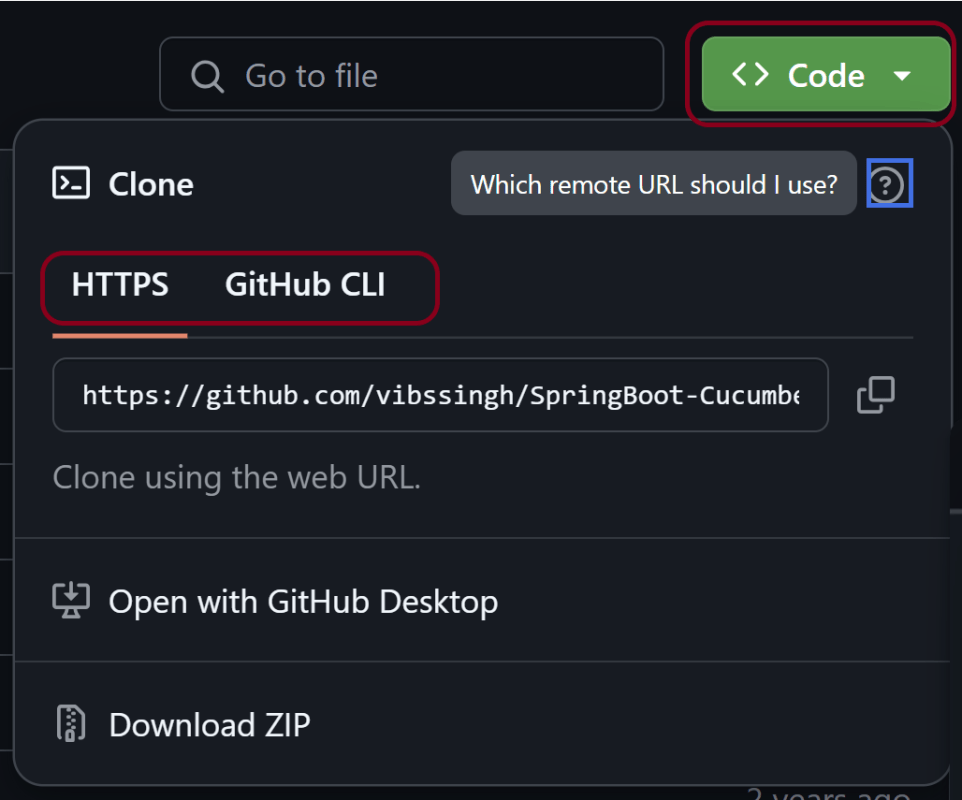
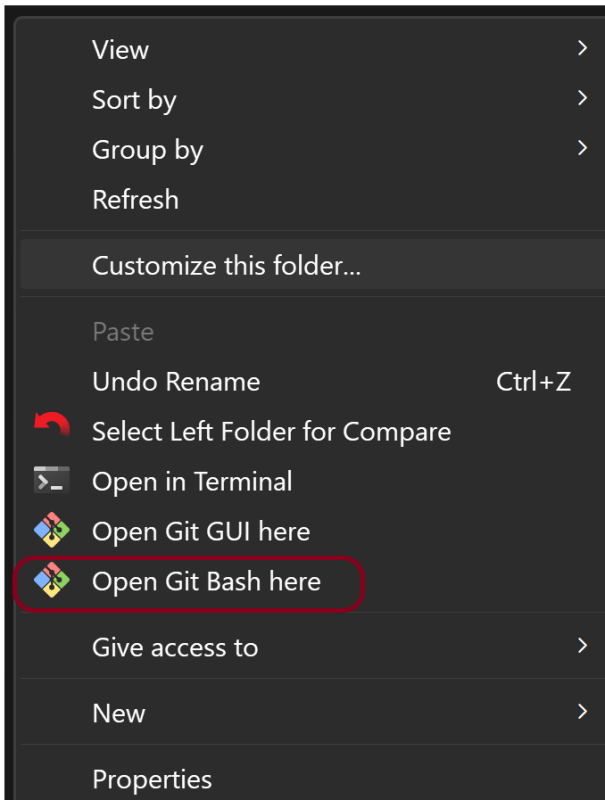
How to clone a Git Repository – git clone

HOME

git clone <repository_url>

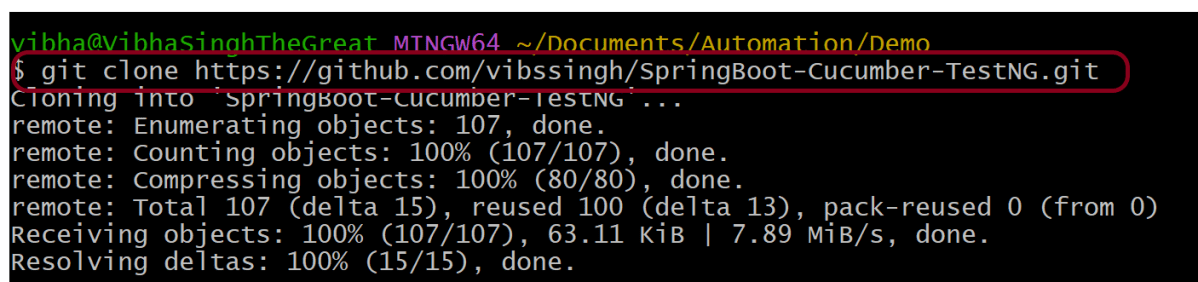
git clone https://github.com/vibssingh/SpringBoot-Cucumber-TestNG.git

git clone -b <branch-name> <repository-url>

DevOps Multiple Choice Answers – MCQ1

HOME

DevOps Multiple Choice Questions – MCQ1


DevOps Multiple Choice Questions – MCQ1

HOME

Answer


Answer


Answer


Answer


Answer


Answer


Answer


Answer


Answer


Answer


Answer


Answer


Answer


Answer


Answer


Answer


Answer


Answer


Answer


Answer


Answer


Answer


Answer


Answer


Answer

====================================================================

Merge PDF Files in Selenium with Java

HOME

  <dependency>
      <groupId>org.seleniumhq.selenium</groupId>
      <artifactId>selenium-java</artifactId>
      <version>4.24.0</version>
    </dependency>

    <dependency>
      <groupId>commons-io</groupId>
      <artifactId>commons-io</artifactId>
      <version>2.16.1</version>
    </dependency>

    <dependency>
      <groupId>org.apache.pdfbox</groupId>
      <artifactId>pdfbox</artifactId>
      <version>3.0.3</version>
    </dependency>

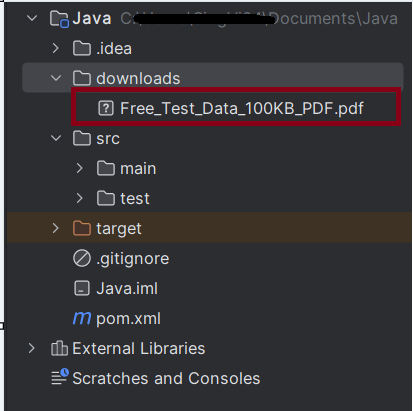
 String downloadFilepath = System.getProperty("user.dir") + File.separator + "downloads";

        ChromeOptions options = new ChromeOptions();
        Map<String, Object> prefs = new HashMap<>();
        prefs.put("plugins.always_open_pdf_externally", true);
        prefs.put("download.default_directory", downloadFilepath);
        options.setExperimentalOption("prefs", prefs);

        WebDriver driver = new ChromeDriver(options);
        driver.manage().window().maximize();
        driver.get("https://freetestdata.com/document-files/pdf/");

// Download first PDF
    WebElement downloadLink1 = driver.findElement(By.xpath("//*[@class='elementor-button-text']"));
    downloadLink1.click();

//Wait for first PDF download to complete
   File downloadedFile1 = new File(downloadFilepath + "/Free_Test_Data_100KB_PDF.pdf");    
   WebDriverWait wait1 = new WebDriverWait(driver, Duration.ofSeconds(30));
   wait1.until((ExpectedCondition<Boolean>) wd -> downloadedFile1.exists());
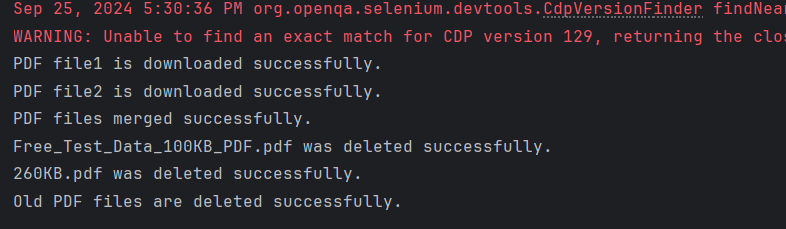
    System.out.println("PDF file1 is downloaded successfully.");

// Download second PDF
    WebElement downloadLink2 = driver.findElement(By.xpath("//*[@id=\"post-81\"]/div/div/section[3]/div/div[1]/div/section[2]/div/div[2]/div/div/div/div/a/span/span"));
    downloadLink2.click();

//Wait for first PDF download to complete
    File downloadedFile2 = new File(downloadFilepath + "/260KB.pdf");
   WebDriverWait wait2 = new WebDriverWait(driver, Duration.ofSeconds(30));
    wait2.until((ExpectedCondition<Boolean>) wd -> downloadedFile2.exists());
    System.out.println("PDF file2 is downloaded successfully.");
 public static void mergePDFFiles(String pdf1Path, String pdf2Path, String mergedPdfPath) throws IOException {
        PDFMergerUtility pdfMerger = new PDFMergerUtility();

        pdfMerger.addSource(new File(pdf1Path));
        pdfMerger.addSource(new File(pdf2Path));
        pdfMerger.setDestinationFileName(mergedPdfPath);

        // Merge PDFs
        pdfMerger.mergeDocuments(null);

    }
PDFMergerUtility pdfMerger = new PDFMergerUtility();
pdfMerger.addSource(new File(pdf1Path));
pdfMerger.addSource(new File(pdf2Path));
 pdfMerger.setDestinationFileName(mergedPdfPath);
pdfMerger.mergeDocuments(null);

public static void deleteOldPDFFiles(File... files) {
        for (File file : files) {
            if (file.exists()) {
                if (file.delete()) {
                    System.out.println(file.getName() + " was deleted successfully.");
                } else {
                    System.out.println("Failed to delete " + file.getName() + ".");
                }
            }
        }
    }
driver.quit();
package com.example;

import org.apache.pdfbox.Loader;
import org.apache.pdfbox.multipdf.PDFMergerUtility;
import org.apache.pdfbox.pdmodel.PDDocument;
import org.openqa.selenium.By;
import org.openqa.selenium.WebDriver;
import org.openqa.selenium.WebElement;
import org.openqa.selenium.chrome.ChromeDriver;
import org.openqa.selenium.chrome.ChromeOptions;
import org.openqa.selenium.support.ui.ExpectedCondition;
import org.openqa.selenium.support.ui.WebDriverWait;
import java.io.File;
import java.io.IOException;
import java.time.Duration;
import java.util.HashMap;
import java.util.Map;

public class PDFMerge_Demo {

    public static void main(String[] args) throws InterruptedException, IOException {

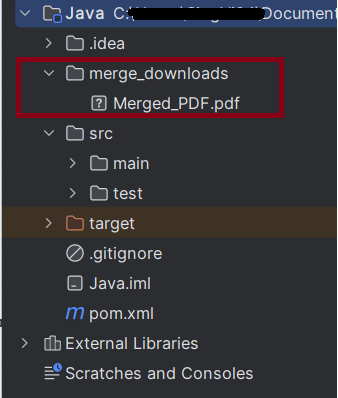
        String downloadFilepath = System.getProperty("user.dir") + File.separator + "merge_downloads";

        ChromeOptions options = new ChromeOptions();
        Map<String, Object> prefs = new HashMap<>();
        prefs.put("plugins.always_open_pdf_externally", true);
        prefs.put("download.default_directory", downloadFilepath);
        options.setExperimentalOption("prefs", prefs);

        WebDriver driver = new ChromeDriver(options);
        driver.manage().window().maximize();
        driver.get("https://freetestdata.com/document-files/pdf/");

        // Download first PDF
        WebElement downloadLink1 = driver.findElement(By.xpath("//*[@class='elementor-button-text']"));
        downloadLink1.click();

        //Wait for first PDF download to complete
        File downloadedFile1 = new File(downloadFilepath + "/Free_Test_Data_100KB_PDF.pdf");
        WebDriverWait wait1 = new WebDriverWait(driver, Duration.ofSeconds(30));
        wait1.until((ExpectedCondition<Boolean>) wd -> downloadedFile1.exists());
        System.out.println("PDF file1 is downloaded successfully.");

        // Download second PDF
        WebElement downloadLink2 = driver.findElement(By.xpath("//*[@id=\"post-81\"]/div/div/section[3]/div/div[1]/div/section[2]/div/div[2]/div/div/div/div/a/span/span"));
        downloadLink2.click();

        //Wait for first PDF download to complete
        File downloadedFile2 = new File(downloadFilepath + "/260KB.pdf");
        WebDriverWait wait2 = new WebDriverWait(driver, Duration.ofSeconds(30));
        wait2.until((ExpectedCondition<Boolean>) wd -> downloadedFile2.exists());
        System.out.println("PDF file2 is downloaded successfully.");

        String pdf1Path = downloadedFile1.getAbsolutePath();
        String pdf2Path = downloadedFile2.getAbsolutePath();

        //Check if PDF files exists
        if (downloadedFile1.exists() && downloadedFile2.exists()) {

            // Merge the PDF files
            mergePDFFiles(pdf1Path, pdf2Path, downloadFilepath + "/Merged_PDF.pdf");

            // Print success message
            System.out.println("PDF files merged successfully.");

            // Delete old PDFs
            deleteOldPDFFiles(downloadedFile1, downloadedFile2);

            // Print success message
            System.out.println("Old PDF files are deleted successfully.");
        } else {
            System.out.println("One or both of the PDF files are missing.");
        }

        // Close the browser
        driver.quit();

    }

    public static void mergePDFFiles(String pdf1Path, String pdf2Path, String mergedPdfPath) throws IOException {
        PDFMergerUtility pdfMerger = new PDFMergerUtility();

        pdfMerger.addSource(new File(pdf1Path));
        pdfMerger.addSource(new File(pdf2Path));
        pdfMerger.setDestinationFileName(mergedPdfPath);

        // Merge PDFs
        pdfMerger.mergeDocuments(null);

    }

    public static void deleteOldPDFFiles(File... files) {
        for (File file : files) {
            if (file.exists()) {
                if (file.delete()) {
                    System.out.println(file.getName() + " was deleted successfully.");
                } else {
                    System.out.println("Failed to delete " + file.getName() + ".");
                }
            }
        }
    }

}

Download PDF in Edge with Selenium Java

HOME

<dependency>
    <groupId>org.seleniumhq.selenium</groupId>
    <artifactId>selenium-java</artifactId>
    <version>4.25.0</version>
</dependency>

 String downloadFilepath = System.getProperty("user.dir") + File.separator + "downloads";
EdgeOptions options = new EdgeOptions();
Map<String, Object> prefs = new HashMap<>();
prefs.put("download.default_directory", downloadFilepath);
prefs.put("download.prompt_for_download", false);
prefs.put("download.default_directory", downloadFilepath);
prefs.put("download.prompt_for_download", false);
WebDriver driver = new EdgeDriver(options);
driver.manage().window().maximize();
driver.get("https://freetestdata.com/document-files/pdf/");
WebElement downloadLink = driver.findElement(By.xpath("//*[@class="elementor-button-text"]"));
downloadLink.click();
Thread.sleep(5000); 
 File downloadedFile = new File(downloadFilepath + "/Free_Test_Data_100KB_PDF.pdf");
        if (downloadedFile.exists()) {
            System.out.println("File is downloaded!");
        } else {
            System.out.println("File is not downloaded.");
      }
driver.quit();
package com.example;

import org.openqa.selenium.By;
import org.openqa.selenium.WebDriver;
import org.openqa.selenium.WebElement;
import org.openqa.selenium.edge.EdgeDriver;
import org.openqa.selenium.edge.EdgeOptions;
import org.openqa.selenium.firefox.FirefoxDriver;
import org.openqa.selenium.firefox.FirefoxOptions;

import java.io.File;
import java.util.HashMap;
import java.util.Map;

public class EdgeDownload_PDF {

    public static void main(String[] args) throws InterruptedException {


        String downloadFilepath = System.getProperty("user.dir") + File.separator + "downloads";

        EdgeOptions options = new EdgeOptions();
        Map<String, Object> prefs = new HashMap<>();
        prefs.put("download.default_directory", downloadFilepath);
        prefs.put("download.prompt_for_download", false);

        WebDriver driver = new EdgeDriver(options);
        driver.manage().window().maximize();
        driver.get("https://freetestdata.com/document-files/pdf/");

        // Locate and click the download link or button if necessary
         WebElement downloadLink = driver.findElement(By.xpath("//*[@class=\"elementor-button-text\"]"));
        downloadLink.click();

        // Wait for the download to complete
        try {
            Thread.sleep(5000);
        } catch (InterruptedException e) {
            e.printStackTrace();
        }

        // Check if the file exists
        File downloadedFile = new File(downloadFilepath + "/Free_Test_Data_100KB_PDF.pdf");
        if (downloadedFile.exists()) {
            System.out.println("File is downloaded from Edge!");
        } else {
            System.out.println("File is not downloaded.");
        }

        driver.quit();
    }

}

How to capture Screenshot of specific element in Selenium

HOME

<dependency>
      <groupId>org.seleniumhq.selenium</groupId>
      <artifactId>selenium-java</artifactId>
      <version>4.24.0</version>
    </dependency>

    <dependency>
      <groupId>commons-io</groupId>
      <artifactId>commons-io</artifactId>
      <version>2.16.1</version>
</dependency>

FirefoxOptions options = new FirefoxOptions();
WebDriver driver = new FirefoxDriver(options);
driver.manage().window().maximize();
driver.get("https://www.selenium.dev/");
WebElement logo = driver.findElement(By.xpath("//div[@class='row']/div"));

 File source = logo.getScreenshotAs(OutputType.FILE);

In order to capture screenshot and store it in a particular location, there is a method called “getScreenshotAs“, where OutputType defines the output type for a screenshot.

4. Specify the location to save the screenshot

 File screenshotLocation = new File("src//test/resources//screenshot/specific_element_screenshot.png");

 FileUtils.copyFile(source, screenshotLocation);
driver.quit();

Let’s see the complete program

package com.example;

import org.openqa.selenium.*;
import org.openqa.selenium.firefox.FirefoxDriver;
import org.openqa.selenium.firefox.FirefoxOptions;
import org.apache.commons.io.FileUtils;
import java.io.File;

public class ScreenShot_Demo {

    public static void main(String[] args) {

        FirefoxOptions options = new FirefoxOptions();
        WebDriver driver = new FirefoxDriver(options);
        driver.manage().window().maximize();
        driver.get("https://www.selenium.dev/");

        // Locate the specific element
        WebElement logo = driver.findElement(By.xpath("//div[@class='row']/div"));

        // Take the screenshot of the element
        File source = logo.getScreenshotAs(OutputType.FILE);

        // Specify the location to save the screenshot
        File screenshotLocation = new File("src//test/resources//screenshot/element_screenshot.png");

        try {
            // Save the screenshot to the specified location
            FileUtils.copyFile(source, screenshotLocation);
            System.out.println("Screenshot saved to: " + screenshotLocation.getAbsolutePath());
        } catch (Exception e) {
            System.out.println(e.getMessage());
        }

        System.out.println("The Screenshot is taken and saved under Screenshots folder");
        driver.quit();
    }

}

A folder with name screenshot is created inside src/test/resources directory and the screenshot is placed in that folder as you can see the image below

The Screenshot looks like something below