Handling token expiration and automatically refreshing tokens in REST Assured involves a few steps to ensure your tests can obtain a fresh token when the current one expires.
Add the below-mentioned dependencies to the Maven project.
Obtain Initial Access Token:– Implement a method to obtain the initial access token from the authentication server.
Store Token and Expiration Time:- Use a structure to store the access token and its expiration time.
Check Token Validity:– Before making an API request, check if the token is still valid. If it’s expired or about to expire, refresh it.
Refresh the Token:- Implement a method to refresh the token.
Update Token Storage:– Store the new token and update the expiration time after refreshing.
import io.restassured.RestAssured;
import io.restassured.response.Response;

import java.time.Instant;

public class TokenGeneration {

    private static String accessToken;
    private static Instant tokenExpiryTime;
    Response response;
    int expiresIn;

    // Method to obtain initial token
    public static String getAccessToken() {
        if (accessToken == null || isTokenExpired()) {
            refreshAccessToken();
        }
        return accessToken;
    }

    // Method to check if the token is expired
    private static boolean isTokenExpired() {
        return tokenExpiryTime == null || Instant.now().isAfter(tokenExpiryTime);
    }

    // Method to refresh token
    private static void refreshAccessToken() {
            response = RestAssured.given()
            .contentType("application/x-www-form-urlencoded")
            .formParam("grant_type", "client_credentials")
            .formParam("client_id", "your-client-id")
            .formParam("client_secret", "your-client-secret")
            .post("https://your-auth-server.com/oauth/token");

        accessToken = response.jsonPath().getString("access_token");
        expiresIn = response.jsonPath().getInt("expires_in");
        tokenExpiryTime = Instant.now().plusSeconds(expiresIn);

        System.out.println("Access Token: " + accessToken);
        System.out.println("Token Expiry Time: " + tokenExpiryTime);
    }
}
Instant.now – The now() method of Instant returns the current time from the system clock. If the current time is “2023-10-01T12:00:00Z”, “Instant.now()“ would represent this moment in time.
isAfter(tokenExpiryTime) – checks if the current time is after the token’s expiration time.
plusSeconds(expiresIn)– This method adds a specified number of seconds to the Instant object. If expiresIn is “3600“ seconds (which is equivalent to 1 hour), it adds an hour to the current Instant.
Token Expiry Buffer:– Consider implementing a buffer time before the actual expiry to refresh the token. This prevents the edge cases where the token might expire during an API call.
In this tutorial, we will discuss how to validate the HTTP response status code, status like, header, body and Content Type using REST Assured. Every HTTP Response received from a server in response to an HTTP request sent by the client has a status code.
Verifying HTTP Response Status Code with Rest Assured
A response code indicating the status of the request (e.g., 200 OK, 404 Not Found). The status code that the server returns tells us whether the request was successful or not. If the request was successful, the server sends the status code in the range of 200-299. If the request was not successful, then the status code other than the range is returned.
The getStatusCode() method returns an integer and then we can verify its value.
Below is an example.
@Test
    public void verifyStatusCode() {

        String BaseURL = "https://dummy.restapiexample.com/api";

        // GIVEN
       Response response =  given()

                // WHEN
                .when()
                .get("https://reqres.in/api/users/2")

                // THEN
                .then()
               .extract().response();

       int actualStatusCode = response.getStatusCode();
       System.out.println("Status Code : " + actualStatusCode);

        Assert.assertEquals(200, actualStatusCode);

    }
The output of the above program is
Verifying HTTP Response Status Line with Rest Assured
The getStatusLine() method returns a string and then we can verify its value.
 @Test
    public void verifyStatusLine() {

        // GIVEN
        Response response =  given()

                // WHEN
                .when()
                .get("https://reqres.in/api/users/2")

                // THEN
                .then()
                .extract().response();

        String actualStatusLine = response.getStatusLine();
        System.out.println("Status Line : " + actualStatusLine);

        Assert.assertEquals("HTTP/1.1 200 OK", actualStatusLine);

    }
The output of the above program is
Verifying HTTP Response Body with Rest Assured
In the below example, we are obtaining the body content of the HTTP response using the getBody().
XML Path Language(XPath) is a query language for selecting nodes from an XML document. XPath provides a syntax for navigating through elements and attributes in an XML document. Paths can be absolute or relative:
Absolute paths starts from the root node, using a single slash (/) e.g., “//rootelement”.
Relative paths start from the current context node, using the double slashes (//) e.g., “//element”.
What is XmlPath in Rest Assured?
XmlPath is a utility that allows us to parse and query XML responses. XmlPath is analogous to JsonPath, but it is specifically designed for handling the XML data.
Add the below mentioned dependency to the pom.xml.
In this tutorial we’re going to talk about parameterizing the REST Assured tests.
What is Parameterization?
Parameterization refers to the process of passing different set of data to the same code. This allows you to verify that the code behaves as expected for various inputs without writing multiple test cases. It enhances the coverage of the test suite by testing the functionality with different data sets and helps identify edge cases or potential bugs that could occur with different input values.
We are using junit4-dataprovider dependency here.
<!-- Data Provider -->
 <dependency>
      <groupId>com.tngtech.junit.dataprovider</groupId>
      <artifactId>junit4-dataprovider</artifactId>
      <version>${junit.dataprovider.version}</version>
      <scope>test</scope>
</dependency>
The first step is to create a test data collection, which is a collection of input and expected outcome values that we want to feed to our test.
@RunWith(DataProviderRunner.class): This annotation tells JUnit to run the tests in this class using the DataProviderRunner, which allows the use of the @DataProvider annotation for parameterized tests
@RunWith(DataProviderRunner.class)
@DataProvider: This annotation marks the method responseData as a provider of test data. The method returns a 2D array of objects (Object[][]), where each inner array represents a set of parameters for a single test run. The responseData method provides four sets of parameters: an ID, a first name, and a last name.
This code defines a parameterized test that verifies the first name and last name of users returned by the API https://reqres.in/api/users/{id} for given user IDs. The test runs multiple times, once for each set of parameters provided by the responseData method. The RestAssured library is used to perform the API requests and assertions.
The output of the above program is
Congratulations on making it through this tutorial and hope you found it useful! Happy Learning!! Cheers!!
Asynchronous request is where the client continues execution after initiating the request and processes the result whenever the AppServer makes it available.
The primary use case for Asynchronous HTTP is where the client polls the server for a delayed response. A common example isan AJAX chat client that pushes/pulls from both the client and the server. In this scenario, the client blocks a long period of time on the server’s socket while waiting for a new message.
Async is multi-thread, which means operations or programs can run in parallel. Sync is a single-thread, so only one operation or program will run at a time. Async is non-blocking, which means it will send multiple requests to a server.
We need to add the below mentioned dependency to pom.xml to test the async requests.
Cucumber is not an API automation tool, but it works well with other API automation tools.
There are 2 most commonly used Automation Tools for JVM to test API – Rest-Assured and Karate. In this tutorial, I will use RestAssured with Cucumber and TestNG for API Testing.
REST Assured is a Java library that provides a domain-specific language (DSL) for writing powerful, maintainable tests for RESTful APIs. REST Assured can be used easily in combination with existing unit testing frameworks, such as JUnit and TestNG. Rest assured, no matter how complex the JSON structures are, Rest Assured has methods to retrieve data from almost every part of the request and response.
What is Cucumber?
Cucumber is one such open-source tool, which supports Behaviour Driven Development(BDD). In simple words, Cucumber can be defined as a testing framework, driven by plain English. It serves as documentation, automated tests, and development aid – all in one.
Each scenario is a set of steps that the Cucumber must complete. Cucumber validates the software’s compliance with the specification and generates a report indicating success or failure for each scenario.
The cucumber must adhere to some basic syntax rules known as Gherkin to comprehend the scenarios.
In this tutorial, I will explain creating a framework for the testing of Rest API in Cucumber BDD.
Dependency List
Cucumber – 7.18.0
Java 17
TestNG – 7.10.2
Maven – 3.9.6
Rest Assured – 5.4.0
Maven Compiler – 3.13.0
Maven Surefire – 3.2.5
Project Structure
Implementation Steps
Step 1 – Download and Install Java
Cucumber and Rest-Assured need Java to be installed on the system to run the tests. Click here to learn How to install Java.
Step 2 – Download and setup Eclipse IDE on the system
The Eclipse IDE (integrated development environment) provides strong support for Java developers. Click here to learn How to install Eclipse.
Step 3 – Setup Maven
To build a test framework, we need to add several dependencies to the project. Click here to learn How to install Maven.
Step 4 – Create a new Maven Project
File -> New Project-> Maven-> Maven project-> Next -> Enter Group ID & Artifact ID -> Finish
Step 5 – Install the Cucumber Eclipse plugin for the Eclipse project(Eclipse Only)
The Cucumber plugin is an Eclipse plugin that allows Eclipse to understand the Gherkin syntax. Cucumber Eclipse Plugin highlights the keywords present in the Feature File. To install Cucumber Eclipse Plugin, please refer to this tutorial – How to install Cucumber Eclipse Plugin.
Step 6 – Create source folder src/test/resources
Create source folder src/test/resources to create test scenarios in the Feature file.
A new Maven Project is created with 2 folders – src/main/java and src/test/java. To create test scenarios, we need a new source folder called – src/test/resources. To create this folder, right-click on your Maven project ->select New ->Java, and then Source Folder.
Mention the source folder name as src/test/resources and click the Next button. This will create a source folder under your new Maven project.
Step 7 – Add dependencies to the project
Add Rest Assured, Cucumber, and TestNG dependencies in the pom.xml/build.gradle. REST Assured includes JsonPath and XmlPath as transitive dependencies.
Step 8 – Add Maven Compiler Plugin and Surefire Plugin
The compiler plugin is used to compile the source code of a Maven project. This plugin has two goals, which are already bound to specific phases of the default lifecycle:
Step 9 – Create a feature file under src/test/resources
Create a folder with name features. Now, create the feature file in this folder. The feature file should be saved with the extension .feature. This feature file contains the test scenarios created to test the application. The Test Scenarios are written in Gherkins language in the format of Given, When, Then, And, But.
Below is an example of a Test Scenario where we are using the GET method to get the information from the API.
Feature: Validation of get method

  @GetUserDetails
  Scenario Outline: Send a valid Request to get user details

    Given I send a request to the URL to get user details
    Then the response will return status <statusCode> and id <id> and email "<employee_email>" and first name "<employee_firstname>" and last name "<employee_lastname>"

    Examples:
    | statusCode | id  | employee_email          | employee_firstname | employee_lastname |
    | 200        | 2   | janet.weaver@reqres.in  | Janet              | Weaver            |
Step 10 – Create the Step Definition class or Glue Code
StepDefinition acts as an intermediate to your runner and feature file. It stores the mapping between each step of the scenario in the Feature file. So when you run the scenario, it will scan the step definition file to check the matched glue or test code.
import io.cucumber.java.en.Given;
import io.cucumber.java.en.Then;
import io.restassured.http.ContentType;
import io.restassured.response.ValidatableResponse;

import static io.restassured.RestAssured.given;
import static org.hamcrest.Matchers.equalTo;

public class APIDemoDefinitions {

    private ValidatableResponse validatableResponse;
    private String endpoint = "https://reqres.in/api/users/2";

    @Given("I send a request to the URL to get user details")
    public void sendRequest(){
        validatableResponse = given().contentType(ContentType.JSON)
                .when().get(endpoint).then();

        System.out.println("Response :"+validatableResponse.extract().asPrettyString());
    }

    @Then("the response will return status {int} and id {int} and email {string} and first name {string} and last name {string}")
    public void verifyStatus(int expectedStatusCode, int expectedId, String expectedEmail, String expectedFirstName, String expectedLastName){

        validatableResponse.assertThat().statusCode(expectedStatusCode).body("data.id",equalTo(expectedId)).and()
                .body("data.email",equalTo(expectedEmail)).body("data.first_name",equalTo(expectedFirstName))
                .body("data.last_name",equalTo(expectedLastName));

    }
}
To use REST assured effectively it’s recommended to statically import methods from the following classes:
A runner will help us run the feature file and act as an interlink between the feature file and the StepDefinition Class.
import io.cucumber.testng.AbstractTestNGCucumberTests;
import io.cucumber.testng.CucumberOptions;

@CucumberOptions(tags = "", features = {"src/test/resources/features"}, glue = {"com.example.stepdefinitions"},
        plugin = {})
public class CucumberRunnerTests extends AbstractTestNGCucumberTests {

}
Note:- The name of the Runner class should end with Test otherwise we can’t run the tests using Command-Line.
Step 12 – Create a testng.xml file
Create a testng.xml at the root of the project.
<?xml version="1.0" encoding="UTF-8"?>
<!DOCTYPE suite SYSTEM "https://testng.org/testng-1.0.dtd">
<suite name="Suite">
    <test  name="Rest Assured, Cucumber with TestNG Test">
        <classes>
            <class name="com.example.runner.CucumberRunnerTests"/>
        </classes>
    </test> <!-- Test -->
</suite> <!-- Suite -->
Step 13 – Run the tests from TestNG
You can execute the test script by right-clicking on TestRunner class -> Run As TestNG (Eclipse).
You can execute the test script by right-clicking on TestRunner class -> Run CucumberRunnerTests (IntelliJ).
Step 14 – Run the tests from the testng.xml
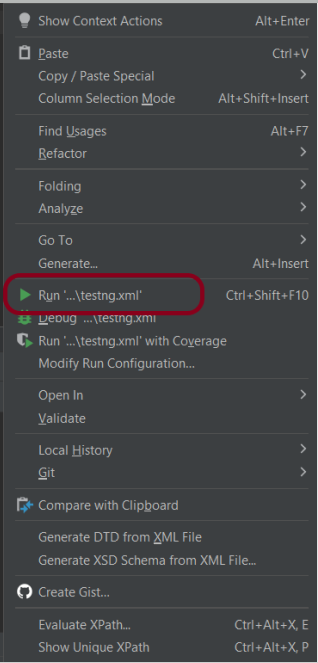
Right-click on the testng.xml. Click on Run’...\testng.xml’.
Step 15 – TestNG Report Generation
TestNG generates various types of reports under the test-output or target folder like emailable-report.html, index.html, and testng-results.xml.
We are interested in the ‘emailable-report.html’ report. Open “emailable-report.html“, as this is an HTML report, and open it with the browser. The below image shows emailable-report.html.
emailable-report.html
Index.html
TestNG also produces “index.html” report, and it resides under the test-output folder. The below image shows the index.html report.
Step 16 – Run the tests from the Command Line
Run the below command in the command prompt to run the tests and to get the test execution report.
mvn clean test
The output of the above program is
Step 17 – Cucumber Report Generation
To get Cucumber Test Reports, add cucumber.properties under src/test/resources and add the below instruction in the file.
Many REST API endpoints require authentication to return the response. To authenticate the request, we will need to provide an authentication token with the required scopes or permissions. First, we need to generate an access token. Then, we pass it to the second request to get the desired response.
What is an Access Token?
An access token is a credential that is used to authenticate and authorize requests made to an API. It proves the user’s identity and permissions. This allows them to access protected resources or perform specific actions within the API.
Access tokens are usually represented as strings of characters (e.g., alphanumeric) that are generated by the server and provided to clients upon successful authentication. Access tokens often have an expiration time associated with them, after which they become invalid. This helps ensure security by limiting their lifespan.
Using access tokens helps ensure secure communication between clients and servers by preventing unauthorized access to protected resources. Without a valid access token, requests may be rejected or limited in their scope.
Access tokens enable stateless communication between client and server. This means that each request contains all necessary authentication and authorization information within itself. This eliminates the need for servers to store session-related data, improving scalability and reducing overhead.
Let us create a class that will generate the access token.
In the above example, a token is generated as shown below.
It is a JSON Response. We need only the token part and not the {“access_token”} part. So we have used the below command to extract the token part only.
JsonPath jsonPath = new JsonPath(token);
accessToken = jsonPath.getString("access_token");
What is Oauth2()?
OAuth 2.0 (Open Authorization 2.0) is an industry-standard protocol for authorization and delegation of access to protected resources on the web. It allows users to securely grant limited access to their resources hosted on one website or application. This site is called the “resource server.” The access is given to another website or application, which is called the “client.”
Below is a test. We are passing the token generated in the previous request for authentication. This token is used in another request with oauth2().
AccessToken_Example
import java.io.IOException;

public class AccessToken_Example extends AbstractHelper {

    Response response;

   @Test
    public void testRequest() throws IOException {

        response = RestAssured.given()
                .auth().oauth2(generateToken())
                .when().get("https://localhost/8080/coreid").then()
                .extract()
                .response();

        System.out.println("Response :" + response.asString());
        int statusCode = response.getStatusCode();

        Assert.assertEquals(200,statusCode);
    }
}
The output of the above program is
Summary:
1. Access tokens are obtained through an authentication process. This may include logging in with a username and password or using a third-party authentication service like OAuth. 2. Once authenticated, the access token contains information about the user’s permissions and privileges within the system. Use this access token and pass it to another request to get the required response.
When you are doing API testing, sometimes the APIs or endpoints are protected. This means you need to be authenticated and authorized to perform certain actions. REST assured supports several authentication schemes, for example, OAuth, digest, certificate, form, and pre-emptive basic authentication.
In this post, we’ll look at how to pass the authorization token in the header in REST Assured.
What is an authorization token?
An authorization token, often referred to as an access token, is a piece of data or credential that is used to authenticate and authorize access to protected resources or operations in a system.
Add the below-mentioned dependencies to the Maven project.
When you are doing API testing, sometimes the APIs or endpoints are protected. This means you need to be authenticated and authorized to perform certain actions. REST assured supports several authentication schemes, for example OAuth, digest, certificate, form and preemptive basic authentication.
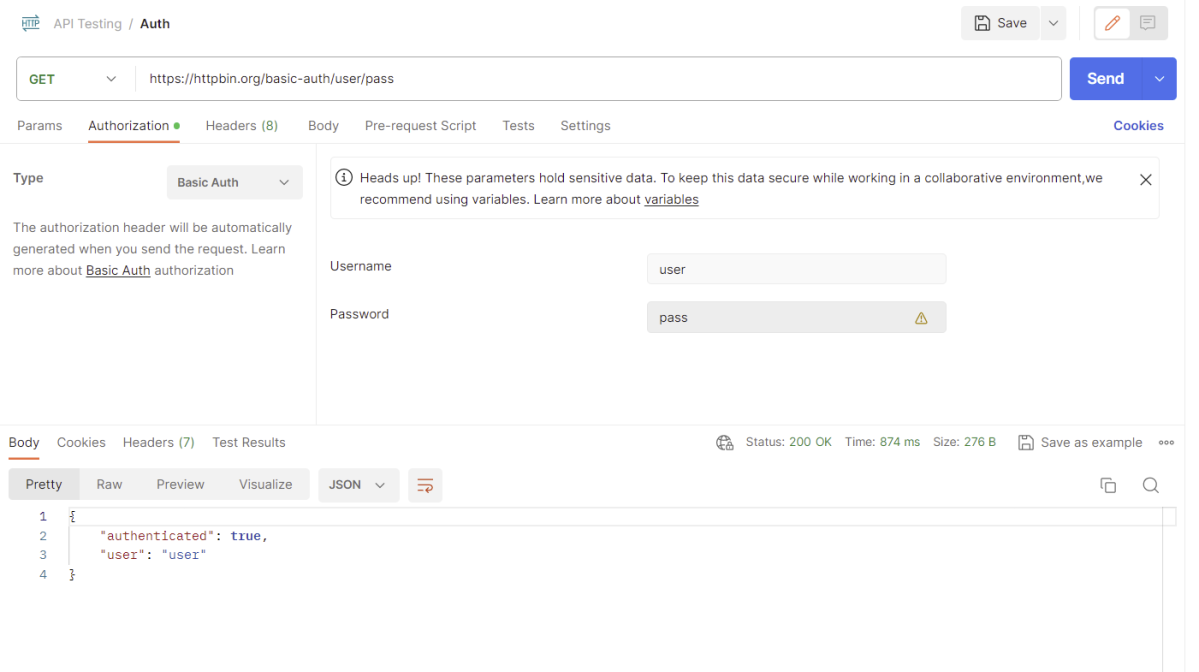
In this post, we’ll look at how to send the authentication credentials (username, password) in REST Assured.
Add the below-mentioned dependencies to the Maven project.
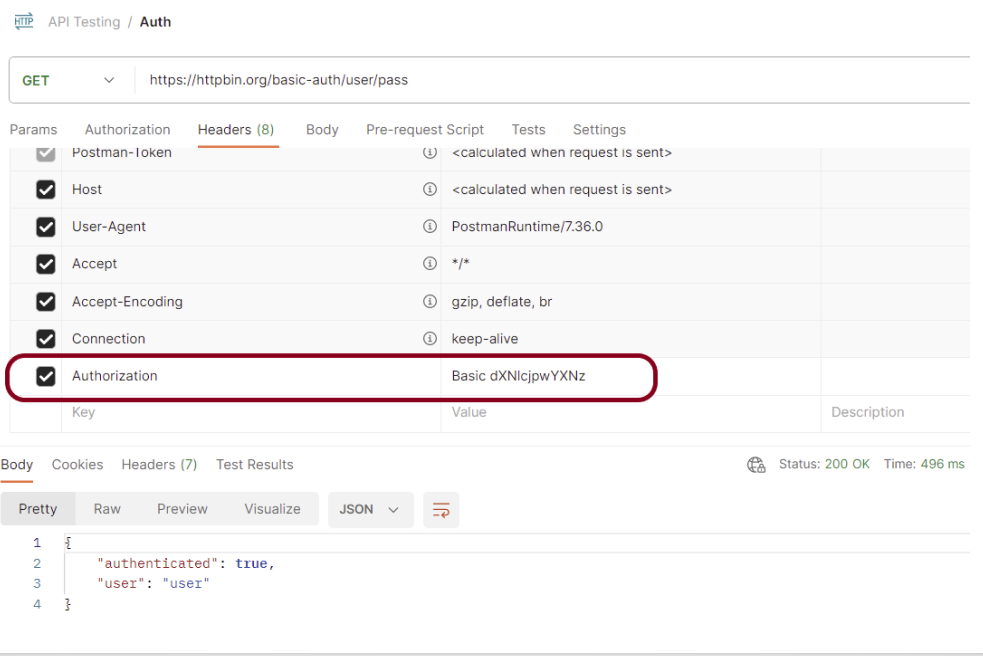
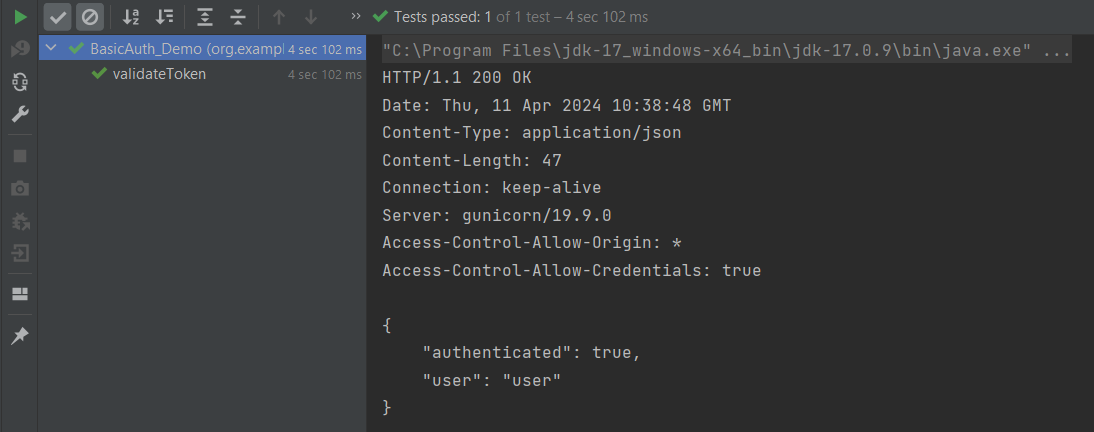
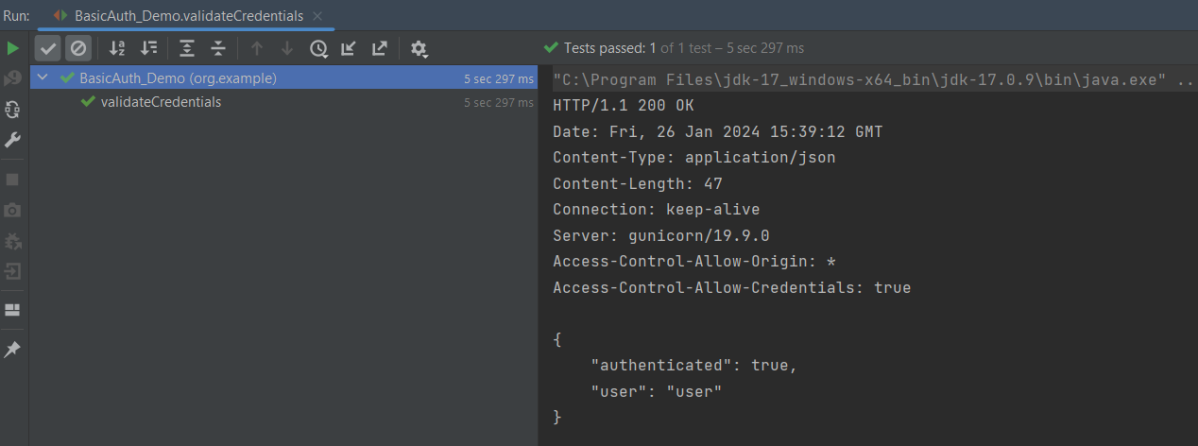
By default, REST-assured waits for the server to challenge before sending the credentials and so the library provides the preemptive directive that we can use:















 QA Automation Expert