How to compare JSON File with JSON Response

HOME

<dependencies>
    <dependency>
      <groupId>junit</groupId>
      <artifactId>junit</artifactId>
      <version>4.13.2</version>
      <scope>test</scope>
    </dependency>

    <dependency>
      <groupId>io.rest-assured</groupId>
      <artifactId>rest-assured</artifactId>
      <version>5.4.0</version>
      <scope>test</scope>
    </dependency>

    <dependency>
    <groupId>com.fasterxml.jackson.core</groupId>
    <artifactId>jackson-databind</artifactId>
    <version>2.11.3</version>
    </dependency>
</dependencies>

package com.example;

import io.restassured.RestAssured;
import io.restassured.response.Response;
import com.fasterxml.jackson.databind.JsonNode;
import com.fasterxml.jackson.databind.ObjectMapper;
import org.junit.Assert;
import org.junit.Test;

import java.io.File;
import java.io.IOException;

public class JsonFileComparison {

    @Test
    public void compareResponse() throws IOException {

        // Path to the JSON file
        File jsonFile = new File("src/test/resources/expectedUser.json");

        // Read JSON content from file
        ObjectMapper objectMapper = new ObjectMapper();
        JsonNode jsonFromFile = objectMapper.readTree(jsonFile);

        // Make an API call
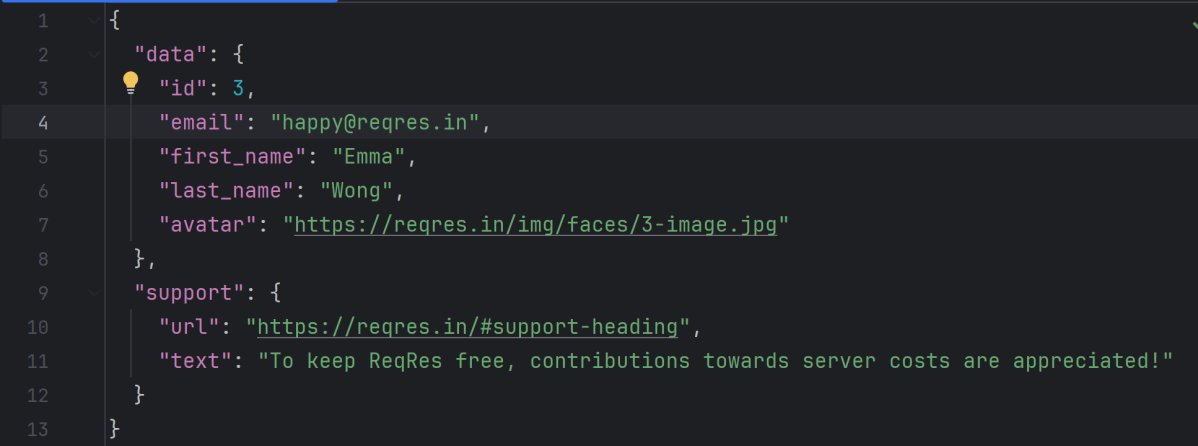
        Response response = RestAssured.given().when().get("https://reqres.in/api/users/3").then().extract().response();
        String expectedResponse = response.getBody().asString();
        System.out.println("Response is : " + expectedResponse);

        // Verify the status code
        response.then().statusCode(200);

        // Read JSON content from response
        JsonNode jsonFromResponse = objectMapper.readTree(expectedResponse);

        Assert.assertEquals(jsonFromFile, jsonFromResponse);

        // Compare JSON content
        if (jsonFromFile.equals(jsonFromResponse)) {
            System.out.println("JSON from file matches JSON from response");
        } else {
            System.out.println("JSON content does not match");
        }
    }
}

ObjectMapper objectMapper = new ObjectMapper();
JsonNode jsonFromFile = objectMapper.readTree(jsonFile);

Response response = RestAssured.given().when().get("https://reqres.in/api/users/3").then().extract().response();
String expectedResponse = response.getBody().asString();
System.out.println("Response is : " + expectedResponse);

// Verify the status code
response.then().statusCode(200);

JsonNode jsonFromResponse = objectMapper.readTree(expectedResponse);
 Assert.assertEquals(jsonFromFile, jsonFromResponse);

Serialization – How to create JSON Payload from Java Object – Jackson API

HOME

In this tutorial, I will explain the creation of JSON Object Payload with the help of POJO (Plain Old Java Object).

What is POJO?

POJO stands for Plain Old Java Object. It is a very simple object, and it has no bounds or we can say that it has no restrictions other than the Java language specification. Also, it does not require any classpath.

A big advantage of POJO is it increases the readability and reusability of our project code and developers find it easy when understanding the code. Also, POJO is easy to write and anyone can understand them easily.

Now let’s deep dive into some technical terms about the POJO. Below are a few points about the POJO are:

  1. A POJO should not have to extend prespecified classes.
  2. Secondly, a POJO should not have implemented any prespecified interface.
  3. Lastly, POJO should not contain prespecified annotations

A POJO class can follow some rules for better usability. These rules are:-

  1. Each variable should be declared as private just to restrict direct access.
  2. Each variable that needs to be accessed outside class may have a getter, a setter, or both methods. If the value of a field is stored after some calculations, then we must not have any setter method for that.
  3. It Should have a default public constructor.
  4. Can override toString(), hashcode, and equals() methods.

POJO classes are extensively used for creating JSON and XML payloads for API.

In the below example, let me create a simple JSON with some nodes which is actually a 1:1 mapping i.e. each key has a single value, and the type of values is mixed.

{
  "firstName" : "Vibha",
  "lastName" : "Singh",
  "age" : 30,
  "salary" : 75000.0,
  "designation" : "Manager",
  "contactNumber" : "+91999996712",
  "emailId" : "abc123@test.com"
}

Let us create variables in the POJO class now for the above JSON. Now, a class name Employee will be created with the private data members as mentioned in the above JSON. Since we have created all variables as private, then there should be a way to manipulate or retrieve these data. So we create the corresponding getter and setter methods for these data members.

It is very tedious to create getter and setter methods for all the data members for big JSON strings.  Every IDE gives you a shortcut to generate getter and setter methods.  Here, I am using Eclipse and creating these getter and setter methods.

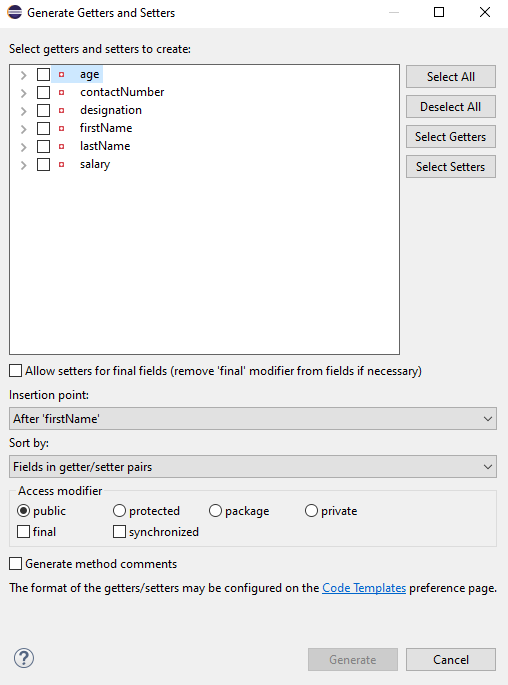
Select all the data members and Right-click on the page. Then select Source and then select Generate Getter and Setter methods.

This opens a new screen as shown below.

You can select the data member for which you want to create the getter and setter method. I want to create the getter and setter methods for all the data members, so click on Select All and then click on the Generate Button. This will generate the getter and setter methods for all the data members.

Below is the sample code of the Employee table, which contains the data members needed for Employee JSON and their corresponding getter and setter methods.

public class Employee {

	// private variables or data members of POJO class
	private String firstName;
	private String lastName;
	private int age;
	private double salary;
	private String designation;
	private String contactNumber;
	private String emailId;

	// Getter and setter methods
	public String getFirstName() {
		return firstName;
	}

	public void setFirstName(String firstName) {
		this.firstName = firstName;
	}

	public String getLastName() {
		return lastName;
	}

	public void setLastName(String lastName) {
		this.lastName = lastName;
	}

	public int getAge() {
		return age;
	}

	public void setAge(int age) {
		this.age = age;
	}

	public double getSalary() {
		return salary;
	}

	public void setSalary(double salary) {
		this.salary = salary;
	}

	public String getDesignation() {
		return designation;
	}

	public void setDesignation(String designation) {
		this.designation = designation;
	}
	
	public String getContactNumber() {
		return contactNumber;
	}

	public void setContactNumber(String contactNumber) {
		this.contactNumber = contactNumber;
	}

	public String getEmailId() {
		return emailId;
	}

	public void setEmailId(String emailId) {
		this.emailId = emailId;
	}

}

Using the above POJO class, you can create any number of custom Employee objects and each object can be converted into a JSON Object and Each JSON object can be parsed into Employee POJO.

We will create a JSON object from POJO and vice versa now, which is generally called serialization and deserialization using Jackson APIs.

Serialization – Serialization is a process where you convert an Instance of a Class (Object of a class) into a Byte Stream. Here, we are converting Employee class object to JSON representation or Object

Deserialization – It is the reverse of serializing. In this process, we will read the Serialized byte stream from the file and convert it back into the Class instance representation. Here, we are converting a JSON Object to an Employee class object.

We are using Jackson API for Serialization and Deserialization. So, add the Jackson dependency to the project.

<dependency>
    <groupId>com.fasterxml.jackson.core</groupId>
    <artifactId>jackson-databind</artifactId>
    <version>2.13.0</version>
</dependency>

What is ObjectMapper ?

ObjectMapper provides functionality for reading and writing JSON, either to and from basic POJOs (Plain Old Java Objects), or to and from a general-purpose JSON Tree Model (JsonNode), as well as related functionality for performing conversions. It is also highly customizable to work both with different styles of JSON content and to support more advanced object concepts such as polymorphism and object identity.

Now, let us create a Test Class to show Serialization.

public class EmployeeTest {

	@Test
	public void serializationTest()  {

		Employee employee = new Employee();
		employee.setFirstName("Vibha");
		employee.setLastName("Singh");
		employee.setAge(30);
		employee.setSalary(75000);
		employee.setDesignation("Manager");

		// Converting a Java class object to a JSON payload as string
		ObjectMapper mapper = new ObjectMapper();
		String employeeJson = mapper.writeValueAsString(employee);
		String employeePrettyJson = mapper.writerWithDefaultPrettyPrinter().writeValueAsString(employee);
		System.out.println(employeeJson);
		System.out.println(employeePrettyJson);
   }
}try {
			String employeeJson = mapper.writeValueAsString(employee);
			System.out.println(employeeJson);
			String employeePrettyJson = mapper.writerWithDefaultPrettyPrinter().writeValueAsString(employee);
			System.out.println(employeePrettyJson);
		} catch (JsonProcessingException e) {
			e.printStackTrace();
		}	
	}

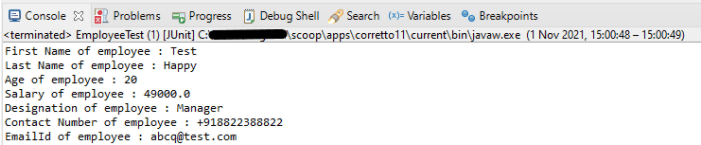
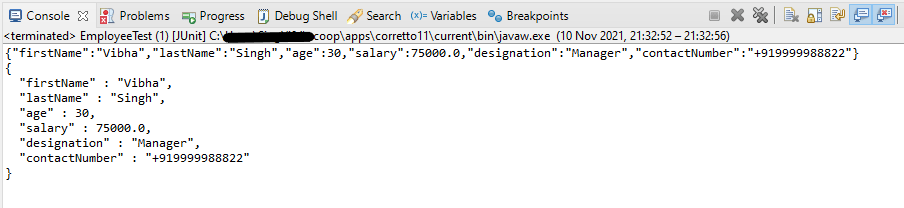
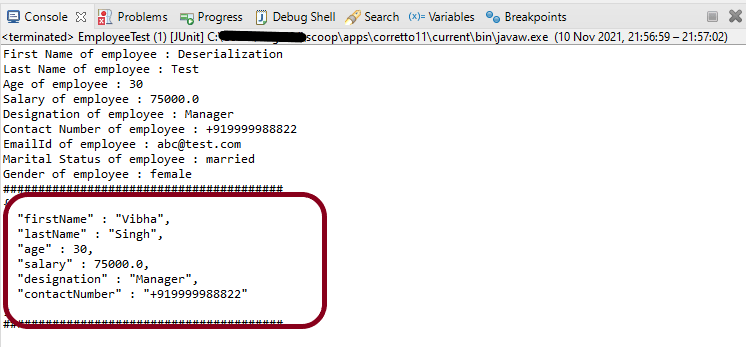
The output of the above program is
Here, ObjectMapper from fasterxml.jackson.databind is used for Serialization.

writeValueAsString() is a method that can be used to serialize any Java value as a String.

writerWithDefaultPrettyPrinter() is used to pretty-print the JSON output. It is a Factory method for constructing ObjectWriter that will serialize objects using the default pretty printer for indentation.

I hope this has helped to clear your doubts regarding POJO and how to create JSON objects using POJO.

We are done! Congratulations on making it through this tutorial and hope you found it useful! Happy Learning!!

Rest Assured Tutorials

HOME

RestAssured is a Java-based library that is used to test RESTful Web Services. REST-assured was designed to simplify the testing and validation of REST APIs. It takes influence from testing techniques used in dynamic languages such as Ruby and Groovy.

Chapter 1 Assertion of JSON in Rest Assured using Hamcrest
Chapter 2 Extraction from JSON in Rest Assured – JsonPath
Chapter 3 How to perform multiple assertions in Rest Assured? 
Chapter 4 How to validate JSON body in Rest Assured?
Chapter 5 Compare JSON Objects using JSONAssert Library
Chapter 6 Compare JSON Arrays using JSONAssert Library
Chapter 7 How to Read JSON with JSON.simple – NEW
Chapter 8 How to create and write to JSON with JSON.simple – NEW

JSON Handling and manipulation

Category 10: XML Manipulations

XML Handling and manipulation

Gradle

Chapter 1 Setup Basic REST Assured Gradle Project In Eclipse IDE

Frameworks

Chapter 1 Integration of REST Assured with TestNG
Chapter 2 Integration of REST Assured with JUnit4
Chapter 3 Integration of REST Assured with JUnit5
Chapter 4 Serenity BDD with Cucumber and Rest Assured
Chapter 5 Serenity BDD with Cucumber and Rest Assured in Gradle
Chapter 6 How To Create Gradle Project with Cucumber to test Rest API
Chapter 7 Rest API Test in Cucumber and JUnit4
Chapter 8 API Automation with REST Assured, Cucumber and TestNG

Deserialization – How to convert JSON to Map using Jackson API

HOME

This tutorial shows how to convert JSON to JAVA map using Jackson’s data binding. In the previous tutorials, I have explained converting Java Objects/Arrays to JSON String using Jackson API. You can refer below tutorials.

Serialization – How to create JSON Payload from Java Object – Jackson API

Deserialization – How to convert JSON to Java Object using Jackson API

How to create JSON Array Payload using POJO – Jackson API

How to create Nested JSON Object using POJO – Jackson API

To start with, we need to add Jackson Maven Dependency to the POM. Always add the latest version of Jackson dependency to your project.

<dependency>
    <groupId>com.fasterxml.jackson.core</groupId>
    <artifactId>jackson-databind</artifactId>
    <version>2.13.0</version>
</dependency

Deserialization converts a stream of bytes into a Java object that we can use in code.

We use Jackson’s ObjectMapper, as we did for serialization, using readValue() to process the input. Also, note our use of Jackson’s TypeReference, which we’ll use in all of our deserialization examples to describe the type of our destination Map.

   @Test
	public void DeserializationMapTest() throws JsonProcessingException {

		String employeeString = 
                     "{\r\n" 
                    + "  \"firstName\" : \"Deserialization\",\r\n"
				    + "  \"lastName\" : \"Test\",\r\n" 
                    + "  \"age\" : 25,\r\n" 
                    + "  \"salary\" : 50000.0,\r\n"
				    + "  \"designation\" : \"Manager\",\r\n" 
                    + "  \"contactNumber\" : \"+918882211111\",\r\n"
				    + "  \"emailId\" : \"abc@test.com\",\r\n" 
                    + "  \"gender\" : \"female\",\r\n"
				    + "  \"maritalStatus\" : \"single\"\r\n" 
                    + " }";

		Map<String, String> resultMap = new HashMap<String, String>();
		ObjectMapper mapper = new ObjectMapper();

		// Converting a JSON to Java Map
		try {
			resultMap = mapper.readValue(employeeString, new TypeReference<HashMap<String, String>>() {
			});
		} catch (JsonMappingException e) {
			e.printStackTrace();
		} catch (JsonProcessingException e) {
			e.printStackTrace();
		}

		System.out.println("Output Map :" + resultMap);
	}

Output

We can get the JSON from a file and convert it to a Hash Map too. Below is an example of the same.

   @Test
	public void PayloadFromFile() {

		String userDir = System.getProperty("user.dir");
		ObjectMapper mapper = new ObjectMapper();

		// Converting Employee JSON string to Employee class object
		Map<String, Object> empMap;
		try {
			empMap = mapper.readValue(new File(userDir + "\\src\\test\\resources\\JSONFromMap.json"),
					new TypeReference<Map<String, Object>>() {
					});

			System.out.println("Gender : " + empMap.get("gender"));
			System.out.println("DOB : " + empMap.get("DOB"));
			System.out.println("Name : " + empMap.get("name"));
			System.out.println("ContactNumber : " + empMap.get("contactNumber"));
			System.out.println("SkillSet : " + empMap.get("skillset"));
		} catch (StreamReadException e) {
			e.printStackTrace();
		} catch (DatabindException e) {
			e.printStackTrace();
		} catch (IOException e) {
			e.printStackTrace();
		}

	}

Output

We are done! Congratulations on making it through this tutorial and hope you found it useful! Happy Learning!!
Deserialization – How to convert JSON to Java Object using Jackson API

HOME

The previous tutorial explains the Serializarion process that means converting Java Objects to JSON Payload. This is done using Jackson API. This tutorial explains the Deserialization, means converting JSON Payload to Java Objects.

Deserialization – It is the reverse of serializing. In this process, we will read the Serialized byte stream from the file and convert it back into the Class instance representation. Here, we are converting a JSON Object to an Employee class object.

We are using Jackson API for Serialization and Deserialization. So, add the Jackson dependency to the project.

<dependency>
    <groupId>com.fasterxml.jackson.core</groupId>
    <artifactId>jackson-databind</artifactId>
    <version>2.13.0</version>
</dependency>

Below is the sample code of the Employee table, which contains the data members needed for Employee JSON and their corresponding getter and setter methods.

public class Employee {
 
    // private variables or data members of POJO class
    private String firstName;
    private String lastName;
    private int age;
    private double salary;
    private String designation;
    private String contactNumber;
    private String emailId;
 
    // Getter and setter methods
    public String getFirstName() {
        return firstName;
    }
 
    public void setFirstName(String firstName) {
        this.firstName = firstName;
    }
 
    public String getLastName() {
        return lastName;
    }
 
    public void setLastName(String lastName) {
        this.lastName = lastName;
    }
 
    public int getAge() {
        return age;
    }
 
    public void setAge(int age) {
        this.age = age;
    }
 
    public double getSalary() {
        return salary;
    }
 
    public void setSalary(double salary) {
        this.salary = salary;
    }
 
    public String getDesignation() {
        return designation;
    }
 
    public void setDesignation(String designation) {
        this.designation = designation;
    }
     
    public String getContactNumber() {
        return contactNumber;
    }
 
    public void setContactNumber(String contactNumber) {
        this.contactNumber = contactNumber;
    }
 
    public String getEmailId() {
        return emailId;
    }
 
    public void setEmailId(String emailId) {
        this.emailId = emailId;
    }
 
}

Now, let us create a Test Class to show Deserialization.

    @Test
    public void deserializationTest() {
 
        Employee employee = new Employee();
        employee.setFirstName("Tim");
        employee.setLastName("Tran");
        employee.setAge(49);
        employee.setSalary(89000);
        employee.setDesignation("Manager");
        employee.setContactNumber("+3538944412341");
        employee.setEmailId("ttran@test.com");
 
        // Converting a Java class object to a JSON payload as string
        ObjectMapper mapper = new ObjectMapper();
        String employeeJson = null;
        try {
            employeeJson = mapper.writeValueAsString(employee);
        } catch (JsonProcessingException e) {
            e.printStackTrace();
        }
 
        // Converting Employee json string to Employee class object

        try {
            Employee employee2 = mapper.readValue(employeeJson, Employee.class);
            System.out.println("First Name of employee : " + employee2.getFirstName());
            System.out.println("Last Name of employee : " + employee2.getLastName());
            System.out.println("Age of employee : " + employee2.getAge());
            System.out.println("Salary of employee : " + employee2.getSalary());
            System.out.println("Designation of employee : " + employee2.getDesignation());
            System.out.println("Contact Number of employee : " + employee2.getContactNumber());
            System.out.println("EmailId of employee : " + employee2.getEmailId());
        } catch (JsonMappingException e) {
            e.printStackTrace();
        } catch (JsonProcessingException e) {
            e.printStackTrace();
        }

    }

We can read JSON String and convert it back to Java Object as shown below. We will use readValue() to deserialize JSON content from the given file into a given Java type.

This is my JSON saved in a file placed at Desktop.

Below is the Test

@Test
public void readJson() {
 
    ObjectMapper mapper = new ObjectMapper();
 
    // Converting Employee JSON string to Employee class object
    try {
          Employee employee2 = mapper.readValue(new File(
                "C:\\Users\\Vibha\\Desktop\\Employee.json"),
                Employee.class);
          System.out.println("First Name of employee : " + employee2.getFirstName());
          System.out.println("Last Name of employee : " + employee2.getLastName());
          System.out.println("Age of employee : " + employee2.getAge());
          System.out.println("Salary of employee : " + employee2.getSalary());
          System.out.println("Designation of employee : " + employee2.getDesignation());
          System.out.println("Contact Number of employee : " + employee2.getContactNumber());
          System.out.println("EmailId of employee : " + employee2.getEmailId());
    } catch (StreamReadException e) {
        e.printStackTrace();
    } catch (DatabindException e) {
        e.printStackTrace();
    } catch (IOException e) {
        e.printStackTrace();
    }
}

I hope this has helped to clear your doubts regarding how to create Java Objects from JSON using Jackson API.

We are done! Congratulations on making it through this tutorial and hope you found it useful! Happy Learning!!

Serialization – How to convert Map to JSON string using Jackson API

HOME

This tutorial shows how to convert a Java map to JSON string using Jackson’s data binding. In the previous tutorials, I explained converting Java Objects/Arrays to JSON String using Jackson API. You can refer to the below tutorials.

Serialization – How to create JSON Payload from Java Object – Jackson API

How to create JSON Array Payload using POJO – Jackson API

How to create Nested JSON Object using POJO – Jackson API

To start off, add the latest Jackson dataformat Maven dependency to the project.

<dependency>
    <groupId>com.fasterxml.jackson.dataformat</groupId>
    <artifactId>jackson-dataformat-xml</artifactId>
    <version>2.13.0</version>
</dependency>

Sample JSON

{
  "skillset" : [ 
                 "Java",
                 "Teradata",
                 "Python", 
                 "Power BI" 
               ],
  "gender" : "female",
  "DOB" : "12-02-1985",
  "name" : "Vibha Singh",
  "contactNumber" : "+919999988822",
  "employeeId" : "10342256",
  "location" : "Dublin",
  "emailId" : "abc@test.com",
  "salary" : "75000.0"
}

First, we will populate a Map, then convert them into JSON and later write that JSON to a file.

	@Test
	public void SerializationMapTest() {

		ObjectMapper mapper = new ObjectMapper();
		Map<String, Object> inputMap = new HashMap<String, Object>();

		inputMap.put("employeeId", "10342256");
		inputMap.put("name", "Vibha Singh");
		inputMap.put("DOB", "12-02-1985");
		inputMap.put("salary", "75000.0");
		inputMap.put("location", "Dublin");
		inputMap.put("contactNumber", "+919999988822");
		inputMap.put("emailId", "abc@test.com");
		inputMap.put("gender", "female");

		List<String> skillset = new ArrayList<String>();

		skillset.add("Java");
		skillset.add("Teradata");
		skillset.add("Python");
		skillset.add("Power BI");

		inputMap.put("skillset", skillset);

		// Converting map to a JSON payload as string
		try {
			String employeePrettyJson = mapper.writerWithDefaultPrettyPrinter().writeValueAsString(inputMap);
			System.out.println(employeePrettyJson);
		} catch (JsonProcessingException e) {
			e.printStackTrace();
		}

		String userDir = System.getProperty("user.dir");

        //Writing JSON on a file
		try {
			mapper.writerWithDefaultPrettyPrinter()
					.writeValue(new File(userDir + "\\src\\test\\resources\\JSONFromMap.json"), inputMap);
		} catch (IOException e) {
			e.printStackTrace();
		}

	}
}

Output

As mentioned above, the new JSON is saved in a file and placed under src/test/resources.

Below is the file with JSON.

Congratulations, we are done. We have successfully created a JSON using HashMap.

Rest Assured – @JsonIgnoreProperties in Jackson

HOME

This tutorial will show how to ignore certain fields when serializing an object to JSON or deserializing the JSON to object using Jackson 2.x.

This is very useful when the Jackson defaults aren’t enough and we need to control exactly what gets serialized to JSON – and there are several ways to ignore properties. One of the most common way is the use of @JsonIgnore Annotation, but it has some limitations. One of the major limitation is that if it is applied to getter method only, it will ignore setter method too. So, we cannot control if we want a property to be ignored for either Serialization or Deserialization.

Moreover, when there is a requirement to ignore multiple properties, it is tedious to mention @JsonIgnore to all the properties which need to be ignored. Imagine there are 100 properties and we need to ignore 30 properties, it is tedious to mention @JsonIgnore to each properties.

To start of, add Jackson databind dependency to the project. Always add the latest dependency to your project.

<dependency>
    <groupId>com.fasterxml.jackson.core</groupId>
    <artifactId>jackson-databind</artifactId>
    <version>2.13.0</version>
</dependency>

We can ignore specific fields at the class level, using the @JsonIgnoreProperties annotation and specifying the fields by name.

Syntax

@JsonIgnoreProperties({"emailId","gender","maritalStatus"})

Sample JSON Payload

{
  "firstName" : "Vibha",
  "lastName" : "Singh",
  "age" : 30,
  "salary" : 75000.0,
  "designation" : "Manager",
  "contactNumber" : "+919999988822",
  "emailId" : "abc@test.com",
  "gender" : "female",
  "maritalStatus" : "married"
 }

We need to create POJO for above JSON. So, let us create a class called Employee. Then create the private data members corresponding to the the nodes of the JSON and the getter and setter methods of these data members.

POJO Class

@JsonIgnoreProperties({"emailId","gender","maritalStatus"})
public class Employee {

	// private variables or data members of pojo class
	private String firstName;
	private String lastName;
	private int age;
	private double salary;
	private String designation;
	private String contactNumber;
	private String emailId;
	private String gender;
	private String maritalStatus;

	// Getter and setter methods
	public String getFirstName() {
		return firstName;
	}

	public void setFirstName(String firstName) {
		this.firstName = firstName;
	}

	public String getLastName() {
		return lastName;
	}

	public void setLastName(String lastName) {
		this.lastName = lastName;
	}

	public int getAge() {
		return age;
	}

	public void setAge(int age) {
		this.age = age;
	}

	public double getSalary() {
		return salary;
	}

	public void setSalary(double salary) {
		this.salary = salary;
	}

	public String getDesignation() {
		return designation;
	}

	public void setDesignation(String designation) {
		this.designation = designation;
	}

	public String getContactNumber() {
		return contactNumber;
	}

	public void setContactNumber(String contactNumber) {
		this.contactNumber = contactNumber;
	}

	public String getEmailId() {
		return emailId;
	}

	public void setEmailId(String emailId) {
		this.emailId = emailId;
	}

	public String getGender() {
		return gender;
	}

	public void setGender(String gender) {
		this.gender = gender;
	}

	public String getMaritalStatus() {
		return maritalStatus;
	}

	public void setMaritalStatus(String maritalStatus) {
		this.maritalStatus = maritalStatus;
	}

}

Here, we have added emailId, gender and maritalStatus to @JsonIgnoreProperties as shown above.

Let us create a test where we pass values to all the nodes present in the JSON and see what happens to properties – emailId, gender and maritalStatus which are tagged as @JsonIgnoreProperties.

SerializationTest

    @Test
	public void serializationTest()  {

		// Create an object of POJO class
		Employee employee = new Employee();
		employee.setFirstName("Vibha");
		employee.setLastName("Singh");
		employee.setAge(30);
		employee.setSalary(75000);
		employee.setDesignation("Manager");
		employee.setContactNumber("+919999988822");
		employee.setEmailId("abc@test.com");
		employee.setMaritalStatus("married");
		employee.setGender("female");

		// Converting a Java class object to a JSON payload as string
		ObjectMapper mapper = new ObjectMapper();
		try {
			String employeeJson = mapper.writeValueAsString(employee);
			System.out.println(employeeJson);
			String employeePrettyJson = mapper.writerWithDefaultPrettyPrinter().writeValueAsString(employee);
			System.out.println(employeePrettyJson);
		} catch (JsonProcessingException e) {
			e.printStackTrace();
		}
}

Output

You can see that emailId, gender and maritalStatus are not present in JSON Payload.

Let us see the impact of @JsonIgnoreProperties to the setter or deserialized properties.

Deserialization Test

    @Test
	public void deserializationTest()  {

		String employeeString = "{\r\n"
				+ "  \"firstName\" : \"Deserialization\",\r\n"
				+ "  \"lastName\" : \"Test\",\r\n"
				+ "  \"age\" : 30,\r\n"
				+ "  \"salary\" : 75000.0,\r\n"
				+ "  \"designation\" : \"Manager\",\r\n"
				+ "  \"contactNumber\" : \"+919999988822\",\r\n"
				+ "  \"emailId\" : \"abc@test.com\",\r\n"
				+ "  \"gender\" : \"female\",\r\n"
				+ "  \"maritalStatus\" : \"married\"\r\n"
				+ " }";
		
	
		// Converting a JSON Payload to a JAVA Object
		ObjectMapper mapper = new ObjectMapper();
        Employee employee2 = null;

		try {
			employee2 = mapper.readValue(employeeString, Employee.class);
		} catch (JsonMappingException e) {
			e.printStackTrace();
		} catch (JsonProcessingException e) {
			e.printStackTrace();
		}

		System.out.println("First Name of employee : " + employee2.getFirstName());
		System.out.println("Last Name of employee : " + employee2.getLastName());
		System.out.println("Age of employee : " + employee2.getAge());
		System.out.println("Salary of employee : " + employee2.getSalary());
		System.out.println("Designation of employee : " + employee2.getDesignation());
		System.out.println("Contact Number of employee : " + employee2.getContactNumber());
		System.out.println("EmailId of employee : " + employee2.getEmailId());
		System.out.println("Marital Status of employee : " + employee2.getMaritalStatus());
		System.out.println("Gender of employee : " + employee2.getGender());

	}

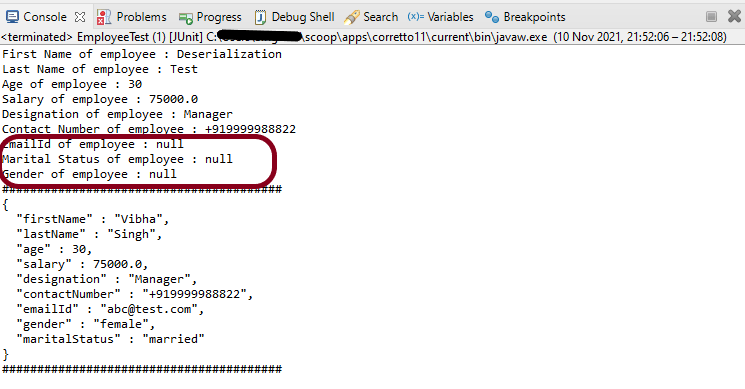
Output

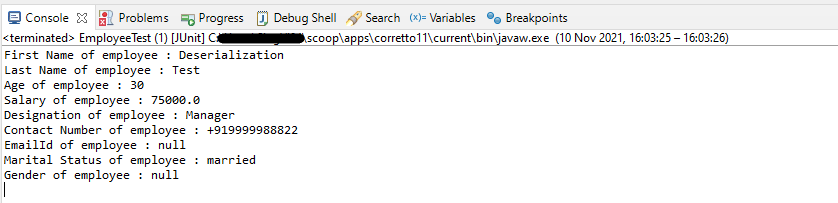
You can see that emailId, gender and maritalStatus – the values present in JSON for all of them are ignored and default values are retrieved.

POJO with allowGetters

allowGetters are enabled to allow “getters” to be used. This is commonly set to support defining “read-only” properties; ones for which there is a getter, but no matching setter: in this case, properties should be ignored for deserialization but NOT serialization. Another way to think about this setting is that setting it to `true` will “disable” ignoring of getters.

Default value is `false`, which means that getters with matching names will be ignored.

In the below example, I have defined emailId, gender and maritalStatus as allowGetters as True.

public class EmployeeTest {
	
	@Test
	public void serializationTest()  {

		Employee employee = new Employee();
		employee.setFirstName("Vibha");
		employee.setLastName("Singh");
		employee.setAge(30);
		employee.setSalary(75000);
		employee.setDesignation("Manager");
		employee.setContactNumber("+919999988822");
		employee.setEmailId("abc@test.com");
		employee.setMaritalStatus("married");
		employee.setGender("female");

		// Converting a Java class object to a JSON payload as string
		ObjectMapper mapper = new ObjectMapper();
      
        try {		
			String employeePrettyJson = mapper.writerWithDefaultPrettyPrinter().writeValueAsString(employee);
			System.out.println(employeePrettyJson);
		} catch (JsonProcessingException e) {
			e.printStackTrace();
		}
		
	}

	@Test
	public void deserializationTest() {

		String employeeString = "{\r\n"
				+ "  \"firstName\" : \"Deserialization\",\r\n"
				+ "  \"lastName\" : \"Test\",\r\n"
				+ "  \"age\" : 30,\r\n"
				+ "  \"salary\" : 75000.0,\r\n"
				+ "  \"designation\" : \"Manager\",\r\n"
				+ "  \"contactNumber\" : \"+919999988822\",\r\n"
				+ "  \"emailId\" : \"abc@test.com\",\r\n"
				+ "  \"gender\" : \"female\",\r\n"
				+ "  \"maritalStatus\" : \"married\"\r\n"
				+ " }";
		
	
		// Converting a JSON Payload to a JAVA Object
		ObjectMapper mapper = new ObjectMapper();

		 Employee employee2 = null;

		try {
			employee2 = mapper.readValue(employeeString, Employee.class);
		} catch (JsonMappingException e) {
			e.printStackTrace();
		} catch (JsonProcessingException e) {
			e.printStackTrace();
		}

		System.out.println("First Name of employee : " + employee2.getFirstName());
		System.out.println("Last Name of employee : " + employee2.getLastName());
		System.out.println("Age of employee : " + employee2.getAge());
		System.out.println("Salary of employee : " + employee2.getSalary());
		System.out.println("Designation of employee : " + employee2.getDesignation());
		System.out.println("Contact Number of employee : " + employee2.getContactNumber());
		System.out.println("EmailId of employee : " + employee2.getEmailId());
		System.out.println("Marital Status of employee : " + employee2.getMaritalStatus());
		System.out.println("Gender of employee : " + employee2.getGender());

	}

}

Output

In the below image, it shows that values of emailId, gender and maritalStatus are ignored and default value is passed.

POJO with allowSetters

allowSetters – Property that can be enabled to allow “setters” to be used. This could be used to specify “write-only” properties; ones that should not be serialized out, but that may be provided in for deserialization. Another way to think about this setting is that setting it to `true` will “disable” ignoring of setters.

Default value is `false`, which means that setters with matching names will be ignored.

public class EmployeeTest {
	
	@Test
	public void serializationTest() {

		Employee employee = new Employee();
		employee.setFirstName("Vibha");
		employee.setLastName("Singh");
		employee.setAge(30);
		employee.setSalary(75000);
		employee.setDesignation("Manager");
		employee.setContactNumber("+919999988822");
		employee.setEmailId("abc@test.com");
		employee.setMaritalStatus("married");
		employee.setGender("female");

		// Converting a Java class object to a JSON payload as string
		ObjectMapper mapper = new ObjectMapper();
		try {		
			String employeePrettyJson = mapper.writerWithDefaultPrettyPrinter().writeValueAsString(employee);
			System.out.println(employeePrettyJson);
		} catch (JsonProcessingException e) {
			e.printStackTrace();
		}
		System.out.println("########################################");
	}

	@Test
	public void deserializationTest()  {

		String employeeString = "{\r\n"
				+ "  \"firstName\" : \"Deserialization\",\r\n"
				+ "  \"lastName\" : \"Test\",\r\n"
				+ "  \"age\" : 30,\r\n"
				+ "  \"salary\" : 75000.0,\r\n"
				+ "  \"designation\" : \"Manager\",\r\n"
				+ "  \"contactNumber\" : \"+919999988822\",\r\n"
				+ "  \"emailId\" : \"abc@test.com\",\r\n"
				+ "  \"gender\" : \"female\",\r\n"
				+ "  \"maritalStatus\" : \"married\"\r\n"
				+ " }";
		
	
		// Converting a JSON Payload to a JAVA Object
		ObjectMapper mapper = new ObjectMapper();

		 Employee employee2 = null;

		try {
			employee2 = mapper.readValue(employeeString, Employee.class);
		} catch (JsonMappingException e) {
			e.printStackTrace();
		} catch (JsonProcessingException e) {
			e.printStackTrace();
		}

		System.out.println("First Name of employee : " + employee2.getFirstName());
		System.out.println("Last Name of employee : " + employee2.getLastName());
		System.out.println("Age of employee : " + employee2.getAge());
		System.out.println("Salary of employee : " + employee2.getSalary());
		System.out.println("Designation of employee : " + employee2.getDesignation());
		System.out.println("Contact Number of employee : " + employee2.getContactNumber());
		System.out.println("EmailId of employee : " + employee2.getEmailId());
		System.out.println("Marital Status of employee : " + employee2.getMaritalStatus());
		System.out.println("Gender of employee : " + employee2.getGender());
		
		System.out.println("########################################");

	}

}

Output

We are done! Congratulations on making it through this tutorial and hope you found it useful! Happy Learning!!

Rest Assured – @JsonIgnore Annotation in Jackson API

HOME

This tutorial will show how to ignore certain fields when serializing an object to JSON using Jackson 2.x.

This is very useful when the Jackson defaults aren’t enough, and we need to control exactly what gets serialized to JSON – and there are several ways to ignore properties. One of the most common ways is the use of @JsonIgnore Annotation.

To start off, add Jackson’s databind dependency to the project. Always add the latest dependency to your project.

<dependency>
    <groupId>com.fasterxml.jackson.core</groupId>
    <artifactId>jackson-databind</artifactId>
    <version>2.13.0</version>
</dependency>

@JsonIgnore is used at field level to mark a property or list of properties to be ignored.

The Jackson’s @JsonIgnore annotation can be placed on fields, getters/setters and constructor parameters mark a property to be ignored during the serialization to JSON (or deserialization from JSON).  If @JsonIgnore is the only annotation associated with a property, it will also cause the whole property to be ignored: that is, if setter has this annotation and getter has no annotations, the getter is also effectively ignored.

Let us have an Employee JSON as shown below.

{
  "firstName" : "Vibha",
  "lastName" : "Singh",
  "age" : 30,
  "salary" : 75000.0,
  "designation" : "Manager",
  "contactNumber" : "+919999988822",
  "emailId" : "abc@test.com",
  "gender" : "female",
  "maritalStatus" : "married"
}

To learn about Serialization and Deserialization of a JSON Object using Jackson API, refer to this

To create a POJO of the above JSON, we need to create a class with the name Employee. Create private data members corresponding to these JSON nodes, and then create the corresponding getter and setter methods.

Here, I have assigned emailId and gender as @JsonIgnore.

public class Employee {

	// private variables or data members of pojo class
	private String firstName;
	private String lastName;
	private int age;
	private double salary;
	private String designation;
	private String contactNumber;

	@JsonIgnore
	private String emailId;

	@JsonIgnore
	private String gender;

	private String maritalStatus;

	// Getter and setter methods
	public String getFirstName() {
		return firstName;
	}

	public void setFirstName(String firstName) {
		this.firstName = firstName;
	}

	public String getLastName() {
		return lastName;
	}

	public void setLastName(String lastName) {
		this.lastName = lastName;
	}

	public int getAge() {
		return age;
	}

	public void setAge(int age) {
		this.age = age;
	}

	public double getSalary() {
		return salary;
	}

	public void setSalary(double salary) {
		this.salary = salary;
	}

	public String getDesignation() {
		return designation;
	}

	public void setDesignation(String designation) {
		this.designation = designation;
	}

	public String getContactNumber() {
		return contactNumber;
	}

	public void setContactNumber(String contactNumber) {
		this.contactNumber = contactNumber;
	}

	public String getEmailId() {
		return emailId;
	}

	public void setEmailId(String emailId) {
		this.emailId = emailId;
	}

	public String getGender() {
		return gender;
	}

	public void setGender(String gender) {
		this.gender = gender;
	}

	public String getMaritalStatus() {
		return maritalStatus;
	}

	public void setMaritalStatus(String maritalStatus) {
		this.maritalStatus = maritalStatus;
	}

}

Now, let us create a SerializationTest with the above-mentioned POJO.

	@Test
	public void serializationTest() {

		Employee employee = new Employee();
		employee.setFirstName("Vibha");
		employee.setLastName("Singh");
		employee.setAge(30);
		employee.setSalary(75000);
		employee.setDesignation("Manager");
		employee.setContactNumber("+919999988822");
		employee.setEmailId("abc@test.com");
		employee.setMaritalStatus("married");
		employee.setGender("female");

		// Converting a Java class object to a JSON payload as string
		ObjectMapper mapper = new ObjectMapper();

		try {
			String employeePrettyJson = mapper.writerWithDefaultPrettyPrinter().writeValueAsString(employee);
			System.out.println(employeePrettyJson);
		} catch (JsonProcessingException e) {
			e.printStackTrace();
		}

		System.out.println("########################################");

	}

Output

As you can see here that emailId and gender nodes are not present in this JSON payload.

Now, let us see an example of deserialization where nodes that are assigned as @JsonIgnore return null values.

@Test
	public void deserializationTest() throws JsonMappingException, JsonProcessingException  {

		String employeeString = "{\r\n"
				+ "  \"firstName\" : \"Deserialization\",\r\n"
				+ "  \"lastName\" : \"Test\",\r\n"
				+ "  \"age\" : 30,\r\n"
				+ "  \"salary\" : 75000.0,\r\n"
				+ "  \"designation\" : \"Manager\",\r\n"
				+ "  \"contactNumber\" : \"+919999988822\",\r\n"
				+ "  \"emailId\" : \"abc@test.com\",\r\n"
				+ "  \"gender\" : \"female\",\r\n"
				+ "  \"maritalStatus\" : \"married\"\r\n"
				+ " }";
		
	
		// Converting a Java class object to a JSON payload as string
		ObjectMapper mapper = new ObjectMapper();

		Employee employee2 = mapper.readValue(employeeString, Employee.class);
		System.out.println("First Name of employee : " + employee2.getFirstName());
		System.out.println("Last Name of employee : " + employee2.getLastName());
		System.out.println("Age of employee : " + employee2.getAge());
		System.out.println("Salary of employee : " + employee2.getSalary());
		System.out.println("Designation of employee : " + employee2.getDesignation());
		System.out.println("Contact Number of employee : " + employee2.getContactNumber());
		System.out.println("EmailId of employee : " + employee2.getEmailId());
		System.out.println("Marital Status of employee : " + employee2.getMaritalStatus());
		System.out.println("Gender of employee : " + employee2.getGender());

	}

Output

We have values for fields emailId and gender in JSON, but it has not been deserialized as you can see it has default values, not from JSON.

I hope this has helped you to understand @JsonIgnore. Cheers!! Have happy learning!!

Rest Assured – How to test JSON Request using Jackson API

HOME

This tutorial focuses on the testing of a REST API (with JSON payload). We will use Jackson API to serialize the request.

It is suggested to go through these tutorials to understand about creating a JSON Object Payload using POJO (Plain Old Java Object).

How to create JSON Object Payload using POJO – Jackson API

How to create JSON Array Payload using POJO – Jackson API

How to create Nested JSON Object using POJO – Jackson API

To start with, we need to add Jackson Maven’s Dependency to the POM. Always add the latest version of Jackson dependency to your project.

<dependency>
    <groupId>com.fasterxml.jackson.core</groupId>
    <artifactId>jackson-databind</artifactId>
    <version>2.17.2</version>
</dependency>

The complete POM.xml will look like this, as shown below:

<?xml version="1.0" encoding="UTF-8"?>
<project xmlns="http://maven.apache.org/POM/4.0.0"
         xmlns:xsi="http://www.w3.org/2001/XMLSchema-instance"
         xsi:schemaLocation="http://maven.apache.org/POM/4.0.0 http://maven.apache.org/xsd/maven-4.0.0.xsd">
    <modelVersion>4.0.0</modelVersion>

    <groupId>com.example</groupId>
    <artifactId>RestAssured_JUnit4_Demo</artifactId>
    <version>1.0-SNAPSHOT</version>

    <properties>
        <rest-assured.version>5.3.0</rest-assured.version>
        <junit.version>4.13.2</junit.version>
        <jackson.version>2.17.2</jackson.version>
        <maven.compiler.source>11</maven.compiler.source>
        <maven.compiler.target>11</maven.compiler.target>
    </properties>

    <dependencies>

        <!-- Rest-Assured Dependency -->
        <dependency>
            <groupId>io.rest-assured</groupId>
            <artifactId>rest-assured</artifactId>
            <version>${rest-assured.version}</version>
            <scope>test</scope>
        </dependency>

        <!-- JUnit4 Dependency -->
        <dependency>
            <groupId>junit</groupId>
            <artifactId>junit</artifactId>
            <version>${junit.version}</version>
            <scope>test</scope>
        </dependency>

        <!-- Jackson Dependency -->
        <dependency>
            <groupId>com.fasterxml.jackson.core</groupId>
            <artifactId>jackson-databind</artifactId>
            <version>${jackson.version}</version>
        </dependency>

        <!-- Hamcrest Dependency -->
        <dependency>
            <groupId>org.hamcrest</groupId>
            <artifactId>hamcrest-all</artifactId>
            <version>1.3</version>
            <scope>test</scope>
        </dependency>

    </dependencies>

</project>

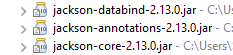
This dependency will also transitively add the following libraries to the classpath:

  1. jackson-annotations
  2. jackson-core

In the below example, let us assume that we need to create a new Employee (POST Request). To start with, we need to create a POJO class of the JSON payload (EmployeeDetails). This POJO class should contain the data members corresponding to the JSON nodes and their corresponding getter and setter methods.

public class EmployeeDetails {

	// private variables or data members of pojo class
	private String name;
	private double salary;
	private int age;

    // Getter and Setters
	public String getName() {
		return name;
	}

	public void setName(String name) {
		this.name = name;
	}

	public double getSalary() {
		return salary;
	}

	public void setSalary(double salary) {
		this.salary = salary;
	}

	public int getAge() {
		return age;
	}

	public void setAge(int age) {
		this.age = age;
	}

}

Now that we have our POJO class, we can start writing some REST Assured Serialization tests!

Let’s start with REST Assured Serialization with JSON. I want to send a POST request to my EmployeeDetails API that will add a new Employee to the database. I will send a POJO of the employee in the request body. This is what the code looks like in the test class:

import com.fasterxml.jackson.core.JsonProcessingException;
import com.fasterxml.jackson.databind.ObjectMapper;
import io.restassured.http.ContentType;
import org.junit.Test;
import static io.restassured.RestAssured.given;
import static org.hamcrest.Matchers.equalTo;

public class EmployeeTests {

    @Test
    public void createEmployee() {

        // Create an object of POJO class
        EmployeeDetails emp = new EmployeeDetails();
        emp.setName("Vibha");
        emp.setSalary(75000);
        emp.setAge(30);

        // Converting a Java class object to a JSON payload as string
        ObjectMapper mapper = new ObjectMapper();
        String employeePrettyJson = null;
        try {
            employeePrettyJson = mapper.writerWithDefaultPrettyPrinter().writeValueAsString(emp);
        } catch (JsonProcessingException e) {
            e.printStackTrace();
        }
        System.out.println("Request");
        System.out.println(employeePrettyJson);
        System.out.println("=========================================");
        System.out.println("Response");

        // GIVEN
        given().baseUri("https://dummy.restapiexample.com/api").contentType(ContentType.JSON).body(emp)

                // WHEN
                .when().post("/v1/create")

                // THEN
                .then().assertThat().statusCode(200).body("data.name", equalTo("Vibha"))
                .body("message", equalTo("Successfully! Record has been added.")).log().body();

    }

}

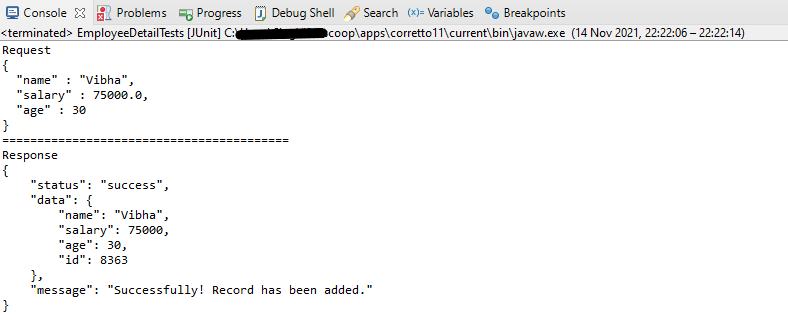
The output of the above program is

If you want to see the structure of the Request, then add the below in the test code.

ObjectMapper mapper = new ObjectMapper();
String employeePrettyJson = mapper.writerWithDefaultPrettyPrinter().writeValueAsString(emp);
System.out.println(employeePrettyJson);

REST Assured Serialization with Jackson handled all the serialization work for us. Great! See, this has become so simple with the help of Jackson API.

We are done! Congratulations on making it through this tutorial and hope you found it useful! Happy Learning!!

How to create Nested JSON Object using POJO – Jackson API

Last Updated On

HOME

In the previous tutorial, I explained the creation of JSON Array using POJO. In this tutorial, I will explain the creation of a nested JSON Object (JSON with multiple nodes) using POJO.

It is recommended to go through these tutorials to understand POJO, JSON Object, and JSON Array.

How to create JSON Object Payload using POJO – Jackson API

How to create JSON Array Payload using POJO – Jackson API

We are using Jackson API for Serialization and Deserialization. So, add the Jackson dependency to the project. We need to add the below-mentioned dependencies to run this example.

<?xml version="1.0" encoding="UTF-8"?>
<project xmlns="http://maven.apache.org/POM/4.0.0"
         xmlns:xsi="http://www.w3.org/2001/XMLSchema-instance"
         xsi:schemaLocation="http://maven.apache.org/POM/4.0.0 http://maven.apache.org/xsd/maven-4.0.0.xsd">
    <modelVersion>4.0.0</modelVersion>

    <groupId>com.example</groupId>
    <artifactId>RestAssured_JUnit4_Demo</artifactId>
    <version>1.0-SNAPSHOT</version>

    <properties>
        <junit.version>4.13.2</junit.version>
        <jackson.version>2.17.1</jackson.version>
        <hamcrest.version>1.3</hamcrest.version>
    </properties>

    <dependencies>

        <!-- JUnit4 Dependency -->
        <dependency>
            <groupId>junit</groupId>
            <artifactId>junit</artifactId>
            <version>${junit.version}</version>
            <scope>test</scope>
        </dependency>

        <!-- Jackson Dependency -->
        <dependency>
            <groupId>com.fasterxml.jackson.core</groupId>
            <artifactId>jackson-databind</artifactId>
            <version>${jackson.version}</version>
        </dependency>

        <!-- Hamcrest Dependency -->
        <dependency>
            <groupId>org.hamcrest</groupId>
            <artifactId>hamcrest-all</artifactId>
            <version>${hamcrest.version}</version>
            <scope>test</scope>
        </dependency>

    </dependencies>

</project>

We will use a nested JSON Object (a combination of JSON Arrays and objects).

{
  "companyName": "QAAutomation",
  "companyEmailId": "qaautomation@org.com",
  "companyNumber": "+353891234121", 
  "companyAddress": "12, HeneryStreet, Dublin, D12PW20", 
  "supportedSalaryBanks": [
    "AIB",
    "BOI",
    "PSB"
  ],
  "employee": [
    { 
	  "firstName" : "Vibha",
      "lastName" : "Singh",
      "age" : 30,
      "salary" : 75000.0,
      "designation" : "Manager",
      "contactNumber" : "+919999988822",
      "emailId" : "abc@test.com"
    },
    {
      "firstName" : "Neha",
      "lastName" : "Verma",
      "age" : 25,
      "salary" : 60000.0,
      "designation" : "Lead",
      "contactNumber" : "+914442266221",
      "emailId" : "xyz@test.com"
    },
    {
      "firstName" : "Rajesh",
      "lastName" : "Gupta",
      "age" : 20,
      "salary" : 40000.0,
      "designation" : "Intern",
      "contactNumber" : "+919933384422",
      "emailId" : "pqr@test.com"
    }
  ],
  "contractors": [
    {
      "firstName": "John",
      "lastName": "Mathew",
      "contractFrom": "Jan-2018",
      "contractTo": "Aug-2022",
	  "contactNumber" : "+919631384422"
    },
    {
      "firstName": "Seema",
      "lastName": "Prasad",
      "contractFrom": "Jun-2019",
      "contractTo": "Jun-2023"
	  "contactNumber" : "+919688881422"
    }
  ],
  "companyPFDeails": {
    "pfName": "XYZ",
    "pfYear": 2020,
    "noOfEmployees": 100
  }
}

It is very overwhelming to handle this type of nested JSON Object at a glance. So, we will split this into small parts or objects. So basically, we can split the above JSON into 4 parts – Employee, Contractors, CompanyPFDetails, and NestedPOJODemo.

companyName, companyEmailId, companyNumber, and companyAddress are 1:1 mapping in the payload. supportedSalaryBanks is an array of String values.

	private String companyName;
	private String companyEmailId;
	private String companyNumber;
	private String companyAddress;
	private List<String> supportedSalaryBanks;

Employee has value as an array of employees. There is no ready-made data type to represent elements of this array as a whole. So here we need to create a POJO class that can contain all details of an employee.

To represent an array of Employees and Contractors

	List<Employee> employee;
	List<Contractors> contractors;

Create a POJO class for CompanyPFDetails and add it to the main payload.

Now, let us see various POJO classes.

Employee POJO Class

public class Employee {

	// private variables or data members of pojo class
	private String firstName;
	private String lastName;
	private int age;
	private double salary;
	private String designation;
	private String contactNumber;
	private String emailId;

	// Getter and setter methods
	public String getFirstName() {
		return firstName;
	}

	public void setFirstName(String firstName) {
		this.firstName = firstName;
	}

	public String getLastName() {
		return lastName;
	}

	public void setLastName(String lastName) {
		this.lastName = lastName;
	}

	public int getAge() {
		return age;
	}

	public void setAge(int age) {
		this.age = age;
	}

	public double getSalary() {
		return salary;
	}

	public void setSalary(double salary) {
		this.salary = salary;
	}

	public String getDesignation() {
		return designation;
	}

	public void setDesignation(String designation) {
		this.designation = designation;
	}

	public String getContactNumber() {
		return contactNumber;
	}

	public void setContactNumber(String contactNumber) {
		this.contactNumber = contactNumber;
	}

	public String getEmailId() {
		return emailId;
	}

	public void setEmailId(String emailId) {
		this.emailId = emailId;
	}

}

Contractors POJO Class

public class Contractors {

	// private variables or data members of pojo class
	private String firstName;
	private String lastName;
	private String contractFrom;
	private String contractTo;
	private String contactNumber;

	public String getFirstName() {
		return firstName;
	}

	public void setFirstName(String firstName) {
		this.firstName = firstName;
	}

	public String getLastName() {
		return lastName;
	}

	public void setLastName(String lastName) {
		this.lastName = lastName;
	}

	public String getContractFrom() {
		return contractFrom;
	}

	public void setContractFrom(String contractFrom) {
		this.contractFrom = contractFrom;
	}

	public String getContractTo() {
		return contractTo;
	}

	public void setContractTo(String contractTo) {
		this.contractTo = contractTo;
	}

	public String getContactNumber() {
		return contactNumber;
	}

	public void setContactNumber(String contactNumber) {
		this.contactNumber = contactNumber;
	}

}

CompanyPFDetails POJO Class

public class CompanyPFDetails {

	private String pfName;
	private int pfYear;
	private int noOfEmployees;

	public String getPfName() {
		return pfName;
	}

	public void setPfName(String pfName) {
		this.pfName = pfName;
	}

	public int getPfYear() {
		return pfYear;
	}

	public void setPfYear(int pfYear) {
		this.pfYear = pfYear;
	}

	public int getNoOfEmployees() {
		return noOfEmployees;
	}

	public void setNoOfEmployees(int noOfEmployees) {
		this.noOfEmployees = noOfEmployees;
	}

}

NestedPOJODemo class

public class NestedPOJODemo {

	// private variables or data members of pojo class
	private String companyName;
	private String companyEmailId;
	private String companyNumber;
	private String companyAddress;
	private List<String> supportedSalaryBanks;
	List<Employee> employee;
	List<Contractors> contractors;
	CompanyPFDetails companyPFDetails;

	public String getCompanyName() {
		return companyName;
	}

	public void setCompanyName(String companyName) {
		this.companyName = companyName;
	}

	public String getCompanyEmailId() {
		return companyEmailId;
	}

	public void setCompanyEmailId(String companyEmailId) {
		this.companyEmailId = companyEmailId;
	}

	public String getCompanyNumber() {
		return companyNumber;
	}

	public void setCompanyNumber(String companyNumber) {
		this.companyNumber = companyNumber;
	}

	public String getCompanyAddress() {
		return companyAddress;
	}

	public void setCompanyAddress(String companyAddress) {
		this.companyAddress = companyAddress;
	}

	public List<String> getSupportedSalaryBanks() {
		return supportedSalaryBanks;
	}

	public void setSupportedSalaryBanks(List<String> supportedSalaryBanks) {
		this.supportedSalaryBanks = supportedSalaryBanks;
	}

	public List<Employee> getEmployee() {
		return employee;
	}

	public void setEmployee(List<Employee> employee) {
		this.employee = employee;
	}

	public List<Contractors> getContractors() {
		return contractors;
	}

	public void setContractors(List<Contractors> contractors) {
		this.contractors = contractors;
	}

	public CompanyPFDetails getCompanyPFDetails() {
		return companyPFDetails;
	}

	public void setCompanyPFDetails(CompanyPFDetails companyPFDetails) {
		this.companyPFDetails = companyPFDetails;
	}

}

Let’s create a JSON Payload using the above POJO classes.

import com.fasterxml.jackson.databind.ObjectMapper;
import org.junit.Test;
import java.io.IOException;
import java.util.ArrayList;
import java.util.List;

public class NestedPOJOTest {

    @Test
    public void createNestedPOJO() throws IOException {

        NestedPOJODemo demo = new NestedPOJODemo();
        demo.setCompanyName("QAAutomation");
        demo.setCompanyEmailId("qaautomation@org.com");
        demo.setCompanyNumber("+353891234121");
        demo.setCompanyAddress("12, HeneryStreet, Dublin, D12PW20");

        List<String> supportedSalaryBanks = new ArrayList<String>();
        supportedSalaryBanks.add("AIB");
        supportedSalaryBanks.add("BOI");
        supportedSalaryBanks.add("PSB");
        demo.setSupportedSalaryBanks(supportedSalaryBanks);

        // First Employee
        Employee emp1 = new Employee();
        emp1.setFirstName("Vibha");
        emp1.setLastName("Singh");
        emp1.setAge(30);
        emp1.setSalary(75000);
        emp1.setDesignation("Manager");
        emp1.setContactNumber("+919999988822");
        emp1.setEmailId("abc@test.com");

        // Second Employee
        Employee emp2 = new Employee();
        emp2.setFirstName("Neha");
        emp2.setLastName("Verms");
        emp2.setAge(35);
        emp2.setSalary(60000);
        emp2.setDesignation("Lead");
        emp2.setContactNumber("+914442266221");
        emp2.setEmailId("xyz@test.com");

        // Third Employee
        Employee emp3 = new Employee();
        emp3.setFirstName("Rajesh");
        emp3.setLastName("Gupta");
        emp3.setAge(20);
        emp3.setSalary(40000);
        emp3.setDesignation("Intern");
        emp3.setContactNumber("+919933384422");
        emp3.setEmailId("pqr@test.com");

        // Creating a List of Employees
        List<Employee> employeeList = new ArrayList<Employee>();
        employeeList.add(emp1);
        employeeList.add(emp2);
        employeeList.add(emp3);
        demo.setEmployee(employeeList);

        // First Contractor
        Contractors contractor1 = new Contractors();
        contractor1.setFirstName("John");
        contractor1.setLastName("Mathew");
        contractor1.setContractFrom("Jan-2018");
        contractor1.setContractTo("Aug-2022");
        contractor1.setContactNumber("+919631384422");

        // Second Contractor
        Contractors contractor2 = new Contractors();
        contractor2.setFirstName("Seema");
        contractor2.setLastName("Mathew");
        contractor2.setContractFrom("Jun-2019");
        contractor2.setContractTo("Jun-2023");
        contractor2.setContactNumber("+919688881422");

        // Creating a List of Contractors
        List<Contractors> contractorList = new ArrayList<Contractors>();
        contractorList.add(contractor1);
        contractorList.add(contractor2);
        demo.setContractors(contractorList);

        CompanyPFDetails pf = new CompanyPFDetails();
        pf.setPfName("XYZ");
        pf.setPfYear(2020);
        pf.setNoOfEmployees(100);
        demo.setCompanyPFDetails(pf);

        ObjectMapper mapper = new ObjectMapper();
        String nestedJsonPayload = mapper.writerWithDefaultPrettyPrinter().writeValueAsString(demo);
        System.out.println(nestedJsonPayload);

    }

}

Here, I have used ObjectMapper for reading and writing JSON, either to and from basic POJOs (Plain Old Java Objects), or to and from a general-purpose JSON Tree Model (JsonNode), as well as related functionality for performing conversions.

We can save this JSON payload in a file in the project or any location of your choice. Here, I’m saving this Nested JSON Payload in a file within src/test/resources.

String userDir = System.getProperty("user.dir");
mapper.writerWithDefaultPrettyPrinter().writeValue(new File(userDir + "\\src\\test\\resources\\NestedEmployeePayload.json"), demo);
	}

We are done! Congratulations on making it through this tutorial and hope you found it useful! Happy Learning!!