Marshalling- How to convert Java Objects to XML using JAXB

HOME

This tutorial explains how to use JAXB (Java Architecture for XML Binding) to convert Java Objects to XML documents.

JAXB provides a fast and convenient way to marshal (write) Java Objects into XML and un-marshal (read) XML into Java Objects. It supports a binding framework that maps XML elements and attributes to Java fields and properties using Java annotations.

With Java releases lower than Java 11, JAXB was part of the JVM and you could use it directly without defining additional libraries.

As of Java 11, JAXB is not part of the JRE anymore, and you need to configure the relevant libraries via your dependency management system, for example, either Maven or Gradle.

Configure the Java compiler level to be at least 11 and add the JAXB dependencies to your pom file.

<?xml version="1.0" encoding="UTF-8"?>

<project xmlns="http://maven.apache.org/POM/4.0.0" xmlns:xsi="http://www.w3.org/2001/XMLSchema-instance"
  xsi:schemaLocation="http://maven.apache.org/POM/4.0.0 https://maven.apache.org/xsd/maven-4.0.0.xsd">
  <modelVersion>4.0.0</modelVersion>

  <groupId>org.example</groupId>
  <artifactId>JAXBDemo</artifactId>
  <version>0.0.1-SNAPSHOT</version>

  <name>JAXBDemo</name>
  <url>http://www.example.com</url>

  <properties>  
    <project.build.sourceEncoding>UTF-8</project.build.sourceEncoding>
    <maven.compiler.plugin.version>3.11.0</maven.compiler.plugin.version>
    <maven.surefire.plugin.version>3.2.1</maven.surefire.plugin.version>
    <maven.compiler.source>17</maven.compiler.source>
    <maven.compiler.target>17</maven.compiler.target>
  </properties>

  <dependencies>
    <dependency>
      <groupId>junit</groupId>
      <artifactId>junit</artifactId>
      <version>4.13.2</version>
      <scope>test</scope>
  </dependency>
    
 <dependency>
    <groupId>com.sun.xml.bind</groupId>
    <artifactId>jaxb-impl</artifactId>
    <version>4.0.4</version>
   </dependency>
 </dependencies>
   
<build>
    <plugins>
      <plugin>
        <groupId>org.apache.maven.plugins</groupId>
        <artifactId>maven-surefire-plugin</artifactId>
        <version>${maven.surefire.plugin.version}</version>
        <configuration>
          <testFailureIgnore>true</testFailureIgnore>
        </configuration>
      </plugin>

      <plugin>
        <groupId>org.apache.maven.plugins</groupId>
        <artifactId>maven-compiler-plugin</artifactId>
        <version>${maven.compiler.plugin.version}</version>
        <configuration>
          <source>${maven.compiler.source}</source>
          <target>${maven.compiler.target}</target>
        </configuration>
      </plugin>
    </plugins>
  </build>
</project>

JAXB Annotations

  1. @XmlRootElement: Define the root element for an XML tree
  2. @XmlType: Define the order in which the fields are written in the XML file
  3. @XmlElement: Define the actual XML element name which will be used
  4. @XmlAttribute: Define the id field is mapped as an attribute instead of an element
  5. @XmlTransient: Annotate fields that we don’t want to be included in XML

Sample XML Structure

<?xml version="1.0" encoding="UTF-8" standalone="yes"?>
<EmployeeDetails>
    <firstName>Vibha</firstName>
    <lastName>Singh</lastName>
    <gender>female</gender>
    <age>30</age>
    <maritalStatus>married</maritalStatus>
    <designation>Manager</designation>
    <contactNumber>+919999988822</contactNumber>
    <emailId>abc@test.com</emailId>
    <GrossSalary>75000.0</GrossSalary>
</EmployeeDetails>

Marshalling

Marshalling provides a client application the ability to convert a JAXB derived Java object tree into XML data.

Let’s see the steps to convert Java Objects into XML document.

  1. Create POJO Class of XML
  2. Create the JAXBContext object
  3. Create the Marshaller objects
  4. Create the content tree by using set methods
  5. Call the marshal method

Now, let us create the Java Objects (POJO).

import jakarta.xml.bind.annotation.*;

@XmlRootElement(name = "EmployeeDetails")
@XmlAccessorType(XmlAccessType.FIELD)

//Define the order in which the fields are written in XML
@XmlType(propOrder = { "firstName", "lastName", "gender", "age", "maritalStatus", "designation", "contactNumber",
		"emailId", "salary" })

public class Employee {

	private String firstName;
	private String lastName;
	private int age;

    @XmlElement(name = "GrossSalary")
	private double salary;
	private String designation;
	private String contactNumber;
	private String emailId;
	private String gender;
	private String maritalStatus;

	// Getter and setter methods
	public String getFirstName() {
		return firstName;
	}

	public void setFirstName(String firstName) {
		this.firstName = firstName;
	}

	public String getLastName() {
		return lastName;
	}

	public void setLastName(String lastName) {
		this.lastName = lastName;
	}

	public int getAge() {
		return age;
	}

	public void setAge(int age) {
		this.age = age;
	}

	public double getSalary() {
		return salary;
	}

	public void setSalary(double salary) {
		this.salary = salary;
	}

	public String getDesignation() {
		return designation;
	}

	public void setDesignation(String designation) {
		this.designation = designation;
	}

	public String getContactNumber() {
		return contactNumber;
	}

	public void setContactNumber(String contactNumber) {
		this.contactNumber = contactNumber;
	}

	public String getEmailId() {
		return emailId;
	}

	public void setEmailId(String emailId) {
		this.emailId = emailId;
	}

	public String getGender() {
		return gender;
	}

	public void setGender(String gender) {
		this.gender = gender;
	}

	public String getMaritalStatus() {
		return maritalStatus;
	}

	public void setMaritalStatus(String maritalStatus) {
		this.maritalStatus = maritalStatus;
	}

   @Override
	public String toString() {
		return "Employee [FirstName=" + firstName + ", LastName=" + lastName + ", Age=" + age + ", Salary=" + salary
				+ ", Designation=" + designation + ", ContactNumber=" + contactNumber + ", EmailId=" + emailId
				+ ", Gender=" + gender + ", MaritalStatus=" + maritalStatus + "]";
	}
}

Create the following test program for writing the XML file.

import jakarta.xml.bind.JAXBContext;
import jakarta.xml.bind.JAXBException;
import jakarta.xml.bind.Marshaller;
import jakarta.xml.bind.PropertyException;
import org.junit.Test;
import java.io.StringWriter;

public class SerializationDemo {

    @Test
    public void serializationTest1() {

        try {

            Employee employee = new Employee();

            employee.setFirstName("Terry");
            employee.setLastName("Mathew");
            employee.setAge(30);
            employee.setSalary(75000);
            employee.setDesignation("Manager");
            employee.setContactNumber("+919999988822");
            employee.setEmailId("abc@test.com");
            employee.setMaritalStatus("married");
            employee.setGender("female");

            // Create JAXB Context
            JAXBContext context = JAXBContext.newInstance(Employee.class);

            // Create Marshaller
            Marshaller jaxbMarshaller = context.createMarshaller();

            // Required formatting
            jaxbMarshaller.setProperty(Marshaller.JAXB_FORMATTED_OUTPUT, Boolean.TRUE);

            // Write XML to StringWriter
            StringWriter sw = new StringWriter();
            jaxbMarshaller.marshal(employee, sw);

            // Convert XML to String
            String xmlContent = sw.toString();
            System.out.println(xmlContent);

        } catch (PropertyException e) {
            e.printStackTrace();

        } catch (JAXBException e) {
            e.printStackTrace();
        }
    }
}

When we run the code above, we may check the console output to verify that we have successfully converted Java object to XML:
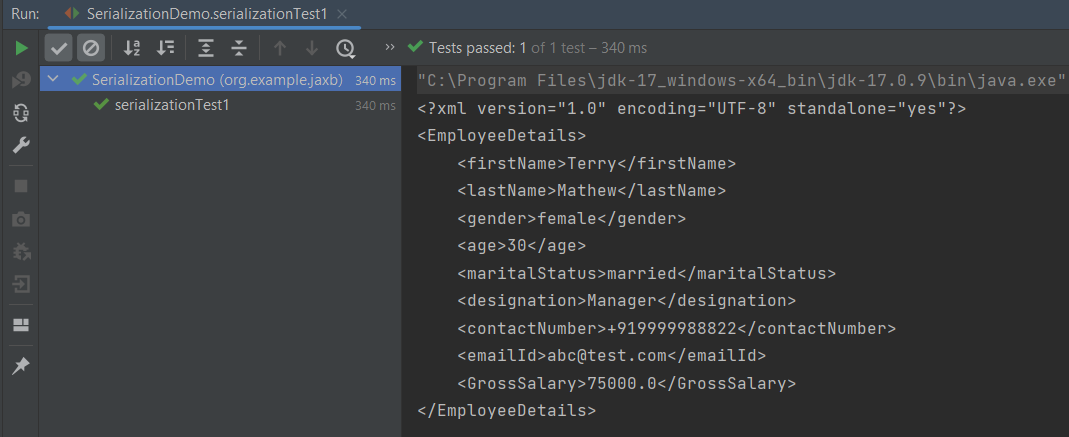
By default, the Marshaller uses UTF-8 encoding when generating XML data.

The javax.xml.bind.JAXBContext class provides a client’s entry point to JAXB API. By default, JAXB does not format the XML document. This saves space and prevents that any white-space may accidentally be interpreted as significant.

To have JAXB format the output, we simply set the Marshaller.JAXB_FORMATTED_OUTPUT property to true on the Marshaller. The marshal method uses an object and an output file where to store the generated XML as parameters.

You can see that we have used JAXB Annotations like @XMLRootElement are changed from Employee to EmployeeDetails.

The order of elements in the XML is defined by

@XmlType(propOrder = { "firstName", "lastName", "gender", "age", "maritalStatus", "designation", "contactNumber","emailId", "salary" })

@XMLElement has set the element name to GrossSalary from Salary.

The below example is the short way of writing the same test and saving XML. We need to add a constructor in the POJO class so that we can set the values to the variables through the Constructor.

import jakarta.xml.bind.annotation.*;

@XmlRootElement(name = "EmployeeDetails")
@XmlAccessorType(XmlAccessType.FIELD)

//Define the order in which the fields are written in XML
@XmlType(propOrder = { "firstName", "lastName", "gender", "age", "maritalStatus", "designation", "contactNumber",
        "emailId", "salary" })

public class Employee {

    private String firstName;
    private String lastName;
    private int age;

    @XmlElement(name = "GrossSalary")
    private double salary;
    private String designation;
    private String contactNumber;
    private String emailId;
    private String gender;
    private String maritalStatus;

    public Employee() {
        super();

    }

    public Employee(String firstName, String lastName, int age, double salary, String designation, String contactNumber,
                    String emailId, String gender, String maritalStatus) {

        this.firstName = firstName;
        this.lastName = lastName;
        this.age = age;


        this.salary = salary;

        this.designation = designation;
        this.contactNumber = contactNumber;
        this.emailId = emailId;
        this.gender = gender;
        this.maritalStatus = maritalStatus;
    }

    // Getter and setter methods
    public String getFirstName() {
        return firstName;
    }

    public void setFirstName(String firstName) {
        this.firstName = firstName;
    }

    public String getLastName() {
        return lastName;
    }

    public void setLastName(String lastName) {
        this.lastName = lastName;
    }

    public int getAge() {
        return age;
    }

    public void setAge(int age) {
        this.age = age;
    }

    public double getSalary() {
        return salary;
    }

    public void setSalary(double salary) {
        this.salary = salary;
    }

    public String getDesignation() {
        return designation;
    }

    public void setDesignation(String designation) {
        this.designation = designation;
    }

    public String getContactNumber() {
        return contactNumber;
    }

    public void setContactNumber(String contactNumber) {
        this.contactNumber = contactNumber;
    }

    public String getEmailId() {
        return emailId;
    }

    public void setEmailId(String emailId) {
        this.emailId = emailId;
    }

    public String getGender() {
        return gender;
    }

    public void setGender(String gender) {
        this.gender = gender;
    }

    public String getMaritalStatus() {
        return maritalStatus;
    }

    public void setMaritalStatus(String maritalStatus) {
        this.maritalStatus = maritalStatus;
    }

    @Override
    public String toString() {
        return "Employee [FirstName=" + firstName + ", LastName=" + lastName + ", Age=" + age + ", Salary=" + salary
                + ", Designation=" + designation + ", ContactNumber=" + contactNumber + ", EmailId=" + emailId
                + ", Gender=" + gender + ", MaritalStatus=" + maritalStatus + "]";
    }
}

The below JAXB example for XML marshalling convert Java objects into an XML.

import jakarta.xml.bind.JAXBContext;
import jakarta.xml.bind.JAXBException;
import jakarta.xml.bind.Marshaller;
import jakarta.xml.bind.PropertyException;
import org.junit.Test;
import java.io.File;
import java.io.StringWriter;

public class SerializationDemo {


    @Test
    public void serializationTest2() {

        try {

            Employee employee = new Employee("Thomas", "Pawsey", 35, 100000, "Director", "+919999988822","Test@test.com", "married", "female");

            // Create JAXB Context
            JAXBContext context = JAXBContext.newInstance(Employee.class);

            // Create Marshaller
            Marshaller jaxbMarshaller = context.createMarshaller();

            // Required formatting
            jaxbMarshaller.setProperty(Marshaller.JAXB_FORMATTED_OUTPUT, Boolean.TRUE);

            // Write XML to StringWriter
            StringWriter writer = new StringWriter();
            jaxbMarshaller.marshal(employee, writer);

            // Convert XML to String
            String xmlContent = writer.toString();
            System.out.println(xmlContent);

            // Save the file
            String userDir = System.getProperty("user.dir");
            jaxbMarshaller.marshal(employee, new File(userDir + "\\src\\test\\resources\\JAXB_XML.xml"));
            System.out.println("File is saved");
            
        } catch (PropertyException e) {
            e.printStackTrace();

        } catch (JAXBException e) {
            e.printStackTrace();
        }
    }
}

When we run the code above, we may check the console output to verify that we have successfully converted Java object to XML:
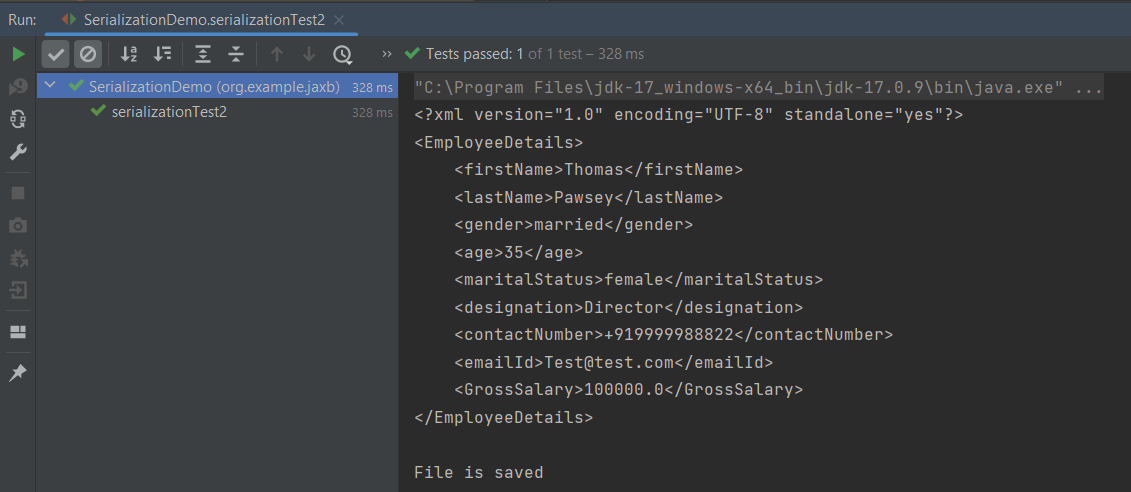
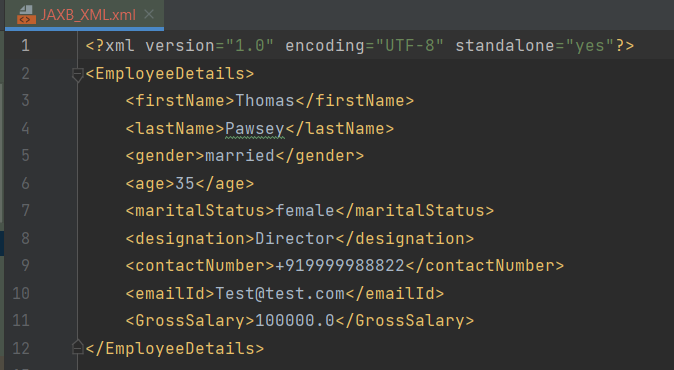
The XML is saved under src/test/resources. To see this file, after the execution of the test, you need to refresh the project.
Similarly, we can unmarshal an XML to Java Objects in the next tutorial.

We are done! Congratulations on making it through this tutorial and hope you found it useful! Happy Learning!!

Rest Assured Tutorials

HOME

RestAssured is a Java-based library that is used to test RESTful Web Services. REST-assured was designed to simplify the testing and validation of REST APIs. It takes influence from testing techniques used in dynamic languages such as Ruby and Groovy.

Chapter 1 Assertion of JSON in Rest Assured using Hamcrest
Chapter 2 Extraction from JSON in Rest Assured – JsonPath
Chapter 3 How to perform multiple assertions in Rest Assured? 
Chapter 4 How to validate JSON body in Rest Assured?
Chapter 5 Compare JSON Objects using JSONAssert Library
Chapter 6 Compare JSON Arrays using JSONAssert Library
Chapter 7 How to Read JSON with JSON.simple – NEW
Chapter 8 How to create and write to JSON with JSON.simple – NEW

JSON Handling and manipulation

Category 10: XML Manipulations

XML Handling and manipulation

Gradle

Chapter 1 Setup Basic REST Assured Gradle Project In Eclipse IDE

Frameworks

Chapter 1 Integration of REST Assured with TestNG
Chapter 2 Integration of REST Assured with JUnit4
Chapter 3 Integration of REST Assured with JUnit5
Chapter 4 Serenity BDD with Cucumber and Rest Assured
Chapter 5 Serenity BDD with Cucumber and Rest Assured in Gradle
Chapter 6 How To Create Gradle Project with Cucumber to test Rest API
Chapter 7 Rest API Test in Cucumber and JUnit4
Chapter 8 API Automation with REST Assured, Cucumber and TestNG

XML Marshalling – Convert Java objects to XML using JAXB Version 3

HOME

The previous tutorials have explained marshalling and unmarshalling of XML using JAXB Version 2.

As of Java 11, JAXB is not part of the JRE anymore, and you need to configure the relevant libraries via your dependency management system, for example, either Maven or Gradle.

Configure the Java compiler level to be at least 11 and add the JAXB Version 3 dependencies to your pom file.

<!-- JAXB API v3.0.1 -->
<dependency>
    <groupId>jakarta.xml.bind</groupId>
    <artifactId>jakarta.xml.bind-api</artifactId>
    <version>3.0.1</version>
</dependency>

<!-- JAXB v3.0.2 reference implementation (curiously with com.sun coordinates) -->
<dependency>
    <groupId>com.sun.xml.bind</groupId>
    <artifactId>jaxb-impl</artifactId>
    <version>3.0.2</version>
    <scope>runtime</scope>
</dependency>
Difference between javax.xml.* and jakarta.xml.*

Eclipse foundation rebrand the Java EE javax.xml.* to Jakarta EE jakarta.xml.*.

Below are some JAXB APIs in versions 2 and 3.

//@Since 3.0.0, rebrand to Jakarta.xml

import jakarta.xml.bind.annotation.XmlAccessType;
import jakarta.xml.bind.annotation.XmlAccessorType;
import jakarta.xml.bind.annotation.XmlRootElement;
import jakarta.xml.bind.annotation.XmlElement;
import jakarta.xml.bind.annotation.XmlTransient;
import jakarta.xml.bind.annotation.XmlType;

import jakarta.xml.bind.JAXBContext;
import jakarta.xml.bind.JAXBException;
import jakarta.xml.bind.Marshaller;
import jakarta.xml.bind.PropertyException;
import jakarta.xml.bind.Unmarshaller;

//JAXB Version 2.0

import javax.xml.bind.annotation.XmlAccessType;
import javax.xml.bind.annotation.XmlAccessorType;
import javax.xml.bind.annotation.XmlElement;
import javax.xml.bind.annotation.XmlRootElement;
import javax.xml.bind.annotation.XmlTransient;
import javax.xml.bind.annotation.XmlType;

import javax.xml.bind.JAXBContext;
import javax.xml.bind.JAXBException;
import javax.xml.bind.Marshaller;
import javax.xml.bind.PropertyException;
import javax.xml.bind.Unmarshaller;
Sample XML Structure
<?xml version="1.0" encoding="UTF-8" standalone="yes"?>
<EmployeeDetail>
    <firstName>Terry</firstName>
    <lastName>Mathew</lastName>
    <age>30</age>
    <salary>75000.0</salary>
    <designation>Manager</designation>
    <contactNumber>+919999988822</contactNumber>
    <emailId>abc@test.com</emailId>
    <gender>female</gender>
    <maritalStatus>married</maritalStatus>
</EmployeeDetail>

Now, let us create the Java Objects (POJO) of the above XML.

import jakarta.xml.bind.annotation.XmlAccessType;
import jakarta.xml.bind.annotation.XmlAccessorType;
import jakarta.xml.bind.annotation.XmlRootElement;

@XmlRootElement(name = "EmployeeDetail")
@XmlAccessorType(XmlAccessType.FIELD)
public class Employee {

	private String firstName;
	private String lastName;
	private int age;
	private double salary;
	private String designation;
	private String contactNumber;
	private String emailId;
	private String gender;
	private String maritalStatus;

	public Employee() {
		super();

	}

	// Getter and setter methods
	public String getFirstName() {
		return firstName;
	}

	public void setFirstName(String firstName) {
		this.firstName = firstName;
	}

	public String getLastName() {
		return lastName;
	}

	public void setLastName(String lastName) {
		this.lastName = lastName;
	}

	public int getAge() {
		return age;
	}

	public void setAge(int age) {
		this.age = age;
	}

	public double getSalary() {
		return salary;
	}

	public void setSalary(double salary) {
		this.salary = salary;
	}

	public String getDesignation() {
		return designation;
	}

	public void setDesignation(String designation) {
		this.designation = designation;
	}

	public String getContactNumber() {
		return contactNumber;
	}

	public void setContactNumber(String contactNumber) {
		this.contactNumber = contactNumber;
	}

	public String getEmailId() {
		return emailId;
	}

	public void setEmailId(String emailId) {
		this.emailId = emailId;
	}

	public String getGender() {
		return gender;
	}

	public void setGender(String gender) {
		this.gender = gender;
	}

	public String getMaritalStatus() {
		return maritalStatus;
	}

	public void setMaritalStatus(String maritalStatus) {
		this.maritalStatus = maritalStatus;
	}

    @Override
	public String toString() {
		return "Employee [FirstName=" + firstName + ", LastName=" + lastName + ", Age=" + age + ", Salary=" + salary
				+ ", Designation=" + designation + ", ContactNumber=" + contactNumber + ", EmailId=" + emailId
				+ ", Gender=" + gender + ", MaritalStatus=" + maritalStatus + "]";
	}
}

Let’s create a simple program using the JAXBContext which provides an abstraction for managing the XML/Java binding information necessary to implement the JAXB binding framework operations.

import java.io.StringWriter;

import org.junit.Test;

import jakarta.xml.bind.JAXBContext;
import jakarta.xml.bind.JAXBException;
import jakarta.xml.bind.Marshaller;
import jakarta.xml.bind.PropertyException;

public class JAXBSerialization {

	@Test
	public void serializationTest1() {

		try {

			Employee employee = new Employee();

			employee.setFirstName("Terry");
			employee.setLastName("Mathew");
			employee.setAge(30);
			employee.setSalary(75000);
			employee.setDesignation("Manager");
			employee.setContactNumber("+919999988822");
			employee.setEmailId("abc@test.com");
			employee.setMaritalStatus("married");
			employee.setGender("female");

			// Create JAXB Context
			JAXBContext context = JAXBContext.newInstance(Employee.class);

			// Create Marshaller
			Marshaller jaxbMarshaller = context.createMarshaller();

			// Required formatting
			jaxbMarshaller.setProperty(Marshaller.JAXB_FORMATTED_OUTPUT, Boolean.TRUE);

			// Print XML String to Console
			StringWriter sw = new StringWriter();

			// Write XML to StringWriter
			jaxbMarshaller.marshal(employee, sw);

			// Verify XML Content
			String xmlContent = sw.toString();
			System.out.println(xmlContent);

		} catch (PropertyException e) {
			e.printStackTrace();

		} catch (JAXBException e) {

		}
	}

}

When we run the code above, we may check the console output to verify that we have successfully converted the Java object into XML:

The Marshaller class is responsible for governing the process of serializing Java content trees back into XML data.

I hope this has helped you to understand the use of JAXB Version 3.

We are done! Congratulations on making it through this tutorial and hope you found it useful! Happy Learning!!

@XmlElementWrapper Annotation for XML – JAXB

HOME

The previous tutorials explain how to use JAXB(Java Architecture for XML Binding) to parse XML documents to Java objects and vice versa. This is also called Marshalling and Unmarshalling.

This tutorial explains @XmlElementWrapper Annotation.

Configure the Java compiler level to be at least 11 and add the JAXB dependencies to the pom file.

<?xml version="1.0" encoding="UTF-8"?>

<project xmlns="http://maven.apache.org/POM/4.0.0" xmlns:xsi="http://www.w3.org/2001/XMLSchema-instance"
  xsi:schemaLocation="http://maven.apache.org/POM/4.0.0 https://maven.apache.org/xsd/maven-4.0.0.xsd">
  <modelVersion>4.0.0</modelVersion>

  <groupId>org.example</groupId>
  <artifactId>JAXBDemo</artifactId>
  <version>0.0.1-SNAPSHOT</version>

  <name>JAXBDemo</name>
  <url>http://www.example.com</url>

  <properties>  

    <project.build.sourceEncoding>UTF-8</project.build.sourceEncoding>
    <maven.compiler.source>11</maven.compiler.source>
    <maven.compiler.target>11</maven.compiler.target>
  </properties>

  <dependencies>
    <dependency>
      <groupId>junit</groupId>
      <artifactId>junit</artifactId>
      <version>4.13.2</version>
      <scope>test</scope>
  </dependency>
    
 <dependency>
    <groupId>com.sun.xml.bind</groupId>
    <artifactId>jaxb-impl</artifactId>
    <version>2.3.3</version>
   </dependency>
 </dependencies>
   
</project>

@XmlElementWrapper generates a wrapper element around XML representation. This is primarily intended to be used to produce a wrapper XML element around collections.

This annotation can be used with the following annotations –  XmlElementXmlElementsXmlElementRefXmlElementRefsXmlJavaTypeAdapter.

@XmlElementWrapper and @XmlElement (Wrapped collection)

Let us understand this with the help of an example shown below.

@XmlRootElement(name = "CustomerDetails")
@XmlAccessorType(XmlAccessType.FIELD)
public class Customer {

	private int id;

	private String name;
	private int yearOfBirth;
	private String emailId;
	private String streetAddress;

	private String postcode;

	@XmlElementWrapper(name = "emergencyContacts")
	@XmlElement(name = "Contact")
	private List<String> emergencyContacts;

	public Customer() {
		super();
	}

	public Customer(int id, String name, int yearOfBirth, String emailId, String streetAddress, String postcode,
			List<String> emergencyContacts) {
		super();
		this.id = id;
		this.name = name;
		this.yearOfBirth = yearOfBirth;
		this.emailId = emailId;
		this.streetAddress = streetAddress;
		this.postcode = postcode;
		this.emergencyContacts = emergencyContacts;
	}

	public int getId() {
		return id;
	}

	public void setId(int id) {
		this.id = id;
	}

	public String getName() {
		return name;
	}

	public void setName(String name) {
		this.name = name;
	}

	public int getYearOfBirth() {
		return yearOfBirth;
	}

	public void setYearOfBirth(int yearOfBirth) {
		this.yearOfBirth = yearOfBirth;
	}

	public String getEmailId() {
		return emailId;
	}

	public void setEmailId(String emailId) {
		this.emailId = emailId;
	}

	public String getStreetAddress() {
		return streetAddress;
	}

	public void setStreetAddress(String streetAddress) {
		this.streetAddress = streetAddress;
	}

	public String getPostcode() {
		return postcode;
	}

	public void setPostcode(String postcode) {
		this.postcode = postcode;
	}

	public List<String> getEmergencyContacts() {
		return emergencyContacts;
	}

	public void setEmergencyContacts(List<String> emergencyContacts) {
		this.emergencyContacts = emergencyContacts;
	}
}

Now, let us create a Test to convert these Java Objects to XML.

   @Test
	public void Test() {

		try {

			Customer cust = new Customer();
			cust.setId(1111);
			cust.setName("Tim");
			cust.setYearOfBirth(1988);
			cust.setEmailId("Test@test.com");
			cust.setStreetAddress("6, JaySmith, Dublin");
			cust.setPostcode("A12 YP22");

			cust.setEmergencyContacts(Arrays.asList("98675 12312", "88881 23415", "44123 67453"));

			// Create JAXB Context
			JAXBContext context = JAXBContext.newInstance(Customer.class);

			// Create Marshaller
			Marshaller jaxbMarshaller = context.createMarshaller();

			// Required formatting
			jaxbMarshaller.setProperty(Marshaller.JAXB_FORMATTED_OUTPUT, Boolean.TRUE);

			// Write XML to StringWriter
			StringWriter sw = new StringWriter();
			jaxbMarshaller.marshal(cust, sw);

			// Print XML Content
			String xmlContent = sw.toString();
			System.out.println(xmlContent);

		} catch (PropertyException e) {
			e.printStackTrace();

		} catch (JAXBException e) {

		}
	}

The output of the above program is

Here, contact is within emergencyContacts, because contact is @XmlElement.

Use Only @XmlElementWrapper

@XmlRootElement(name = "CustomerDetails")
@XmlAccessorType(XmlAccessType.FIELD)

public class Customer {

	private int id;

	private String name;
	private int yearOfBirth;
	private String emailId;
	private String streetAddress;

	private String postcode;

	@XmlElementWrapper(name = "emergencyContacts")
 //	@XmlElement(name = "Contact") //Commented this
	private List<String> emergencyContacts;

	public Customer() {
		super();
	}

	public Customer(int id, String name, int yearOfBirth, String emailId, String streetAddress, String postcode,
			List<String> emergencyContacts) {
		super();
		this.id = id;
		this.name = name;
		this.yearOfBirth = yearOfBirth;
		this.emailId = emailId;
		this.streetAddress = streetAddress;
		this.postcode = postcode;
		this.emergencyContacts = emergencyContacts;
	}

The output of the above program is

Here, there is no contact within emergencyContacts, it is because there is no @XmlElement for contact.

Do not use @XmlElementWrapper (Unwrapped collection)

@XmlRootElement(name = "CustomerDetails")
@XmlAccessorType(XmlAccessType.FIELD)

public class Customer {

	private int id;

	private String name;
	private int yearOfBirth;
	private String emailId;
	private String streetAddress;

	private String postcode;

 //@XmlElementWrapper(name = "emergencyContacts") Commented this
	@XmlElement(name = "Contact")
	private List<String> emergencyContacts;

	public Customer() {
		super();
	}

	public Customer(int id, String name, int yearOfBirth, String emailId, String streetAddress, String postcode,
			List<String> emergencyContacts) {
		super();
		this.id = id;
		this.name = name;
		this.yearOfBirth = yearOfBirth;
		this.emailId = emailId;
		this.streetAddress = streetAddress;
		this.postcode = postcode;
		this.emergencyContacts = emergencyContacts;
	}

The output of the above program is

Here, there is no @XmlElementWrapper. So, all the contact appear as attributes of XML.

I hope this has helped to understand the usage of @XmlElementWrapper.

We are done! Congratulations on making it through this tutorial and hope you found it useful! Happy Learning!!