How to run JUnit5 tests in order

HOME

The general practices say that automated tests should be able to run independently and with no specific order, as well as the result of the test should not depend on the results of previous tests. But there are situations where a specific order of test execution can be justified, especially in integration or end-to-end tests. The test methods don’t follow a specific order by default to execute the tests. The test cases need not necessarily execute in the order in which they have been written.

There are different ways or modes to set the order of execution for the test cases.  This article shows how to control the JUnit 5 test execution order via the following MethodOrderer classes:

  • DisplayName – sorts test methods alphanumerically based on their display names
  • MethodName – sorts test methods alphanumerically based on their names and formal parameter lists
  • Alphanumeric – sorts test methods alphanumerically based on their names and formal parameter lists. This is deprecated from JUnit Version 5.7 onwards
  • OrderAnnotation – sorts test methods numerically based on values specified via the @Order annotation
  • Random – orders test methods pseudo-randomly and support the configuration of a custom seed
  • Custom Order – A custom ordering sequence can be implemented by the interface MethodOrderer and providing it as the argument to @TestMethodOrder.

Let us create JUnit5 Tests and execute them.

public class OrderRandomDemo {

    @Test
    void test_Add() {

        System.out.println("test_Add()");
        assertEquals(10, 3 + 7);
    }

    @Test
    void test_Subtract() {

        System.out.println("test_Subtract()");
        assertEquals(10, 14 - 4);
    }

    @Test
    void test_Multiply() {

        System.out.println("test_Multiply()");
        assertEquals(10, 5 * 2);
    }

    @Test
    void test_Divide() {

        System.out.println("test_Divide()");
        assertEquals(10, 30 / 3);
    }

    @Test
    void test_IsEven() {

        System.out.println("test_IsEven()");
        assertEquals(0, 10%2);
    }

}

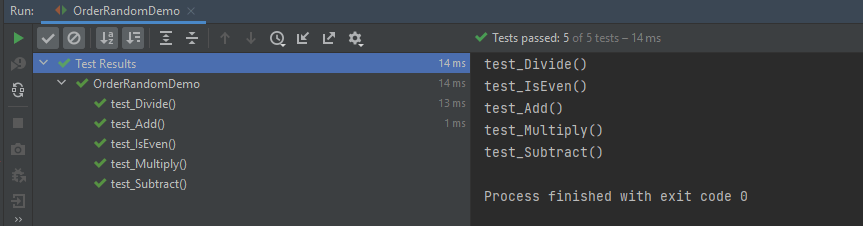
The output of the above program
1. DisplayName

It sorts test methods alphanumerically based on their display names. Test Method can be anything annotated with @Test, @RepeatedTest, @ParameterizedTest, @TestFactory, or @TestTemplate.

@TestMethodOrder(MethodOrderer.DisplayName.class)

@TestMethodOrder is a type-level annotation that is used to configure a MethodOrderer for the test methods of the annotated test class or test interface.

MethodOrderer defines the API for ordering the test methods in a given test class.

Test Method – It is any method annotated with @Test, @RepeatedTest, @ParameterizedTest, @TestFactory, or @TestTemplate.

DisplayName.class – MethodOrderer that sorts methods alphanumerically based on their names using String.compareTo(String).
If two methods have the same name, String representations of their formal parameter lists will be used as a fallback for comparing the methods.

An example of sorting the tests based on their display names.

import org.junit.jupiter.api.DisplayName;
import org.junit.jupiter.api.MethodOrderer;
import org.junit.jupiter.api.Test;
import org.junit.jupiter.api.TestMethodOrder;
import static org.junit.jupiter.api.Assertions.assertEquals;

@TestMethodOrder(MethodOrderer.DisplayName.class)
public class DisplayNameOrderedTests {

    @DisplayName("C")
    @Test
    void test_Add() {

        System.out.println("test_Add()");
        assertEquals(10, 3 + 7);
    }


    @DisplayName("E")
    @Test
    void test_Multiply() {

        System.out.println("test_Multiply()");
        assertEquals(10, 5 * 2);
    }

    @DisplayName("A")
    @Test
    void test_Divide() {

        System.out.println("test_Divide()");
        assertEquals(10, 30 / 3);
    }


    @DisplayName("D")
    @Test
    void test_Subtract() {

        System.out.println("test_Subtract()");
        assertEquals(10, 18 - 8);
    }

    @DisplayName("B")
    @Test
    void test_IsEven() {

        System.out.println("test_IsEven()");
        assertEquals(0, 18%2);
    }
}

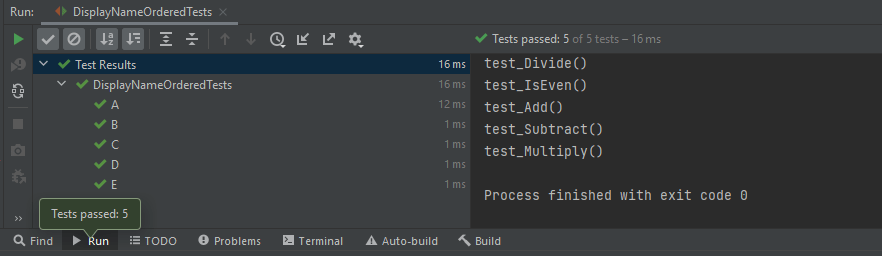
We can see that the test methods are sorted alphanumerically based on their display name starting from A to E. The output of the above program
2. MethodName

This annotation sorts methods alphanumerically based on their names using String.compareTo(String).
If two methods have the same name, String representations of their formal parameter lists will be used as a fallback for comparing the methods.

@TestMethodOrder(MethodOrderer.MethodName.class)

Let us see an example of MethodName.

import org.junit.jupiter.api.MethodOrderer;
import org.junit.jupiter.api.Test;
import org.junit.jupiter.api.TestMethodOrder;
import static org.junit.jupiter.api.Assertions.assertEquals;

@TestMethodOrder(MethodOrderer.MethodName.class)
class MethodNameOrderedTests {

    @Test
    void testE() {

        System.out.println("testE");
        assertEquals(10, 3 + 7);
    }

    @Test
    void testA() {

        System.out.println("testA");
        assertEquals(10, 14 - 4);
    }

    @Test
    void testC() {
        System.out.println("testC");
        assertEquals(10, 5 * 2);
    }

    @Test
    void testB() {
        System.out.println("testB");
        assertEquals(10, 30 / 3);
    }

    @Test
    void testD() {
        System.out.println("testD");
        assertEquals(10, 10 + 0);
    }

}

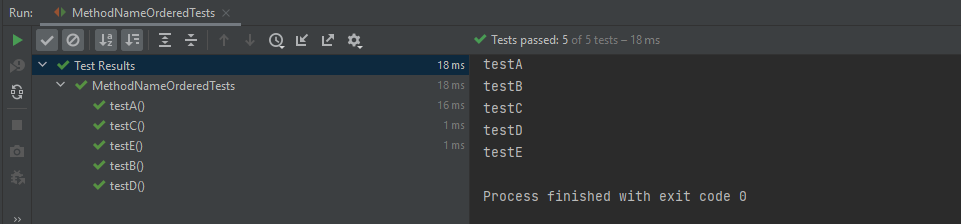
The output of the above program
3. OrderAnnotation

This sorts test method numerically based on values specified via the @Order annotation.
Any methods that are assigned the same order value will be sorted arbitrarily adjacent to each other.
When any method is not annotated with @Order, it will be assigned the default order value, which will effectively cause them to appear at the end of the sorted list.

@TestMethodOrder(MethodOrderer.OrderAnnotation.class)

Let us see an example of OrderAnnotation.

import org.junit.jupiter.api.MethodOrderer;
import org.junit.jupiter.api.Order;
import org.junit.jupiter.api.Test;
import org.junit.jupiter.api.TestMethodOrder;
import static org.junit.jupiter.api.Assertions.assertEquals;

@TestMethodOrder(MethodOrderer.OrderAnnotation.class)
public class OrderAnnotationDemo {

    @Test
    @Order(3)
    void test_Add() {

        System.out.println("test_Add()");
        assertEquals(10, 3 + 7);
    }

    @Test
    @Order(4)
    void test_IsOdd() {
        System.out.println("test_IsOdd()");
        assertEquals(1, 11%2);
    }

    @Test
    void test_Subtract() {
        System.out.println("test_Subtract()");
        assertEquals(10, 14 - 4);
    }

    @Test
    @Order(1)
    void test_Multiply() {
        System.out.println("test_Multiply()");
        assertEquals(10, 5 * 2);
    }

    @Test
    @Order(4)
    void test_Divide() {
        System.out.println("test_Divide()");
        assertEquals(10, 30 / 3);
    }

    @Test
    @Order(2)
    void test_IsEven() {
        System.out.println("test_IsEven()");
        assertEquals(0, 10%2);
    }
}

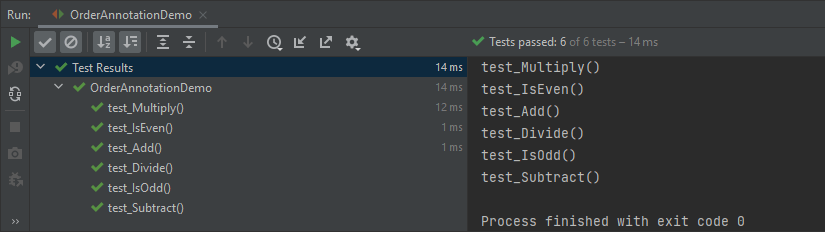
Here, test_Subtract() is not assigned any order value, so it is displayed as the last one in the last.
4. Random

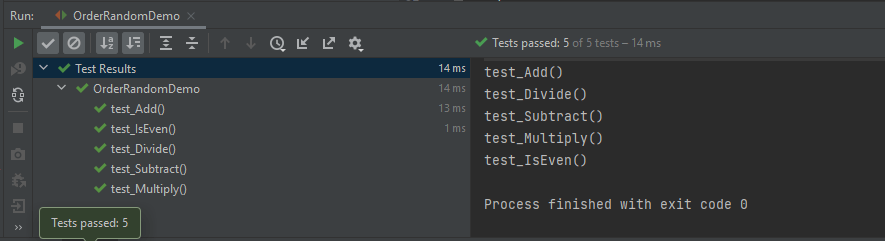
These sorts of test methods are pseudo-randomnly.

@TestMethodOrder(MethodOrderer.Random.class)

Let us create a program to show the random order of tests in JUnit5.

import org.junit.jupiter.api.MethodOrderer;
import org.junit.jupiter.api.Test;
import org.junit.jupiter.api.TestMethodOrder;
import static org.junit.jupiter.api.Assertions.assertEquals;

@TestMethodOrder(MethodOrderer.Random.class)
public class OrderRandomDemo {

    @Test
    void test_Add() {

        System.out.println("test_Add()");
        assertEquals(10, 3 + 7);
    }

    @Test
    void test_Subtract() {

        System.out.println("test_Subtract()");
        assertEquals(10, 14 - 4);
    }

    @Test
    void test_Multiply() {

        System.out.println("test_Multiply()");
        assertEquals(10, 5 * 2);
    }

    @Test
    void test_Divide() {

        System.out.println("test_Divide()");
        assertEquals(10, 30 / 3);
    }

    @Test
    void test_IsEven() {

        System.out.println("test_IsEven()");
        assertEquals(0, 10%2);
    }
}

The output of the above program
5. Custom Order

We can define our own custom ordering sequence by implementing the interface MethodOrderer and providing it as the argument to @TestMethodOrder.

Here, the tests are arranged in descending method order.

import org.junit.jupiter.api.MethodDescriptor;
import org.junit.jupiter.api.MethodOrderer;
import org.junit.jupiter.api.MethodOrdererContext;

public class DescendingMethodOrder implements MethodOrderer {

    @Override
    public void orderMethods(MethodOrdererContext context) {
        context.getMethodDescriptors().sort((MethodDescriptor m1, MethodDescriptor m2) ->
                m2.getMethod().getName().compareTo(m1.getMethod().getName()));
    }
    
}

Now, test the above custom order.

import org.junit.jupiter.api.Test;
import org.junit.jupiter.api.TestMethodOrder;
import static org.junit.jupiter.api.Assertions.assertEquals;

@TestMethodOrder(DescendingMethodOrder.class)
public class CustomOrderTests {

    @Test
    void test_Add() {
        System.out.println("test_Add()");
        assertEquals(10 , 4 + 6);
    }

    @Test
    void test_Subtract() {
        System.out.println("test_Subtract()");
        assertEquals(10 , 17 - 7);
    }

    @Test
    void test_Multiply() {
        System.out.println("test_Multiply()");
        assertEquals(10 , 5 * 2);
    }

    @Test
    void test_Divide() {
        System.out.println("test_Divide()");
        assertEquals(10 , 20/2);
    }

    @Test
    void test_IsEven() {
        System.out.println("test_IsEven()");
        assertEquals(0 , 20%2);
    }
}

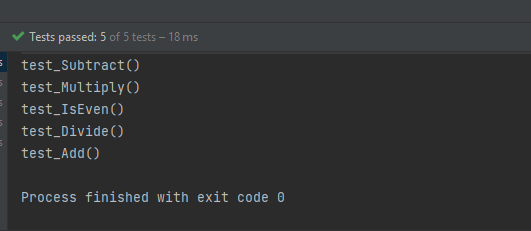
Notice the test output. The tests are executed in descending order. The result of the above program is
Test Classes Ordering

  1. ClassName: sorts test classes alphanumerically based on their fully qualified class names.
  2. DisplayName: sorts test classes alphanumerically based on their display names (see display name generation precedence rules).
  3. OrderAnnotation: sorts test classes numerically based on values specified via the @Order annotation.
  4. Random: orders test classes pseudo-randomly and support the configuration of a custom seed.

The configured ClassOrderer will be applied to all top-level test classes (including static nested test classes) and @Nested test classes.

1. ClassName

The Test Classes are sorted alphanumerically based on their fully qualified class names.

package JUnit5;

import org.junit.jupiter.api.ClassOrderer;
import org.junit.jupiter.api.Nested;
import org.junit.jupiter.api.Test;
import org.junit.jupiter.api.TestClassOrder;

import static org.junit.jupiter.api.Assertions.assertEquals;

@TestClassOrder(ClassOrderer.ClassName.class)
public class ClassNameOrderTests {

    @Nested
    class Addition {

        @Test
        void test_Add() {
            System.out.println("test_Add()");
            assertEquals(10, 3 + 7);
        }
    }

    @Nested
    class IsEven {

        @Test
        void test_IsEven() {
            System.out.println("test_IsEven()");
            assertEquals(0, 10 % 2);
        }
    }

    @Nested
    class Subtraction {

        @Test
        void test_Subtract() {
            System.out.println("test_Subtract()");
            assertEquals(9, 14 - 5);
        }
    }

    @Nested
    class Multiply {

        @Test
        void test_Multiply() {
            System.out.println("test_Multiply()");
            assertEquals(10, 5 * 2);
        }
    }
}

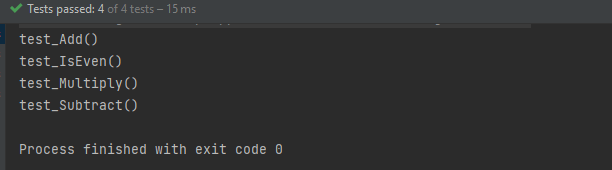
The result of the above program is
2. DisplayName

It sorts test classes alphanumerically based on their display names.

package JUnit5;

import org.junit.jupiter.api.*;

import static org.junit.jupiter.api.Assertions.assertEquals;

@TestClassOrder(ClassOrderer.DisplayName.class)
public class ClassDisplayNameTests {

    @Nested
    @DisplayName("B")
    class AppFlowTests {

        @Test
        void test_Add() {
            System.out.println("test_Add()");
            assertEquals(10, 6 + 4);
        }
    }

    @Nested
    @DisplayName("C")
    class TearDownTests {

        @Test
        void test_Subtract() {
            System.out.println("test_Subtract()");
            assertEquals(10, 15 - 5);

        }
    }

    @Nested
    @DisplayName("A")
    class SetupTests {

        @Test
        void test_Multiply() {
            System.out.println("test_Multiply()");
            assertEquals(10, 5 * 2);
        }
    }
}

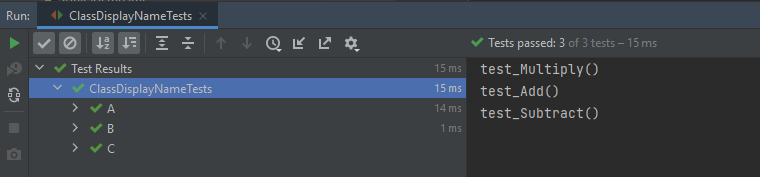
The result of the above program is
3. OrderAnnotation in Class

The test classes are sorted numerically based on values specified via the @Order annotation.

import org.junit.jupiter.api.*;

import static org.junit.jupiter.api.Assertions.assertEquals;

@TestClassOrder(ClassOrderer.ClassName.class) //sorts test classes alphanumerically based on their fully qualified class names.
public class ClassOrderedTests {

    @Nested
    @Order(2)
    class AppFlowTests {

        @Test
        void test_Add() {
            System.out.println("test_Add()");
            assertEquals(10, 3 + 7);
        }
    }

    @Nested
    @Order(3)
    class TearDownTests {

        @Test
        void test_Subtract() {
            System.out.println("test_Subtract()");
            assertEquals(9, 14 - 5);
        }
    }

    @Nested
    @Order(1)
    class SetupTests {

        @Test
        void test_Multiply() {
            System.out.println("test_Multiply()");
            assertEquals(10, 5 * 2);
        }
    }
}

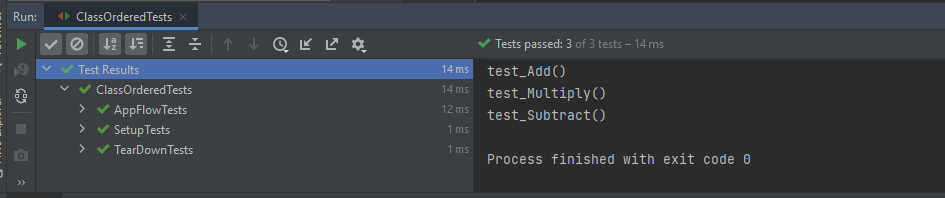
The result of the above program is
4. Random

The test classes are sorted pseudo-randomly and support the configuration of a custom seed.

import org.junit.jupiter.api.*;
import static org.junit.jupiter.api.Assertions.assertEquals;

@TestClassOrder(ClassOrderer.Random.class)
public class ClassRandomTests {

    @Nested
    class Addition {

        @Test
        void test_Add() {
            System.out.println("test_Add()");
            assertEquals(10, 3 + 7);
        }
    }

    @Nested
    class IsEven {

        @Test
        void test_IsEven() {
            System.out.println("test_IsEven()");
            assertEquals(0, 10 % 2);
        }
    }

    @Nested
    class Subtraction {

        @Test
        void test_Subtract() {
            System.out.println("test_Subtract()");
            assertEquals(9, 14 - 5);
        }
    }

    @Nested
    class Multiply {

        @Test
        void test_Multiply() {
            System.out.println("test_Multiply()");
            assertEquals(10, 5 * 2);
        }
    }
}

The result of the above program is
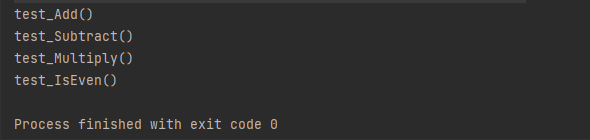
Congratulation!! We have gone through different types of ordering in JUnit5. Happy Learning!!

How to run JUnit5 tests through Command Line

HOME

The previous tutorial explains to configure Junit in IntelliJ and run the tests as JUnit Tests. This tutorial shows the steps to run the tests through command line. We can ask, why we need to run the tests through command line?? There are many reasons, one of the reason is to achieve CI/CD. To run the tests in pipeline, they need to be run through command line. Another reason is that we don’t need to open the IDE to run the tests. Third reason is that many reports are only generated (Serenity, Cucumber), if the tests run through command line.

Below is a JUnit5 test.

import io.github.bonigarcia.wdm.WebDriverManager;
import org.junit.jupiter.api.*;
import org.openqa.selenium.WebDriver;
import org.openqa.selenium.chrome.ChromeDriver;
import org.openqa.selenium.chrome.ChromeOptions;

public class Demo {

    WebDriver driver;

    @BeforeEach
    public void setUp() {
        WebDriverManager.chromedriver().setup();
        ChromeOptions chromeOptions = new ChromeOptions();
        driver = new ChromeDriver(chromeOptions);
        driver.manage().window().fullscreen();
    }

    @Test
    public void Junit5Test() {
        driver.get("http://automationpractice.com/index.php");
        System.out.println("Title of Page :" + driver.getTitle());
        System.out.println("Page URL : " + driver.getCurrentUrl());
        Assertions.assertEquals("My Store",driver.getTitle());

    }

    @AfterEach
    public void tearDown() {
        driver.close();
    }
}

Let us see what happens when we try to run the JUnit tests through Command Line. This command is used to run the tests present in Demo class.

mvn clean test -Dtest=Demo

The output generated by the test is shown below

This shows that surefire-plugin is need to be add to the project to run t he tests successfully through command line.

Add surefire-plugin to the project

Go back to the Apache Maven Project and copy the code.

 <dependencies>

        <dependency>
            <groupId>org.junit.jupiter</groupId>
            <artifactId>junit-jupiter-engine</artifactId>
            <version>5.8.2</version>
            <scope>test</scope>
        </dependency>

        <dependency>
            <groupId>org.junit.jupiter</groupId>
            <artifactId>junit-jupiter-api</artifactId>
            <version>5.8.2</version>
            <scope>test</scope>
        </dependency>
 
</dependencies>       
    
<build>
        <plugins>
            <plugin>
                <groupId>org.apache.maven.plugins</groupId>
                <artifactId>maven-surefire-plugin</artifactId>
                <version>3.0.0-M5</version>
                <dependencies>
                    <dependency>
                        <groupId>org.junit.jupiter</groupId>
                        <artifactId>junit-jupiter-engine</artifactId>
                        <version>5.8.2</version>
                    </dependency>
                </dependencies>
            </plugin>
        </plugins>
    </build>

Again run the tests through command line using the command mentioned above. Now, will see that the tests are executed successfully.

Congratulations. We can see that JUnit5 tests are executed through command line. Happy Learning!!
JUnit5 Assertions Example

HOME

JUnit5 contains the assertions available as in JUnit 4 Assertions as well there are a few additional new asserts too. In this post, let’s discuss each new assertion in JUnit5 works in detail with examples.

1. assertIterableEquals

The assertIterableEquals() asserts that the expected and the actual iterables are deeply equal. In order to be equal, both iterable must return equal elements in the same order and it isn’t required that the two iterables are of the same type in order to be equal.

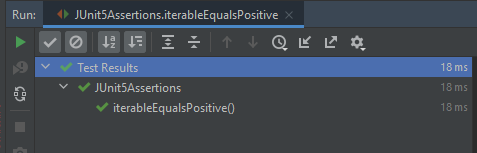
Example 1 – In this example, the number of elements as well as the sequence of elements is in the same order in both Iterables. It is not mandatory to have Iterables of the same type, so we can see as one of the Iterable is ArrayList whereas another Iteratble is of type LinkedList.

@Test
void iterableEqualsPositive() {
     Iterable<String> iterat1 = new ArrayList<>(asList("Java", "Junit", "Test"));
     Iterable<String> iterat2 = new LinkedList<>(asList("Java", "Junit", "Test"));

     assertIterableEquals(iterat1, iterat2);
  }

The assertion passes as the sequence and number of elements in both Iterables are the same.

Example 2 – In the below example, the ordering of elements in the Iterables is different.

@Test
void iterableEqualsNegative() {
     Iterable<String> iterat1 = new ArrayList<>(asList("Java", "Junit", "Test"));
     Iterable<String> iterat2 = new ArrayList<>(asList("Java","Test","Junit" ));

     assertIterableEquals(iterat1, iterat2);
 }

Here, we can see that the sequence of elements in Iterable are different, so the assertion fails.

Example 3 – In the below example, the number of elements is different in the Iterables. Iterable 1 has 3 elements whereas Iterable 2 has 4 elements.

@Test
void iterableEqualsNegative1() {
     Iterable<String> iterat1 = new ArrayList<>(asList("Java", "Junit", "Test"));
     Iterable<String> iterat2 = new LinkedList<>(asList("Java", "Junit", "Test","Junit5"));

     assertIterableEquals(iterat1, iterat2);
 }

As both Iterables do not have same number of elements, so the Assertion has failed.

Note:- There are no assertions like assertNotIterableEquals() or assertIterableNotEquals().

2. assertLinesMatch

This Assertion asserts that the expected list of Strings matches the actual list of String.
This method differs from other assertions that effectively only check String.equals(Object), in that it uses the following staged matching algorithm:
For each pair of expected and actual lines do
a) check if expected.equals(actual) – if yes, continue with next pair
b) otherwise treat expected as a regular expression and check via String.matches(String) – if yes, continue with the next pair
c) otherwise check if an expected line is a fast-forward marker, if yes apply to fast-forward actual lines accordingly (see below) and goto 1.

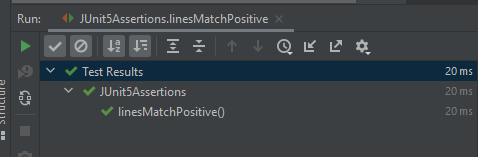
Example 1 – In the below example, expected has a regular expression that matches with the elements of actual.

@Test
void linesMatchPositive() {
    List<String> expected = asList("Java", "\\d+", ".*");
    List<String> actual = asList("Java", "11", "JUnit");

    assertLinesMatch(expected, actual);
}

As the regular expression of elements matches, the assertion passes.

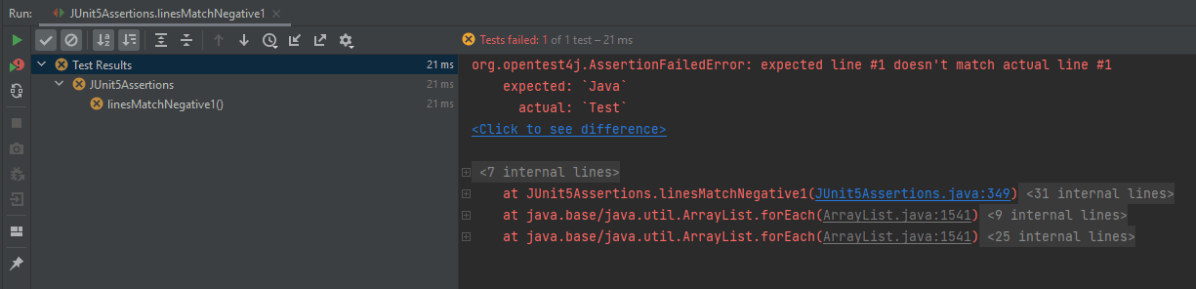
Example 2 – In the below example, the elements in the lists are different.

@Test
void linesMatchNegative1() {
   List<String> expected = asList("Java", "\\d+", ".*");
   List<String> actual = asList("Test","Java", "11");

   assertLinesMatch(expected, actual);
}

The assertion fails as the elements are different in actual and expected.

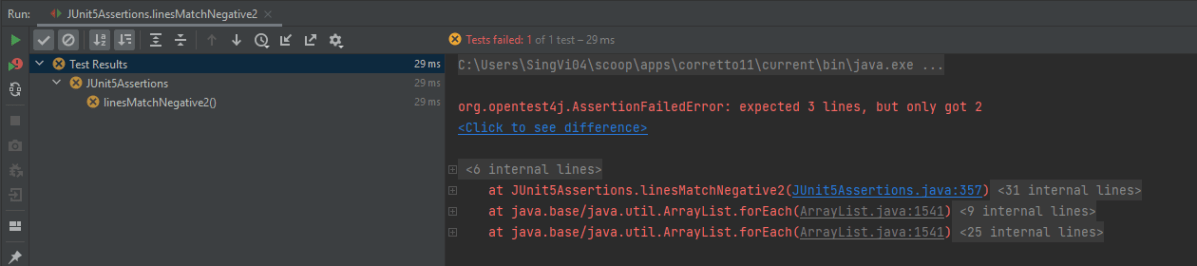
Example 3 – In the below example, the number of elements is different in expected and actual lists.

@Test
void linesMatchNegative2() {
    List<String> expected = asList("Java", "\\d+", ".*");
    List<String> actual = asList("Java", "11");

    assertLinesMatch(expected, actual);
}

The assertion fails as the number of elements in expected is 3 whereas 2 elements are available in actual list.

3. assertThrows

The new assertThrows() assertion allows us a clear and a simple way to assert if an executable throws the specified exception type.

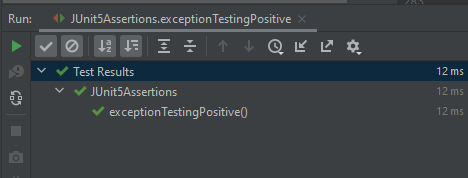
Example 1 – In the below example, the length of string arr is null, so it throws a NullPointerException

@Test
void exceptionTestingPositive() {

    String arr = null;
    Exception exception = assertThrows(NullPointerException .class, () -> arr.length() );
    assertEquals(null, exception.getMessage());
 }

Result

Example 2 – In the below example, the exception thrown by String arr is NullPointerException. But, we are asserting it with ArithmeticException.

@Test
 void exceptionTestingNegative() {

     String arr = null;
     Exception exception = assertThrows(ArithmeticException .class, () -> arr.length() );
     assertEquals("Arithmetic Exception", exception.getMessage());
 }

Result

4. assertTimeout

When we want to assert that execution of the supplied executable completes before the given timeout, we can use assertTimeout().

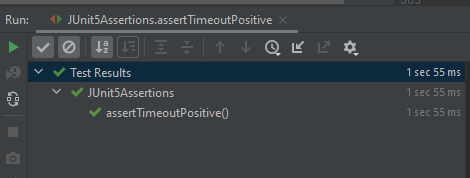
Example 1 – In the below example, assertTimeout() is 2 sec, which means the assertion should be completed within 2 secs. We are waiting for 1 sec and then perform the assertion.

 @Test
     void assertTimeoutPositive() {
       int a = 4;
       int b= 5;
        assertTimeout(
                ofSeconds(2),
                () -> {
                    // code that requires less then 2 seconds to execute
                    Thread.sleep(1000);
                }
        );
        assertEquals(9, (a + b));
    }

As the assertion is within the specified time of assertTimeout(), the timeout assertion passes and the test passes.

Example 2 – In the below example, assertTimeout() is 2 sec whereas are waiting for 5 sec and then performing the assertion.

  @Test
   void assertTimeoutNegative() {
        int a = 4;
        int b= 5;
        assertTimeout(
                ofSeconds(2),
                () -> {
                    // code that requires less then 2 seconds to execute
                    Thread.sleep(5000);
                }
        );
        assertEquals(9, (a + b));
    }

As the assertion is outside the specified time of assertTimeout(), so the test fails. The assertion fails with an error message similar to: “execution exceeded timeout of 2000 ms by 3010 ms”.

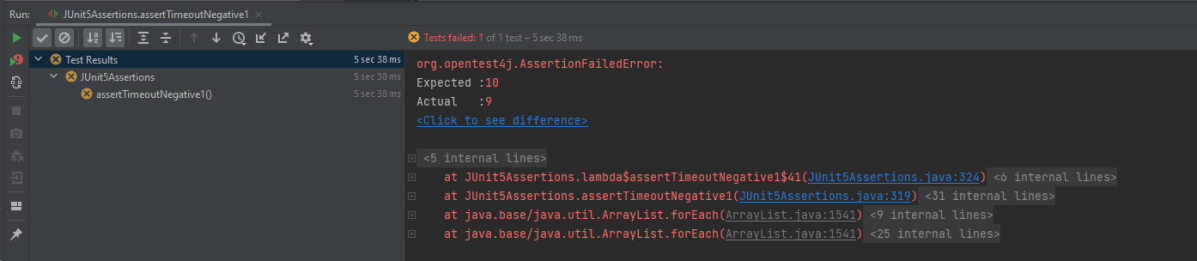
Example 3 – In the below example, the assertion is mentioned just after

The executable will be executed in the same thread as that of the calling code. Consequently, execution of the executable will not be preemptively aborted if the timeout is exceeded.

@Test
 void assertTimeoutNegative1() {
    int a = 4;
    int b= 5;
    assertTimeout(
        ofSeconds(2),
        () -> {
                // code that requires less then 2 seconds to execute
                 Thread.sleep(5000);
                 assertEquals(10, (a + b));
              }
        );
    }

This shows that the assertion assertEquals() is still executed after the timeout also.

5. assertTimeoutPreemptively()

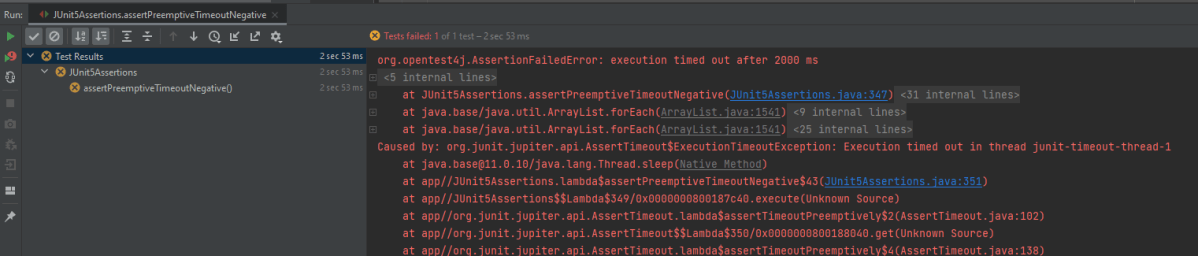
This assertion works just like assertTimeout(). When we want to assert that the execution of the supplied executable completes before the given timeout, we can use assertTimeoutPreemptively(). The only difference is that here the executable will be executed in a different thread than that of the calling code, whereas in assertTimeout() the executable will be executed in the same thread as that of the calling code. Furthermore, execution of the executable will be preemptively aborted if the timeout is exceeded here as contrary to assertTimeout() where the executable will not be preemptively aborted.

@Test
    void assertPreemptiveTimeoutNegative() {
        int a = 4;
        int b= 5;
        assertTimeoutPreemptively(
                ofSeconds(2),
                () -> {
                    // code that requires less then 2 seconds to execute
                    Thread.sleep(5000);
                    assertEquals(9, (a + b));
                }
        );
    }

Result

There is another very famous assertion called assertAll() [Group Assertions]. This is discussed in another tutorial.

In this post, We saw that JUnit Jupiter comes with many of the assertion methods that JUnit 4 has and adds a few that lend themselves well to being used with Java 8 lambdas. All JUnit Jupiter assertions are static methods in the org.junit.jupiter.api.Assertions class.

Grouped Assertions in JUnit 5 – assertAll()

HOME

org.junit.jupiter.api.Assertions

What is JUnit5?

JUnit 5 is composed of several different modules from three different sub-projects.

JUnit 5 = JUnit Platform + JUnit Jupiter + JUnit Vintage

The JUnit Platform serves as a foundation for launching testing frameworks on the JVM. It also defines the Test Engine  API for developing a testing framework that runs on the platform.

JUnit Jupiter is the combination of the new programming model and extension model for writing tests and extensions in JUnit 5. The Jupiter sub-project provides a Test Engine for running Jupiter-based tests on the platform.

JUnit Vintage provides a Test Engine for running JUnit 3 and JUnit 4 based tests on the platform. It requires JUnit 4.12 or later to be present on the classpath or module path.

To use JUnit5, add the Junit5 maven dependency to the POM.xml

<dependency>
    <groupId>org.junit.jupiter</groupId>
    <artifactId>junit-jupiter-engine</artifactId>
    <version>511.4</version>
    <scope>test</scope>
</dependency>

<dependency>
	<groupId>org.junit.jupiter</groupId>
	<artifactId>junit-jupiter-api</artifactId>
    <version>5.11.4</version>
	<scope>test</scope>
</dependency>

Grouped Assertions With Heading As Parameter

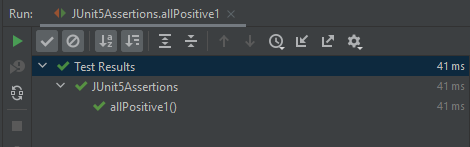
Example 1 – The following example demonstrates positive assertions using `assertAll()` in JUnit 5. All assertions in this example are of the same type, specifically `assertEquals()`, grouped within an `assertAll()` assertion. The heading parameter for this group of assertions is “GroupedAssertionsWithSameAssertionType”.

@Test
void allPositive1() {
   assertAll(
     "GroupedAssertionsWithSameAssertionType",
      () -> assertEquals(8, 5+3, "8 is not sum of 5 and 3"),
      () -> assertEquals("java", "JAVA".toLowerCase()),
      () -> assertEquals(16,4*4,"16 is not product of 4 and 4")
   );
}

Result

As all 3 assertions pass, so the final result passes.

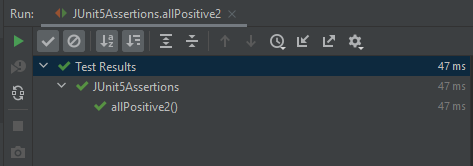
Example 2 – The following example demonstrates using `assertAll()` in JUnit 5 to group assertions of different types – assertEquals(), assertNotNull and assertNotEquals() within a single test. It consists of the heading parameter with the value “GroupedAssertionsWithDifferentAssertionType”.

@Test
void allPositive2() {

    String str ="Spring";
    assertAll(
        "GroupedAssertionsWithDifferentAssertionType",
         () -> assertEquals(8, 5+3, "8 is not sum of 5 and 3"),
         () -> assertNotNull(str, () -> "The string should be null"),
         () -> assertEquals("java", "JAVA".toLowerCase()),
         () -> assertNotEquals(20,5*3,"20 is product of 5 and 3")
    );
 }

Result

As all 3 assertions pass, so the final result passes.

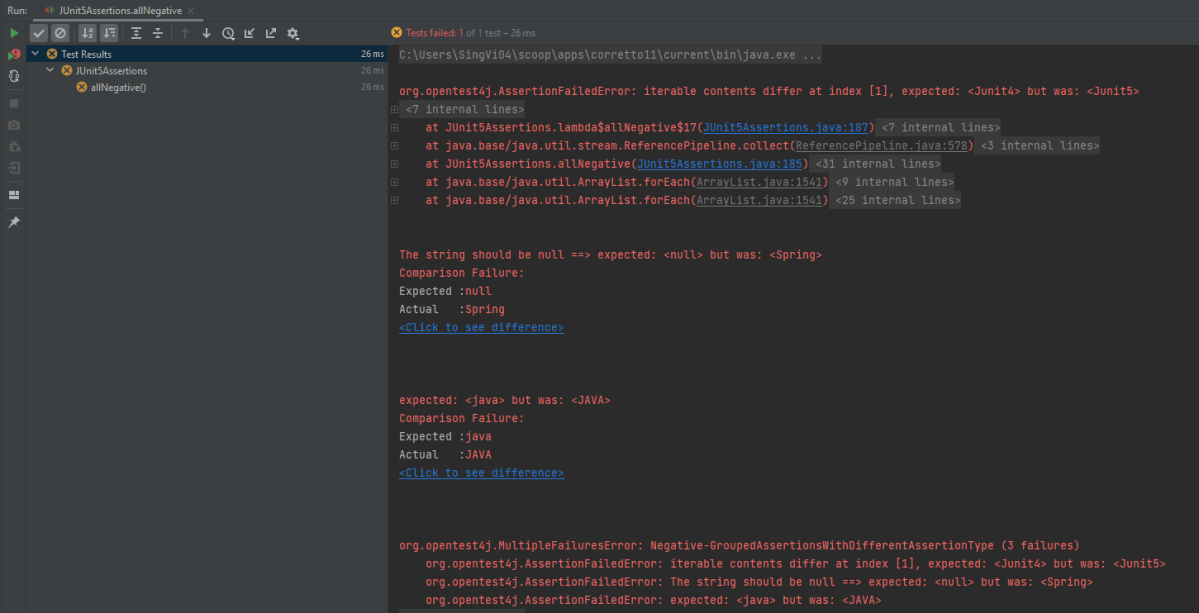
Example 3 – In the below example, out of 4 assertions, 3 assertions are failing, so the output will have the detail about all 3 assertion errors.

 @Test
 void allNegative() {

    String str ="Spring";
    Iterable<String> iterat1 = new ArrayList<>(asList("Java", "Junit4", "Test"));
    Iterable<String> iterat2 = new ArrayList<>(asList("Java", "Junit5", "Test"));
    
    assertAll(
        "Negative-GroupedAssertionsWithDifferentAssertionType",
        () -> assertIterableEquals(iterat1, iterat2),
        () -> assertNull(str, () -> "The string should be null"),
        () -> assertEquals("java", "JAVA"),
        () -> assertNotEquals(20,5*3,"20 is product of 5 and 3")
     );
 }

Result

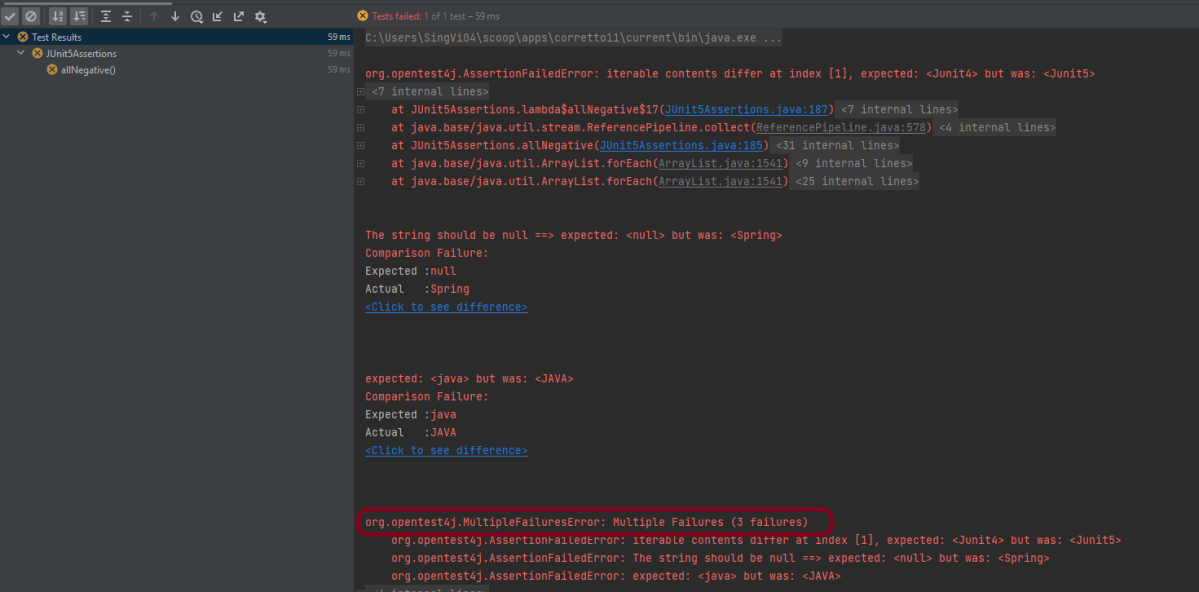
As one of the asserts in the group fails, instead of AssertionFailureError it results in MultipleFailuresError thereby displaying the heading of the grouped assertion passed as the input parameter i.e. Negative-GroupedAssertionsWithDifferentAssertionType in this example. This image shows all the 3 assertion failures.

Assertion 1 fails as we were expecting JUnit4, but response has JUnit5
Assertion 2 fails as the string was not NULL.
Assertion 3 fails as Java is not equal to JAVA (case sensitivity).

Grouped Assertions Without Heading As Parameter

The assertAll () can be implemented without using the heading parameter. The below example is the same as the above one, we are just skipping the heading part.

@Test
void allNegative() {

      String str ="Spring";
      Iterable<String> iterat1 = new ArrayList<>(asList("Java", "Junit4", "Test"));
      Iterable<String> iterat2 = new ArrayList<>(asList("Java", "Junit5", "Test"));
      
     // In a grouped assertion all assertions are executed, and all failures will be reported together
      assertAll(
          () -> assertIterableEquals(iterat1, iterat2),
          () -> assertNull(str, () -> "The string should be null"),
          () -> assertEquals("java", "JAVA"),
          () -> assertNotEquals(20,5*3,"20 is product of 5 and 3")
      );
  }

Result

The result displays without a heading.

Nested Or Dependent Grouped Assertions

When one assertAll() includes one or more assertAll() then these are referred to as Nested or Dependent grouped assertions.

Example 1 – In this case, first, the assertAll() validates if the sum is correct or not. The sum is correct here, so the control moves to the nested assertAll() to verify all the assertions present within it.

@Test
void allDependentPositive() {

   String str ="Spring";

   // Within a code block, if an assertion fails the subsequent code in the same block will be skipped.
    assertAll(
         "DependentPositiveAssertions",
         () -> {
                assertEquals(8, 5 + 3, "8 is not sum of 5 and 3");

                // Executed only if the previous assertion is valid.
                assertAll("sub-heading",
                   () -> assertNotNull(str, () -> "The string should be null"),
                   () -> assertEquals("java", "JAVA".toLowerCase()),
                   () -> assertEquals(20, 5 * 4, "20 is product of 5 and 4")
                ); // end of inner AssertAll()
           }

      );  // end of outer AssertAll()
 }

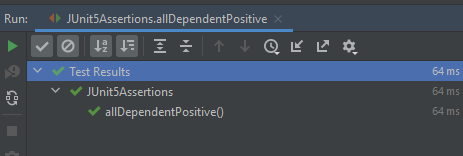
Result

All the assertions within nested assertAll() are passes. So the final result passes.

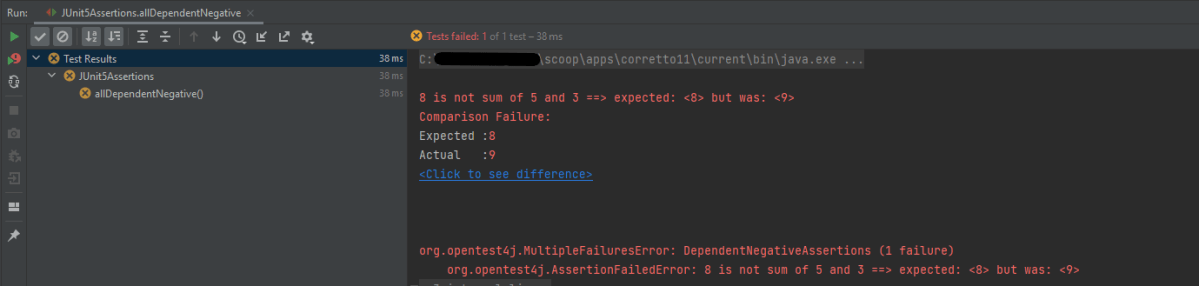
Example 2 – In the below example, outer AssertAll() fails, so all the assertions within nested/dependent assertAll() are not executed.

 @Test
 void allDependentNegative() {

    String str ="Spring";

    // Within a code block, if an assertion fails the subsequent code in the same block will be skipped.
    assertAll(
       "DependentPositiveAssertions",
        () -> {
                assertEquals(8, 5 + 4, "8 is not sum of 5 and 3");

                // Executed only if the previous assertion is valid.
                assertAll("sub-heading",
                   () -> assertNull(str, () -> "The string should be null"),
                   () -> assertNotEquals("java", "JAVA".toLowerCase()),
                   () -> assertNotEquals(20, 5 * 4, "20 is product of 5 and 4")
               ); // end of inner AssertAll()
           }

        ); // end of outer AssertAll()
    }

Result

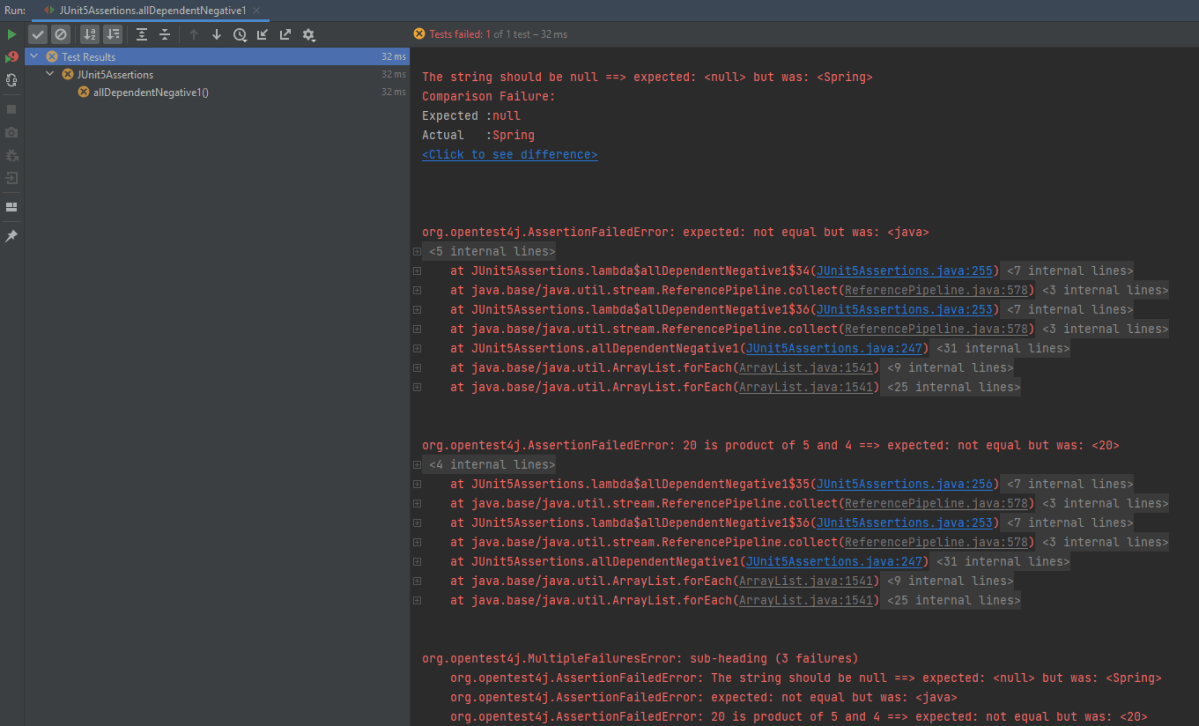
Example 3 – In the below example, outer AssertAll() passes, so all the assertions within nested/dependent assertAll() are executed. But due to the failure of assertNull, the nested assertions are not evaluated, and the report will indicate the failure of `assertNull` first

@Test
void allDependentNegative1() {

    String str ="Spring";

   // Within a code block, if an assertion passes the subsequent code in the same block will be executed.
    assertAll(
      "DependentNegativeAssertions",
      () -> {
             assertEquals(8, 5 + 3, "8 is not sum of 5 and 3");

             // Executed only if the previous assertion is valid.
             assertAll("sub-heading",
               () -> assertNull(str, () -> "The string should be null"),
               () -> assertNotEquals("java", "JAVA".toLowerCase()),
               () -> assertNotEquals(20, 5 * 4, "20 is product of 5 and 4")
             ); // end of inner AssertAll()
         }

      ); // end of outer AssertAll()
    }

Result

The nested assertions have failed. So they can be seen in the execution status.

In short,

  1. When first assertAll() method passes, then all the subsequent assertions within that block will be executed and these assertions can further pass or fails.
  2. When the first assertAll() assertion fails, then the execution of subsequent assertions is skipped.

That’s it! Congratulations on making it through this tutorial and hope you found it useful! Happy Learning!!
Manual Tests in Serenity with JUnit5

HOME

In this tutorial, I will explain about Manual Tests in Serenity JUnit5.

You can annotate @Test not @Steps as @Manual.

In contrast to Junit4 a test method annotated with @Manual will actually be executed. This allows to further specify the example using @Step methods and show them the report.

Below is an example where tests are annotated with @Manual with description.

@SerenityTest
public class LoginTests {

	@Managed
	WebDriver driver;

	@Steps
	StepLoginPage loginPage;

	@Steps
	StepDashboardPage dashPage;

	@Steps
	StepForgetPasswordPage forgetpasswordPage;

	@Test
	@Title("Login to application should be successful")
	public void sucessfulLogin() {

		// Given
		loginPage.open();

		// When
		loginPage.inputUserName("Admin");
		loginPage.inputPassword("admin123");
		loginPage.clickLogin();

		// Then
		dashPage.loginVerify();
	}

	@Test
	@Title("Login to application should be unsuccessful with error message")
	public void unsucessfulLogin() throws InterruptedException {

		// Given
		loginPage.open();

		// When
		loginPage.inputUserName("abc");
		loginPage.inputPassword("abc12");
		loginPage.clickLogin();

		// Then
		String actualErrorMessage = loginPage.errorMessage();
		assertEquals("Invalid credentials", actualErrorMessage);
	}

	@Test
	@Manual
	void manualDefault() {
		loginPage.manualStep();
	}

	@Test
	@Manual(result = TestResult.SUCCESS)
	void manualSuccess() {
		loginPage.manualStep();
	}

	@Test
	@Manual(result = TestResult.COMPROMISED)
	void manualCompromised() {
		loginPage.manualStep();
	}

	@Test
	@Manual(result = TestResult.ERROR)
	void manualError() {
		loginPage.manualStep();
	}

	@Test
	@Manual(result = TestResult.ERROR, reason = "A reason for the error")
	void manualErrorWithReason() {
		loginPage.manualStep();
	}

	@Test
	@Manual(result = TestResult.FAILURE)
	void manualFailure() {
		loginPage.manualStep();
	}

	@Test
	@Manual(result = TestResult.IGNORED)
	void manualIgnored() {
		loginPage.manualStep();
	}

	@Test
	@Manual(result = TestResult.PENDING)
	void manualPending() {
		loginPage.manualStep();
	}

	@Test
	@Manual(result = TestResult.SKIPPED)
	void manualSkipped() {
		loginPage.manualStep();
	}

	@Test
	@Manual(result = TestResult.UNDEFINED)
	void manualUndefined() {
		loginPage.manualStep();
	}

	@Test
	@Manual(result = TestResult.UNSUCCESSFUL)
	void manualUnsuccessful() {
		loginPage.manualStep();
	}

}

StepLoginPage.java

public class StepLoginPage extends PageObject {

	@FindBy(name = "txtUsername")
	WebElementFacade username;

	@FindBy(name = "txtPassword")
	WebElementFacade password;

	@FindBy(name = "Submit")
	WebElementFacade submitButton;

	@FindBy(id = "spanMessage")
	WebElementFacade errorMessage;

	@FindBy(id = "forgotPasswordLink")
	WebElementFacade linkText;

	@Step("Enter Username")
	public void inputUserName(String userName) {
		username.sendKeys((userName));
	}

	@Step("Enter Password")
	public void inputPassword(String passWord) {
		password.sendKeys((passWord));
	}

	@Step("Click Submit Button")
	public void clickLogin() {
		submitButton.click();
	}

	@Step("Error Message on unsuccessful login")
	public String errorMessage() {
		String actualErrorMessage = errorMessage.getText();
		System.out.println("Actual Error Message :" + actualErrorMessage);
		return actualErrorMessage;
	}

	@Step("Manual Test Step")
	public void manualStep() {

		System.out.println("Verify various status of manual step");

	}

}

StepDashboardPage.java

public class StepDashboardPage extends PageObject {

	@FindBy(id = "welcome")
	WebElementFacade dashboardText;

	@Step("Successful login")
	public void loginVerify() {
		String dashboardTitle = dashboardText.getText();
		assertThat(dashboardTitle, containsString("Welcome"));
	}
}

Execute these tests by using the below command in commandline.

mvn clean verify

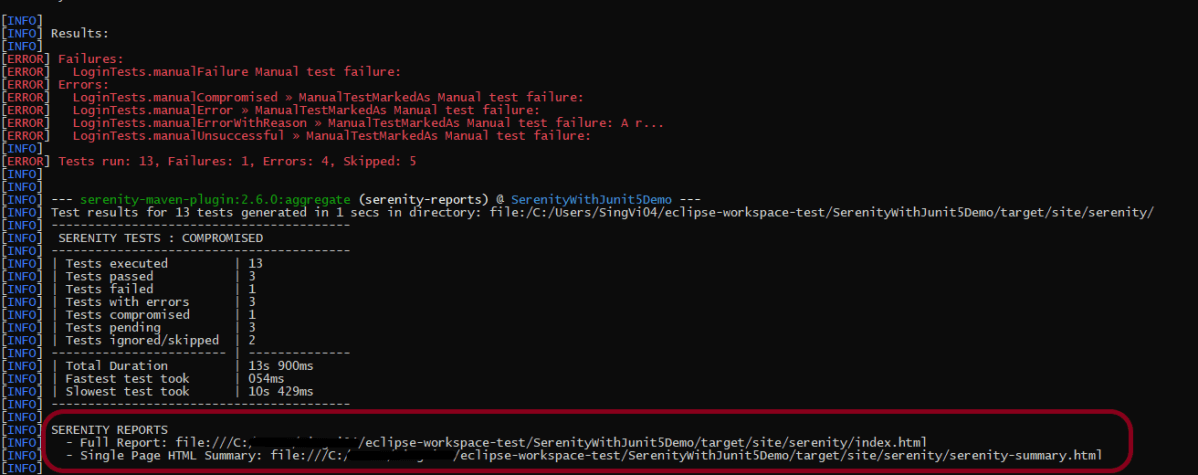
There are two automated tests and rest all are Manual tests. We have Manual Test marked as Default, SUCCESS, COMPROMISED, ERROR, FAILURE, IGNORED, PENDING, SKIPPED, UNDEFINED and UNSUCCESSFUL.

The execution status looks like as shown below.

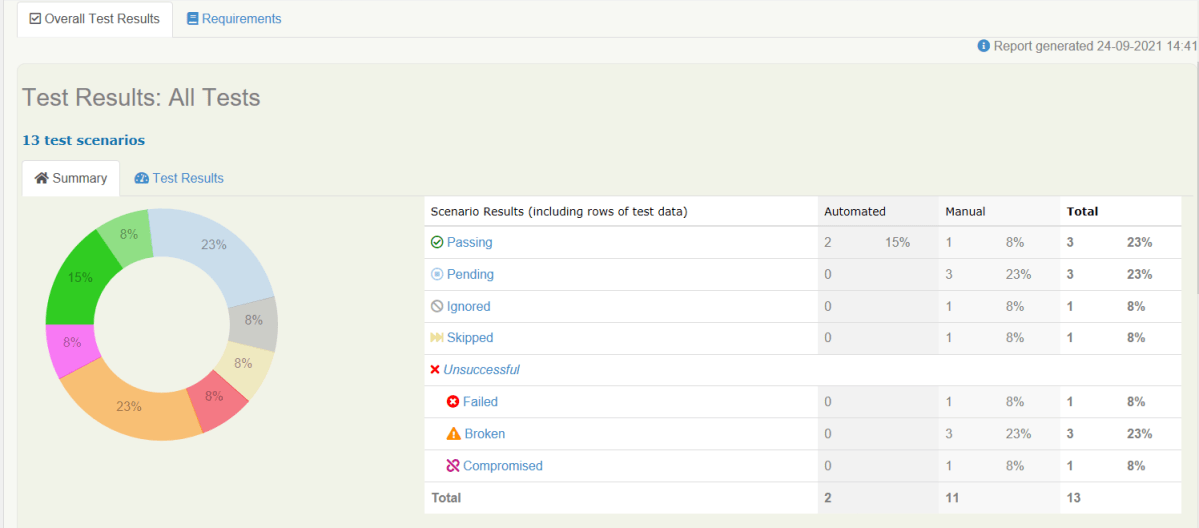
The reports are generated under /target/site/serenity. There are 2 types of Reports are generated – index.html and serenity-summary.html. To know how to generate Serenity Reports, please refer tutorials for index.html and serenity-summary.html.

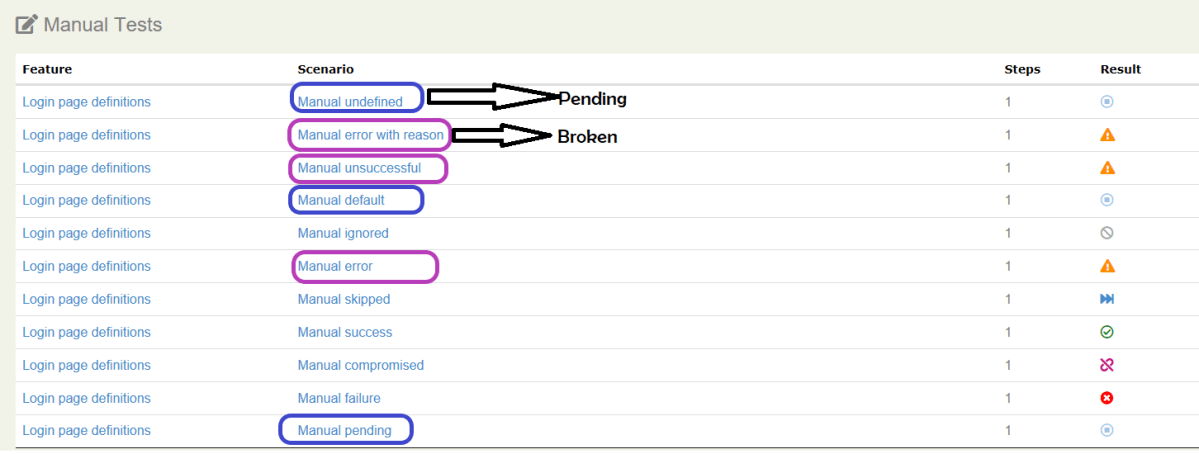
By default, @manual scenarios are marked as pending in the Serenity reports.

All scenarios highlighted by blue color are Pending ones whereas pink color are Broken ones.

Serenity-Summary.html

We are done! Congratulations on making it through this tutorial and hope you found it useful! Happy Learning!!
Allure Report with Selenium and JUnit5

HOME

In the previous tutorial, I explained the Integration of the Allure Report with Selenium and JUnit4. In this tutorial, I will explain how to Integrate Allure Report with Selenium and JUnit5.

Prerequisite

  1. Java 11 is installed
  2. Maven is installed
  3. Eclipse or IntelliJ is installed
  4. Allure is installed

Dependency List:

  1. Selenium – 3.141.59
  2. Java 11
  3. JUnit – 4.13.2
  4. Maven – 3.8.1
  5. Allure Report – 2.14.0
  6. Allure JUnit4 – 2.14.0

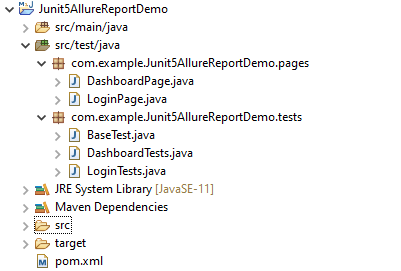
Structure of Project

Step 1 – Update Properties section in Maven pom.xml

 <properties>
    <project.build.sourceEncoding>UTF-8</project.build.sourceEncoding>
    <java.version>11</java.version>
    <selenium.version>3.141.59</selenium.version> 
    <junit.jupiter.version>5.8.0-M1</junit.jupiter.version>
    <junit.platform.version>1.8.0-M1</junit.platform.version>
    <allure.maven.version>2.10.0</allure.maven.version>
    <allure.junit5.version>2.14.0</allure.junit5.version>
    <maven.surefire.plugin.version>3.0.0-M3</maven.surefire.plugin.version>
    <maven.compiler.plugin.version>3.8.1</maven.compiler.plugin.version>
    <aspectj.version>1.9.6</aspectj.version>
    <maven.compiler.source>11</maven.compiler.source>
    <maven.compiler.target>11</maven.compiler.target>
  </properties>

Step 2 – Add Selenium, JUnit5, and Allure-JUnit5 dependencies in POM.xml

<dependencies>
  
      <!--Selenium Dependency-->
      <dependency>
          <groupId>org.seleniumhq.selenium</groupId>
          <artifactId>selenium-java</artifactId>
          <version>${selenium.version}</version>
       </dependency>
  
     <!--JUNIT 5 Dependencies-->
        <dependency>
            <groupId>org.junit.jupiter</groupId>
            <artifactId>junit-jupiter-api</artifactId>
            <version>${junit.jupiter.version}</version>
        </dependency>
        
        <dependency>
            <groupId>org.junit.jupiter</groupId>
            <artifactId>junit-jupiter-engine</artifactId>
            <version>${junit.jupiter.version}</version>
        </dependency>
        
        <dependency>
            <groupId>org.junit.platform</groupId>
            <artifactId>junit-platform-engine</artifactId>
            <version>${junit.platform.version}</version>
        </dependency>
        
        <dependency>
            <groupId>org.junit.platform</groupId>
            <artifactId>junit-platform-launcher</artifactId>
            <version>${junit.platform.version}</version>
        </dependency>
        
        <dependency>
            <groupId>org.junit.platform</groupId>
            <artifactId>junit-platform-runner</artifactId>
            <version>${junit.platform.version}</version>
        </dependency>
        
        <!--Allure Reporting Dependencies-->
        <dependency>
            <groupId>io.qameta.allure</groupId>
            <artifactId>allure-junit5</artifactId>
            <version>${allure.junit5.version}</version>
        </dependency>
        
  </dependencies>

Step 3 – Update the Build Section of pom.xml in Allure Report Project

<build>
        <plugins>
        <plugin>
               
                <artifactId>maven-surefire-plugin</artifactId>
                <version>${maven.surefire.plugin.version}</version>
                <configuration>
                <testFailureIgnore>false</testFailureIgnore>
                        <argLine>
                            -javaagent:"${settings.localRepository}/org/aspectj/aspectjweaver/${aspectj.version}/aspectjweaver-${aspectj.version}.jar"
                        </argLine>
                    <systemProperties>
                        <property>
                            <name>junit.jupiter.extensions.autodetection.enabled</name>
                            <value>true</value>
                        </property>
                    </systemProperties>
                </configuration>
                
                <dependencies>
                   
                    <dependency>
                        <groupId>org.aspectj</groupId>
                        <artifactId>aspectjweaver</artifactId>
                        <version>${aspectj.version}</version>
                    </dependency>
                </dependencies>
                
            </plugin>
            <plugin>
                <groupId>io.qameta.allure</groupId>
                <artifactId>allure-maven</artifactId>
                <version>${allure.maven.version}</version>
                <configuration>
                    <reportVersion>2.4.1</reportVersion>
                </configuration>
            </plugin>
      </plugins>
  </build>

Step 4 – Create Pages and Test Code for the pages

Below is the sample project which uses Selenium and JUnit4 which is used to generate an Allure Report.

We have 2 pages. Below is the code for Login Page which contains all the web elements and methods related to that web elements.

Note:- This is a sample code. There could be the probability that XPath would have changed. So, the tests won’t run as expected and please keep this in mind.

public class LoginPage {

	WebDriver driver;

	By userName = By.name("txtUsername");

	By password = By.name("txtPassword");

	By titleText = By.id("logInPanelHeading");

	By login = By.id("btnLogin");

	By errorMessage = By.id("spanMessage");

	public LoginPage(WebDriver driver) {
		this.driver = driver;
	}

	// Set user name in textbox
	public void setUserName(String strUserName) {
		driver.findElement(userName).sendKeys(strUserName);
	}

	// Set password in password textbox
	public void setPassword(String strPassword) {
		driver.findElement(password).sendKeys(strPassword);
	}

	// Click on login button
	public void clickLogin() {
		driver.findElement(login).click();
	}

	@Step("Verify title of Login Page")
	public void verifyPageTitle() {
		String loginPageTitle = driver.findElement(titleText).getText();
		assertTrue(loginPageTitle.contains("LOGIN Panel"));
	}

	/* Failed Test */
	@Step("Verify error message when invalid credentail is provided")
	public void verifyErrorMessage() {
		String invalidCredentialErrorMessage = driver.findElement(errorMessage).getText();
		assertTrue(invalidCredentialErrorMessage.contains("Incorrect Credentials"));
	}

	@Step("Enter username and password")
	public void login(String strUserName, String strPasword) {

		// Fill user name
		this.setUserName(strUserName);

		// Fill password
		this.setPassword(strPasword);

		// Click Login button
		this.clickLogin();

	}
}

assertTrue() is imported from the below JUnit package for assertion.

import static org.junit.jupiter.api.Assertions.assertTrue;

DashboardPage.java

public class DashboardPage {

	WebDriver driver;

	By dashboardPageTitle = By.id("welcome");

	By assignLeaveOption = By.cssSelector(
			"#dashboard-quick-launch-panel-menu_holder > table > tbody > tr > td:nth-child(1) > div > a > span");

	By leaveListOption = By.cssSelector(
			"#dashboard-quick-launch-panel-menu_holder > table > tbody > tr > td:nth-child(2) > div > a > span");

	By timesheetsOption = By.cssSelector(
			"#dashboard-quick-launch-panel-menu_holder > table > tbody > tr > td:nth-child(3) > div > a > span");

	By applyLeaveOption = By.cssSelector(
			"#dashboard-quick-launch-panel-menu_holder > table > tbody > tr > td:nth-child(4) > div > a > span");

	public DashboardPage(WebDriver driver) {
		this.driver = driver;

	}

	@Step("Verify title of Dashboard page")
	public void verifyDashboardPageTitle() {
		String DashboardPageTitle = driver.findElement(dashboardPageTitle).getText();
		assertTrue(DashboardPageTitle.contains("Welcome"));
	}

	@Step("Verify Assign Leave Quick Launch Options on Dashboard page")
	public void verifyAssignLeaveOption() {
		String QuickLaunchOptions = driver.findElement(assignLeaveOption).getText();
		assertTrue(QuickLaunchOptions.contains("Assign Leave"));
	}

	@Step("Verify Leave List Quick Launch Options on Dashboard page")
	public void verifyLeaveListOption() {
		String LeaveListQuickLaunchOption = driver.findElement(leaveListOption).getText();
		assertTrue(LeaveListQuickLaunchOption.contains("Leave List"));
	}

	@Step("Verify Assign Leave Quick Launch Options on Dashboard page")
	public void verifytimesheetsOption() {
		String timesheetsOptionQuickLaunchOption = driver.findElement(timesheetsOption).getText();
		assertTrue(timesheetsOptionQuickLaunchOption.contains("Timesheets"));
	}

	@Step("Verify Leave List Quick Launch Options on Dashboard page")
	public void verifyApplyLeaveOption() {
		String applyLeaveQuickLaunchOptions = driver.findElement(applyLeaveOption).getText();
		assertTrue(applyLeaveQuickLaunchOptions.contains("Apply Leave"));
	}

}


Test Classes related to various Pages

BaseTest.java

public class BaseTest {

	public static WebDriver driver;
	LoginPage objLogin;
	DashboardPage objDashboardPage;

	@Step("Start the application")
	@BeforeEach
	public void setup() {
		System.setProperty("webdriver.gecko.driver",
				"C:\\Users\\Vibha\\Software\\geckodriver-v0.26.0-win64\\geckodriver.exe");
		driver = new FirefoxDriver();
		driver.manage().window().maximize();
		driver.manage().timeouts().implicitlyWait(10, TimeUnit.SECONDS);
		driver.get("https://opensource-demo.orangehrmlive.com/");
	}

	@Step("Stop the application")
	@AfterEach
	public void close() {
		driver.close();
	}
}

@BeforeEach is used to signal that the annotated method should be executed before each @Test, @RepeatedTest, @ParameterizedTest, @TestFactory, and @TestTemplate method in the current test class. It is imported from:-

import org.junit.jupiter.api.BeforeEach;

@AfterEach is used to signal that the annotated method should be executed after each @Test, @RepeatedTest, @ParameterizedTest, @TestFactory, and @TestTemplate method in the current test class. It is imported from:-

import org.junit.jupiter.api.AfterEach;

LoginTests.java

@Epic("Web Application Regression Testing using JUnit5")
@Feature("Login Page Tests")
public class LoginTests extends BaseTest {

	LoginPage objLogin;
	DashboardPage objDashboardPage;

	@Severity(SeverityLevel.NORMAL)
	@Test
	@Description("Test Description : Verify the title of Login Page")
	@Story("Title of Login Page")
	public void verifyLoginPage() {

		// Create Login Page object
		objLogin = new LoginPage(driver);

		// Verify login page text
		objLogin.verifyPageTitle();
	}

	@Severity(SeverityLevel.BLOCKER)
	@Test
	@Description("Test Description : Login Test with invalid credentials")
	@Story("Unsuccessful Login to Application")
	public void invalidCredentialTest() {

		// Create Login Page object
		objLogin = new LoginPage(driver);
		objLogin.login("test", "test123");

		// Verify login page text
		objLogin.verifyErrorMessage();

	}

}

DashboardTests.java

package com.example.Junit5AllureReportDemo.tests;

import org.junit.jupiter.api.Test;

import com.example.Junit5AllureReportDemo.pages.DashboardPage;
import com.example.Junit5AllureReportDemo.pages.LoginPage;

import io.qameta.allure.Description;
import io.qameta.allure.Epic;
import io.qameta.allure.Feature;
import io.qameta.allure.Severity;
import io.qameta.allure.SeverityLevel;
import io.qameta.allure.Story;

@Epic("Web Application Regression Testing using JUnit5")
@Feature("Dashboard Page Tests")
public class DashboardTests extends BaseTest {

	LoginPage objLogin;
	DashboardPage objDashboardPage;

	@Severity(SeverityLevel.BLOCKER)
	@Test
	@Description("Test Description : Verify title of Dashboard page")
	@Story("Title of Dashboard Page")
	public void dashboardTitleTest() {

		objLogin = new LoginPage(driver);

		// login to application
		objLogin.login("Admin", "admin123");

		// go the dashboard page
		objDashboardPage = new DashboardPage(driver);

		objDashboardPage.verifyDashboardPageTitle();

	}

	@Severity(SeverityLevel.BLOCKER)
	@Test
	@Description("Test Description : Verify Assign Leave Option in Quick Link Menu")
	@Story("Validation of Assign Leave Option")
	public void assignLeaveOptionTest() {

		objLogin = new LoginPage(driver);

		// login to application
		objLogin.login("Admin", "admin123");

		// go the dashboard page
		objDashboardPage = new DashboardPage(driver);

		objDashboardPage.verifyAssignLeaveOption();

	}

	@Severity(SeverityLevel.BLOCKER)
	@Test
	@Description("Test Description : Verify Apply Leave Option in Quick Link Menu")
	@Story("Validation of Apply Leave Option")
	public void applyLeaveOptionTest() {

		objLogin = new LoginPage(driver);

		// login to application
		objLogin.login("Admin", "admin123");

		// go the dashboard page
		objDashboardPage = new DashboardPage(driver);

		objDashboardPage.verifyApplyLeaveOption();

	}

	@Severity(SeverityLevel.BLOCKER)
	@Test
	@Description("Test Description : Verify Leave List Option in Quick Link Menu")
	@Story("Validation of Leave List Option")
	public void leaveListOptionTest() {

		objLogin = new LoginPage(driver);

		// login to application
		objLogin.login("Admin", "admin123");

		// go the dashboard page
		objDashboardPage = new DashboardPage(driver);

		objDashboardPage.verifyLeaveListOption();

	}

	@Severity(SeverityLevel.BLOCKER)
	@Test
	@Description("Test Description : Verify Timesheets Option in Quick Link Menu")
	@Story("Validation of Timesheets Option")
	public void timesheetsOptionTest() {

		objLogin = new LoginPage(driver);

		// login to application
		objLogin.login("Admin", "admin123");

		// go the dashboard page
		objDashboardPage = new DashboardPage(driver);

		objDashboardPage.verifyTimesheetsOption();

	}

}

Step 5 – Run the Test and Generate Allure Report

To run the tests, use the below command

mvn clean test

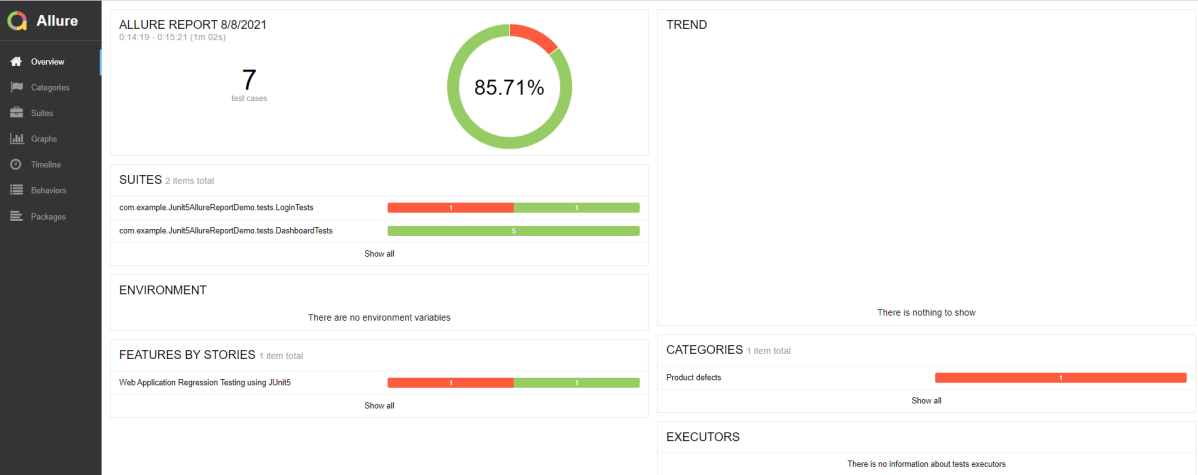
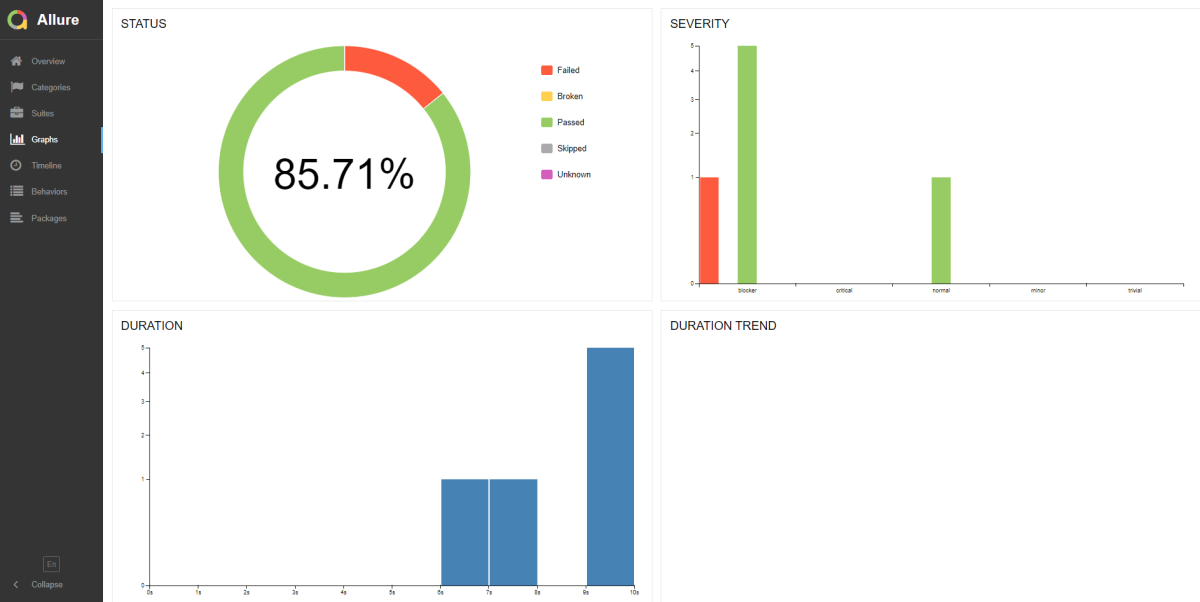
In the below image, we can see that one test failed and six passed out of seven tests.

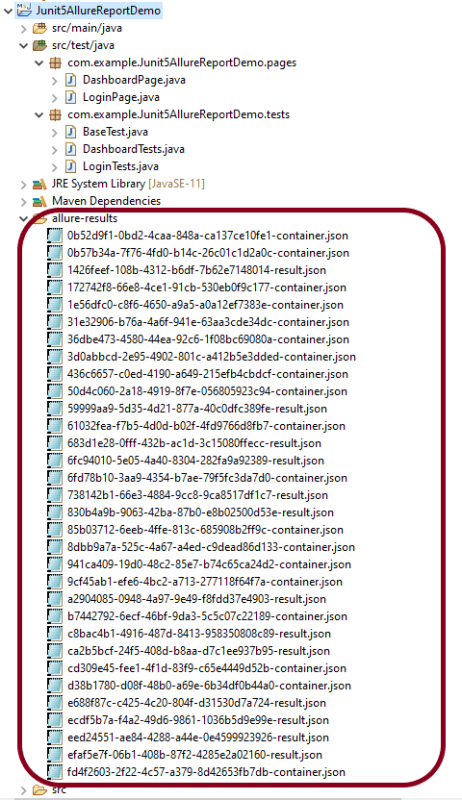
This will create the allure-results folder with all the test reports. These files will be used to generate Allure Report.

To create Allure Report, use the below command

allure serve

This will generate the beautiful Allure Test Report as shown below.

Allure Report Dashboard

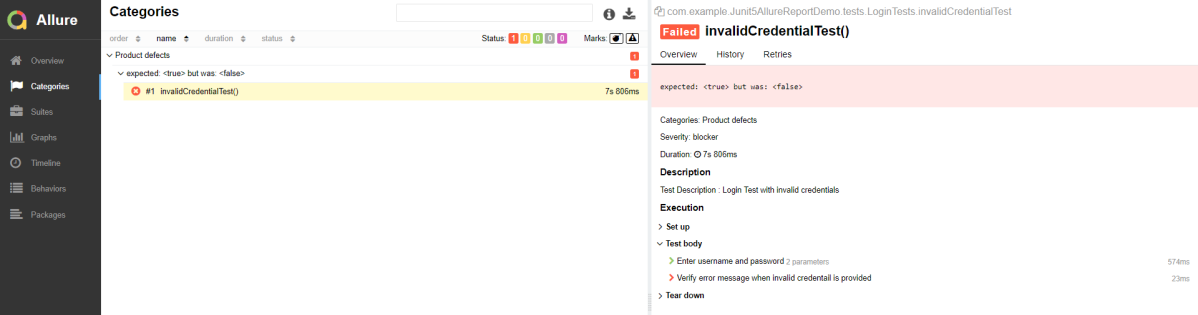
Categories in Allure Report

The categories tab gives you a way to create custom defect classifications to apply for test results. There are two categories of defects – Product Defects (failed tests) and Test Defects (broken tests).

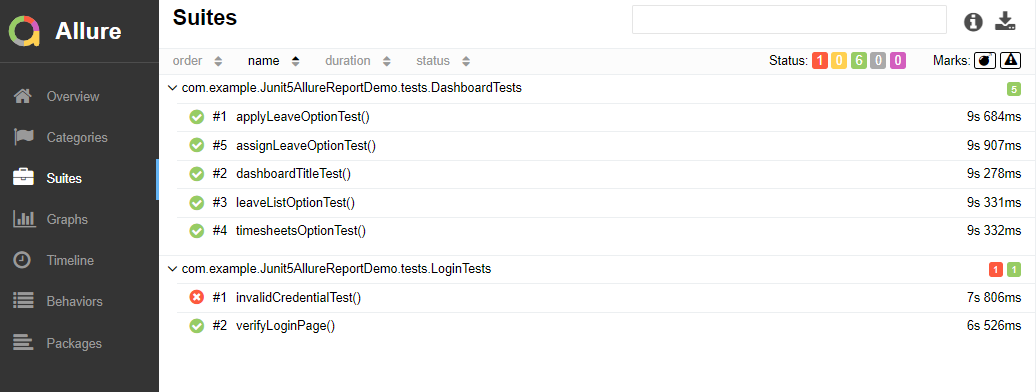
Suites in Allure Report

On the Suites tab a standard structural representation of executed tests, grouped by suites and classes can be found.

Graphs in Allure Report

Graphs allow you to see different statistics collected from the test data: status breakdown or severity and duration diagrams.

Timeline in Allure Report

Timeline tab visualizes retrospective of tests execution, allure adaptors collect precise timings of tests, and here on this tab they are arranged accordingly to their sequential or parallel timing structure.

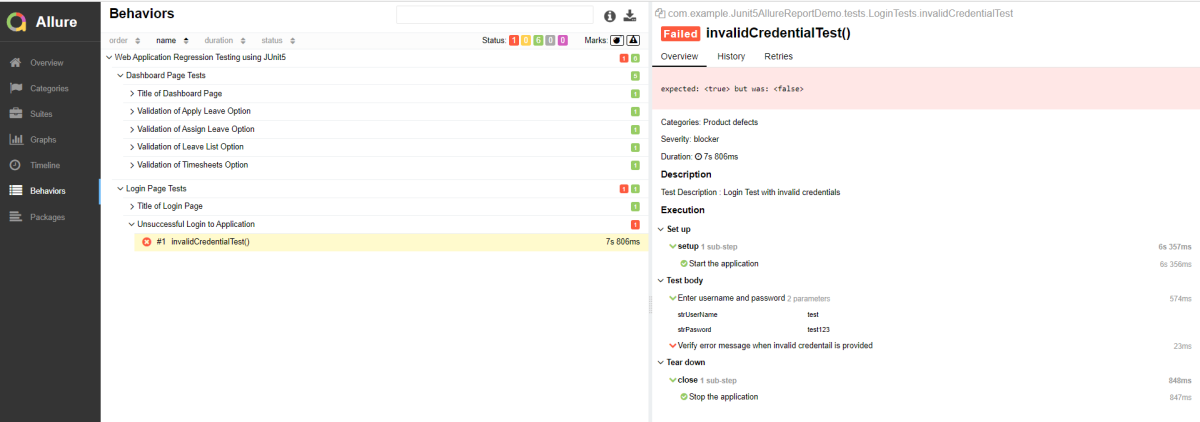
Behaviors of Allure Report

This tab groups test results according to Epic, Feature, and Story tags.

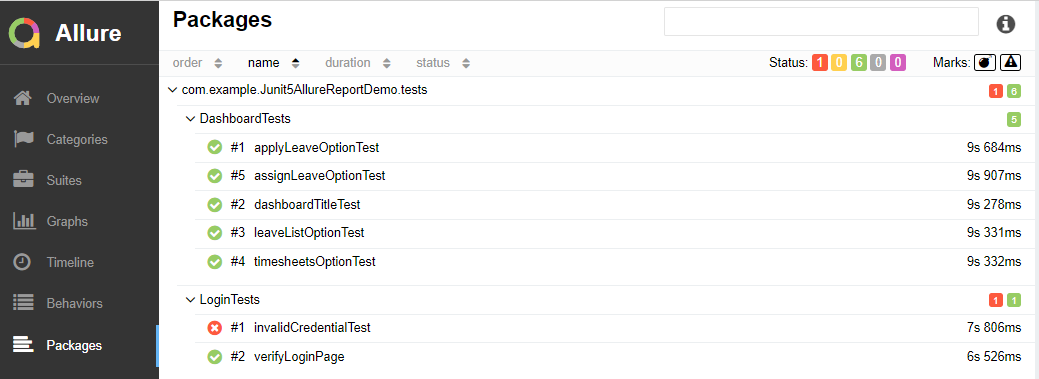
Packages in Allure Report

Packages tab represents a tree-like layout of test results, grouped by different packages.

We are done! Congratulations on making it through this tutorial and hope you found it useful! Happy Learning!!