How to run JUnit5 tests in order

HOME

The general practices say that automated tests should be able to run independently and with no specific order, as well as the result of the test should not depend on the results of previous tests. But there are situations where a specific order of test execution can be justified, especially in integration or end-to-end tests. The test methods don’t follow a specific order by default to execute the tests. The test cases need not necessarily execute in the order in which they have been written.

There are different ways or modes to set the order of execution for the test cases.  This article shows how to control the JUnit 5 test execution order via the following MethodOrderer classes:

  • DisplayName – sorts test methods alphanumerically based on their display names
  • MethodName – sorts test methods alphanumerically based on their names and formal parameter lists
  • Alphanumeric – sorts test methods alphanumerically based on their names and formal parameter lists. This is deprecated from JUnit Version 5.7 onwards
  • OrderAnnotation – sorts test methods numerically based on values specified via the @Order annotation
  • Random – orders test methods pseudo-randomly and support the configuration of a custom seed
  • Custom Order – A custom ordering sequence can be implemented by the interface MethodOrderer and providing it as the argument to @TestMethodOrder.

Let us create JUnit5 Tests and execute them.

public class OrderRandomDemo {

    @Test
    void test_Add() {

        System.out.println("test_Add()");
        assertEquals(10, 3 + 7);
    }

    @Test
    void test_Subtract() {

        System.out.println("test_Subtract()");
        assertEquals(10, 14 - 4);
    }

    @Test
    void test_Multiply() {

        System.out.println("test_Multiply()");
        assertEquals(10, 5 * 2);
    }

    @Test
    void test_Divide() {

        System.out.println("test_Divide()");
        assertEquals(10, 30 / 3);
    }

    @Test
    void test_IsEven() {

        System.out.println("test_IsEven()");
        assertEquals(0, 10%2);
    }

}

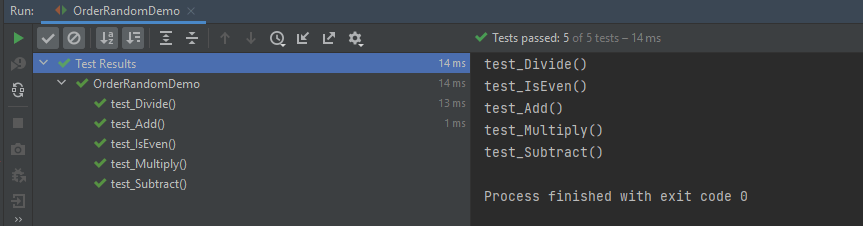
The output of the above program
1. DisplayName

It sorts test methods alphanumerically based on their display names. Test Method can be anything annotated with @Test, @RepeatedTest, @ParameterizedTest, @TestFactory, or @TestTemplate.

@TestMethodOrder(MethodOrderer.DisplayName.class)

@TestMethodOrder is a type-level annotation that is used to configure a MethodOrderer for the test methods of the annotated test class or test interface.

MethodOrderer defines the API for ordering the test methods in a given test class.

Test Method – It is any method annotated with @Test, @RepeatedTest, @ParameterizedTest, @TestFactory, or @TestTemplate.

DisplayName.class – MethodOrderer that sorts methods alphanumerically based on their names using String.compareTo(String).
If two methods have the same name, String representations of their formal parameter lists will be used as a fallback for comparing the methods.

An example of sorting the tests based on their display names.

import org.junit.jupiter.api.DisplayName;
import org.junit.jupiter.api.MethodOrderer;
import org.junit.jupiter.api.Test;
import org.junit.jupiter.api.TestMethodOrder;
import static org.junit.jupiter.api.Assertions.assertEquals;

@TestMethodOrder(MethodOrderer.DisplayName.class)
public class DisplayNameOrderedTests {

    @DisplayName("C")
    @Test
    void test_Add() {

        System.out.println("test_Add()");
        assertEquals(10, 3 + 7);
    }


    @DisplayName("E")
    @Test
    void test_Multiply() {

        System.out.println("test_Multiply()");
        assertEquals(10, 5 * 2);
    }

    @DisplayName("A")
    @Test
    void test_Divide() {

        System.out.println("test_Divide()");
        assertEquals(10, 30 / 3);
    }


    @DisplayName("D")
    @Test
    void test_Subtract() {

        System.out.println("test_Subtract()");
        assertEquals(10, 18 - 8);
    }

    @DisplayName("B")
    @Test
    void test_IsEven() {

        System.out.println("test_IsEven()");
        assertEquals(0, 18%2);
    }
}

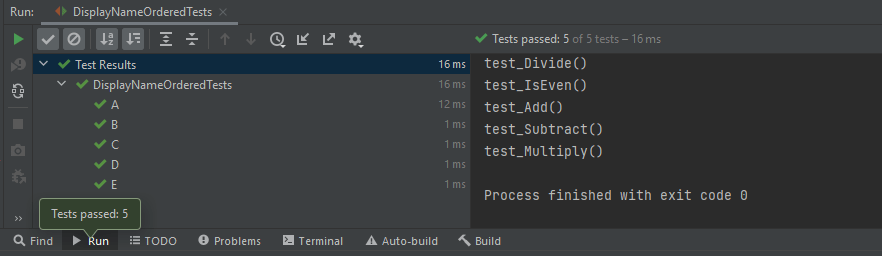
We can see that the test methods are sorted alphanumerically based on their display name starting from A to E. The output of the above program
2. MethodName

This annotation sorts methods alphanumerically based on their names using String.compareTo(String).
If two methods have the same name, String representations of their formal parameter lists will be used as a fallback for comparing the methods.

@TestMethodOrder(MethodOrderer.MethodName.class)

Let us see an example of MethodName.

import org.junit.jupiter.api.MethodOrderer;
import org.junit.jupiter.api.Test;
import org.junit.jupiter.api.TestMethodOrder;
import static org.junit.jupiter.api.Assertions.assertEquals;

@TestMethodOrder(MethodOrderer.MethodName.class)
class MethodNameOrderedTests {

    @Test
    void testE() {

        System.out.println("testE");
        assertEquals(10, 3 + 7);
    }

    @Test
    void testA() {

        System.out.println("testA");
        assertEquals(10, 14 - 4);
    }

    @Test
    void testC() {
        System.out.println("testC");
        assertEquals(10, 5 * 2);
    }

    @Test
    void testB() {
        System.out.println("testB");
        assertEquals(10, 30 / 3);
    }

    @Test
    void testD() {
        System.out.println("testD");
        assertEquals(10, 10 + 0);
    }

}

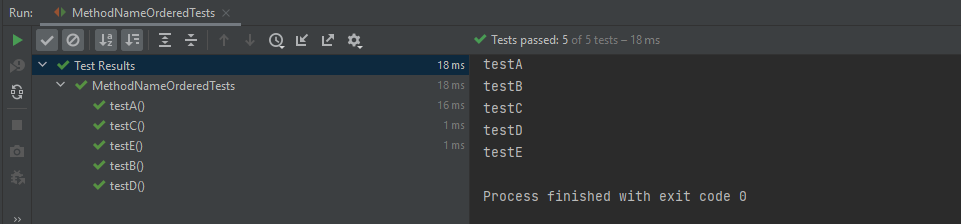
The output of the above program
3. OrderAnnotation

This sorts test method numerically based on values specified via the @Order annotation.
Any methods that are assigned the same order value will be sorted arbitrarily adjacent to each other.
When any method is not annotated with @Order, it will be assigned the default order value, which will effectively cause them to appear at the end of the sorted list.

@TestMethodOrder(MethodOrderer.OrderAnnotation.class)

Let us see an example of OrderAnnotation.

import org.junit.jupiter.api.MethodOrderer;
import org.junit.jupiter.api.Order;
import org.junit.jupiter.api.Test;
import org.junit.jupiter.api.TestMethodOrder;
import static org.junit.jupiter.api.Assertions.assertEquals;

@TestMethodOrder(MethodOrderer.OrderAnnotation.class)
public class OrderAnnotationDemo {

    @Test
    @Order(3)
    void test_Add() {

        System.out.println("test_Add()");
        assertEquals(10, 3 + 7);
    }

    @Test
    @Order(4)
    void test_IsOdd() {
        System.out.println("test_IsOdd()");
        assertEquals(1, 11%2);
    }

    @Test
    void test_Subtract() {
        System.out.println("test_Subtract()");
        assertEquals(10, 14 - 4);
    }

    @Test
    @Order(1)
    void test_Multiply() {
        System.out.println("test_Multiply()");
        assertEquals(10, 5 * 2);
    }

    @Test
    @Order(4)
    void test_Divide() {
        System.out.println("test_Divide()");
        assertEquals(10, 30 / 3);
    }

    @Test
    @Order(2)
    void test_IsEven() {
        System.out.println("test_IsEven()");
        assertEquals(0, 10%2);
    }
}

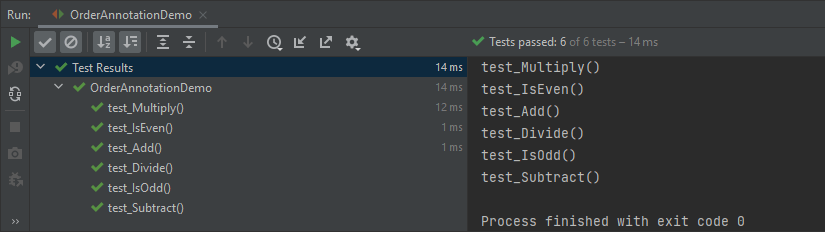
Here, test_Subtract() is not assigned any order value, so it is displayed as the last one in the last.
4. Random

These sorts of test methods are pseudo-randomnly.

@TestMethodOrder(MethodOrderer.Random.class)

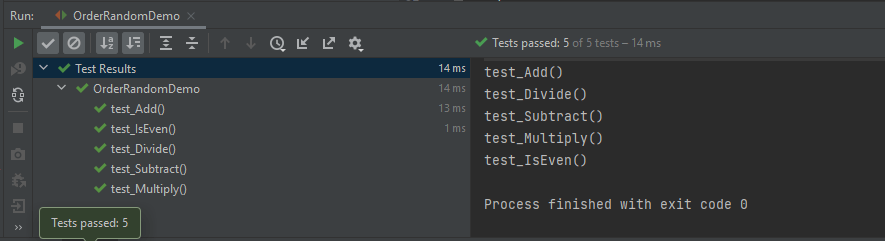
Let us create a program to show the random order of tests in JUnit5.

import org.junit.jupiter.api.MethodOrderer;
import org.junit.jupiter.api.Test;
import org.junit.jupiter.api.TestMethodOrder;
import static org.junit.jupiter.api.Assertions.assertEquals;

@TestMethodOrder(MethodOrderer.Random.class)
public class OrderRandomDemo {

    @Test
    void test_Add() {

        System.out.println("test_Add()");
        assertEquals(10, 3 + 7);
    }

    @Test
    void test_Subtract() {

        System.out.println("test_Subtract()");
        assertEquals(10, 14 - 4);
    }

    @Test
    void test_Multiply() {

        System.out.println("test_Multiply()");
        assertEquals(10, 5 * 2);
    }

    @Test
    void test_Divide() {

        System.out.println("test_Divide()");
        assertEquals(10, 30 / 3);
    }

    @Test
    void test_IsEven() {

        System.out.println("test_IsEven()");
        assertEquals(0, 10%2);
    }
}

The output of the above program
5. Custom Order

We can define our own custom ordering sequence by implementing the interface MethodOrderer and providing it as the argument to @TestMethodOrder.

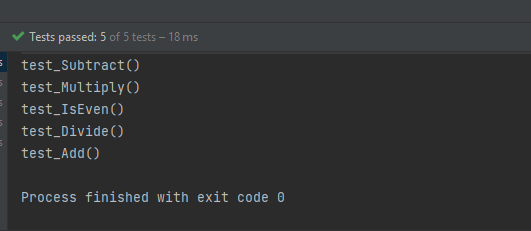
Here, the tests are arranged in descending method order.

import org.junit.jupiter.api.MethodDescriptor;
import org.junit.jupiter.api.MethodOrderer;
import org.junit.jupiter.api.MethodOrdererContext;

public class DescendingMethodOrder implements MethodOrderer {

    @Override
    public void orderMethods(MethodOrdererContext context) {
        context.getMethodDescriptors().sort((MethodDescriptor m1, MethodDescriptor m2) ->
                m2.getMethod().getName().compareTo(m1.getMethod().getName()));
    }
    
}

Now, test the above custom order.

import org.junit.jupiter.api.Test;
import org.junit.jupiter.api.TestMethodOrder;
import static org.junit.jupiter.api.Assertions.assertEquals;

@TestMethodOrder(DescendingMethodOrder.class)
public class CustomOrderTests {

    @Test
    void test_Add() {
        System.out.println("test_Add()");
        assertEquals(10 , 4 + 6);
    }

    @Test
    void test_Subtract() {
        System.out.println("test_Subtract()");
        assertEquals(10 , 17 - 7);
    }

    @Test
    void test_Multiply() {
        System.out.println("test_Multiply()");
        assertEquals(10 , 5 * 2);
    }

    @Test
    void test_Divide() {
        System.out.println("test_Divide()");
        assertEquals(10 , 20/2);
    }

    @Test
    void test_IsEven() {
        System.out.println("test_IsEven()");
        assertEquals(0 , 20%2);
    }
}

Notice the test output. The tests are executed in descending order. The result of the above program is
Test Classes Ordering

  1. ClassName: sorts test classes alphanumerically based on their fully qualified class names.
  2. DisplayName: sorts test classes alphanumerically based on their display names (see display name generation precedence rules).
  3. OrderAnnotation: sorts test classes numerically based on values specified via the @Order annotation.
  4. Random: orders test classes pseudo-randomly and support the configuration of a custom seed.

The configured ClassOrderer will be applied to all top-level test classes (including static nested test classes) and @Nested test classes.

1. ClassName

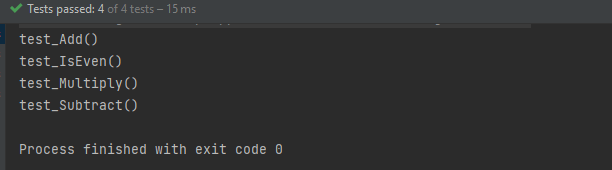
The Test Classes are sorted alphanumerically based on their fully qualified class names.

package JUnit5;

import org.junit.jupiter.api.ClassOrderer;
import org.junit.jupiter.api.Nested;
import org.junit.jupiter.api.Test;
import org.junit.jupiter.api.TestClassOrder;

import static org.junit.jupiter.api.Assertions.assertEquals;

@TestClassOrder(ClassOrderer.ClassName.class)
public class ClassNameOrderTests {

    @Nested
    class Addition {

        @Test
        void test_Add() {
            System.out.println("test_Add()");
            assertEquals(10, 3 + 7);
        }
    }

    @Nested
    class IsEven {

        @Test
        void test_IsEven() {
            System.out.println("test_IsEven()");
            assertEquals(0, 10 % 2);
        }
    }

    @Nested
    class Subtraction {

        @Test
        void test_Subtract() {
            System.out.println("test_Subtract()");
            assertEquals(9, 14 - 5);
        }
    }

    @Nested
    class Multiply {

        @Test
        void test_Multiply() {
            System.out.println("test_Multiply()");
            assertEquals(10, 5 * 2);
        }
    }
}

The result of the above program is
2. DisplayName

It sorts test classes alphanumerically based on their display names.

package JUnit5;

import org.junit.jupiter.api.*;

import static org.junit.jupiter.api.Assertions.assertEquals;

@TestClassOrder(ClassOrderer.DisplayName.class)
public class ClassDisplayNameTests {

    @Nested
    @DisplayName("B")
    class AppFlowTests {

        @Test
        void test_Add() {
            System.out.println("test_Add()");
            assertEquals(10, 6 + 4);
        }
    }

    @Nested
    @DisplayName("C")
    class TearDownTests {

        @Test
        void test_Subtract() {
            System.out.println("test_Subtract()");
            assertEquals(10, 15 - 5);

        }
    }

    @Nested
    @DisplayName("A")
    class SetupTests {

        @Test
        void test_Multiply() {
            System.out.println("test_Multiply()");
            assertEquals(10, 5 * 2);
        }
    }
}

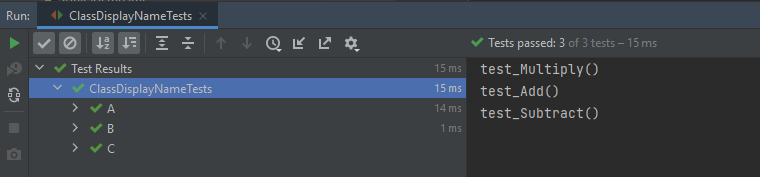
The result of the above program is
3. OrderAnnotation in Class

The test classes are sorted numerically based on values specified via the @Order annotation.

import org.junit.jupiter.api.*;

import static org.junit.jupiter.api.Assertions.assertEquals;

@TestClassOrder(ClassOrderer.ClassName.class) //sorts test classes alphanumerically based on their fully qualified class names.
public class ClassOrderedTests {

    @Nested
    @Order(2)
    class AppFlowTests {

        @Test
        void test_Add() {
            System.out.println("test_Add()");
            assertEquals(10, 3 + 7);
        }
    }

    @Nested
    @Order(3)
    class TearDownTests {

        @Test
        void test_Subtract() {
            System.out.println("test_Subtract()");
            assertEquals(9, 14 - 5);
        }
    }

    @Nested
    @Order(1)
    class SetupTests {

        @Test
        void test_Multiply() {
            System.out.println("test_Multiply()");
            assertEquals(10, 5 * 2);
        }
    }
}

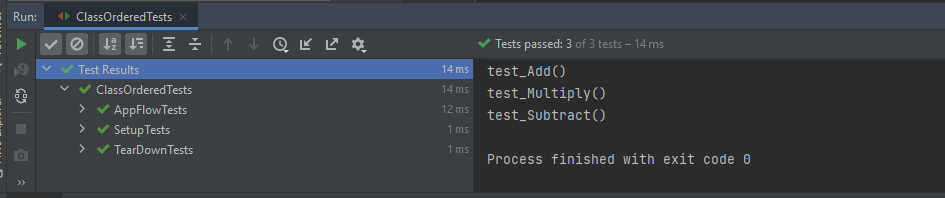
The result of the above program is
4. Random

The test classes are sorted pseudo-randomly and support the configuration of a custom seed.

import org.junit.jupiter.api.*;
import static org.junit.jupiter.api.Assertions.assertEquals;

@TestClassOrder(ClassOrderer.Random.class)
public class ClassRandomTests {

    @Nested
    class Addition {

        @Test
        void test_Add() {
            System.out.println("test_Add()");
            assertEquals(10, 3 + 7);
        }
    }

    @Nested
    class IsEven {

        @Test
        void test_IsEven() {
            System.out.println("test_IsEven()");
            assertEquals(0, 10 % 2);
        }
    }

    @Nested
    class Subtraction {

        @Test
        void test_Subtract() {
            System.out.println("test_Subtract()");
            assertEquals(9, 14 - 5);
        }
    }

    @Nested
    class Multiply {

        @Test
        void test_Multiply() {
            System.out.println("test_Multiply()");
            assertEquals(10, 5 * 2);
        }
    }
}

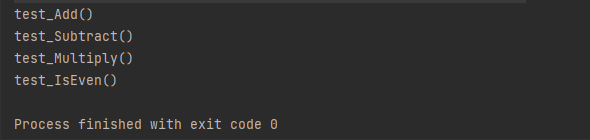
The result of the above program is
Congratulation!! We have gone through different types of ordering in JUnit5. Happy Learning!!

How to run JUnit5 tests through Command Line

HOME

The previous tutorial explains to configure Junit in IntelliJ and run the tests as JUnit Tests. This tutorial shows the steps to run the tests through command line. We can ask, why we need to run the tests through command line?? There are many reasons, one of the reason is to achieve CI/CD. To run the tests in pipeline, they need to be run through command line. Another reason is that we don’t need to open the IDE to run the tests. Third reason is that many reports are only generated (Serenity, Cucumber), if the tests run through command line.

Below is a JUnit5 test.

import io.github.bonigarcia.wdm.WebDriverManager;
import org.junit.jupiter.api.*;
import org.openqa.selenium.WebDriver;
import org.openqa.selenium.chrome.ChromeDriver;
import org.openqa.selenium.chrome.ChromeOptions;

public class Demo {

    WebDriver driver;

    @BeforeEach
    public void setUp() {
        WebDriverManager.chromedriver().setup();
        ChromeOptions chromeOptions = new ChromeOptions();
        driver = new ChromeDriver(chromeOptions);
        driver.manage().window().fullscreen();
    }

    @Test
    public void Junit5Test() {
        driver.get("http://automationpractice.com/index.php");
        System.out.println("Title of Page :" + driver.getTitle());
        System.out.println("Page URL : " + driver.getCurrentUrl());
        Assertions.assertEquals("My Store",driver.getTitle());

    }

    @AfterEach
    public void tearDown() {
        driver.close();
    }
}

Let us see what happens when we try to run the JUnit tests through Command Line. This command is used to run the tests present in Demo class.

mvn clean test -Dtest=Demo

The output generated by the test is shown below

This shows that surefire-plugin is need to be add to the project to run t he tests successfully through command line.

Add surefire-plugin to the project

Go back to the Apache Maven Project and copy the code.

 <dependencies>

        <dependency>
            <groupId>org.junit.jupiter</groupId>
            <artifactId>junit-jupiter-engine</artifactId>
            <version>5.8.2</version>
            <scope>test</scope>
        </dependency>

        <dependency>
            <groupId>org.junit.jupiter</groupId>
            <artifactId>junit-jupiter-api</artifactId>
            <version>5.8.2</version>
            <scope>test</scope>
        </dependency>
 
</dependencies>       
    
<build>
        <plugins>
            <plugin>
                <groupId>org.apache.maven.plugins</groupId>
                <artifactId>maven-surefire-plugin</artifactId>
                <version>3.0.0-M5</version>
                <dependencies>
                    <dependency>
                        <groupId>org.junit.jupiter</groupId>
                        <artifactId>junit-jupiter-engine</artifactId>
                        <version>5.8.2</version>
                    </dependency>
                </dependencies>
            </plugin>
        </plugins>
    </build>

Again run the tests through command line using the command mentioned above. Now, will see that the tests are executed successfully.

Congratulations. We can see that JUnit5 tests are executed through command line. Happy Learning!!
JUnit5 Assertions Example

HOME

JUnit5 contains the assertions available as in JUnit 4 Assertions as well there are a few additional new asserts too. In this post, let’s discuss each new assertion in JUnit5 works in detail with examples.

1. assertIterableEquals

The assertIterableEquals() asserts that the expected and the actual iterables are deeply equal. In order to be equal, both iterable must return equal elements in the same order and it isn’t required that the two iterables are of the same type in order to be equal.

Example 1 – In this example, the number of elements as well as the sequence of elements is in the same order in both Iterables. It is not mandatory to have Iterables of the same type, so we can see as one of the Iterable is ArrayList whereas another Iteratble is of type LinkedList.

@Test
void iterableEqualsPositive() {
     Iterable<String> iterat1 = new ArrayList<>(asList("Java", "Junit", "Test"));
     Iterable<String> iterat2 = new LinkedList<>(asList("Java", "Junit", "Test"));

     assertIterableEquals(iterat1, iterat2);
  }

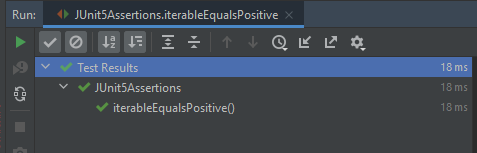
The assertion passes as the sequence and number of elements in both Iterables are the same.

Example 2 – In the below example, the ordering of elements in the Iterables is different.

@Test
void iterableEqualsNegative() {
     Iterable<String> iterat1 = new ArrayList<>(asList("Java", "Junit", "Test"));
     Iterable<String> iterat2 = new ArrayList<>(asList("Java","Test","Junit" ));

     assertIterableEquals(iterat1, iterat2);
 }

Here, we can see that the sequence of elements in Iterable are different, so the assertion fails.

Example 3 – In the below example, the number of elements is different in the Iterables. Iterable 1 has 3 elements whereas Iterable 2 has 4 elements.

@Test
void iterableEqualsNegative1() {
     Iterable<String> iterat1 = new ArrayList<>(asList("Java", "Junit", "Test"));
     Iterable<String> iterat2 = new LinkedList<>(asList("Java", "Junit", "Test","Junit5"));

     assertIterableEquals(iterat1, iterat2);
 }

As both Iterables do not have same number of elements, so the Assertion has failed.

Note:- There are no assertions like assertNotIterableEquals() or assertIterableNotEquals().

2. assertLinesMatch

This Assertion asserts that the expected list of Strings matches the actual list of String.
This method differs from other assertions that effectively only check String.equals(Object), in that it uses the following staged matching algorithm:
For each pair of expected and actual lines do
a) check if expected.equals(actual) – if yes, continue with next pair
b) otherwise treat expected as a regular expression and check via String.matches(String) – if yes, continue with the next pair
c) otherwise check if an expected line is a fast-forward marker, if yes apply to fast-forward actual lines accordingly (see below) and goto 1.

Example 1 – In the below example, expected has a regular expression that matches with the elements of actual.

@Test
void linesMatchPositive() {
    List<String> expected = asList("Java", "\\d+", ".*");
    List<String> actual = asList("Java", "11", "JUnit");

    assertLinesMatch(expected, actual);
}

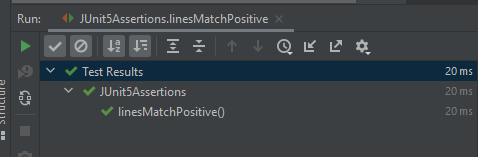
As the regular expression of elements matches, the assertion passes.

Example 2 – In the below example, the elements in the lists are different.

@Test
void linesMatchNegative1() {
   List<String> expected = asList("Java", "\\d+", ".*");
   List<String> actual = asList("Test","Java", "11");

   assertLinesMatch(expected, actual);
}

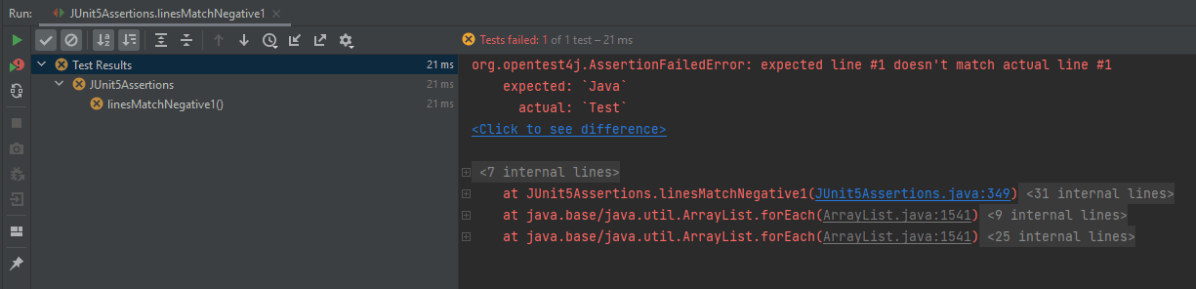
The assertion fails as the elements are different in actual and expected.

Example 3 – In the below example, the number of elements is different in expected and actual lists.

@Test
void linesMatchNegative2() {
    List<String> expected = asList("Java", "\\d+", ".*");
    List<String> actual = asList("Java", "11");

    assertLinesMatch(expected, actual);
}

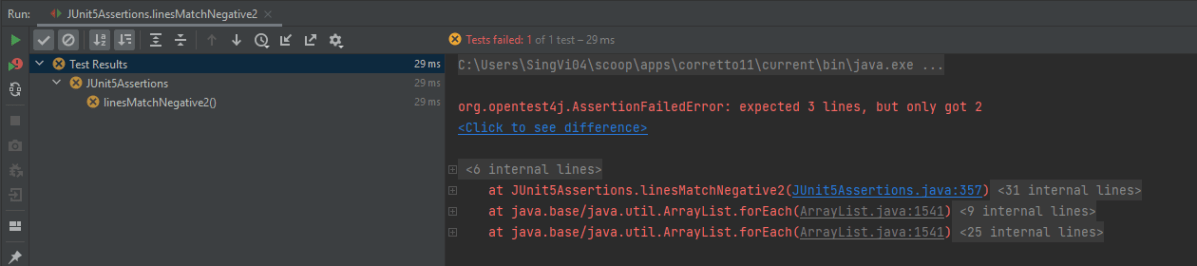
The assertion fails as the number of elements in expected is 3 whereas 2 elements are available in actual list.

3. assertThrows

The new assertThrows() assertion allows us a clear and a simple way to assert if an executable throws the specified exception type.

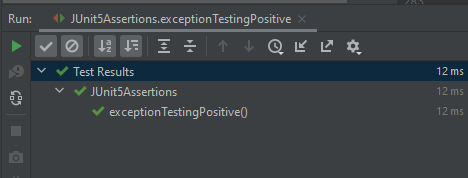
Example 1 – In the below example, the length of string arr is null, so it throws a NullPointerException

@Test
void exceptionTestingPositive() {

    String arr = null;
    Exception exception = assertThrows(NullPointerException .class, () -> arr.length() );
    assertEquals(null, exception.getMessage());
 }

Result

Example 2 – In the below example, the exception thrown by String arr is NullPointerException. But, we are asserting it with ArithmeticException.

@Test
 void exceptionTestingNegative() {

     String arr = null;
     Exception exception = assertThrows(ArithmeticException .class, () -> arr.length() );
     assertEquals("Arithmetic Exception", exception.getMessage());
 }

Result

4. assertTimeout

When we want to assert that execution of the supplied executable completes before the given timeout, we can use assertTimeout().

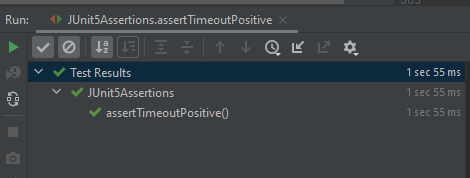
Example 1 – In the below example, assertTimeout() is 2 sec, which means the assertion should be completed within 2 secs. We are waiting for 1 sec and then perform the assertion.

 @Test
     void assertTimeoutPositive() {
       int a = 4;
       int b= 5;
        assertTimeout(
                ofSeconds(2),
                () -> {
                    // code that requires less then 2 seconds to execute
                    Thread.sleep(1000);
                }
        );
        assertEquals(9, (a + b));
    }

As the assertion is within the specified time of assertTimeout(), the timeout assertion passes and the test passes.

Example 2 – In the below example, assertTimeout() is 2 sec whereas are waiting for 5 sec and then performing the assertion.

  @Test
   void assertTimeoutNegative() {
        int a = 4;
        int b= 5;
        assertTimeout(
                ofSeconds(2),
                () -> {
                    // code that requires less then 2 seconds to execute
                    Thread.sleep(5000);
                }
        );
        assertEquals(9, (a + b));
    }

As the assertion is outside the specified time of assertTimeout(), so the test fails. The assertion fails with an error message similar to: “execution exceeded timeout of 2000 ms by 3010 ms”.

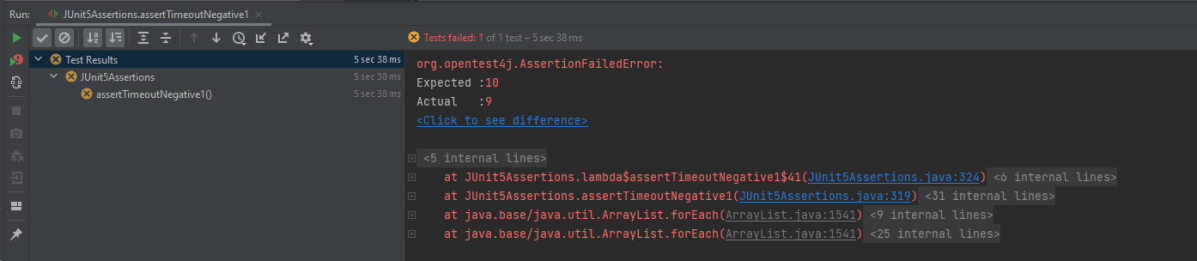
Example 3 – In the below example, the assertion is mentioned just after

The executable will be executed in the same thread as that of the calling code. Consequently, execution of the executable will not be preemptively aborted if the timeout is exceeded.

@Test
 void assertTimeoutNegative1() {
    int a = 4;
    int b= 5;
    assertTimeout(
        ofSeconds(2),
        () -> {
                // code that requires less then 2 seconds to execute
                 Thread.sleep(5000);
                 assertEquals(10, (a + b));
              }
        );
    }

This shows that the assertion assertEquals() is still executed after the timeout also.

5. assertTimeoutPreemptively()

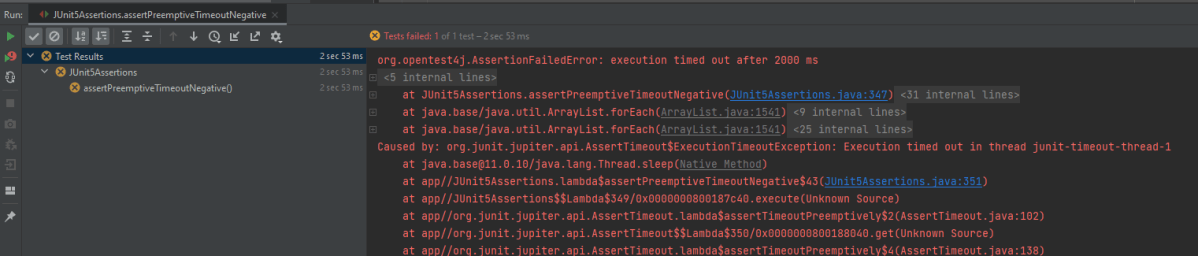
This assertion works just like assertTimeout(). When we want to assert that the execution of the supplied executable completes before the given timeout, we can use assertTimeoutPreemptively(). The only difference is that here the executable will be executed in a different thread than that of the calling code, whereas in assertTimeout() the executable will be executed in the same thread as that of the calling code. Furthermore, execution of the executable will be preemptively aborted if the timeout is exceeded here as contrary to assertTimeout() where the executable will not be preemptively aborted.

@Test
    void assertPreemptiveTimeoutNegative() {
        int a = 4;
        int b= 5;
        assertTimeoutPreemptively(
                ofSeconds(2),
                () -> {
                    // code that requires less then 2 seconds to execute
                    Thread.sleep(5000);
                    assertEquals(9, (a + b));
                }
        );
    }

Result

There is another very famous assertion called assertAll() [Group Assertions]. This is discussed in another tutorial.

In this post, We saw that JUnit Jupiter comes with many of the assertion methods that JUnit 4 has and adds a few that lend themselves well to being used with Java 8 lambdas. All JUnit Jupiter assertions are static methods in the org.junit.jupiter.api.Assertions class.

Grouped Assertions in JUnit 5 – assertAll()

HOME

org.junit.jupiter.api.Assertions

What is JUnit5?

JUnit 5 is composed of several different modules from three different sub-projects.

JUnit 5 = JUnit Platform + JUnit Jupiter + JUnit Vintage

The JUnit Platform serves as a foundation for launching testing frameworks on the JVM. It also defines the Test Engine  API for developing a testing framework that runs on the platform.

JUnit Jupiter is the combination of the new programming model and extension model for writing tests and extensions in JUnit 5. The Jupiter sub-project provides a Test Engine for running Jupiter-based tests on the platform.

JUnit Vintage provides a Test Engine for running JUnit 3 and JUnit 4 based tests on the platform. It requires JUnit 4.12 or later to be present on the classpath or module path.

To use JUnit5, add the Junit5 maven dependency to the POM.xml

<dependency>
    <groupId>org.junit.jupiter</groupId>
    <artifactId>junit-jupiter-engine</artifactId>
    <version>511.4</version>
    <scope>test</scope>
</dependency>

<dependency>
	<groupId>org.junit.jupiter</groupId>
	<artifactId>junit-jupiter-api</artifactId>
    <version>5.11.4</version>
	<scope>test</scope>
</dependency>

Grouped Assertions With Heading As Parameter

Example 1 – The following example demonstrates positive assertions using `assertAll()` in JUnit 5. All assertions in this example are of the same type, specifically `assertEquals()`, grouped within an `assertAll()` assertion. The heading parameter for this group of assertions is “GroupedAssertionsWithSameAssertionType”.

@Test
void allPositive1() {
   assertAll(
     "GroupedAssertionsWithSameAssertionType",
      () -> assertEquals(8, 5+3, "8 is not sum of 5 and 3"),
      () -> assertEquals("java", "JAVA".toLowerCase()),
      () -> assertEquals(16,4*4,"16 is not product of 4 and 4")
   );
}

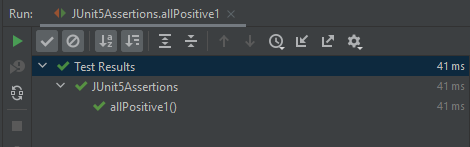
Result

As all 3 assertions pass, so the final result passes.

Example 2 – The following example demonstrates using `assertAll()` in JUnit 5 to group assertions of different types – assertEquals(), assertNotNull and assertNotEquals() within a single test. It consists of the heading parameter with the value “GroupedAssertionsWithDifferentAssertionType”.

@Test
void allPositive2() {

    String str ="Spring";
    assertAll(
        "GroupedAssertionsWithDifferentAssertionType",
         () -> assertEquals(8, 5+3, "8 is not sum of 5 and 3"),
         () -> assertNotNull(str, () -> "The string should be null"),
         () -> assertEquals("java", "JAVA".toLowerCase()),
         () -> assertNotEquals(20,5*3,"20 is product of 5 and 3")
    );
 }

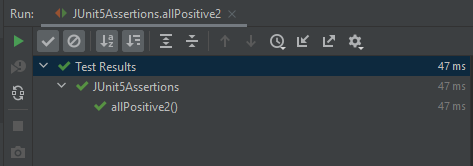
Result

As all 3 assertions pass, so the final result passes.

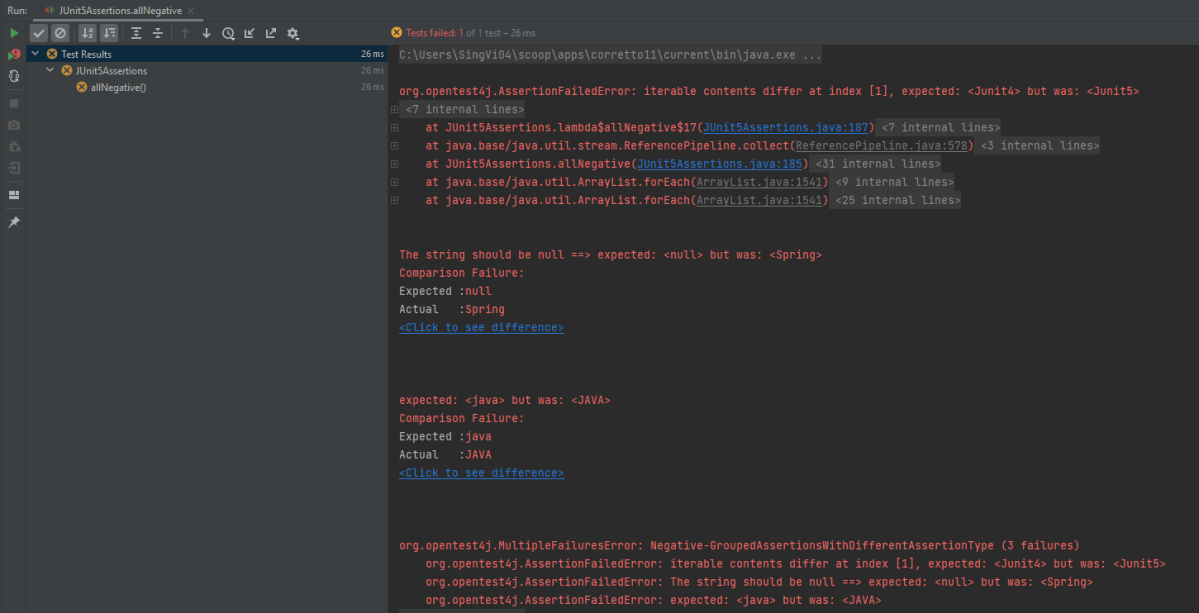
Example 3 – In the below example, out of 4 assertions, 3 assertions are failing, so the output will have the detail about all 3 assertion errors.

 @Test
 void allNegative() {

    String str ="Spring";
    Iterable<String> iterat1 = new ArrayList<>(asList("Java", "Junit4", "Test"));
    Iterable<String> iterat2 = new ArrayList<>(asList("Java", "Junit5", "Test"));
    
    assertAll(
        "Negative-GroupedAssertionsWithDifferentAssertionType",
        () -> assertIterableEquals(iterat1, iterat2),
        () -> assertNull(str, () -> "The string should be null"),
        () -> assertEquals("java", "JAVA"),
        () -> assertNotEquals(20,5*3,"20 is product of 5 and 3")
     );
 }

Result

As one of the asserts in the group fails, instead of AssertionFailureError it results in MultipleFailuresError thereby displaying the heading of the grouped assertion passed as the input parameter i.e. Negative-GroupedAssertionsWithDifferentAssertionType in this example. This image shows all the 3 assertion failures.

Assertion 1 fails as we were expecting JUnit4, but response has JUnit5
Assertion 2 fails as the string was not NULL.
Assertion 3 fails as Java is not equal to JAVA (case sensitivity).

Grouped Assertions Without Heading As Parameter

The assertAll () can be implemented without using the heading parameter. The below example is the same as the above one, we are just skipping the heading part.

@Test
void allNegative() {

      String str ="Spring";
      Iterable<String> iterat1 = new ArrayList<>(asList("Java", "Junit4", "Test"));
      Iterable<String> iterat2 = new ArrayList<>(asList("Java", "Junit5", "Test"));
      
     // In a grouped assertion all assertions are executed, and all failures will be reported together
      assertAll(
          () -> assertIterableEquals(iterat1, iterat2),
          () -> assertNull(str, () -> "The string should be null"),
          () -> assertEquals("java", "JAVA"),
          () -> assertNotEquals(20,5*3,"20 is product of 5 and 3")
      );
  }

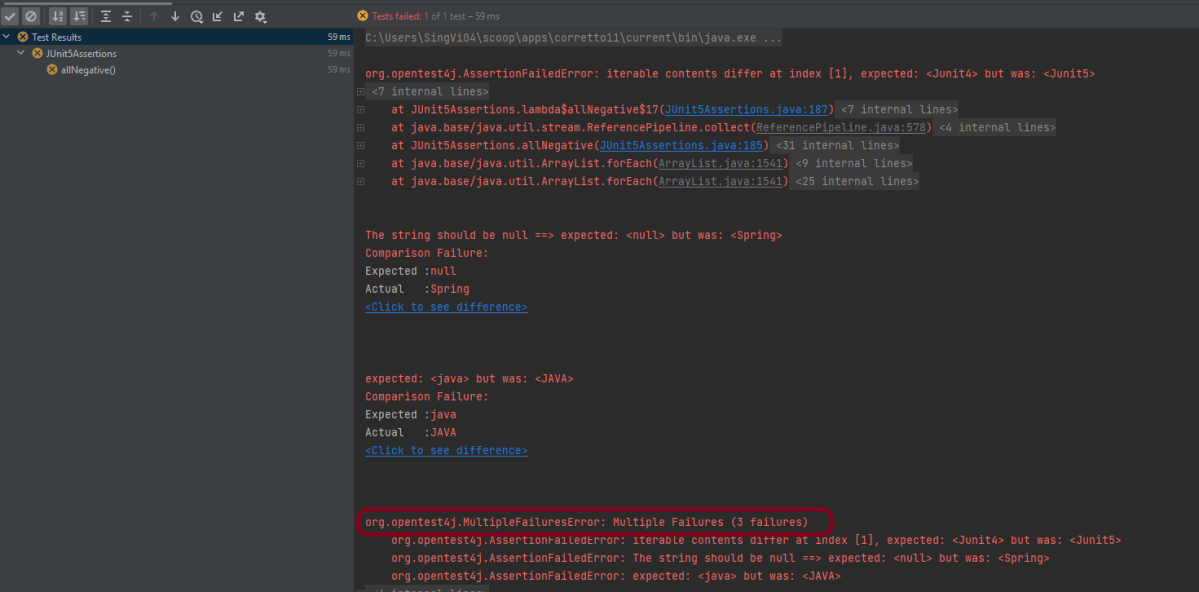
Result

The result displays without a heading.

Nested Or Dependent Grouped Assertions

When one assertAll() includes one or more assertAll() then these are referred to as Nested or Dependent grouped assertions.

Example 1 – In this case, first, the assertAll() validates if the sum is correct or not. The sum is correct here, so the control moves to the nested assertAll() to verify all the assertions present within it.

@Test
void allDependentPositive() {

   String str ="Spring";

   // Within a code block, if an assertion fails the subsequent code in the same block will be skipped.
    assertAll(
         "DependentPositiveAssertions",
         () -> {
                assertEquals(8, 5 + 3, "8 is not sum of 5 and 3");

                // Executed only if the previous assertion is valid.
                assertAll("sub-heading",
                   () -> assertNotNull(str, () -> "The string should be null"),
                   () -> assertEquals("java", "JAVA".toLowerCase()),
                   () -> assertEquals(20, 5 * 4, "20 is product of 5 and 4")
                ); // end of inner AssertAll()
           }

      );  // end of outer AssertAll()
 }

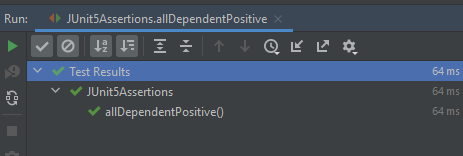
Result

All the assertions within nested assertAll() are passes. So the final result passes.

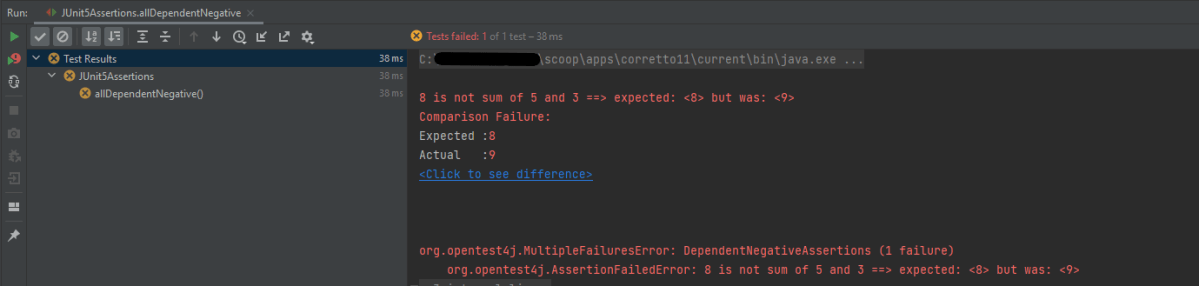
Example 2 – In the below example, outer AssertAll() fails, so all the assertions within nested/dependent assertAll() are not executed.

 @Test
 void allDependentNegative() {

    String str ="Spring";

    // Within a code block, if an assertion fails the subsequent code in the same block will be skipped.
    assertAll(
       "DependentPositiveAssertions",
        () -> {
                assertEquals(8, 5 + 4, "8 is not sum of 5 and 3");

                // Executed only if the previous assertion is valid.
                assertAll("sub-heading",
                   () -> assertNull(str, () -> "The string should be null"),
                   () -> assertNotEquals("java", "JAVA".toLowerCase()),
                   () -> assertNotEquals(20, 5 * 4, "20 is product of 5 and 4")
               ); // end of inner AssertAll()
           }

        ); // end of outer AssertAll()
    }

Result

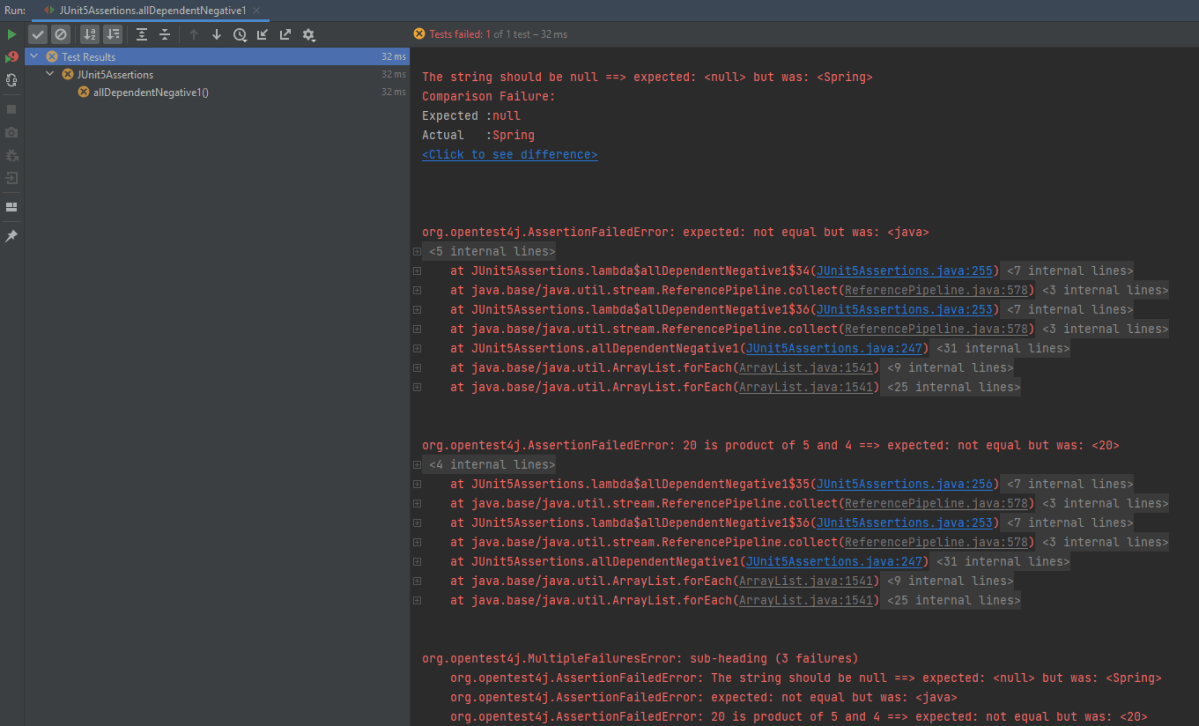
Example 3 – In the below example, outer AssertAll() passes, so all the assertions within nested/dependent assertAll() are executed. But due to the failure of assertNull, the nested assertions are not evaluated, and the report will indicate the failure of `assertNull` first

@Test
void allDependentNegative1() {

    String str ="Spring";

   // Within a code block, if an assertion passes the subsequent code in the same block will be executed.
    assertAll(
      "DependentNegativeAssertions",
      () -> {
             assertEquals(8, 5 + 3, "8 is not sum of 5 and 3");

             // Executed only if the previous assertion is valid.
             assertAll("sub-heading",
               () -> assertNull(str, () -> "The string should be null"),
               () -> assertNotEquals("java", "JAVA".toLowerCase()),
               () -> assertNotEquals(20, 5 * 4, "20 is product of 5 and 4")
             ); // end of inner AssertAll()
         }

      ); // end of outer AssertAll()
    }

Result

The nested assertions have failed. So they can be seen in the execution status.

In short,

  1. When first assertAll() method passes, then all the subsequent assertions within that block will be executed and these assertions can further pass or fails.
  2. When the first assertAll() assertion fails, then the execution of subsequent assertions is skipped.

That’s it! Congratulations on making it through this tutorial and hope you found it useful! Happy Learning!!

Dependency Injection in Cucumber using Pico-Container

HOME

In this tutorial, we will use the constructor injection technique to share web driver instances in multiple-step definitions using PicoContainer.

Why do we need Dependency Injection in Cucumber?

A new Framework is built that contains several Page Objects, Step Definitions, Feature files, and Helper Classes. Eventually, new Feature Files will be added that contain the steps that are already present in the existing Step Definition files. In this case, we will prefer to use the existing Step Definitions instead of creating new ones. But, Cucumber does not support Inheritance means it does not allow extending classes that contain Step Definitions or Hooks (@After, @Before, etc.). Now, Dependency Injection comes into the picture.

In Cucumber, if we want to share the state between multiple-step definition files, we will need to use dependency injection (DI). There are several options: PicoContainer, Spring, OpenEJB, etc. If you’re not already using DI, then it is recommended to use PicoContainer. Otherwise, use the one that’s already in use, because you should only have one.

To use PicoContainer, add the following dependency to the POM.xml

<dependency>
    <groupId>io.cucumber</groupId>
    <artifactId>cucumber-picocontainer</artifactId>
    <version>7.0.0</version>
    <scope>test</scope>
</dependency>

Let me explain this with the help of an example.

Imagine there are 2 feature files. These feature files are using the same browser initialization and website. Now, instead of creating the browser initialization twice for 2 feature files, why not create a Common Class and mention these details in that class and using DI, call this class in the main Step Definition classes.

Feature File 1 – HomePage.feature

Below is the example of feature file 1.

Feature: Home page validation
  
Background:
   Given User Navigates to HRM login page
   And User login with valid credentials
 
   @ValidQuickLaunch
   Scenario Outline: Login with valid credentials to check QuickLanuch options  
     
   When User is in Dashboard page
     Then there are valid QuickLaunch options '<options>'
         
    Examples: 
        | options                  |
        | Assign Leave             |
        | Leave List               |
        | Timesheets               |
 
     
    @ValidLegendOptions    
    Scenario Outline: Login with valid credentials to check Manu Options 
     
   When User is in Dashboard page
     Then there are valid Legend options '<legendOptions>'
         
    Examples: 
        | legendOptions               |
        | Not assigned to Subunits    |
        | Administration              |
        | Client Services             |

Feature File 2 – LoginPage.feature

Below is the example of feature file 2.

Feature: Login to HRM Application 
  
   @ValidCredentials
   Scenario: Login with valid credentials
      
    Given User is on Home page
    When User enters username as "Admin"
    And User enters password as "admin123"
    Then User should be able to login sucessfully

Next, create a new class that holds the common data. For example:

public class ApplicationHooks {

	private WebDriver driver;

	@Before
	public void setUp() {
		setDriver();
	}

	public void setDriver() {

		WebDriverManager.chromedriver().setup();
		driver = new ChromeDriver();
		driver.manage().window().maximize();
		driver.get("https://opensource-demo.orangehrmlive.com/");
	}

	public WebDriver getDriver() {
		return driver;
	}

	@After
	public void tearDown() {
		getDriver().quit();
	}
}

Then, in each of your step definition files that you want to use this common data, you can add a constructor that takes Step Data as an argument. This is where the injection occurs. For example:

LoginDefinition

public class LoginDefinition {

	private ApplicationHooks hooks;

	public LoginDefinition(ApplicationHooks hooks) {

		this.hooks = hooks;
	}

	@Given("User is on Home page")
	public void userOnHomePage() {

		System.out.println("Home Page is opened");
	}

	@When("User enters username as {string}")
	public void entersUsername(String userName) throws InterruptedException {

		System.out.println("Username Entered");
		hooks.getDriver().findElement(By.name("txtUsername")).sendKeys(userName);

	}

	@When("User enters password as {string}")
	public void entersPassword(String passWord) throws InterruptedException {

		System.out.println("Password Entered");
		hooks.getDriver().findElement(By.name("txtPassword")).sendKeys(passWord);

		hooks.getDriver().findElement(By.id("btnLogin")).submit();
	}

	@Then("User should be able to login sucessfully")
	public void sucessfullLogin() throws InterruptedException {

		String newPageText = hooks.getDriver().findElement(By.id("welcome")).getText();
		System.out.println("newPageText :" + newPageText);
		Assert.assertTrue(newPageText.contains("Welcome"));

	}
}

HomeDefinition

public class HomePageDefinition {

	ApplicationHooks hooks;

	public HomePageDefinition(ApplicationHooks hooks) {
		this.hooks = hooks;
	}

	@Given("User Navigates to HRM login page")
	public void userOnHomePage() {

		System.out.println("HRM login Page is opened");
	}

	@Given("User login with valid credentials")
	public void entersCredentials() throws InterruptedException {

		hooks.getDriver().findElement(By.name("txtUsername")).sendKeys("Admin");
	hooks.getDriver().findElement(By.name("txtPassword")).sendKeys("admin123");
		hooks.getDriver().findElement(By.id("btnLogin")).submit();

	}

	@When("User is in Dashboard page")
	public void verifyDashboardPage() {

		String dashboardTitle = hooks.getDriver().findElement(By.id("welcome")).getText();
		Assert.assertTrue(dashboardTitle.contains("Welcome"));

	}

	@Then("there are valid QuickLaunch options {string}")
	public void verifyQuickLinks(String options) throws InterruptedException {

		switch (options) {
		case "Assign Leave":
			String linkOne = hooks.getDriver()
					.findElement(By.xpath(
							"//*[@id='dashboard-quick-launch-panel-menu_holder']/table/tbody/tr/td[1]/div/a/span"))
					.getText();
			Assert.assertEquals(linkOne, options);

			break;
		case "Leave List ":
			String linkTwo = hooks.getDriver()
					.findElement(By.xpath(
							"//*[@id='dashboard-quick-launch-panel-menu_holder']/table/tbody/tr/td[2]/div/a/span"))
					.getText();
			Assert.assertEquals(linkTwo, options);
			Thread.sleep(1000);
			break;

		case "Timesheets":
			String linkThree = hooks.getDriver()
					.findElement(By.xpath(
							"//*[@id='dashboard-quick-launch-panel-menu_holder']/table/tbody/tr/td[3]/div/a/span"))
					.getText();
			Assert.assertEquals(linkThree, options);
			break;

		default:
			break;
		}

	}

	@Then("there are valid Legend options {string}")
	public void verifyMenuOptions(String options) throws InterruptedException {

		switch (options) {
		case "Not assigned to Subunits":
			String linkOne = hooks.getDriver()
					.findElement(
							By.xpath("//*[@id='div_legend_pim_employee_distribution_legend']/table/tbody/tr[1]/td[2]"))
					.getText();
			Assert.assertEquals(linkOne, options);
			break;

		case "Administration":
			String linkTwo = hooks.getDriver()
					.findElement(
							By.xpath("//*[@id='div_legend_pim_employee_distribution_legend']/table/tbody/tr[2]/td[2]"))
					.getText();
			Assert.assertEquals(linkTwo, options);
			break;

		case "Client Services":
			String linkThree = hooks.getDriver()
					.findElement(
							By.xpath("//*[@id='div_legend_pim_employee_distribution_legend']/table/tbody/tr[3]/td[2]"))
					.getText();
			Assert.assertEquals(linkThree, options);
			break;
		default:
			break;

		}
	}
}

Create a Test Runner Class to execute the tests.

import org.junit.runner.RunWith;

import io.cucumber.junit.Cucumber;
import io.cucumber.junit.CucumberOptions;

@RunWith(Cucumber.class)

@CucumberOptions(features= {"src/test/resources"}, glue= {"com.cucumber"})
public class RunCucumberTest {

}

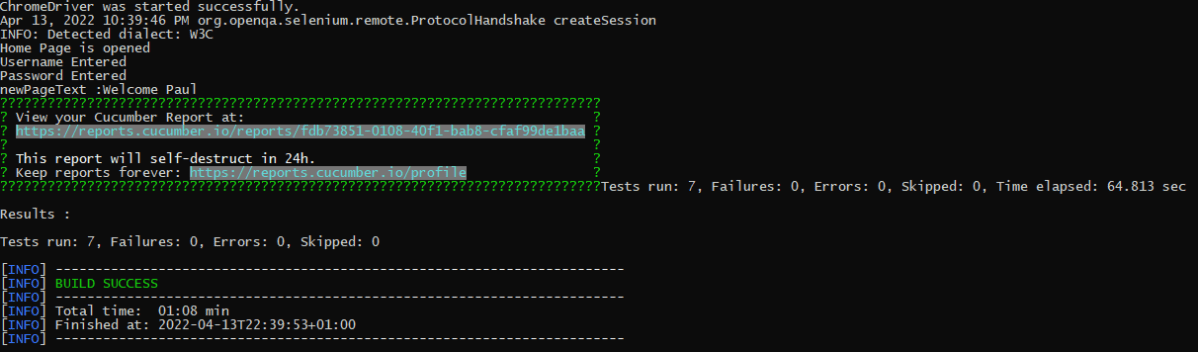
Execute the tests either through JUnit Runner or Command-Line using maven.

The test Report can be accessed from the link provided in the execution status:

We are done! Congratulations on making it through this tutorial and hope you found it useful! Happy Learning!!

Integration Testing of SpringBoot using RestAssured

HOME

In this tutorial, I am going to build an automation framework to test Springboot application with Rest Assured and JUnit4 only.

  1. What is Rest Assured?
  2. Dependency List
  3. Sample SpringBoot Application
  4. Implementation Steps
    1. Add SpringbootTest and Rest-Assured dependencies to the project
    2. Create a test file under src/test/java and write the test code
    3. Run the tests from JUnit
    4. Run the tests from Command Line

What is Rest Assured?

REST Assured is a Java DSL for simplifying the testing of REST-based services built on top of HTTP Builder. It supports POST, GET, PUT, DELETE, OPTIONS, PATCH, and HEAD requests and can be used to validate and verify the response to these requests.

The rest-Assured library also provides the ability to validate the HTTP Responses received from the server. For e.g. we can verify the Status code, Status message, Headers, and even the Body of the response. This makes Rest-Assured a very flexible library that can be used for testing.

Dependency List:

  1. Springboot – 3.2.3
  2. Java 17
  3. JUnit – 4.13.2
  4. Maven – 3.9.6
  5. RestAssured – 5.3.2
  6. Junit Vintage

Below is the sample SpringBoot application used for the testing.

The Spring Boot Application class is generated with Spring Initializer. This class acts as the launching point for the application.

import org.springframework.boot.SpringApplication;
import org.springframework.boot.autoconfigure.SpringBootApplication;

@SpringBootApplication
public class SpringBootDemoApplication {

	public static void main(String[] args) {
		SpringApplication.run(SpringBootDemoApplication.class, args);
	}

}

The JPA Entity is any Java POJO, which can represent the underlying table structure. As our service is based on the Student table, we will create a Student Entity object.

import jakarta.persistence.Entity;
import jakarta.persistence.GeneratedValue;
import jakarta.persistence.Id;
import jakarta.validation.constraints.NotBlank;
import jakarta.validation.constraints.NotNull;
import jakarta.validation.constraints.Size;


@Entity
public class Student {

    @Id
    @GeneratedValue
    private Long id;

    @NotNull
    @Size(min = 4, message = "Name should have atleast 4 characters")
    private String name;

    @NotBlank(message = "passportNumber is mandatory")
    private String passportNumber;

    public Student() {
        super();
    }

    public Student(Long id, String name, String passportNumber) {
        super();
        this.id = id;
        this.name = name;
        this.passportNumber = passportNumber;
    }

    public Long getId() {
        return id;
    }

    public void setId(Long id) {
        this.id = id;
    }

    public String getName() {
        return name;
    }

    public void setName(String name) {
        this.name = name;
    }

    public String getPassportNumber() {
        return passportNumber;
    }

    public void setPassportNumber(String passportNumber) {
        this.passportNumber = passportNumber;
    }
}

The Repository represents the DAO layer, which typically does all the database operations. Thanks to Spring Data, who provides the implementations for these methods. Let’s have a look at our StudentRepository, which extends the JpaRepository. There are no method declarations here in the StudentRepository. That is because Spring Data’s JpaRepository has already declared basic CRUD methods.

import org.springframework.data.jpa.repository.JpaRepository;
import org.springframework.stereotype.Repository;

@Repository
public interface StudentRepository extends JpaRepository<Student, Long>{

}

Spring Rest Controller exposes all services on the student resource. RestController used for the below example is shown below.

import jakarta.validation.Valid;
import org.springframework.beans.factory.annotation.Autowired;
import org.springframework.hateoas.EntityModel;
import org.springframework.hateoas.server.mvc.WebMvcLinkBuilder;
import org.springframework.http.ResponseEntity;
import org.springframework.web.bind.annotation.*;
import org.springframework.web.servlet.support.ServletUriComponentsBuilder;
import java.net.URI;
import java.util.List;
import java.util.Optional;

import static org.springframework.hateoas.server.mvc.WebMvcLinkBuilder.linkTo;
import static org.springframework.hateoas.server.mvc.WebMvcLinkBuilder.methodOn;

@RestController
public class StudentController {

    @Autowired
    private StudentRepository studentRepository;

    @GetMapping("/students")
    public List<Student> retrieveAllStudents() {
        return studentRepository.findAll();
    }

    @GetMapping("/students/{id}")
    public EntityModel<Student> retrieveStudent(@PathVariable long id) {
        Optional<Student> student = studentRepository.findById(id);

        if (!student.isPresent())
            throw new StudentNotFoundException("id-" + id);

        EntityModel<Student> resource = EntityModel.of(student.get());

        WebMvcLinkBuilder linkTo = linkTo(methodOn(this.getClass()).retrieveAllStudents());

        resource.add(linkTo.withRel("all-students"));

        return resource;
    }

    @PostMapping("/students")
    public ResponseEntity<Object> createStudent(@Valid @RequestBody Student student) {
        Student savedStudent = studentRepository.save(student);

        URI location = ServletUriComponentsBuilder.fromCurrentRequest().path("/{id}")
                .buildAndExpand(savedStudent.getId()).toUri();

        return ResponseEntity.created(location).build();

    }

    @DeleteMapping("/students/{id}")
    public void deleteStudent(@PathVariable long id) {
        studentRepository.deleteById(id);
    }

    @PutMapping("/students/{id}")
    public ResponseEntity<Object> updateStudent(@Valid @RequestBody Student student, @PathVariable long id) {

        Optional<Student> studentOptional = studentRepository.findById(id);

        if (!studentOptional.isPresent())
            return ResponseEntity.notFound().build();

        student.setId(id);

        studentRepository.save(student);

        return ResponseEntity.noContent().build();
    }
}

import org.springframework.http.HttpStatus;
import org.springframework.web.bind.annotation.ResponseStatus;

@ResponseStatus(HttpStatus.NOT_FOUND)
public class StudentNotFoundException extends RuntimeException {

    public StudentNotFoundException(String exception) {
        super(exception);
    }

}

spring.jpa.defer-datasource-initialization=true
insert into student values(10001,'Annie', 'E1234567');
insert into student values(20001,'John', 'A1234568');
insert into student values(30001,'David','C1232268');
insert into student values(40001,'Amy','D213458');

Implementation Steps

Step 1 – Add SpringbootTest and Rest-Assured dependencies to the project

<project xmlns="http://maven.apache.org/POM/4.0.0" xmlns:xsi="http://www.w3.org/2001/XMLSchema-instance"
  xsi:schemaLocation="http://maven.apache.org/POM/4.0.0 http://maven.apache.org/xsd/maven-4.0.0.xsd">
  <modelVersion>4.0.0</modelVersion>

  <parent>
    <groupId>org.springframework.boot</groupId>
    <artifactId>spring-boot-starter-parent</artifactId>
    <version>3.2.3</version>
    <relativePath/> <!-- lookup parent from repository -->
  </parent>

  <groupId>com.example</groupId>
  <artifactId>demo</artifactId>
  <version>0.0.1-SNAPSHOT</version>
  <name>SpringBoot_Demo</name>
  <description>Demo project for Spring Boot</description>

  <properties>
    <java.version>17</java.version>
    <junit.version>4.13.2</junit.version>
    <rest-assured.version>5.3.2</rest-assured.version>
    <maven.compiler.plugin.version>3.12.1</maven.compiler.plugin.version>
    <maven.surefire.plugin.version>3.2.3</maven.surefire.plugin.version>
    <maven.compiler.source>17</maven.compiler.source>
    <maven.compiler.target>17</maven.compiler.target>
  </properties>

  <dependencies>
    <dependency>
      <groupId>org.springframework.boot</groupId>
      <artifactId>spring-boot-starter</artifactId>
    </dependency>

    <dependency>
      <groupId>org.springframework.boot</groupId>
      <artifactId>spring-boot-starter-test</artifactId>
      <scope>test</scope>
    </dependency>

    <dependency>
      <groupId>org.springframework.boot</groupId>
      <artifactId>spring-boot-starter-data-jpa</artifactId>
    </dependency>

    <dependency>
      <groupId>org.springframework.boot</groupId>
      <artifactId>spring-boot-starter-web</artifactId>
    </dependency>

    <dependency>
      <groupId>org.springframework.boot</groupId>
      <artifactId>spring-boot-starter-hateoas</artifactId>
    </dependency>

    <dependency>
      <groupId>org.springframework.boot</groupId>
      <artifactId>spring-boot-starter-validation</artifactId>
    </dependency>

    <dependency>
      <groupId>org.springframework.boot</groupId>
      <artifactId>spring-boot-devtools</artifactId>
      <scope>runtime</scope>
    </dependency>

    <dependency>
      <groupId>com.h2database</groupId>
      <artifactId>h2</artifactId>
      <scope>runtime</scope>
    </dependency>

    <dependency>
      <groupId>junit</groupId>
      <artifactId>junit</artifactId>
      <version>${junit.version}</version>
      <scope>test</scope>
    </dependency>

    <dependency>
      <groupId>io.rest-assured</groupId>
      <artifactId>rest-assured</artifactId>
      <version>${rest-assured.version}</version>
      <scope>test</scope>
    </dependency>

    <dependency>
      <groupId>org.junit.vintage</groupId>
      <artifactId>junit-vintage-engine</artifactId>
      <scope>test</scope>
    </dependency>

  </dependencies>

  <build>
    <plugins>
      <plugin>
        <groupId>org.springframework.boot</groupId>
        <artifactId>spring-boot-maven-plugin</artifactId>
      </plugin>

      <plugin>
        <groupId>org.apache.maven.plugins</groupId>
        <artifactId>maven-compiler-plugin</artifactId>
        <version>${maven.compiler.plugin.version}</version>
        <configuration>
          <source>${maven.compiler.source}</source>
          <target>${maven.compiler.target}</target>
        </configuration>
      </plugin>

      <plugin>
        <groupId>org.apache.maven.plugins</groupId>
        <artifactId>maven-surefire-plugin</artifactId>
        <version>${maven.surefire.plugin.version}</version>
        <configuration>
          <testFailureIgnore>true</testFailureIgnore>
        </configuration>
      </plugin>
    </plugins>
  </build>
</project>

Step 2 – Create a test file under src/test/java and write the test code

package org.example;

import io.restassured.RestAssured;
import io.restassured.http.ContentType;
import io.restassured.response.ValidatableResponse;
import org.json.JSONException;
import org.json.JSONObject;
import org.junit.Before;
import org.junit.Test;
import org.junit.runner.RunWith;
import org.springframework.boot.test.context.SpringBootTest;
import org.springframework.boot.test.web.server.LocalServerPort;
import org.springframework.test.context.junit4.SpringRunner;

import static io.restassured.RestAssured.given;
import static org.hamcrest.Matchers.equalTo;

@RunWith(SpringRunner.class)
@SpringBootTest(webEnvironment = SpringBootTest.WebEnvironment.RANDOM_PORT)
public class SpringbootDemoTests {

    private final static String BASE_URI = "http://localhost";

    @LocalServerPort
    private int port;

    private ValidatableResponse validatableResponse;

    private ValidatableResponse validatableResponse1;

    @Before
    public void configureRestAssured() {
        RestAssured.baseURI = BASE_URI;
        RestAssured.port = port;
    }

    /* Get operation - Get the details of a Student */
    @Test
    public void listUsers() {

        validatableResponse = given()
                .contentType(ContentType.JSON)
                .when()
                .get("/students")
                .then()
                .assertThat().statusCode(200);

    }

    /* Get operation - Get the details of a Student */
    @Test
    public void listAUser() {

        validatableResponse = given()
                .contentType(ContentType.JSON)
                .when()
                .get("/students/30001")
                .then()
                .assertThat().log().all().statusCode(200)
                .body("id",equalTo(30001))
                .body("name",equalTo("David"))
                .body("passportNumber",equalTo("C1232268"));;
    }

    /* Create operation - Create a new Student */
    @Test
    public void createAUser() throws JSONException {

        JSONObject newStudent = new JSONObject();

        newStudent.put("name", "Timmy");
        newStudent.put("passportNumber", "ZZZ12345");

        validatableResponse = given()
                .contentType(ContentType.JSON).body(newStudent.toString())
                .when()
                .post("/students")
                .then()
                .log().all().assertThat().statusCode(201);

        /* Verify that a new Student is created */
        validatableResponse1 = given()
                .contentType(ContentType.JSON)
                .when()
                .get("/students/1")
                .then()
                .log().all().assertThat().statusCode(200)
                .body("id",equalTo(1))
                .body("name",equalTo("Timmy"))
                .body("passportNumber",equalTo("ZZZ12345"));

    }

    /* Update operation - Update PassportNumber of a Student */
    @Test
    public void updateAUser() throws JSONException {

        JSONObject newStudent = new JSONObject();

        newStudent.put("name", "John");
        newStudent.put("passportNumber", "YYYY1234");

        validatableResponse = given()
                .contentType(ContentType.JSON).body(newStudent.toString())
                .when()
                .put("/students/20001")
                .then()
                .log().all().assertThat().statusCode(204);

        /* Verify that the updated Student has updated PassportNumber */
        validatableResponse1 = given()
                .contentType(ContentType.JSON)
                .when()
                .get("/students/20001")
                .then()
                .log().all().assertThat().statusCode(200)
                .body("id",equalTo(20001))
                .body("name",equalTo("John"))
                .body("passportNumber",equalTo("YYYY1234"));

    }

    /* Delete operation - Delete a Student */
    @Test
    public void deleteAUser() throws JSONException {

        validatableResponse = given()
                .contentType(ContentType.JSON)
                .when()
                .delete("/students/10003")
                .then()
                .log().all().assertThat().statusCode(200);


        /* Verify that the deleted Student Request returns STATUS 404 */
        validatableResponse1 = given()
                .contentType(ContentType.JSON)
                .when()
                .get("/students/10003")
                .then()
                .log().all().assertThat().statusCode(404);

    }
}

When a class is annotated with @RunWith or extends a class annotated with @RunWith, JUnit will invoke the class it references to run the tests in that class instead of the runner built into JUnit.

SpringRunner is an alias for the SpringJUnit4ClassRunner. Here, we have simply annotated a JUnit 4-based test class with @RunWith(SpringRunner.class). The Spring TestContext Framework provides generic, annotation-driven unit and integration testing support that is agnostic of the testing framework in use (JUnit, TestNG).

We build the test class with @SpringBootTest annotation which starts up an Application Context used throughout our test. In the classes property of @SpringBootTest annotation, we can specify which configuration classes build our Application Context. By default, @SpringBootTest annotation does not provide any web environment.
In order to set up a test web server we need to use @SpringBootTest’s webEnvironment annotation.
There are a few modes in which the web server can be started.

  • RANDOM_PORT – this is a recommended option where a real, embedded web server starts on a random port
  • DEFINED_PORT – web server will start on an 8080 or a port defined in application.properties
  • MOCK – loads a mock web environment where embedded servers are not started up.

Step 3 – Run the tests from JUnit

Right-click Run as JUnit Tests (Eclipse)

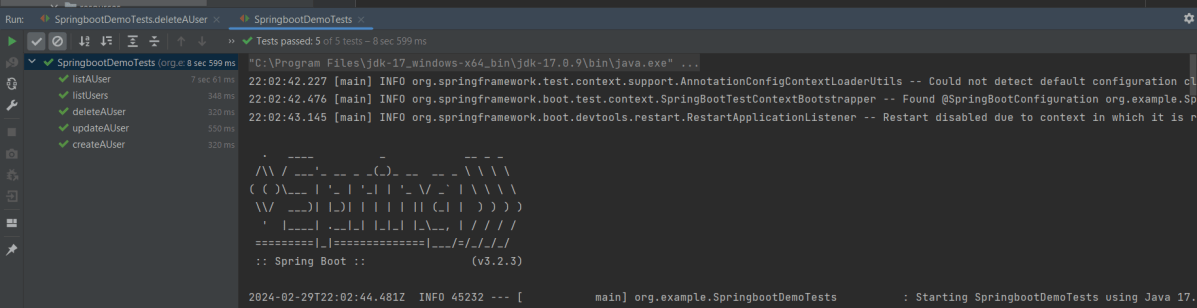
Right Click and select Run SpringBootDemoTests (IntelliJ)

Step 4 – Run the tests from Command Line

Open a command prompt and use the below command to run the tests.

mvn clean test

We are done! Congratulations on making it through this tutorial and hope you found it useful! Happy Learning!!

Testing of SpringBoot REST Application using Serenity BDD and Rest Assured for DELETE Method to delete a Resource

HOME

In the previous tutorial, I explained about the Testing of SpringBoot PUT Method. In this tutorial, I will discuss about the Testing of DELETE method to delete a Resource in SpringBoot application.

To know how you can test a SpringBoot Application in BDD format using Serenity, refer the tutorial related to Serenity BDD with Cucumber for SpringBoot application.

The structure of project and various Java classes present in SpringBoot application and the dependencies need in POM.xml to test springboot framework are mentioned here.

Below is the code of Student Controller which exposes the services of DELETE method of Student resource.

@DeleteMapping("/students/{id}")

@DeleteMapping annotation maps HTTP DELETE requests onto specific handler methods. It is a composed annotation that acts as a shortcut for @RequestMapping(method=RequestMethod.DELETE) .

Code of StudentController.java for DELETE method is below

@DeleteMapping("/students/{id}")
	public void deleteStudent(@PathVariable long id) {
		studentRepository.deleteById(id);
	}

Here, we are deleting the student resource by Id.

Scenario 1- Below picture shows how we can execute a sucessful DELETE Request Method using Postman

Before Deleting a Student Resource with Id 1001

In the below image, it shows all the details of student with Id 1001 and with status code of 201 is returned.

Now, we delete a Student with Id 1001 and the status code returned is 200.

After deleting the resource, again send a request to get the details of student of id 1001 which returns 404 – Not Found status.

Above scenario can be tested in the below way.

Feature: Delete Student  Request

   @DeleteStudent
   Scenario: Send a valid Request to delete a student

    Given I send a request to the URL "/students/1001" to get the detail of user with Id 1001
    When I send a request to the URL "/students/1001" to delete user
    Then the response will return status of 200 
    And I resend the request to the URL "/students/1001" to get status of 404

Test Code to test above scenario (StepDefinition file)

@SpringBootTest(classes = SpringBoot2RestServiceApplication.class, webEnvironment = WebEnvironment.RANDOM_PORT)
public class DeleteStudentsDefinition {

	private final static String BASE_URI = "http://localhost";

	@LocalServerPort
	private int port;

	private ValidatableResponse validatableResponse1, validatableResponse2, validatableResponse3;

	private void configureRestAssured() {

		RestAssured.baseURI = BASE_URI;
		RestAssured.port = port;
	}

	protected RequestSpecification getAnonymousRequest() throws NoSuchAlgorithmException {
		configureRestAssured();
		return given();
	}

	@Given("^I send a request to the URL \"([^\"]*)\" to get the detail of user with Id 1001$")
	public void getRequest(String endpoint) throws Throwable {

		validatableResponse1 = getAnonymousRequest().contentType(ContentType.JSON).body(toString()).when().get(endpoint)
				.then();
	}

	@When("^I send a request to the URL \"([^\"]*)\" to delete user$")
	public void iSendARequest(String endpoint) throws Throwable {

		validatableResponse2 = getAnonymousRequest().contentType(ContentType.JSON).when().delete(endpoint).then();
	}

	@Then("^the response will return status of (\\d+)$")
	public void extractResponseOfValidStudent(int status) throws NoSuchAlgorithmException {
		validatableResponse2.assertThat().statusCode(equalTo(status));
	}

	@And("^I resend the request to the URL \"([^\"]*)\" to get status of (\\d+)$")
	public void reverifyStudent(String endpoint, int status) throws NoSuchAlgorithmException {
		validatableResponse3 = getAnonymousRequest().contentType(ContentType.JSON).body(toString()).when().get(endpoint)
				.then();
		validatableResponse3.assertThat().statusCode(equalTo(status));

   }
}

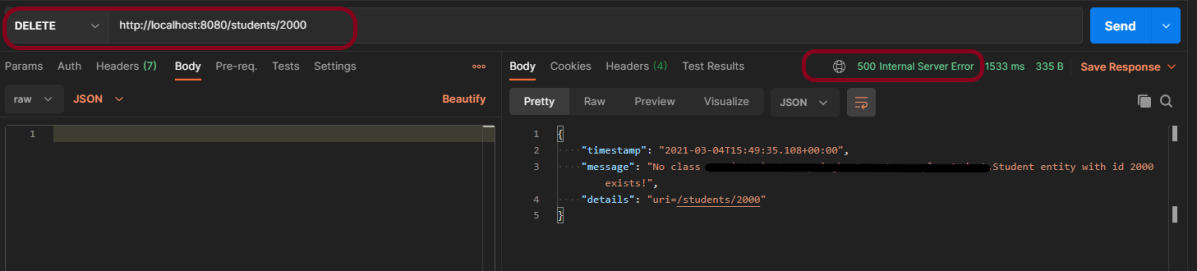
We can test the negative scenario similarly. Send a request with invalid student id, then we will get 500 Internal Server Error.

The next tutorial explains about the Testing of SpringBoot Exception Handling.

Testing of SpringBoot REST Application using Serenity BDD and Rest Assured for PUT Method to update a Resource

HOME

In the previous tutorial, I explained about the Testing of SpringBoot POST Method. In this tutorial, I will discuss about the Testing of PUT method to update a Resource in SpringBoot application.

To know how you can test a SpringBoot Application in BDD format using Serenity, refer the tutorial related to Serenity BDD with Cucumber for SpringBoot application.

The structure of project and various Java classes present in SpringBoot application and the dependencies need in POM.xml to test springboot framework are mentioned here.

Below is the code of Student Controller which exposes the services of PUT method of Student resource.

@PutMapping("/students/{id}")

PutMapping – It is Annotation for mapping HTTP PUT requests onto specific handler methods.

RequestBody – It maps body of the web request to the method parameter.

Code of StudentController.java for PUT method is below

@PutMapping("/students/{id}")
	public ResponseEntity<Object> updateStudent(@Valid @RequestBody Student student, @PathVariable long id) {

		Optional<Student> studentOptional = studentRepository.findById(id);
		if (!studentOptional.isPresent())
			return ResponseEntity.notFound().build();
		student.setId(id);
		studentRepository.save(student);
		return ResponseEntity.noContent().build();
	}

Here, we are checking if the student exists or not before updating the student. If the student does not exist, we return a not found status. Otherwise, we save the student details using studentRepository.save(student) method.

To test a PUT method of springboot application, you should use below code snippet to send a PUT request

Map<String, String> map = new HashMap<>();
   map.put("name", newName);
   map.put("passport", passport);

JSONObject newStudent = new JSONObject(map);
validatableResponse1 = getAnonymousRequest().contentType(ContentType.JSON).body(newStudent.toString()).when()
.put(endpoint).then();

Scenario 1- Below picture shows how we can execute a sucessful PUT Request Method using Postman

Before Updation

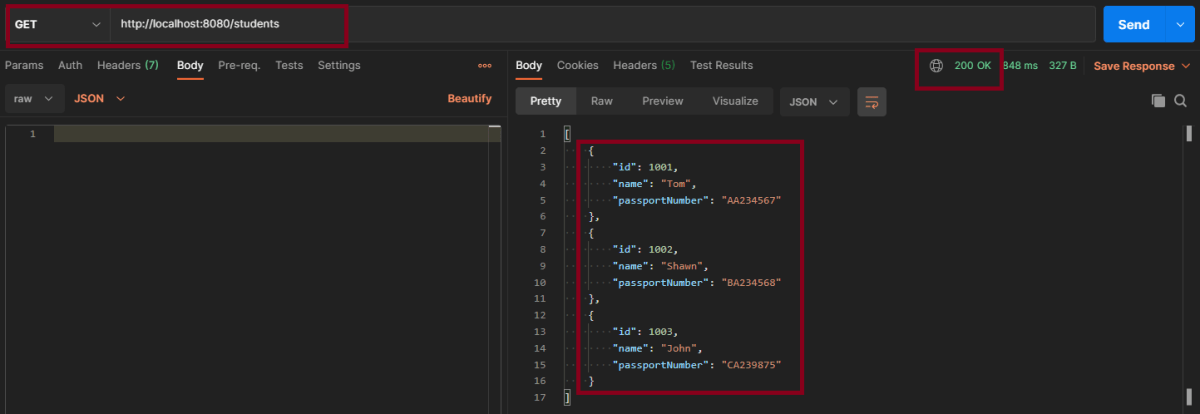
In the below image, details of all students with status code of 201 is returned.

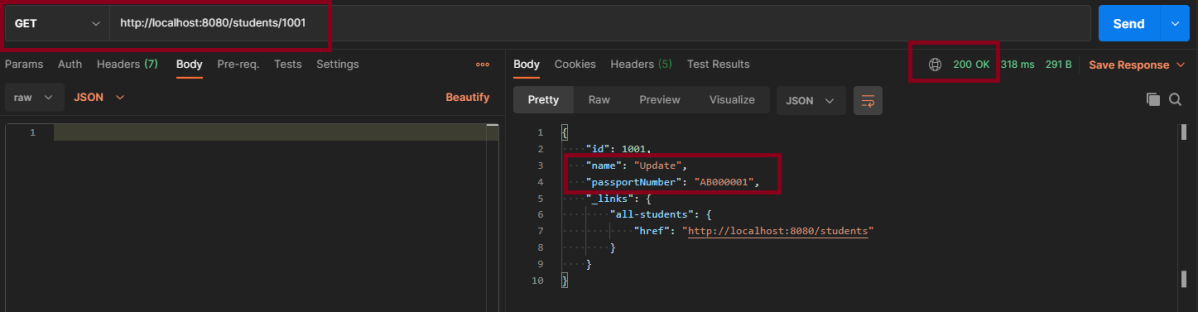
Update Student – Here, I’m updating Student with Id 1001 from name Tom to Update and passport from AA234567 to AB000001

This is the image of updated Student of Id 1001

Above scenario can be tested in the below way.

Feature: Update Student Detail

   @UpdateStudent
   Scenario: Send a valid Request to update a student

    Given I send a request to the URL "/students" to get the detail of all users
    When I send a request to the URL "/students/1001" to update a user with name "Update" and passport as "AB000001"
    Then the response will return status of 204 for update student
    And I send a request to the URL "/students/1001" to get detail of updated student name as "Update"

Test Code to test above scenario (StepDefinition file)

@SpringBootTest(classes = SpringBoot2RestServiceApplication.class, webEnvironment = WebEnvironment.RANDOM_PORT)
public class UpdateStudentDefinitions {

	private final static String BASE_URI = "http://localhost";

	@LocalServerPort
	private int port;

	private ValidatableResponse validatableResponse, validatableResponse1, validatableResponse2;

	private void configureRestAssured() {

		RestAssured.baseURI = BASE_URI;
		RestAssured.port = port;
		
	}

	protected RequestSpecification getAnonymousRequest() throws NoSuchAlgorithmException {
		configureRestAssured();
		return given();
	}

	@Given("^I send a request to the URL \"([^\"]*)\" to get the detail of all users$")
	public void getRequest(String endpoint) throws Throwable {

		validatableResponse = getAnonymousRequest().contentType(ContentType.JSON).body(toString()).when().get(endpoint)
				.then();
	}

	@When("^I send a request to the URL \"([^\"]*)\" to update a user with name \"([^\"]*)\" and passport as \"([^\"]*)\"$")
	public void updateRequest(String endpoint, String newName, String passport) throws Throwable {

		Map<String, String> map = new HashMap<>();
		map.put("name", newName);
		map.put("passport", passport);

		JSONObject newStudent = new JSONObject(map);

		validatableResponse1 = getAnonymousRequest().contentType(ContentType.JSON).body(newStudent.toString()).when()
				.put(endpoint).then();
	}

	@Then("^the response will return status of (\\d+) for update student$")
	public void extractResponse(int status) {

		validatableResponse1.assertThat().statusCode(equalTo(status));
	}

	@And("^I send a request to the URL \"([^\"]*)\" to get detail of updated student name as \"([^\"]*)\"$")
	public void extractUpdatedResponse(String endpoint, String newName) throws NoSuchAlgorithmException {

		validatableResponse2 = getAnonymousRequest().contentType(ContentType.JSON).when().get(endpoint).then();
		validatableResponse2.assertThat().body("name", equalTo(newName));
	}

Scenario 2- Below picture shows how we can execute a unsucessful PUT Request Method using Postman

In the above image, I am trying to update the name of invalid student id 1000, so the response returns the status of 404.

This can be tested by using above step definition.

To know about all the dependencies we need to add to pom.xml to run the SpringBoot Test, refer the tutorial about Testing of SpringBoot REST Application using Serenity BDD and Rest Assured for GET Method.

The next tutorial explains about the Testing of DELETE method in SpringBoot Application.

Testing of SpringBoot Exception Handling

HOME

In the previous tutorial, I explained about the Testing of SpringBoot POST Method. In this tutorial, I will discuss the Testing of Exceptions in the SpringBoot application.

Response Statuses for Errors

The most commonly used error codes in SpringBoot Application are:-

  • 404 – RESOURCE NOT FOUND
  • 400 – BAD REQUEST
  • 401 – UNAUTHORIZED
  • 415 – UNSUPPORTED TYPE – Representation not supported for the resource
  • 500 – SERVER ERROR

Default Exception Handling with Spring Boot

Spring Boot provides a good default implementation for exception handling for RESTful Services.

This is the response when you try getting details of a non-existing student. You can see that the response status is 500 – Internal Server Error.

Customizing Exception Handling with Spring Boot

There are 2 most commonly used annotations used in Error Handling – @ExceptionHandler and @ControllerAdvice.

What is ExceptionHandler?

The @ExceptionHandler is an annotation used to handle the specific exceptions and send the custom responses to the client.

@ExceptionHandler(StudentNotFoundException.class)


What is ControllerAdvice?

A controller advice allows you to use exactly the same exception-handling techniques but apply them across the whole application, not just to an individual controller.

A combination of Spring and Spring Boot provides multiple options to customize responses for errors.

@ControllerAdvice
@RestController
public class CustomizedResponseEntityExceptionHandler extends ResponseEntityExceptionHandler {

You can specify the Response Status for a specific exception along with the definition of the Exception with the ‘@ResponseStatus’ annotation.

@ResponseStatus(HttpStatus.NOT_FOUND)

I have defined the StudentNotFoundExceptionclass. This Exception will be thrown by the controller when no resource i.e. Student to be returned in our case is found with HTTP Status of NOT_FOUND (404).

import org.springframework.http.HttpStatus;
import org.springframework.web.bind.annotation.ResponseStatus;

@ResponseStatus(HttpStatus.NOT_FOUND)
public class StudentNotFoundException extends RuntimeException {

	public StudentNotFoundException(String exception) {
		super(exception);
	}
}

Now the response will be 404 – Not Found

{
    "timestamp": "2021-02-22T15:56:59.494+00:00",
    "status": 404,
    "error": "Not Found",
    "trace": "StudentNotFoundException: id-100,
    "message": "id-100",
    "path": "/students/100"
}

Customizing Error Response Structure

The default error response provided by Spring Boot contains all the details that are typically needed.

However, you might want to create a framework-independent response structure for your organization. In that case, you can define a specific error response structure.

import java.util.Date;

public class ExceptionResponse {
	private Date timestamp;
	private String message;
	private String details;

	public ExceptionResponse(Date timestamp, String message, String details) {
		super();
		this.timestamp = timestamp;
		this.message = message;
		this.details = details;
	}

	public Date getTimestamp() {
		return timestamp;
	}

	public String getMessage() {
		return message;
	}

	public String getDetails() {
		return details;
	}
}

To use ExceptionResponse to return the error response, let’s define a ControllerAdvice as shown below.

@ControllerAdvice
@RestController
public class CustomizedResponseEntityExceptionHandler extends ResponseEntityExceptionHandler {

	@ExceptionHandler(StudentNotFoundException.class)
	public final ResponseEntity<Object> handleUserNotFoundException(StudentNotFoundException ex, WebRequest request) {
		ExceptionResponse exceptionResponse = new ExceptionResponse(new Date(), ex.getMessage(),
				request.getDescription(false));
		return new ResponseEntity(exceptionResponse, HttpStatus.NOT_FOUND);
	}

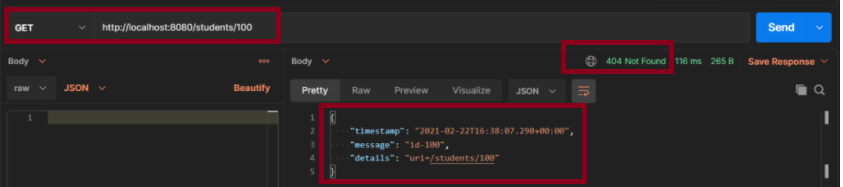
Scenario 1-  How to execute a Get Request Method with an Invalid URL using Postman

The above scenario can be tested in the below way.

Feature: Student Exception

   @InvalidURL
   Scenario: Send a valid Request to create a student

    Given I send a request to the invalid URL "/students/100" to get a student details
    Then the response will return status of 404 and message "id-100"

Test Code to test the above scenario (StepDefinition file)

@SpringBootTest(classes = SpringBootRestServiceApplication.class, webEnvironment = WebEnvironment.RANDOM_PORT)
public class CustomizedErrorsDefinition {

	private final static String BASE_URI = "http://localhost";

	@LocalServerPort
	private int port;

	private ValidatableResponse validatableResponse;

	private void configureRestAssured() {

		RestAssured.baseURI = BASE_URI;
		RestAssured.port = port;
	}

	protected RequestSpecification getAnonymousRequest() throws NoSuchAlgorithmException {
		configureRestAssured();
		return given();
	}

	@Given("^I send a request to the invalid URL \"([^\"]*)\" to get a student details$")
	public void iSendARequest(String endpoint) throws Throwable {

		validatableResponse = getAnonymousRequest().contentType(ContentType.JSON).when().get(endpoint).then();
	}

	@Then("^the response will return status of (\\d+) and message \"([^\"]*)\"$")
	public void extractResponse(int status, String message) {		validatableResponse.assertThat().statusCode(equalTo(status)).body("message", equalTo(message));
	}
}

To know more about SpringBootTest, refer to the tutorial on Integration Testing of SpringBoot.

@SpringBootTest(classes = SpringBootRestServiceApplication.class, webEnvironment = WebEnvironment.RANDOM_PORT)

To know about all the dependencies we need to add to pom.xml to run the SpringBoot Test, refer to the tutorial about Testing of SpringBoot REST Application using Serenity BDD and Rest Assured for GET Method.

To know how you can test a SpringBoot Application in BDD format using Serenity, refer to the tutorial related to Serenity BDD with Cucumber for SpringBoot application.

The next tutorial explains the Testing of SpringBoot Validation for RESTful Services.

Testing of SpringBoot Validation for RESTful Services

HOME

In the previous tutorial, I have explain about SpringBoot and how to perform Integration testing of SpringBoot Exception Handling. In this tutorial, I will explain about the Integration testing of Testing of SpringBoot Validation for RESTful Services.

What is Validation?

It is necessary that the response recieve from RestFul service should return meaningful information, like certain data type, constraints. If a response returns error message, then we expect it to provide information like clear error message, which field has an error, what is the type of error, proper status code and most importantly should not provide any sensitive information.

From SpringBoot 2.3, we also need to explicitly add the spring-boot-starter-validation dependency:

<dependency> 
    <groupId>org.springframework.boot</groupId> 
    <artifactId>spring-boot-starter-validation</artifactId> 
</dependency>

To know about all the dependencies neede to test Springboot, please click here.

Below are various Java classes present in a SpringBoot REST Application/API

SpringBootRestServiceApplication.java – The Spring Boot Application class generated with Spring Initializer. This class acts as the launching point for application.

pom.xml – Contains all the dependencies needed to build this project. 

Student.java – This is JPA Entity for Student class

StudentRepository.java – This is JPA Repository for Student. This is created using Spring Data JpaRepository.

StudentController.java – Spring Rest Controller exposing all services on the student resource.

CustomizedExceptionHandler.java – This implements global exception handling and customize the responses based on the exception type.

ErrorDetails.java – Response Bean to use when exceptions are thrown from API.

StudentNotFoundException.java – Exception thrown from resources when student is not found.

data.sql –  Data is loaded from data.sql into Student table. Spring Boot would execute this script after the tables are created from the entities.

REST request validation annotations

ANNOTATIONUSAGE
@AssertFalseThe annotated element must be false.
@AssertTrueThe annotated element must be true.
@DecimalMaxThe annotated element must be a number whose value must be lower or equal to the specified maximum.
@DecimalMinThe annotated element must be a number whose value must be higher or equal to the specified minimum.
@FutureThe annotated element must be an instant, date or time in the future.
@MaxThe annotated element must be a number whose value must be lower or equal to the specified maximum.
@MinThe annotated element must be a number whose value must be higher or equal to the specified minimum.
@NegativeThe annotated element must be a strictly negative number.
@NotBlankThe annotated element must not be null and must contain at least one non-whitespace character.
@NotEmptyThe annotated element must not be null nor empty.
@NotNullThe annotated element must not be null.
@NullThe annotated element must be null.
@PatternThe annotated CharSequence must match the specified regular expression.
@PositiveThe annotated element must be a strictly positive number.
@SizeThe annotated element size must be between the specified boundaries (included).

Implementing Validation on the Resource

Add @Valid in addition to @RequestBody.

public ResponseEntity<Object> createStudent(@Valid @RequestBody Student student) {

Below is the example of Student.java class. Here, you can see I have used various validations.

Here, Student class is annotated with @Entity, indicating that it is a JPA entity. There is no @Table annotation so entity is mapped to a table named Student .)

Id property is annotated with @Id and also annotated with @GeneratedValue  to indicate that the ID should be generated automatically.

@Entity
public class Student {
    @Id
    @GeneratedValue
    private Long id;
 
    @NotNull
    @Size(min = 4, message = "Name should have atleast 4 characters")
    private String name;
 
   @NotBlank(message = "passportNumber is mandatory") 
   private String passportNumber;
 
    public Student() {
        super();
    }
 
    public Student(Long id, String name, String passportNumber) {
        super();
        this.id = id;
        this.name = name;
        this.passportNumber = passportNumber;
    }
 
    public Long getId() {
        return id;
    }
 
    public void setId(Long id) {
        this.id = id;
    }
 
    public String getName() {
        return name;
    }
 
    public void setName(String name) {
        this.name = name;
    }
 
    public String getPassportNumber() {
        return passportNumber;
    }
 
    public void setPassportNumber(String passportNumber) {
        this.passportNumber = passportNumber;
    }
}

We need a @ControllerAdvice to handle validation errors. Below is the snippet of validation error for invalid method arguement.

@ControllerAdvice
@RestController
public class CustomizedResponseEntityExceptionHandler extends ResponseEntityExceptionHandler {

	@Override
	protected ResponseEntity<Object> handleMethodArgumentNotValid(MethodArgumentNotValidException ex,
			HttpHeaders headers, HttpStatus status, WebRequest request) {
		ExceptionResponse exceptionResponse = new ExceptionResponse(new Date(), "Validation Failed",
				ex.getBindingResult().toString());
		return new ResponseEntity(exceptionResponse, HttpStatus.BAD_REQUEST);
	}
}

Scenario 1 – Below picture shows how we can execute a POST Request where Name is passed as null using Postman

@NotNull
    private String name;

In the below image, I am trying to create a new Student with name as null.

Above scenario can be tested in the below way.

Feature: Validation of  Student Request

  @CreateStudentWithNoName
    Scenario: Send a Request to create a student with no name

    Given I send a request to the URL "/students" to create a user with name as null and passport as "RA000002"
    Then the response will return error message as "Validation Failed" and details contain error detail as "default message [name]]; default message [must not be null]"

Test Code to test above scenario (StepDefinition file)

@SpringBootTest(classes = SpringBootRestServiceApplication.class, webEnvironment = WebEnvironment.RANDOM_PORT)
public class ValidationDefinitions {

	private final static String BASE_URI = "http://localhost";

	@LocalServerPort
	private int port;

	private ValidatableResponse validatableResponse, validatableResponse1;

	private void configureRestAssured() {

		RestAssured.baseURI = BASE_URI;
		RestAssured.port = port;
	}

	protected RequestSpecification getAnonymousRequest() throws NoSuchAlgorithmException {
		configureRestAssured();
		return given();
	}

	@Given("^I send a request to the URL \"([^\"]*)\" to create a user with name as null and passport as \"([^\"]*)\"$")
	public void iSendARequestwithNullName(String endpoint, String passport) throws Throwable {

		Map<String, String> map = new HashMap<>();
		map.put("name", null);
		map.put("passport", passport);

		JSONObject newStudent = new JSONObject(map);

		validatableResponse = getAnonymousRequest().contentType(ContentType.JSON).body(newStudent.toString()).when()
				.post(endpoint).then();
	}

	@Then("^the response will return error message as \"([^\"]*)\" and details contain error detail as \"([^\"]*)\"$")

	public void extractErrorResponse(String message, String details) {

		validatableResponse.assertThat().body("message", equalTo(message)).and().body(containsString(details));
	}
}

To know how to start the springBoot test and web environment. Please refer this link.

Scenario 2 – Below picture shows how we can execute a POST Request to create a student with Name as length outside the range using Postman

@Size(min = 4, max = 10, message = "Name should have atleast 4 characters and not more than 10 characters")
	private String name;

This means that name should have minimum 4 characters and maximum 10 character. Name not in this range will throw validation error with message as “Name should have atleast 4 characters and not more than 10 characters”

Above scenario can be tested in the below way.

 @CreateStudentWithInvalidName
   
    Scenario: Send a Request to create a student with invalid name

    Given I send a request to the URL "/students" to create a user with name as "SamuelBobin" and passport as "RA000003"
    Then the response will return error message as "Validation Failed" and details contain error detail as "Name should have atleast 4 characters and not more than 10 characters"

Test Code to test above scenario (StepDefinition file)

@Given("^I send a request to the URL \"([^\"]*)\" to create a user with name as \"([^\"]*)\" and passport as \"([^\"]*)\"$")
	public void iSendARequest(String endpoint, String newName, String passport) throws Throwable {

		Map<String, String> map = new HashMap<>();
		map.put("name", newName);
		map.put("passport", passport);

		JSONObject newStudent = new JSONObject(map);

		validatableResponse = getAnonymousRequest().contentType(ContentType.JSON).body(newStudent.toString()).when()
				.post(endpoint).then();
	}

	@Then("^the response will return error message as \"([^\"]*)\" and details contain error detail as \"([^\"]*)\"$")

	public void extractErrorResponse(String message, String details) {

		validatableResponse.assertThat().body("message", equalTo(message)).and().body(containsString(details));

	}

Scenario 3 – Below picture shows how we can execute a POST Request where creating a student with passport as not Blank using Postman

@NotBlank(message = "passportNumber is mandatory")
	private String passportNumber;

@NotBlank is to specify the attribute should not be blank and also a message when a validation error occurs “passportNumber is mandatory”.

This scenario can be tested as shown above.