Rest–Assuredis a Java-based library that is used to test RESTful Web Services. REST-assured was designed to simplify the testing and validation of REST APIs. It takes influence from testing techniques used in dynamic languages such as Ruby and Groovy.
This tutorial will show how to ignore certain fields when serializing an object to JSON using Jackson 2.x.
This is very useful when the Jackson defaults aren’t enough, and we need to control exactly what gets serialized to JSON – and there are several ways to ignore properties. One of the most common ways is the use of @JsonIgnore Annotation.
To start off, add Jackson’s databind dependency to the project. Always add the latest dependency to your project.
@JsonIgnore is used at field level to mark a property or list of properties to be ignored.
The Jackson’s @JsonIgnore annotation can be placed on fields, getters/setters and constructor parameters mark a property to be ignored during the serialization to JSON (or deserialization from JSON). If @JsonIgnore is the only annotation associated with a property, it will also cause the whole property to be ignored: that is, if setter has this annotation and getter has no annotations, the getter is also effectively ignored.
To learn about Serialization and Deserialization of a JSON Object using Jackson API, refer to this
To create a POJO of the above JSON, we need to create a class with the name Employee. Create private data members corresponding to these JSON nodes, and then create the corresponding getter and setter methods.
Here, I have assigned emailId and gender as @JsonIgnore.
public class Employee {

	// private variables or data members of pojo class
	private String firstName;
	private String lastName;
	private int age;
	private double salary;
	private String designation;
	private String contactNumber;

	@JsonIgnore
	private String emailId;

	@JsonIgnore
	private String gender;

	private String maritalStatus;

	// Getter and setter methods
	public String getFirstName() {
		return firstName;
	}

	public void setFirstName(String firstName) {
		this.firstName = firstName;
	}

	public String getLastName() {
		return lastName;
	}

	public void setLastName(String lastName) {
		this.lastName = lastName;
	}

	public int getAge() {
		return age;
	}

	public void setAge(int age) {
		this.age = age;
	}

	public double getSalary() {
		return salary;
	}

	public void setSalary(double salary) {
		this.salary = salary;
	}

	public String getDesignation() {
		return designation;
	}

	public void setDesignation(String designation) {
		this.designation = designation;
	}

	public String getContactNumber() {
		return contactNumber;
	}

	public void setContactNumber(String contactNumber) {
		this.contactNumber = contactNumber;
	}

	public String getEmailId() {
		return emailId;
	}

	public void setEmailId(String emailId) {
		this.emailId = emailId;
	}

	public String getGender() {
		return gender;
	}

	public void setGender(String gender) {
		this.gender = gender;
	}

	public String getMaritalStatus() {
		return maritalStatus;
	}

	public void setMaritalStatus(String maritalStatus) {
		this.maritalStatus = maritalStatus;
	}

}
Now, let us create a SerializationTest with the above-mentioned POJO.
	@Test
	public void serializationTest() {

		Employee employee = new Employee();
		employee.setFirstName("Vibha");
		employee.setLastName("Singh");
		employee.setAge(30);
		employee.setSalary(75000);
		employee.setDesignation("Manager");
		employee.setContactNumber("+919999988822");
		employee.setEmailId("abc@test.com");
		employee.setMaritalStatus("married");
		employee.setGender("female");

		// Converting a Java class object to a JSON payload as string
		ObjectMapper mapper = new ObjectMapper();

		try {
			String employeePrettyJson = mapper.writerWithDefaultPrettyPrinter().writeValueAsString(employee);
			System.out.println(employeePrettyJson);
		} catch (JsonProcessingException e) {
			e.printStackTrace();
		}

		System.out.println("########################################");

	}
Output
As you can see here that emailId and gender nodes are not present in this JSON payload.
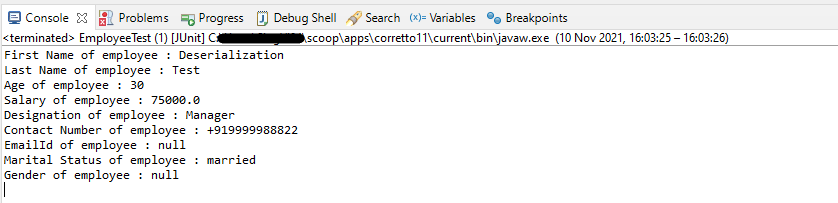
Now, let us see an example of deserialization where nodes that are assigned as @JsonIgnore return null values.
@Test
	public void deserializationTest() throws JsonMappingException, JsonProcessingException  {

		String employeeString = "{\r\n"
				+ "  \"firstName\" : \"Deserialization\",\r\n"
				+ "  \"lastName\" : \"Test\",\r\n"
				+ "  \"age\" : 30,\r\n"
				+ "  \"salary\" : 75000.0,\r\n"
				+ "  \"designation\" : \"Manager\",\r\n"
				+ "  \"contactNumber\" : \"+919999988822\",\r\n"
				+ "  \"emailId\" : \"abc@test.com\",\r\n"
				+ "  \"gender\" : \"female\",\r\n"
				+ "  \"maritalStatus\" : \"married\"\r\n"
				+ " }";


		// Converting a Java class object to a JSON payload as string
		ObjectMapper mapper = new ObjectMapper();

		Employee employee2 = mapper.readValue(employeeString, Employee.class);
		System.out.println("First Name of employee : " + employee2.getFirstName());
		System.out.println("Last Name of employee : " + employee2.getLastName());
		System.out.println("Age of employee : " + employee2.getAge());
		System.out.println("Salary of employee : " + employee2.getSalary());
		System.out.println("Designation of employee : " + employee2.getDesignation());
		System.out.println("Contact Number of employee : " + employee2.getContactNumber());
		System.out.println("EmailId of employee : " + employee2.getEmailId());
		System.out.println("Marital Status of employee : " + employee2.getMaritalStatus());
		System.out.println("Gender of employee : " + employee2.getGender());

	}
Output
We have values for fields emailId and gender in JSON, but it has not been deserialized as you can see it has default values, not from JSON.
I hope this has helped you to understand @JsonIgnore. Cheers!! Have happy learning!!


 QA Automation Expert