Compare JSON Arrays using JSONAssert Library

HOME

  <dependency>
      <groupId>org.skyscreamer</groupId>
      <artifactId>jsonassert</artifactId>
      <version>1.5.1</version>
      <scope>test</scope>
    </dependency>

import org.json.JSONArray;
import org.junit.Test;
import org.skyscreamer.jsonassert.JSONAssert;
import org.skyscreamer.jsonassert.JSONCompareMode;

public class JsonArrayAssertDemo {

    @Test
    public void sameArray() {

        // same no of elements, values and in same order
        String jsonArray1 = "[\"Vibha\",\"Abha\",\"Nysha\"]";
        String jsonArray2 = "[\"Vibha\",\"Abha\",\"Nysha\"]";

        JSONAssert.assertEquals(jsonArray1, jsonArray2, JSONCompareMode.LENIENT);
   }
}

    @Test
    public void sameArrayDifferentOrder() {

        // Same no of elements but different order
        String jsonArray1 = "[\"Vibha\",\"Abha\",\"Nysha\"]";
        String jsonArray2 = "[\"Nysha\",\"Vibha\",\"Abha\"]";

        JSONAssert.assertEquals(jsonArray1, jsonArray2, JSONCompareMode.LENIENT);
    }

    @Test
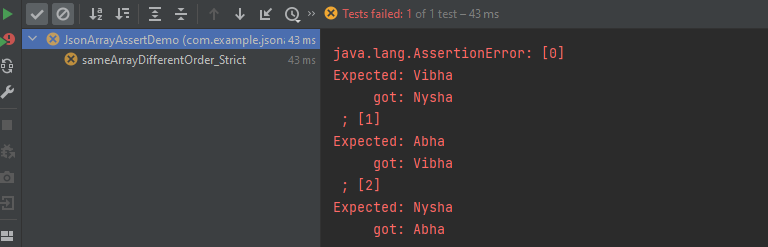
    public void sameArrayDifferentOrder_Strict() {

        // same no of elements, values and in same order
        String jsonArray1 = "[\"Vibha\",\"Abha\",\"Nysha\"]";
        String jsonArray2 = "[\"Nysha\",\"Vibha\",\"Abha\"]";

        JSONAssert.assertEquals(jsonArray1, jsonArray2, JSONCompareMode.STRICT);
    }

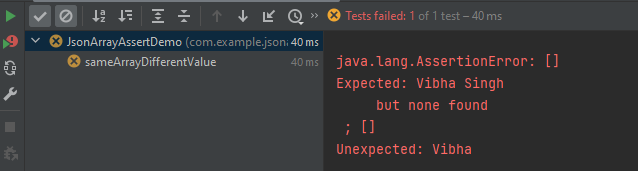
    @Test
    public void sameArrayDifferentValue() {

        // Same no of elements but different values
        String jsonArray1 = "[\"Vibha Singh\",\"Abha\",\"Nysha\"]";
        String jsonArray2 = "[\"Vibha\",\"Abha\",\"Nysha\"]";

        JSONAssert.assertEquals(jsonArray1, jsonArray2, JSONCompareMode.LENIENT);
    }

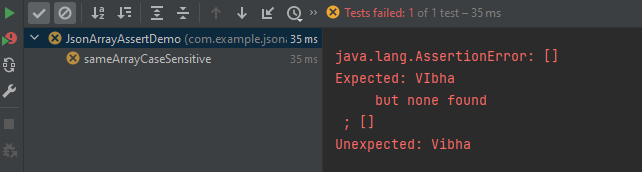
   @Test
    public void sameArrayCaseSensitive() {

        // case sensitive
        String jsonArray1 = "[\"VIbha\",\"Abha\",\"Nysha\"]";
        String jsonArray2 = "[\"Vibha\",\"Abha\",\"Nysha\"]";

        JSONAssert.assertEquals(jsonArray1, jsonArray2, JSONCompareMode.LENIENT);
    }

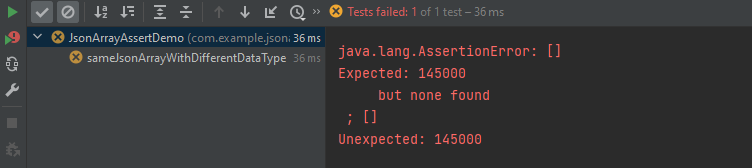
    @Test
    public void sameJsonArrayWithDifferentDataType() {

        String jsonArray1 = "[\"Vibha\",\"Abha\",\"145000\"]";
        String jsonArray2 = "[\"Vibha\",\"Abha\",145000]";


        JSONAssert.assertEquals(jsonArray1, jsonArray2, JSONCompareMode.LENIENT);
    }

   @Test
    public void sameArrayDifferentNumber() {
        
        String jsonArray1 = "[\"Vibha\",\"Abha\",\"Nysha\", \"Pooja\"]";
        String jsonArray2 = "[\"Vibha\",\"Abha\",\"Nysha\"]";

        JSONAssert.assertEquals(jsonArray1, jsonArray2, JSONCompareMode.LENIENT);
    }

    @Test
    public void sameArrayDifferentNumber() {

        String jsonArray1 = "[\"Vibha\",\"Abha\",\"Nysha\", \"Pooja\"]";
        String jsonArray2 = "[\"Vibha\",\"Abha\",\"Nysha\"]";

        JSONAssert.assertEquals(jsonArray1, jsonArray2, JSONCompareMode.STRICT);
    }

        JSONAssert.assertEquals(jsonArray1, jsonArray2, JSONCompareMode.LENIENT);
        JSONAssert.assertEquals(jsonArray1, jsonArray2, false);

        JSONAssert.assertEquals(jsonArray1, jsonArray2, JSONCompareMode.STRICT);
        JSONAssert.assertEquals(jsonArray1, jsonArray2, true);

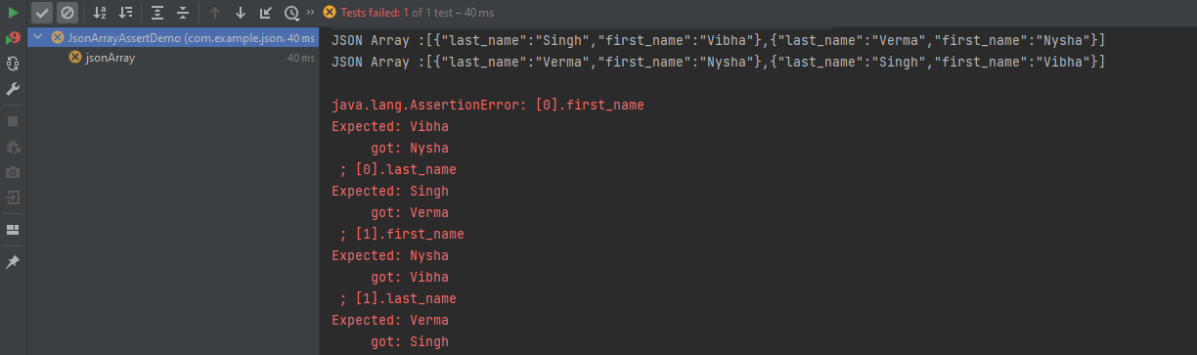
 @Test
    public void jsonArray() {

        JSONObject data1 = new JSONObject();
        data1.put("first_name", "Vibha");
        data1.put("last_name", "Singh");

        JSONObject data2 = new JSONObject();
        data2.put("first_name", "Nysha");
        data2.put("last_name", "Verma");


        // Creating JSON array to add both JSON objects
        JSONArray array1 = new JSONArray();
        array1.put(data1);
        array1.put(data2);

        System.out.println("JSON Array :" + array1);

       //Second JSON Array

        JSONObject data3 = new JSONObject();
        data3.put("first_name", "Nysha");
        data3.put("last_name", "Verma");

        JSONObject data4 = new JSONObject();
        data4.put("first_name", "Vibha");
        data4.put("last_name", "Singh");

        // Creating JSON array to add both JSON objects
        JSONArray array2 = new JSONArray();
        array2.put(data3);
        array2.put(data4);

        System.out.println("JSON Array :" + array2);

        JSONAssert.assertEquals(array1, array2, JSONCompareMode.STRICT);
    }

How to convert a Java list to JSON Array – org.json

HOME

 <dependency>
            <groupId>org.json</groupId>
            <artifactId>json</artifactId>
            <version>20230618</version>
 </dependency>

List<String> list = Arrays.asList("Test 1", "Test 2", "Test 3", "Test 4");
import org.json.JSONArray;
import org.testng.annotations.Test;
import java.util.Arrays;
import java.util.List;

public class ListToJsonObject {

    @Test
    public static void test() {

        List<String> list = Arrays.asList("Test 1", "Test 2", "Test 3", "Test 4");
        System.out.println("List :" + list);

        JSONArray jsonArray = new JSONArray(list);
        System.out.println("Json Array :" + jsonArray);

    }
}

Rest Assured Tutorials

HOME

RestAssured is a Java-based library that is used to test RESTful Web Services. REST-assured was designed to simplify the testing and validation of REST APIs. It takes influence from testing techniques used in dynamic languages such as Ruby and Groovy.

Chapter 1 Assertion of JSON in Rest Assured using Hamcrest
Chapter 2 Extraction from JSON in Rest Assured – JsonPath
Chapter 3 How to perform multiple assertions in Rest Assured? 
Chapter 4 How to validate JSON body in Rest Assured?
Chapter 5 Compare JSON Objects using JSONAssert Library
Chapter 6 Compare JSON Arrays using JSONAssert Library
Chapter 7 How to Read JSON with JSON.simple – NEW
Chapter 8 How to create and write to JSON with JSON.simple – NEW

JSON Handling and manipulation

Category 10: XML Manipulations

XML Handling and manipulation

Gradle

Chapter 1 Setup Basic REST Assured Gradle Project In Eclipse IDE

Frameworks

Chapter 1 Integration of REST Assured with TestNG
Chapter 2 Integration of REST Assured with JUnit4
Chapter 3 Integration of REST Assured with JUnit5
Chapter 4 Serenity BDD with Cucumber and Rest Assured
Chapter 5 Serenity BDD with Cucumber and Rest Assured in Gradle
Chapter 6 How To Create Gradle Project with Cucumber to test Rest API
Chapter 7 Rest API Test in Cucumber and JUnit4
Chapter 8 API Automation with REST Assured, Cucumber and TestNG

How to create JSON Array Request Body – org.json

Last Updated On

HOME

In the last tutorial, I explained How to test POST JSON Object request using Java Map in Rest Assured. In this tutorial, I will create a request body using JSON Array in Rest Assured. This request body can be used for POST or PUT operations.

Table of Contents

  1. What is JSONArray?
  2. How to create JSONArray Request Body or payload?
  3. Complex JSON Array

What is JSONArray?

JSONArray represents an immutable JSON array (an ordered sequence of zero or more values). It also provides an unmodifiable list view of the values in the array.

  1. JSON array can store multiple value types. The values in a JSONArray can be of the following types: JsonObject, JsonArray, JsonString, JsonNumber, JsonValue.TRUE, JsonValue.FALSE, and JsonValue.NULL.
  2. The array index begins with 0.
  3. The square brackets [ ] are used to declare the JSON array.

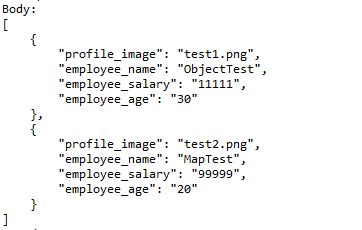
An API can accept a JSON Array payload as a request body. Imagine, we want to add employee details of more than one employee in the below example. In this case, we can pass multiple JSON objects within a JSON array. I have explained 2 ways to create JSON Object – map or JsonObject. Refer to any one of the tutorials to get to know about the creation of JSON Object.

To create a JSON Array, we need to add org.json Maven dependency, as shown below. The latest version can be found here.

<dependency>
    <groupId>org.json</groupId>
    <artifactId>json</artifactId>
    <version>20240303</version>
</dependency>  

JSONObject is imported from the package:

import org.json.JSONObject;

JSONArray is imported from the package:

import org.json.JSONArray;

Below is an example of JSONArray.

How to create JSONArray Request Body or payload?

  1. Create a JSON Object and add the first employee details.
  2. Create another JSON Object and add second guest details.
  3. Create a JSONArray.
  4. Add both JSON Objects to JSONArray.

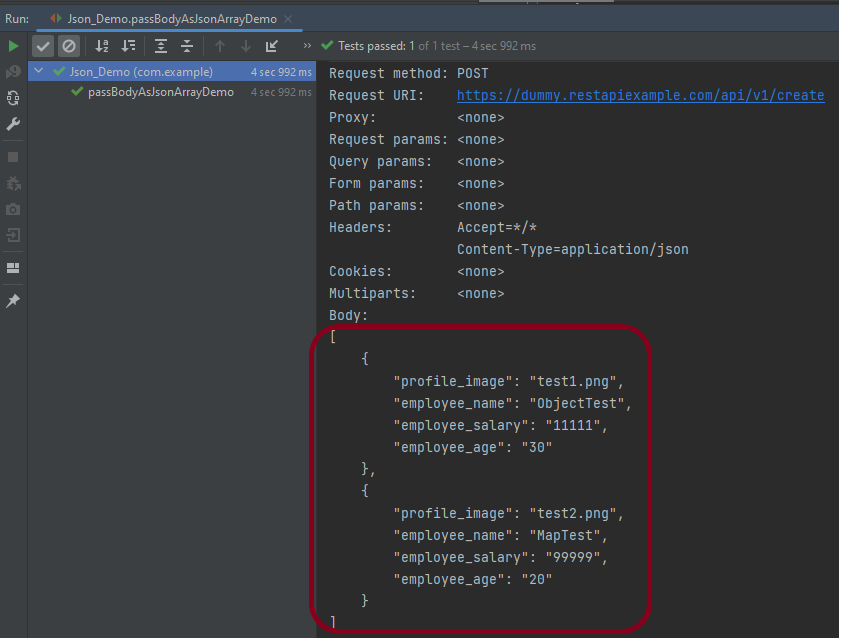
Below is an example of creating a request from JSONArray with multiple JSON Objects.  I am using a logger just to print the JSON body in the Console. 

import io.restassured.RestAssured;
import io.restassured.http.ContentType;
import org.json.JSONArray;
import org.json.JSONObject;
import org.junit.Test;
import static org.hamcrest.Matchers.equalTo;

public class Json_Demo {

    @Test
    public void passBodyAsJsonArrayDemo() {

        // JSON Object for first employee
        JSONObject data1 = new JSONObject();

        data1.put("employee_name", "ObjectTest");
        data1.put("profile_image", "test1.png");
        data1.put("employee_age", "30");
        data1.put("employee_salary", "11111");

        // JSON Object for second employee
        JSONObject data2 = new JSONObject();

        data2.put("employee_name", "MapTest");
        data2.put("profile_image", "test2.png");
        data2.put("employee_age", "20");
        data2.put("employee_salary", "99999");

        // Creating JSON array to add both JSON objects
        JSONArray array = new JSONArray();
        array.put(data1);
        array.put(data2);

        // Send the request
        RestAssured.given()
                .contentType(ContentType.JSON)
                .body(array.toString())
                .log().all()

                .when()
                .post("https://dummy.restapiexample.com/api/v1/create")

                .then()
                .assertThat().statusCode(200)
                .body("message", equalTo("Successfully! Record has been added."))
                .log().all();
    }
}

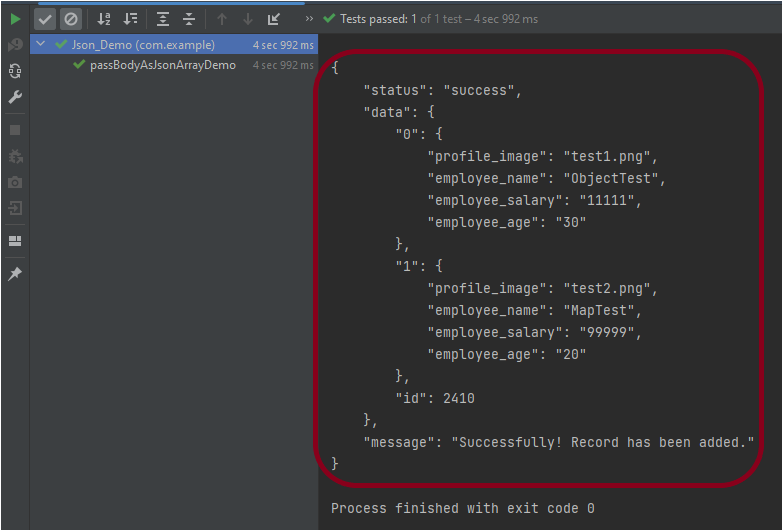
The output of the above program is

       // JSON Object for first employee
        JSONObject data1 = new JSONObject();

        data1.put("employee_name", "ObjectTest");
        data1.put("profile_image", "test1.png");
        data1.put("employee_age", "30");
        data1.put("employee_salary", "11111");

        // JSON Object for second employee
        JSONObject data2 = new JSONObject();

        data2.put("employee_name", "MapTest");
        data2.put("profile_image", "test2.png");
        data2.put("employee_age", "20");
        data2.put("employee_salary", "99999");
JSONArray array = new JSONArray();
array.put(data1);
array.put(data2);
contentType(ContentType.JSON)
.body(array.toString())
.log().all()
.post("https://dummy.restapiexample.com/api/v1/create")
.assertThat().statusCode(200)
.body("message", equalTo("Successfully! Record has been added."))
.log().all()

Complex JSON Array

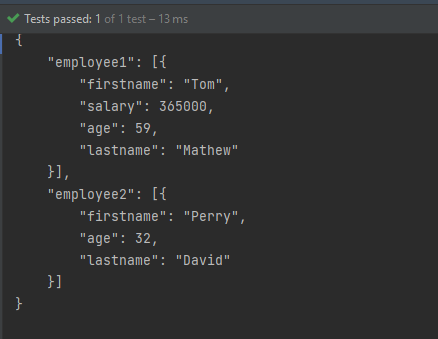
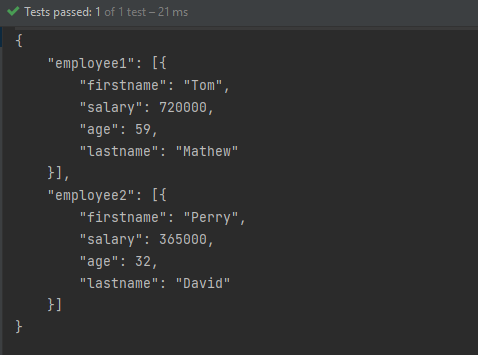
Let us see an example of a complex JSON Array. This structure represents two separate employee data sets. Each is contained within its own JSON array. The whole is encapsulated within a larger JSON object identified by keys employee1 and employee2.


{
    "employee1": [
      {
        "firstname": "Tom",
        "salary": 720000,
        "age": 59,
        "lastname": "Mathew"
     }
    ],
    "employee2": [
     {
        "firstname": "Perry",
        "salary": 365000,
        "age": 32,
        "lastname": "David"
    }
   ]
}

The above JSON Array can be created as

import org.json.JSONArray;
import org.json.JSONObject;
import org.junit.Test;

public class Json_Demo {

    @Test
    public void passBodyAsJsonArray() {

        // JSON Object for first employee
        JSONObject data1 = new JSONObject();

        data1.put("firstname", "Tom");
        data1.put("lastname", "Mathew");
        data1.put("age", 59);
        data1.put("salary", 720000);

        // JSON Object for second employee
        JSONObject data2 = new JSONObject();

        data2.put("firstname", "Perry");
        data2.put("lastname", "David");
        data2.put("age", 32);
        data1.put("salary", 365000);

        // Creating first JSON array
        JSONArray array1 = new JSONArray();
        array1.put(data1);

        // Creating second JSON array
        JSONArray array2 = new JSONArray();
        array2.put(data2);

        // Create JSON Object to add both JSONArrays
        JSONObject data3 = new JSONObject();
        data3.put("employee1", array1);
        data3.put("employee2", array2);

        System.out.println(data3.toString(4));

    }
}

JSONObject data1 = new JSONObject();
data1.put("firstname", "Tom");
data1.put("lastname", "Mathew");
data1.put("age", 59);
data1.put("salary", 720000);

JSONObject data2 = new JSONObject();
data2.put("firstname", "Perry");
data2.put("lastname", "David");
data2.put("age", 32);
data2.put("salary", 365000);

JSONArray array1 = new JSONArray();
array1.put(data1);

JSONArray array2 = new JSONArray();
array2.put(data2);

A third JSONObject, data3, is created to aggregate the two JSON arrays under separate keys: employee1 and employee2.

JSONObject data3 = new JSONObject();
data3.put("employee1", array1);
data3.put("employee2", array2);
System.out.println(data3.toString(4));

Similarly, there is another way to create this JSON Structure.

import org.json.JSONArray;
import org.json.JSONObject;
import org.junit.Test;

public class Json_Demo {

    @Test
    public void passBodyAsJsonArray1() {

        // Creating JSON array to add first JSON object
        JSONArray array1 = new JSONArray();
        array1.put(new JSONObject().put("firstname", "Tom").put("lastname", "Mathew").put("age", 59).put("salary",
                720000));

        // Creating JSON array
        JSONArray array2 = new JSONArray();
        array2.put(new JSONObject().put("firstname", "Perry").put("lastname", "David").put("age", 32).put("salary",
                365000));

        // Create JSON Object to add JSONArrays
        JSONObject data1 = new JSONObject();
        data1.put("employee1", array1);
        data1.put("employee2", array2);

        System.out.println(data1.toString(4));

    }
}

The output of the above program is

Congratulations on making it through this tutorial and hope you found it useful! Happy Learning!! Cheers!!

Rest Assured – How to test JSON Request using Jackson API

HOME

This tutorial focuses on the testing of a REST API (with JSON payload). We will use Jackson API to serialize the request.

It is suggested to go through these tutorials to understand about creating a JSON Object Payload using POJO (Plain Old Java Object).

How to create JSON Object Payload using POJO – Jackson API

How to create JSON Array Payload using POJO – Jackson API

How to create Nested JSON Object using POJO – Jackson API

To start with, we need to add Jackson Maven’s Dependency to the POM. Always add the latest version of Jackson dependency to your project.

<dependency>
    <groupId>com.fasterxml.jackson.core</groupId>
    <artifactId>jackson-databind</artifactId>
    <version>2.17.2</version>
</dependency>

The complete POM.xml will look like this, as shown below:

<?xml version="1.0" encoding="UTF-8"?>
<project xmlns="http://maven.apache.org/POM/4.0.0"
         xmlns:xsi="http://www.w3.org/2001/XMLSchema-instance"
         xsi:schemaLocation="http://maven.apache.org/POM/4.0.0 http://maven.apache.org/xsd/maven-4.0.0.xsd">
    <modelVersion>4.0.0</modelVersion>

    <groupId>com.example</groupId>
    <artifactId>RestAssured_JUnit4_Demo</artifactId>
    <version>1.0-SNAPSHOT</version>

    <properties>
        <rest-assured.version>5.3.0</rest-assured.version>
        <junit.version>4.13.2</junit.version>
        <jackson.version>2.17.2</jackson.version>
        <maven.compiler.source>11</maven.compiler.source>
        <maven.compiler.target>11</maven.compiler.target>
    </properties>

    <dependencies>

        <!-- Rest-Assured Dependency -->
        <dependency>
            <groupId>io.rest-assured</groupId>
            <artifactId>rest-assured</artifactId>
            <version>${rest-assured.version}</version>
            <scope>test</scope>
        </dependency>

        <!-- JUnit4 Dependency -->
        <dependency>
            <groupId>junit</groupId>
            <artifactId>junit</artifactId>
            <version>${junit.version}</version>
            <scope>test</scope>
        </dependency>

        <!-- Jackson Dependency -->
        <dependency>
            <groupId>com.fasterxml.jackson.core</groupId>
            <artifactId>jackson-databind</artifactId>
            <version>${jackson.version}</version>
        </dependency>

        <!-- Hamcrest Dependency -->
        <dependency>
            <groupId>org.hamcrest</groupId>
            <artifactId>hamcrest-all</artifactId>
            <version>1.3</version>
            <scope>test</scope>
        </dependency>

    </dependencies>

</project>

This dependency will also transitively add the following libraries to the classpath:

  1. jackson-annotations
  2. jackson-core

In the below example, let us assume that we need to create a new Employee (POST Request). To start with, we need to create a POJO class of the JSON payload (EmployeeDetails). This POJO class should contain the data members corresponding to the JSON nodes and their corresponding getter and setter methods.

public class EmployeeDetails {

	// private variables or data members of pojo class
	private String name;
	private double salary;
	private int age;

    // Getter and Setters
	public String getName() {
		return name;
	}

	public void setName(String name) {
		this.name = name;
	}

	public double getSalary() {
		return salary;
	}

	public void setSalary(double salary) {
		this.salary = salary;
	}

	public int getAge() {
		return age;
	}

	public void setAge(int age) {
		this.age = age;
	}

}

Now that we have our POJO class, we can start writing some REST Assured Serialization tests!

Let’s start with REST Assured Serialization with JSON. I want to send a POST request to my EmployeeDetails API that will add a new Employee to the database. I will send a POJO of the employee in the request body. This is what the code looks like in the test class:

import com.fasterxml.jackson.core.JsonProcessingException;
import com.fasterxml.jackson.databind.ObjectMapper;
import io.restassured.http.ContentType;
import org.junit.Test;
import static io.restassured.RestAssured.given;
import static org.hamcrest.Matchers.equalTo;

public class EmployeeTests {

    @Test
    public void createEmployee() {

        // Create an object of POJO class
        EmployeeDetails emp = new EmployeeDetails();
        emp.setName("Vibha");
        emp.setSalary(75000);
        emp.setAge(30);

        // Converting a Java class object to a JSON payload as string
        ObjectMapper mapper = new ObjectMapper();
        String employeePrettyJson = null;
        try {
            employeePrettyJson = mapper.writerWithDefaultPrettyPrinter().writeValueAsString(emp);
        } catch (JsonProcessingException e) {
            e.printStackTrace();
        }
        System.out.println("Request");
        System.out.println(employeePrettyJson);
        System.out.println("=========================================");
        System.out.println("Response");

        // GIVEN
        given().baseUri("https://dummy.restapiexample.com/api").contentType(ContentType.JSON).body(emp)

                // WHEN
                .when().post("/v1/create")

                // THEN
                .then().assertThat().statusCode(200).body("data.name", equalTo("Vibha"))
                .body("message", equalTo("Successfully! Record has been added.")).log().body();

    }

}

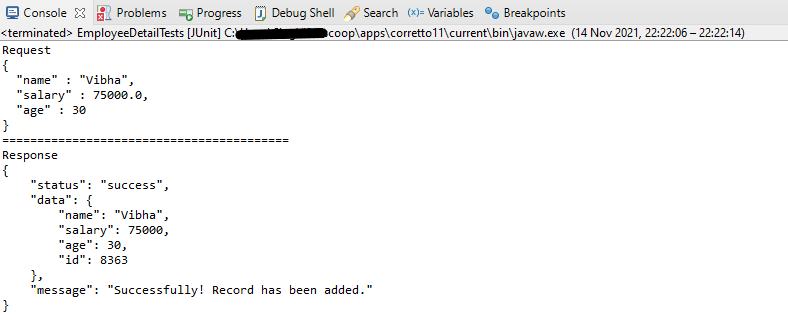
The output of the above program is
If you want to see the structure of the Request, then add the below in the test code.

ObjectMapper mapper = new ObjectMapper();
String employeePrettyJson = mapper.writerWithDefaultPrettyPrinter().writeValueAsString(emp);
System.out.println(employeePrettyJson);

REST Assured Serialization with Jackson handled all the serialization work for us. Great! See, this has become so simple with the help of Jackson API.

We are done! Congratulations on making it through this tutorial and hope you found it useful! Happy Learning!!

How to create JSON Array Payload using POJO – Jackson API

HOME

In the previous tutorial, I explained the creation of JSON Object using POJO. In this tutorial, will create a JSON Array Payload using POJO.

To learn about POJO, please refer to this tutorial.

You can refer to these tutorials to understand various ways of using Jackson API

Serialization – How to create JSON Payload from Java Object – Jackson API

How to create JSON Array Payload using POJO – Jackson API

How to create Nested JSON Object using POJO – Jackson API

Serialization – How to convert Map to JSON string using Jackson API

JSON Array is a collection of JSON Objects. In the below example, will create a list of employees.

The sample JSON Array structure looks like the image as shown below:-

{
  "firstName" : "Vibha",
  "lastName" : "Singh",
  "age" : 30,
  "salary" : 75000.0,
  "designation" : "Manager",
  "contactNumber" : "+919999988822",
  "emailId" : "abc@test.com"
  
  "firstName" : "Neha",
  "lastName" : "Verma",
  "age" : 25,
  "salary" : 60000.0,
  "designation" : "Lead",
  "contactNumber" : "+914442266221",
  "emailId" : "xyz@test.com"
  
  "firstName" : "Rajesh",
  "lastName" : "Gupta",
  "age" : 20,
  "salary" : 40000.0,
  "designation" : "Intern",
  "contactNumber" : "+919933384422",
  "emailId" : "pqr@test.com"
}

We need to create an Employee class that contains private data members and the corresponding getter and setter methods of these data members.

Below is an Employee Class with private data members, as well as the corresponding getter and setter methods of these data members. Every IDE provides a shortcut to create these getter and setter methods.

public class Employee {

	// private variables or data members of POJO class
	private String firstName;
	private String lastName;
	private int age;
	private double salary;
	private String designation;
	private String contactNumber;
	private String emailId;

	// Getter and setter methods
	public String getFirstName() {
		return firstName;
	}

	public void setFirstName(String firstName) {
		this.firstName = firstName;
	}

	public String getLastName() {
		return lastName;
	}

	public void setLastName(String lastName) {
		this.lastName = lastName;
	}

	public int getAge() {
		return age;
	}

	public void setAge(int age) {
		this.age = age;
	}

	public double getSalary() {
		return salary;
	}

	public void setSalary(double salary) {
		this.salary = salary;
	}

	public String getDesignation() {
		return designation;
	}

	public void setDesignation(String designation) {
		this.designation = designation;
	}

	public String getContactNumber() {
		return contactNumber;
	}

	public void setContactNumber(String contactNumber) {
		this.contactNumber = contactNumber;
	}

	public String getEmailId() {
		return emailId;
	}

	public void setEmailId(String emailId) {
		this.emailId = emailId;
	}

}

Serialization – Serialization is a process where you convert an Instance of a Class (Object of a class) into a Byte Stream. Here, we are converting Employee class object to JSON Array representation or Object.

Deserialization – It is the reverse of serializing. In this process, we will read the Serialized byte stream from the file and convert it back into the Class instance representation. Here, we are converting a JSON Array to an Employee class object.

We are using Jackson API for Serialization and Deserialization. So, add the Jackson dependency to the project.

<dependency>
    <groupId>com.fasterxml.jackson.core</groupId>
    <artifactId>jackson-databind</artifactId>
    <version>2.13.0</version>
</dependency>

Below is the class where we will assign values to the data members by using getter methods (Serialization).

public class EmployeeArrayTest {

	@Test
	public void createEmployeeArray() {

		Employee emp1 = new Employee();
		emp1.setFirstName("Vibha");
		emp1.setLastName("Singh");
		emp1.setAge(30);
		emp1.setSalary(75000);
		emp1.setDesignation("Manager");
		emp1.setContactNumber("+919999988822");
		emp1.setEmailId("abc@test.com");

		Employee emp2 = new Employee();
		emp2.setFirstName("Neha");
		emp2.setLastName("Verms");
		emp2.setAge(35);
		emp2.setSalary(60000);
		emp2.setDesignation("Lead");
		emp2.setContactNumber("+914442266221");
		emp2.setEmailId("xyz@test.com");

		Employee emp3 = new Employee();
		emp3.setFirstName("Rajesh");
		emp3.setLastName("Gupta");
		emp3.setAge(20);
		emp3.setSalary(40000);
		emp3.setDesignation("Intern");
		emp3.setContactNumber("+919933384422");
		emp3.setEmailId("pqr@test.com");

		// Creating a List of Employees
		List<Employee> employeeList = new ArrayList<Employee>();
		employeeList.add(emp1);
		employeeList.add(emp2);
		employeeList.add(emp3);

		// Converting a Java class object to a JSON Array Payload as string
		ObjectMapper mapper = new ObjectMapper();
		try {
			String allEmployeeJson = mapper.writeValueAsString(employeeList);
			String employeeListPrettyJson = mapper.writerWithDefaultPrettyPrinter().writeValueAsString(employeeList);
			System.out.println(allEmployeeJson);
			System.out.println(employeeListPrettyJson);
		} catch (JsonProcessingException e) {
			e.printStackTrace();
		}
	}

ObjectMapper is imported from:-

import com.fasterxml.jackson.databind.ObjectMapper;

In the below example, we are deserializing the JSON Array Payload to Java objects.

    @Test
	public void getEmployeeArray() {

		Employee emp1 = new Employee();
		emp1.setFirstName("Vibha");
		emp1.setLastName("Singh");
		emp1.setAge(30);
		emp1.setSalary(75000);
		emp1.setDesignation("Manager");
		emp1.setContactNumber("+919999988822");
		emp1.setEmailId("abc@test.com");

		Employee emp2 = new Employee();
		emp2.setFirstName("Neha");
		emp2.setLastName("Verms");
		emp2.setAge(35);
		emp2.setSalary(60000);
		emp2.setDesignation("Lead");
		emp2.setContactNumber("+914442266221");
		emp2.setEmailId("xyz@test.com");

		Employee emp3 = new Employee();
		emp3.setFirstName("Rajesh");
		emp3.setLastName("Gupta");
		emp3.setAge(20);
		emp3.setSalary(40000);
		emp3.setDesignation("Intern");
		emp3.setContactNumber("+919933384422");
		emp3.setEmailId("pqr@test.com");

		// Creating a List of Employees
		List<Employee> employeeList = new ArrayList<Employee>();
		employeeList.add(emp1);
		employeeList.add(emp2);
		employeeList.add(emp3);

		// Converting a Java class object to a JSON Array Payload as string

		ObjectMapper mapper = new ObjectMapper();
		String allEmployeeJson = null;

		try {
			allEmployeeJson = mapper.writerWithDefaultPrettyPrinter().writeValueAsString(employeeList);
		} catch (JsonProcessingException e) {
			e.printStackTrace();
		}

		List<Employee> allEmployeeDetails = null;
		try {
			allEmployeeDetails = mapper.readValue(allEmployeeJson, new TypeReference<List<Employee>>() {
			});
		} catch (JsonMappingException e) {
			e.printStackTrace();
		} catch (JsonProcessingException e) {
			e.printStackTrace();
		}

		for (Employee emp : allEmployeeDetails) {

			System.out.println("===================================");

			System.out.println("First Name of employee : " + emp.getFirstName());
			System.out.println("Last Name of employee : " + emp.getLastName());
			System.out.println("Age of employee : " + emp.getAge());
			System.out.println("Salary of employee : " + emp.getSalary());
			System.out.println("Designation of employee : " + emp.getDesignation());
			System.out.println("Contact Number of employee : " + emp.getContactNumber());
			System.out.println("EmailId of employee : " + emp.getEmailId());
		}
	}

If you want to read the data from a file placed on Desktop, below is the sample code for the same.

  @Test
	public void readArrayJsonFromFile() throws IOException {

		ObjectMapper mapper = new ObjectMapper();

		// Converting Employee json string to Employee class object
		List<Employee> allEmployeeDetails = null;
		try {
			allEmployeeDetails = mapper.readValue(new File(
					"C:\\Users\\Vibha\\Desktop\\EmployeeList.json"),
					new TypeReference<List<Employee>>() {
					});
		} catch (StreamReadException e) {
			e.printStackTrace();
		} catch (DatabindException e) {
			e.printStackTrace();
		} catch (IOException e) {
			e.printStackTrace();
		}


		for (Employee emp : allEmployeeDetails) {

			System.out.println("######################################");

			System.out.println("First Name of employee : " + emp.getFirstName());
			System.out.println("Last Name of employee : " + emp.getLastName());
			System.out.println("Age of employee : " + emp.getAge());
			System.out.println("Salary of employee : " + emp.getSalary());
			System.out.println("Designation of employee : " + emp.getDesignation());
			System.out.println("Contact Number of employee : " + emp.getContactNumber());
			System.out.println("EmailId of employee : " + emp.getEmailId());
		}
	}

We are done! Congratulations on making it through this tutorial and hope you found it useful! Happy Learning!!