How to verify JSON response headers in Rest Assured?

HOME

import org.junit.Test;
import static io.restassured.RestAssured.given;
import static org.hamcrest.CoreMatchers.containsString;

public class ResponseHeader {

    @Test
    public void verifyResponseHeader() {

      // Given
      given()

              // When
              .when()
              .get("https://reqres.in/api/users/2")

              // Then
              .then()
              .statusCode(200).statusLine("HTTP/1.1 200 OK")
              .log().all()
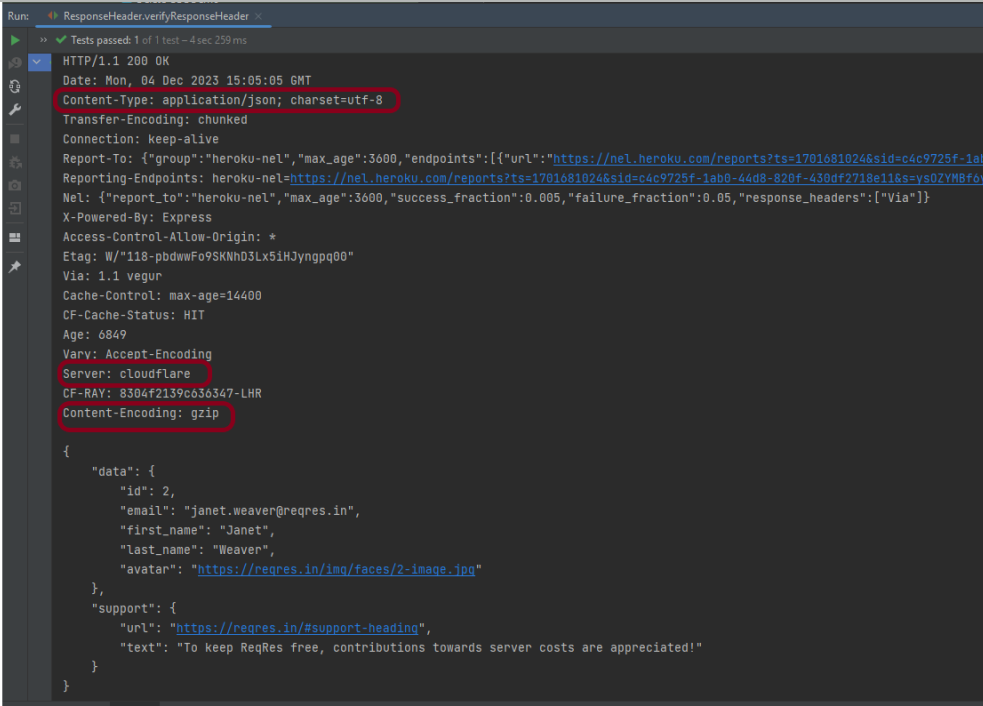
              .header("Content-Type" , "application/json; charset=utf-8")
              .header("Content-Encoding" , "gzip")
              .header("Server" , containsString("cloudflare"));

    }
}

Class and Object in Java

HOME

Let us consider the Phone as the object. The state of the Phone is coloured grey, and black, and types like IPhone, Samsung, and behaviour is calling, sending messages, and internet browsing.

public class Student {
          String Name;
}

How to create an Object?

To create an object, specify a class name like Student, an object name like stud, and use a new keyword. 

Student stud = new Student();

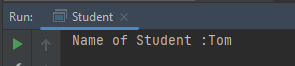
Let us create a class and an object of its class and print the value of the variable name.

public class Student {

    String Name = "Tom";
    public static void main(String[] args)

    {
        Student stud = new Student();
        System.out.println("Name of Student :"+stud.Name);
    }
}

Multiple Objects of a Class

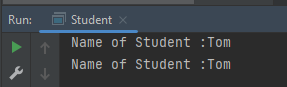
We can create multiple objects of a class. In the below example, we have created 2 objects of class Student.

public class Student {

    String Name = "Tom";
    public static void main(String[] args)
    {
        Student stud1 = new Student();
        Student stud2 = new Student();
        System.out.println("Name of Student :"+stud1.Name);
        System.out.println("Name of Student :"+stud2.Name);
    }
}

Multiple Classes

We can create a class and then create an object of that class in another class. Like, here, we have created a class called Student.java and another class is Student_Demo.java where we will create the object of class Student. This is a better approach than the previous one.

public class Student {
          String Name = "Tom";         
}


public class Student_Test{
    public static void main(String[] args)
    {
        Student stud = new Student();
        System.out.println("Name of Student :"+stud.Name);
    }
}

There are multiple ways to initialize the classes and objects.

1) Initialize through reference

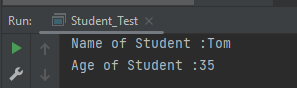
Here, initializing an object means storing data in the object. Let’s see a simple example where we are going to initialize the object through a reference variable.

public class Student {
          String Name ;
          int Age;
}

public class Student_Test {
    public static void main(String[] args)
    {
        Student stud = new Student();
        stud.Name ="Tom";
        stud.Age=35;
        System.out.println("Name of Student :"+stud.Name);
        System.out.println("Age of Student :"+stud.Age);
    }
}

2) Initializing through method

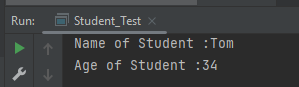
We are creating the two objects of the Student class and initializing the value to these objects by invoking the InsertData() method. Here, we are displaying the state (data) of the objects by invoking the DisplayData() method.

public class Student {
	String Name;
	int Age;

	void InsertData(String n, int a) {
		Name = n;
		Age = a;
	}

	void DisplayData() {
		System.out.println("Name of Student :" + Name);
		System.out.println("Age of Student :" + Age);
	}
}


public class Student_Test {
    
    public static void main(String[] args) {
        Student stud = new Student();
        stud.InsertData("Tom", 34);
        stud.DisplayData();
    }
}

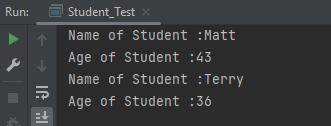
We can create multiple objects

public class Student {
          String Name ;
          int Age;

          void InsertData(String n, int a)
          {
                   Name =n;
                   Age = a;
          }

          void DisplayData()
          {
                   System.out.println("Name of Student :"+Name);
                   System.out.println("Age of Student :"+Age);
          }
    }  


public class Student_Test {
    
    public static void main(String[] args) {

            Student stud1 = new Student();
            Student stud2 = new Student();
            stud1.InsertData("Matt",43);
            stud1.DisplayData();
            stud2.InsertData("Terry",36);
            stud2.DisplayData();
    }
 }

Method Overloading in Java

HOME

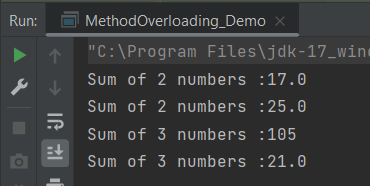
public class MethodOverloading_Demo {

    public void Calculation(int a, float b) {
        System.out.println("Sum of 2 numbers :" + (a + b));
    }

    //Different type of parameters
    public void Calculation(float x, float y) {
        System.out.println("Sum of 2 numbers :" + (x + y));
    }

    //Different number of parameters
    public void Calculation(int i, int j, int k) {
        System.out.println("Sum of 3 numbers :" + (i + j + k));
    }

    //Different sequence of parameters
    public void Calculation(float p, int r) {
        System.out.println("Sum of 3 numbers :" + (p + r));
    }

    public static void main(String[] args) {

        MethodOverloading_Demo add = new MethodOverloading_Demo();

        //Call overloaded methods
        add.Calculation(5, 12f);
        add.Calculation(13f, 12.0f);
        add.Calculation(22, 33, 50);
        add.Calculation(11f, 10);
    }

}

What is Type Promotion?

When a data type of smaller type, promote to bigger type, it called type promotion.  Suppose a method has double data type and object provides float, then the program works fine. Float will be promote to double.

Let us explain this with an example. In the below example, object has provided float data type, but method has double data type, so there is type promotion.

public class Addition {

    public void Calculation(int a, int b)  {
        System.out.println("Sum of 2 numbers :"+(a+b));
    }

    public void Calculation(int x, double y)   {
        System.out.println("Sum of 2 numbers :"+(x+y));
    }

    public static void main(String[] args) {
        Addition add = new Addition();
        //Type Promotion method
        add.Calculation(5,12);
        add.Calculation(13,12f);
    }
}

Multiple questions on Exception Handling in Java

HOME

In this tutorial, you will see the various questions related to Exception Handling.

Example1

public class ExceptionHandlingDemo {

	public static void main(String[] args) {

		try {
			int a[] = new int[5];
			a[5] = 30 / 0;
		} catch (ArithmeticException e) {
			System.out.println("Arithmetic Exception occurs");
		} catch (ArrayIndexOutOfBoundsException e) {
			System.out.println("ArrayIndexOutOfBounds Exception occurs");
		} catch (Exception e) {
			System.out.println("Parent Exception occurs");
		}
		System.out.println("Continue the program..");
	}
}

Here, we have multiple catch blocks with different types of exceptions. 30 is divided by 0 which throws ArithmeticException. So, the catch block for ArithmeticException is executed. Once the try-catch block is executed, the program runs in normal flow.


Example2

public class ExceptionHandlingDemo {

	public static void main(String[] args) {

		try {
			int a[] = new int[5];
			a[5] = 30 / 15;
		} catch (ArithmeticException e) {
			System.out.println("Arithmetic Exception occurs");
		} catch (ArrayIndexOutOfBoundsException e) {
			System.out.println("ArrayIndexOutOfBounds Exception occurs");
		} catch (Exception e) {
			System.out.println("Parent Exception occurs");
		}
		System.out.println("Continue the program..");
	}
}

Here, we are trying to access a[5] where index 5 is out of range, which throws ArrayIndexOutOfBoundsException. So, the catch block for ArrayIndexOutOfBoundsException is executed. Once the try-catch block is executed, the program runs in normal flow.


Example3

public class ExceptionHandlingDemo {

	public static void main(String[] args) {
		try {
			int a[] = new int[5];

			System.out.println(a[7]);
		} catch (ArithmeticException e) {
			System.out.println("Arithmetic Exception occurs");
		} catch (ArrayIndexOutOfBoundsException e) {
			System.out.println("ArrayIndexOutOfBounds Exception occurs");
		} catch (Exception e) {
			System.out.println("Parent Exception occurs");
		}
		System.out.println("Continue the program..");
	}
}

Output
ArrayIndexOutOfBounds Exception occurs
Continue the program..

Here, we are trying to access a[7] where index 7 is out of range, which throws ArrayIndexOutOfBoundsException. So, the catch block for ArrayIndexOutOfBoundsException is executed. Once the try-catch block is executed, the program runs in normal flow.


Example4

public class ExceptionHandlingDemo {

	public static void main(String[] args) {
		try {
			int a[] = new int[5];
			a[5] = 30 / 0;
			System.out.println(a[10]);
		} catch (ArithmeticException e) {
			System.out.println("Arithmetic Exception occurs");
		} catch (ArrayIndexOutOfBoundsException e) {
			System.out.println("ArrayIndexOutOfBounds Exception occurs");
		} catch (Exception e) {
			System.out.println("Parent Exception occurs");
		}
		System.out.println("Continue the program..");
	}
}

Here, the try block contains two exceptions. But at a time only one exception occurs and its corresponding catch block is executed. So, the first exception is 30 divided by 0 which throws an ArithmeticException. So, the catch block for ArithmeticException is executed. Once the corresponding catch block is executed, the program runs in normal flow.


Example5

public class ExceptionHandlingDemo {

    public static void main(String[] args) {
        try {
            String name = null;
            System.out.println(name.length());
        } catch (ArithmeticException e) {
            System.out.println("Arithmetic Exception occurs");
        } catch (ArrayIndexOutOfBoundsException e) {
            System.out.println("ArrayIndexOutOfBounds Exception occurs");
        } catch (Exception e) {
            System.out.println("Parent Exception occurs");
        }
        System.out.println("Continue the program..");
    }
}

Here, the try block contains NullPointerException. But, there is no NullPointerException present in any of the catch blocks. In such a case, the catch block containing the parent exception class Exception will be invoked.


Example6

public class ExceptionHandlingDemo {

	public static void main(String[] args) {
		try {
			int a[] = new int[5];
			a[5] = 30 / 0;
		} catch (Exception e) {
			System.out.println("common task completed");
		} catch (ArithmeticException e) {
			System.out.println("Arithmetic Exception occurs");
		} catch (ArrayIndexOutOfBoundsException e) {
			System.out.println("ArrayIndexOutOfBounds Exception occurs");
		}
		System.out.println("Continue the program..");
	}
}

Here, the order of exceptions is not maintained like most specific to general exceptions. The exception is the parent exception, so should be mentioned as the last exception. As a result, there is a compile-time error.


Example7

public class ExceptionHandlingDemo {

    public static void main(String args[]) {
        int x = 0;
        int y = 10;
        int z = y/x;
    }
}

Here, ArithmeticException is an unchecked exception that is not checked at a compiled time. So the program compiles fine but throws ArithmeticException.


Example8

public class ExceptionHandlingDemo {

    public static void main(String[] args) {
        try {
            int a[] = { 1, 2, 3, 4 };
            for (int i = 1; i <= 4; i++) {
                System.out.println("a[" + i + "]=" + a[i]);
            }
        }

        catch (Exception e) {
            System.out.println("error = " + e);
        }

        catch (ArrayIndexOutOfBoundsException e) {
            System.out.println("ArrayIndexOutOfBounds Exception occured");
        }
    }
}

Here, ArrayIndexOutOfBoundsException has been already caught by the base class Exception. When a subclass exception is mentioned after the base class exception, then an error occurs.


Example9

public class Example9 {

	public static void main(String[] args) {
		try {
			int a[] = { 1, 2, 3, 4 };
			for (int i = 1; i <= 4; i++) {
				System.out.println("a[" + i + "]=" + a[i]);
			}
		}

		catch (ArrayIndexOutOfBoundsException e) {
			System.out.println("ArrayIndexOutOfBounds Exception occured");
		}

		catch (Exception e) {
			System.out.println("error = " + e);
		}
	}
}

Here, the try block prints a[1] to a[3] and then throws ArrayIndexOutOfBoundsException which is handled by the corresponding catch block.


Example10

public class ExceptionHandlingDemo {

	public static void main(String[] args) {

		// outer try block
		try {

			// inner try and catch block 1
			try {
				System.out.println("going to divide by 0");
				int b = 40 / 0;
			}
			catch (ArithmeticException e) {
				System.out.println(e);
			}

			// inner try and catch block 2
			try {
				int a[] = new int[5];

				// assigning the value out of array bounds
				a[5] = 4;
			}
			catch (ArrayIndexOutOfBoundsException e) {
				System.out.println(e);
			}

			System.out.println("No more inner try catch block");
		}

		// catch block of outer try block
		catch (Exception e) {
			System.out.println("Handled the exception of outer try");
		}

		System.out.println("Continue the program..");
	}
}

Here, the first inner try-catch block is executed. Then second inner try-catch block is executed and at last outer try-catch block is executed. Post all these, the program runs in normal flow.


Example11

public class ExceptionHandlingDemo {

	public static void main(String[] args) {

        // outer try block
        try {

            // inner try block 1
            try {

                // inner try block 2
                try {
                    int x = 25 / 0;
                    System.out.println("Value of x :" + x);
                }

                // to handles ArrayIndexOutOfBoundsException
                catch (ArrayIndexOutOfBoundsException e) {
                    System.out.println("Arithmetic exception");
                    System.out.println(" inner try block 2");
                }
            }

            // to handle ArrayIndexOutOfBoundsException
            catch (ArrayIndexOutOfBoundsException e) {
                System.out.println("Arithmetic exception");
                System.out.println("inner try block 1");
            }
        }

        // to handle ArithmeticException
        catch (ArithmeticException e) {
            System.out.println(e);
            System.out.println("Outer try block");
        } catch (Exception e) {
            System.out.print("Exception");
            System.out.println("Handled in main try block");
        }
    }
}

Here, the try block within the nested try block (inner try block 2) does not handle the exception. The control is then transferred to its parent try block (inner try block 1) and it also does not handle the exception, then the control is transferred to the main try block (outer try block) where the appropriate catch block handles the exception. 


Example12

public class ExceptionHandlingDemo {

	public static void main(String[] args) {

		// outer try block
		try {

			// inner try block 1
			try {

				// inner try block 2
				try {
					int x = 25 / 0;
					System.out.println(x);
				}

				// to handles ArrayIndexOutOfBoundsException
				catch (ArrayIndexOutOfBoundsException e) {
					System.out.println("Arithmetic exception");
					System.out.println(" inner try block 2");
				}
			}

			// to handle ArithmeticException 
			catch (ArithmeticException e) {
				System.out.println("Arithmetic exception");
				System.out.println("inner try block 1");
			}
		}

		// to handle ArithmeticException
		catch (ArithmeticException e) {
			System.out.print(e);
			System.out.println("Outer try block");

		} catch (Exception e) {
			System.out.print("Exception");
			System.out.println("Handled in main try block");
		}
	}
}

Here, the try block within the nested try block (inner try block 2) does not handle the exception. The control is then transferred to its parent try block (inner try block 1) and it does handle the exception, so the catch block of inner try block 1 handles the exception.


Example13

public class ExceptionHandlingDemo {

	public static void main(String[] args) {
		try {
			// below code do not throw any exception
			int data = 25 / 5;
			System.out.println(data);
		}

		// catch won't be executed
		catch (NullPointerException e) {
			System.out.println(e);
		}

		// This is executed whether exception occurs or not
		finally {
			System.out.println("finally block is always executed");
		}

		System.out.println("Continue the Program ..");
	}
}

Output
5
finally block is always executed
Continue the Program ..

Here, no exception is thrown, so the catch block is not executed. finally block is always executed irrespective the catch block is executed or not.


Example14

public class ExceptionHandlingDemo {

	public static void main(String[] args) {
		try {

			System.out.println("Inside the try block");

			// below code throws divide by zero exception
			int data = 25 / 0;
			System.out.println(data);
		}

		catch (NullPointerException e) {
			System.out.println("Exception handled");
			System.out.println(e);
		}

		// executes regardless of exception occurred or not
		finally {
			System.out.println("finally block is always executed");
		}

		System.out.println("Continue the Program ..");
	}
}

Here, the code throws an exception, however, the catch block cannot handle it. Despite this, the finally block is executed after the try block and then the program terminates abnormally.


Example15

public class ExceptionHandlingDemo {

	public static void main(String[] args) {
		
       try {

			System.out.println("Inside try block");

			// below code throws divide by zero exception
			int data = 25 / 0;
			System.out.println(data);
		}

		// handles the Arithmetic Exception 
		catch (ArithmeticException e) {
			System.out.println("Exception is handled");
			System.out.println(e);
		}

		// executes regardless of exception occured or not
		finally {
			System.out.println("finally block is always executed");
		}

		System.out.println("Continue the Program ..");
	}
}

Here, the code throws an exception and the catch block handles the exception. Later the finally block is executed after the try-catch block. Further, the rest of the code is also executed normally.


Example16

public class ExceptionHandlingDemo {

	public static void main(String[] args) {
		try {
			int a = 0;
			System.out.println("a = " + a);
			int b = 20 / a;
			System.out.println("b = " + b);
		}

		catch (ArithmeticException e) {
			System.out.println("Divide by zero error");
		}

		finally {
			System.out.println("inside the finally block");
		}
	}
}

Here, a is printed. Then, 20 is divided by 0, which throws ArithmeticException and control goes inside the catch block. Also, the finally block is always executed whether an exception occurs or not.


Example 17

public class ExceptionHandlingDemo {

	public static void main(String[] args) {
		int data = 50 / 0; // may throw exception

		System.out.println("rest of the code");
	}

}

Here, there is no try-catch block. So, the error is thrown.


Example 18

public class ExceptionHandlingDemo  {

	public static void main(String[] args) {
		try {
			int data1 = 50 / 0; 

		}
		catch (Exception e) {
			// generating the exception in catch block
			String name = null;
			System.out.println(name.length());
			
		}
		System.out.println("Continue the Program ..");
	}

}

Output
Exception in thread "main" java.lang.NullPointerException

Here, the catch block didn’t contain the exception code. So, enclose the exception code within a try block and use a catch block only to handle the exceptions.


Example 19

public class ExceptionHandlingDemo {

	static void checkEligibilty(int age, int marks) {
		if (age < 18 && marks < 90) {
			throw new ArithmeticException("Student is not eligible for admission");
		} else {
			System.out.println("Student Entry is Valid!!");
		}
	}

	public static void main(String[] args) {
		System.out.println("Welcome to the Admission process!!");
		checkEligibilty(17, 80);
		System.out.println("Continue the Program ..");
	}
}

Here, an unchecked exception was thrown and it is not handled, so the program halts.


Example 20

public class ExceptionHandlingDemo {

	public static void myMethod(int testnum) throws Exception {
		System.out.println("start - myMethod");
		if (testnum < 100)
			throw new Exception();
		System.out.println("end - myMethod");
		return;
	}

	public static void main(String args[]) {
		int testnum = 90;
		try {
			System.out.println("try - first statement");
			myMethod(testnum);
			System.out.println("try - last statement");
		} catch (Exception ex) {
			System.out.println("An Exception");
		} finally {
			System.out.println("finally");
		}
		System.out.println("Out of try/catch/finally - statement");
	}
}

Here, an exception is thrown in the try block, which is handled by the catch block. A finally block is executed, and then the program continues as usual.


Example 21

public class ExceptionHandlingDemo {

   public static void main(String args[]) {
      try {
         throw 10;
      }
      catch(int e) {
         System.out.println("Got the  Exception " + e);
      }
  }
}

In Java, only throwable objects (Throwable objects are instances of any subclass of the Throwable class) can be thrown as exceptions. So basic data types can not be thrown at all.


Example 22

public class ExceptionHandlingDemo {

	public static void main(String[] args) {
		
      try {
			throw new Test();
		} catch (Test t) {
			System.out.println("Got the Test Exception");
		} finally {
			System.out.println("Inside finally block ");
		}
	}
}

The output of the above program is


Example 23

class Base extends Exception {
}

class Derived extends Base {
}

 class ExceptionHandlingDemo  {

    public static void main(String[] args) {
        try {

            throw new Derived();
        } catch (Base b) {
            System.out.println("Caught base class exception");
        } catch (Derived d) {
            System.out.println("Caught derived class exception");
        }
    }
}


Example 24

public class ExceptionHandlingDemo {

	String str = "a";

    void A() {
        try {
            str += "b";
            B();
        } catch (Exception e) {
            str += "c";
        }
    }

    void B() throws Exception {
        try {
            str += "d";
            C();
        } catch (Exception e) {
            throw new Exception();
        } finally {
            str += "e";
        }

        str += "f";

    }

    void C() throws Exception {
        throw new Exception();
    }

    void display() {
        System.out.println(str);
    }

    public static void main(String[] args) {
        ExceptionHandlingDemo object = new ExceptionHandlingDemo();
        object.A();
        object.display();
    }

}

}

‘throw’ keyword is used to explicitly throw an exception.
Call to method C() throws an exception. Thus, control goes to the catch block of method B() which again throws an exception. Then finally block is always executed even when an exception occurs. Now, control goes to the catch block of method A().


Example 25

public class ExceptionHandlingDemo {

	 void m() {
        int data = 50 / 0;
    }

    void n() {
        m();
    }

    void p() {
        try {
            n();
        } catch (Exception e) {
            System.out.println("Exception Handled");
        }
    }

    public static void main(String args[]) {
        ExceptionHandlingDemo obj = new ExceptionHandlingDemo();
        obj.p();
        System.out.println("Continue the program..");
    }
}

Here, the exception occurs in the m() method where it is not handled, so it is propagated to the previous n() method where it is not handled, again it is propagated to the p() method where the exception is handled.


Example 26

public class ExceptionHandlingDemo {

	void m() {
        throw new IOException("device error");// checked exception
    }

    void n() {
        m();
    }

    void p() {
        try {
            n();
        } catch (Exception e) {
            System.out.println("Exception Handled");
        }
    }

    public static void main(String args[]) {
        ExceptionHandlingDemo obj = new ExceptionHandlingDemo();
        obj.p();
        System.out.println("Continue the program..");
    }
}

Here, the exception occurs in the m() method where it is not handled, so it is propagated to the previous n() method where it is not handled, it is propagated to the p() method where the exception is supposed to be handled, but as it is checked Exception which can not be handled by Exception.


Example 27

public class ExceptionHandlingDemo {

    void m() {
        throw new ArithmeticException("Arithmetic Exception occured ");
    }

    void n() {
        m();
    }

    void p() {
        try {
            n();
        } catch (Exception e) {
            System.out.println("Exception handled");
        }
    }

    public static void main(String args[]) {
        ExceptionHandlingDemo obj = new ExceptionHandlingDemo();
        obj.p();
        System.out.println("Continue the program..");
    }
}

Here, the exception occurs in the m() method – ArithmeticException where it is not handled, so it is propagated to the previous n() method where it is not handled, again it is propagated to the p() method where the exception is handled.


Example 28

public class ExceptionHandlingDemo {

	public static void main(String args[]) {
		try {
			int i, sum;
			sum = 10;
			for (i = -1; i < 3; ++i)
				sum = (sum / i);
		} catch (ArithmeticException e) {
			System.out.print("0");
		}
		System.out.print(sum);
	}
}

Here, the value of the variable sum is printed outside of the try block, the sum is declared only in the try block, and outside try block it is undefined.


Example 29

public class ExceptionHandlingDemo {

	public static void main(String args[]) {
		try {
			String str = "beginnersbook";
			System.out.println(str.length());
			char c = str.charAt(0);
			c = str.charAt(40);
			System.out.println(c);
		} catch (StringIndexOutOfBoundsException e) {
			System.out.println("StringIndexOutOfBoundsException!!");
		}
	}
}

Here, an exception occurred because the referenced index was not present in the String.


Example 30

public class ExceptionHandlingDemo {

    public static void main(String[] args) {

            try {
                int num = Integer.parseInt("XYZ");
                System.out.println(num);
            } catch (StringIndexOutOfBoundsException e) {
                System.out.println("String IndexOutOfBounds Exception occurred!!");
            } catch (NumberFormatException e) {
                System.out.println("Number format exception occurred");
            } catch (Exception e) {
                System.out.println("Exception occurred");
            }
        }
    }

Here, an exception is not of type StringIndexOutOfBounds, so moved to the next catch where the exception is handled.

How to stash changes in GIT – git stash command

HOME

The previous tutorial has explained about committing the changes in GIT. This tutorial explains about stashing the changes in GIT.

What is git stash?

git stash temporarily stashes or shelves the changes made in the working copy so that we can work on something else and later apply these changes.

Imagine a situation where you are working on updating a feature, but suddenly there is a production bug in the existing functionality of the feature that needs to be fixed immediately. So, we need to switch to a bug fix and leave working on the update work. As the update work is not completed, we can stash these changes and work on the bug fix. Later, we can re-apply our stashed changes back to the code.

The git stash command can stash the uncommitted changes (both staged and unstaged), save them away for later use, and then revert them from your working copy. 

How to reapply stashed changes?

To re-apply the stashed changes, use this command

git stash pop

This command removes the changes from your stash and reapplies them to your working copy.

Alternatively, you can reapply the changes to your working copy and keep them in your stash with : 

git stash apply

Stashing untracked or ignored files

If a new file is created and not staged, then git stash is not going to stash that file.

Adding the -u option (or –include-untracked) tells git stash to also stash your untracked files:

git stash -u

Congratulation!! We have learned about stash in GIT.

CI/CD Interview Questions and Answers 2026

HOME

pipeline {
    agent any
 
    stages {
        stage('Test') {
            steps {
                bat "mvn -D clean test"
            }
 
            post {                
                // If Maven was able to run the tests, even if some of the test
                // failed, record the test results and archive the jar file.
                success {
                   publishHTML([
                       allowMissing: false, 
                       alwaysLinkToLastBuild: false, 
                       keepAll: false, 
                       reportDir: 'target/surefire-reports/', 
                       reportFiles: 'emailable-report.html', 
                       reportName: 'HTML Report', 
                       reportTitles: '', 
                       useWrapperFileDirectly: true])
                }
            }
        }
    }
}

7. Logging and Monitoring – Integrate logging mechanisms within Docker containers to capture logs for monitoring and troubleshooting.

JMeter Tutorials

HOME

Chapter 1 How to send GET Requests in JMeter
Chapter 2 How to send POST requests in JMeter
Chapter 3 JMeter Authorization with access token
Chapter 4 Step-by-Step Guide to Test SOAP Services with JMeter – NEW

How to verify the response time of a request in Rest Assured?

HOME

import io.restassured.RestAssured;
import io.restassured.response.Response;
import io.restassured.specification.RequestSpecification;
import org.junit.Test;
import java.util.concurrent.TimeUnit;

public class ResponseTime {


    @Test
    public void getResponseTime() {

        RequestSpecification  requestSpecification = RestAssured.given();

        // Calling GET method
        Response response = requestSpecification.get("https://reqres.in/api/users/2");

        // Let's print response body.
        String resString = response.prettyPrint();
        System.out.println("Response Details : " + resString);

        //Get Response Time
        System.out.println("Response Time in milliseconds: " + response.getTime());

        System.out.println("Response Time in seconds: " + response.getTimeIn(TimeUnit.SECONDS));

        System.out.println("Response Time in milliseconds: " + response.time());

        System.out.println("Response Time in seconds: " + response.timeIn(TimeUnit.SECONDS));

    }

    }

import org.hamcrest.Matchers;
import org.junit.Test;
import static io.restassured.RestAssured.given;

public class ResponseTime {

    @Test
    public void verifyResponseTime() {

        // Given
        given()

                // When
                .when()
                .get("https://reqres.in/api/users/2")

                // Then
                .then()
                .statusCode(200).statusLine("HTTP/1.1 200 OK")

                // Asserting response time is less than 2000 milliseconds
                .time(Matchers.lessThan(3000L));

    }
}

    @Test
    public void verifyGreaterResponseTime() {

        // Given
        given()

                // When
                .when()
                .get("https://reqres.in/api/users/2")

                // Then
                .then()
                .statusCode(200).statusLine("HTTP/1.1 200 OK")

                // Asserting response time is greater than 3000 milliseconds
                .time(Matchers.greaterThan(2000L));
    }

    @Test
    public void verifyResponseTimeRange() {

        // Given
        given()

                // When
                .when()
                .get("https://reqres.in/api/users/2")

                // Then
                .then()
                .statusCode(200).statusLine("HTTP/1.1 200 OK")

                // Asserting response time is greater than 1000 milliseconds and less than 2000 milliseconds
                .time(Matchers.both(Matchers.greaterThanOrEqualTo(1000L)).and(Matchers.lessThanOrEqualTo(2000L)));
    }

Marshalling- How to convert Java Objects to XML using JAXB

HOME

This tutorial explains how to use JAXB (Java Architecture for XML Binding) to convert Java Objects to XML documents.

JAXB provides a fast and convenient way to marshal (write) Java Objects into XML and un-marshal (read) XML into Java Objects. It supports a binding framework that maps XML elements and attributes to Java fields and properties using Java annotations.

With Java releases lower than Java 11, JAXB was part of the JVM and you could use it directly without defining additional libraries.

As of Java 11, JAXB is not part of the JRE anymore, and you need to configure the relevant libraries via your dependency management system, for example, either Maven or Gradle.

Configure the Java compiler level to be at least 11 and add the JAXB dependencies to your pom file.

<?xml version="1.0" encoding="UTF-8"?>

<project xmlns="http://maven.apache.org/POM/4.0.0" xmlns:xsi="http://www.w3.org/2001/XMLSchema-instance"
  xsi:schemaLocation="http://maven.apache.org/POM/4.0.0 https://maven.apache.org/xsd/maven-4.0.0.xsd">
  <modelVersion>4.0.0</modelVersion>

  <groupId>org.example</groupId>
  <artifactId>JAXBDemo</artifactId>
  <version>0.0.1-SNAPSHOT</version>

  <name>JAXBDemo</name>
  <url>http://www.example.com</url>

  <properties>  
    <project.build.sourceEncoding>UTF-8</project.build.sourceEncoding>
    <maven.compiler.plugin.version>3.11.0</maven.compiler.plugin.version>
    <maven.surefire.plugin.version>3.2.1</maven.surefire.plugin.version>
    <maven.compiler.source>17</maven.compiler.source>
    <maven.compiler.target>17</maven.compiler.target>
  </properties>

  <dependencies>
    <dependency>
      <groupId>junit</groupId>
      <artifactId>junit</artifactId>
      <version>4.13.2</version>
      <scope>test</scope>
  </dependency>
    
 <dependency>
    <groupId>com.sun.xml.bind</groupId>
    <artifactId>jaxb-impl</artifactId>
    <version>4.0.4</version>
   </dependency>
 </dependencies>
   
<build>
    <plugins>
      <plugin>
        <groupId>org.apache.maven.plugins</groupId>
        <artifactId>maven-surefire-plugin</artifactId>
        <version>${maven.surefire.plugin.version}</version>
        <configuration>
          <testFailureIgnore>true</testFailureIgnore>
        </configuration>
      </plugin>

      <plugin>
        <groupId>org.apache.maven.plugins</groupId>
        <artifactId>maven-compiler-plugin</artifactId>
        <version>${maven.compiler.plugin.version}</version>
        <configuration>
          <source>${maven.compiler.source}</source>
          <target>${maven.compiler.target}</target>
        </configuration>
      </plugin>
    </plugins>
  </build>
</project>

JAXB Annotations

  1. @XmlRootElement: Define the root element for an XML tree
  2. @XmlType: Define the order in which the fields are written in the XML file
  3. @XmlElement: Define the actual XML element name which will be used
  4. @XmlAttribute: Define the id field is mapped as an attribute instead of an element
  5. @XmlTransient: Annotate fields that we don’t want to be included in XML

Sample XML Structure

<?xml version="1.0" encoding="UTF-8" standalone="yes"?>
<EmployeeDetails>
    <firstName>Vibha</firstName>
    <lastName>Singh</lastName>
    <gender>female</gender>
    <age>30</age>
    <maritalStatus>married</maritalStatus>
    <designation>Manager</designation>
    <contactNumber>+919999988822</contactNumber>
    <emailId>abc@test.com</emailId>
    <GrossSalary>75000.0</GrossSalary>
</EmployeeDetails>

Marshalling

Marshalling provides a client application the ability to convert a JAXB derived Java object tree into XML data.

Let’s see the steps to convert Java Objects into XML document.

  1. Create POJO Class of XML
  2. Create the JAXBContext object
  3. Create the Marshaller objects
  4. Create the content tree by using set methods
  5. Call the marshal method

Now, let us create the Java Objects (POJO).

import jakarta.xml.bind.annotation.*;

@XmlRootElement(name = "EmployeeDetails")
@XmlAccessorType(XmlAccessType.FIELD)

//Define the order in which the fields are written in XML
@XmlType(propOrder = { "firstName", "lastName", "gender", "age", "maritalStatus", "designation", "contactNumber",
		"emailId", "salary" })

public class Employee {

	private String firstName;
	private String lastName;
	private int age;

    @XmlElement(name = "GrossSalary")
	private double salary;
	private String designation;
	private String contactNumber;
	private String emailId;
	private String gender;
	private String maritalStatus;

	// Getter and setter methods
	public String getFirstName() {
		return firstName;
	}

	public void setFirstName(String firstName) {
		this.firstName = firstName;
	}

	public String getLastName() {
		return lastName;
	}

	public void setLastName(String lastName) {
		this.lastName = lastName;
	}

	public int getAge() {
		return age;
	}

	public void setAge(int age) {
		this.age = age;
	}

	public double getSalary() {
		return salary;
	}

	public void setSalary(double salary) {
		this.salary = salary;
	}

	public String getDesignation() {
		return designation;
	}

	public void setDesignation(String designation) {
		this.designation = designation;
	}

	public String getContactNumber() {
		return contactNumber;
	}

	public void setContactNumber(String contactNumber) {
		this.contactNumber = contactNumber;
	}

	public String getEmailId() {
		return emailId;
	}

	public void setEmailId(String emailId) {
		this.emailId = emailId;
	}

	public String getGender() {
		return gender;
	}

	public void setGender(String gender) {
		this.gender = gender;
	}

	public String getMaritalStatus() {
		return maritalStatus;
	}

	public void setMaritalStatus(String maritalStatus) {
		this.maritalStatus = maritalStatus;
	}

   @Override
	public String toString() {
		return "Employee [FirstName=" + firstName + ", LastName=" + lastName + ", Age=" + age + ", Salary=" + salary
				+ ", Designation=" + designation + ", ContactNumber=" + contactNumber + ", EmailId=" + emailId
				+ ", Gender=" + gender + ", MaritalStatus=" + maritalStatus + "]";
	}
}

Create the following test program for writing the XML file.

import jakarta.xml.bind.JAXBContext;
import jakarta.xml.bind.JAXBException;
import jakarta.xml.bind.Marshaller;
import jakarta.xml.bind.PropertyException;
import org.junit.Test;
import java.io.StringWriter;

public class SerializationDemo {

    @Test
    public void serializationTest1() {

        try {

            Employee employee = new Employee();

            employee.setFirstName("Terry");
            employee.setLastName("Mathew");
            employee.setAge(30);
            employee.setSalary(75000);
            employee.setDesignation("Manager");
            employee.setContactNumber("+919999988822");
            employee.setEmailId("abc@test.com");
            employee.setMaritalStatus("married");
            employee.setGender("female");

            // Create JAXB Context
            JAXBContext context = JAXBContext.newInstance(Employee.class);

            // Create Marshaller
            Marshaller jaxbMarshaller = context.createMarshaller();

            // Required formatting
            jaxbMarshaller.setProperty(Marshaller.JAXB_FORMATTED_OUTPUT, Boolean.TRUE);

            // Write XML to StringWriter
            StringWriter sw = new StringWriter();
            jaxbMarshaller.marshal(employee, sw);

            // Convert XML to String
            String xmlContent = sw.toString();
            System.out.println(xmlContent);

        } catch (PropertyException e) {
            e.printStackTrace();

        } catch (JAXBException e) {
            e.printStackTrace();
        }
    }
}

When we run the code above, we may check the console output to verify that we have successfully converted Java object to XML:

By default, the Marshaller uses UTF-8 encoding when generating XML data.

The javax.xml.bind.JAXBContext class provides a client’s entry point to JAXB API. By default, JAXB does not format the XML document. This saves space and prevents that any white-space may accidentally be interpreted as significant.

To have JAXB format the output, we simply set the Marshaller.JAXB_FORMATTED_OUTPUT property to true on the Marshaller. The marshal method uses an object and an output file where to store the generated XML as parameters.

You can see that we have used JAXB Annotations like @XMLRootElement are changed from Employee to EmployeeDetails.

The order of elements in the XML is defined by

@XmlType(propOrder = { "firstName", "lastName", "gender", "age", "maritalStatus", "designation", "contactNumber","emailId", "salary" })

@XMLElement has set the element name to GrossSalary from Salary.

The below example is the short way of writing the same test and saving XML. We need to add a constructor in the POJO class so that we can set the values to the variables through the Constructor.

import jakarta.xml.bind.annotation.*;

@XmlRootElement(name = "EmployeeDetails")
@XmlAccessorType(XmlAccessType.FIELD)

//Define the order in which the fields are written in XML
@XmlType(propOrder = { "firstName", "lastName", "gender", "age", "maritalStatus", "designation", "contactNumber",
        "emailId", "salary" })

public class Employee {

    private String firstName;
    private String lastName;
    private int age;

    @XmlElement(name = "GrossSalary")
    private double salary;
    private String designation;
    private String contactNumber;
    private String emailId;
    private String gender;
    private String maritalStatus;

    public Employee() {
        super();

    }

    public Employee(String firstName, String lastName, int age, double salary, String designation, String contactNumber,
                    String emailId, String gender, String maritalStatus) {

        this.firstName = firstName;
        this.lastName = lastName;
        this.age = age;


        this.salary = salary;

        this.designation = designation;
        this.contactNumber = contactNumber;
        this.emailId = emailId;
        this.gender = gender;
        this.maritalStatus = maritalStatus;
    }

    // Getter and setter methods
    public String getFirstName() {
        return firstName;
    }

    public void setFirstName(String firstName) {
        this.firstName = firstName;
    }

    public String getLastName() {
        return lastName;
    }

    public void setLastName(String lastName) {
        this.lastName = lastName;
    }

    public int getAge() {
        return age;
    }

    public void setAge(int age) {
        this.age = age;
    }

    public double getSalary() {
        return salary;
    }

    public void setSalary(double salary) {
        this.salary = salary;
    }

    public String getDesignation() {
        return designation;
    }

    public void setDesignation(String designation) {
        this.designation = designation;
    }

    public String getContactNumber() {
        return contactNumber;
    }

    public void setContactNumber(String contactNumber) {
        this.contactNumber = contactNumber;
    }

    public String getEmailId() {
        return emailId;
    }

    public void setEmailId(String emailId) {
        this.emailId = emailId;
    }

    public String getGender() {
        return gender;
    }

    public void setGender(String gender) {
        this.gender = gender;
    }

    public String getMaritalStatus() {
        return maritalStatus;
    }

    public void setMaritalStatus(String maritalStatus) {
        this.maritalStatus = maritalStatus;
    }

    @Override
    public String toString() {
        return "Employee [FirstName=" + firstName + ", LastName=" + lastName + ", Age=" + age + ", Salary=" + salary
                + ", Designation=" + designation + ", ContactNumber=" + contactNumber + ", EmailId=" + emailId
                + ", Gender=" + gender + ", MaritalStatus=" + maritalStatus + "]";
    }
}

The below JAXB example for XML marshalling convert Java objects into an XML.

import jakarta.xml.bind.JAXBContext;
import jakarta.xml.bind.JAXBException;
import jakarta.xml.bind.Marshaller;
import jakarta.xml.bind.PropertyException;
import org.junit.Test;
import java.io.File;
import java.io.StringWriter;

public class SerializationDemo {


    @Test
    public void serializationTest2() {

        try {

            Employee employee = new Employee("Thomas", "Pawsey", 35, 100000, "Director", "+919999988822","Test@test.com", "married", "female");

            // Create JAXB Context
            JAXBContext context = JAXBContext.newInstance(Employee.class);

            // Create Marshaller
            Marshaller jaxbMarshaller = context.createMarshaller();

            // Required formatting
            jaxbMarshaller.setProperty(Marshaller.JAXB_FORMATTED_OUTPUT, Boolean.TRUE);

            // Write XML to StringWriter
            StringWriter writer = new StringWriter();
            jaxbMarshaller.marshal(employee, writer);

            // Convert XML to String
            String xmlContent = writer.toString();
            System.out.println(xmlContent);

            // Save the file
            String userDir = System.getProperty("user.dir");
            jaxbMarshaller.marshal(employee, new File(userDir + "\\src\\test\\resources\\JAXB_XML.xml"));
            System.out.println("File is saved");
            
        } catch (PropertyException e) {
            e.printStackTrace();

        } catch (JAXBException e) {
            e.printStackTrace();
        }
    }
}

When we run the code above, we may check the console output to verify that we have successfully converted Java object to XML:

The XML is saved under src/test/resources. To see this file, after the execution of the test, you need to refresh the project.

Similarly, we can unmarshal an XML to Java Objects in the next tutorial.

We are done! Congratulations on making it through this tutorial and hope you found it useful! Happy Learning!!


How to save Log4j 2 logs in output file using YML file

HOME

 <!-- Log4j Dependency -->
    <dependency>
      <groupId>org.apache.logging.log4j</groupId>
      <artifactId>log4j-core</artifactId>
      <version>3.0.0-alpha1</version>
    </dependency>

<!-- Jackson Dataformat YAML -->
    <dependency>
      <groupId>com.fasterxml.jackson.dataformat</groupId>
      <artifactId>jackson-dataformat-yaml</artifactId>
      <version>2.16.0</version>
    </dependency>

<project xmlns="http://maven.apache.org/POM/4.0.0" xmlns:xsi="http://www.w3.org/2001/XMLSchema-instance"
  xsi:schemaLocation="http://maven.apache.org/POM/4.0.0 http://maven.apache.org/xsd/maven-4.0.0.xsd">
  <modelVersion>4.0.0</modelVersion>

  <groupId>com.example</groupId>
  <artifactId>Log4j2_Demo</artifactId>
  <version>1.0-SNAPSHOT</version>
  <packaging>jar</packaging>

  <name>Log4j2_Demo</name>
  <url>http://maven.apache.org</url>

  <properties>
    <selenium.version>4.15.0</selenium.version>
    <testng.version>7.8.0</testng.version>
    <log4j.version>3.0.0-alpha1</log4j.version>
    <jackson.version>2.16.0</jackson.version>
    <maven.compiler.version>3.11.0</maven.compiler.version>
    <project.build.sourceEncoding>UTF-8</project.build.sourceEncoding>
    <maven.surefire.failsafe.version>3.1.2</maven.surefire.failsafe.version>
    <maven.compiler.source>17</maven.compiler.source>
    <maven.compiler.target>17</maven.compiler.target>
  </properties>

  <dependencies>

    <!-- TestNG Dependency -->
    <dependency>
      <groupId>org.testng</groupId>
      <artifactId>testng</artifactId>
      <version>${testng.version}</version>
      <scope>test</scope>
    </dependency>


    <!-- Log4j Dependency -->
    <dependency>
      <groupId>org.apache.logging.log4j</groupId>
      <artifactId>log4j-core</artifactId>
      <version>${log4j.version}</version>
    </dependency>

    <!-- Selenium Dependency -->
    <dependency>
      <groupId>org.seleniumhq.selenium</groupId>
      <artifactId>selenium-java</artifactId>
      <version>${selenium.version}</version>
    </dependency>

    <!-- Jackson Dataformat YAML -->
    <dependency>
      <groupId>com.fasterxml.jackson.dataformat</groupId>
      <artifactId>jackson-dataformat-yaml</artifactId>
      <version>${jackson.version}</version>
    </dependency>


  </dependencies>

  <build>

    <plugins>
      <plugin>
        <groupId>org.apache.maven.plugins</groupId>
        <artifactId>maven-surefire-plugin</artifactId>
        <version>${maven.surefire.failsafe.version}</version>
        <configuration>
          <skipTests>false</skipTests>
          <skip>false</skip>
          <testFailureIgnore>true</testFailureIgnore>
        </configuration>
      </plugin>

      <plugin>
        <groupId>org.apache.maven.plugins</groupId>
        <artifactId>maven-compiler-plugin</artifactId>
        <version>${maven.compiler.version}</version>
        <configuration>
          <source>${maven.compiler.source}</source>
          <target>${maven.compiler.target}</target>
          <fork>true</fork>
        </configuration>
      </plugin>
    </plugins>

  </build>

</project>

Configuration:
  status: warn

  appenders:
    Console:
      name: LogToConsole
      PatternLayout:
        Pattern: "[%-5level] %d{yyyy-MM-dd HH:mm:ss.SSS} [%t] %c{1} - %msg%n"

    File:
      name: File
      fileName: logs/app.log
      PatternLayout:
      Pattern: "%d %p %C{1.} [%t] %m%n"


  Loggers:
    logger:
      - name: com.example
        level: debug
        additivity: false
        AppenderRef:
          - ref: LogToConsole
          - ref: File

    Root:
      level: error
      AppenderRef:
        ref: LogToConsole

import org.apache.logging.log4j.LogManager;
import org.apache.logging.log4j.Logger;

private static Logger logger = LogManager.getLogger();

package com.example;

import org.apache.logging.log4j.LogManager;
import org.apache.logging.log4j.Logger;

import org.openqa.selenium.By;
import org.openqa.selenium.WebDriver;
import org.openqa.selenium.chrome.ChromeDriver;
import org.openqa.selenium.chrome.ChromeOptions;
import org.testng.Assert;
import org.testng.annotations.AfterMethod;
import org.testng.annotations.BeforeMethod;
import org.testng.annotations.Test;

import java.util.concurrent.TimeUnit;

public class Log4j_XML_Example {

    WebDriver driver;

    By userName = By.name("username");
    By passWord = By.name("password");
    By loginBtn = By.xpath("//*[@id='app']/div[1]/div/div[1]/div/div[2]/div[2]/form/div[3]/button");
    By loginTitle = By.xpath("//*[@id='app']/div[1]/div/div[1]/div/div[2]/h5");
    By dashboardPage = By.xpath("//*[@id='app']/div[1]/div[1]/header/div[1]/div[1]/span/h6");
    By actualErrorMessage =  By.xpath("//*[@class='orangehrm-login-error']/div[1]/div[1]/p");

    // Creating a logger
    private static Logger logger = LogManager.getLogger();

    @BeforeMethod
    public void setUp() {

        logger.info("Open a Chrome Web Browser");
        ChromeOptions options=new ChromeOptions();

        logger.info("Make the Web Browser full screen");
        options.addArguments("--start-maximized");
        driver=new ChromeDriver(options);

        logger.info("Wait for 10 sec");
        driver.manage().timeouts().implicitlyWait(10, TimeUnit.SECONDS);
        driver.get("https://opensource-demo.orangehrmlive.com/");
        logger.info("Open the application");
    }

    @Test(description = "This test validates title of login functionality", priority = 0)
    public void verifyLoginPageTitle() {

        logger.info("Verify the Login page title");
        String expectedTitle = driver.findElement(loginTitle).getText();

        logger.info("Expected Title :" + expectedTitle);
        Assert.assertTrue(expectedTitle.equalsIgnoreCase("Login"));
    }

    @Test(description = "This test validates successful login to Home page", priority = 1)
    public void verifyloginPage() {

        logger.info("Enter Username");
        driver.findElement(userName).sendKeys("Admin");

        logger.info("Enter Password");
        driver.findElement(passWord).sendKeys("admin123");

        driver.findElement(loginBtn).submit();
        logger.info("New page - Dashboard is opened");
        String newPageText = driver.findElement(dashboardPage).getText();

        logger.info("Heading of new page :" + newPageText);
        Assert.assertTrue(newPageText.contains("Dashboard"));

    }

    @Test(description = "This test validates unsuccessful login", priority = 2)
    public void verifyIncorrectCredentials() {

        logger.info("Enter Username");
        driver.findElement(userName).sendKeys("12345");

        logger.info("Enter Password");
        driver.findElement(passWord).sendKeys("admin123");

        driver.findElement(loginBtn).submit();
        logger.info("Error Message is displayed");
        String ErrorMessage = driver.findElement(actualErrorMessage).getText();

        logger.info("Error Message :" + ErrorMessage);
        Assert.assertEquals(ErrorMessage, "Invalid credentials");
    }

    @AfterMethod
    public void teardown() {

        logger.info("Close the webpage");
        driver.quit();
    }

}

If you want to add RollingFile details in the file, you can refer to the below file for the same.

    RollingFile:
      - name: LogToRollingFile
        fileName: logs/app.log
        filePattern: "logs/$${date:yyyy-MM}/app-%d{MM-dd-yyyy}-%i.log.gz"
        PatternLayout:
          pattern: "[%-5level] %d{yyyy-MM-dd HH:mm:ss.SSS} [%t] %c{1} - %msg%n"
        Policies:
          SizeBasedTriggeringPolicy:
            size: 1KB
        DefaultRollOverStrategy:
          max: 5