In REST API development, blacklisting headers refers to explicitly disallowing or filtering out certain headers from being used or processed.
Starting from REST Assured version 4.2.0, a new feature has been introduced that allows you to blacklist specific headers in order to prevent them from appearing in request or response logs. Instead of displaying the actual header value, it will be replaced with “[ BLACKLISTED ]”. This feature can be enabled on a per-header basis using LogConfig.
Here is an example of how you can enable this feature for a specific header using LogConfig:
.config(RestAssured.config().logConfig(LogConfig.logConfig().blacklistHeader("Accept"))).log().headers()
In the below code snippet, the “Accept” header will be blacklisted. Once this configuration is set, any requests or responses containing this header will have its value replaced with “[ BLACKLISTED ]” in the logs.
Blacklist single header
blacklistHeader – It blacklists one or more headers. If these headers show up during logging, they will be replaced with ‘BLACKLISTED ‘. The purpose of a blacklist is to prevent sensitive information to be included in the log.
import io.restassured.RestAssured;
import io.restassured.config.LogConfig;
import org.junit.Test;
import java.util.ArrayList;
import java.util.List;
import static io.restassured.RestAssured.given;
import static org.hamcrest.CoreMatchers.equalTo;

public class BlackListDemo {

    @Test
    public void verifyUser() {

        // Given
        given()

                .config(RestAssured.config().logConfig(LogConfig.logConfig().blacklistHeader("Accept")))
                .log().headers()

                // When
                .when()
                .get("https://reqres.in/api/users/2")

                // Then
                .then()
                .statusCode(200).statusLine("HTTP/1.1 200 OK")
                .body("data.email", equalTo("janet.weaver@reqres.in"))
                .body("data.first_name", equalTo("Janet"))
                .body("data.last_name", equalTo("Weaver")).log().all();
    }
The output of the above program is

Blacklist multiple headers
In the below example, we want to blacklist “Accept” as well as “Content-Type”. This can be achieved by the below-mentioned example:
import io.restassured.RestAssured;
import io.restassured.config.LogConfig;
import org.junit.Test;
import java.util.ArrayList;
import java.util.List;
import static io.restassured.RestAssured.given;
import static org.hamcrest.CoreMatchers.equalTo;

public class BlackListDemo {

    @Test
    public void verifyUser() {

        // Given
        given()

              .config(RestAssured.config().logConfig(LogConfig.logConfig().blacklistHeader("Accept","Content-Type")))
                .log().headers()

                // When
                .when()
                .get("https://reqres.in/api/users/2")

                // Then
                .then()
                .statusCode(200).statusLine("HTTP/1.1 200 OK")
                .body("data.email", equalTo("janet.weaver@reqres.in"))
                .body("data.first_name", equalTo("Janet"))
                .body("data.last_name", equalTo("Weaver")).log().all();
    }
The output of the above program is
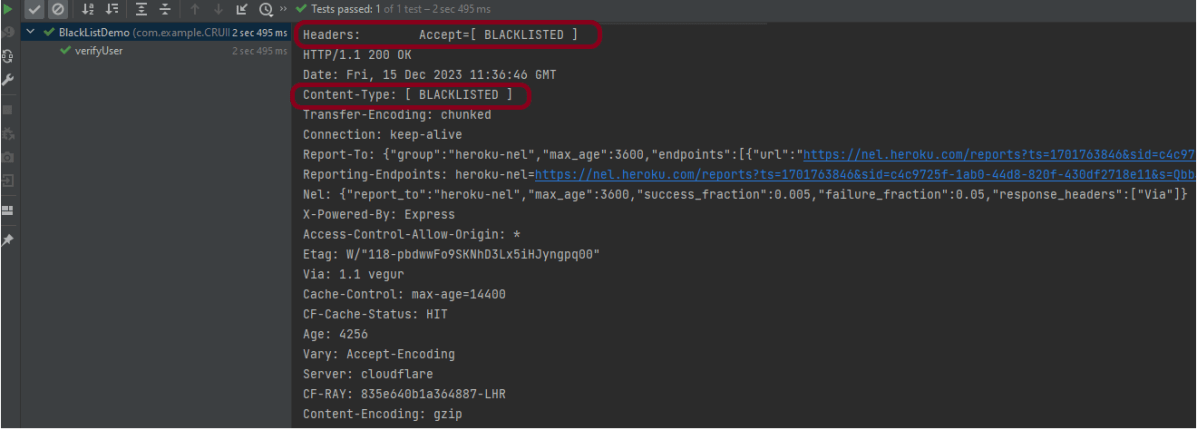
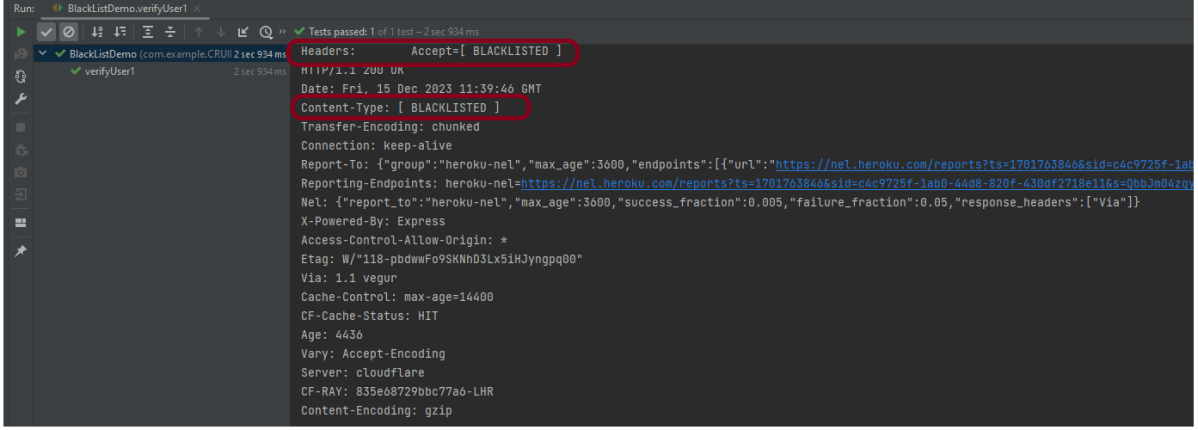
BlackList Request and Response using collection
import io.restassured.RestAssured;
import io.restassured.config.LogConfig;
import org.junit.Test;
import java.util.ArrayList;
import java.util.List;
import static io.restassured.RestAssured.given;
import static org.hamcrest.CoreMatchers.equalTo;

public class BlackListDemo {

    @Test
    public void verifyUser1() {

        List headers = new ArrayList<String>();
        headers.add("Accept");
        headers.add("Content-Type");

        // Given
        given()
                .config(RestAssured.config().logConfig(LogConfig.logConfig().blacklistHeader(headers.toArray(new String[0]))))
                .log().headers()

                // When
                .when()
                .get("https://reqres.in/api/users/2")

                // Then
                .then()
                .statusCode(200).statusLine("HTTP/1.1 200 OK")

                // To verify booking id at index 3
                .body("data.email", equalTo("janet.weaver@reqres.in"))
                .body("data.first_name", equalTo("Janet"))
                .body("data.last_name", equalTo("Weaver")).log().all();
    }

}
The output of the above program is
Congratulations on making it through this tutorial and hope you found it useful! Happy Learning!!
 QA Automation Expert
Great tutorial, thanks for sharing!
I just wanted to point out that in the section “BlackList Request and Response using collection”, the provided code example doesn’t actually use the List that is created:
List headers = new ArrayList<String>();
headers.add(“Accept”);
headers.add(“Content-Type”);
Later, the code calls:
.config(RestAssured.config().logConfig(LogConfig.logConfig().blacklistHeader(“Accept”,”Content-Type”)))
But it doesn’t make sense, to make the example meaningful, it should use the list like this:
.blacklistHeader(headers.toArray(new String[0]))
That way, the list of blacklisted headers is actually applied dynamically.
Just wanted to share this in case others wonder why the List was there but not used 😀
Greetings from Germany!
LikeLike
Thank you for pointing out this. I have updated the code.
LikeLike