Integrate Allure Report with Playwright with Java, Cucumber, and JUnit5

Last Updated On

HOME

In this tutorial, I will explain how to Integrate Allure Report 3 with Playwright, Java Cucumber,  and JUnit5.

Before starting, make sure to install Allure on your machine. Refer to this tutorial to install allure – What is Allure Report?.

Table of Contents

System requirements

  1. Java 17 installed
  2. Maven installed
  3. Eclipse or IntelliJ installed
  4. Allure installed
  5. Browsers on which tests need to be run, like Chrome, Firefox, etc.

Dependency List

  1. Playwright – 1.57.0
  2. Java 17
  3. Cucumber – 7.33.0
  4. Maven – 3.9.6
  5. Allure Report – 2.32.0
  6. Allure Maven – 2.12.0
  7. Aspectj – 1.9.25.1
  8. Maven Compiler Plugin – 3.13.1
  9. Maven Surefire Plugin – 3.5.4

Implementation Steps

Step 1 – Update the Properties section in Maven pom.xml
<properties>
        <project.build.sourceEncoding>UTF-8</project.build.sourceEncoding>
        <java.version>17</java.version>
        <cucumber.version>7.33.0</cucumber.version>
        <playwright.version>1.57.0</playwright.version>
        <lombok.version>1.18.30</lombok.version>
        <junit.platform.version>6.1.0-M1</junit.platform.version>
        <junit.jupiter.api.version>6.1.0-M1</junit.jupiter.api.version>
        <junit.jupiter.params.version>6.1.0-M1</junit.jupiter.params.version>
        <junit.platform.launcher.version>6.1.0-M1</junit.platform.launcher.version>
        <maven.compiler.plugin.version>3.14.1</maven.compiler.plugin.version>
        <maven.compiler.source.version>17</maven.compiler.source.version>
        <maven.compiler.target.version>17</maven.compiler.target.version>
        <maven.surefire.plugin.version>3.5.4</maven.surefire.plugin.version>
        <allure.version>2.32.0</allure.version>
        <aspectj.version>1.9.25.1</aspectj.version>
</properties>

Step 2 – Add dependencies to pom.xml

Add Cucumber, JUnit Platform, Allure-Cucumber, and Allure-JUnit-Platform dependencies to pom.xml (Maven Project).

 <!-- Add allure-bom to dependency management to ensure correct versions of all the dependencies are used -->
    <dependencyManagement>
        <dependencies>
            <dependency>
                <groupId>io.qameta.allure</groupId>
                <artifactId>allure-bom</artifactId>
                <version>${allure.version}</version>
                <type>pom</type>
                <scope>import</scope>
            </dependency>
        </dependencies>
    </dependencyManagement>

    <dependencies>
        <dependency>
            <groupId>com.microsoft.playwright</groupId>
            <artifactId>playwright</artifactId>
            <version>${playwright.version}</version>
        </dependency>

        <!-- JUnit 5 -->
        <dependency>
            <groupId>org.junit.jupiter</groupId>
            <artifactId>junit-jupiter-api</artifactId>
            <version>${junit.jupiter.api.version}</version>
            <scope>test</scope>
        </dependency>

        <dependency>
            <groupId>org.junit.jupiter</groupId>
            <artifactId>junit-jupiter-params</artifactId>
            <version>${junit.jupiter.params.version}</version>
            <scope>test</scope>
        </dependency>

        <dependency>
            <groupId>org.junit.platform</groupId>
            <artifactId>junit-platform-launcher</artifactId>
            <version>${junit.platform.launcher.version}</version>
            <scope>test</scope>
        </dependency>

        <!-- Cucumber with Java -->
        <dependency>
            <groupId>io.cucumber</groupId>
            <artifactId>cucumber-java</artifactId>
            <version>${cucumber.version}</version>
            <scope>test</scope>
        </dependency>

        <!-- Cucumber with Junit5 -->
        <dependency>
            <groupId>io.cucumber</groupId>
            <artifactId>cucumber-junit-platform-engine</artifactId>
            <version>${cucumber.version}</version>
        </dependency>

        <!-- JUnit Platform -->
        <dependency>
            <groupId>org.junit.platform</groupId>
            <artifactId>junit-platform-suite</artifactId>
            <version>${junit.platform.version}</version>
            <scope>test</scope>
        </dependency>

        <dependency>
            <groupId>io.qameta.allure</groupId>
            <artifactId>allure-cucumber7-jvm</artifactId>
            <scope>test</scope>
        </dependency>

        <dependency>
            <groupId>io.qameta.allure</groupId>
            <artifactId>allure-junit-platform</artifactId>
            <scope>test</scope>
        </dependency>

    </dependencies>

Step 3 – Update the Build Section of pom.xml in the Allure Report Project
<build>
        <plugins>
            <plugin>
                <groupId>org.apache.maven.plugins</groupId>
                <artifactId>maven-compiler-plugin</artifactId>
                <version>${maven.compiler.plugin.version}</version>
                <configuration>
                    <source>${maven.compiler.source.version}</source>
                    <target>${maven.compiler.target.version}</target>
                </configuration>
            </plugin>

            <plugin>
                <groupId>org.apache.maven.plugins</groupId>
                <artifactId>maven-surefire-plugin</artifactId>
                <version>${maven.surefire.plugin.version}</version>
                <configuration>
                    <argLine>
                        -javaagent:"${settings.localRepository}/org/aspectj/aspectjweaver/${aspectj.version}/aspectjweaver-${aspectj.version}.jar"
                    </argLine>
                </configuration>
                <dependencies>
                    <dependency>
                        <groupId>org.aspectj</groupId>
                        <artifactId>aspectjweaver</artifactId>
                        <version>${aspectj.version}</version>
                    </dependency>
                </dependencies>
            </plugin>
        </plugins>
    </build>

<project xmlns="http://maven.apache.org/POM/4.0.0" xmlns:xsi="http://www.w3.org/2001/XMLSchema-instance"
         xsi:schemaLocation="http://maven.apache.org/POM/4.0.0 http://maven.apache.org/xsd/maven-4.0.0.xsd">
    <modelVersion>4.0.0</modelVersion>

    <groupId>com.example</groupId>
    <artifactId>Cucumber_Playwright_JUnit5</artifactId>
    <version>1.0-SNAPSHOT</version>
    <packaging>jar</packaging>

    <name>Cucumber_Playwright_JUnit5</name>
    <url>http://maven.apache.org</url>

    <properties>
        <project.build.sourceEncoding>UTF-8</project.build.sourceEncoding>
        <java.version>17</java.version>
        <cucumber.version>7.33.0</cucumber.version>
        <playwright.version>1.57.0</playwright.version>
        <lombok.version>1.18.30</lombok.version>
        <junit.platform.version>6.1.0-M1</junit.platform.version>
        <junit.jupiter.api.version>6.1.0-M1</junit.jupiter.api.version>
        <junit.jupiter.params.version>6.1.0-M1</junit.jupiter.params.version>
        <junit.platform.launcher.version>6.1.0-M1</junit.platform.launcher.version>
        <maven.compiler.plugin.version>3.14.1</maven.compiler.plugin.version>
        <maven.compiler.source.version>17</maven.compiler.source.version>
        <maven.compiler.target.version>17</maven.compiler.target.version>
        <maven.surefire.plugin.version>3.5.4</maven.surefire.plugin.version>
        <allure.version>2.32.0</allure.version>
        <aspectj.version>1.9.25.1</aspectj.version>
    </properties>

    <!-- Add allure-bom to dependency management to ensure correct versions of all the dependencies are used -->
    <dependencyManagement>
        <dependencies>
            <dependency>
                <groupId>io.qameta.allure</groupId>
                <artifactId>allure-bom</artifactId>
                <version>${allure.version}</version>
                <type>pom</type>
                <scope>import</scope>
            </dependency>
        </dependencies>
    </dependencyManagement>

    <dependencies>
        <dependency>
            <groupId>com.microsoft.playwright</groupId>
            <artifactId>playwright</artifactId>
            <version>${playwright.version}</version>
        </dependency>

        <!-- JUnit 5 -->
        <dependency>
            <groupId>org.junit.jupiter</groupId>
            <artifactId>junit-jupiter-api</artifactId>
            <version>${junit.jupiter.api.version}</version>
            <scope>test</scope>
        </dependency>

        <dependency>
            <groupId>org.junit.jupiter</groupId>
            <artifactId>junit-jupiter-params</artifactId>
            <version>${junit.jupiter.params.version}</version>
            <scope>test</scope>
        </dependency>

        <dependency>
            <groupId>org.junit.platform</groupId>
            <artifactId>junit-platform-launcher</artifactId>
            <version>${junit.platform.launcher.version}</version>
            <scope>test</scope>
        </dependency>

        <!-- Cucumber with Java -->
        <dependency>
            <groupId>io.cucumber</groupId>
            <artifactId>cucumber-java</artifactId>
            <version>${cucumber.version}</version>
            <scope>test</scope>
        </dependency>

        <!-- Cucumber with Junit5 -->
        <dependency>
            <groupId>io.cucumber</groupId>
            <artifactId>cucumber-junit-platform-engine</artifactId>
            <version>${cucumber.version}</version>
        </dependency>

        <!-- JUnit Platform -->
        <dependency>
            <groupId>org.junit.platform</groupId>
            <artifactId>junit-platform-suite</artifactId>
            <version>${junit.platform.version}</version>
            <scope>test</scope>
        </dependency>

        <dependency>
            <groupId>io.qameta.allure</groupId>
            <artifactId>allure-cucumber7-jvm</artifactId>
            <scope>test</scope>
        </dependency>

        <dependency>
            <groupId>io.qameta.allure</groupId>
            <artifactId>allure-junit-platform</artifactId>
            <scope>test</scope>
        </dependency>

    </dependencies>

    <build>
        <plugins>
            <plugin>
                <groupId>org.apache.maven.plugins</groupId>
                <artifactId>maven-compiler-plugin</artifactId>
                <version>${maven.compiler.plugin.version}</version>
                <configuration>
                    <source>${maven.compiler.source.version}</source>
                    <target>${maven.compiler.target.version}</target>
                </configuration>
            </plugin>

            <plugin>
                <groupId>org.apache.maven.plugins</groupId>
                <artifactId>maven-surefire-plugin</artifactId>
                <version>${maven.surefire.plugin.version}</version>
                <configuration>
                    <argLine>
                        -javaagent:"${settings.localRepository}/org/aspectj/aspectjweaver/${aspectj.version}/aspectjweaver-${aspectj.version}.jar"
                    </argLine>
                </configuration>
                <dependencies>
                    <dependency>
                        <groupId>org.aspectj</groupId>
                        <artifactId>aspectjweaver</artifactId>
                        <version>${aspectj.version}</version>
                    </dependency>
                </dependencies>
            </plugin>
        </plugins>
    </build>
</project>

2. Create a Feature file

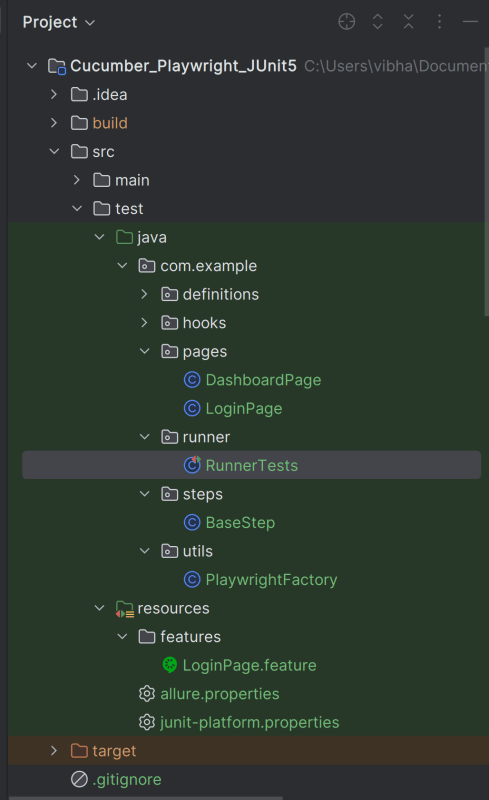
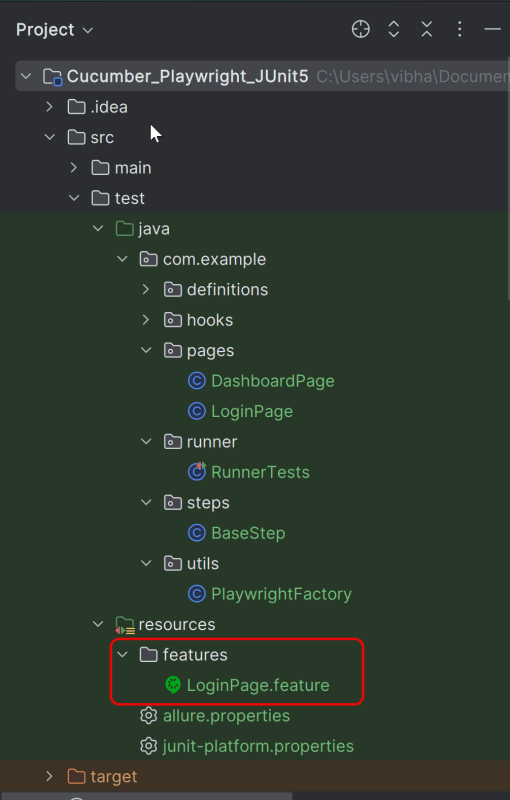
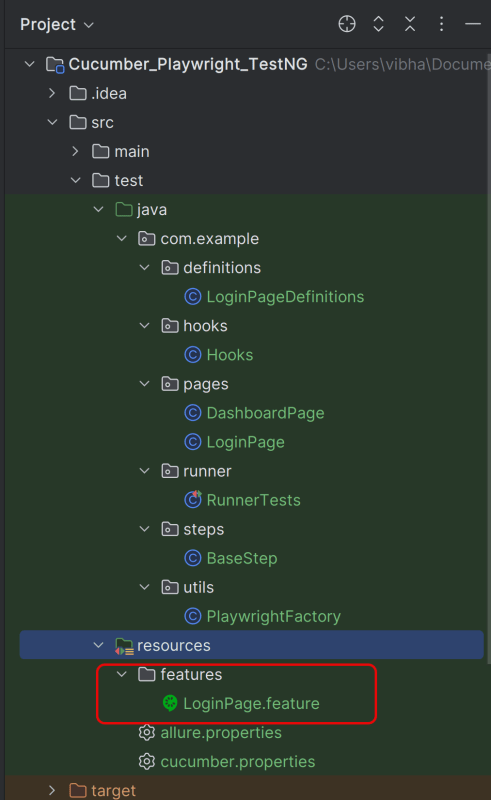
Create a folder – features within src/test/resources to create test scenarios in the Feature file.

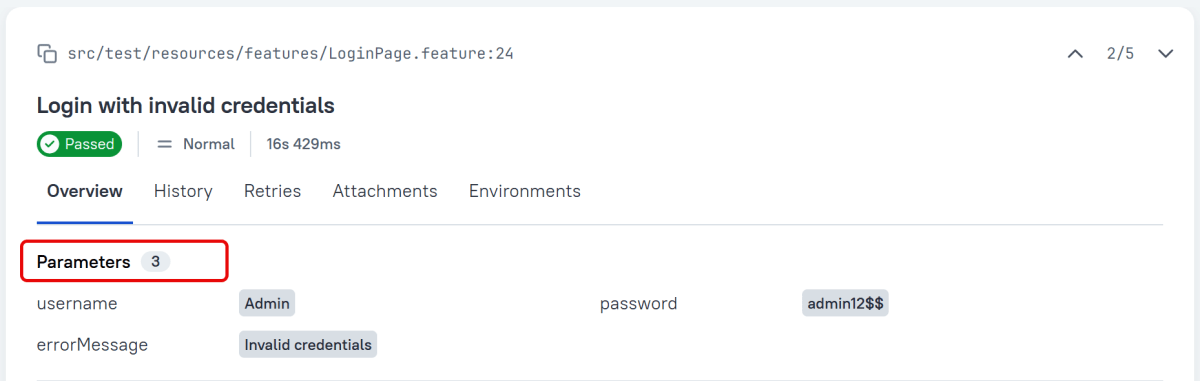
Feature file should be saved as an extension of .feature. Add the test scenarios in this feature file. I have added sample test scenarios. In this feature file. The test scenarios are written in Gherkins language.

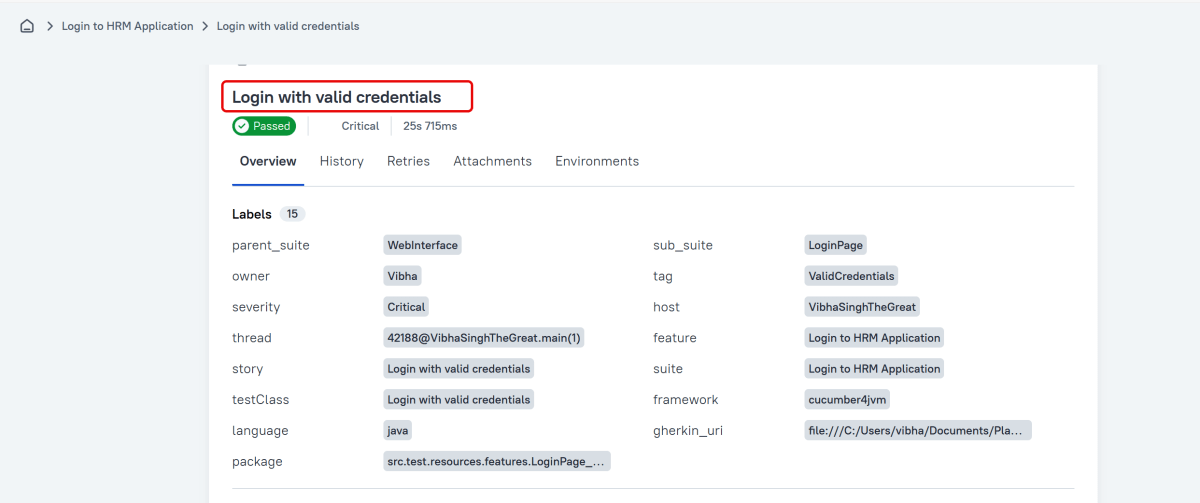
@allure.label.parent_suite:WebInterface
@allure.label.sub_suite:Login Page
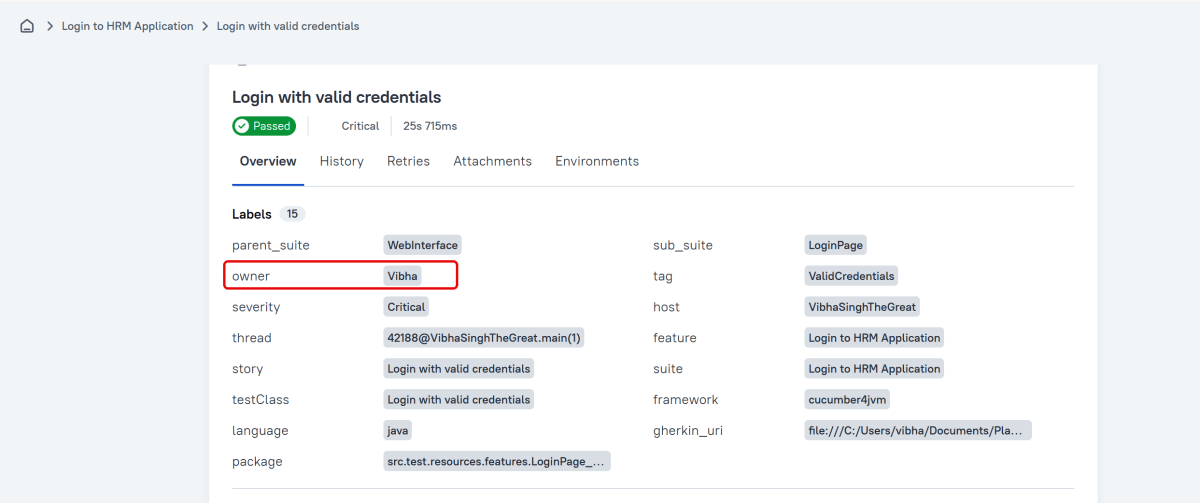
@allure.label.owner:Vibha

Feature: Login to HRM Application

  Background:
    Given User is on HRMLogin page "https://opensource-demo.orangehrmlive.com/"

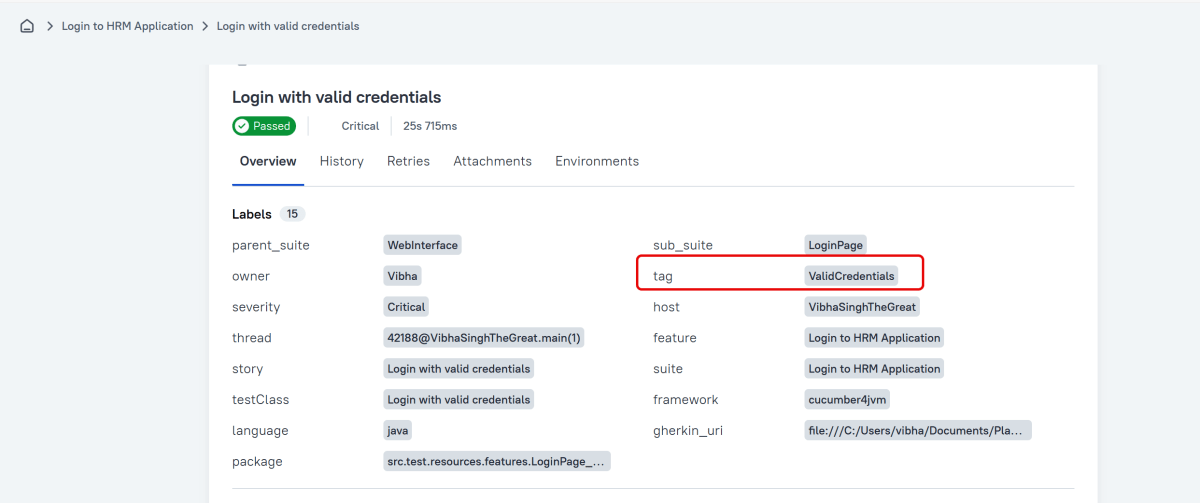
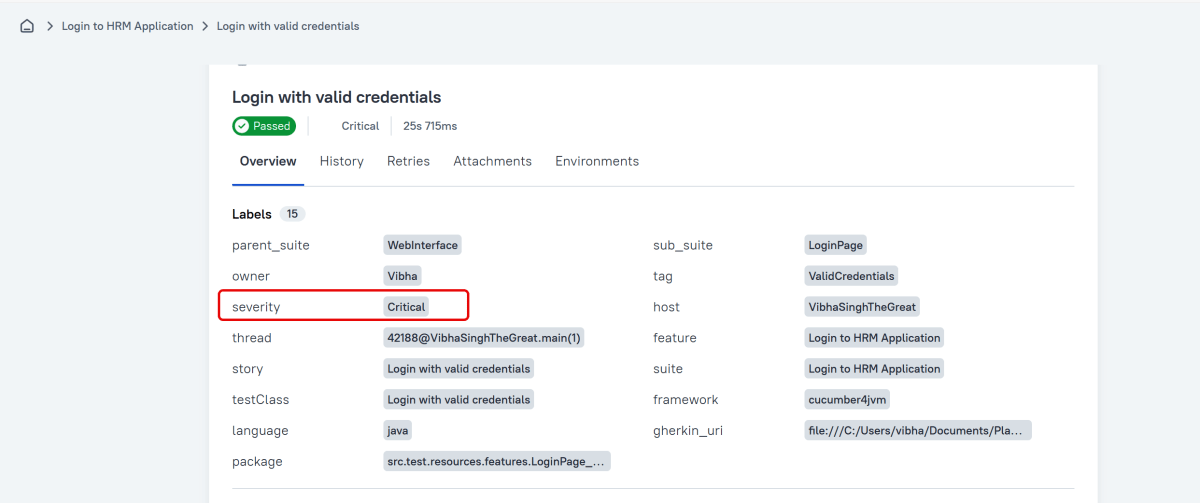
  @ValidCredentials @Critical
  Scenario: Login with valid credentials

    When User enters username as "Admin" and password as "admin123"
    Then User should be able to login successfully and new page opens with heading "Dashboard"

  @InvalidCredentials @High
  Scenario Outline: Login with invalid credentials

    When User enters username as "<username>" and password as "<password>"
    Then User should be able to see error message "<errorMessage>"

    Examples:
      | username   | password  | errorMessage           |
      | Admin      | admin12$$ | Invalid credentials    |
      | admin$$    | admin123  | Invalid credentials    |
      | abc123     | xyz$$     | Invalid credentials    |

  @MissingUsername @Medium
  Scenario: Login with blank username

    When User enters username as " " and password as "admin123"
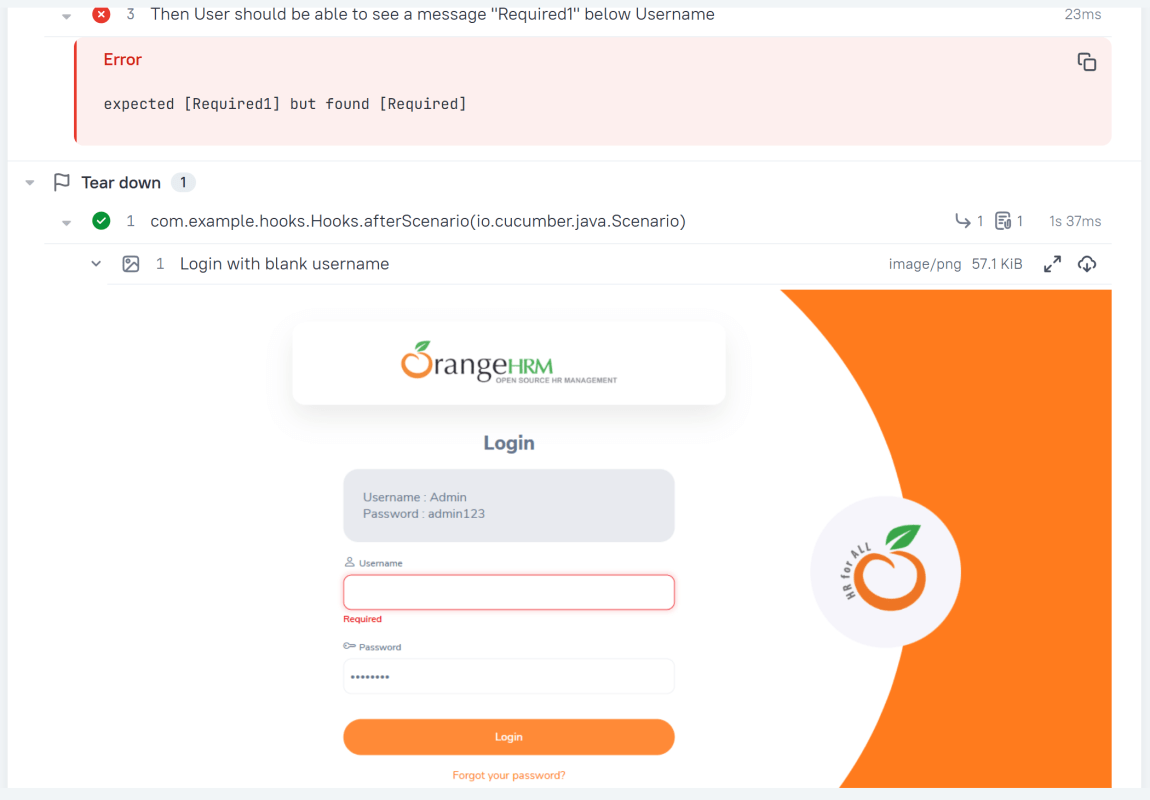
    Then User should be able to see a message "Required1" below Username

7. Create the step definition class in src/test/java

8. Create a JUnit Cucumber Runner class

This JUnit 5 runner configures and launches Cucumber scenarios by selecting feature files, defining glue code packages, and executing them via the Cucumber engine on the JUnit Platform.

import static io.cucumber.junit.platform.engine.Constants.GLUE_PROPERTY_NAME;

import org.junit.platform.suite.api.ConfigurationParameter;
import org.junit.platform.suite.api.IncludeEngines;
import org.junit.platform.suite.api.SelectClasspathResource;
import org.junit.platform.suite.api.Suite;

@Suite
@IncludeEngines("cucumber")
@SelectClasspathResource("features")
@ConfigurationParameter(
        key = GLUE_PROPERTY_NAME,
        value = "com.example"
)


public class RunnerTests {
}

cucumber.publish.enabled=true
cucumber.plugin=io.qameta.allure.cucumber7jvm.AllureCucumber7Jvm
#allure.properties
allure.results.directory=build/allure-results

11. Run the Test and Generate Allure Report

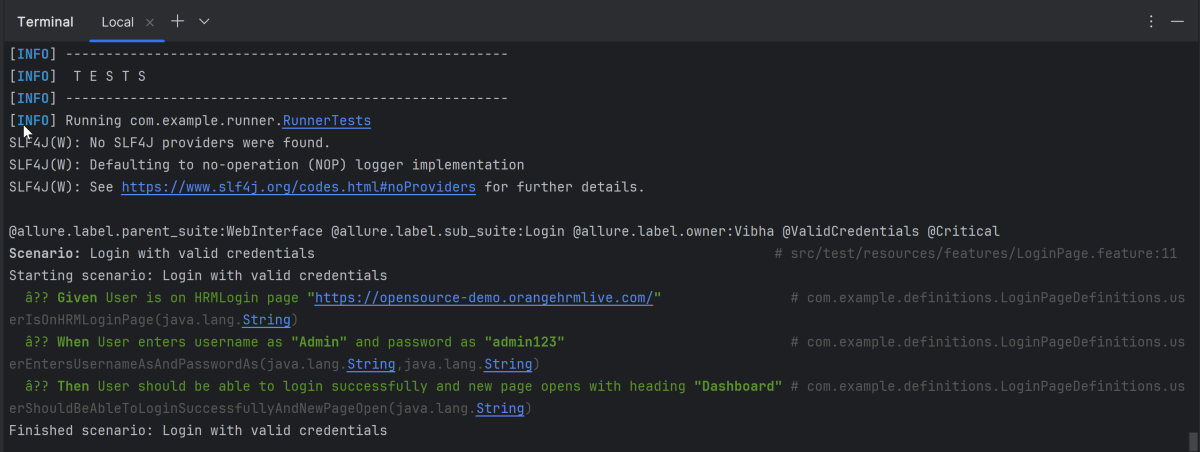
To run the tests, use the below command

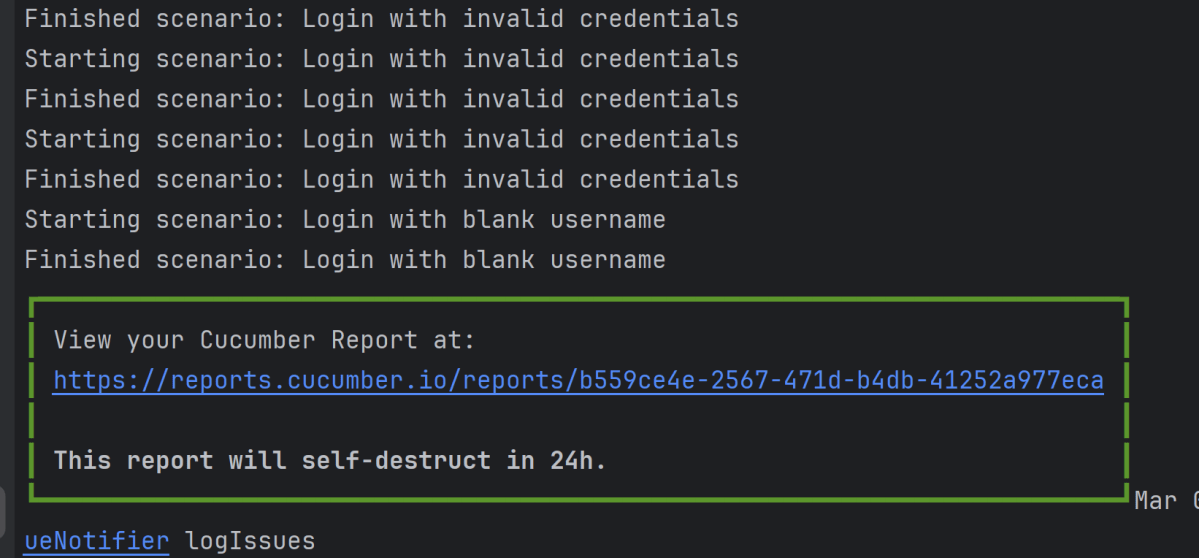
mvn clean test

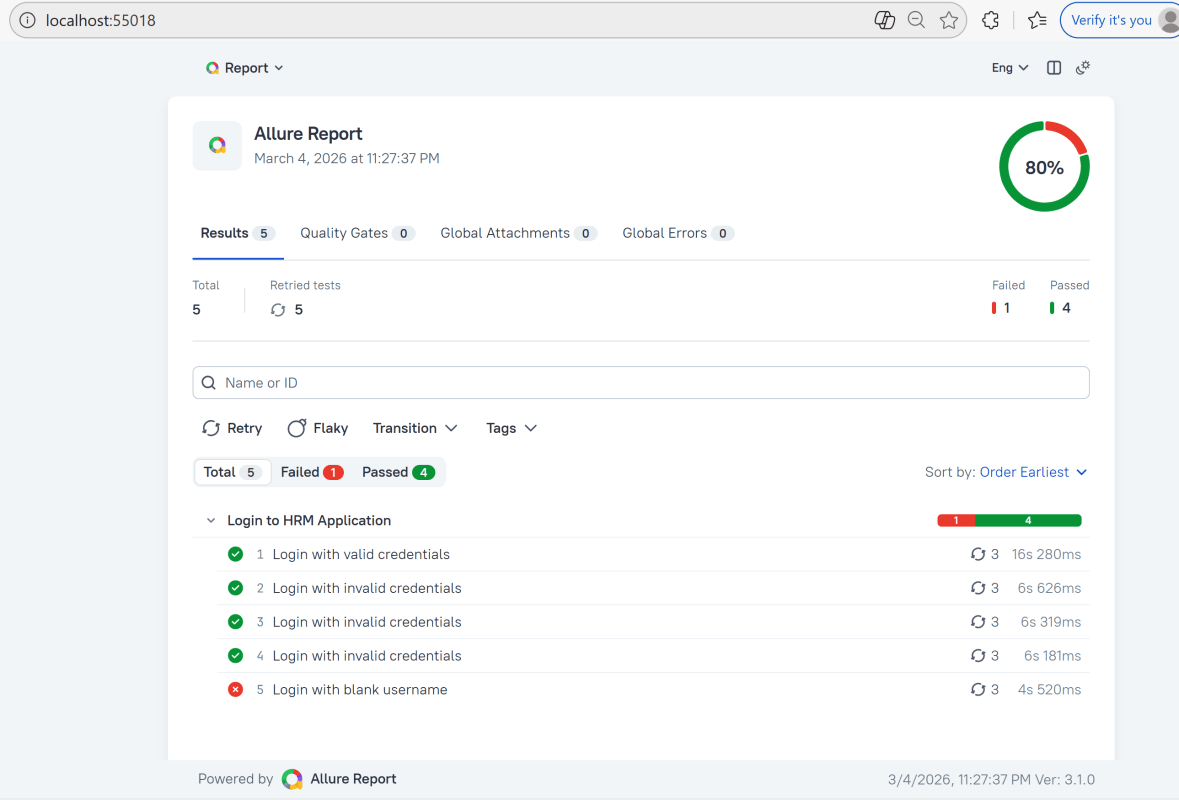
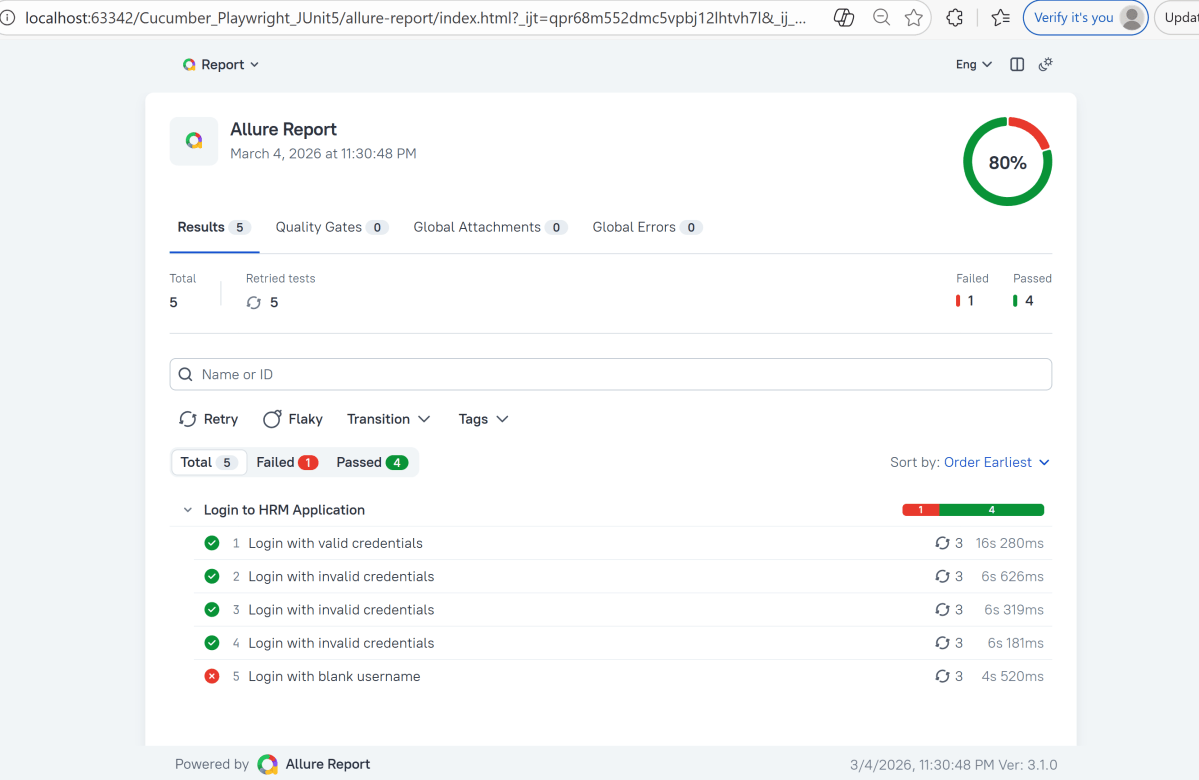
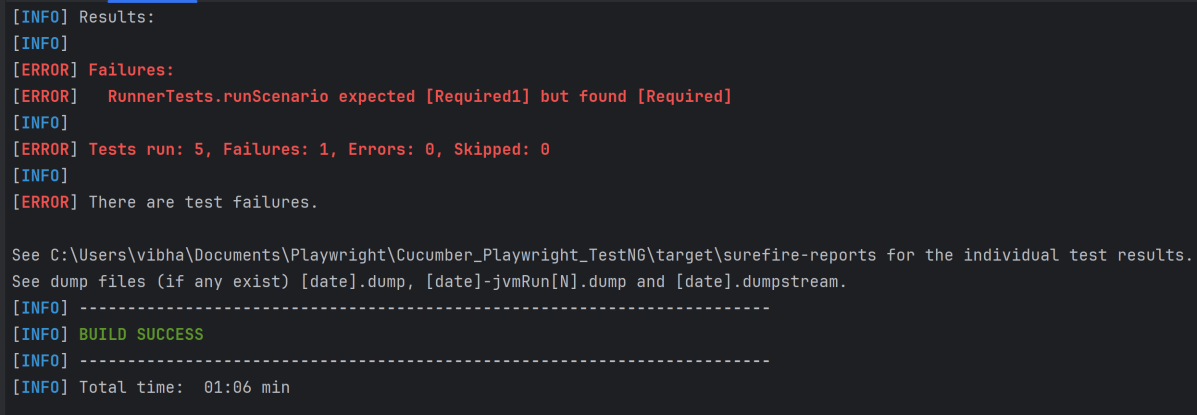
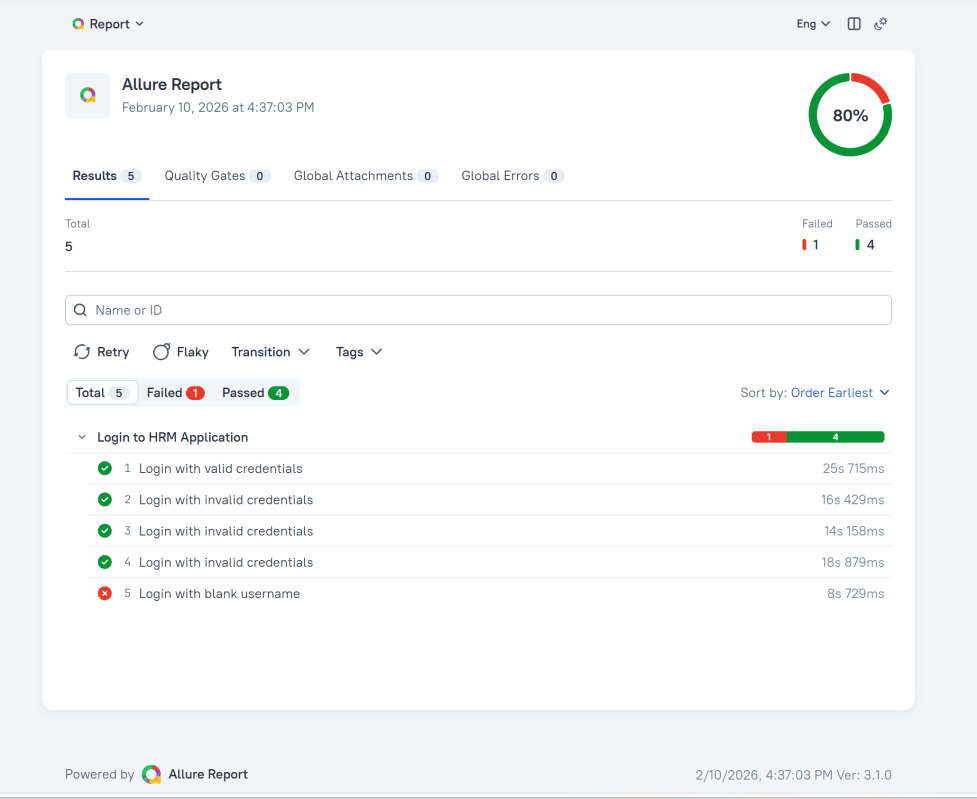
In the image below, we can see that one test failed and four passed out of five tests.

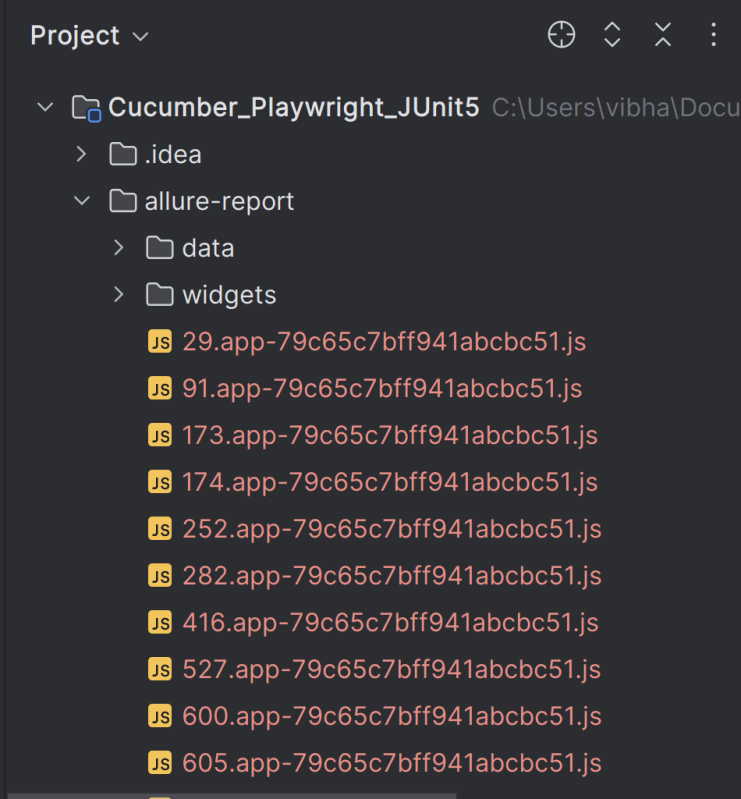
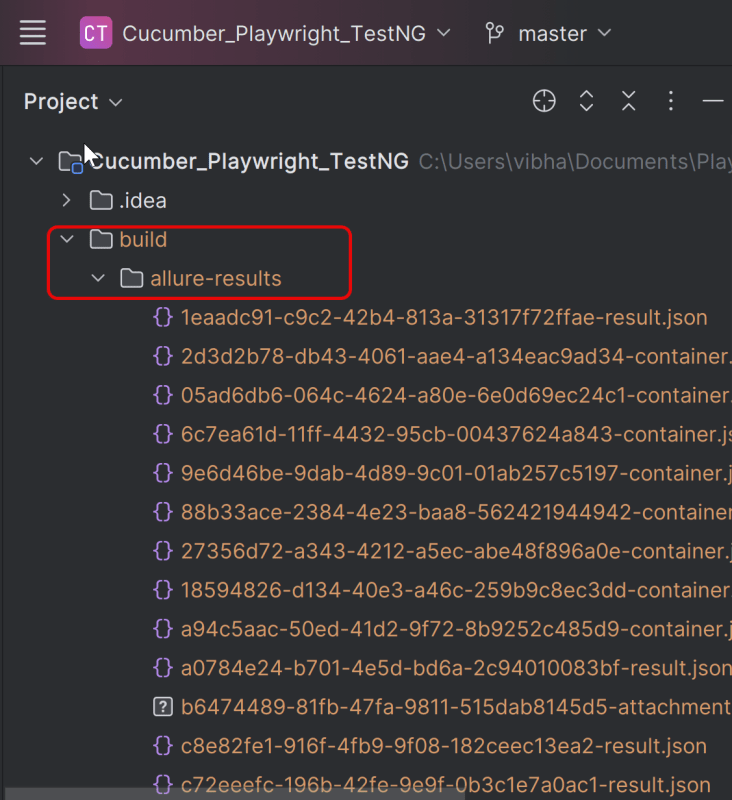
This will create the allure-results folder with all the test reports within build folder. These files will be used to generate Allure Report.

12. How to Generate a Report

Use the command below to generate the Allure Report

 allure serve build/allure-results

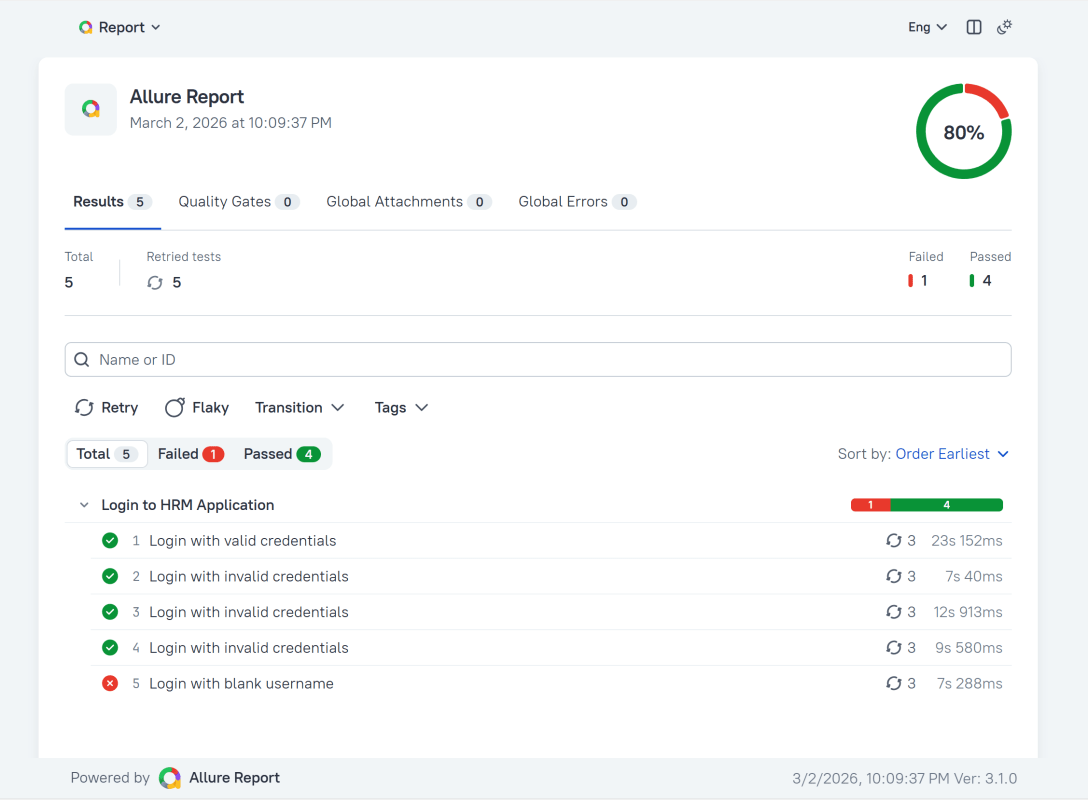
This will generate the beautiful Allure Test Report as shown below.

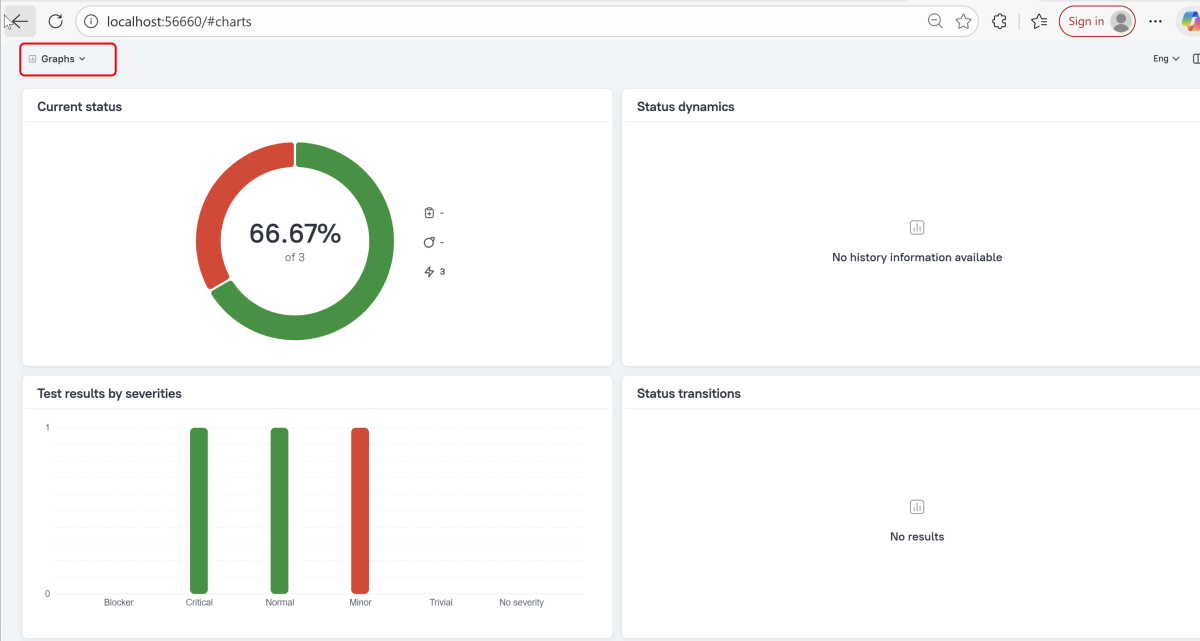
Graphs in Allure Report

Graphs allow you to see different statistics collected from the test data: status breakdown or severity and duration diagrams.

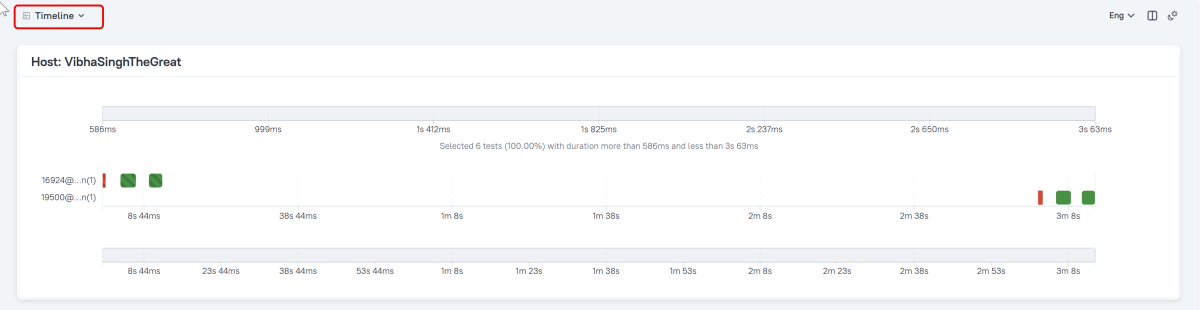
Timeline in Allure Report

The timeline tab visualizes retrospective test execution, allure adaptors collect precise timings of tests, and here on this tab, they are arranged accordingly to their sequential or parallel timing structure.

 allure awesome build/allure-results

Congratulations!! We have integrated an allure report with Playwright, Java Cucumber, and TestNG. I hope this tutorial is useful to you.

Additional Tutorials on Allure Reports

Integration of Allure Report with Selenium and JUnit4
Integration of Allure Report with Selenium and TestNG
Gradle – Allure Report for Selenium and JUnit4
Gradle – Allure Report for Cucumber, Selenium and TestNG
Integration of Allure Report with Rest Assured and JUnit4

Integrate Allure Report with Playwright with Java, Cucumber, and TestNG

Last Updated On

HOME

In this tutorial, I will explain how to Integrate Allure Report 3 with Playwright, Java Cucumber,  and TestNG.

Before starting, make sure to install Allure on your machine. Refer to this tutorial to install allure – What is Allure Report?.

Table of Contents

System requirements

  1. Java 17 installed
  2. Maven installed
  3. Eclipse or IntelliJ installed
  4. Allure installed
  5. Browsers on which tests need to be run, like Chrome, Firefox, etc.

Dependency List

  1. Playwright – 1.57.0
  2. Java 17
  3. Cucumber – 7.33.0
  4. Maven – 3.9.6
  5. TestNG – 7.11.0
  6. Allure Report – 2.32.0
  7. Aspectj – 1.9.25.1
  8. Maven Compiler Plugin – 3.13.0
  9. Maven Surefire Plugin – 3.5.4

Implementation Steps

Step 1 – Update the Properties section in Maven pom.xml
 <properties>
        <project.build.sourceEncoding>UTF-8</project.build.sourceEncoding>
        <playwright.version>1.57.0</playwright.version>
        <testng.version>7.11.0</testng.version>
        <allure.version>2.32.0</allure.version>
        <aspectj.version>1.9.25</aspectj.version>
        <maven.compiler.plugin.version>3.13.0</maven.compiler.plugin.version>
        <maven.compiler.source.version>17</maven.compiler.source.version>
        <maven.compiler.target.version>17</maven.compiler.target.version>
        <maven.surefire.plugin.version>3.5.4</maven.surefire.plugin.version>
</properties>

Step 2 – Add dependencies to pom.xml

Add Cucumber, TestNG, Allure-Cucumber, and Allure-TestNG dependencies to pom.xml (Maven Project).

  <!-- Add allure-bom to dependency management to ensure correct versions of all the dependencies are used -->
  <dependencyManagement>
    <dependencies>
      <dependency>
        <groupId>io.qameta.allure</groupId>
        <artifactId>allure-bom</artifactId>
        <version>${allure.version}</version>
        <type>pom</type>
        <scope>import</scope>
      </dependency>
    </dependencies>
  </dependencyManagement>

  <dependencies>

    <!-- Cucumber with Java -->
    <dependency>
      <groupId>io.cucumber</groupId>
      <artifactId>cucumber-java</artifactId>
      <version>${cucumber.version}</version>
      <scope>test</scope>
    </dependency>

    <!-- Cucumber with TestNG -->
    <dependency>
      <groupId>io.cucumber</groupId>
      <artifactId>cucumber-testng</artifactId>
      <version>${cucumber.version}</version>
      <scope>test</scope>
    </dependency>

    <!-- TestNG -->
    <dependency>
      <groupId>org.testng</groupId>
      <artifactId>testng</artifactId>
      <version>${testng.version}</version>
      <scope>test</scope>
    </dependency>

    <!-- Playwright -->
    <dependency>
      <groupId>com.microsoft.playwright</groupId>
      <artifactId>playwright</artifactId>
      <version>${playwright.version}</version>
    </dependency>

    <!-- Add necessary Allure dependencies -->
      <dependency>
        <groupId>io.qameta.allure</groupId>
        <artifactId>allure-cucumber7-jvm</artifactId>
        <scope>test</scope>
      </dependency>

      <dependency>
        <groupId>io.qameta.allure</groupId>
        <artifactId>allure-testng</artifactId>
        <scope>test</scope>
      </dependency>
    
  </dependencies>

Step 3 – Update the Build Section of pom.xml in the Allure Report Project
<build>
    <plugins>
      <plugin>
        <groupId>org.apache.maven.plugins</groupId>
        <artifactId>maven-compiler-plugin</artifactId>
        <version>${maven.compiler.plugin.version}</version>
        <configuration>
          <source>${maven.compiler.source.version}</source>
          <target>${maven.compiler.target.version}</target>
        </configuration>
      </plugin>
      <plugin>
        <groupId>org.apache.maven.plugins</groupId>
        <artifactId>maven-surefire-plugin</artifactId>
        <version>${maven.surefire.plugin.version}</version>
        <configuration>
          <suiteXmlFiles>
            <suiteXmlFile>testng.xml</suiteXmlFile>
          </suiteXmlFiles>
          <argLine>
            -javaagent:"${settings.localRepository}/org/aspectj/aspectjweaver/${aspectj.version}/aspectjweaver-${aspectj.version}.jar"
          </argLine>
        </configuration>
        <dependencies>
          <dependency>
            <groupId>org.aspectj</groupId>
            <artifactId>aspectjweaver</artifactId>
            <version>${aspectj.version}</version>
            <scope>runtime</scope>
          </dependency>
        </dependencies>
      </plugin>
      <plugin>
        <groupId>io.qameta.allure</groupId>
        <artifactId>allure-maven</artifactId>
        <version>${allure.maven}</version>
        <configuration>
          <reportVersion>${allure.maven}</reportVersion>
        </configuration>
      </plugin>
    </plugins>
  </build>

<project xmlns="http://maven.apache.org/POM/4.0.0" xmlns:xsi="http://www.w3.org/2001/XMLSchema-instance"
         xsi:schemaLocation="http://maven.apache.org/POM/4.0.0 http://maven.apache.org/xsd/maven-4.0.0.xsd">
    <modelVersion>4.0.0</modelVersion>

    <groupId>com.example</groupId>
    <artifactId>Playwright_PageObjectModel</artifactId>
    <version>1.0-SNAPSHOT</version>
    <packaging>jar</packaging>

    <name>Playwright_PageObjectModel</name>
    <url>http://maven.apache.org</url>

    <properties>
        <project.build.sourceEncoding>UTF-8</project.build.sourceEncoding>
        <playwright.version>1.57.0</playwright.version>
        <testng.version>7.11.0</testng.version>
        <allure.version>2.32.0</allure.version>
        <aspectj.version>1.9.25</aspectj.version>
        <maven.compiler.plugin.version>3.13.0</maven.compiler.plugin.version>
        <maven.compiler.source.version>17</maven.compiler.source.version>
        <maven.compiler.target.version>17</maven.compiler.target.version>
        <maven.surefire.plugin.version>3.5.4</maven.surefire.plugin.version>
    </properties>

    <!-- Add allure-bom to dependency management to ensure correct versions of all the dependencies are used -->
    <dependencyManagement>
        <dependencies>
            <dependency>
                <groupId>io.qameta.allure</groupId>
                <artifactId>allure-bom</artifactId>
                <version>${allure.version}</version>
                <type>pom</type>
                <scope>import</scope>
            </dependency>
        </dependencies>
    </dependencyManagement>

    <dependencies>

        <!-- Playwright -->
        <dependency>
            <groupId>com.microsoft.playwright</groupId>
            <artifactId>playwright</artifactId>
            <version>${playwright.version}</version>
        </dependency>

        <!-- TestNG -->
        <dependency>
            <groupId>org.testng</groupId>
            <artifactId>testng</artifactId>
            <version>${testng.version}</version>
            <scope>test</scope>
        </dependency>

        <!-- Allure-TestNG -->
        <dependency>
            <groupId>io.qameta.allure</groupId>
            <artifactId>allure-testng</artifactId>
            <scope>test</scope>
        </dependency>

    </dependencies>

    <build>
        <plugins>
            <plugin>
                <groupId>org.apache.maven.plugins</groupId>
                <artifactId>maven-compiler-plugin</artifactId>
                <version>${maven.compiler.plugin.version}</version>
                <configuration>
                    <source>${maven.compiler.source.version}</source>
                    <target>${maven.compiler.target.version}</target>
                </configuration>
            </plugin>
            <plugin>
                <groupId>org.apache.maven.plugins</groupId>
                <artifactId>maven-surefire-plugin</artifactId>
                <version>${maven.surefire.plugin.version}</version>
                <configuration>
                    <suiteXmlFiles>
                        <suiteXmlFile>testng.xml</suiteXmlFile>
                    </suiteXmlFiles>
                    <argLine>
                        -javaagent:"${settings.localRepository}/org/aspectj/aspectjweaver/${aspectj.version}/aspectjweaver-${aspectj.version}.jar"
                    </argLine>
                </configuration>
                <dependencies>
                    <dependency>
                        <groupId>org.aspectj</groupId>
                        <artifactId>aspectjweaver</artifactId>
                        <version>${aspectj.version}</version>
                    </dependency>
                </dependencies>
            </plugin>
        </plugins>
    </build>
</project>


2. Create a Feature file

Create a folder – features within src/test/resources to create test scenarios in the Feature file.

Feature file should be saved as an extension of .feature. Add the test scenarios in this feature file. I have added sample test scenarios. In this feature file. The test scenarios are written in Gherkins language.

@allure.label.parent_suite:WebInterface
@allure.label.sub_suite:Login Page
@allure.label.owner:Vibha

Feature: Login to HRM Application

  Background:
    Given User is on HRMLogin page "https://opensource-demo.orangehrmlive.com/"

  @ValidCredentials @Critical
  Scenario: Login with valid credentials

    When User enters username as "Admin" and password as "admin123"
    Then User should be able to login successfully and new page opens with heading "Dashboard"

  @InvalidCredentials @High
  Scenario Outline: Login with invalid credentials

    When User enters username as "<username>" and password as "<password>"
    Then User should be able to see error message "<errorMessage>"

    Examples:
      | username   | password  | errorMessage           |
      | Admin      | admin12$$ | Invalid credentials    |
      | admin$$    | admin123  | Invalid credentials    |
      | abc123     | xyz$$     | Invalid credentials    |

  @MissingUsername @Medium
  Scenario: Login with blank username

    When User enters username as " " and password as "admin123"
    Then User should be able to see a message "Required1" below Username

7. Create the step definition class in src/test/java

8. Create a TestNG Cucumber Runner class

We need to create a class called Runner class to run the tests. This class will use the TestNG annotation @Test, which tells TestNG what is the test runner class.

package com.example.runner;

import io.cucumber.testng.AbstractTestNGCucumberTests;
import io.cucumber.testng.CucumberOptions;

@CucumberOptions(features = "src/test/resources/features/LoginPage.feature",
        glue = {"com.example.hooks","com.example.definitions"},
        plugin = { "io.qameta.allure.cucumber7jvm.AllureCucumber7Jvm",
                "pretty",
        }
)

public class RunnerTests extends AbstractTestNGCucumberTests {

}

Note:- @Test annotation marks this class as part of the test. So, if we will remove this annotation, the Allure Report executes CucumberRunnerTests as a separate test suite, so there will be duplicate results.

9. Create testng.xml for the project

<?xml version = "1.0"encoding = "UTF-8"?>
<!DOCTYPE suite SYSTEM "http://testng.org/testng-1.0.dtd">
<suite name = "Suite1">
    <test name = "Test Demo">
        <classes>
            <class name = "com.example.runner.CucumberRunnerTests"/>
        </classes>
    </test>
</suite>

#allure.properties
allure.results.directory=build/allure-results

11. Run the Test and Generate Allure Report

To run the tests, use the below command

mvn clean test

In the image below, we can see that one test failed and four passed out of five tests.

This will create the allure-results folder with all the test reports within build folder. These files will be used to generate Allure Report.

12. How to Generate a Report

Use the command below to generate the Allure Report

 allure serve build/allure-results

This will generate the beautiful Allure Test Report as shown below.

Graphs in Allure Report

Graphs allow you to see different statistics collected from the test data: status breakdown or severity and duration diagrams.

Timeline in Allure Report

The timeline tab visualizes retrospective test execution, allure adaptors collect precise timings of tests, and here on this tab, they are arranged accordingly to their sequential or parallel timing structure.

 allure awesome build/allure-results

Congratulations!! We have integrated an allure report with Playwright, Java Cucumber, and TestNG. I hope this tutorial is useful to you.

Additional Tutorials on Allure Reports

Integration of Allure Report with Selenium and JUnit4
Integration of Allure Report with Selenium and TestNG
Gradle – Allure Report for Selenium and JUnit4
Gradle – Allure Report for Cucumber, Selenium and TestNG
Integration of Allure Report with Rest Assured and JUnit4

Integrate Allure Report with Playwright with Java and JUnit5

Last Updated On

HOME

In this tutorial, I will explain how to Integrate Allure Report 3 with Playwright, Java and JUnit5.

Refer to this tutorial to install allure – What is Allure Report?.

Table of Contents

System requirements

  1. Java 17 installed
  2. Maven installed
  3. Eclipse or IntelliJ installed
  4. Allure installed
  5. Browsers on which tests need to be run, like Chrome, Firefox, etc.

Dependency List

  1. Playwright – 1.57.0
  2. Java 17
  3. Maven – 3.9.6
  4. Allure Report – 2.32.0
  5. Aspectj – 1.9.25
  6. Maven Compiler Plugin – 3.13.0
  7. Maven Surefire Plugin – 3.5.4

Implementation Steps

Step 1 – Update the Properties section in Maven pom.xml
<properties>
    <project.build.sourceEncoding>UTF-8</project.build.sourceEncoding>
    <playwright.version>1.57.0</playwright.version>
    <junit.jupiter.engine.version>6.1.0-M1</junit.jupiter.engine.version>
    <junit.jupiter.api.version>6.1.0-M1</junit.jupiter.api.version>
    <junit.jupiter.params.version>6.1.0-M1</junit.jupiter.params.version>
    <junit.platform.launcher.version>6.1.0-M1</junit.platform.launcher.version>
    <maven.compiler.plugin.version>3.14.1</maven.compiler.plugin.version>
    <maven.compiler.source.version>17</maven.compiler.source.version>
    <maven.compiler.target.version>17</maven.compiler.target.version>
    <maven.surefire.plugin.version>3.5.4</maven.surefire.plugin.version>
    <maven.compiler.source>17</maven.compiler.source>
    <maven.compiler.target>17</maven.compiler.target>
    <maven.site.plugin.version>4.0.0-M16</maven.site.plugin.version>
    <allure.version>2.32.0</allure.version>
    <aspectj.version>1.9.25.1</aspectj.version>
  </properties>

Step 2 – Add dependencies to pom.xml

Add Playwright, JUnit Jupiter Engine, JUnit Jupiter API, JUnit Param, JUnit Platform and Allure-JUnit5 dependencies to pom.xml (Maven Project).

 <dependencyManagement>
      <dependencies>
        <dependency>
          <groupId>io.qameta.allure</groupId>
          <artifactId>allure-bom</artifactId>
          <version>${allure.version}</version>
          <type>pom</type>
          <scope>import</scope>
        </dependency>
      </dependencies>
    </dependencyManagement>

  <dependencies>

    <dependency>
      <groupId>com.microsoft.playwright</groupId>
      <artifactId>playwright</artifactId>
      <version>${playwright.version}</version>
    </dependency>

    <dependency>
      <groupId>org.junit.jupiter</groupId>
      <artifactId>junit-jupiter-engine</artifactId>
      <version>${junit.jupiter.engine.version}</version>
      <scope>test</scope>
    </dependency>

    <dependency>
      <groupId>org.junit.jupiter</groupId>
      <artifactId>junit-jupiter-api</artifactId>
      <version>${junit.jupiter.api.version}</version>
      <scope>test</scope>
    </dependency>

    <dependency>
      <groupId>org.junit.jupiter</groupId>
      <artifactId>junit-jupiter-params</artifactId>
      <version>${junit.jupiter.params.version}</version>
      <scope>test</scope>
    </dependency>

    <dependency>
      <groupId>org.junit.platform</groupId>
      <artifactId>junit-platform-launcher</artifactId>
      <version>${junit.platform.launcher.version}</version>
      <scope>test</scope>
    </dependency>

    <dependency>
      <groupId>io.qameta.allure</groupId>
      <artifactId>allure-junit5</artifactId>
      <scope>test</scope>
    </dependency>

  </dependencies>

Step 3 – Update the Build Section of pom.xml in the Allure Report Project
 <build>
    <plugins>
      <plugin>
        <groupId>org.apache.maven.plugins</groupId>
        <artifactId>maven-compiler-plugin</artifactId>
        <version>${maven.compiler.plugin.version}</version>
        <configuration>
          <source>${maven.compiler.source.version}</source>
          <target>${maven.compiler.target.version}</target>
        </configuration>
      </plugin>

      <plugin>
        <groupId>org.apache.maven.plugins</groupId>
        <artifactId>maven-surefire-plugin</artifactId>
        <version>${maven.surefire.plugin.version}</version>
        <configuration>
          <argLine>
            -javaagent:"${settings.localRepository}/org/aspectj/aspectjweaver/${aspectj.version}/aspectjweaver-${aspectj.version}.jar"
          </argLine>
        </configuration>
        <dependencies>
          <dependency>
            <groupId>org.aspectj</groupId>
            <artifactId>aspectjweaver</artifactId>
            <version>${aspectj.version}</version>
          </dependency>
        </dependencies>
      </plugin>

    </plugins>
  </build>

<project xmlns="http://maven.apache.org/POM/4.0.0" xmlns:xsi="http://www.w3.org/2001/XMLSchema-instance"
         xsi:schemaLocation="http://maven.apache.org/POM/4.0.0 http://maven.apache.org/xsd/maven-4.0.0.xsd">
  <modelVersion>4.0.0</modelVersion>

  <groupId>com.example</groupId>
  <artifactId>PageObjectModel_Playwright_JUnit5</artifactId>
  <version>1.0-SNAPSHOT</version>
  <packaging>jar</packaging>

  <name>PageObjectModel_Playwright_JUnit5</name>
  <url>http://maven.apache.org</url>

  <properties>
    <project.build.sourceEncoding>UTF-8</project.build.sourceEncoding>
    <playwright.version>1.57.0</playwright.version>
    <junit.jupiter.engine.version>6.1.0-M1</junit.jupiter.engine.version>
    <junit.jupiter.api.version>6.1.0-M1</junit.jupiter.api.version>
    <junit.jupiter.params.version>6.1.0-M1</junit.jupiter.params.version>
    <junit.platform.launcher.version>6.1.0-M1</junit.platform.launcher.version>
    <maven.compiler.plugin.version>3.14.1</maven.compiler.plugin.version>
    <maven.compiler.source.version>17</maven.compiler.source.version>
    <maven.compiler.target.version>17</maven.compiler.target.version>
    <maven.surefire.plugin.version>3.5.4</maven.surefire.plugin.version>
    <maven.compiler.source>17</maven.compiler.source>
    <maven.compiler.target>17</maven.compiler.target>
    <maven.site.plugin.version>4.0.0-M16</maven.site.plugin.version>
    <allure.version>2.32.0</allure.version>
    <aspectj.version>1.9.25.1</aspectj.version>
  </properties>


    <!-- Add allure-bom to dependency management to ensure correct versions of all the dependencies are used -->
    <dependencyManagement>
      <dependencies>
        <dependency>
          <groupId>io.qameta.allure</groupId>
          <artifactId>allure-bom</artifactId>
          <version>${allure.version}</version>
          <type>pom</type>
          <scope>import</scope>
        </dependency>
      </dependencies>
    </dependencyManagement>

  <dependencies>

    <dependency>
      <groupId>com.microsoft.playwright</groupId>
      <artifactId>playwright</artifactId>
      <version>${playwright.version}</version>
    </dependency>

    <dependency>
      <groupId>org.junit.jupiter</groupId>
      <artifactId>junit-jupiter-engine</artifactId>
      <version>${junit.jupiter.engine.version}</version>
      <scope>test</scope>
    </dependency>

    <dependency>
      <groupId>org.junit.jupiter</groupId>
      <artifactId>junit-jupiter-api</artifactId>
      <version>${junit.jupiter.api.version}</version>
      <scope>test</scope>
    </dependency>

    <dependency>
      <groupId>org.junit.jupiter</groupId>
      <artifactId>junit-jupiter-params</artifactId>
      <version>${junit.jupiter.params.version}</version>
      <scope>test</scope>
    </dependency>

    <dependency>
      <groupId>org.junit.platform</groupId>
      <artifactId>junit-platform-launcher</artifactId>
      <version>${junit.platform.launcher.version}</version>
      <scope>test</scope>
    </dependency>

    <dependency>
      <groupId>io.qameta.allure</groupId>
      <artifactId>allure-junit5</artifactId>
      <scope>test</scope>
    </dependency>

  </dependencies>

  <build>
    <plugins>
      <plugin>
        <groupId>org.apache.maven.plugins</groupId>
        <artifactId>maven-compiler-plugin</artifactId>
        <version>${maven.compiler.plugin.version}</version>
        <configuration>
          <source>${maven.compiler.source.version}</source>
          <target>${maven.compiler.target.version}</target>
        </configuration>
      </plugin>

      <plugin>
        <groupId>org.apache.maven.plugins</groupId>
        <artifactId>maven-surefire-plugin</artifactId>
        <version>${maven.surefire.plugin.version}</version>
        <configuration>
          <argLine>
            -javaagent:"${settings.localRepository}/org/aspectj/aspectjweaver/${aspectj.version}/aspectjweaver-${aspectj.version}.jar"
          </argLine>
        </configuration>
        <dependencies>
          <dependency>
            <groupId>org.aspectj</groupId>
            <artifactId>aspectjweaver</artifactId>
            <version>${aspectj.version}</version>
          </dependency>
        </dependencies>
      </plugin>
    </plugins>
  </build>

</project>


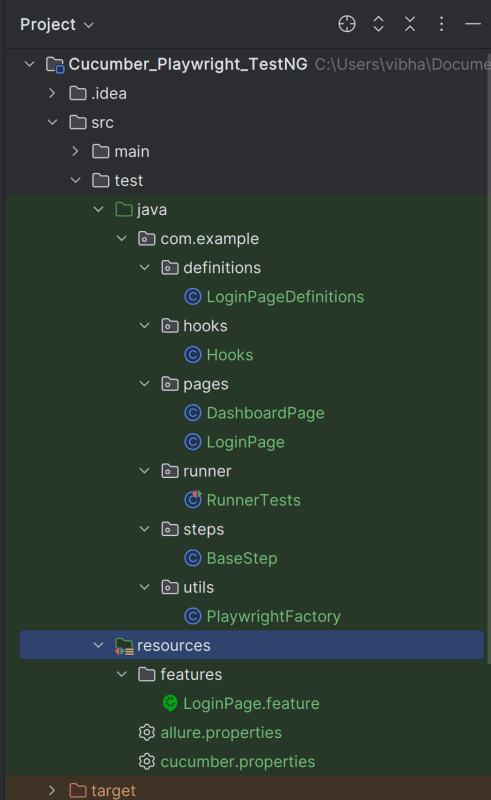
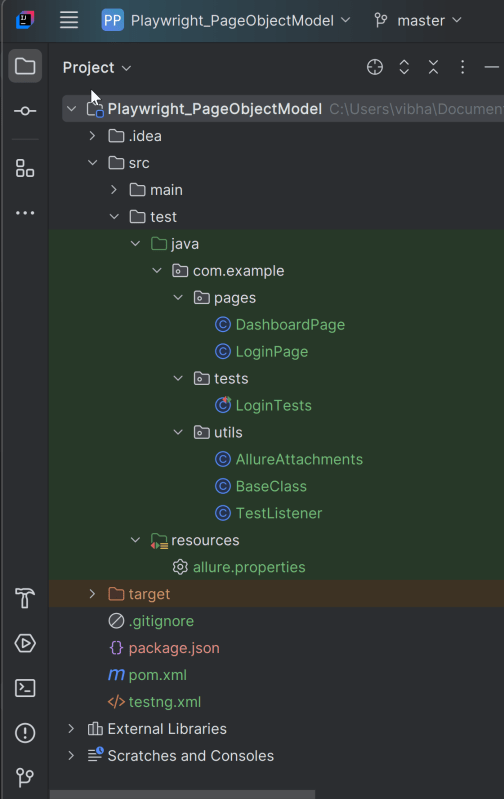
2. Project Structure for Maintainability

Creating a well-organized project structure is crucial for maintaining a scalable and efficient automation framework.

3. Creating Page Object Classes in src/test/java

package com.example.pages;

import com.microsoft.playwright.Locator;
import com.microsoft.playwright.Page;
import io.qameta.allure.Step;

public class LoginPage {

    private final Page page;

    // Locators
    private final Locator usernameLocator;
    private final Locator passwordLocator;
    private final Locator submitLocator;
    private final Locator invalidCredentialsLocator;
    private final Locator missingUsernameErrorMessageLocator;

    public LoginPage(Page page) {
        this.page = page;
        this.usernameLocator = page.locator("input[name='username']");
        this.passwordLocator = page.locator("input[name='password']");
        this.submitLocator = page.locator("button[type='submit']");
        this.invalidCredentialsLocator = page.locator("//p[contains(@class, \"oxd-text oxd-text--p oxd-alert-content-text\")]");
        this.missingUsernameErrorMessageLocator = page.locator("//span[contains(@class, 'oxd-text oxd-text--span oxd-input-field-error-message oxd-input-group__message')]");
    }

    @Step("Enter credentials")
    public void login(String user, String pass){
        usernameLocator.fill(user);
        passwordLocator.fill(pass);
        submitLocator.click();
    }

    @Step("Get Error Message for invalid credentials")
    public String getErrorMessage () {
        return invalidCredentialsLocator.textContent();
    }

    @Step("Get Error Message for missing username")
    public String getMissingUsernameErrorMessage () {
        return missingUsernameErrorMessageLocator.textContent();
    }
}

package com.example.pages;

import com.microsoft.playwright.Locator;
import com.microsoft.playwright.Page;
import io.qameta.allure.Step;

public class DashboardPage {

    private Page page;

    private final Locator headingLocator;

    public DashboardPage(Page page){
        this.page = page;
        this.headingLocator = page.locator("//h6[contains(@class, \"oxd-topbar-header-breadcrumb-module\")]");
        this.assignLeaveLocator = page.locator("//[contains(@text, \"Assign Leave\")]");
        this.leaveListLocator = page.getByTitle("Leave List");

    }

    @Step("Get Heading of Dashboard page")
    public String getDashboardPageHeading() {
        return headingLocator.textContent();
    }

}

package com.example.utils;

import com.microsoft.playwright.*;
import org.junit.jupiter.api.*;

// Subclasses will inherit PER_CLASS behavior.
@TestInstance(TestInstance.Lifecycle.PER_CLASS)
public class BaseTests {

    // Shared between all tests in the class.
    static Playwright playwright;
    static Browser browser;

    // New instance for each test method.
    BrowserContext context;
    protected Page page;

    @BeforeAll
    public static void launchBrowser() {
        playwright = Playwright.create();
        browser = playwright.chromium().launch(new BrowserType.LaunchOptions().setHeadless(false));

    }

    @AfterAll
    public static void closeBrowser() {
        playwright.close();
    }


    @BeforeEach
    public void createContextAndPage() {
        context = browser.newContext();
        page = context.newPage();
        page.navigate("https://opensource-demo.orangehrmlive.com/web/index.php/auth/login");
    }

    @AfterEach
    public void closeContext() {
        context.close();
    }
}

package com.example.tests;

import com.example.pages.DashboardPage;
import com.example.pages.LoginPage;
import com.example.utils.BaseTests;
import org.junit.jupiter.api.Assertions;
import org.junit.jupiter.api.Test;
import org.junit.jupiter.params.ParameterizedTest;
import org.junit.jupiter.params.provider.CsvFileSource;
import io.qameta.allure.Description;
import io.qameta.allure.Issue;
import io.qameta.allure.Link;
import io.qameta.allure.Owner;
import io.qameta.allure.Severity;
import io.qameta.allure.TmsLink;
import org.junit.jupiter.api.DisplayName;

import static io.qameta.allure.SeverityLevel.CRITICAL;

public class LoginTests extends BaseTests {

    @ParameterizedTest
    @CsvFileSource(files = "src/test/resources/testData/credentials.csv", numLinesToSkip = 1)
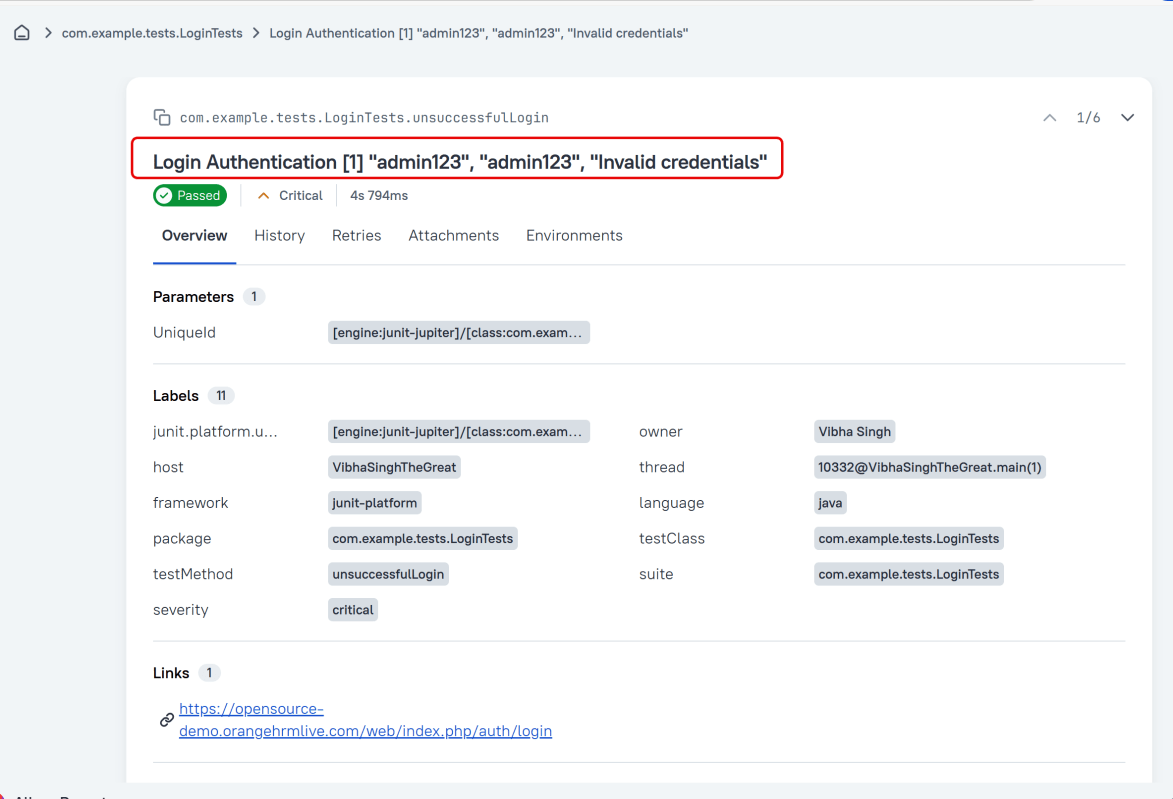
    @DisplayName("Login Authentication")
    @Description("This test attempts to log into the website using a incorrect username and a password. Fails if any error happens.")
    @Severity(CRITICAL)
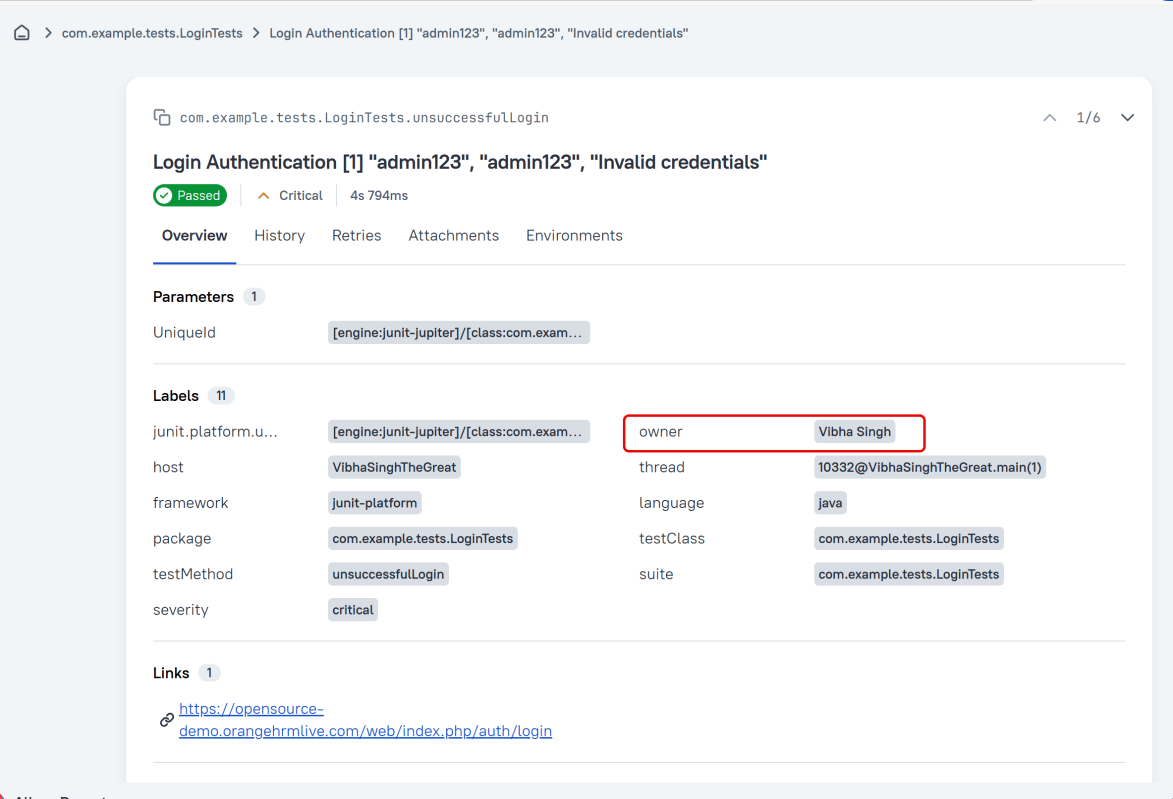
    @Owner("Vibha Singh")
    @Link(name = "Website", url = "https://opensource-demo.orangehrmlive.com/web/index.php/auth/login")
    @Issue("AUTH-123")
    @TmsLink("TMS-456")
    public void unsuccessfulLogin(String username, String password, String expectedErrorMessage) {

        LoginPage loginPage = new LoginPage(page);
        loginPage.login(username,password);
        String actualErrorMessage = loginPage.getErrorMessage();
        Assertions.assertEquals(expectedErrorMessage, actualErrorMessage, "Incorrect error message is displayed");

   }

    @Test
    @DisplayName("Successful Login Authentication")
    @Description("This test attempts to log into the website using a correct username and a password. Fails if any error happens.")
    @Severity(CRITICAL)
    @Owner("Vibha Singh")
    @Link(name = "Website", url = "https://opensource-demo.orangehrmlive.com/web/index.php/auth/login")
    @Issue("AUTH-124")
    @TmsLink("TMS-460")
    public void successfulLogin() {

        LoginPage loginPage = new LoginPage(page);
        loginPage.login("Admin","admin123");
        DashboardPage dashboardPage = new DashboardPage(page);
        String actualHeading = dashboardPage.getDashboardPageHeading();
        Assertions.assertEquals("Dashboard",actualHeading, "Unable to login to the application");

    }

}
@Description("This test attempts to log into the website using a invalid login and a password that result in error")

#allure.properties
allure.results.directory=target/allure-results

7. Run the Tests and Generate Allure Report

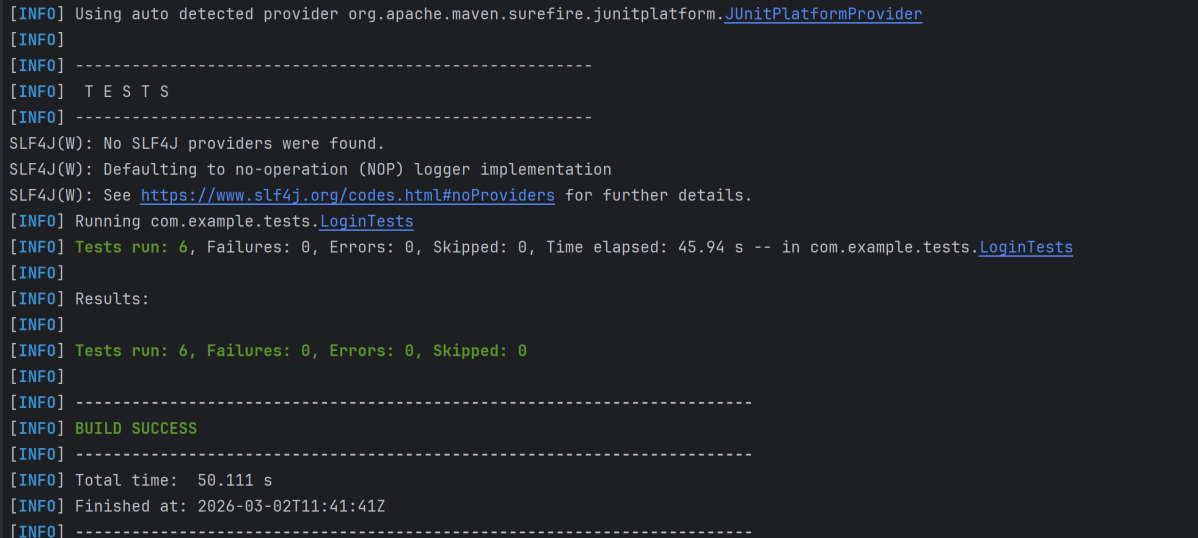
To run the tests, use the below command

mvn clean test

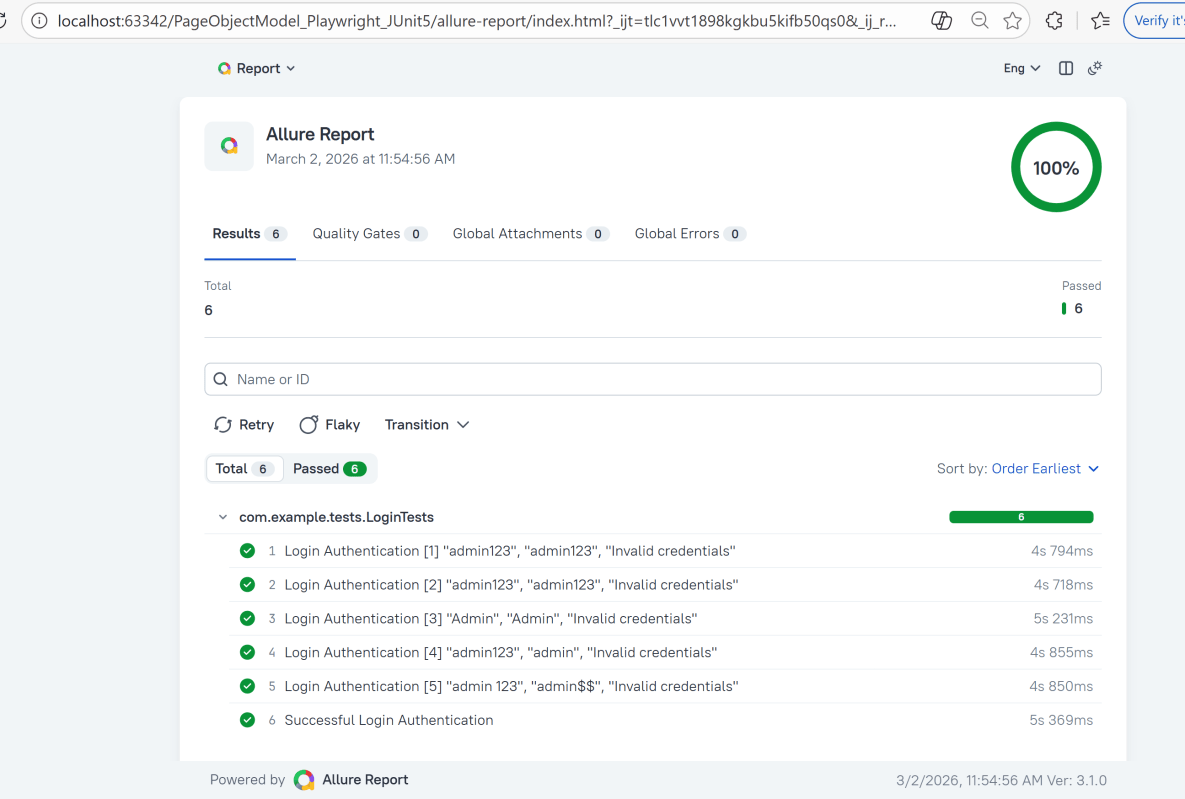
The output of the above program is

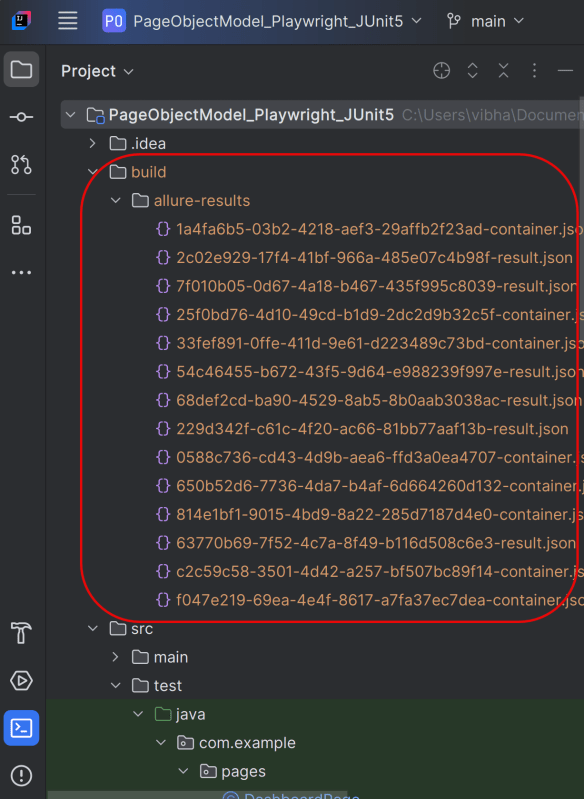
This will create the allure-results folder with all the test reports within build folder. These files will be used to generate Allure Report.

8. How to Generate an Allure Report

Use the command below to generate the Allure Report

 allure serve build/allure-results

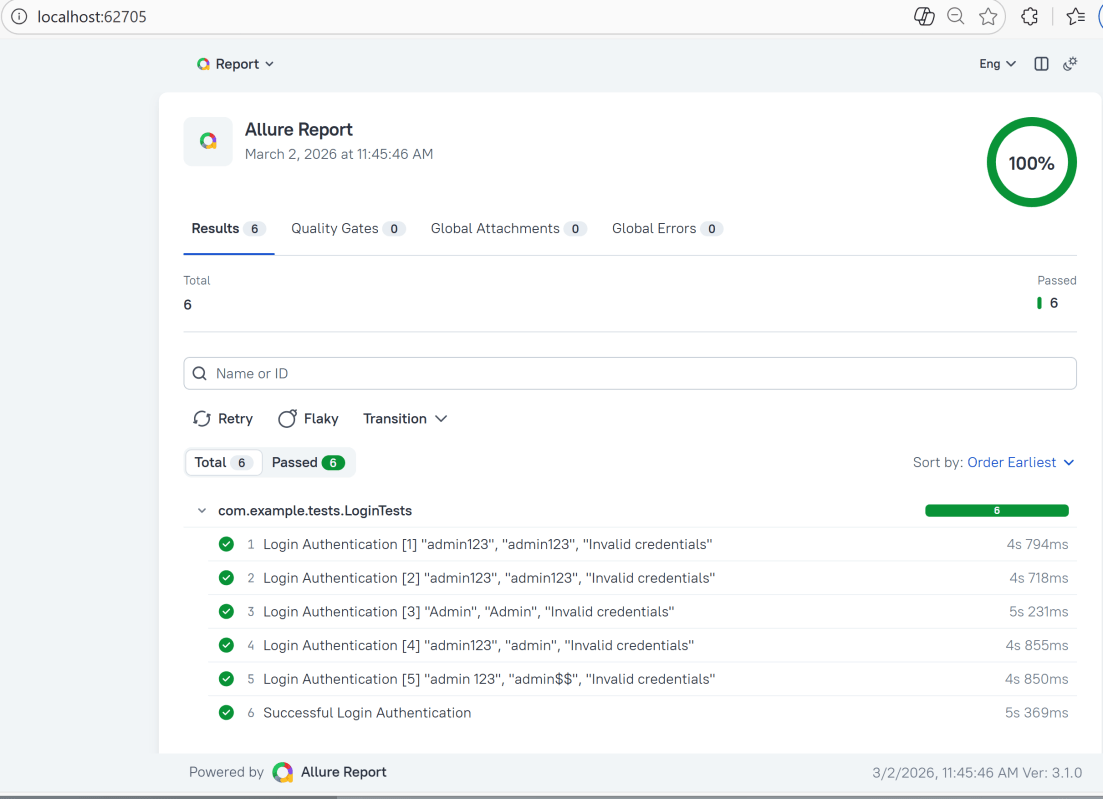
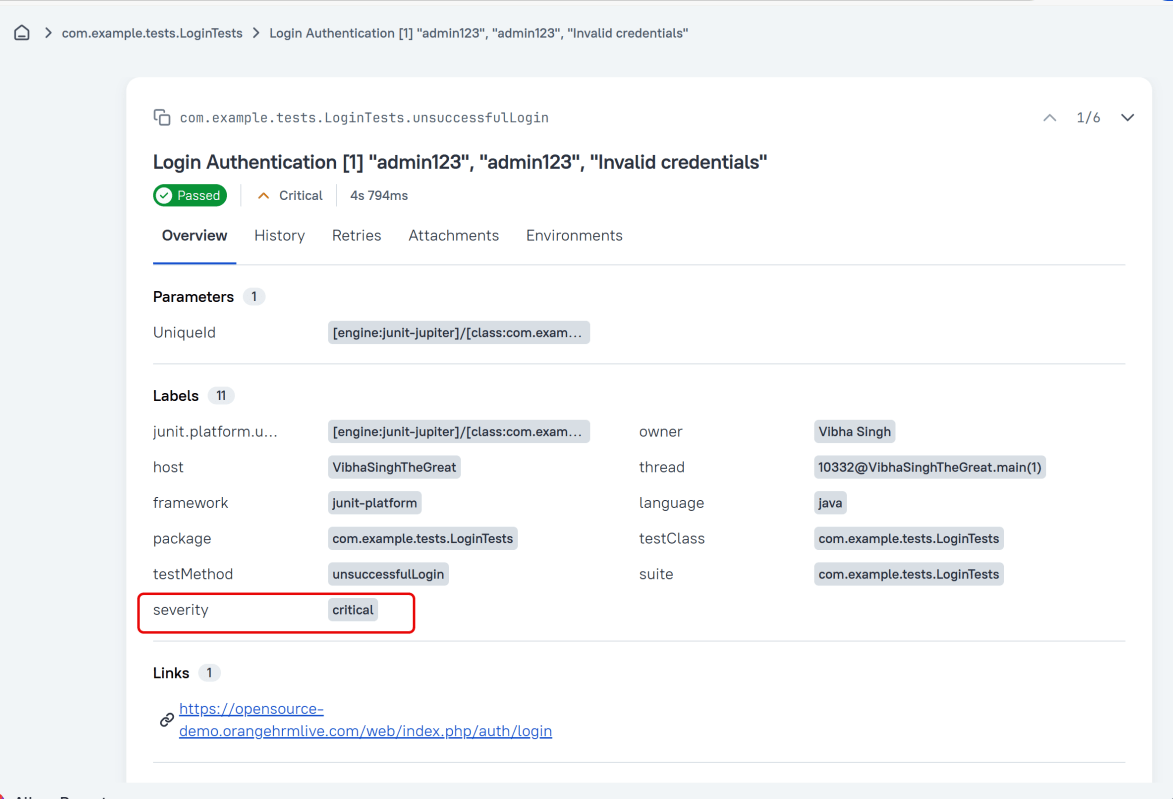
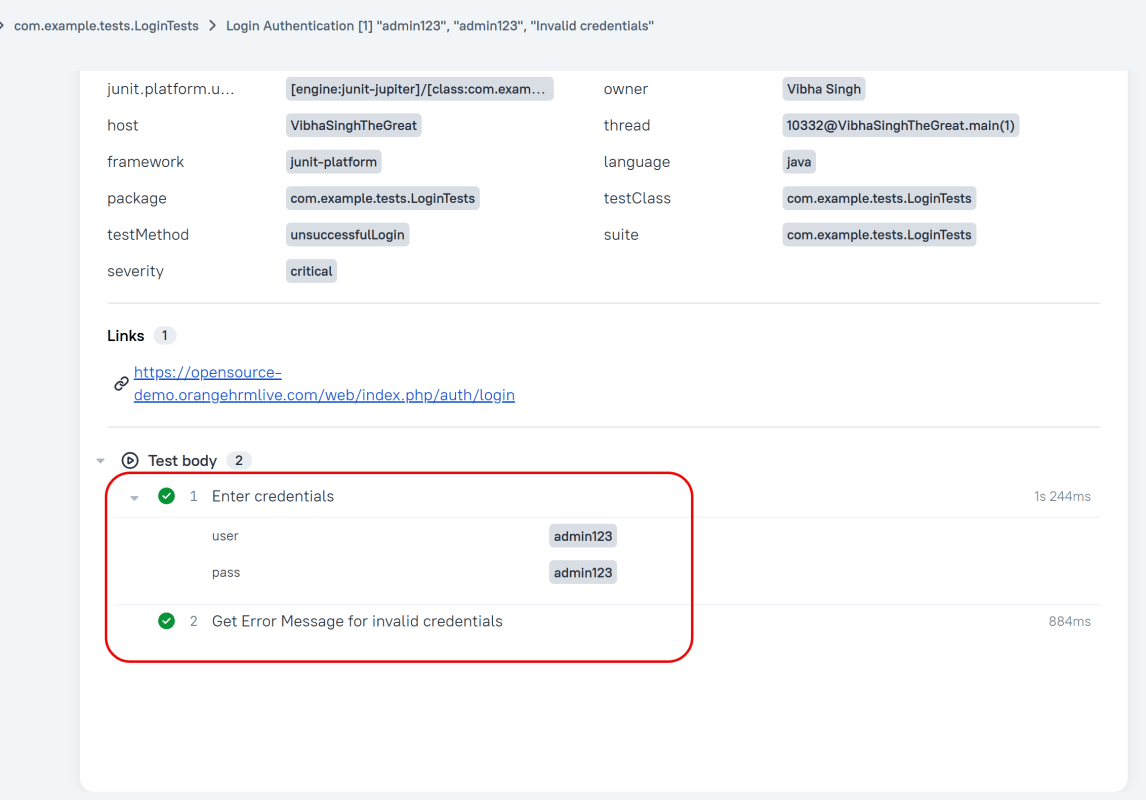
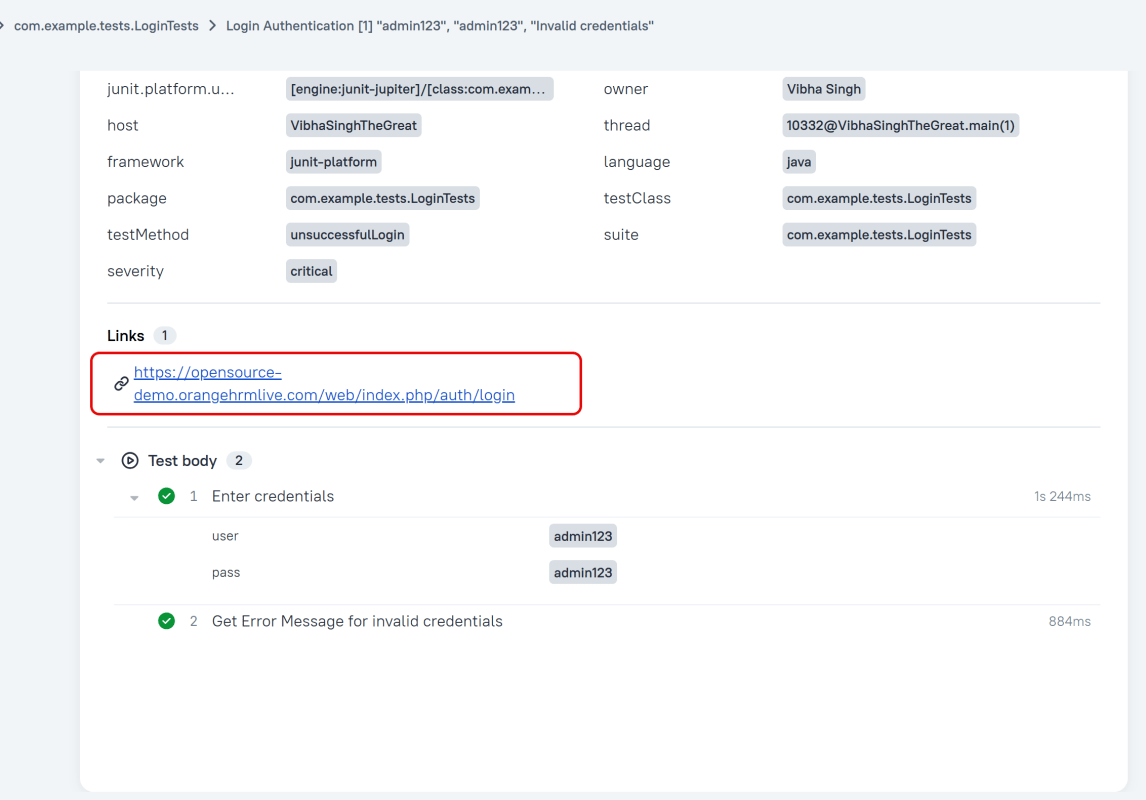
This will generate the beautiful Allure Test Report as shown below.

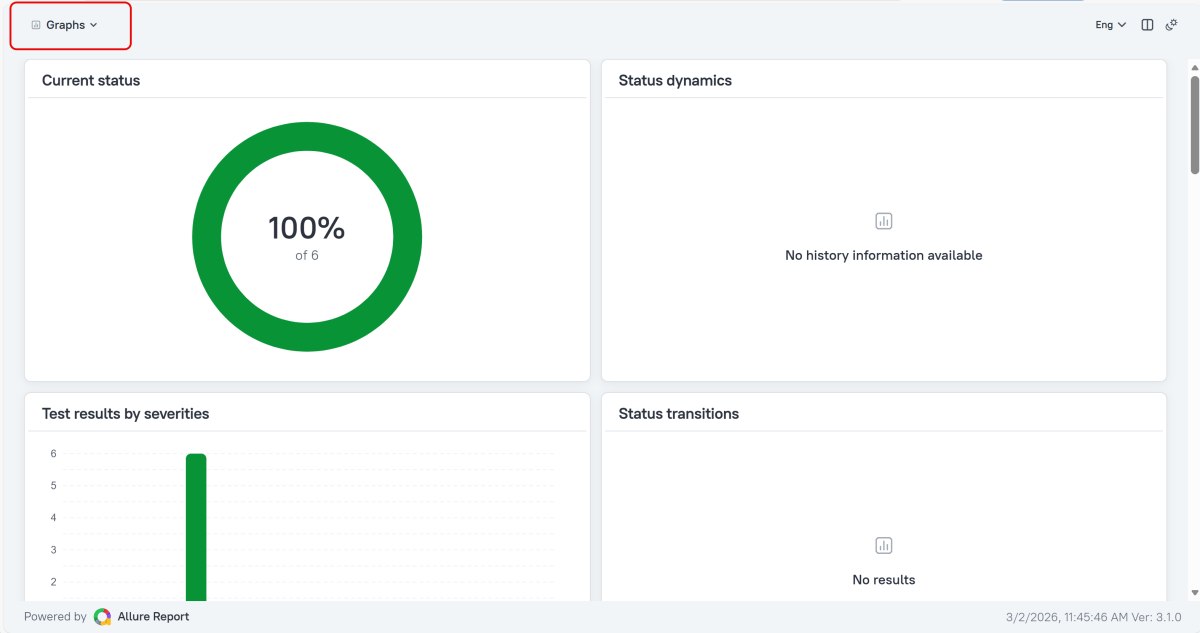
Graphs in Allure Report

Graphs allow you to see different statistics collected from the test data: status breakdown or severity and duration diagrams.

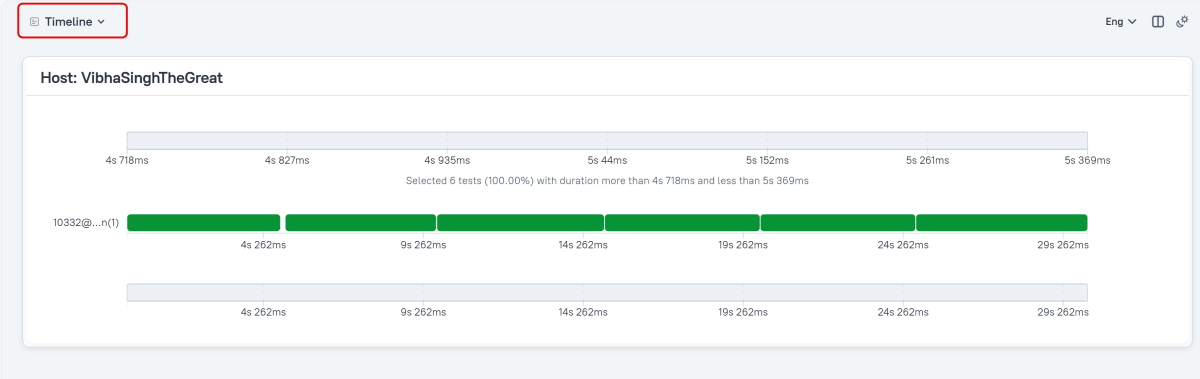
Timeline in Allure Report

The timeline tab visualizes retrospective test execution. Allure adaptors collect precise timings of tests. Here on this tab, they are arranged according to their sequential or parallel timing structure.

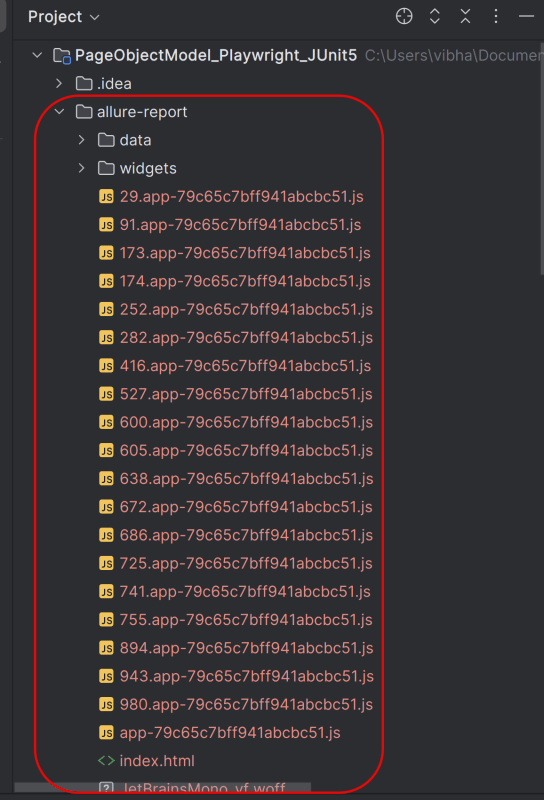
 allure awesome build/allure-results

This will create the allure-report folder with all the test files and index.html report.

Congratulations!! We have integrated an allure report with Playwright, Java, and JUnit5. I hope this tutorial is useful to you.

Additional Tutorials on Allure Reports

Integration of Allure Report with Selenium and JUnit4
Integration of Allure Report with Selenium and TestNG
Gradle – Allure Report for Selenium and JUnit4
Gradle – Allure Report for Cucumber, Selenium and TestNG
Integration of Allure Report with Rest Assured and JUnit4

Integrate Allure Report with Playwright with Java and TestNG

Last Updated On

HOME

In this tutorial, I will explain how to Integrate Allure Report 3 with Playwright, Java and TestNG.

Refer to this tutorial to install allure – What is Allure Report?.

Table of Contents

System requirements

  1. Java 17 installed
  2. Maven installed
  3. Eclipse or IntelliJ installed
  4. Allure installed
  5. Browsers on which tests need to be run, like Chrome, Firefox, etc.

Dependency List

  1. Playwright – 1.57.0
  2. Java 17
  3. Maven – 3.9.6
  4. Allure Report – 2.32.0
  5. Aspectj – 1.9.25
  6. Maven Compiler Plugin – 3.13.0
  7. Maven Surefire Plugin – 3.5.4

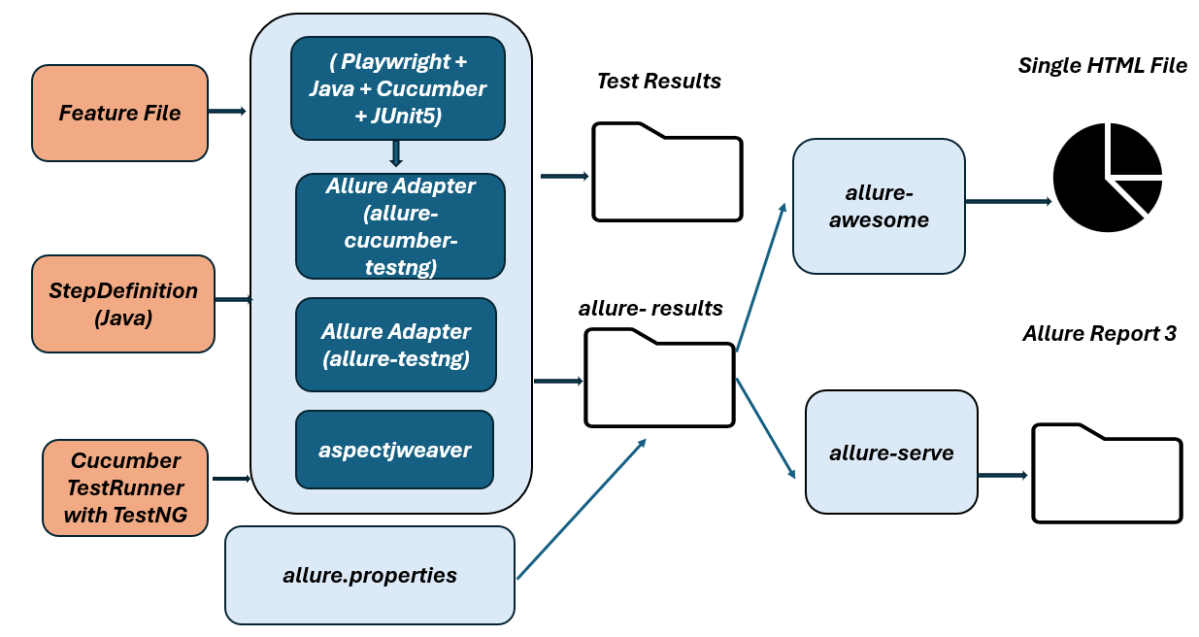
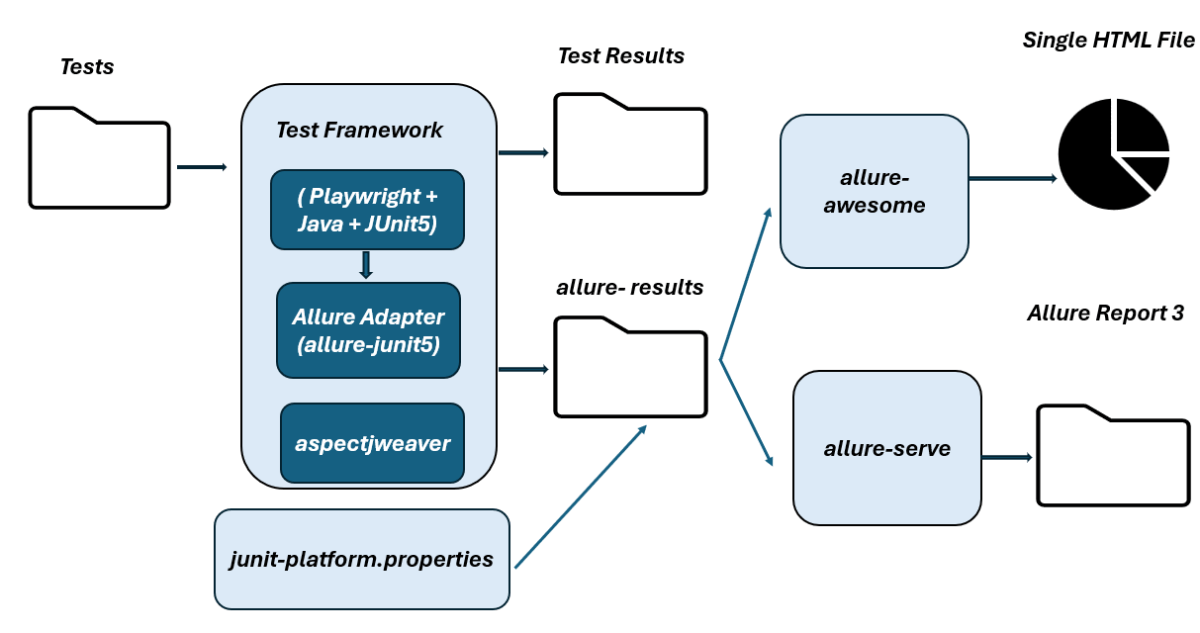
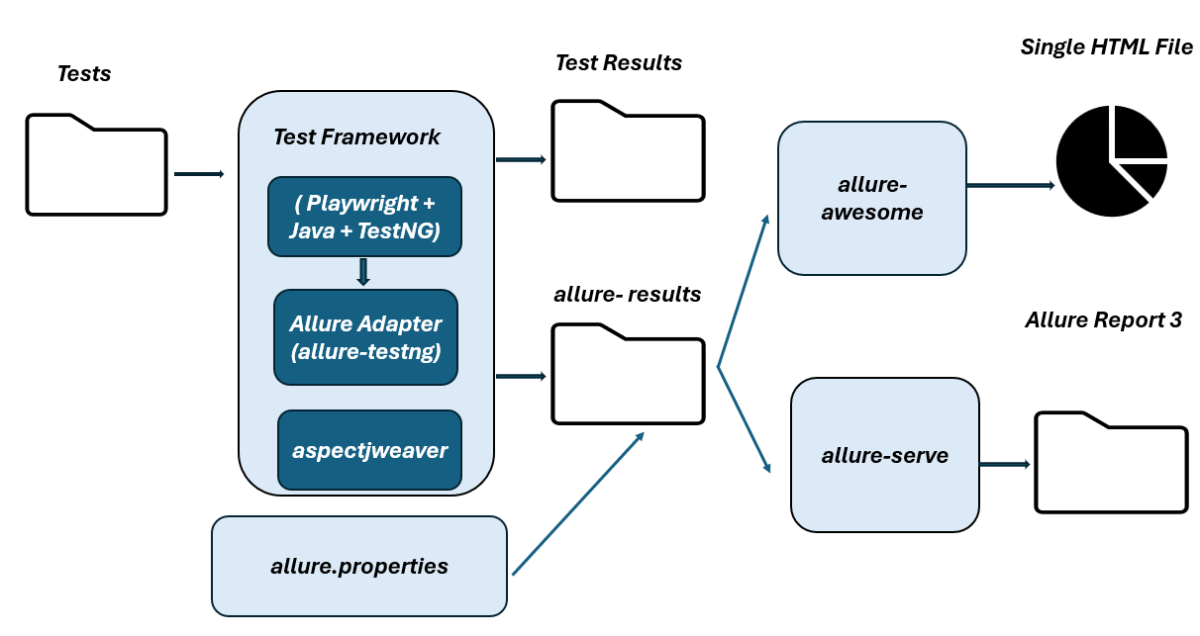
High-Level Execution Flow
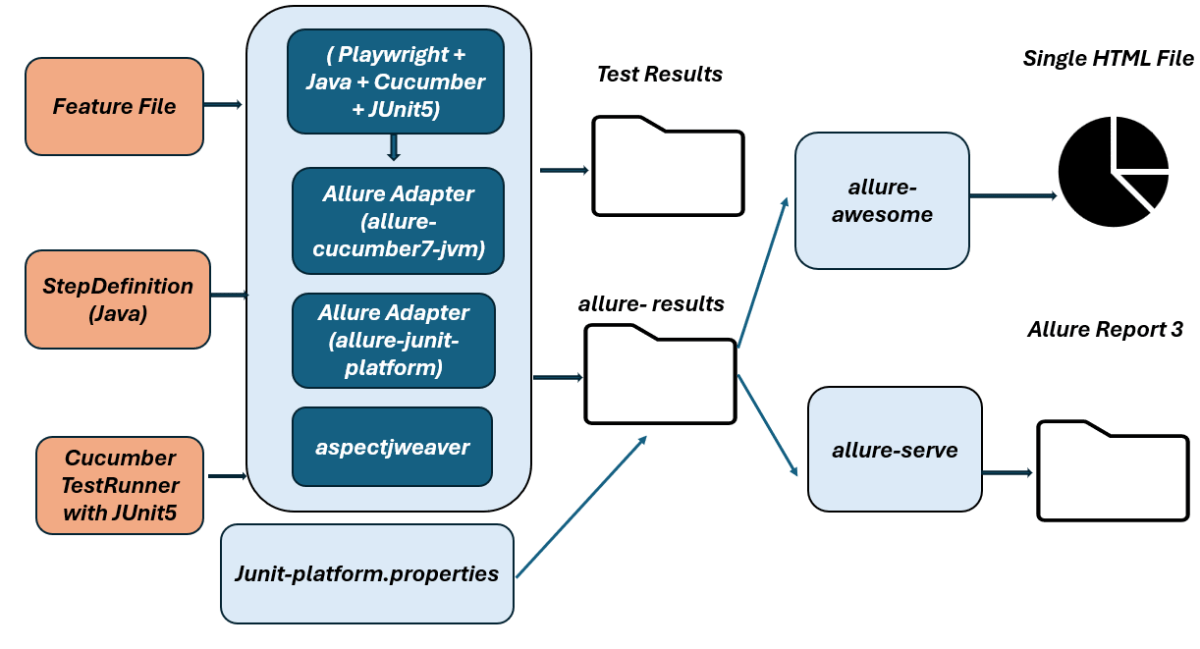
Implementation Steps

Step 1 – Update the Properties section in Maven pom.xml
<properties>
    <project.build.sourceEncoding>UTF-8</project.build.sourceEncoding>
    <playwright.version>1.57.0</playwright.version>
    <testng.version>7.11.0</testng.version>
    <allure.version>2.32.0</allure.version>
    <aspectj.version>1.9.25</aspectj.version>
    <maven.compiler.plugin.version>3.13.0</maven.compiler.plugin.version>
    <maven.compiler.source.version>17</maven.compiler.source.version>
    <maven.compiler.target.version>17</maven.compiler.target.version>
    <maven.surefire.plugin.version>3.5.4</maven.surefire.plugin.version>
  </properties>

Step 2 – Add dependencies to pom.xml

Add Playwright, TestNG, and Allure-TestNG dependencies to pom.xml (Maven Project).

 <dependencyManagement>
        <dependencies>
            <dependency>
                <groupId>io.qameta.allure</groupId>
                <artifactId>allure-bom</artifactId>
                <version>${allure.version}</version>
                <type>pom</type>
                <scope>import</scope>
            </dependency>
        </dependencies>
    </dependencyManagement>

    <dependencies>

        <!-- Playwright -->
        <dependency>
            <groupId>com.microsoft.playwright</groupId>
            <artifactId>playwright</artifactId>
            <version>${playwright.version}</version>
        </dependency>

        <!-- TestNG -->
        <dependency>
            <groupId>org.testng</groupId>
            <artifactId>testng</artifactId>
            <version>${testng.version}</version>
            <scope>test</scope>
        </dependency>

        <!-- Allure-TestNG -->
        <dependency>
            <groupId>io.qameta.allure</groupId>
            <artifactId>allure-testng</artifactId>
            <scope>test</scope>
        </dependency>

    </dependencies>

Step 3 – Update the Build Section of pom.xml in the Allure Report Project
 <build>
        <plugins>
            <plugin>
                <groupId>org.apache.maven.plugins</groupId>
                <artifactId>maven-compiler-plugin</artifactId>
                <version>${maven.compiler.plugin.version}</version>
                <configuration>
                    <source>${maven.compiler.source.version}</source>
                    <target>${maven.compiler.target.version}</target>
                </configuration>
            </plugin>
            <plugin>
                <groupId>org.apache.maven.plugins</groupId>
                <artifactId>maven-surefire-plugin</artifactId>
                <version>${maven.surefire.plugin.version}</version>
                <configuration>
                    <suiteXmlFiles>
                        <suiteXmlFile>testng.xml</suiteXmlFile>
                    </suiteXmlFiles>
                    <argLine>
                        -javaagent:"${settings.localRepository}/org/aspectj/aspectjweaver/${aspectj.version}/aspectjweaver-${aspectj.version}.jar"
                    </argLine>
                </configuration>
                <dependencies>
                    <dependency>
                        <groupId>org.aspectj</groupId>
                        <artifactId>aspectjweaver</artifactId>
                        <version>${aspectj.version}</version>
                    </dependency>
                </dependencies>
            </plugin>
        </plugins>
    </build>

<project xmlns="http://maven.apache.org/POM/4.0.0" xmlns:xsi="http://www.w3.org/2001/XMLSchema-instance"
         xsi:schemaLocation="http://maven.apache.org/POM/4.0.0 http://maven.apache.org/xsd/maven-4.0.0.xsd">
    <modelVersion>4.0.0</modelVersion>

    <groupId>com.example</groupId>
    <artifactId>Playwright_PageObjectModel</artifactId>
    <version>1.0-SNAPSHOT</version>
    <packaging>jar</packaging>

    <name>Playwright_PageObjectModel</name>
    <url>http://maven.apache.org</url>

    <properties>
        <project.build.sourceEncoding>UTF-8</project.build.sourceEncoding>
        <playwright.version>1.57.0</playwright.version>
        <testng.version>7.11.0</testng.version>
        <allure.version>2.32.0</allure.version>
        <aspectj.version>1.9.25</aspectj.version>
        <maven.compiler.plugin.version>3.13.0</maven.compiler.plugin.version>
        <maven.compiler.source.version>17</maven.compiler.source.version>
        <maven.compiler.target.version>17</maven.compiler.target.version>
        <maven.surefire.plugin.version>3.5.4</maven.surefire.plugin.version>
    </properties>

    <!-- Add allure-bom to dependency management to ensure correct versions of all the dependencies are used -->
    <dependencyManagement>
        <dependencies>
            <dependency>
                <groupId>io.qameta.allure</groupId>
                <artifactId>allure-bom</artifactId>
                <version>${allure.version}</version>
                <type>pom</type>
                <scope>import</scope>
            </dependency>
        </dependencies>
    </dependencyManagement>

    <dependencies>

        <!-- Playwright -->
        <dependency>
            <groupId>com.microsoft.playwright</groupId>
            <artifactId>playwright</artifactId>
            <version>${playwright.version}</version>
        </dependency>

        <!-- TestNG -->
        <dependency>
            <groupId>org.testng</groupId>
            <artifactId>testng</artifactId>
            <version>${testng.version}</version>
            <scope>test</scope>
        </dependency>

        <!-- Allure-TestNG -->
        <dependency>
            <groupId>io.qameta.allure</groupId>
            <artifactId>allure-testng</artifactId>
            <scope>test</scope>
        </dependency>

    </dependencies>

    <build>
        <plugins>
            <plugin>
                <groupId>org.apache.maven.plugins</groupId>
                <artifactId>maven-compiler-plugin</artifactId>
                <version>${maven.compiler.plugin.version}</version>
                <configuration>
                    <source>${maven.compiler.source.version}</source>
                    <target>${maven.compiler.target.version}</target>
                </configuration>
            </plugin>
            <plugin>
                <groupId>org.apache.maven.plugins</groupId>
                <artifactId>maven-surefire-plugin</artifactId>
                <version>${maven.surefire.plugin.version}</version>
                <configuration>
                    <suiteXmlFiles>
                        <suiteXmlFile>testng.xml</suiteXmlFile>
                    </suiteXmlFiles>
                    <argLine>
                        -javaagent:"${settings.localRepository}/org/aspectj/aspectjweaver/${aspectj.version}/aspectjweaver-${aspectj.version}.jar"
                    </argLine>
                </configuration>
                <dependencies>
                    <dependency>
                        <groupId>org.aspectj</groupId>
                        <artifactId>aspectjweaver</artifactId>
                        <version>${aspectj.version}</version>
                    </dependency>
                </dependencies>
            </plugin>
        </plugins>
    </build>
</project>


2. Project Structure for Maintainability

Creating a well-organized project structure is crucial for maintaining a scalable and efficient automation framework.

3. Creating Page Object Classes in src/test/java

package com.example.utils;

import io.qameta.allure.Attachment;

public abstract class AllureAttachments {

    @Attachment(value = "Failure Screenshot", type = "image/png")
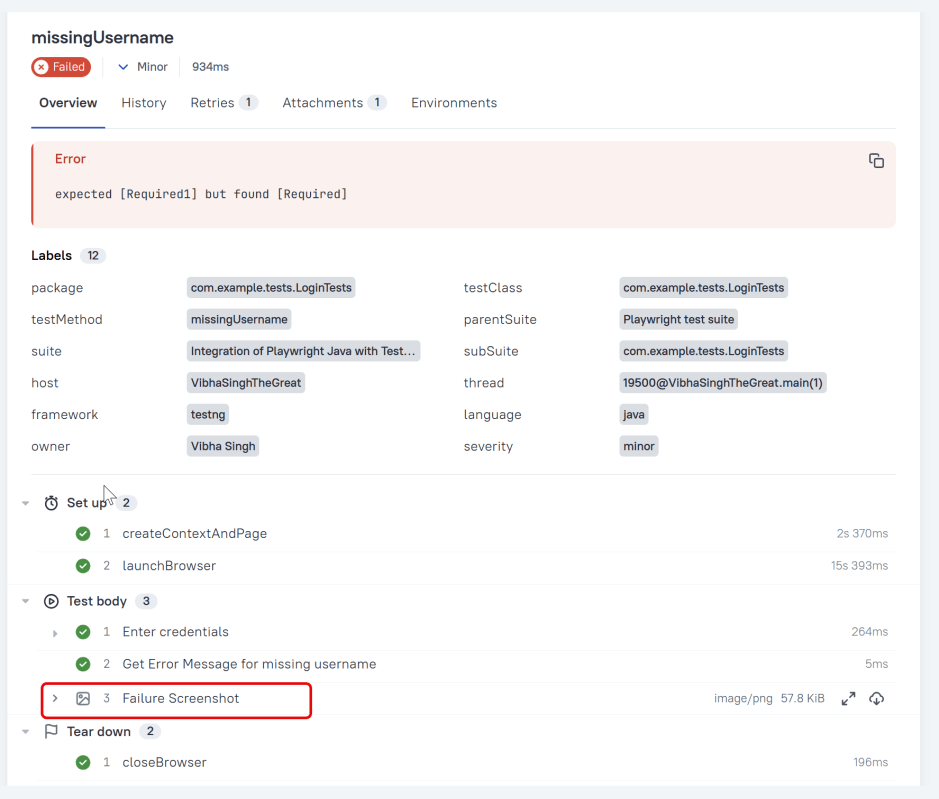
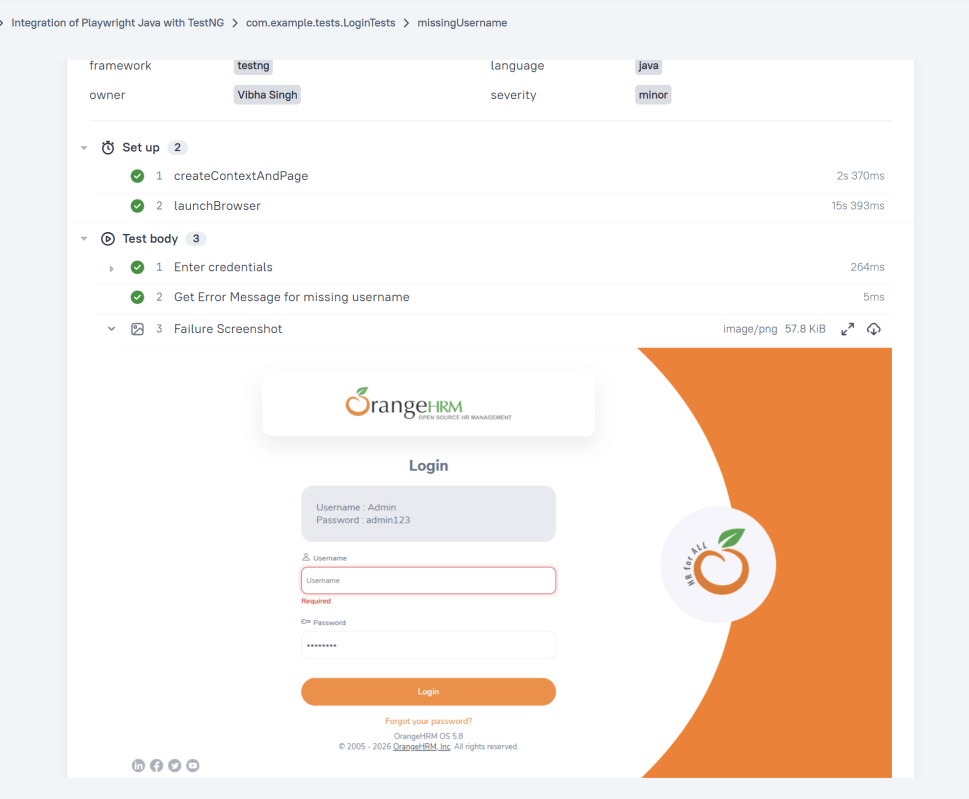
    public static byte[] attachScreenshot(byte[] screenshot) {
        return screenshot;
    }
}

package com.example.utils;

import com.microsoft.playwright.*;
import org.testng.annotations.*;

public class BaseClass {

    // Shared between all tests in this class.
    Playwright playwright;
    Browser browser = null;

    // New instance for each test method.
    BrowserContext context;
    public Page page;

    public Page getPage() {
        return page;
    }

    @BeforeClass
    public void launchBrowser() {
        playwright = Playwright.create();
        browser = playwright.chromium().launch(new BrowserType.LaunchOptions().setHeadless(false));
    }

    @BeforeMethod
    public void createContextAndPage() {
        context = browser.newContext();
        page = context.newPage();
        page.navigate("https://opensource-demo.orangehrmlive.com/web/index.php/auth/login");
    }

    @AfterMethod
    public void closeContext() {
        context.close();
    }

    @AfterClass
    public void closeBrowser() {
        playwright.close();
    }
}

package com.example.utils;

import com.microsoft.playwright.Page;
import org.testng.ITestListener;
import org.testng.ITestResult;

public class TestListener implements ITestListener {

     @Override
    public void onTestFailure(ITestResult result) {
        System.out.println("❌ onTestFailure triggered");
        Page page = BaseClass.getPage();
        if (page != null) {
            byte[] screenshot = page.screenshot();
            AllureAttachments.attachScreenshot(screenshot);
        }
    }
}

package com.example.tests;

import com.example.pages.DashboardPage;
import com.example.pages.LoginPage;
import com.example.utils.BaseClass;
import com.example.utils.TestListener;
import io.qameta.allure.Description;
import io.qameta.allure.Owner;
import io.qameta.allure.Severity;
import org.testng.Assert;
import org.testng.annotations.Listeners;
import org.testng.annotations.Test;
import static io.qameta.allure.SeverityLevel.*;

public class LoginTests extends BaseClass {

    @Test
    @Description("This test attempts to log into the website using a invalid login and a password that result in error")
    @Severity(NORMAL)
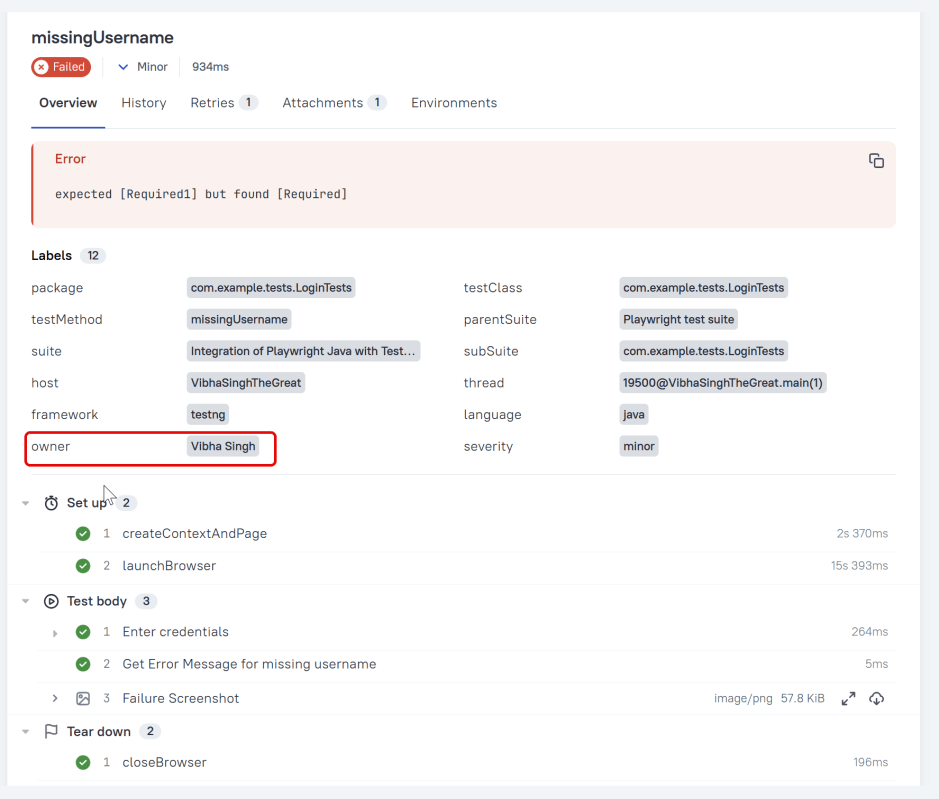
    @Owner("Vibha Singh")
    public void unsuccessfulLogin() {
        LoginPage loginPage = new LoginPage(page);
        loginPage.login("abc","abc");
        String actualErrorMessage = loginPage.getErrorMessage();
        Assert.assertEquals(actualErrorMessage, "Invalid credentials");
   }

    @Test
    @Description("This test attempts to log into the website using a valid login and a password")
    @Severity(CRITICAL)
    @Owner("Vibha Singh")
    public void successfulLogin() {
        LoginPage loginPage = new LoginPage(page);
        loginPage.login("Admin","admin123");
        DashboardPage dashboardPage = new DashboardPage(page);
        String actualHeading = dashboardPage.getDashboardPageHeading();
        Assert.assertEquals(actualHeading, "Dashboard");
    }

    @Test
    @Description("This test attempts to log into the website using a blank login and a password that result in error")
    @Severity(MINOR)
    @Owner("Vibha Singh")
    public void missingUsername() {
        LoginPage loginPage = new LoginPage(page);
        loginPage.login("","admin123");
        String actualErrorMessage = loginPage.getMissingUsernameErrorMessage();
        Assert.assertEquals(actualErrorMessage, "Required1");
    }

}

@Description("This test attempts to log into the website using a invalid login and a password that result in error")

6. Create testng.xml for the project

<?xml version="1.0" encoding="UTF-8"?>
<!DOCTYPE suite SYSTEM "http://testng.org/testng-1.0.dtd">
<suite name="Playwright test suite">

    <listeners>
        <listener class-name="com.example.utils.TestListener"/>
    </listeners>

    <test name="Integration of Playwright Java with TestNG">
    <classes>
        <class name="com.example.tests.LoginTests">

        </class>
    </classes>
    </test>
</suite>

#allure.properties
allure.results.directory=target/allure-results

8. Run the Tests and Generate Allure Report

To run the tests, use the below command

mvn clean test

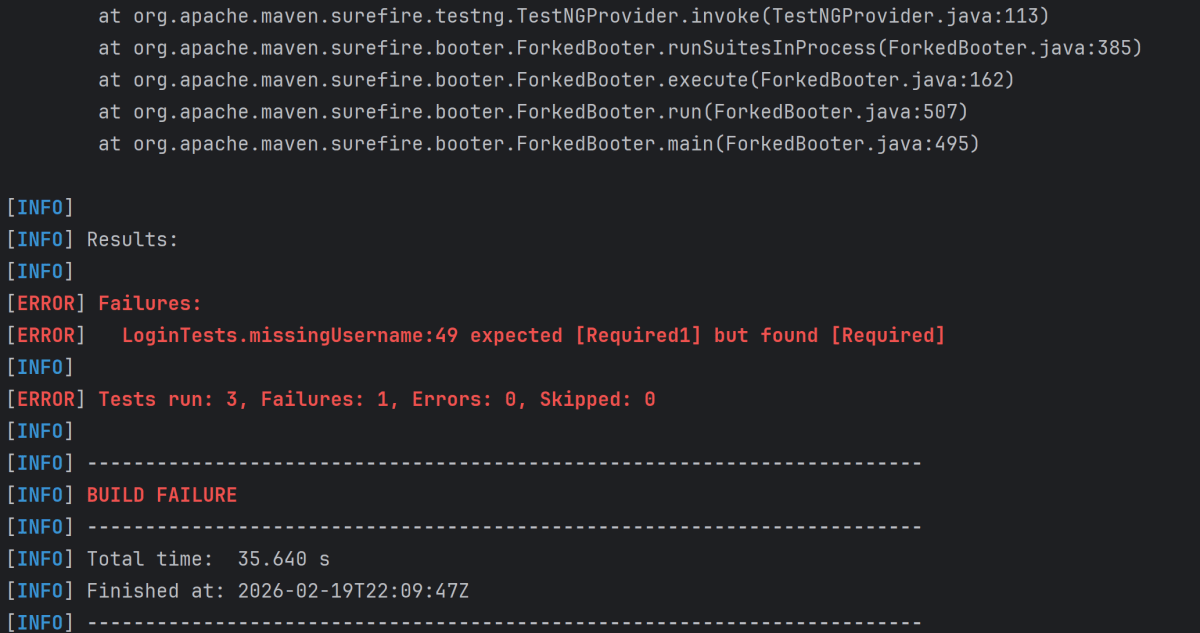
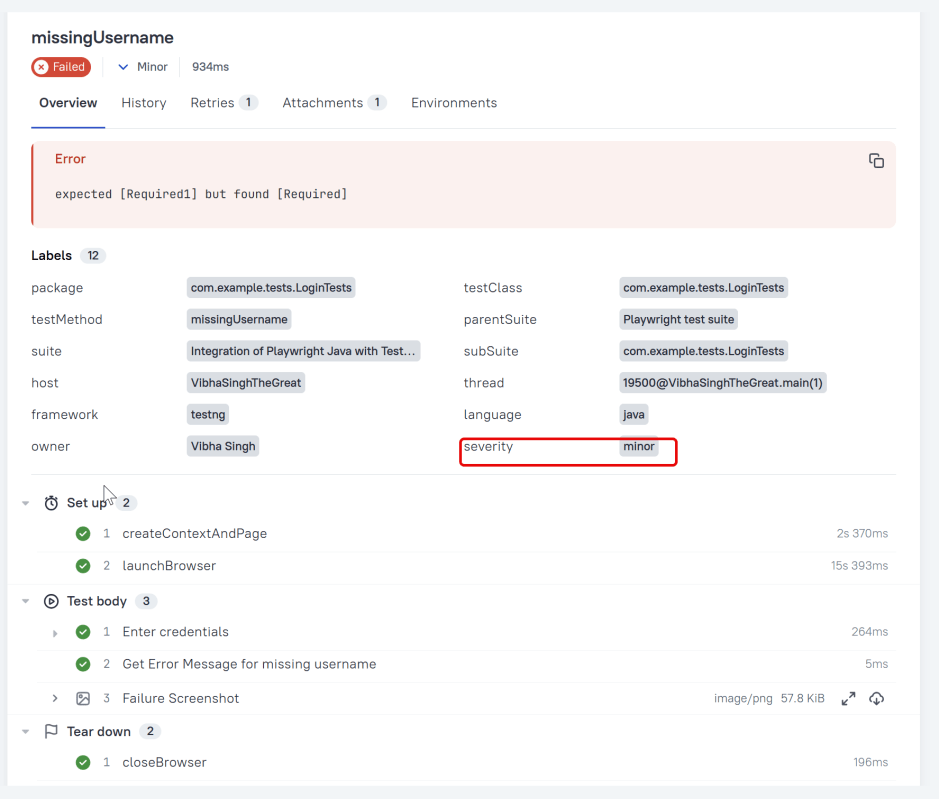
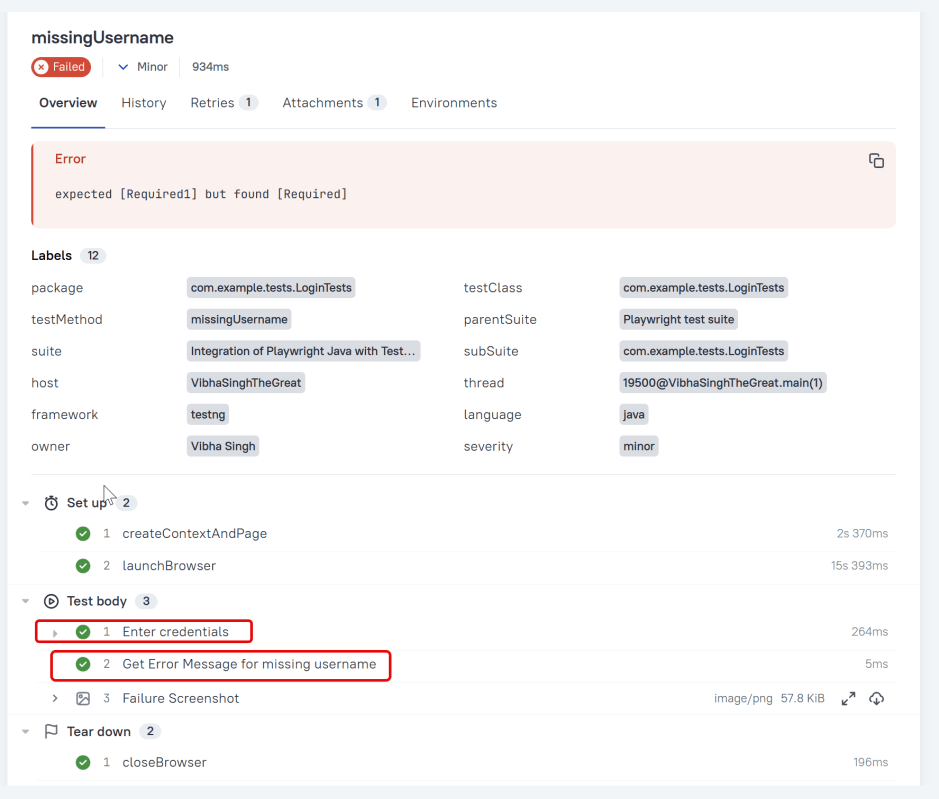
In the image below, we can see that one test failed and four passed out of three tests.

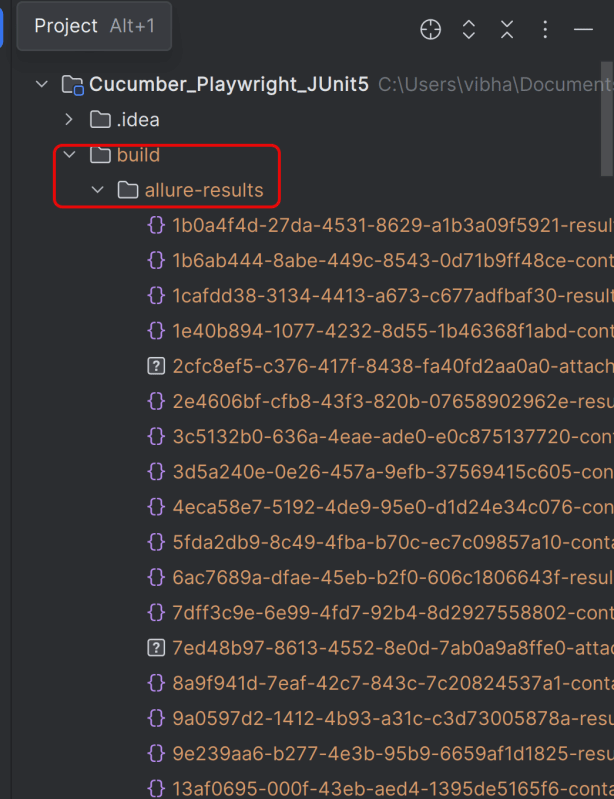
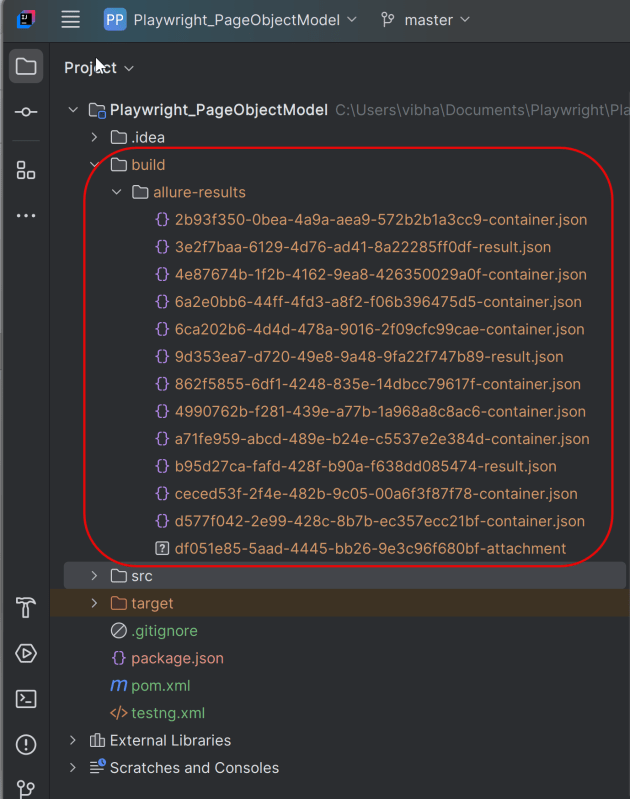
This will create the allure-results folder with all the test reports within build folder. These files will be used to generate Allure Report.
9. How to Generate an Allure Report

Use the command below to generate the Allure Report

 allure serve build/allure-results

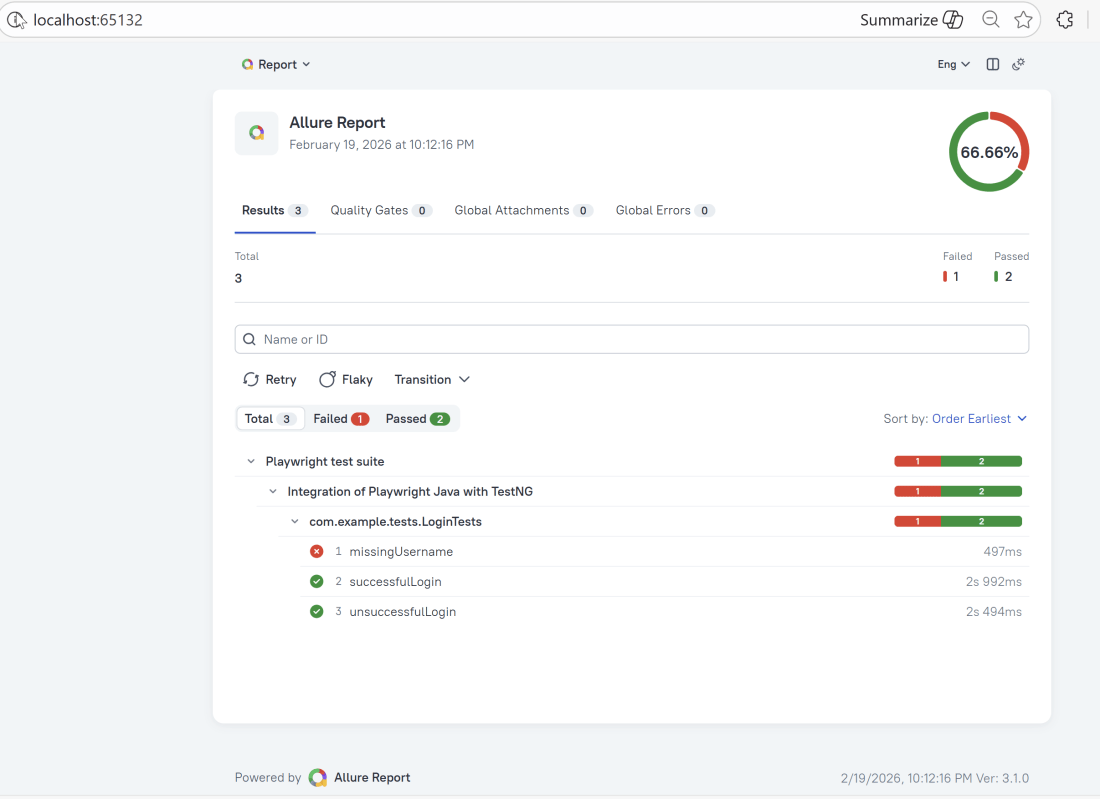
This will generate the beautiful Allure Test Report as shown below.

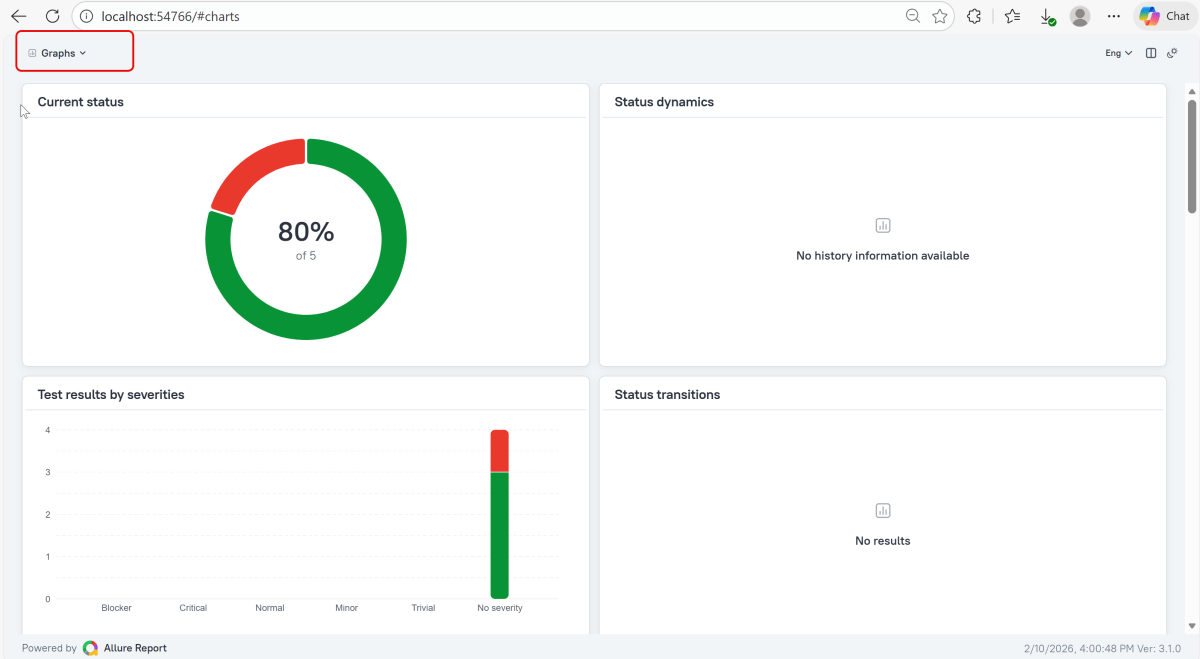
Graphs in Allure Report

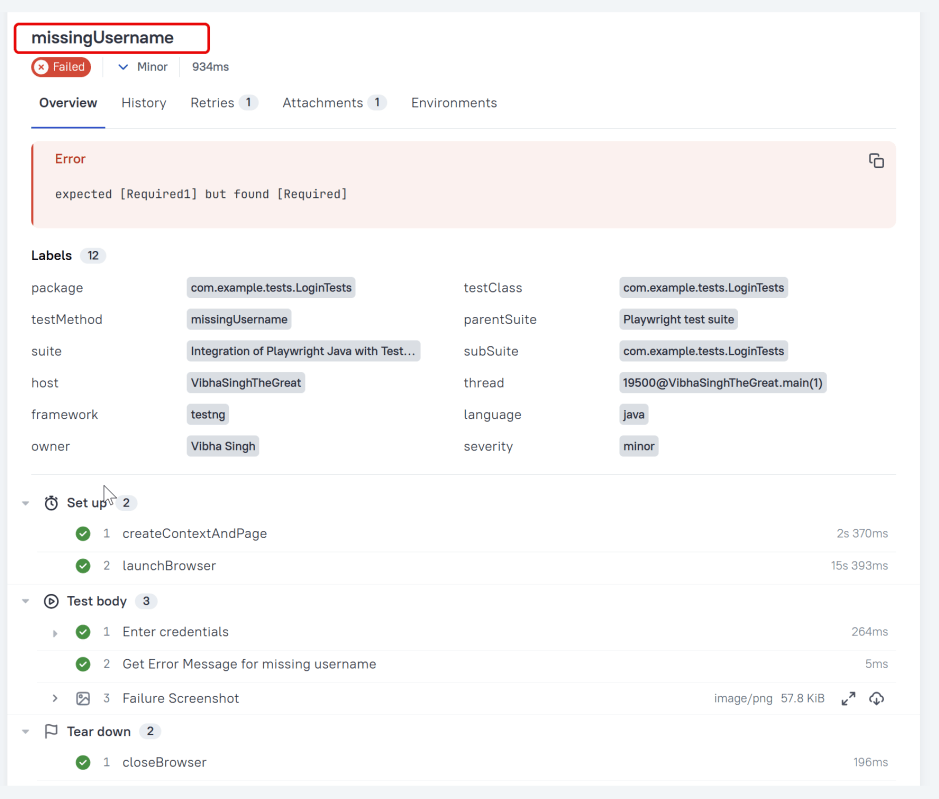
Graphs allow you to see different statistics collected from the test data: status breakdown or severity and duration diagrams.
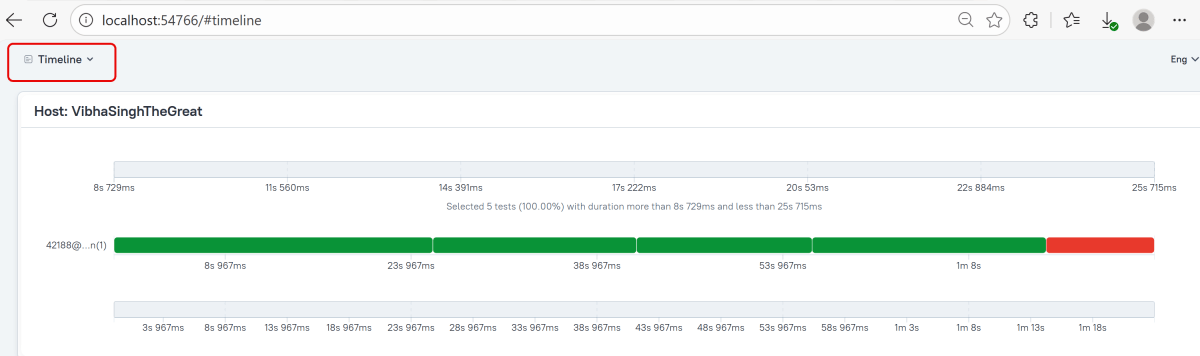
Timeline in Allure Report

The timeline tab visualizes retrospective test execution. Allure adaptors collect precise timings of tests. Here on this tab, they are arranged according to their sequential or parallel timing structure.
 allure awesome build/allure-results

Congratulations!! We have integrated an allure report with Cucumber, Selenium, and TestNG. I hope this tutorial is useful to you.

Additional Tutorials on Allure Reports

Integration of Allure Report with Selenium and JUnit4
Integration of Allure Report with Selenium and TestNG
Gradle – Allure Report for Selenium and JUnit4

Gradle – Allure Report for Cucumber, Selenium and TestNG
Integration of Allure Report with Rest Assured and JUnit4