Reading Excel Data in Python using openpyxl

HOME

pip install openpyxl

workbook = load_workbook("C:\\Users\\Vibha\\Automation\\SearchInBing.xlsx")

sheet = workbook.active

for row in sheet.iter_rows(min_row=1, max_row=sheet.max_row, min_col=1, max_col=sheet.max_column):
    for cell in row:
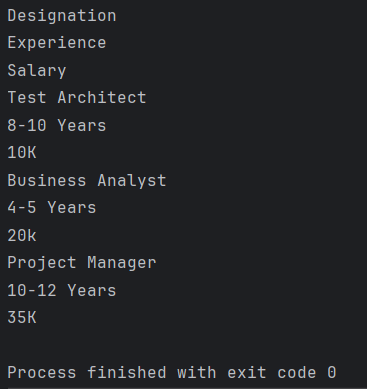
        print(cell.value)

from openpyxl import load_workbook
from tabulate import tabulate

#Load the workbook
workbook = load_workbook("C:\\Users\\Vibha\\Automation\\SearchInBing.xlsx")

#Select the active worksheet
sheet = workbook.active

#Iterate over rows and columns
for row in sheet.iter_rows(min_row=1, max_row=sheet.max_row, min_col=1, max_col=sheet.max_column):
    for cell in row:
        print(cell.value)

from openpyxl import load_workbook
from tabulate import tabulate

#Load the workbook
workbook = load_workbook("C:\\Users\\Vibha\\Automation\\SearchInBing.xlsx")

#Select the active worksheet
sheet = workbook.active

#Display data in a structured format
for row in sheet.iter_rows(min_row=1, max_row=sheet.max_row, min_col=1, max_col=sheet.max_column):
    row_data =[]
    for cell in row:
        row_data.append((cell.value))
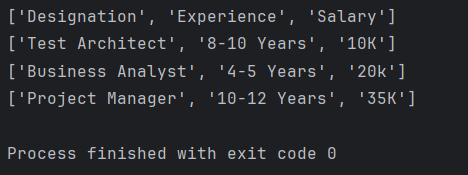
    print(row_data)

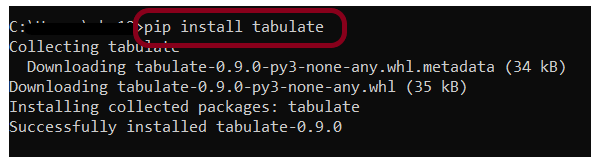
pip install tabulate

from openpyxl import load_workbook
from tabulate import tabulate

#Load the workbook
workbook = load_workbook("C:\\Users\\Vibha\\Automation\\SearchInBing.xlsx")

#Select the active worksheet
sheet = workbook.active

#Display data in a tabular format
data =[]
for row in sheet.iter_rows(values_only = True):
    data.append(list(row))

print(tabulate(data, headers='firstrow', tablefmt='grid'))

Status Code, Line, Body, and Header Verification in Python Requests

HOME

pip install -U requests
pip install -U pytest

import requests


def test_get_statuscode():

    # Define the API endpoint
    url = "https://reqres.in/api/users/2"

    # Make a GET request to the API endpoint
    response = requests.get(url)

    # Retrieve status code
    status_code = response.status_code

    # Display the results
    print("Status Code:", status_code)
    assert status_code == 200

pytest ResponseStatusCode_test.py -s

import requests


def test_get_statuscode():

    # Define the API endpoint
    url = "https://reqres.in/api/users/200000"

    # Make a GET request to the API endpoint
    response = requests.get(url)

    # Retrieve status code
    status_code = response.status_code

    # Display the results
    if status_code == 200:
        print("Request is successful")
    elif status_code == 401:
        print("Unauthorized Request")
    elif status_code == 404:
        print("Resource not found")
    elif status_code == 500:
        print("Server Error")
    elif status_code == 503:
        print("Service Unavailable")
    else:
        print("Status Code:", status_code)

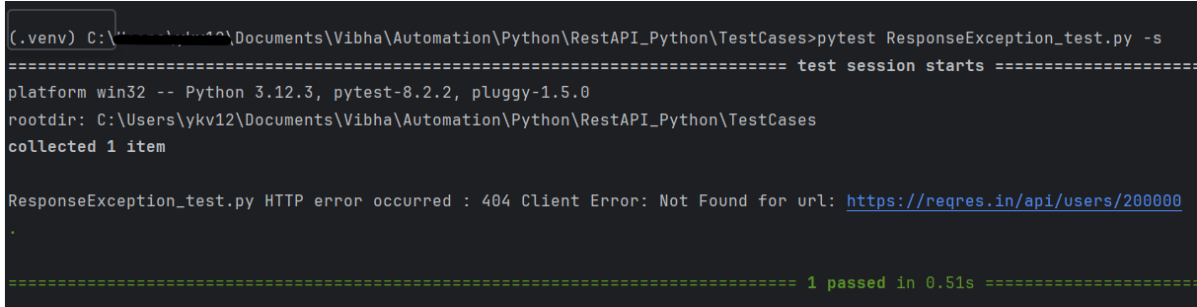
import requests


def test_get_statuscode():

    # Define the API endpoint
    url = "https://reqres.in/api/users/200000"

    # Make a GET request to the API endpoint
    response = requests.get(url)

    # Retrieve status code
    status_code = response.status_code

    # Display the results
    try:
        response.raise_for_status()
        print("Request is successful")
    except requests.exceptions.HTTPError as http_err:
        print(f"HTTP error occurred : {http_err}")
    except Exception as err:
        print(f"Other error occurred: {err}")

import requests


def test_get_statusline():

    # Define the API endpoint
    url = "https://reqres.in/api/users/2"

    # Make a GET request to the API endpoint
    response = requests.get(url)

    # Retrieve status line (in this example, requests library does not provide status line directly, so we can construct it)
    status_line = f"{response.status_code} {response.reason}"

    # Display the results
    print("Status Line:", status_line)
    assert status_line == "200 OK"

import requests


def test_get_responsebody():

    # Define the API endpoint
    url = "https://reqres.in/api/users/2"

    # Make a GET request to the API endpoint
    response = requests.get(url)

    # Retrieve response content
    content = response.content

    # Display the results
    print("Response Content:", content)

import requests


def test_get_headers():

    # Define the API endpoint
    url = "https://reqres.in/api/users/2"

    # Make a GET request to the API endpoint
    response = requests.get(url)

    # Retrieve content type
    content_type = response.headers['Content-Type']

    # Display the results
    print("Content Type:", content_type)
    assert content_type == "application/json; charset=utf-8"


Deleting Directories in Java: Complete Tutorial

HOME

package org.example;

import java.io.File;

public class DeleteDirectoryDemo {

    public static void main(String[] args) {

        String directoryPath = "C:\\Users\\Vibha\\Desktop\\Test";

        //Create a file object for the directory
        File directory = new File(directoryPath);

        if(directory.exists()&& directory.isDirectory()) {
            boolean successful = deleteDirectory(directory);
            if (successful) {
                System.out.println("Directory deleted :" + directoryPath);
            } else {
                System.out.println("Failed to delete Directory :" + directoryPath);
            }
        } else {
            System.out.println("Directory does not exists :" + directoryPath);

            }
        }

        private static boolean deleteDirectory(File directory) {
            File[] allContents = directory.listFiles();

            if (allContents != null) {
                for (File file : allContents) {
                    deleteDirectory(file);
                    System.out.println("File deleted :" + file);
                }
            }
            return directory.delete();
        }
    }

  if(directory.exists()&& directory.isDirectory())
File[] allContents = directory.listFiles();
 for (File file : allContents) {
                    deleteDirectory(file);
                    System.out.println("File deleted :" + file);
                }
            }
directory.delete();

REST Assured: Validating HTTP Response Status Code, Line, Body, Headers, Content Type

HOME

 <dependency>
            <groupId>io.rest-assured</groupId>
            <artifactId>rest-assured</artifactId>
            <version>5.5.0</version>
            <scope>test</scope>
</dependency>

@Test
    public void verifyStatusCode() {

        String BaseURL = "https://dummy.restapiexample.com/api";

        // GIVEN
       Response response =  given()

                // WHEN
                .when()
                .get("https://reqres.in/api/users/2")

                // THEN
                .then()
               .extract().response();

       int actualStatusCode = response.getStatusCode();
       System.out.println("Status Code : " + actualStatusCode);

        Assert.assertEquals(200, actualStatusCode);

    }

 @Test
    public void verifyStatusLine() {

        // GIVEN
        Response response =  given()

                // WHEN
                .when()
                .get("https://reqres.in/api/users/2")

                // THEN
                .then()
                .extract().response();

        String actualStatusLine = response.getStatusLine();
        System.out.println("Status Line : " + actualStatusLine);

        Assert.assertEquals("HTTP/1.1 200 OK", actualStatusLine);

    }

  @Test
    public void verifyResponseBody() {

        // GIVEN
        Response response =  given()

                // WHEN
                .when()
                .get("https://reqres.in/api/users/2")

                // THEN
                .then()
                .extract().response();

        String actualResponseBody = response.getBody().asString();
        System.out.println("Response Body : " + actualResponseBody);

        JsonPath jsonPath = response.jsonPath();
        String actualResponse_Id = jsonPath.getString("data.id");
        System.out.println("Response Id : " + actualResponse_Id);

        Assert.assertEquals("2", actualResponse_Id);

    }

@Test
    public void verifyResponseHeader() {

        // GIVEN
        Response response =  given()

                // WHEN
                .when()
                .get("https://reqres.in/api/users/2")

                // THEN
                .then()
                .extract().response();

        Headers allHeaders = response.getHeaders();
        System.out.println("All Headers : " + allHeaders);

       for(Header header: allHeaders){
           System.out.println(header.getName() +  ":" + header.getValue());
       }

       Assert.assertTrue(allHeaders.getValue("Content-Encoding").contains("gzip"));

    }

 @Test
    public void verifyContentType() {

        // GIVEN
        Response response =  given()

                // WHEN
                .when()
                .get("https://reqres.in/api/users/2")

                // THEN
                .then()
                .extract().response();

        String actualContentType = response.getContentType();
        System.out.println("Actual ContentType : " + actualContentType);

         Assert.assertEquals("application/json; charset=utf-8", actualContentType);

    }

XmlPath in Rest Assured

HOME

 <dependency>
            <groupId>io.rest-assured</groupId>
            <artifactId>xml-path</artifactId>
            <version>5.5.0</version>
 </dependency>

<shopping>
 <category type="groceries">
 <item>
 <name>Chocolate</name>
 <price>10</price>
 </item>
 <item>
 <name>Coffee</name>
 <price>20</price>
 </item>
 </category>
 <category type="supplies">
 <item>
 <name>Paper</name>
 <price>5</price>
 </item>
 <item quantity="4">
 <name>Pens</name>
 <price>15</price>
 </item>
 </category>
 <category type="present">
 <item when="Aug 10">
 <name>Kathryn's Birthday</name>
 <price>200</price>
 </item>
 </category>
 </shopping>

import io.restassured.path.xml.XmlPath;
import io.restassured.path.xml.element.Node;
import org.junit.Test;

import java.util.List;


public class XMLPath_Demo {

    String body = "<shopping>\n" +
            " <category type=\"groceries\">\n" +
            " <item>\n" +
            " <name>Chocolate</name>\n" +
            " <price>10</price>\n" +
            " </item>\n" +
            " <item>\n" +
            " <name>Coffee</name>\n" +
            " <price>20</price>\n" +
            " </item>\n" +
            " </category>\n" +
            " <category type=\"supplies\">\n" +
            " <item>\n" +
            " <name>Paper</name>\n" +
            " <price>5</price>\n" +
            " </item>\n" +
            " <item quantity=\"4\">\n" +
            " <name>Pens</name>\n" +
            " <price>15</price>\n" +
            " </item>\n" +
            " </category>\n" +
            " <category type=\"present\">\n" +
            " <item when=\"Aug 10\">\n" +
            " <name>Kathryn's Birthday</name>\n" +
            " <price>200</price>\n" +
            " </item>\n" +
            " </category>\n" +
            " </shopping>";

    @Test
    public void test() {
        XmlPath xmlPath = new XmlPath(body);

        //Get the name of the first category item:
        String name = xmlPath.get("shopping.category.item[0].name");
        System.out.println("Item Name: " + name);

        // Get the price of the first category price:
        String chocolatePrice = xmlPath.get("shopping.category.item[0].price");
        System.out.println("chocolatePrice :" + chocolatePrice);

        // Get the price of the second category price:
        String coffeePrice = xmlPath.get("shopping.category.item[1].price");
        System.out.println("coffeePrice :" + coffeePrice);

        //To get the number of category items:
        int itemSize = xmlPath.get("shopping.category.item.size()");
        System.out.println("Item Size: " + itemSize);

       // Get a specific category:
        Node category = xmlPath.get("shopping.category[0]");
        System.out.println("category :" + category);
        
        //To get the number of categories with type attribute equal to 'groceries':
        int groceryCount = xmlPath.get("shopping.category.findAll { it.@type == 'groceries' }.size()");
        System.out.println("groceryCount :" + groceryCount);

        //Get all items with price greater than or equal to 10 and less than or equal to 20:
        List<Node> itemsBetweenTenAndTwenty = xmlPath.get("shopping.category.item.findAll { item -> def price = item.price.toFloat(); price >= 10 && price <= 20 }");
        System.out.println("itemsBetweenTenAndTwenty :" + itemsBetweenTenAndTwenty);

       // Get the chocolate price:
        int priceOfChocolate = xmlPath.getInt("**.find { it.name == 'Chocolate' }.price");
        System.out.println("priceOfChocolate :" + priceOfChocolate);
    }
}

Parameterizing REST Assured Tests with junit4-dataprovider Dependency

HOME

<!-- Data Provider -->
 <dependency>
      <groupId>com.tngtech.junit.dataprovider</groupId>
      <artifactId>junit4-dataprovider</artifactId>
      <version>${junit.dataprovider.version}</version>
      <scope>test</scope>
</dependency>

<project xmlns="http://maven.apache.org/POM/4.0.0" xmlns:xsi="http://www.w3.org/2001/XMLSchema-instance"
  xsi:schemaLocation="http://maven.apache.org/POM/4.0.0 http://maven.apache.org/xsd/maven-4.0.0.xsd">
  <modelVersion>4.0.0</modelVersion>

  <groupId>com.example</groupId>
  <artifactId>Parameterized_APITests</artifactId>
  <version>1.0-SNAPSHOT</version>
  <packaging>jar</packaging>

  <name>Parameterized_APITests</name>
  <url>http://maven.apache.org</url>

  <properties>
    <rest-assured.version>5.4.0</rest-assured.version>
    <junit.version>4.13.2</junit.version>
    <junit.dataprovider.version>2.10</junit.dataprovider.version>
    <maven.compiler.plugin.version>3.12.1</maven.compiler.plugin.version>
    <maven.surefire.plugin.version>3.2.3</maven.surefire.plugin.version>
    <maven.compiler.source>17</maven.compiler.source>
    <maven.compiler.target>17</maven.compiler.target>
  </properties>

  <dependencies>
    <!-- Rest-Assured Dependency -->
    <dependency>
      <groupId>io.rest-assured</groupId>
      <artifactId>rest-assured</artifactId>
      <version>${rest-assured.version}</version>
      <scope>test</scope>
    </dependency>

    <!-- JUnit4 Dependency -->
    <dependency>
      <groupId>junit</groupId>
      <artifactId>junit</artifactId>
      <version>${junit.version}</version>
      <scope>test</scope>
    </dependency>

    <!-- Data Provider -->
    <dependency>
      <groupId>com.tngtech.junit.dataprovider</groupId>
      <artifactId>junit4-dataprovider</artifactId>
      <version>${junit.dataprovider.version}</version>
      <scope>test</scope>
    </dependency>
    
  </dependencies>

  <build>

    <plugins>

      <plugin>
        <groupId>org.apache.maven.plugins</groupId>
        <artifactId>maven-compiler-plugin</artifactId>
        <version>${maven.compiler.plugin.version}</version>
        <configuration>
          <source>${maven.compiler.source}</source>
          <target>${maven.compiler.target}</target>
        </configuration>
      </plugin>

      <plugin>
        <groupId>org.apache.maven.plugins</groupId>
        <artifactId>maven-surefire-plugin</artifactId>
        <version>${maven.surefire.plugin.version}</version>
        <configuration>
          <testFailureIgnore>true</testFailureIgnore>
        </configuration>
      </plugin>

    </plugins>
  </build>
</project>

@RunWith(DataProviderRunner.class)

 @DataProvider
    public static Object[][] responseData() {
        return new Object[][] {
                { "1", "George", "Bluth" },
                { "2", "Janet", "Weaver" },
                { "3", "Emma", "Wong" },
                { "4", "Eve", "Holt" }
        };
    }

import com.tngtech.java.junit.dataprovider.DataProvider;
import com.tngtech.java.junit.dataprovider.DataProviderRunner;
import com.tngtech.java.junit.dataprovider.UseDataProvider;
import org.junit.Test;
import org.junit.runner.RunWith;

import static io.restassured.RestAssured.given;
import static org.hamcrest.CoreMatchers.equalTo;

@RunWith(DataProviderRunner.class)
public class ParameterizedTets {

    @DataProvider
    public static Object[][] responseData() {
        return new Object[][] {
                { "1", "George", "Bluth" },
                { "2", "Janet", "Weaver" },
                { "3", "Emma", "Wong" },
                { "4", "Eve", "Holt" }
        };
    }

    @Test
    @UseDataProvider("responseData")
    public void verifyResponse(String id, String expectedFirstName, String expectedLastName)
    {
        given().
                when().
                pathParam("id", id).
                get("https://reqres.in/api/users/{id}").
                then().
                assertThat().
                statusCode(200).
                body("data.first_name", equalTo(expectedFirstName)).
                body("data.last_name", equalTo(expectedLastName));
    }
}

How to handle HTTP Query Parameters in Python

HOME

https://reqres.in/api/users?page=2

import requests

ENDPOINT = 'https://reqres.in/api/users/'


def test_verify_header():
    params = {
        'pages': 2
    }

    response = requests.get(ENDPOINT, params)
    print(response.json())

    print("Response Header", response.headers)

    #Assert status code
    assert response.status_code == 200

    # Assert Response Body
    response_body = response.json()
    assert response_body["per_page"] == 6

    assert response_body["data"][0]["id"] == 1

pytest QueryParam_test.py

How to handle async requests in API Testing

HOME

<dependency>
            <groupId>org.asynchttpclient</groupId>
            <artifactId>async-http-client</artifactId>
            <version>3.0.0.Beta3</version>
</dependency>

package org.example;

import com.jayway.jsonpath.JsonPath;
import org.asynchttpclient.Dsl;
import org.asynchttpclient.Response;
import org.junit.Assert;
import org.junit.Test;

import java.util.concurrent.ExecutionException;
import java.util.concurrent.Future;

import static org.hamcrest.MatcherAssert.assertThat;


public class AsyncRequest_Demo {

    @Test
    public void verifyResponse() throws ExecutionException, InterruptedException {
         Future<Response> futureResponse = Dsl.asyncHttpClient().prepareGet("https://reqres.in/api/users?delay=5").execute();
         Response response = futureResponse.get();

         System.out.println("Response :" + response);

         Assert.assertEquals(200, response.getStatusCode());
         Assert.assertTrue(response.toString().contains("george.bluth@reqres.in"));

    }
}

How to insert data in SQL Server using Java

HOME

jdbc:<driver protocol>:<driver connection details>
MS MySql Server - jdbc:odbc:DemoDSN
MySQL - jdbc:mysql://localhost:3306/demodb
Oracle - jdbc:orac;e:thin@myserver:1521:demodb
String dbUrl = "jdbc:mysql://localhost:3306/demo";
String username = "student";
String password = "student1$";

Connection conn = DriverManager.getConnection(dbUrl,username,password)
Statement stmt = conn.createStatement();

 int rowAffected = stmt.executeUpdate(
                    "insert into employees (last_name, first_name, email, department,salary) values ('Singh', 'Vibha','vibha.test@gmail.com', 'QA', 85000)");

<dependencies>
    <dependency>
      <groupId>com.mysql</groupId>
      <artifactId>mysql-connector-j</artifactId>
      <version>8.2.0</version>
</dependency>

package org.example;

import java.sql.*;

public class InsertRow_Demo {
    public static void main(String[] args) throws SQLException {

        Connection conn;
        Statement stmt = null;
        ResultSet result = null;
        ResultSet result1 = null;
        ResultSet result2 = null;

        String dbUrl = "jdbc:mysql://localhost:3306/demo";
        String username = "student";
        String password = "student1$";

        try {
            //Get a connection to database
            conn = DriverManager.getConnection(dbUrl, username, password);

            System.out.println("Database connection is successful\n");

            //Create a statement
            stmt = conn.createStatement();

            System.out.println("Inserting a new employee\n");

            int rowAffected = stmt.executeUpdate(
                    "insert into employees (last_name, first_name, email, department,salary) values ('Singh', 'Vibha','vibha.test@gmail.com', 'QA', 85000)");

            System.out.println("No of rows inserted :" + rowAffected);

            //Execute the SQL Query
            result = stmt.executeQuery("Select * from employees");

            //Process the result set
            while (result.next()) {
                System.out.println("First_Name :" + result.getString("first_name") + " , " + ("Last_Name :" + result.getString("last_name")));

            }


        } catch (Exception e) {
            e.printStackTrace();
        }
    }
}

How to Use dependsOnMethods() in TestNG for Selenium Test Case Dependency

HOME

import org.testng.annotations.Test;

public class TestNGMethodDependencyDemo {

    @Test
    public static void FirstTest() {
        System.out.println("This is Test Case 1");
    }

    @Test(dependsOnMethods = "FirstTest")
    public static void SecondTest() {
        System.out.println("This is Test Case 2 and will be executed after Test Case 1 successfully executed");
    }

    @Test
    public static void ThirdTest() {
        System.out.println("This is Test Case 3");
    }

    @Test
    public static void FourthTest() {
        System.out.println("This is Test Case 4");
    }
}

In the below scenario, Test Case 2 is dependent on Test CASE 1. If Test Case 1 fails, then Test Case 2 will skip.

package TestNGDemo;

import org.testng.annotations.Test;
public class TestNGMethodDependencyErrorDemo {

      @Test
      public static void FirstTest() {
            System.out.println("This is Test Case 1");
            throw new RuntimeException();
      }

      @Test(dependsOnMethods = "FirstTest")
      public static void SecondTest() {
          System.out.println("This is Test Case 2 and will be executed after Test Case 1 sucessfully executed");
     }

     @Test
     public static void ThirdTest() {
          System.out.println("This is Test Case 3");
     }

      @Test
      public static void FourthTest() {
            System.out.println("This is Test Case 4");
    }
}