Last Updated On
An XML file contains data between the tags. This makes it complex to read compared to other file formats like docx and txt. There are two types of parsers which parse an XML file:
In this article, we will discuss how to create a XML document using Java DOM parser. There is another tutorial to read XML – How to read XML using Java DOM Parser.
Java DOM parser API has methods, interfaces and classes to create XML documents. Using this API, we can create XML documents from the scratch through our Java applications. The createElement() method creates new elements and the appendChild() method appends the created elements to already existing elements.
Below is the sample XML which is created and saved in resources/Payloads as output.xml.
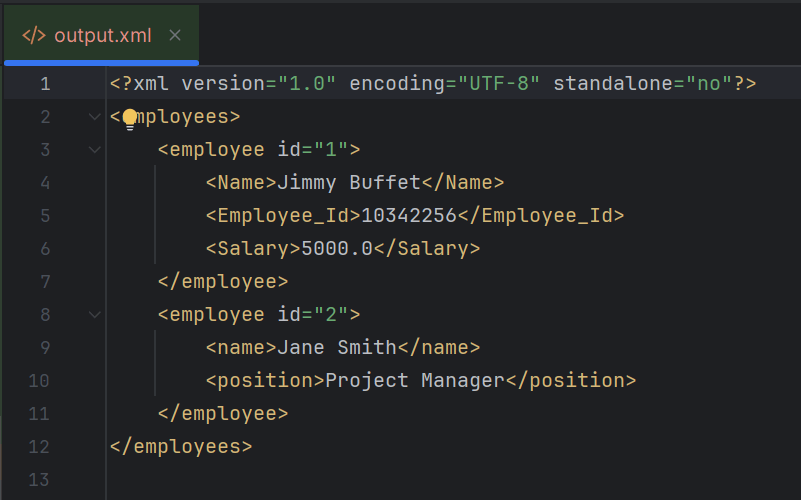
The complete program looks like as shown below:
import org.w3c.dom.Document;
import org.w3c.dom.Element;

import javax.xml.parsers.DocumentBuilder;
import javax.xml.parsers.DocumentBuilderFactory;
import javax.xml.parsers.ParserConfigurationException;
import javax.xml.transform.Transformer;
import javax.xml.transform.TransformerException;
import javax.xml.transform.TransformerFactory;
import javax.xml.transform.dom.DOMSource;
import javax.xml.transform.stream.StreamResult;
import java.io.File;
import javax.xml.transform.OutputKeys;

public class CreateXMLDocument {

    public static void main(String[] args) {
        try {

            // Step 1: Create a DocumentBuilderFactory and DocumentBuilder
            DocumentBuilderFactory factory = DocumentBuilderFactory.newInstance();
            DocumentBuilder builder = factory.newDocumentBuilder();

            // Step 2: Create a new Document
            Document document = builder.newDocument();

            // Step 3: Create and append root element
            Element root = document.createElement("employees");
            document.appendChild(root);

            // Step 4: Create and append employee elements
            Element employee1 = document.createElement("employee");
            employee1.setAttribute("id", "1");
            Element name1 = document.createElement("Name");
            name1.appendChild(document.createTextNode("Jimmy Buffet"));
            Element id1 = document.createElement("Employee_Id");
            id1.appendChild(document.createTextNode(String.valueOf(10342256)));
            Element salary1 = document.createElement("Salary");
            salary1.appendChild(document.createTextNode(String.valueOf(5000.00)));
            employee1.appendChild(name1);
            employee1.appendChild(id1);
            employee1.appendChild(salary1);
            root.appendChild(employee1);

            Element employee2 = document.createElement("employee");
            employee2.setAttribute("id", "2");
            Element name2 = document.createElement("name");
            name2.appendChild(document.createTextNode("Jane Smith"));
            Element position2 = document.createElement("position");
            position2.appendChild(document.createTextNode("Project Manager"));
            employee2.appendChild(name2);
            employee2.appendChild(position2);
            root.appendChild(employee2);

            // Step 5: Write the content into an XML file
            TransformerFactory transformerFactory = TransformerFactory.newInstance();
            Transformer transformer = transformerFactory.newTransformer();

            transformer.setOutputProperty(OutputKeys.INDENT, "yes"); // Pretty print the XML
            transformer.setOutputProperty("{http://xml.apache.org/xslt}indent-amount", "4");

            DOMSource domSource = new DOMSource(document);

            // Write XML to file
            StreamResult fileResult = new StreamResult(new File("src/test/resources/Payloads/output.xml"));
            transformer.transform(domSource, fileResult);

           // Print XML to console
            StreamResult consoleResult = new StreamResult(System.out);
            transformer.transform(domSource, consoleResult);

            System.out.println("XML file created successfully!");

        } catch (ParserConfigurationException | TransformerException e) {
            e.printStackTrace();
        }
    }
}
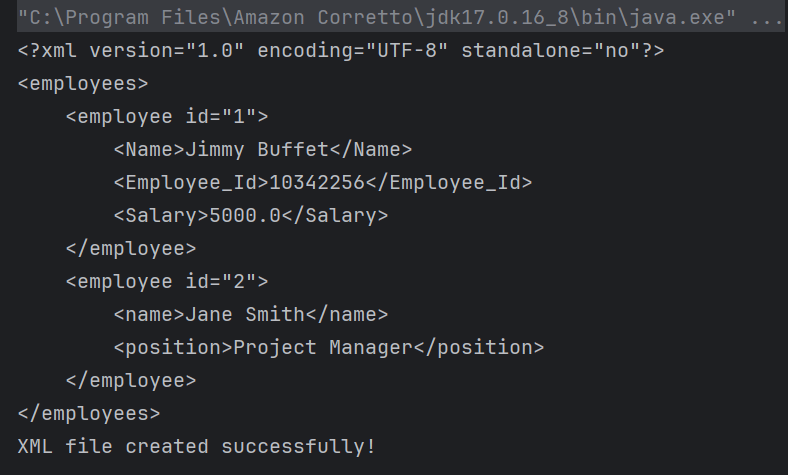
The output of the above program is
Explanation
1. Creating a DocumentBuilder Object
It has ‘newDocumentBuilder()’ method that creates an instance of the class ‘DocumentBuilder’. This DocumentBuilder class is used to get input in the form of streams, files, URLs and SAX InputSources.
DocumentBuilderFactory factory = DocumentBuilderFactory.newInstance();
DocumentBuilder builder = factory.newDocumentBuilder();
2. Create a new Document
Using DocumentBuilder object created in the above step, create a new document with newDocument() function.
Document document = builder.newDocument();
3. Creating the root element
Every XML document should possess a single root element , which is also called a parent element. We can create the root element using createElement() method and append it to the document created in the previous step.
Element root = document.createElement("employees");
document.appendChild(root);
4. Appending elements to the root element
Inside the root element, we can create any number of child elements. We append them the same way we appended the root element to the document.
To write text content inside an element, we can use createTextNode() method.
We can also create attributes for elements using createAttribute() method.
Element employee1 = document.createElement("employee");
employee1.setAttribute("id", "1");
Element name1 = document.createElement("Name");
name1.appendChild(document.createTextNode("Jimmy Buffet"));
Element id1 = document.createElement("Employee_Id");
id1.appendChild(document.createTextNode(String.valueOf(10342256)));
Element salary1 = document.createElement("Salary");
salary1.appendChild(document.createTextNode(String.valueOf(5000.00)));
employee1.appendChild(name1);
employee1.appendChild(id1);
employee1.appendChild(salary1);
root.appendChild(employee1);

Element employee2 = document.createElement("employee");
employee2.setAttribute("id", "2");
Element name2 = document.createElement("name");
name2.appendChild(document.createTextNode("Jane Smith"));
Element position2 = document.createElement("position");
position2.appendChild(document.createTextNode("Project Manager"));
employee2.appendChild(name2);
employee2.appendChild(position2);
root.appendChild(employee2);
5. Writing the content into XML file
After building the elements inside the document with their corresponding attributes, we must write this content into an XML file. We do this by creating a Transformer object, which transforms our source document into StreamResult. It then stores the result in the specified file path with the given name.
TransformerFactory transformerFactory = TransformerFactory.newInstance();
Transformer transformer = transformerFactory.newTransformer();

transformer.setOutputProperty(OutputKeys.INDENT, "yes"); // Pretty print the XML
transformer.setOutputProperty("{http://xml.apache.org/xslt}indent-amount", "4");

DOMSource domSource = new DOMSource(document);

 // Write XML to file
 StreamResult fileResult = new StreamResult(new File("src/test/resources/Payloads/output.xml"));
transformer.transform(domSource, fileResult);
6. Printing the output on the console
We can test our XML file by printing it on the console. This is an optional step.
StreamResult consoleResult = new StreamResult(System.out);
transformer.transform(domSource, consoleResult);
Summary:
1. DocumentBuilderFactory and DocumentBuilder: These are used for creating new DOM `Document` instances.
2. Document Object: Represents the XML in memory, and methods like `createElement()` and `createTextNode()` are used to build the XML structure.
3. Transformer: Converts the DOM representation to a file.
4. StreamResult: Used to specify the output file where the XML content will be written.
We are done! Congratulations on making it through this tutorial and hope you found it useful! Happy Learning!!
 QA Automation Expert