What is HTML?
HTML (HyperText Markup Language) is the most basic building block of the Web. It defines the meaning and structure of web content.
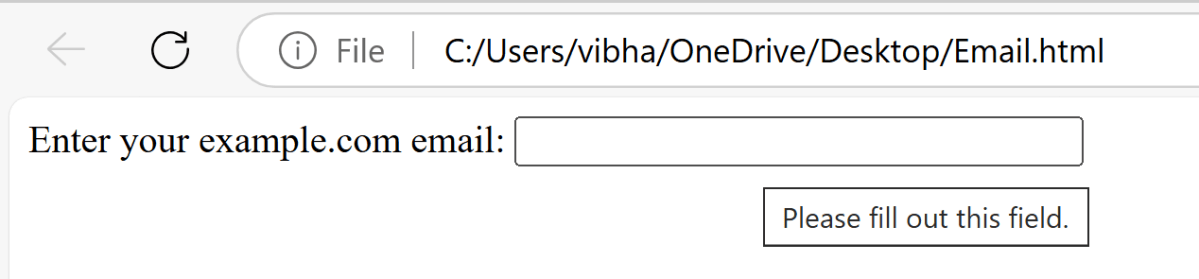
<input> elements of type email are used to let the user enter and edit an email address, or, if the multiple attribute is specified, a list of email addresses.
Below is an example of Email box.
<label for="email">Enter your example.com email:</label>

<input type="email" id="email" pattern=".+@example\.com" size="30" required />

Testing HTML5 validation messages with Selenium involves checking the behavior of form elements when they fail client-side validation.
Step 1 – Initialize WebDriver
Initialize the WebDriver. Here, it is ChromeDriver.
ChromeOptions options = new ChromeOptions();
WebDriver driver = new ChromeDriver(options);
Step 2 – Put an Implicit wait and launch URL
driver.manage().timeouts().implicitlyWait(Duration.ofSeconds(5));
String filePath = "file:///C:/Users/vibha/OneDrive/Desktop/Email.html";
driver.get(filePath);
Step 3 – Maximize the browser
Maximizes the browser window.
driver.manage().window().maximize();
Step 4 – Locate Web Element and Perform Validation
Locates the email input field using “By.id“. Sends an empty string to trigger the form validation. Retrieves the validation message using “getAttribute(“validationMessage”)“.
WebElement email = driver.findElement(By.id("email"));
email.sendKeys("");
String validationMessage = email.getAttribute("validationMessage");
Step 5 – Validation Check
Prints out whether the validation test passed or failed based on the comparison.
 String expectedMessage = "Please fill out this field.";
    if (validationMessage.equals(expectedMessage)) {
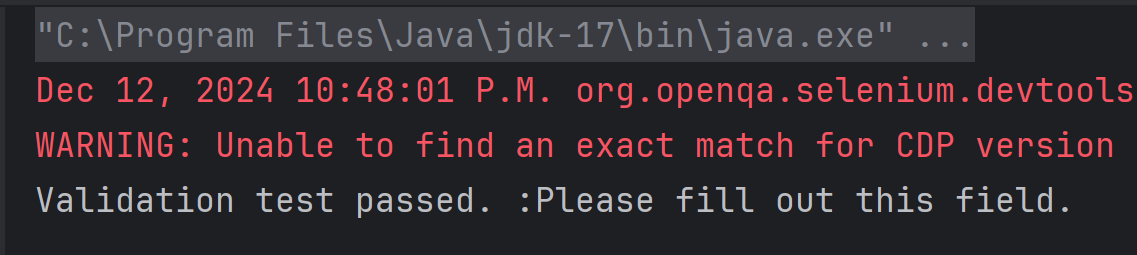
        System.out.println("Validation test passed. :" + validationMessage);
    } else {
        System.out.println("Validation test failed. Expected: '" + expectedMessage + "' but got: '" + validationMessage + "'");
    }
Step 6 – Close the Browser
Closes the browser and ends the WebDriver session.
driver.quit();
Below is an example to test the validation message generated on entering the blank space in the email field.
package com.example.Sample;

import org.openqa.selenium.By;
import org.openqa.selenium.WebDriver;
import org.openqa.selenium.WebElement;
import org.openqa.selenium.chrome.ChromeDriver;
import org.openqa.selenium.chrome.ChromeOptions;
import org.openqa.selenium.support.ui.ExpectedConditions;
import org.openqa.selenium.support.ui.WebDriverWait;

import java.time.Duration;
import java.util.List;

public class HTML5Validation {

    public static void main(String[] args)  {

        // Setup the webdriver
        ChromeOptions options = new ChromeOptions();
        WebDriver driver = new ChromeDriver(options);

        // Put an Implicit wait and launch URL
        driver.manage().timeouts().implicitlyWait(Duration.ofSeconds(5));
        String filePath = "file:///C:/Users/vibha/OneDrive/Desktop/Email.html";
        driver.get(filePath);

        //maximize browser
        driver.manage().window().maximize();

        //Blank field
        WebElement email = driver.findElement(By.id("email"));
        email.sendKeys("");
        String validationMessage = email.getAttribute("validationMessage");

        // Expected validation message
        String expectedMessage = "Please fill out this field.";
        if (validationMessage.equals(expectedMessage)) {
            System.out.println("Validation test passed. :" + validationMessage);
        } else {
            System.out.println("Validation test failed. Expected: '" + expectedMessage + "' but got: '" + validationMessage + "'");
        }

         // Close the browser
         driver.quit();
    }

}
The output of the above program is
Note:
The validation message might vary based on the browser (and its version) and the system’s language/locale settings.
That’s it! Congratulations on making it through this tutorial and hope you found it useful! Happy Learning!!
 QA Automation Expert