In this article we will see how we can download a pdf file in chrome using selenium at a desired location in java.
When a PDF link on a website is clicked, the PDF file typically opens in Chrome’s default PDF viewer. While clicking on the PDF link itself is straightforward using Selenium, interacting with the PDF viewer afterward presents a challenge. This is because the PDF viewer is not part of the HTML DOM, and Selenium cannot interact with elements within it, such as the download button. As a result, we are unable to perform Selenium actions on controls within Chrome’s built-in PDF viewer.
To overcome this problem, we need to disable the default chrome pdf viewer plugin before launching the driver, and set the download directory where we need to download the file.
Implementation Steps
Step 1 – Download Path and Chrome Options Setup
Define the directory path where the PDF will be downloaded.
String downloadFilepath = System.getProperty("user.dir") + File.separator + "downloads";
Step 2 – Configure ChromeOptions to set download preferences in Chrome
This includes setting the browser to always download PDFs instead of opening them in the browser, and specifying the default download directory.
ChromeOptions options = new ChromeOptions();
Map<String, Object> prefs = new HashMap<>();
prefs.put("plugins.always_open_pdf_externally", true);
prefs.put("download.default_directory", downloadFilepath);
options.setExperimentalOption("prefs", prefs);
Explanation
prefs.put("plugins.always_open_pdf_externally", true)
This line is setting a Chrome preference to always open PDF files using an external application (like Adobe Reader) instead of the Chrome PDF viewer. By setting this preference to true, Chrome will automatically download the PDF files rather than opening them in the built-in PDF viewer.
prefs.put("download.default_directory", System.getProperty("user.dir") + File.separator + "downloads");
This line sets the default directory where downloaded files should be saved.
options.setExperimentalOption("prefs", prefs);
setExperimentalOption is a method used to pass custom preferences to the ChromeDriver. This line applies the preferences you’ve set to the ChromeOptions object.
Step 3 – Initialize WebDriver and Open Webpage
WebDriver driver = new ChromeDriver(options);
driver.manage().window().maximize();
driver.get("https://freetestdata.com/document-files/pdf/");
Step 4 – Find and Click the Download Link
Locate the download link using XPath and click on it to start the download.
WebElement downloadLink = driver.findElement(By.xpath("//*[@class=\"elementor-button-text\"]"));
downloadLink.click();
Step 5 – Wait for the Download to Complete
This is used to pause the execution for a specified amount of time (5 seconds here) to allow the file to download completely. It is not recommended to use Thread.sleep in production.
Thread.sleep(5000);
Step 6 – Verify the File Download
Check if the downloaded file exists in the specified download directory or not.
 File downloadedFile = new File(downloadFilepath + "/Free_Test_Data_100KB_PDF.pdf");
        if (downloadedFile.exists()) {
            System.out.println("File is downloaded!");
        } else {
            System.out.println("File is not downloaded.");
      }
Step 7 – Quit the WebDriver
driver.quit();
The complete program can be seen below:
import org.openqa.selenium.By;
import org.openqa.selenium.WebDriver;
import org.openqa.selenium.WebElement;
import org.openqa.selenium.chrome.ChromeDriver;
import org.openqa.selenium.chrome.ChromeOptions;

import java.io.File;
import java.util.HashMap;
import java.util.Map;

public class DownloadPDF_Chrome_Demo {

    public static void main(String[] args) throws InterruptedException {

        String downloadFilepath = System.getProperty("user.dir") + File.separator + "downloads";

        ChromeOptions options = new ChromeOptions();
        Map<String, Object> prefs = new HashMap<>();
        prefs.put("plugins.always_open_pdf_externally", true);
        prefs.put("download.default_directory", downloadFilepath);
        options.setExperimentalOption("prefs", prefs);

        WebDriver driver = new ChromeDriver(options);
        driver.manage().window().maximize();
        driver.get("https://freetestdata.com/document-files/pdf/");

        // Locate and click the download link or button if necessary
        WebElement downloadLink = driver.findElement(By.xpath("//*[@class=\"elementor-button-text\"]"));
        downloadLink.click();

        // Wait for the download to complete
        Thread.sleep(5000);

        // Check if the file exists
        File downloadedFile = new File(downloadFilepath + "/Free_Test_Data_100KB_PDF.pdf");
        if (downloadedFile.exists()) {
            System.out.println("File is downloaded!");
        } else {
            System.out.println("File is not downloaded.");
        }

        driver.quit();
    }
}
The output of the above program is

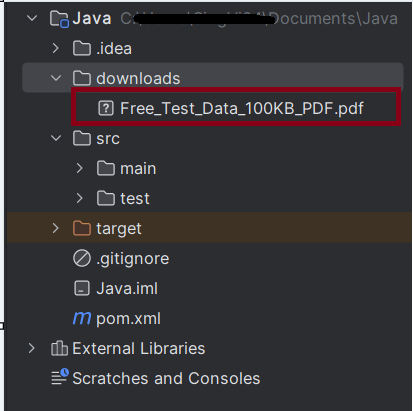
We can see that a downloads folder is created, and it has the downloaded pdf file – Free_Test_Data_100KB_PDF.pdf.
Summary:
- Setup: Configures Chrome to automatically download PDFs and sets the download directory.
- Download and Verify: Navigates to a specific URL, clicks the download link, waits for the download to complete, and verifies if the file exists in the specified directory.
- Cleanup: Closes the browser session.
That’s it! Congratulations on making it through this tutorial and hope you found it useful! Happy Learning!!
 QA Automation Expert