In this tutorial, we will create a Scenario Outline in PyTest-BDD.
Table of Contents
- Prerequisite
- What is Scenario Outline?
- How to implement Scenario Outline in PyTest – BDD?
- Project Structure
- Implementation Steps
Prerequisite:
- Python is installed on the machine
- PIP is installed on the machine
- PyCharm or other Python Editor is installed on the machine
If you need help in installing Python, please refer to this tutorial – How to Install Python on Windows 11.
If you need help in installing PyCharms, please refer to this tutorial – How to install PyCharms on Windows 11.
What is Scenario Outline?
Scenarios can be parametrized to cover multiple cases. These are called Scenario Outlines in Gherkin, and the variable templates are written using angular brackets (e.g. <name>). It allows us to define a scenario template with placeholders for parameters, and then specify multiple examples of that scenario using different values for those parameters.
Here’s an example of a Scenario Outline:
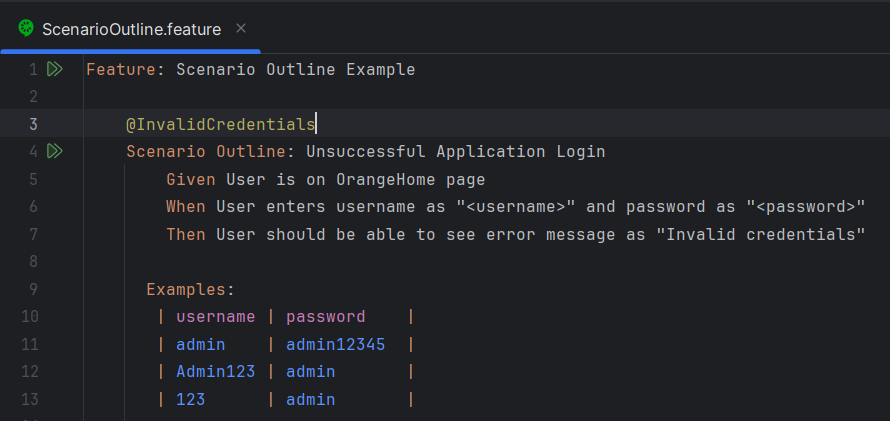
In this Scenario Outline:
<username> and <password> are placeholders for parameters. The Examples section provides multiple sets of values for these parameters. Each set of values represents a different example of the scenario.
How to implement Scenario Outline in PyTest – BDD?
Project Structure
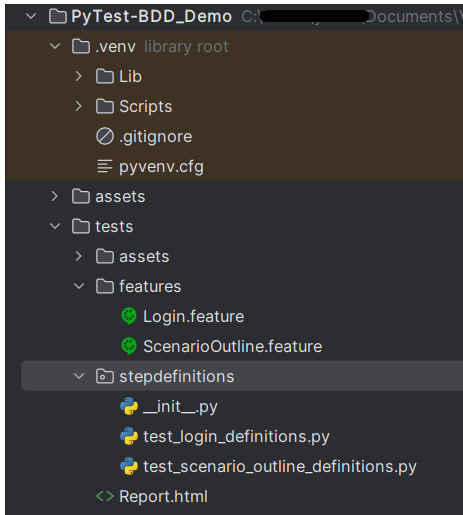
Implementation Steps
Step 1 – Install pytest
Use the below command to install PyTest on your machine.
pip install pytest
pip install pytest-bdd
pip install pytest-selenium (If using Selenium)
Step 2 – Create a new project in PyCharm
Create a new project folder and open it in PyCharm.

Step 3 – Create a new directory
Go to the project folder and create a new directory – tests.
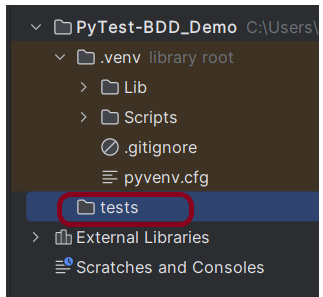
Step 4 – Create python directories
Go to the test directory and create a new directory within it – features and another Python directory – stepdefinitions.

Step 5 – Add pytest-selenium and pytest-bdd packages to the PyCharms
Go to File->Settings ->Project: PyTest-BDD_Demo->Python Interpreter.
Click on the “+” sign and enter allure-r in the search bar. It will show a list of packages. Select the “pytest-selenium” package and click on the “Install Package”.

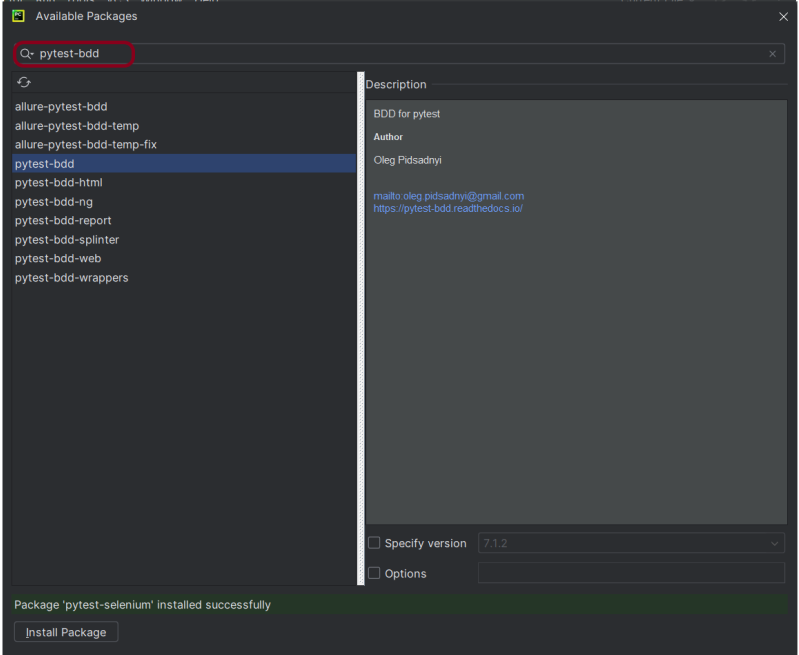
Once the package is installed, we will see the message that the package is installed successfully.

Step 6 – Create a feature file
Create a feature file – ScenarioOutline.feature in the features directory.
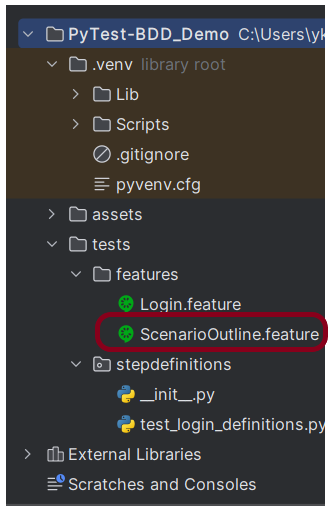
Below is the sample feature file that contains Scenario Outline.
Feature: Scenario Outline Example

    @InvalidCredentials
    Scenario Outline: Unsuccessful Application Login
        Given User is on OrangeHome page
        When User enters username as "<username>" and password as "<password>"
        Then User should be able to see error message as "Invalid credentials"

      Examples:
       | username | password    |
       | admin    | admin12345  |
       | Admin123 | admin       |
       | 123      | admin       |
Step 7 – Create the test code in stepdefinitions directory
The stepdefinition of the ScenarioOutline.feature file is created in stepdefinitions directory – test_scenario_outline_definitions.py.

Below is the sample code.
import pytest

from pytest_bdd import scenarios, given, when, then, parsers
from selenium import webdriver
from selenium.webdriver.common.by import By


# Constants
TIMEOUT = 5
URL = 'https://opensource-demo.orangehrmlive.com/'


# Scenarios
scenarios('../features/ScenarioOutline.feature')


# Fixtures
@pytest.fixture
def driver():
    driver = webdriver.Firefox()
    driver.implicitly_wait(TIMEOUT)
    driver.maximize_window()
    yield driver
    driver.quit()


# Given Steps
@given('User is on OrangeHome page')
def open_browser(driver):
    driver.get(URL)


# When Steps
@when(parsers.parse('User enters username as "{username}" and password as "{password}"'))
def search_phrase(driver, username, password):
    driver.find_element(By.NAME, "username").send_keys(username)
    driver.find_element(By.NAME, "password").send_keys(password)
    driver.find_element(By.XPATH, "//*[@class='oxd-form']/div[3]/button").click()


# Then Steps
@then(parsers.parse('User should be able to see error message as "{expected_error_message}"'))
def search_results(driver, expected_error_message):
    actual_error_message = driver.find_element(By.XPATH, "//*[@id='app']/div[1]/div/div[1]/div/div[2]/div[2]/div/div[1]/div[1]/p").text
    assert actual_error_message == expected_error_message
To bind all scenarios found in the ScenarioOutline.feature, we need to use the below syntax:
scenarios('../features/ScenarioOutline.feature')
Step 8 – Execute the tests
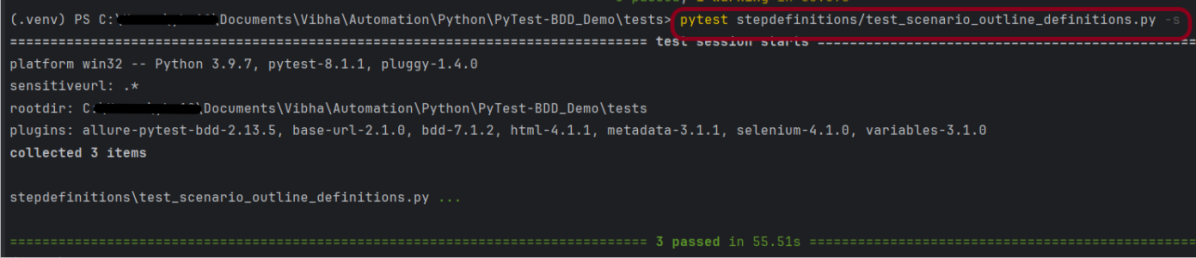
As we know that the stepdefinitions file is present in the tests directory, so to run this test, use the below command:
pytest stepdefinitions/test_scenario_outline_definitions.py -s
The output of the above execution is
Step 9 – Generate the HTML Report
To generate a HTML Report, please refer to this tutorial – How to generate HTML Report in PyTest Framework.
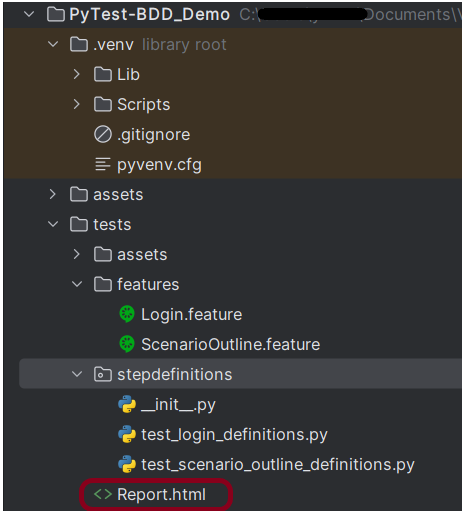
Generate a HTML Report using the below command:
pytest stepdefinitions/test_scenario_outline_definitions.py --html=Report.html

The Report.html report will be generated in the root directory.
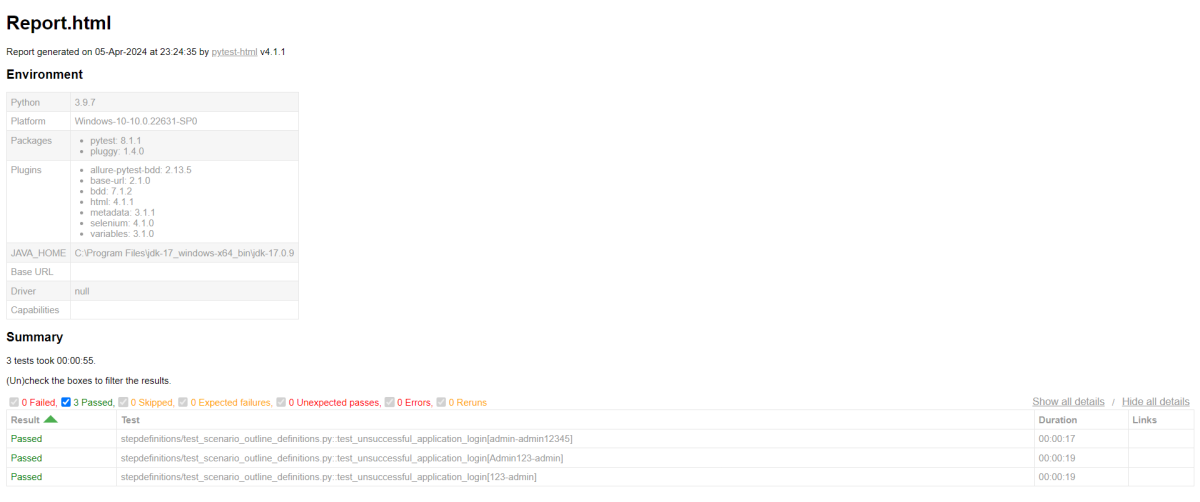
Step 10 – View the HTML report
Right-click and open with Web Browser.
That’s it! Congratulations on making it through this tutorial and hope you found it useful! Happy Learning!!


Great and detailed step-by-step tutorial! Scenario Outlines in PyTest-BDD are essential when you need to run data-driven tests without cluttering your feature files.
For anyone looking to dive deeper into scaling this setup, managing step definitions across larger suites, and integrating test reporting, Testomat.io has an excellent breakdown on using pytest-bdd effectively in modern CI/CD pipelines. Thanks for sharing this guide!
LikeLike