In the previous tutorial, I explained the Implicit Wait in Serenity. This tutorial will explain the Explicit Wait in Serenity.
What is Explicit Wait?
The explicit wait is used to wait for a specific web element on the web page for a specified amount of time. You can configure wait time element by element basis.
By default, the explicit wait is for 5 sec, with an interval of 10 ms.
Below is the example where I have created two classes – ExplicitWaitDemo and SynchronizationTests.
ExplicitWaitDemo
@DefaultUrl("http://the-internet.herokuapp.com/dynamic_loading/1")
public class ExplicitWaitDemo extends PageObject {

    //Incorrect XPath
	@FindBy(xpath = "//*[@id='start']/buttons")
	WebElementFacade startButton;

	@FindBy(xpath = "//*[@id='finish']/h4")
	WebElementFacade pageText;

	public void explicitWaitDemo1() throws InterruptedException {

		open();

		startButton.waitUntilClickable().click();

	}
}
SynchronizationTests
@RunWith(SerenityRunner.class)
public class SynchronizationTests {

	ExplicitWaitDemo ewaitDemo;

	@Managed
	WebDriver driver;

	@Test
	public void waitTest1() throws InterruptedException {

		ewaitDemo.explicitWaitDemo1();

	}

}
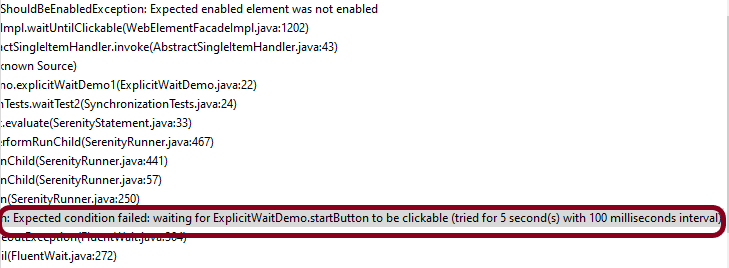
You can see that Serenity waited for 5 sec, with an interval of 100 ms.
When we need to wait for a web element for a specific amount of time, then the below-mentioned command can be added to serenity.conf.
webdriver {
      wait {
         for {
            timeout = 6000

        }
   }
}
The same can be added to serenity.properties as shown below.
webdriver.wait.for.timeout = 6000
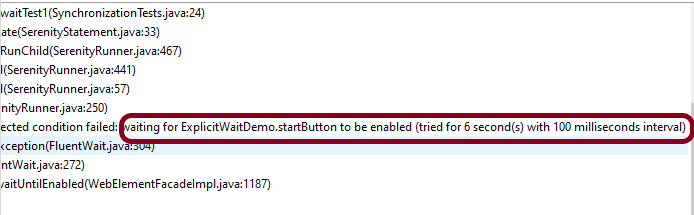
Now, let us run the same above test. I have used the incorrect XPath for the button. So the test should fail after trying to locate the button for 6 secs.
You can print the explicit wait time by using the method – getWaitForTimeout().
In the below example, I have used the explicit wait as 6 sec and which is also returned by the method – getWaitForTimeout().
@DefaultUrl("http://the-internet.herokuapp.com/dynamic_loading/2")
public class ExplicitWaitDemo extends PageObject {

	@FindBy(xpath = "//*[@id='start']/button")
	WebElementFacade startButton;

	@FindBy(xpath = "//*[@id='finish']/h4")
	WebElementFacade pageText;

	public void explicitWaitDemo1() throws InterruptedException {

		open();

		startButton.click();

		System.out.println("Explicit Time defined for the test (in seconds):" + getWaitForTimeout().toSeconds());

	}
}
The output of the above program is

You can override the value of explicit wait mentioned in the serenity.properties or serenity.conf files. This can be done by using the method – withTimeoutOf(Duration duration).
@DefaultUrl("http://the-internet.herokuapp.com/dynamic_loading/1")
public class ExplicitWaitDemo extends PageObject {

    //Incorrect XPath
	@FindBy(xpath = "//*[@id='start']/buttons")
	WebElementFacade startButton;

	@FindBy(xpath = "//*[@id='finish']/h4")
	WebElementFacade pageText;

	public void explicitWaitDemo1() throws InterruptedException {

		open();

       //Override the value mentioned in serenity.conf for timeout from 6 sec to 8 sec
		startButton.withTimeoutOf(Duration.ofSeconds(8)).click();

	}
}
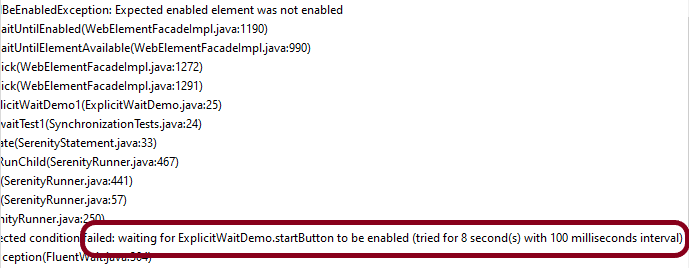
The output of the above program is
You can also wait for more arbitrary conditions, e.g.
@DefaultUrl("http://the-internet.herokuapp.com/dynamic_loading/2")
public class ExplicitWaitDemo extends PageObject {

	@FindBy(xpath = "//*[@id='start']/button")
	WebElementFacade startButton;

	@FindBy(xpath = "//*[@id='finish']/h4")
	WebElementFacade pageText;

	public void explicitWaitDemo1() throws InterruptedException {

		open();
        startButton.click();
		String expected = waitFor(pageText).getText();
		System.out.println("Value of Page :" + expected);
		Assert.assertEquals("Hello World!", expected);

	}
}
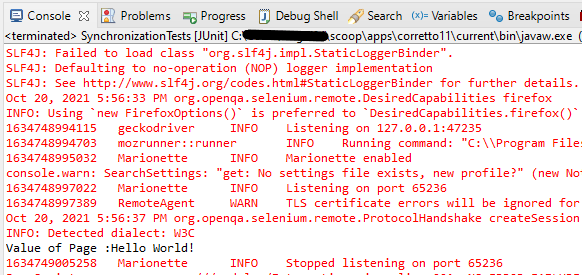
The output of the above program is
You can also specify the timeout for a field. For example, if you wanted to wait for up to 8 seconds for a button to become clickable before clicking on it, you could do the following:
startButton.withTimeoutOf(Duration.ofSeconds(8)).waitUntilClickable().click();
Finally, if a specific element of a PageObject needs to have a bit more time to load, you can use the timeoutInSeconds attribute in the Serenity @FindBy annotation, e.g.
import net.serenitybdd.core.annotations.findby.FindBy;
...
@FindBy(xpath = ("//*[@id='start']/button"), timeoutInSeconds="10"))
public WebElementFacade startButton;
To wait for a specific text on the web page, you can use waitForTextToAppear attribute
waitForTextToAppear("Example 1").waitFor(startButton).click();
There are many other methods that can be used with Explicit Wait.
We are done! Congratulations on making it through this tutorial and hope you found it useful! Happy Learning!!
 QA Automation Expert