What is Apache JMeter?
The Apache JMeter™ application is open source software, a 100% pure Java application designed to load test functional behavior and measure performance. It was design for testing Web Applications but has since expanded to other test functions.
It can used to simulate a heavy load on a server, group of servers, network or object to test its strength or to analyze overall performance under different load types.
How to send GET HTTP Request in JMeter?
We can perform GET as well as POST operation in JMeter. In this tutorial, we will only explain how we can perform GET operation.
Create a Test Plan in JMeter
Step 1 – Add Thread Group
- Select Test Plan on the tree
- Add Thread Group
- To add Thread Group: Right click on the “Test Plan” and add a new thread group: Add -> Threads (Users) -> Thread Group

In the Thread Group control panel, enter Thread Properties as follows: We will take an example of row no 5.
- Number of Threads: 5 – Number of users connects to the target website
- Loop Count: 5 – Number of time to execute testing
- Ramp-Up Period: 5 – It tells JMeter how long to delay before starting the next user. For example, if we have 5 users and a 5 -second Ramp-Up period, then the delay between starting users would be 1 second (5 seconds /5 users).

Step 2 – Adding JMeter elements
The JMeter element used here is HTTP Request Sampler. In HTTP Request Control Panel, the Path field indicates which URL request you want to send.
2.1 Add HTTP Request Sampler
To add: Right-click on Thread Group and select: Add -> Sampler -> HTTP Request.

Below mentioned are the values use in HTTP Request to perform the test
- Name – HTTP Request
- Server Name or IP – localhost
- Port – 8010
- Method – GET
- Path – /demo/helloworld/demo

OR
URL – https://reqres.in/api/users?page=2
- Name – HTTP GET Request
- Protocol – https
- Server Name or IP – reqres.in
- Port –
- Method – GET
- Path – /api/users?page=2

Step 3 – Adding Listeners to Test Plan
Listeners – They shows the results of the test execution. They can show results in a different format such as a tree, table, graph or log file
We are adding View Result Tree listener
View Result Tree – View Result Tree show results of the user request in basic HTML format
To add: Right click Test Plan, Add -> Listener -> View Result Tree

Complete Test Plan will look like as shown below

Step 4 – Save the Test Plan
To Save: Click File Select -> Save Test Plan as ->Give name of the Test Plan. It will be save as .jmx format.
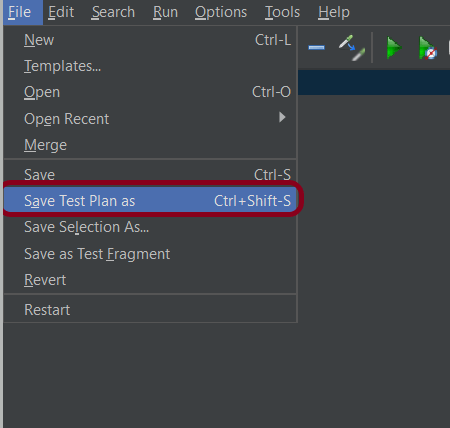
Sample .jmx File

Step 5 – Run the Test Plan
Click on Green Triangle as shown below to run the test.

Step 6 – View the Execution Status
Click on View Result Tree to see the status of Run. Successful request will be of Green color in the Text Section.

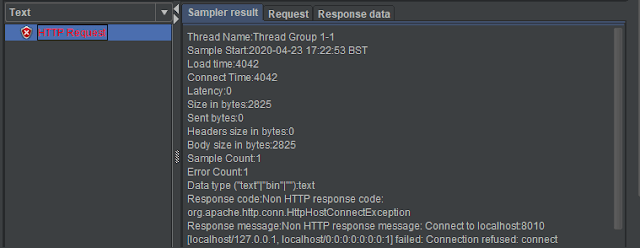
Sample of Failed Request. Failed request will be of Red color in View Result Tree under Text option. This screen sows the reason for the failure of the request like Connection refused here.
That’s it! Congratulations on making it through this tutorial and hope you found it useful! Happy Learning!!
 QA Automation Expert
Nice Explanation. I'm trying to follow the same, but my test is little different. I'm getting a token from a request and sending that to another request to get response in postman. Same test I have to perform in JMeter.. Can you tell me how this can be done in Jmeter
LikeLike
Thanks Ninu. You can add a Http request in Thread group1 which will generate the token and add another http request in thread group 2 and pass this token to second http request. You can refer this blog for detailed descriptionhttps://configureselenium.blogspot.com/2020/05/jmeter-authorization-with-access-token.html
LikeLike
Detailed explanation ..very helpful
LikeLike
Very informative !!
LikeLike
Hi, I want to run my JMeter script through ci/cd pipeline. Is it possible? Any suggestion is welcomed. Thanks in advance
LikeLike
Hi Shawn, it is possible to run JMeter scripts through CI/CD. I have a tutorial that explains the steps to run JMeter script through Jenkins. You can refer this – https://qaautomation.expert/2023/07/17/integration-of-jmeter-with-jenkins/. Hope this helps.
LikeLike