Docker provides the ability to package and run an application in a loosely isolated environment called a container.
This cheatsheet provides a comprehensive and practical reference for common Docker commands. It covers images, containers, volumes, networks, Docker Compose, command combos, and more.
Docker images are a lightweight, standalone, executable package of software that includes everything needed to run an application: code, runtime, system tools, system libraries and settings
1.List local images
docker images
2. Build an Image from a Dockerfile
docker build -t [image_name] .
3. Build an Image from a Dockerfile without the cache
docker build -t [image_name] . –no-cache
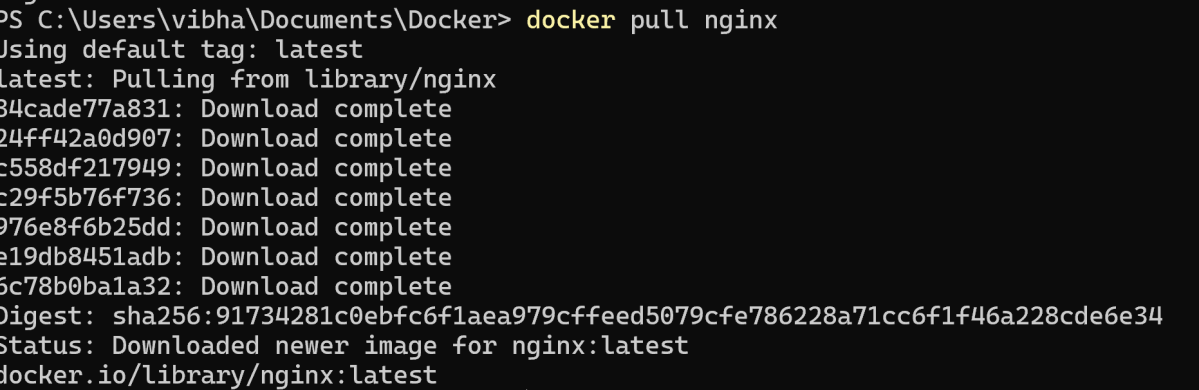
4. Download an image from Docker Hub/registry
docker pull [image]
5. Tag an image
docker tag [image] [new_image]
6. Delete an Image
docker rmi [image_id]
7. Remove all unused images
docker image prune
Container Management
A container is a runtime instance of a docker image. A container will always run the same, regardless of the infrastructure.
Commands for running, stopping, inspecting, and managing containers.
1.List running containers
docker ps
2. List all containers (including stopped ones)
docker ps -a
3. Run a container from an image
docker run [image]
4. List all containers (including stopped ones)
docker ps -a
5. Run a container from an image
docker run [image]
6. Create and run a container from an image, with a custom name
docker run --name [container_name] [image_name]
7. Run a container in detached mode
docker run -d --name [container_name] [image_name]
Version control systems are tools that manage changes made to files and directories in a project. They enable you to monitor your actions over time. You can revert any changes that you wish to discard. You can also work collaboratively with others on a larger scale. This cheat sheet highlights one of the most widely used systems, Git.
Git configuration
1. Specify the username and email address that will be used with the commits.
1. Initializes a new Git repository in the current directory.
git init
2. Creates a local copy of a remote repository.
git clone <repository_url>
3. Clones a specific branch from a remote repository instead of the default branch (main or master)
git clone --branch <branch_name> <repo_url>
Basic Commands
1. Displays the status of your working directory. Options include new, staged, and modified files. It will retrieve branch name, current commit identifier, and changes pending commit.
git status
2. To move files from the Working Directory to the Staging Index
2.1. To add specific files,
git add <file1> <file2> … <fileN>
2.2. To add all the files:
git add .
3. Remove a file from a working directory or staging area
git rm <filename_or_dir>
4. Show changes between working directory and staging area.
git diff [file]
5. Create a new commit from changes added to the staging area with custom message.
git commit -m “[Commit message]”
6. Editing the message of the latest commit
git commit --amend -m "New commit message"
Branch & Merge
1. List all local branches in repository.
git branch
Lists all branches, including: Local branches, Remote-tracking branches (from remote like origin)
git branch -a
2. Create a new branch referencing the current HEAD
git branch [branch-name]
3. Apply commits of the current working branch and apply them to the HEAD of [branch]
git rebase [branch_name]
4.1. Switch working directory to another existing branch
git checkout [branch_name]
4.2. Create and switch to a new branch (older method):
git checkout -b [branch_name]
4.3. Create and switch to a new branch (new method):
git switch -c [branch_name]
5. Remove selected branch, if it is already merged into any other.
git branch -d [branch_name]
6. Force delete a local branch (whether merged or unmerged)
git branch -D [branch_name]
7. Rename the current branch to new branch name
git branch -m [branch_name]
8. Join specified [branch_name] branch into your current branch
git merge [branch_name]
Synchronizing repositories
1.Fetch changes from the remote, but not update tracking branches.
git fetch [remote]
2. Push a local branch named branch to a remote repository (usually named origin)
git push origin branch
3. Fetches changes from the remote repository and merges them into the current branch.
git pull
4. Fetches changes from the remote repository and rebases the current branch onto the updated branch.
git pull --rebase
5. Pushes all branches to the remote repository.
git push --all
6. Lists all remote repositories.
git remote
7. Adds a new remote repository with the specified name and URL.
git remote add [name] [url]
8. Remove a connection to a remote repository.
git remote rm [remote]
9. Rename an existing remote connection.
git remote rename [old_name] [new_name]
Temporary Commits
1. Stashes the changes in the working directory, allowing you to switch to a different branch or commit without committing the changes.
git stash
2. Lists all stashes in the repository.
git stash list
3. Applies and removes the most recent stash from the stash list.
git stash pop
4. Removes the most recent stash from the stash list.
git stash drop
Git Logging
1. Show the commit history for the currently active branch.
git log
2. Shows commit logs for all branches.
git log --all
3. Compares working directory and staging area (unstaged changes).
git diff
4. Shows commits made by a specific author.
git log --author="Name"
5. Shows commits made before a specific date.
git log --until="2024-12-31"
6. Shows the commit history of a specific file.
git log [file]
7. Displays the full details of a specific commit (diff + metadata).
Welcome to the Docker Quiz! This blog post features 25 multiple-choice questions that explore advance concepts of Docker.
1. How do Docker containers achieve process isolation on the host system?
a) Virtual Machines b) Hypervisors c) Namespaces and cgroups d) Dedicated resources
Answer 1
c) Namespaces and cgroups
Namespaces are a feature of the Linux kernel that provide isolation for resources such as process IDs, network, user IDs, and file systems.
Docker uses cgroups to allocate resources efficiently among containers running on the same host, preventing one container from consuming excessive resources and impacting others.
2. What is the purpose of a Dockerfile?
a) To create virtual machines b) To optimize application code c) To store environment variables d) To define and build Docker images
Answer 2
d) To define and build Docker images
A Dockerfile contains a set of instructions to define and build a Docker image, specifying dependencies, configuration, and application code.
3. What does the Dockerfile contain?
a) Compiled source code b) Docker images c) Binary data d) Instructions for building a Docker image
Answer 3
Instructions for building a Docker image
A Dockerfile is a text file that contains a set of instructions used to automatically build a Docker image. These instructions define everything needed to assemble the image, such as: Base Image, Package Installation, Execution Commands, File Operations
4. How many types of volumes are there in Docker?
a) 3 b) 2 c) 4 d) 5
Answer 4
b) 2
There are two types of volumes in docker – Named volumes and Bind Mounts
5. Which of the following volume type allows you to share a directory from the host’s filesystem into the container?
a) Named volumes b) Bind Mounts
Answer 5
b) Bind Mounts
The bind mount volume type allows you to share a directory from the host’s filesystem into the container.
6. In which of the following volume type docker chooses the host location?
a) Named volumes b) Bind Mounts
Answer 6
a) Named volumes
In the Named volume type docker chooses the host location, whereas you decide the host location in the bind mount type of volume.
7. Which command is used to remove unused Docker objects, such as containers and images?
a) docker prune b) docker clean c) docker system prune d) docker remove
Answer 7
c) docker system prune
8. To list all the networks linked with Docker on the host, the ____ command is used.
a) docker network list b) docker network ls c) docker ls d) network ls
Answer 8
b) docker network ls
To list all the networks linked with Docker on the host, the docker network ls command is used.
9. What is port binding in Docker?
a) Binding environment variables b) Assigning internal ports to external ones c) Binding memory resources d) Binding IP addresses to containers
Answer 9
b) Assigning internal ports to external ones
Port binding in Docker refers to the process of linking internal ports within a Docker container to external ports on the host system. This allows applications running inside the container to communicate with external networks or systems
10. Which of the following is a tool that was built to assist define and distribute multi-container applications?
a) Docker setup b) Docker compose c) Docker notify
Answer 10
b) Docker compose
Docker Compose is a tool that was built to assist define and distribute multi-container applications.
11. Which of the following command is used to display the statistics of a running container?
Choose one option
a) Docker statistics b) Stats c) Docker statics d) Docker stats
Answer 11
d) Docker stats
The stats command is used to display the statistics of a running container.
12. Which command is used to view the logs of a running container?
Choose one option
a) docker view [container ID] b) docker logs [container ID] c) docker inspect [container ID] d) docker output [container ID]
Answer 12
b) docker logs [container ID]
13. What is the default Docker network mode?
Choose one option
a) host b) none c) bridge d) overlay
Answer 13
c) bridge
14. After making changes to a running container, how can you save those changes into an image?
Choose one option
a) docker save b) docker commit c) docker store d) docker snapshot
Answer 14
b) docker commit
15. What does the `ENTRYPOINT` directive do in a Dockerfile?
a) Sets an environment variable b) Specifies the command that will run on container start c) Exposes a port d) Confirms the image build
Answer 15
b) Specifies the command that will run on container start
16. What is the function of the `Dockerfile` directive `COPY`?
Choose one option
a) Copies files and directories from localhost to the image b) Moves data between volumes c) Copies data between containers d) Duplicates Docker images
Answer 16
a) Copies files and directories from localhost to the image
17. What is the syntax used to specify base image in a Dockerfile?
Choose one option
a) FROM [image name] b) BASE [image name] c) SOURCE [image name] d) INITIAL [image name]
Answer 17
a) FROM [image name]
18. What is the primary function of the .dockerignore file?
Choose one option
a) To list all images to be pulled from the Docker Hub b) To specify commands to run inside a container c) To prevent certain files and directories from being copied into an image d) To provide metadata about a Docker image
Answer 18
c) To prevent certain files and directories from being copied into an image
The .dockerignore file allows users to exclude files and directories from being copied to the image during the build process, much like .gitignore does for git repositories.
19. In a docker-compose.yml file, what is the function of the depends_on key?
a) Specifies the base images for services b) Specifies the build context for services c) Specifies the order in which services are started d) Specifies the network links between services
Answer 19
c) Specifies the order in which services are started
In a docker-compose.yml file, the depends_on key indicates the order in which services should be started. A service with a depends_on key will not start until the services it depends on have been started.
20. What is the primary purpose of Docker Swarm?
a) Image version management b) Multi-host container orchestration c) Container storage optimization d) Automated container build pipeline
Answer 20
b) Multi-host container orchestration
Docker Swarm is a native clustering and orchestration tool for Docker. It allows you to create and manage a swarm of Docker nodes and orchestrate services across multiple hosts.
21. What command initializes a node as a Docker Swarm manager?
a) docker swarm init b) docker swarm start c) docker swarm create d) docker swarm manager
Answer 21
a) docker swarm init
The docker swarm init command initializes the current node as a Docker Swarm manager, which manages the infrastructure of a swarm.
22. How can you inspect the details of a Docker network?
a) docker network view NETWORK_NAME b) docker network show NETWORK_NAME c) docker network detail NETWORK_NAME d) docker network inspect NETWORK_NAME
Answer 22
d) docker network inspect NETWORK_NAME
The docker network inspect command is used to display detailed information about a network.
23. Which command creates a Docker volume?
a) docker storage create b) docker add volume c) docker volume create d) docker create
Answer 23
c) docker volume create
The docker volume create command creates a new Docker volume for persistent storage.
24. Why is Docker commonly integrated with CI/CD pipelines?
a) Consistent environments across testing and production b) Easier dependency management c) Faster build and deployment times d) All of the mentioned
Answer 24
d) All of the mentioned
Docker integration with CI/CD ensures faster deployments, dependency management, and environment consistency.
25. Why is Kubernetes often paired with Docker?
a) For debugging local machines b) For virtualizing operating systems c) For orchestrating large-scale container deployments d) For building individual containers
Answer 25
c) For orchestrating large-scale container deployments
Kubernetes orchestrates, deploys, and manages containers at scale, complementing Docker’s container creation capabilities.
We would love to hear from you! Please leave your comments and share your scores in the section below
Welcome to the Docker Quiz! This blog post features 25 multiple-choice questions that explore basic concepts of Docker.
1. What is Docker?
a) A Hypervisor b) An Operating System c) A Virtual Machine d) A Containerization platform
Answer 1
d) A Containerization platform
Docker is a containerization platform that allows developers to package and distribute applications and their dependencies in isolated containers.
2. Which of the following is the core component of Docker?
a) Docker CLI b) Docker Engine c) Docker Server d) Docker Hypervisor
Answer 2
b) Docker Engine
Docker Engine is the core component of Docker. It is responsible for creating, managing, and running Docker containers.
3. Which command is used to check the version of Docker?
a) docker details b) docker info c) docker version d) docker –version
Answer 3
d) docker –version
4. What is a Docker Container?
a) A network service b) A lightweight executable package c) An Operating System kernel d) A Virtual Machine
Answer 4
b) A lightweight executable package
A Docker container is a lightweight, standalone executable package containing everything needed to run a piece of software, including code, runtime, libraries, and system tools.
5. Which command creates and starts a new container?
a) docker create b) docker start c) docker run d) docker build
Answer 5
c) docker run
The command docker run creates and starts a new container from a specified Docker image. It combines the functions of the docker create and docker start commands into a single step, allowing the user to instantiate and execute a container immediately.
6. Which of the following command you will use to list your containers?
a) docker list b) docker show c) docker ps d) docker display
Answer 6
c) docker ps
The docker ps command lists all running Docker containers, along with various details like container ID, image name, creation time, and so on.
7. Which of the following statement is correct?
a) To remove a container, you first need to stop it b) You can directly remove a container, without stopping it.
Answer 7
a) To remove a container, you first need to stop it
To remove a container, you first need to stop it. Once it has stopped, you can remove it.
8. How do you stop a running Docker container?
a) docker pause b) docker terminate c) docker end d) docker stop
Answer 8
d) docker stop
The docker stop command stops a running container, gracefully terminating its processes.
9. What is a Docker Image?
a) A running container b) A snapshot of an application and its dependencies c) A configuration file d) A virtual hard drive
Answer 9
b) A snapshot of an application and its dependencies
A Docker Image contains all the necessary components to run an application, including code, libraries, dependencies, and runtime.
10. Which command is used to create a new Docker image?
a) docker build b) docker pull c) docker run d) docker commit
Answer 10
a) docker build
The docker build command is used to build a new image from a Dockerfile and a “context”. The context is the set of files in a specified directory or URLs that the image is built from.
11. Which command pulls an image from Docker Hub?
Choose one option
a) docker get b) docker fetch c) docker pull d) docker download
Answer 11
c) docker pull
The docker pull command is used to pull or download a Docker image from a registry like Docker Hub.
12. How can you remove a Docker image?
Choose one option
a) docker remove b) docker delete c) docker rm d) docker rmi
Answer 12
d) docker rmi
The docker rmi command is used to remove a Docker image from the system.
13. How can you run a command inside an existing Docker container?
Choose one option
a) docker exec b) docker attach c) docker run d) docker enter
Answer 13
a) docker exec
The docker exec command allows you to run commands inside an existing container. For example, docker exec -it container_id /bin/bash would open a bash shell inside the container with ID container_id.
14. What is Docker Compose?
Choose one option
a) A scripting language for Docker b) A continuous integration tool for Docker c) A tool for defining and running multi-container Docker applications d) A Docker CLI plugin
Answer 14
c) A tool for defining and running multi-container Docker applications
Docker Compose is a tool for defining and running multi-container Docker applications. With Compose, you define the services, networks, and volumes in a single docker-compose.yml file and then use docker-compose up to start the entire application stack.
15. What is the difference between a Docker Container and a Virtual Machine?
Choose one option
a) Containers are slower than VMs b) VMs run on hardware, while containers do not c) Containers share the host OS kernel, while VMs have their own kernel d) Containers are heavier than VMs
Answer 15
c) Containers share the host OS kernel, while VMs have their own kernel
Containers share the host OS kernel, whereas VMs have their own OS kernel, making containers more lightweight and efficient.
16. Which of the following is the default registry used by Docker?
Choose one option
a) Kubernetes Hub b) Container Store c) Docker Hub d) Image Hub
Answer 16
c) Docker Hub
Docker Hub is the default public registry where Docker images are stored and shared. You can pull and push images from and to Docker Hub.
17. What are the key components of Docker architecture?
Choose one option
a) Docker Manager, Docker Processor, Docker Configurator b) Docker Master, Docker Node, Docker Registry c) Docker Engine, Docker CLI, Docker Daemon d) Docker Kernel, Docker Service, Docker Network
Answer 17
c) Docker Engine, Docker CLI, Docker Daemon
18. What is the role of the Docker Daemon?
a) It stores operating system data b) It manages containers, images, and networks c) It interacts with the user interface d) It only handles logs
Answer 18
b) It manages containers, images, and networks
19. What is a Docker Registry?
a) A network router b) A local storage system c) A virtual machine host d) A repository for storing and sharing Docker images
Answer 19
d) A repository for storing and sharing Docker images
A Docker Registry is a storage system where you can store, share, and retrieve Docker images. Docker Hub is a popular example.
20. What is the primary purpose of the Docker Engine?
Choose one option
a) To provide a graphical visualization of containers b) To build and run containers c) To manage databases inside containers d) To interface with Kubernetes
Answer 20
b) To build and run containers
21. Which of the following commands logs you into Docker Hub from the CLI?
a) docker login b) docker auth c) docker sign-in d) docker connect
Answer 21
a) docker login
The docker login command allows users to log into Docker Hub or any other Docker registry from the command-line interface.
22. What does the -d flag do in the docker run command?
a) Deletes the container b) Displays detailed information c) Detaches the container (runs in the background) d) Downloads the latest image
Answer 22
c) Detaches the container (runs in the background)
23. How do you specify a Dockerfile other than the default “Dockerfile” during the build process?
a) Use –filename option b) Use –source option c) Use –file option d) Use –dockerfile option
Answer 23
c) Use –file option
The –file or -f option allows users to specify a different Dockerfile than the default one. For example, docker build –f MyDockerfile .
24. Which CLI command shows detailed information about a container?
a) docker inspect b) docker show c) docker details d) docker info
Answer 24
a) docker inspect
docker inspect provides detailed information about containers, including network configurations, status, and metadata.
25. Once the container has stopped, which of the following command you will use to remove a container?
a) Docker remove b) Docker Destroy c) Docker rm d) Docker del
Answer 25
c) Docker rm
When the container has stopped, use the docker rm command to remove it.
We would love to hear from you! Please leave your comments and share your scores in the section below
Integrating JMeter with GitHub using the JMeter Maven plugin enables you to automate performance testing within your CI/CD pipeline. Here’s how you can set up this integration effectively:
Create a JMeter script (.jmx) which load test the application. Here, I have created a JMeter script (.jmx file) for load testing a SOAP web service involves setting up HTTP Request samplers to interact with the SOAP endpoints.
2. Create a Maven project and place the JMeter script in it
Create a Maven project and create a directory in src/test as jmeter and place the JMeter script in it.
Modify the pom.xml to include the JMeter Maven plugin. You can also refer this tutorial to learn to configure JMeter plugin – How to use the JMeter Maven Plugin
Go to the GitHub and verify that JMeter project is pushed to GitHub.
8. Create GitHub Actions and Workflows
I have a repository available in GitHub – JMeter_GitHub_Integration as shown in the below image. Go to the “Actions” tab. Click on the “Actions” tab.
9. Select the type of Actions
You will see that GitHub recommends Actions depending on the project. In our case, it is recommending actions suitable for a Java project. I have selected the “Java with Maven” option as my project is built in Maven.
10. Generation of Sample pipeline
If you choose an existing option, it will automatically generate a .yaml for the project as shown below.
We will replace the current workflow with the following .yml file as shown below:
name: JMeter Test Run

on:
  push:
    branches: [ "main" ]
  pull_request:
    branches: [ "main" ]

jobs:
  build:

    runs-on: ubuntu-latest

    steps:
    - uses: actions/checkout@v4
    - name: Set up JDK 17
      uses: actions/setup-java@v4
      with:
        java-version: '17'
        distribution: 'temurin'

    - name: Run JMeter tests
      run: mvn clean verify

    - name: JMeter Test Report Generation
      uses: actions/upload-artifact@v4
      if: success() || failure()
      with:
          name: JMeter Report                                             # Name of the folder
          path: target/jmeter/reports/SOAP_Request           # Path to test results
11. Commit the changes
After the changes, hit the “Start Commit” button.
This will give the option to add a description for the commit. It will also enable the user to commit either to the main branch or commit to any other branch that exists in the project. Click on the “Commit new file” button to set up the workflow file.
12. Verify that the workflow is running
Next, head over to the “Actions” tab, and you will see your YAML workflow file present under the tab. The yellow sign represents that the job is in the queue.
In Progress – When the job starts building and running, you will see the status change from “Queued” to “in progress”.
Passed – If the build is successful, you will see a green tick mark.
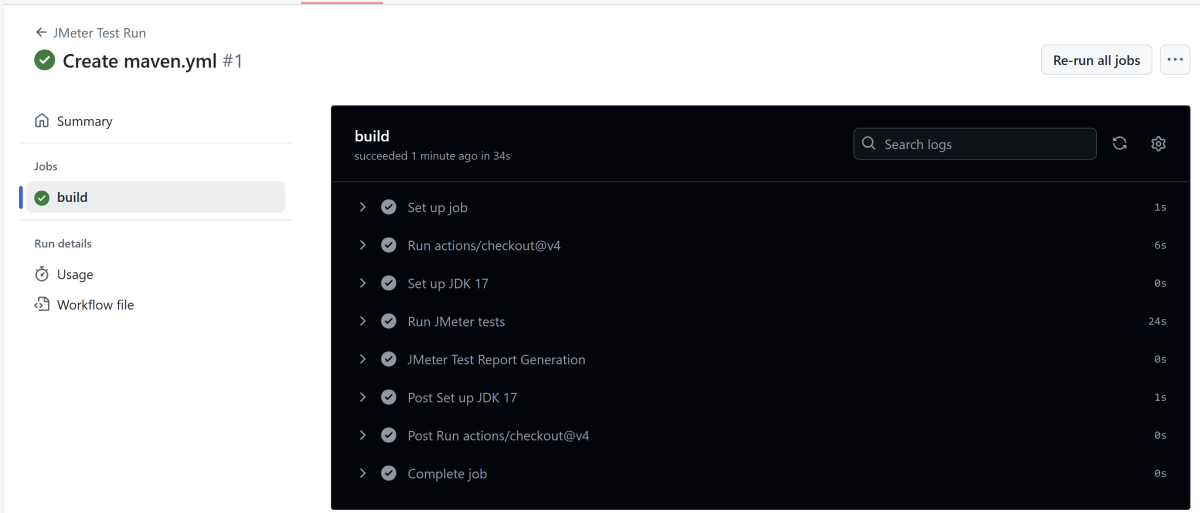
Click on the workflow and the below screen is displayed. It shows the status of the run of the workflow, the total time taken to run the workflow, and the name of the .yml file.
Below shows all the steps of the workflow.
13. Verify the JMeter Report published in GitHub
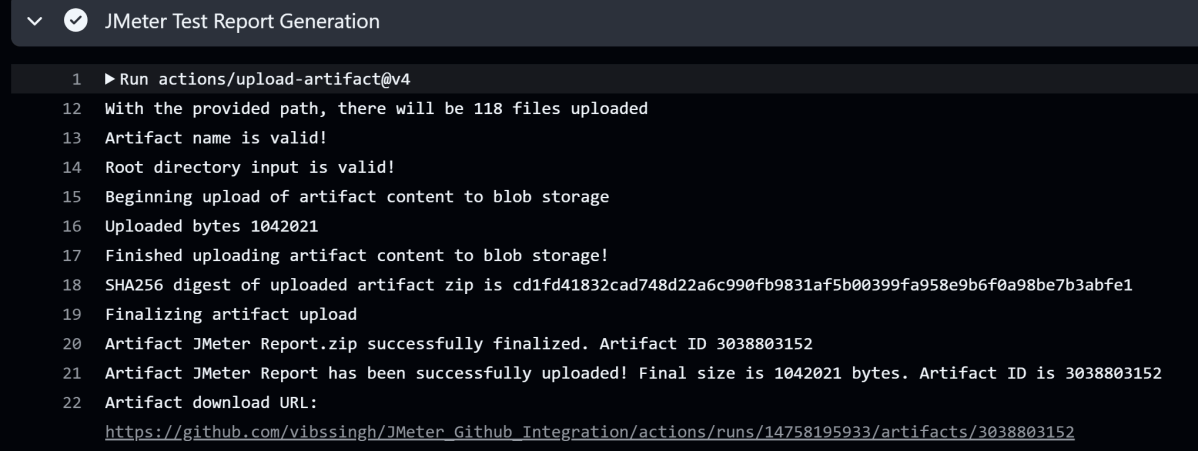
From the logs of the Workflow, you can see that the Test Report step was executed successfully.
Once the pipeline run, a JMeter Report folder will be generated as shown in the below image:
When we click on the folder JMeter Report, a zipped file will be downloaded. We can extract it to see all the files contained within it.
Open the folder and we will see all the files including index.html and others.
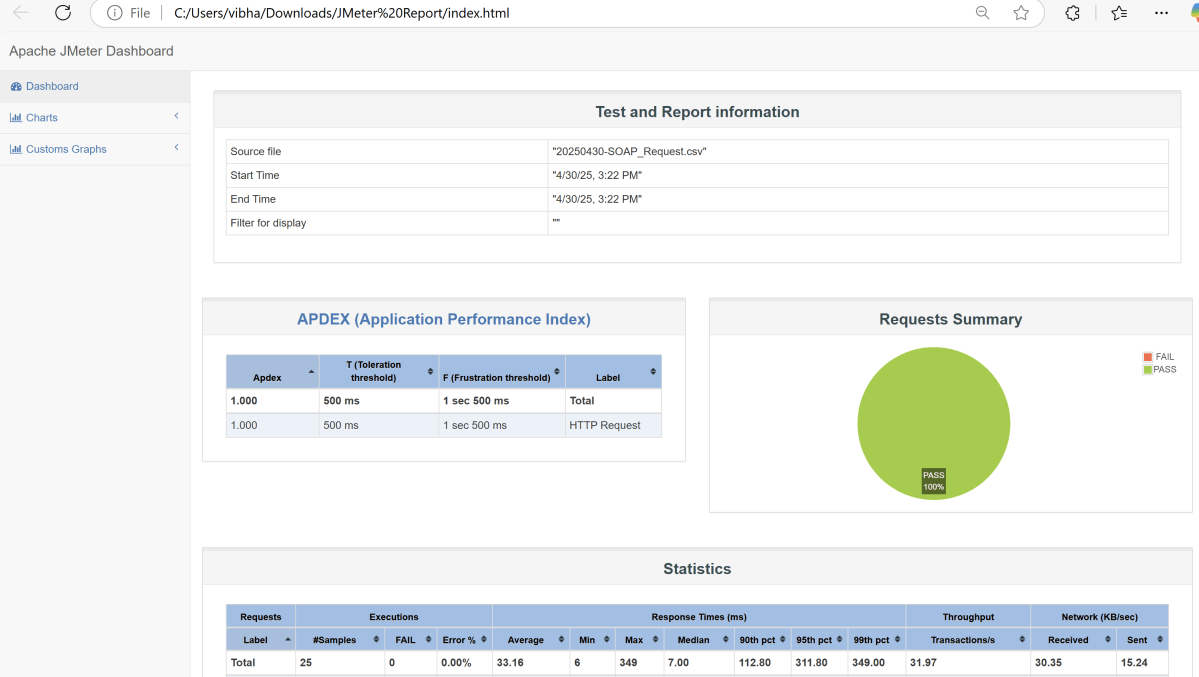
Open the index.html and we will see the report.
Congratulations on making it through this tutorial and hope you found it useful! Happy Learning!! Cheers!!
Welcome to the GitHub Quiz! This blog post features 25 multiple-choice questions that explore concepts of GitHub.
1. What is GitHub?
Select the best answer
a) A software to draw diagrams b) A web-based platform for version control and collaboration c) A mobile app for photo editing d) A music player
Answer 1
b) A web-based platform for version control and collaboration
GitHub is a web-based platform used for hosting Git repositories. It enables collaboration by providing tools for version control, issue tracking, and project management, making it easier for teams to work together.
2. What is the primary purpose of GitHub?
Choose one option
a) To host Git repositories b) To write code c) To debug programs d) To compile code
Answer 2
a) To host Git repositories
3. GitHub is based on which version control system?
Choose one option
a) Mercurial b) SVN c) Git d) CVS
Answer 3
c) Git
4. Which of these is NOT a feature of GitHub?
Choose one option
a) Repository hosting b) Issue tracking c) Video streaming d) Pull requests
Answer 4
c) Video streaming
5. Which icon is used to “star” a repository?
Choose one option
a) 🛠️ b) ⭐ c) 💬 d) 🔒
Answer 5
b) ⭐
6. What is the purpose of a GitHub repository’s README.md file?
a) To describe the project and provide instructions b) To store sensitive information c) To commit code changes d) To manage branches
Answer 6
a) To describe the project and provide instructions.
The README.md file in a GitHub repository serves as the main documentation for the project. It typically contains a description of the project. It provides instructions on how to install and use it. The README also includes information on how to contribute.
7. What is the purpose of the Issues tab in a repository?
a) Chat with followers b) Log bugs, tasks, or feature requests c) Share files d) View stars
Answer 7
b) Log bugs, tasks, or feature requests
The Issues tab in a repository is used for logging and tracking bugs, tasks, or feature requests. It serves as a project management tool, allowing contributors to identify, discuss, and resolve various issues related to the project.
8. What does the “Fork” button do?
Choose one option
a) Merges two branches b) Creates a duplicate copy of a repository under your account c) Deletes the repository d) Creates a zip file
Answer 8
b) Creates a duplicate copy of a repository under your account
The “Fork” button on platforms like GitHub or GitLab creates a copy of a repository under your own account.
9. What is GitHub Pages used for?
Choose one option
a) Database hosting b) Deploying static websites c) Messaging d) Cloud computing
Answer 9
b) Deploying static websites
GitHub Pages is a feature provided by GitHub that allows users to host static websites directly from their repositories. It is an ideal platform for creating projects, documentation, or personal websites. It leverages static files such as HTML, CSS, and JavaScript. There is no need for server-side processing.
10. Which GitHub feature allows you to manage bugs and tasks?
Choose one option
a) Projects b) Issues c) Actions d) Forks
Answer 10
b) Issues
GitHub Issues is a feature that allows the tracking and management of bugs, tasks, and enhancements within a repository.
11. What does “watching” a repository mean?
Choose one option
a) Getting updates b) Downloading c) Editing d) Sharing
Answer 11
a) Getting updates
“Watching” a repository on platforms like GitHub means subscribing to notifications and updates related to the repository. When you watch a repository, you receive notifications about new releases, pull requests, issues, and any discussions or changes made within that repository.
12. What does a green check mark in a pull request indicate?
Choose one option
a) Merged b) Pending c) Failed tests d) Passed checks
Answer 12
d) Passed checks
In the context of a pull request on platforms like GitHub, a green check mark typically indicates that all checks have passed successfully. This can include automated tests, linting, and other CI/CD pipeline checks that are set to run on the code changes within the pull request.
13. What is the default branch name in a new GitHub repository (as of 2020+)?
Choose one option
a) master b) default c) main d) dev
Answer 13
c) main
Starting from late 2020, GitHub changed the default branch name for new repositories from “master” to “main”. This change was part of a broader effort to make inclusive naming the default across software projects and platforms.
14. What symbol is used to reference users on GitHub?
Choose one option
a) # b) $ c) @ d) &
Answer 14
c) @ s
15. How can you open a pull request on GitHub?
Choose one option
a) Through the command line b) Through the repository page on GitHub c) Only with admin access d) By watching the repository
Answer 15
b) Through the repository page on GitHub
To open a pull request on GitHub, you first go to the repository page. This is where you have forked or made changes. From there, you click on the “Pull Requests” tab. Next, click on the “New Pull Request” button to propose your changes.
16. Which tab in a GitHub repo lets you download a ZIP of the project?
Choose one option
a) Code b) Pull requests c) Issues d) Actions
Answer 16
a) Code
17. Can you edit a file directly on GitHub without cloning it?
Choose one option
a) No b) Yes c) Only admins can d) Only with GitHub Pro
Answer 17
b) Yes
18. What do you need to clone a GitHub repo?
Choose one option
a) A password b) A link to the repository c) A GitHub invitation d) An SSH certificate
Answer 18
b) A link to the repository
19. What does the “Insights” tab show?
a) Programming errors b) Contribution and activity stats c) File size d) Email history
Answer 19
b) Contribution and activity stats
20. Where is the “README.md” file displayed?
Choose one option
a) Inside the issues b) At the top of the repository main page c) In GitHub Pages d) Hidden from users
Answer 20
b) At the top of the repository main page.
21. What’s the purpose of a commit message?
a) To delete files b) To describe what changes were made c) To reset changes d) To download the code
Answer 21
b) To describe what changes were made
22. What is required to create a GitHub account?
a) Mobile number b) GitHub invite code c) Email address d) GitHub token
Answer 22
c) Email address
23. What does the green “Code” button do on a repo’s main page?
a) Upload files b) Share a video c) Lets you clone or download the repository d) Edit code online
Answer 23
c) Lets you clone or download the repository
24. Which GitHub feature displays the commit history visually?
a) Timeline b) Graph c) Network d) Feed
Answer 24
c) Network
25. Which GitHub feature can automate workflows?
a) GitHub Pages b) GitHub Actions c) GitHub Gist d) GitHub Sponsors
Answer 25
b) GitHub Actions
We would love to hear from you! Please leave your comments and share your scores in the section below
Docker is an open platform for developing, shipping, and running applications using the containers. Docker enables us to separate the applications from the infrastructure so we can deliver software quickly. With Docker, we can manage your infrastructure in the same ways you manage your applications.
Containers are lightweight, portable, and self-sufficient units that package an application and its dependencies, ensuring consistency across different environments.
What is Docker Desktop?
Docker Desktop is a one-click-install application for your Mac, Linux, or Windows environment that lets you build, share, and run containerized applications and microservices.
It provides a straightforward GUI (Graphical User Interface) that lets you manage your containers, applications, and images directly from your machine.
Before installing Docker on Windows 10 or 11, ensure your system meets the following requirements:
Windows 10 64-bit: Build 18362 or higher
Windows 11 64-bit
Hardware Virtualization Technology (VT-x) enabled in BIOS
Microsoft Hyper-V and Containers features enabled
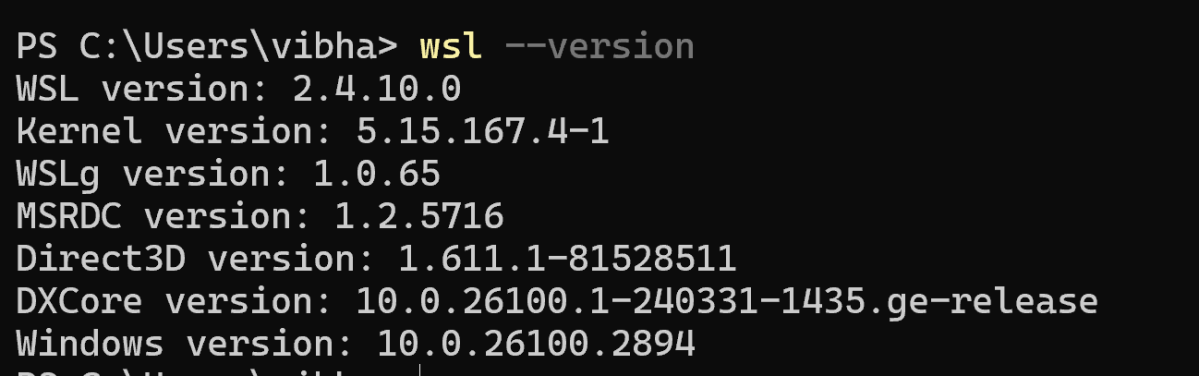
How to verify WSL is installed?
Windows Subsystem for Linux (WSL) 2 is a prerequisite for Docker Desktop on Windows. It provides a lightweight Linux kernel for compatibility and performance improvements.
wsl --version
The output of the above command should display the version of wsl installed on the machine.
Open PowerShell as Administrator and run:
wsl --install
Restart the computer if prompted.
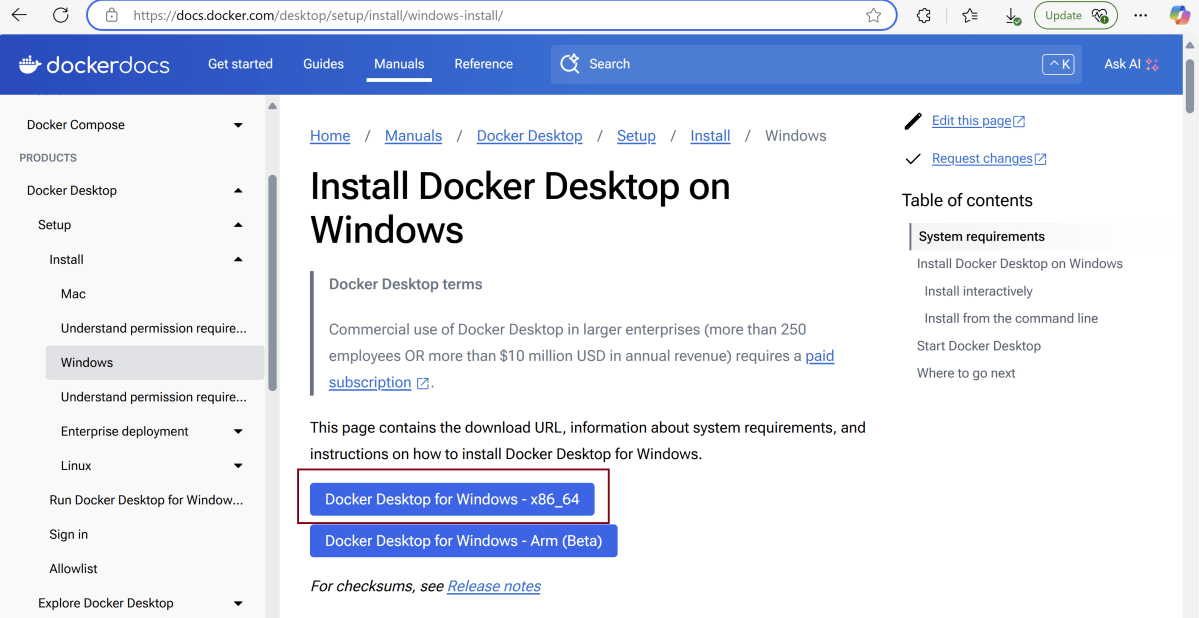
Install Docker Desktop
On the Docker download page, select “Windows” as your operating system.
The download will begin automatically. The duration will depend on your internet speed.
After installation, open Docker Desktop.
After clicking “OK,” the installation will start.
After installation completes, it will show a confirmation screen.
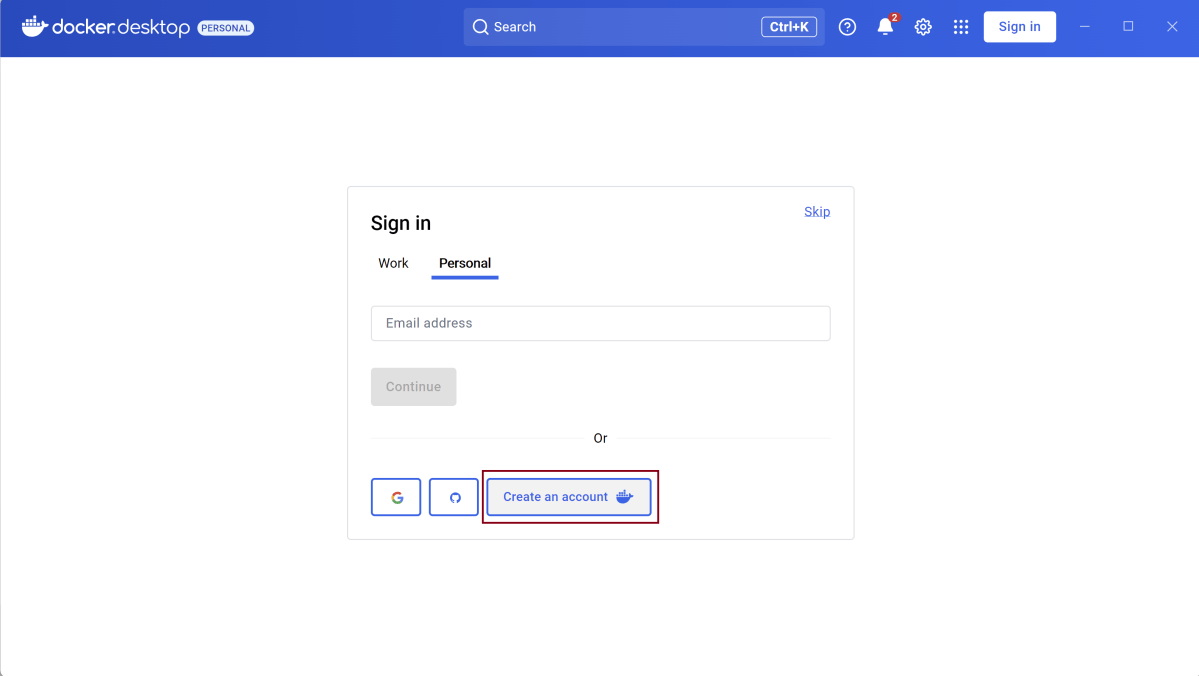
Create an account for Docker Desktop.
Once we will create the account, we will login and see that the Docker Engine is stopped.
Go to the settings and select “Start Docker Desktop when sign in to your computer.”. This is optional.
Go to the bottom tray and right click on the Desktop option.
It will show below mentioned options. Select “Quit Docker Desktop”.
Start Docker Desktop
Docker Desktop does not start automatically after installation. To start Docker Desktop:
Search for Docker, and select Docker Desktop in the search results.
The Docker menu displays the Docker Subscription Service Agreement. Select Acceptto continue. Docker Desktop starts after you accept the terms.
Note that Docker Desktop won’t run if you do not agree to the terms. You can choose to accept the terms at a later date by opening Docker Desktop.
Welcome to the DevOps Quiz! This blog post features answers to DevOps questions that explore key DevOps concepts, covering foundational principles and commonly used tools in a typical DevOps pipeline.
3) a) DevOps is only suitable for start-up companies
4) c) Blue-Green Deployment
Blue-Green Deployment involves two parallel environments – Blue (current production) and Green (clone of production). New code is deployed to the Green environment and, once tested and verified, traffic is switched to it.
5) c) Tracking changes to source code
A VCS like Git allows developers to track and manage changes to source code, facilitating collaboration and version management.
6) c) Terraform
Terraform is a widely-used tool for defining and providing cloud infrastructure using a declarative configuration language. It enables Infrastructure as Code (IaC) practices for cloud resources.
7) b) Continuous Integration
Continuous Integration (CI) is a DevOps practice where developers integrate code into a shared repository several times a day. It encourages more frequent code integrations and testing.
8) c) Grafana
Grafana is an open-source platform for monitoring and observability. It’s commonly used to visualize metrics from time-series databases.
9) b) Infrastructure components that are never updated once deployed
Immutable Infrastructure refers to an approach where once infrastructure components are deployed, they are never modified. Instead, if changes are needed, new instances are created to replace the old ones.
10) c) Configuration Management
Configuration Management involves the use of tools and practices to automate the provisioning and management of servers, ensuring that they maintain the desired state over time.
11) d) Ansible
12) d)Infrastructure as code and configuration management tools that enable the programmers in changing the environments themselves
13) b) No
14) c) Archetype
15) c) Telemetry is the process of recording the behaviour of your systems.
16) c) Reproducible and version-controlled infrastructure changes.
17) c) Implementing automated Dependency Scanning in the CI/CD pipeline.
18) d) Allows flexibility to choose the best environment for specific workloads.
19) d) Enables reproducible and consistent deployments with pre-built images.
20) b) Siloed Development, as breaking down organizational silos is a key aspect of fostering collaboration and efficiency in DevOps.
21) d) Both a) and b)
22) d) All of the above
23) a) Changes deployed by creating new instances with the updates applied, modifying existing instances directly.
24) a) Developers collaborate on code in a single branch called “trunk”.
25) b) Never mix test driven development (TDD) together with your test automation approach.
Welcome to the DevOps Quiz! This blog post features more than 20 multiple-choice questions that explore key DevOps concepts, covering foundational principles and commonly used tools in a typical DevOps pipeline.
1. What are the key components of DevOps?
Select the best answer
a) Continuous Testing b) Continuous Integration c) Continuous Delivery & Monitoring d) All of the above
3. Which one of the following statements about DevOps is incorrect?
Choose one option
a) DevOps is only suitable for start-up companies b) DevOps is suitable for brownfield software products and services c) DevOps is suitable for greenfield software products and services d) Some of the most exemplary DevOps initiatives started in companies with giant and mature IT organizations
9. What does the term “Immutable Infrastructure” refer to?
Choose one option
a) Infrastructure that can be easily changed and adapted b) Infrastructure components that are never updated once deployed c) Frequently changing infrastructure d) Infrastructure that is resistant to hacker attacks
12. Which tooling can best be used to automate the building and configuration of environments?
Choose one option
a) A ticketing system for the provision of a development, test or acceptance environment ​ b) A tool that copies the production environment settings to the development, test and acceptance environments c) Configuration files per environment that are manually distributed and maintained in order to keep the environments in sync d)Infrastructure as code and configuration management tools that enable the programmers in changing the environments themselves
a) Telemetry is a widely known SaaS tool to plan and execute DevOps projects. b) Telemetry is a communication tool used by DevOps teams at geographically distributed locations. c) Telemetry is the process of recording the behaviour of your systems. d) Telemetry is a tool to design, code and execute automated unit tests.
16. The DevOps team at Innovation Solutions is adopting Infrastructure as Code (IaC) for managing their cloud infrastructure. What is a key advantage of using IaC in terms of infrastructure provisioning and configuration?
Choose one option
a) Manual intervention for each infrastructure change. b) Infrastructure changes performed only by the operations team. c) Reproducible and version-controlled infrastructure changes. d) Infrastructure changes documented in a separate manual document.
17. As a DevOps engineer at AWS DevOps Certification Services, you are tasked with improving the security posture of the CI/CD pipeline. What security practice should be implemented to detect and address vulnerabilities in third-party dependencies during the build process?
Choose one option
a) Manual code review by security experts. b) Regularly updating dependencies without security analysis. c) Implementing automated Dependency Scanning in the CI/CD pipeline. d) Ignoring third-party dependencies to prioritize faster builds.
18. The DevOps team at DevOps Foundation Inc (Part of DevOps Institute) is considering the adoption of a hybrid cloud strategy. What is a key advantage of a hybrid cloud approach compared to a purely on-premises or public cloud solution?
Choose one option
a) Reduced flexibility in choosing cloud providers. b) Higher costs associated with data transfer between on-premises and the cloud. c) Optimized for either fully on-premises or fully public cloud solutions. d) Allows flexibility to choose the best environment for specific workloads.
19. The DevOps team at Microsoft DevOps Azure Solutions is implementing automated deployment pipelines. What is a key advantage of using immutable infrastructure in the deployment process?
a) Requires manual configuration for each deployment. b) Allows for in-place updates to running infrastructure. c) Minimizes consistency across different environments. d) Enables reproducible and consistent deployments with pre-built images.
20. Devops supports the elimination of _ because it can hamper collaboration, operations and morale within the company.
Choose one option
a) Excessive Documentation, which tends to create bottlenecks and hinder effective communication. b) Siloed Development, as it impedes the flow of information and slows down the overall delivery process. c) Traditional Waterfall Methodology, which lacks agility and responsiveness to changing requirements. d) Manual Testing Practices, as they introduce delays and are prone to human errors.
21. How does DevOps impact security of an application or machine?
a) Security is increased by including it earlier in the process. b) Security is increased because of the automation process. c) Security is reduced because of the automation process. d) Both (a) and (b)
23. Certain companies utilize immutable deployment, in which changes to the system are _ as opposed to _.
a) Changes deployed by creating new instances with the updates applied, modifying existing instances directly. b) Changes are temporarily implemented, allowing adjustments post-deployment. c) Changes are dynamically applied, enabling real-time system modifications. d) Changes are stored in a separate environment for future manual application.
a) Developers collaborate on code in a single branch called “trunk”. b) Trunk is a special private branch in a developer workstation. c) Trunk is the process of merging code in DevOps deliveries. d) Trunk is a special source code version controlling system which stores mission critical special projects of your DevOps organization.
25. Which one of the following is not one of the DevOps principles for good test automation?
a) Test Automation should give quick and early feedback about your quality of work. b) Never mix test driven development (TDD) together with your test automation approach. c) Tests should generate consistent, deterministic and repeatable results provided same conditions for different test runs. d) With your test automation, avoid slow and periodic feedback. What you need is fast feedback whenever you or your developer attempts to check-in code to your trunk.
2) C) Jenkins notifies you and allows you to decide when to restart
3) C) Use Global Tool Configuration to add different Git versions
4) A) SonarQube Scanner Plugin
5) C) Go to Manage Plugins and uninstall the plugin from the Installed tab
6) C) To store build artifacts generated by the build process
7) A) To provide a log of the builds that have been performed in Jenkins
The Jenkins Build History provides a log of the builds that have been performed in Jenkins. It allows users to view the status of previous builds and identify any issues that occurred
8) C) A tool used to manage the installation of software on Jenkins nodes
The Jenkins Global Tool Configuration is a tool used to manage the installation of software on Jenkins nodes. It allows users to specify which software tools are required for builds and ensures that they are installed on the nodes.
9) A) To provide an overview of the status of Jenkins jobs
The Jenkins Dashboard provides an overview of the status of Jenkins jobs. It allows users to monitor the progress of builds and view the results of tests.
10) B) A folder where Jenkins builds and stores files for a job
11) D) All of the above
12) B) SCM polling trigger
13) B) Groovy
14) B) A machine that Jenkins can use to execute jobs
15) C) A more structured and simplified way to define pipelines
16) A) Jenkins Master is the central server, while Jenkins Slave is a remote agent
17) C) Jenkinsfile
18) A) A syntax used to define the build process in Jenkins
The Jenkins Pipeline Syntax is a syntax used to define the build process in Jenkins. It is used to create pipelines that automate the building, testing, and deployment of software.
19) A) To validate the syntax of Jenkinsfiles
The Jenkinsfile Validator is used to validate the syntax of Jenkinsfiles. It ensures that the syntax is correct and identifies any errors or issues.
20) B) To execute Jenkins jobs on Jenkins Nodes
The Jenkins Build Executor is used to execute Jenkins jobs on Jenkins Nodes. It is responsible for running the build process and executing the commands specified in the job configuration.
21) D) To queue Jenkins jobs for execution by the Build Executor
The Jenkins Build Queue is used to queue Jenkins jobs for execution by the Build Executor. Jobs are placed in the queue when there are no Build Executors available to execute them, and are executed in the order in which they were added to the queue.
22) C) To store build artifacts generated by the build process
Jenkins Artifacts are used to store build artifacts generated by the build process. Artifacts can include compiled code, test results, and documentation, and are stored in the Jenkins workspace.
23) D) A mechanism used to authenticate users in Jenkins
The Jenkins Authentication Mechanism is used to authenticate users in Jenkins. It can be configured to use a variety of authentication methods, including LDAP and Active Directory.
24) D) The machine on which the Jenkins server is installed
The Jenkins Master is the machine on which the Jenkins server is installeD) It is responsible for managing the Jenkins configuration, scheduling builds, and distributing work to Jenkins slaves.
25) C) A machine that is configured to execute builds for a Jenkins Master
A Jenkins Slave is a machine that is configured to execute builds for a Jenkins Master. It receives work from the Jenkins Master and executes it in a separate process or container.











 QA Automation Expert