How to pretty print JSON using the Gson library?

HOME

Add the below dependency to POM.xml to use Gson API.

<dependency>
    <groupId>com.google.code.gson</groupId>
    <artifactId>gson</artifactId>
    <version>2.10.1</version>
</dependency>

Let us take an example of a JSON.

{
  "firstName" : "Vibha",
  "lastName" : "Singh",
  "age" : 30,
  "salary" : 75000.0,
  "designation" : "Manager",
  "contactNumber" : "+919999988822",
  "emailId" : "abc@test.com"
  }

Let us create a table named Employee which contains the data members same as node names in the above JSON payload and their corresponding getter and setter methods.

public class Employee {

	// private data members of POJO class
	private String firstName;
	private String lastName;
	private int age;
	private double salary;
	private String designation;
	private String contactNumber;
	private String emailId;

	// Getter and setter methods
	public String getFirstName() {
		return firstName;
	}

	public void setFirstName(String firstName) {
		this.firstName = firstName;
	}

	public String getLastName() {
		return lastName;
	}

	public void setLastName(String lastName) {
		this.lastName = lastName;
	}

	public int getAge() {
		return age;
	}

	public void setAge(int age) {
		this.age = age;
	}

	public double getSalary() {
		return salary;
	}

	public void setSalary(double salary) {
		this.salary = salary;
	}

	public String getDesignation() {
		return designation;
	}

	public void setDesignation(String designation) {
		this.designation = designation;
	}

	public String getContactNumber() {
		return contactNumber;
	}

	public void setContactNumber(String contactNumber) {
		this.contactNumber = contactNumber;
	}

	public String getEmailId() {
		return emailId;
	}

	public void setEmailId(String emailId) {
		this.emailId = emailId;
	}

}

We will convert a Java Object to a JSON object as a String and also will write it into a .json file. There are many variations for the method toJson().

You can create a Gson instance by invoking a new Gson() if the default configuration is all you need, as shown in the below example.

  @Test
    public void withoutPretty() {

        // Create an object of POJO class
        Employee employee = new Employee();
        employee.setFirstName("Vibha");
        employee.setLastName("Singh");
        employee.setAge(30);
        employee.setSalary(75000);
        employee.setDesignation("Manager");
        employee.setContactNumber("+919999988822");
        employee.setEmailId("abc@test.com");

        Gson gson = new Gson();
        String employeeJsonPayload = gson.toJson(employee);
        System.out.println("Json :" + employeeJsonPayload);

    }

The execution message is shown below.

public GsonBuilder setPrettyPrinting()

@Test
    public void withPretty() {
        // Create an object of POJO class
        Employee employee = new Employee();
        employee.setFirstName("Vibha");
        employee.setLastName("Singh");
        employee.setAge(30);
        employee.setSalary(75000);
        employee.setDesignation("Manager");
        employee.setContactNumber("+919999988822");
        employee.setEmailId("abc@test.com");

        Gson gson = new GsonBuilder().setPrettyPrinting().create();

        String json = gson.toJson(employee);

        System.out.println("Pretty Json :" + json);

    }

Exclude Fields from Serialization in Gson – @Expose Annotation

HOME

The previous tutorials have explained the conversion of Java Object to JSON using Gson API. This tutorial explains the process of excluding the attributes from the JSON using Gson API.

@Expose helps control what class attributes can be serialized or deserialized.

@Expose(serialize = false)
private String lastName;

@Expose (serialize = false, deserialize = false)
private String emailAddress

Add the below dependency to POM.xml to use Gson API.

<dependency>
    <groupId>com.google.code.gson</groupId>
    <artifactId>gson</artifactId>
    <version>2.10.1</version>
</dependency>

Let us take an example of a JSON.

{
  "firstName": "Vibha",
  "lastName": "Singh",
  "salary": {
    "2018": 14000,
    "2012": 12000,
    "2010": 10000
  },
  "designation": "Manager",
  "emailId": [
    "abc@test.com",
    "vibha@test.com"
  ]
}

Let us create a table named Employee which contains the data members same as node names in the above JSON payload with @Expose annotation and their corresponding getter and setter methods.

package com.example.gson;

import com.google.gson.annotations.Expose;

import java.math.BigDecimal;
import java.util.List;
import java.util.Map;

public class Employee {

    // private data members of POJO class

    @Expose(serialize = true)
    private String firstName;

    @Expose(serialize = true)
    private String lastName;

    @Expose(serialize = false)
    private int age;

    @Expose(serialize = true)
    private Map<String, BigDecimal> salary;

    @Expose()
    private String designation;

    @Expose(serialize = false)
    private String contactNumber;

    @Expose(serialize = true)
    private List<String> emailId;

    // Getter and setter methods
    public String getFirstName() {
        return firstName;
    }

    public void setFirstName(String firstName) {
        this.firstName = firstName;
    }

    public String getLastName() {
        return lastName;
    }

    public void setLastName(String lastName) {
        this.lastName = lastName;
    }

    public int getAge() {
        return age;
    }

    public void setAge(int age) {
        this.age = age;
    }

    public Map<String, BigDecimal> getSalary() {
        return salary;
    }

    public void setSalary(Map<String, BigDecimal> salary) {
        this.salary = salary;
    }

    public String getDesignation() {
        return designation;
    }

    public void setDesignation(String designation) {
        this.designation = designation;
    }

    public String getContactNumber() {
        return contactNumber;
    }

    public void setContactNumber(String contactNumber) {
        this.contactNumber = contactNumber;
    }

    public List<String> getEmailId() {
        return emailId;
    }

    public void setEmailId(List<String> emailId) {
        this.emailId = emailId;
    }

    @Override
    public String toString() {
        return "(firstName: " + firstName + "," +
                "lastName: " + lastName + "," +
                "age: " + age + ", " +
                "salary: " + salary + "," +
                "designation: " + designation + ", " +
                "contactNumber: " + contactNumber + ", " +
                "emailId: " + emailId + ")";

    }
}

Suppose the attribute age and contactNumber in the Employee class should not serialize because it’s sensitive information. Hence, we must decorate these attributes with the annotation @Expose(serialize=false):

import com.google.gson.Gson;
import com.google.gson.GsonBuilder;
import org.junit.Test;
import java.math.BigDecimal;
import java.util.Arrays;
import java.util.HashMap;
import java.util.Map;

public class GsonExpose_Demo {

    @Test
    public void gsonExposeTest()  {

        // Create an object of POJO class
        Employee employee = new Employee();
        employee.setFirstName("Vibha");
        employee.setLastName("Singh");
        employee.setAge(30);
        Map<String, BigDecimal> salary = new HashMap() {{
            put("2010", new BigDecimal(10000));
            put("2012", new BigDecimal(12000));
            put("2018", new BigDecimal(14000));
        }};

        employee.setSalary(salary);
        employee.setDesignation("Manager");
        employee.setContactNumber("+919999988822");
        employee.setEmailId(Arrays.asList("abc@test.com","vibha@test.com"));

        Gson gson = new GsonBuilder().setPrettyPrinting().excludeFieldsWithoutExposeAnnotation().create();
        String employeeJsonPayload = gson.toJson(employee);
        System.out.println("Json :" + employeeJsonPayload);

    }
}

The output of the above program is shown below.

How to read JSON from File Using Gson API

HOME

The previous tutorials have explained the conversion of Java Object to JSON using Gson API. This tutorial explains the process of reading the JSON Payload from a file using Gson API.

Gson is a Java library that can be used to convert Java Objects into their JSON representation. It can also be used to convert a JSON string to an equivalent Java object. Gson can work with arbitrary Java objects, including pre-existing objects for those you do not have source code.

  • Provide simple toJson() and fromJson() methods to convert Java objects to JSON and vice versa.

Add the below dependency to POM.xml to use Gson API.

<dependency>
    <groupId>com.google.code.gson</groupId>
    <artifactId>gson</artifactId>
    <version>2.10.1</version>
</dependency>

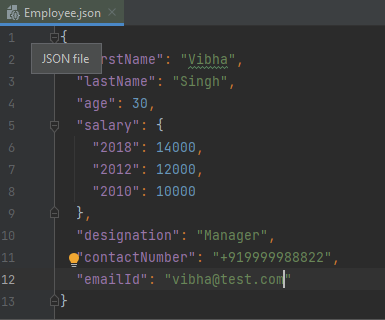
Let us take an example of a JSON.

{
  "firstName": "Vibha",
  "lastName": "Singh",
  "age": 30,
  "salary": {
    "2023": 74000,
    "2022": 62000,
    "2021": 50000
  },
  "designation": "Manager",
  "contactNumber": "+919999988822",
  "emailId": "abc@test.com"
}

Let us create a table named Employee which contains the data members same as node names in the above JSON payload and their corresponding getter and setter methods.

import java.math.BigDecimal;
import java.util.Map;

public class Employee {

    // private data members of POJO class
    private String firstName;
    private String lastName;
    private int age;
    private Map<String, BigDecimal> salary;
    private String designation;
    private String contactNumber;
    private String emailId;

    // Getter and setter methods
    public String getFirstName() {
        return firstName;
    }

    public void setFirstName(String firstName) {
        this.firstName = firstName;
    }

    public String getLastName() {
        return lastName;
    }

    public void setLastName(String lastName) {
        this.lastName = lastName;
    }

    public int getAge() {
        return age;
    }

    public void setAge(int age) {
        this.age = age;
    }

    public Map<String, BigDecimal> getSalary() {
        return salary;
    }

    public void setSalary(Map<String, BigDecimal> salary) {
        this.salary = salary;
    }

    public String getDesignation() {
        return designation;
    }

    public void setDesignation(String designation) {
        this.designation = designation;
    }

    public String getContactNumber() {
        return contactNumber;
    }

    public void setContactNumber(String contactNumber) {
        this.contactNumber = contactNumber;
    }

    public String getEmailId() {
        return emailId;
    }

    public void setEmailId(String emailId) {
        this.emailId = emailId;
    }

    @Override
    public String toString() {
        return "(firstName: " + firstName + "," +
                "lastName: " + lastName + "," +
                "age: " + age + ", " +
                "salary: " + salary + "," +
                "designation: " + designation + ", " +
                "contactNumber: " + contactNumber + ", " +
                "emailId: " + emailId + ")";

    }
}

We will convert a JSON Object to a Java Object.

You can create a Gson instance by invoking a new Gson() if the default configuration is all you need, as shown in the below example.

import org.junit.Test;
import java.io.File;
import java.io.FileNotFoundException;
import java.io.FileReader;

public class GsonReadFromFile {

    @Test
    public void readJsonFromFile() throws FileNotFoundException {

        String userDir = System.getProperty("user.dir");
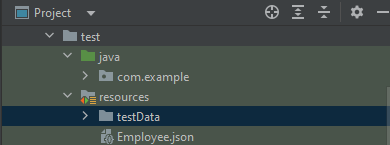
        File jsonFilePath = new File(userDir + "\\src\\test\\resources\\Employee.json");
        FileReader fileReader = new FileReader(jsonFilePath);

        Gson gson = new Gson();
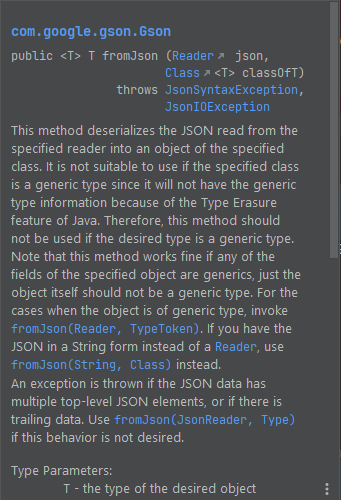
        Employee employee = gson.fromJson(fileReader, Employee.class);
        System.out.println(employee.toString());

        System.out.println("FirstName :" + employee.getFirstName());
        System.out.println("LastName :" + employee.getLastName());
        System.out.println("Age :" + employee.getAge());
        System.out.println("Salary :" + employee.getSalary());
        System.out.println("Designation :" + employee.getDesignation());
        System.out.println("ContactNumber :" + employee.getContactNumber());
        System.out.println("EmailId :" + employee.getEmailId());


    }
}

The execution message is shown below.

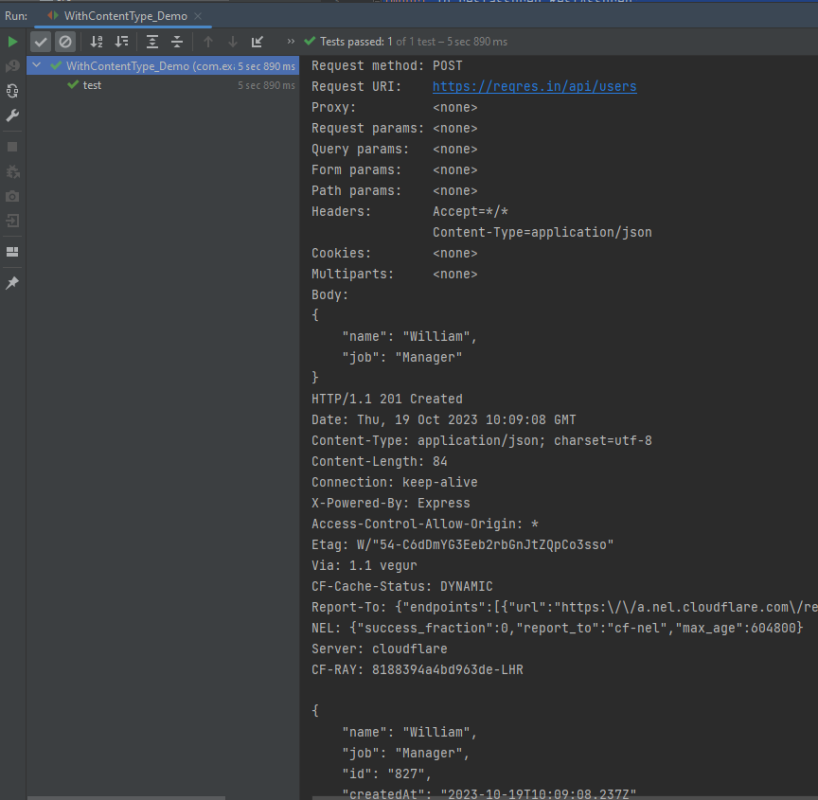
How to add Content Type to request in Rest Assured

HOME

import io.restassured.RestAssured;
import io.restassured.http.ContentType;
import org.json.JSONObject;
import org.junit.Test;
import static org.hamcrest.CoreMatchers.equalTo;

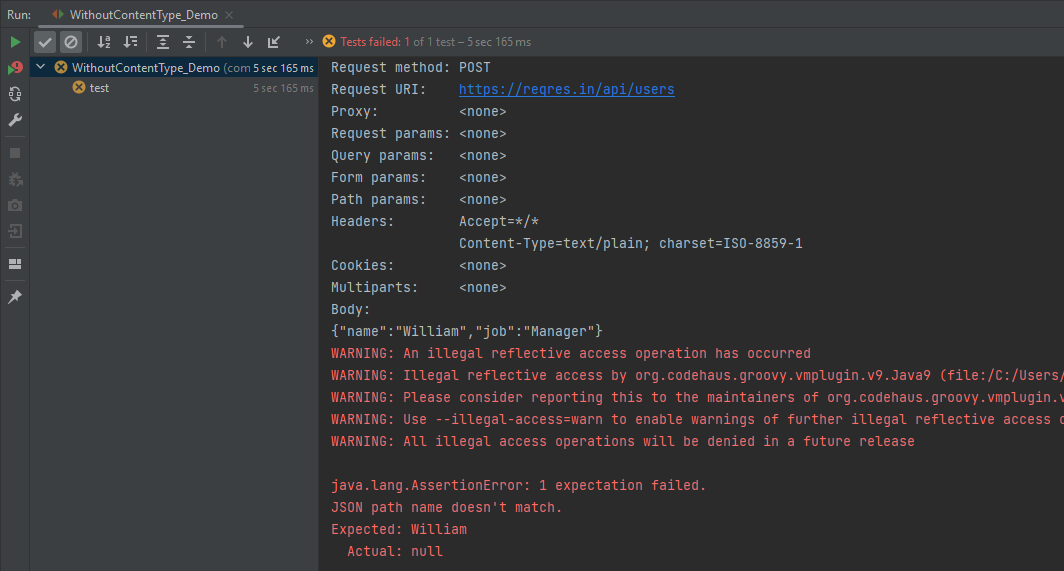
public class WithoutContentType_Demo {

    @Test
    public void test() {

        JSONObject data = new JSONObject();

        data.put("name", "William");
        data.put("job", "Manager");

        RestAssured
                .given()
                .body(data.toString())
                .log().all()

                .when()
                .post("https://reqres.in/api/users")

                .then()
                .assertThat().statusCode(201)
                .body("name", equalTo("William"))
                .body("job", equalTo("Manager"))
                .log().all();

    }
}

contentType(ContentType.JSON)

import io.restassured.RestAssured;
import io.restassured.http.ContentType;
import org.json.JSONObject;
import org.junit.Test;
import static org.hamcrest.CoreMatchers.equalTo;

public class WithContentType_Demo {

    @Test
    public void test() {

        JSONObject data = new JSONObject();

        data.put("name", "William");
        data.put("job", "Manager");

        RestAssured
                .given()
                .contentType(ContentType.JSON)
                .body(data.toString())
                .log().all()

                .when()
                .post("https://reqres.in/api/users")

                .then()
                .assertThat().statusCode(201)
                .body("name", equalTo("William"))
                .body("job", equalTo("Manager"))
                .log().all();

    }
}

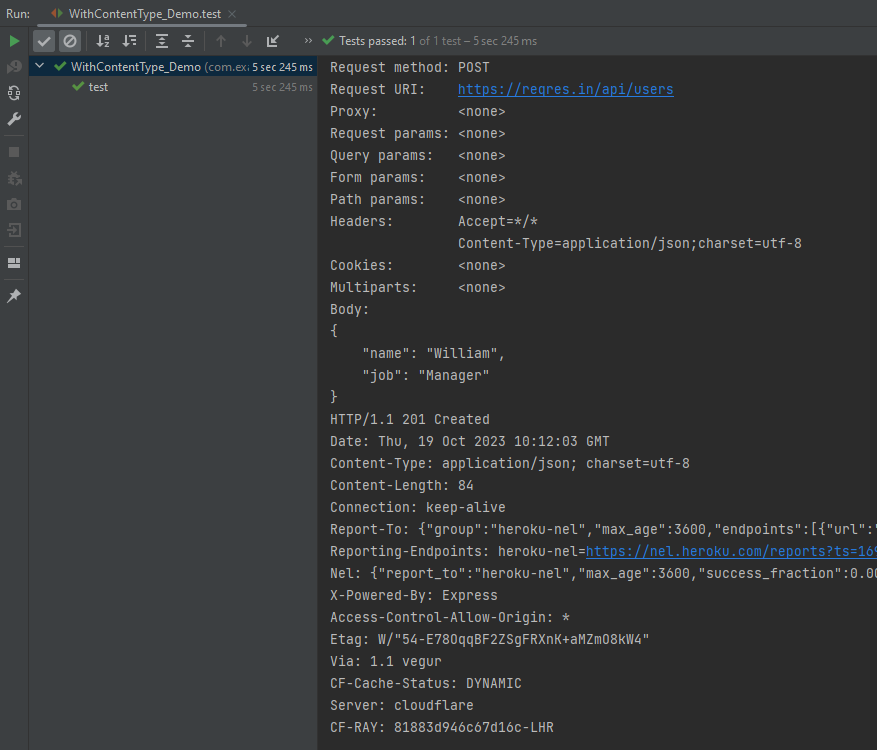
.header("Content-Type","application/json;charset=utf-8")
import io.restassured.RestAssured;
import io.restassured.http.ContentType;
import org.json.JSONObject;
import org.junit.Test;
import static org.hamcrest.CoreMatchers.equalTo;

public class WithContentType_Demo {

    @Test
    public void test() {

        JSONObject data = new JSONObject();

        data.put("name", "William");
        data.put("job", "Manager");

        RestAssured
                .given()
                .header("Content-Type","application/json;charset=utf-8")
                .body(data.toString())
                .log().all()

                .when()
                .post("https://reqres.in/api/users")

                .then()
                .assertThat().statusCode(201)
                .body("name", equalTo("William"))
                .body("job", equalTo("Manager"))
                .log().all();

    }
}

How to save Json in File Using Gson API

HOME

The previous tutorials have explained the conversion of Java Object to JSON using Gson API. This tutorial explains the process of saving JSON Payload in a file using Gson API.

Gson is a Java library that can be used to convert Java Objects into their JSON representation. It can also be used to convert a JSON string to an equivalent Java object. Gson can work with arbitrary Java objects, including pre-existing objects those you do not have source code.

  • Provide simple toJson() and fromJson() methods to convert Java objects to JSON and vice versa.
  • Allow pre-existing unmodifiable objects to be converted to and from JSON.
  • Extensive support of Java Generics.
  • Allow custom representations for objects.
  • Support arbitrarily complex objects (with deep inheritance hierarchies and extensive use of generic types).

Add the below dependency to POM.xml to use Gson API.

<dependency>
    <groupId>com.google.code.gson</groupId>
    <artifactId>gson</artifactId>
    <version>2.10.1</version>
</dependency>

Let us take an example of a JSON.

{
  "firstName" : "Vibha",
  "lastName" : "Singh",
  "age" : 30,
  "salary" : 75000.0,
  "designation" : "Manager",
  "contactNumber" : "+919999988822",
  "emailId" : "abc@test.com"
  }

Let us create a table named Employee which contains the data members same as node names in the above JSON payload and their corresponding getter and setter methods.

public class Employee {

	// private data members of POJO class
	private String firstName;
	private String lastName;
	private int age;
	private double salary;
	private String designation;
	private String contactNumber;
	private String emailId;

	// Getter and setter methods
	public String getFirstName() {
		return firstName;
	}

	public void setFirstName(String firstName) {
		this.firstName = firstName;
	}

	public String getLastName() {
		return lastName;
	}

	public void setLastName(String lastName) {
		this.lastName = lastName;
	}

	public int getAge() {
		return age;
	}

	public void setAge(int age) {
		this.age = age;
	}

	public double getSalary() {
		return salary;
	}

	public void setSalary(double salary) {
		this.salary = salary;
	}

	public String getDesignation() {
		return designation;
	}

	public void setDesignation(String designation) {
		this.designation = designation;
	}

	public String getContactNumber() {
		return contactNumber;
	}

	public void setContactNumber(String contactNumber) {
		this.contactNumber = contactNumber;
	}

	public String getEmailId() {
		return emailId;
	}

	public void setEmailId(String emailId) {
		this.emailId = emailId;
	}

}

We will convert a Java Object to a JSON object as a String and also will write it into a .json file. There are many variations for the method toJson().

You can create a Gson instance by invoking a new Gson() if the default configuration is all you need, as shown in the below example.

You can also use GsonBuilder to build a Gson instance with various configuration options such as versioning support, pretty-printing, custom JsonSerializer, JsonDeserializer.

import com.google.gson.Gson;
import com.google.gson.GsonBuilder;
import org.junit.Test;
import java.io.File;
import java.io.FileWriter;

public class WriteJsonFileDemo {

    @Test
    public void saveJsonToFile() {

        Employee employee = new Employee();
        employee.setFirstName("Vibha");
        employee.setLastName("Singh");
        employee.setAge(30);
        employee.setSalary(75000);
        employee.setDesignation("Manager");
        employee.setContactNumber("+919999988822");
        employee.setEmailId("abc@test.com");

        Gson builder = new GsonBuilder().setPrettyPrinting().create();
        String employeePrettyJsonPayload = builder.toJson(employee);
        System.out.println(employeePrettyJsonPayload);

        String userDir = System.getProperty("user.dir");
        File outputJsonFile = new File(userDir + "\\src\\test\\resources\\testData\\EmployeePayloadUsingGson.json");
        try {
            FileWriter fileWriter = new FileWriter(outputJsonFile);
            builder.toJson(employee, fileWriter);
            fileWriter.flush();
        } catch (Exception e) {
            System.out.println(e);
        }
    }
}

The execution message is shown below.

Serialization – How to convert Java Object To JSON Object Using Gson API

HOME

The previous tutorials have explained the conversion of Java Object to JSON and JSON payload to Java Objects using Jackson API. This tutorial explains the process to convert Java Object to JSON Payload using Gson API.

Gson is a Java library that can be used to convert Java Objects into their JSON representation. It can also be used to convert a JSON string to an equivalent Java object. Gson can work with arbitrary Java objects, including pre-existing objects those you do not have source code.

  • Provide simple toJson() and fromJson() methods to convert Java objects to JSON and vice-versa.
  • Allow pre-existing unmodifiable objects to be converted to and from JSON.
  • Extensive support of Java Generics.
  • Allow custom representations for objects.
  • Support arbitrarily complex objects (with deep inheritance hierarchies and extensive use of generic types).

Add the below dependency to POM.xml to use Gson API.

<dependency>
    <groupId>com.google.code.gson</groupId>
    <artifactId>gson</artifactId>
    <version>2.10.1</version>
</dependency>

Let us take an example of a JSON.

{
  "firstName" : "Vibha",
  "lastName" : "Singh",
  "age" : 30,
  "salary" : 75000.0,
  "designation" : "Manager",
  "contactNumber" : "+919999988822",
  "emailId" : "abc@test.com"
  }

Let us create a table named Employee which contains the data members same as node names in the above JSON payload and their corresponding getter and setter methods.

public class Employee {

	// private data members of POJO class
	private String firstName;
	private String lastName;
	private int age;
	private double salary;
	private String designation;
	private String contactNumber;
	private String emailId;

	// Getter and setter methods
	public String getFirstName() {
		return firstName;
	}

	public void setFirstName(String firstName) {
		this.firstName = firstName;
	}

	public String getLastName() {
		return lastName;
	}

	public void setLastName(String lastName) {
		this.lastName = lastName;
	}

	public int getAge() {
		return age;
	}

	public void setAge(int age) {
		this.age = age;
	}

	public double getSalary() {
		return salary;
	}

	public void setSalary(double salary) {
		this.salary = salary;
	}

	public String getDesignation() {
		return designation;
	}

	public void setDesignation(String designation) {
		this.designation = designation;
	}

	public String getContactNumber() {
		return contactNumber;
	}

	public void setContactNumber(String contactNumber) {
		this.contactNumber = contactNumber;
	}

	public String getEmailId() {
		return emailId;
	}

	public void setEmailId(String emailId) {
		this.emailId = emailId;
	}

}

We will convert a Java Object to a JSON object as a String and also will write it into a .json file. There are many variations for the method toJson().

You can create a Gson instance by invoking a new Gson() if the default configuration is all you need, as shown in the below example.

You can also use GsonBuilder to build a Gson instance with various configuration options such as versioning support, pretty-printing, custom JsonSerializer, JsonDeserializer.

import com.google.gson.Gson;
import com.google.gson.GsonBuilder;
import org.junit.Test;

public class EmployeeGsonTest {

    @Test
    public void gsonSerializationTest()  {

        // Create an object of POJO class
        Employee employee = new Employee();
        employee.setFirstName("Vibha");
        employee.setLastName("Singh");
        employee.setAge(30);
        employee.setSalary(75000);
        employee.setDesignation("Manager");
        employee.setContactNumber("+919999988822");
        employee.setEmailId("abc@test.com");

        Gson gson = new Gson();
        String employeeJsonPayload = gson.toJson(employee);
        System.out.println("Json :" + employeeJsonPayload);

        Gson builder = new GsonBuilder().setPrettyPrinting().create();
        String employeePrettyJsonPayload = builder.toJson(employee);
        System.out.println("Pretty Json :" + employeePrettyJsonPayload);

    }
}

The execution message is shown below.

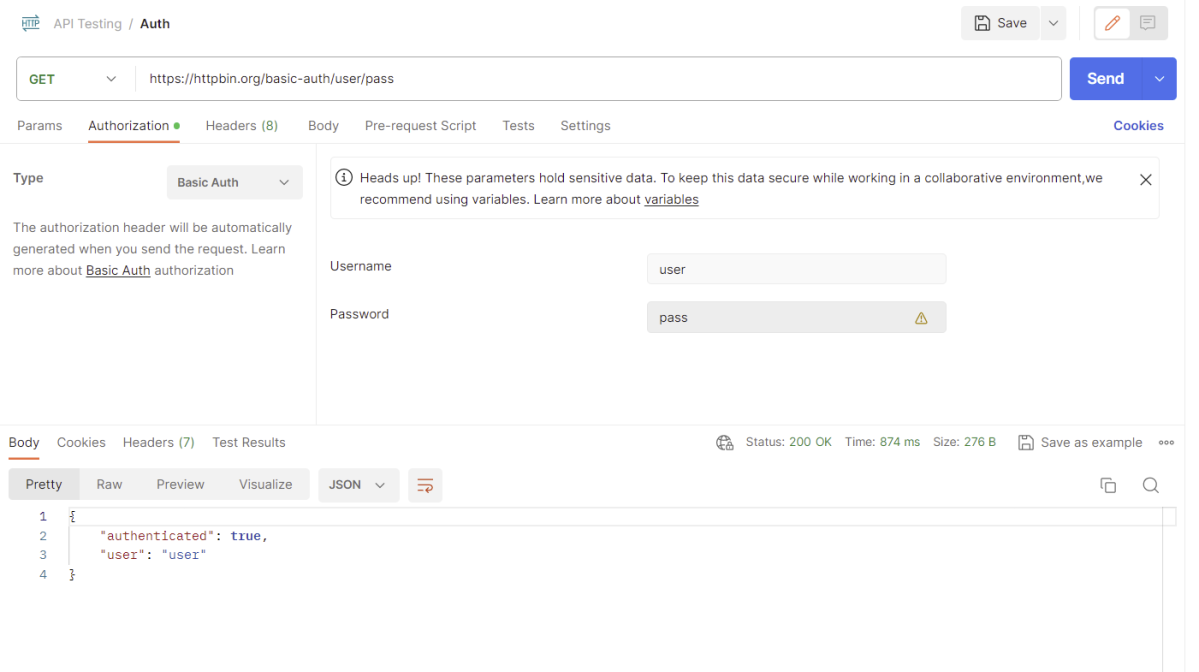
How to send basic authentication credentials in Rest Assured

HOME

 <dependencies>

       <!-- Rest Assured Dependency -->
      <dependency>
         <groupId>io.rest-assured</groupId>
        <artifactId>rest-assured</artifactId>
        <version>5.3.2</version>
        <scope>test</scope>
      </dependency>

        <!-- TestNG Dependency-->
      <dependency>
          <groupId>org.testng</groupId>
         <artifactId>testng</artifactId>
         <version>7.8.0</version>
         <scope>test</scope>
       </dependency>

</dependencies>

import io.restassured.http.ContentType;
import io.restassured.response.Response;
import org.testng.Assert;
import org.testng.annotations.Test;
import static io.restassured.RestAssured.given;

public class BasicAuth_Demo {

   private String validRequest = "{" +
           "\"username\": \"Samu01\"," +
           "\"email\": \"samuel@email.com\"," +
           "\"password\": \"Passw0rd123!\"" +
           "}";

    @Test
    public void createUser() {
        Response response = given()
                .auth()
                .preemptive()
                .basic("username", "password")
                .header("Accept", "application/json")
                .contentType(ContentType.JSON)
                .body(validRequest)
                .when()
                .post("http://localhost:8080/users")
                .then()
                .extract()
                .response();

        int statusCode = response.getStatusCode();

        Assert.assertEquals(statusCode,200);
    }
}

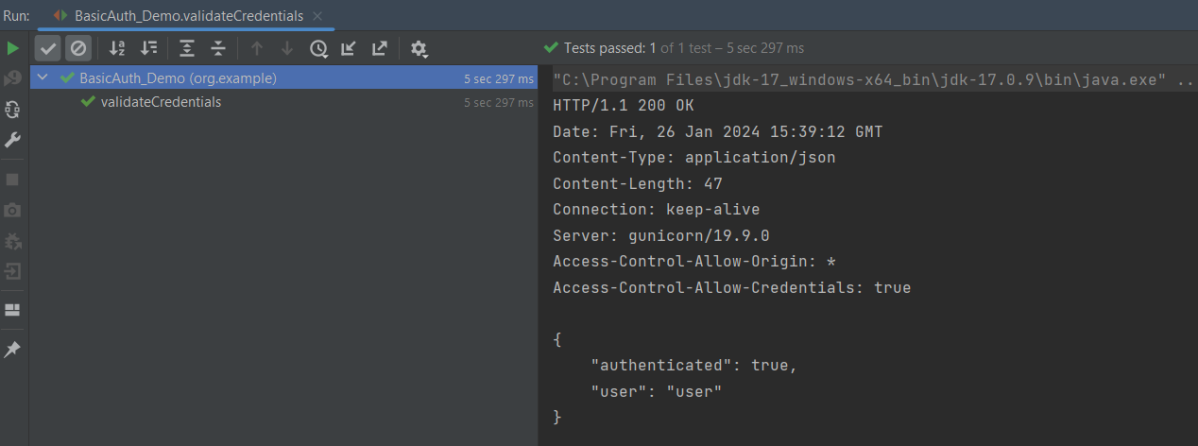
import io.restassured.http.ContentType;
import io.restassured.response.Response;
import org.junit.Assert;
import org.junit.Test;

import static io.restassured.RestAssured.given;

public class BasicAuth_Demo {

    @Test
    public void validateCredentials() {

        Response response = given()
                .auth()
                .preemptive()
                .basic("user", "pass")
                .header("Accept", "application/json")
                .contentType(ContentType.JSON)
                .when()
                .get("https://httpbin.org/basic-auth/user/pass")
                .then()
                .log().all()
                .extract()
                .response();

        int statusCode = response.getStatusCode();

        Assert.assertEquals(200,statusCode);
    }

given()
    .auth()
    .preemptive()
    .basic("username", "password")

How to test PATCH Request using Rest Assured

HOME

In the last tutorial, I explained How to test POST Request using Rest Assured. In this tutorial, I will automate a PATCH Request using Rest Assured. I will verify the status code, line of Status, and content of the Response.

To set up a basic Rest Assured Maven Project, click here and Gradle project, click here.

<dependency>
      <groupId>junit</groupId>
      <artifactId>junit</artifactId>
      <version>4.13.1</version>
      <scope>test</scope>
</dependency>
  
<dependency>
      <groupId>io.rest-assured</groupId>
      <artifactId>rest-assured</artifactId>
      <version>5.3.2</version>
      <scope>test</scope>
</dependency>

What is the PATCH Method?

The HTTP PATCH request method applies partial modifications to a resource

Below are the steps to test a PATCH Request using Rest Assured:

The steps to test the PATCH request are similar to the PUT request.

Below is the example for the test to PATCH method. (Non BDD)

import io.restassured.RestAssured;
import io.restassured.http.ContentType;
import io.restassured.response.Response;
import io.restassured.response.ValidatableResponse;
import io.restassured.specification.RequestSpecification;
import org.junit.Test;
import static org.hamcrest.CoreMatchers.equalTo;

public class Patch_NonBDDDemo {

    RequestSpecification requestSpecification;
    Response response;
    ValidatableResponse validatableResponse;

    @Test
    public void updateUser() {

        String jsonString = "{\"name\": \"William\"}";

        RestAssured.baseURI = "https://reqres.in/api/users/2";

        // Create a request specification
        requestSpecification = RestAssured.given();

        // Setting content type to specify format in which request payload will be sent.
        requestSpecification.contentType(ContentType.JSON);

        // Adding body as string
        requestSpecification.body(jsonString);

        // Calling PATCH method
        response = requestSpecification.patch();

        // Let's print response body.
        String responseString = response.prettyPrint();

        /*
         * To perform validation on response, we need to get ValidatableResponse type of
         * response
         */
        validatableResponse = response.then();

        // Get status code
        validatableResponse.statusCode(200);

        // It will check if status line is as expected
        validatableResponse.statusLine("HTTP/1.1 200 OK");

        // Check response - name attribute
        validatableResponse.body("name", equalTo("William"));

    }
}

Test implemented in BDD Format

import io.restassured.http.ContentType;
import io.restassured.response.Response;
import io.restassured.response.ValidatableResponse;
import io.restassured.specification.RequestSpecification;
import org.junit.Test;
import static io.restassured.RestAssured.given;
import static org.hamcrest.CoreMatchers.equalTo;

public class Patch_BDDDemo {

    RequestSpecification requestSpecification;
    Response response;
    ValidatableResponse validatableResponse;

    @Test
    public void updateUser() {

       String jsonString = "{\"name\": \"William\"}";

        // Update name
        validatableResponse = given()
                .baseUri("https://reqres.in/api/users/2")
                .contentType(ContentType.JSON)
                .body(jsonString)
                .when()
                .patch()
                .then()
                .assertThat().statusCode(200)
                .body("name", equalTo("William"));

        System.out.println("Response :" + validatableResponse.extract().asPrettyString());

    }

}

Congratulations on making it through this tutorial and hope you found it useful! Happy Learning!! Cheers!!

How to print pretty JSON using org.json library in Java?

HOME

public java.lang.String toString(int indentFactor)

import org.json.JSONArray;
import org.json.JSONObject;
import org.junit.Test;


public class Json_Demo {

    @Test
    public void passBodyAsJsonArray1() {

        // Creating JSON array to add first JSON object
        JSONArray array1 = new JSONArray();
        array1.put(new JSONObject().put("firstname", "Tom").put("lastname", "Mathew").put("age", 59).put("salary",
                720000));

        // Creating JSON array
        JSONArray array2 = new JSONArray();
        array2.put(new JSONObject().put("firstname", "Perry").put("lastname", "David").put("age", 32).put("salary",
                365000));

        // Create JSON Object to add JSONArrays
        JSONObject data1 = new JSONObject();
        data1.put("employee1", array1);
        data1.put("employee2", array2);

        System.out.println(data1);

    }
}

import org.json.JSONArray;
import org.json.JSONObject;
import org.junit.Test;

public class Json_Demo {

    @Test
    public void passBodyAsJsonArray1() {

        // Creating JSON array to add first JSON object
        JSONArray array1 = new JSONArray();
        array1.put(new JSONObject().put("firstname", "Tom").put("lastname", "Mathew").put("age", 59).put("salary",
                720000));

        // Creating JSON array
        JSONArray array2 = new JSONArray();
        array2.put(new JSONObject().put("firstname", "Perry").put("lastname", "David").put("age", 32).put("salary",
                365000));

        // Create JSON Object to add JSONArrays
        JSONObject data1 = new JSONObject();
        data1.put("employee1", array1);
        data1.put("employee2", array2);

        System.out.println(data1.toString(4));

    }
}

How to test DELETE in Rest Assured

HOME

In the last tutorial, I explained How to test PUT Request using Rest Assured. In this tutorial, I will automate a DELETE Request using Rest Assured. I will verify the status code, line of Status, and content of the Response.

To set up a basic Rest Assured Maven Project, click here and Gradle project, click here.

<dependency>
      <groupId>junit</groupId>
      <artifactId>junit</artifactId>
      <version>4.13.1</version>
      <scope>test</scope>
</dependency>
  
<dependency>
      <groupId>io.rest-assured</groupId>
      <artifactId>rest-assured</artifactId>
      <version>5.3.2</version>
      <scope>test</scope>
</dependency>

What is the DELETE Method?

An HTTP DELETE method is used to delete an existing resource from the collection of resources. The DELETE method requests the origin server to delete the resource identified by the Request-URI. On successful deletion of a resource, it returns  200 (OK) and 204 (No Content) status codes. It may return as 202 (Accepted) status code if the request is queued. To learn more about Rest API, please click here.

Below are the steps to test a DELETE Request using Rest Assured:

The steps to test the DELETE request are similar to any API request like GET, POST, or PUT. To know about the steps and various imports used in the below example in detail, please refer to the tutorial for POST Request.

Let’s see the existing details of an Employee ID 3 using Postman:

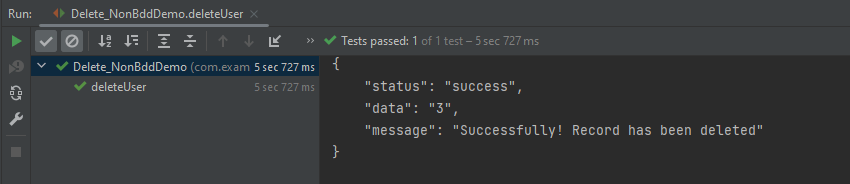
Let’s write DELETE request in REST Assured in Non BDD Format for id 3:-

import io.restassured.RestAssured;
import io.restassured.response.Response;
import io.restassured.response.ValidatableResponse;
import io.restassured.specification.RequestSpecification;
import org.junit.Test;
import static org.hamcrest.CoreMatchers.equalTo;

public class Delete_NonBddDemo {

    RequestSpecification requestSpecification;
    Response response;
    ValidatableResponse validatableResponse;

    @Test
    public void deleteUser() {

        RestAssured.baseURI = "https://dummy.restapiexample.com/api";

        // Create a request specification
        requestSpecification = RestAssured.given();

        // Calling DELETE method
        response = requestSpecification.delete("/v1/delete/3");

        // Let's print response body.
        String resString = response.prettyPrint();

        /*
         * To perform validation on response, we need to get ValidatableResponse type of
         * response
         */
        validatableResponse = response.then();

        // Get status code
        validatableResponse.statusCode(200);

        // It will check if status line is as expected
        validatableResponse.statusLine("HTTP/1.1 200 OK");

        // Check response - message attribute
        validatableResponse.body("message", equalTo("Successfully! Record has been deleted"));

    }
}

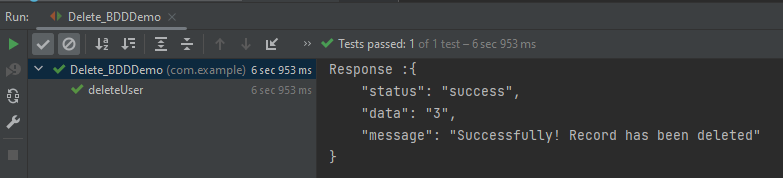
Let’s write DELETE request in REST Assured in BDD Format:

import io.restassured.http.ContentType;
import io.restassured.response.ValidatableResponse;
import org.junit.Test;
import static io.restassured.RestAssured.given;
import static org.hamcrest.CoreMatchers.equalTo;

public class Delete_BDDDemo {

    ValidatableResponse validatableResponse;

    @Test
    public void deleteUser() {
        
        validatableResponse = given()
                .baseUri("https://dummy.restapiexample.com/api/v1/delete/3")
                .contentType(ContentType.JSON)
                .when()
                .delete()
                .then()
                .assertThat().statusCode(200)
                .body("message", equalTo("Successfully! Record has been deleted"));

        System.out.println("Response :" + validatableResponse.extract().asPrettyString());

    }

}

.baseUri("https://dummy.restapiexample.com/api/v1/delete/3")
  .contentType(ContentType.JSON)
assertThat().statusCode(200)
.body("message", equalTo("Successfully! Record has been deleted"));

We are done. Congratulations on making it through this tutorial and hope you found it useful! Happy Learning!! Cheers!!