In this tutorial, I’ll explain about abstraction in Java.
What is Abstraction?
Abstraction is a process of hiding the implementation details and showing only functionality to the user.
There are two ways to achieve abstraction in java
Abstract class
Interface
What is an Abstract Class?
A class which is declared as abstract is known as an abstract class.
It can have abstract and non-abstract methods.
It needs to be extended and its method is implemented.
It cannot be instantiated.
It can have constructors and static methods also.
It can have final methods which will force the subclass not to change the body of the method.
An abstract class is a class that contains at least one abstract method.
When an abstract class is subclassed, the subclass usually provides implementations for all of the abstract methods in its parent class. However, if it does not, then the subclass must also be declared abstract.
Example of Abstract Class
abstract class Test
{
}
What is Abstract Method?
An abstract method is a method that is declared without an implementation (without braces, and followed by a semicolon), like this:
abstract int test(int a, int b);
Below is an example of abstraction.
Abstract Class
//Abstract Class
public abstract class Bank {

	// Abstract method
	abstract void getRateOfInterest();
}
SubClass1
//Subclass (inherit from Bank)
public class SBI extends Bank {

	// The body of getRateOfInterest is declared here
	public void getRateOfInterest() {

		System.out.println("Interest Rate of SBI Bank :" + 5.3);

	}
}
SubClass2
//Subclass (inherit from Bank)
public class BOI extends Bank {

	// The body of getRateOfInterest is declared here
	public void getRateOfInterest() {

		System.out.println("Interest Rate of BOI Bank :" + 4.1);

	}

}
Test Class
public class AbstractionTest {

	public static void main(String[] args) {

		Bank bank1 = new SBI();
		bank1.getRateOfInterest();

		Bank bank2 = new BOI();
		bank2.getRateOfInterest();

	}

}
Output
Interest Rate of SBI Bank :5.3
Interest Rate of BOI Bank :4.1
Abstract class can have a data member, constructor, abstract method, non abstract method and even main() method.
Below is an example where the abstract class has both abstract method as well as non abstract method.
public abstract class Bike { // abstract class

	int x = 25; // Instance Variable

	Bike() // Constructor
	{
		int y = 10;

		System.out.println("Value of y :" + y);
		System.out.println("Bike is created");

	}

	abstract void run(); // abstract method

	void change_gear() // non abstract method
	{
		System.out.println("Gear is changed");
	}

}
SubClass
public class Trek extends Bike {

	void run() {
		System.out.println("Bike is running");
	}

}
Test Class
public class AbstractionDemoTest {

	public static void main(String[] args) {

		Bike bike = new Trek();
		bike.run();
		bike.change_gear();

		System.out.println("Value of x :" + bike.x);

	}
}
Output
Value of y :10
Bike is created
Bike is running
Gear is changed
Value of x :25
Advantages of Abstraction
It reduces the complexity of viewing the things.
Avoids code duplication and increases reusability.
Helps to increase security of an application or program as only important details are provided to the user.
Encapsulation in Java is a process of wrapping the data and code in a single unit. The whole idea behind encapsulation is to hide the implementation details from users. If a data member is private it means it can only be accessed within the same class. No outside class can access private data member (variable) of other class. It is one of the four important OOPs concept.
To achieve encapsulation in Java −
Declare the variables of a class as private.
Provide public setter and getter methods to modify and view the variables values.
The get method returns the variable value, and the set method sets the value.
Syntax of get method – method name starts with get followed by the variable name where first letter is capital.
Syntax of set method – method name starts with set followed by the variable name where first letter is capital.
Below is an example of encapsulation with two variables and their getter and setter method.
public class EncapsulationDemo {

	// private variables
	private String name;
	private int age;

	// getter method for age
	public int getAge() {
		return age;
	}

	// setter method for age
	public void setAge(int setAge) {
		this.age = setAge;

	}

	// getter method for name
	public String getName() {
		return name;
	}

	// setter method for name
	public void setName(String newName) {
		this.name = newName;
	}

}
The variables of the EncapsulationDemo class can be accessed using the following program −
public class EncapsulationTest {

	public static void main(String[] args) {

		//creating instance of the encapsulated class
		EncapsulationDemo encap = new EncapsulationDemo();

		//setting value in the age member
		encap.setAge(25);

		//setting value in the name member
		encap.setName("Terry");

		//getting value of the age and name member
		System.out.print("Name : " + encap.getName() + " and Age :" + encap.getAge());

	}

}
Output
Name : Terry and Age :25
The encapsulate class is easy to test. So, it is better for unit testing.
The standard IDE’s are providing the facility to generate the getters and setters. So, it is easy and fast to create an encapsulated class in Java.
In this tutorial, we will discuss Inheritance and types of Inheritance in Java.
What is Interitance?
Inheritance can be defined as the process where one class acquires the properties (methods and fields) of another class.
The class which inherits the properties of other is known as subclass (derived class, child class) and the class whose properties are inherited is known as superclass (base class, parent class).
Inheritance is applicable for public and protected members only. Private members can’t be inherited.
Inheritance represents the IS-A relationship which is also known as a parent-child relationship.
Inheritance supports the concept of “reusability”, i.e. when we want to create a new class and there is already a class that includes some of the code that we want, we can derive our new class from the existing class. By doing this, we are reusing the fields and methods of the existing class.
The keyword used for inheritance is extends.
Syntax
class derived-class extends base class
{
//methods and variables
}
Below is an example of Inheritance. In the below example, ParentCalculation is the Base class (parent class) and has a method addition. ChildCaclculation is the derived class (child class) which has extends base class ParentCalculation. When an object of ChildCaclculation class is created, a copy of all methods and fields of the superclass acquire memory in this object. That is why by using the object of the subclass we can also access the members of a superclass.
Base Class
public class ParentCalculation {

	int z;

	public void addition(int x, int y) {
		z = x + y;
		System.out.println("The sum of the given numbers:" + z);
	}

}
Derived Class
public class ChildCaclculation extends ParentCalculation {

	int c;

	public void multiplication(int a, int b) {
		c = a * b;
		System.out.println("The multiplication of the given numbers:" + c);
	}

	public static void main(String[] args) {
		ChildCaclculation cal = new ChildCaclculation();
		cal.addition(10, 14);
		cal.multiplication(5, 6);

	}

}
Output
The sum of the given numbers:24
The multiplication of the given numbers:30
Types of Inheritance in Java
Below are the different types of inheritance available in Java.
1. Single Inheritance
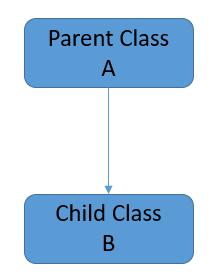
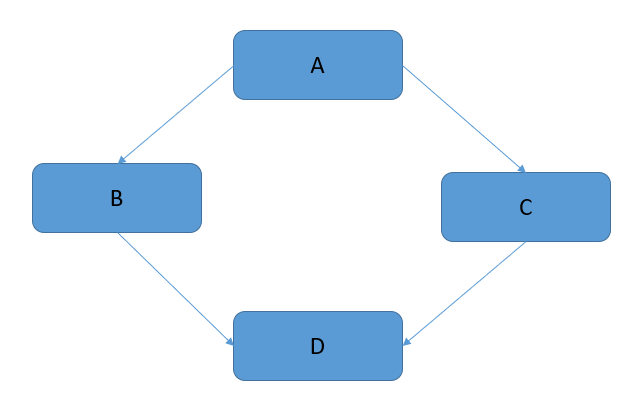
In single inheritance, subclass (derived) inherit the features of superclass (base). In the image below, class A serves as a base class for the derived class B.
Base Class
public class Employee {

	String name = "Tom";
	int emp_no = 12001;

	public void displayEmployee() {
		System.out.println("Base Class");

		System.out.println("Name :" + name);
		System.out.println("Emp_No :" + emp_no);
	}
}
Derived Class
package JavaDemo.Inheritance;

public class Department extends Employee {

	String deptName = "IT Division";

	public void displayDept() {
		System.out.println("Derived Class");

		System.out.println("Department Name :" + deptName);
	}

	public static void main(String[] args) {

		Department dept = new Department();

		// Derived method
		dept.displayDept();

		// Base Method
		dept.displayEmployee();

	}

}
Output
Derived Class
Department Name :IT Division
Base Class
Name :Tom
Emp_No :12001
2. Multilevel Inheritance
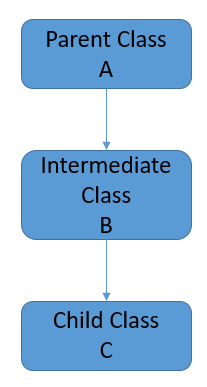
In this, derived class extends an base class as well as the derived class act as a base class for another derived class. In the below example, Employee is Base class, Department is intermediate derived class and SubDivision is derived class.
Base Class
package JavaDemo.Inheritance;

public class Employee {

	String name = "Tom";
	int emp_no = 12001;

	public void displayEmployee() {
		System.out.println("Base Class");

		System.out.println("Name :" + name);
		System.out.println("Emp_No :" + emp_no);
	}
}
Intermediate Derived Class
package JavaDemo.Inheritance;

public class Department extends Employee {

	String deptName = "IT Division";

	public void displayDept() {
		System.out.println("Intermediate Derived Class");

		System.out.println("Department Name :" + deptName);
	}

	public static void main(String[] args) {

		Department dept = new Department();

		// Intermediate Derived method
		dept.displayDept();

		// Base Method
		dept.displayEmployee();

	}

}
Derived Class
package JavaDemo.Inheritance;

public class SubDivision extends Department {

	String sub_division = "Production Support";

	public void displaySubDivision() {
		System.out.println("Derived Class");

		System.out.println("SubDivision Name :" + sub_division);
	}

	public static void main(String[] args) {

		SubDivision div = new SubDivision();

		// Derived method
		div.displaySubDivision();

		// Intermediate Derived method
		div.displayDept();

		// Base Method
		div.displayEmployee();

	}

}
Output
Derived Class
SubDivision Name :Production Support
Intermediate Derived Class
Department Name :IT Division
Base Class
Name :Tom
Emp_No :12001
3. Hierarchical Inheritance
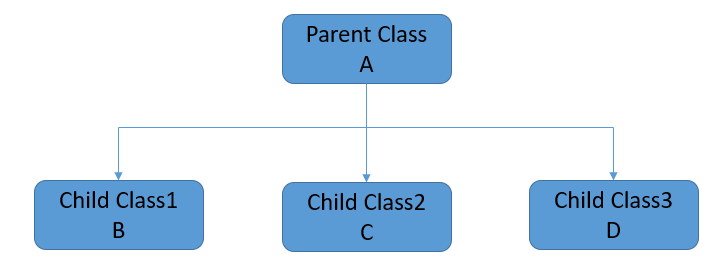
In Hierarchical Inheritance, one class serves as a superclass (base class) for more than one subclasses.
In the below example, Employee is the base class. Department and Salary are the derived classes.
Base Class
package JavaDemo.Inheritance;

public class Employee {

	String name = "Tom";
	int emp_no = 12001;

	public void displayEmployee() {
		System.out.println("Base Class");

		System.out.println("Name :" + name);
		System.out.println("Emp_No :" + emp_no);
	}
}
Derived Class1
public class Department extends Employee {

	String deptName = "IT Division";

	public void displayDept() {
		System.out.println("Derived Class 1");

		System.out.println("Department Name :" + deptName);
	}

	public static void main(String[] args) {

		Department dept = new Department();

		// Derived method
		dept.displayDept();

		// Base Method
		dept.displayEmployee();

	}

}
Derived Class2
package JavaDemo.Inheritance;

public class Salary extends Employee {

	float Salary = 65000;

	public void displaySalary() {
		System.out.println("Derived Class 2");
		System.out.println("Salary :" + Salary);
	}

	public static void main(String[] args) {

		Salary sal = new Salary();
		sal.displaySalary();
		sal.displayEmployee();

		System.out.println("=========================");

		Department dept = new Department();
		dept.displayDept();
		dept.displayEmployee();

	}

}
Output
Derived Class 2
Salary :65000.0
Base Class
Name :Tom
Emp_No :12001
=========================
Derived Class 1
Department Name :IT Division
Base Class
Name :Tom
Emp_No :12001
4. Multiple Inheritance
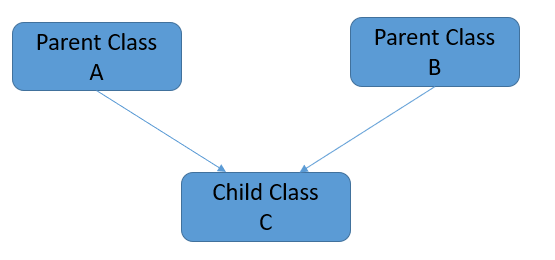
In Multiple inheritances, one class can have more than one superclass and inherit features from all parent classes. Java does not support multiple inheritances with classes. We can achieve multiple inheritances only through Interfaces.
5. Hybrid Inheritance
It is a combination of single and multiple inheritance. As Java doesn’t support multiple inheritances with classes, hybrid inheritance is also not possible with classes. In java, we can achieve hybrid inheritance only through Interfaces.
Congratulations on making it through this tutorial and hope you found it useful! Happy Learning!! Cheers!!
In the previous tutorial, I have explained about thecontrol flow of try catch and finally blocks in Java. In this tutorial, I’ll explain multiple catch exceptions. Java supports multiple catch exceptions, that means a try block can have more than one catch handlers. All catch blocks must be ordered from most specific to most general, i.e. catch for ArithmeticException must come before catch for Exception.
Scenario 1 – In the below example, an array is defined of size 10 and we want to perform an invalid arithmetic operation on element 15 of the array. In this case, we have defined 3 different catch handlers to handle the exception – Arithmetic Exception, ArrayIndexOutOfBounds Exception and Parent Exception. The try block has thrown exception – Arithmetic as the Arithmetic operation is invalid (divide by 0).
public class MultipleCatchDemo1 {

	public static void main(String[] args) {
		try {
			int a[] = new int[10];
			a[15] = 30 / 0;

        } catch (ArithmeticException e) {
			System.out.println("Arithmetic Exception occurs");

        } catch (ArrayIndexOutOfBoundsException e) {
			System.out.println("ArrayIndexOutOfBounds Exception occurs");

        } catch (Exception e) {
			System.out.println("Parent Exception occurs");

        }
		System.out.println("Rest of the program");
	}
}
The output of the above program is
Scenario 2 – In the below example, I’m throwing an exception which is not handled by first catch exception handler.
public class MultipleCatchDemo2 {

	public static void main(String[] args) {

		try {
			int a[] = new int[10];
			System.out.println(a[15]);

		} catch (ArithmeticException e) {
			System.out.println("Arithmetic Exception occurs");

		} catch (ArrayIndexOutOfBoundsException e) {
			System.out.println("ArrayIndexOutOfBounds Exception occurs");

		} catch (Exception e) {
			System.out.println("Parent Exception occurs");

		}
		System.out.println("Rest of the program");
	}
}
The output of the above program is
Scenario 3 – In the below example, I’m throwing an exception which is not handled by any catch exception handler specified in the program. Then, parent exception handler will be invoked.
public class MultipleCatchDemo3 {

	public static void main(String[] args) {
		try {
			int a[] = new int[10];
			System.out.println(a[10]);

		} catch (ArithmeticException e) {
			System.out.println("Arithmetic Exception occurs");

		} catch (NullPointerException e) {
			System.out.println("NullPointer Exception occurs");

		} catch (Exception e) {
			System.out.println("Parent Exception occurs");

		}
		System.out.println("Rest of the program");
	}
}
The output of the above program is
Scenario 4 – In the below example, we do not maintain the order of preference in exceptions (child to parent), then compile time error occurs.
public class MultipleCatchDemo4 {

	public static void main(String[] args) {
		try {
			int a[] = new int[10];
			System.out.println(a[10]);

		} catch (Exception e) {
			System.out.println("Parent Exception occurs");

		} catch (ArithmeticException e) {
			System.out.println("Arithmetic Exception occurs");

		} catch (ArrayIndexOutOfBoundsException e) {
			System.out.println("ArrayIndexOutOfBounds Exception occurs");

		}
		System.out.println("Rest of the program");
	}
}
The output of the above program is
Scenario 5– In the below example, try block has 2 exceptions. It will call the first suitable catch block for the first try statement which has thrown the exception.
public class MultipleCatchDemo5 {

	public static void main(String[] args) {
		try {
			int a[] = new int[10];
			a[15] = 30 / 0;
			System.out.println(a[20]);

		} catch (ArithmeticException e) {
			System.out.println("Arithmetic Exception occurs");

		} catch (ArrayIndexOutOfBoundsException e) {
			System.out.println("ArrayIndexOutOfBounds Exception occurs");

		} catch (Exception e) {
			System.out.println("Parent Exception occurs");

		}
		System.out.println("Rest of the program");
	}
}
The output of the above program is
Similarly, if I interchanged the try statements as shown below the response will also changes.
public class MultipleCatchDemo6 {

	public static void main(String[] args) {
		try {
			int a[] = new int[10];
			System.out.println(a[20]);
			a[15] = 30 / 0;

		} catch (ArithmeticException e) {
			System.out.println("Arithmetic Exception occurs");

		} catch (ArrayIndexOutOfBoundsException e) {
			System.out.println("ArrayIndexOutOfBounds Exception occurs");

		} catch (Exception e) {
			System.out.println("Parent Exception occurs");

		}
		System.out.println("Rest of the program");
	}
}
In this tutorial, I’ll explain about the flow control of try catch and finally blocks in accordance to the exception.
What is try block in Java?
It is used to specify a block where we should place exception code. The try block must be followed by either catch or finally. It means, we can’t use try block alone. If an exception occurs at the particular statement of try block, the rest of the block code will not execute. So, it is recommended not to keeping the code in try block that will not throw an exception.
What is catch block in Java?
It is used to handle the exception by declaring the type of exception within the parameter. It must be preceded by try block which means we can’t use catch block alone. It can be followed by finally block later. You can use multiple catch block with a single try block.
What is finally block in Java?
It is used to execute important statements such as establishing connection, stream, etc. It is always executed whether exception is handled or not.
Syntax of try-catch block
try{
//throw an exception
}catch{ //handle exception }
Syntax of try-catch-finally block
try{
//throw an exception
}catch { //handle exception }
finally { //important code which will always be executed  }
1.Exception occurs in try block and handled in catch block
If a statement in try block throws an exception, then rest of the code of try block is not executed. The control transfers to corresponding catch block. After the execution of code in catch block, the control moves to the rest of the program code to be executed.
public class TryCatchDemo {

	public static void main(String[] args) {
		{
			try {
				String a = null; // null value
				System.out.println(a.length());

				// This will never execute as try block has exception just above this statement
				System.out.println("Inside try block");

				// Exception will be handled in catch block and will execute the statements in
				// catch block
			} catch (NullPointerException e) {
				System.out.println("NullPointer Exception - Exception caught in Catch block");

			}

			// Rest of the program will be executed
			System.out.println("Outside try-catch block");
		}
	}
}

Output
NullPointer Exception - Exception caught in Catch block
Outside try-catch block
2. Exception occurs in try block and handled in catch block and finally block is present
If a statement in try block throws an exception, then rest of the code of try block is not executed. The control transfers to corresponding catch block. After the execution of code in catch block, the control moves to finally block (if present) and then the rest of the program is executed.
public class TryCatchFinallyDemo {

	public static void main(String[] args) {
		{
			try {
				String a = null; // null value
				System.out.println(a.length());

				// This will never execute as try block has exception just above this statement
				System.out.println("Inside try block");

				// Exception will be handled in catch block and will execute the statements in
				// catch block
			} catch (NullPointerException e) {
				System.out.println("NullPointer Exception - Exception caught in Catch block");

				// Statement present in finally block will be executed irrespective whether
				// exception is handled or not
			} finally {
				System.out.println("finally block executed");
			}

			// Rest of the program will be executed
			System.out.println("Outside try-catch block");
		}
	}
}

Output
NullPointer Exception - Exception caught in Catch block
finally block executed
Outside try-catch block
3. Exception occurred in try-block is not handled in catch block without finally block
If a statement in try block throws an exception, then rest of the code of try block is not executed.
public class TryNoCatchDemo {

	public static void main(String[] args) {
		{
			try {
				String a = null; // null value
				System.out.println(a.length());

				// This will never execute as try block has exception just above this statement
				System.out.println("Inside try block");

				// Incorrect Exception
			} catch (IndexOutOfBoundException e) {
				System.out.println("IndexOutOfBound Exception - Exception caught in Catch block");

			}


			// Rest of the program will be executed
			System.out.println("Outside try-catch block");
		}
	}
}

Output
Exception in thread "main" java.lang.Error: Unresolved compilation problem:
	IndexOutOfBoundException cannot be resolved to a type

	at JavaDemo.Exception.TryNoCatchDemo.main(TryNoCatchDemo.java:15)
4. Exception occurred in try-block is not handled in catch block with finally block
public class TryNoCatchFinallyDemo {

	public static void main(String[] args) {
		{
			try {
				String a = null; // null value
				System.out.println(a.length());

				// This will never execute as try block has exception just above this statement
				System.out.println("Inside try block");

				// Incorrect Exception
			} catch (IndexOutOfBoundException e) {
				System.out.println("IndexOutOfBound Exception - Exception caught in Catch block");

			}

			finally {
				System.out.println("finally block executed");
			}

			// Rest of the program will be executed
			System.out.println("Outside try-catch block");
		}
	}
}

Output
Exception in thread "main" java.lang.Error: Unresolved compilation problem:
	IndexOutOfBoundException cannot be resolved to a type

	at JavaDemo.Exception.TryNoCatchDemo.main(TryNoCatchDemo.java:15)
5. Exception doesn’t occur in try-block
If a statement in try block does not throw an exception, then catch block will be never executed and then rest of the program will be executed.
public class NoTryCatchDemo {

	public static void main(String[] args) {
		try {

			String str = "123";

			int num = Integer.parseInt(str);

			// this statement will execute
			// as no any exception is raised by above statement
			System.out.println("Inside try block");

		}

		catch (NumberFormatException ex) {

			System.out.println("catch block executed.");

		}

		System.out.println("Outside try-catch clause");
	}
}

Output
Inside try block
Outside try-catch clause
6. Exception doesn’t occur in try-block with finally block
If a statement in try block does not throw an exception, then catch block will never be executed. But the finally block will be executed and then rest of the program will be executed.
public class NoTryCatchFinallyDemo {

	public static void main(String[] args) {
		try {

			String str = "123";

			int num = Integer.parseInt(str);

			// this statement will execute
			// as no any exception is raised by above statement
			System.out.println("Inside try block");

		}

		catch (NumberFormatException ex) {

			System.out.println("catch block executed");

		} finally {
			System.out.println("finally block executed");
		}

		System.out.println("Outside try-catch clause");
	}
}

Output
Inside try block
finally block executed
Outside try-catch clause
Exceptions in Java are events that disrupt the normal flow of the program’s instructions during runtime. When an exceptional event occurs, an exception object is created, which the runtime system then throws. This exception object contains information about the error, including its type and the state of the program when the error occurred.
Category of Exceptions
Java defines two categories of exceptions – Built-in Exceptions and User-Defined Exception.
Built-in Exceptions
These exceptions are available in Java libraries. There are various types of exceptions which are suitable to specific type of exception situations. Built-in Exceptions are divided into Checked and Unchecked Exceptions.
Checked Exceptions
These are exceptions that are checked at compile-time.
They must be either handled using a try-catch block or declared in the method signature using the `throws` keyword.
Examples include IOException, SQLException, and FileNotFoundException.
UnChecked Exceptions
These are exceptions that are not checked at compile-time but are instead checked at runtime.
Unchecked exceptions are subclasses of RuntimeException. They do not need to be declared or handled explicitly.
Examples include NullPointerException, ArrayIndexOutOfBoundsException, and ArithmeticException.
User-defined or Custom Exceptions
There are several conditions where built-in exceptions in Java is unable to handle certain situations. In such cases, user can create a custom or user defined exception.
In this tutorial, I’ll explain about built-in exceptions.
Types of Exceptions
1. ArithmeticException
It is thrown when an exception has occurred in an arithmetic operation. Below is an example of this exception.
public class ArithmeticExceptionDemo {

	public static void main(String[] args) {
		{
			try {
				int a = 30, b = 0;
				int c = a / b; // cannot divide by zero
				System.out.println("Result = " + c);
			} catch (ArithmeticException e) {
				System.out.println("Can't divide a number by 0");
			}
		}
	}
}
The output of the above program is
2. ArrayIndexOutOfBoundsException
It is thrown when an array has been accessed with an illegal index. The index is either negative or greater than or equal to the size of the array.
public class ArrayIndexOutOfBoundsExceptionDemo {

	public static void main(String[] args) {
		{
			try {
				// Create an array of size 5
				int a[] = new int[5];

				// Access 11th element from array of size 5
				a[10] = 9;
			} catch (ArrayIndexOutOfBoundsException e) {
				System.out.println("Array Index is Out Of Bounds");
			}
		}
	}
}
The output of the above program is
3. StringIndexOutOfBoundsException
It is thrown by String class methods to indicate that an index is either negative or greater than the size of the string.
public class StringOutOfBoundDemo {

	public static void main(String[] args) {
		{
			try {
				String a = "This is testing"; // length is 15
				System.out.println("Length of String :" + a.length());

				char b = a.charAt(20); // accessing 20th element
				System.out.println(b);
			} catch (StringIndexOutOfBoundsException e) {
				System.out.println("StringIndexOutOfBoundsException");
			}
		}
	}
}
The output of the above program is
4. NullPointerException
This exception is thrown when referring to the members of a null object.
public class NullPointerDemo {

	public static void main(String[] args) {
		{
			try {
				String a = null; // null value
				System.out.println(a.length());
			} catch (NullPointerException e) {
				System.out.println("NullPointerException");
			}
		}
	}
}
The output of the above program is
5. NumberFormatException
This exception is thrown when a method can not convert a string into a numeric format.
public class NumberFormatDemo {

	public static void main(String[] args) {
		try {
			// "java" is not a number
			int num = Integer.parseInt("java");

			System.out.println(num);
		} catch (NumberFormatException e) {
			System.out.println("Number format exception");
		}
	}
}
The output of the above program is
6. FileNotFoundException
This Exception is thrown when a file is not accessible or does not open.
import java.io.File;
import java.io.FileNotFoundException;
import java.io.FileReader;

public class FileNotFoundDemo {

	public static void main(String[] args) {
		try {

			// Following file does not exist
			File file = new File("C://demofile.txt");

			FileReader fr = new FileReader(file);
		} catch (FileNotFoundException e) {
			System.out.println("File does not exist");
		}
	}
}
The output of the above program is
7. ClassNotFoundException
This Exception is raised when we try to access a class whose definition is not found.
package JavaDemo;

public class ClassNotFoundExceptionDemo {

	public static void main(String[] args) {
		try {
			Class temp = Class.forName("gfg");
			// Calling the clas gfg which is not present in the
			// current class temp instance of calling class it
			// will throw ClassNotFoundException;
		} catch (ClassNotFoundException e) {
			// block executes when mention exception occur
			System.out.println("Class does not exist check the name of the class");
		}
	}
}
The output of the above program is
8. IOException
It is thrown when an input-output operation failed or interrupted.
It is thrown when accessing a method which is not found.
10. InterruptedException
It is thrown when a thread is waiting , sleeping , or doing some processing , and it is interrupted.
11. NoSuchFieldException
It is thrown when a class does not contain the field (or variable) specified.
12. RuntimeException
This represents any exception which occurs during runtime. They are ignored during compilation time. Such as logical bugs.
import java.util.Scanner;

public class RunTimeDemo {

	public static void main(String[] args) {
		// Reading user input
		Scanner input_dev = new Scanner(System.in);
		System.out.print("Enter your age in Numbers: ");
		int age1 = input_dev.nextInt();
		if (age1 > 20) {
			System.out.println("You can view the page");
		} else {
			System.out.println("You cannot view the page");
		}
	}
}
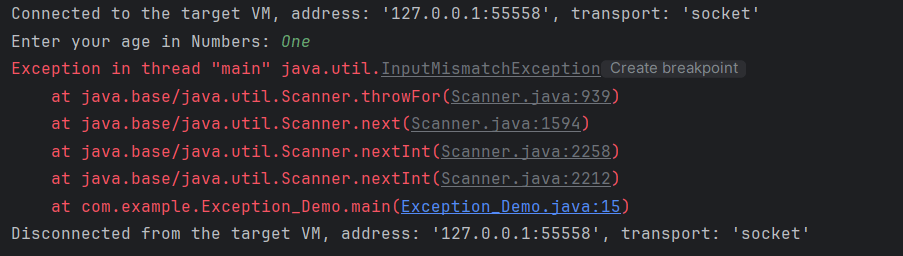
The output of the above program is
13. SQLException
This type of exception occurs while executing queries on a database related to the SQL syntax.
14. IllegalArgumentException
It is thrown when an inappropriate and incorrect argument is passed to the method. Suppose, a method does not allow null, but we are providing null as the parametr, then this exception is thrown.
An exception is an unwanted or unexpected event which occurs at the run time of the program, that leads to the disruption of the normal flow of execution of the program.
What is Exception Handling?
Exception Handling is a mechanism to handle runtime errors happen in the program such as ClassNotFoundException, IOException, SQLException, RemoteException, etc, which disruptes the normal execution of the program.
Suppose there are 6 statements in your program and there occurs an exception at statement 3, the rest of the code will not be executed i.e. statement 4 to 6 will not be executed. If we perform exception handling, the rest of the statement will be executed. That is why we use exception handling in Java.
What is the difference between Error and Exception?
Error: An Error indicates serious problem that a reasonable application should not try to catch. Error are used by the Java run-time system(JVM) to indicate errors having to do with the run-time environment itself(JRE) or StackOverflowError or OutOfMemoryError
Exception: Exception indicates conditions that a reasonable application might try to catch. Example of exceptions are IOException, SQLException, etc.
Types of Exceptions
1) Checked Exception The classes which directly inherit Throwable class except RuntimeException and Error are known as checked exceptions e.g. IOException, SQLException etc. Checked exceptions are checked at compile-time.
2) Unchecked Exception The classes which inherit RuntimeException are known as unchecked exceptions e.g. ArithmeticException, NullPointerException, ArrayIndexOutOfBoundsException etc. Unchecked exceptions are not checked at compile-time, but they are checked at runtime.
Hierarchy of Java Exception classes
Keywords used in Exception Handling in Java
1. try keyword – It is used to specify a block where we should place exception code. The try block must be followed by either catch or finally. It means, we can’t use try block alone.
2. catch keyword – It is used to handle the exception. It must be preceded by try block which means we can’t use catch block alone. It can be followed by finally block later.
3. finally keyword – It is used to execute the important code of the program irrespective the exception is handled or not.
4. throw keyword – It is used to throw an exception explicitly in the program inside a function or inside a block of code.
5. throws keyword – It is used to declare exceptions. It doesn’t throw an exception. It specifies that there may occur an exception in the method. It is always used with method signature.
Exception Handling Example in Java
Let’s see an example of exception handling where we can use try-catch block and will not use try-catch statements. Below example shows an exception without try-catch block.
package JavaDemo;

public class ExceptionHandlingDemo {

	static String a = null;

	public static void main(String[] args) {

		System.out.println(a.length());
	}

}

Output
Exception in thread "main" java.lang.NullPointerException
	at JavaDemo.ExceptionHandlingDemo.main(ExceptionHandlingDemo.java:9)
Below example shows an exception with try-catch block.
package JavaDemo;

public class ExceptionHandlingDemo {
	static String a = null;

	public static void main(String[] args) {
		// TODO Auto-generated method stub

		try {
			System.out.println(a.length());
		} catch (NullPointerException e) {
			System.out.println(e);
		}
		System.out.println("Exception is handled");
	}

}

Output
java.lang.NullPointerException
Exception is handled
Eclipse IDE is a software that allows you to write your programs and test scripts in multiple programming languages (with Java being the most popular one).
Download Eclipse IDE
1. Open the below mentioned link. Latest version of Eclipse available is Eclipse IDE 2024-09 R Packages Eclipse Download .
2. Select – Eclipse IDE for Java Developers. Depending on type of Operating System, download either 32 bit or 64 bit. My system is 64 bit, so downloading 64 bit Eclipse .
3. Click on the Download button to start downloading process.
Install/Setup Eclipse
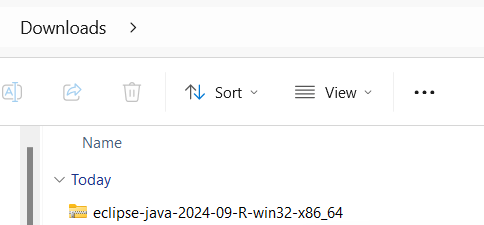
1. We do not need to install Eclipse, just unzip the Eclipse downloaded folder. Go to the path where Eclipse downloaded and unzip the folder .
2. Eclipse folder have Eclipse Editor (Eclipse.exe), double click on it.
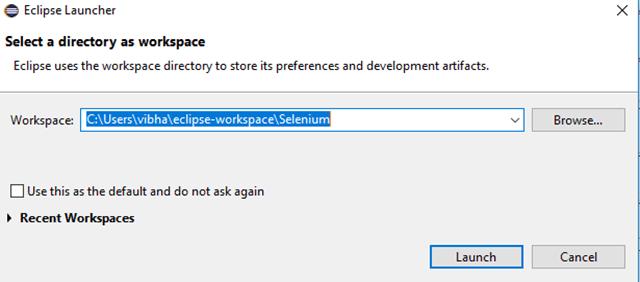
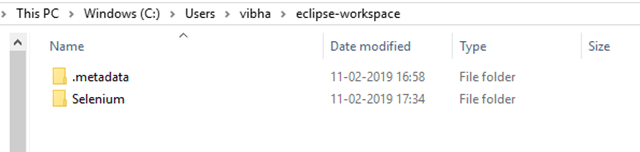
3. Eclipse Workplace directory will get open. You can provide name to this directory. In Eclipse, all the projects saved in Eclipse Directory
4. A folder with same Eclipse Directory name creates in same path as mentioned above.
5. Eclipse Workspace will open as shown below:
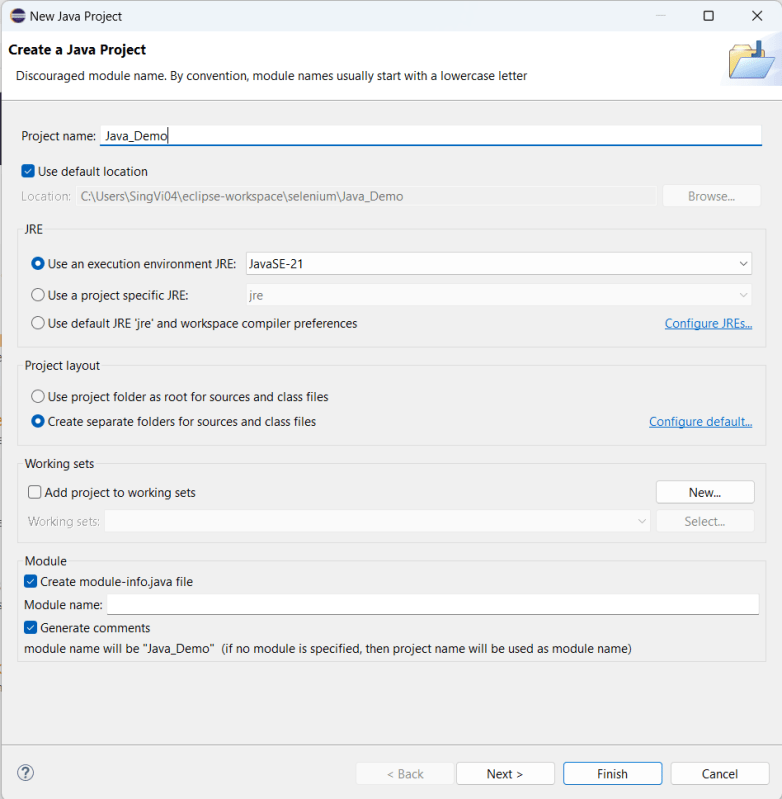
6. Click on the “Create a new Java project”. It will open an editor as shown below. We need to provide the Java Project name here as it is Java_Demo in this case. Click on the “Next” button.
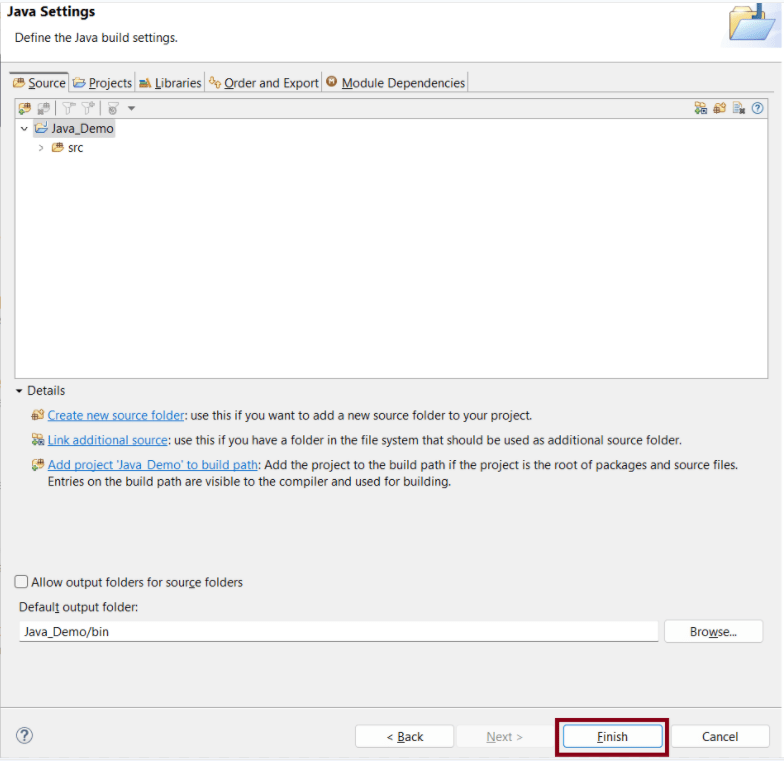
7. It will show the Java Settings as shown in the below image. Click on the “Finish” button.
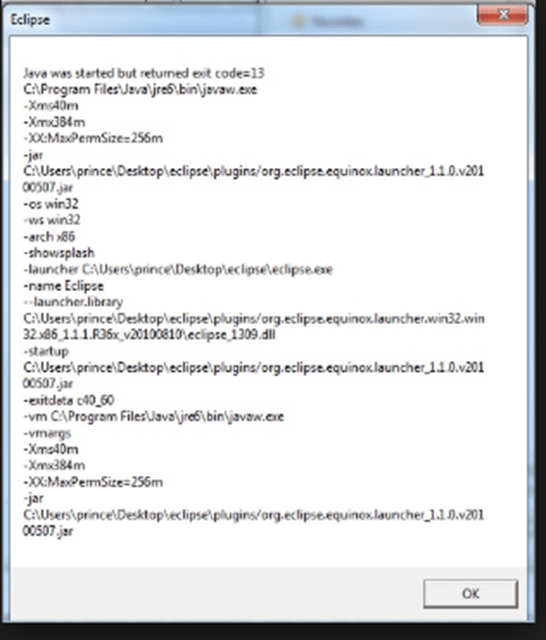
Note: – There are chances that you may face the issue while trying to access Eclipse IDE – Java was started but returned exit code =13. This is because there is configuration mistake in Eclipse.ini (Eclipse Configuration) file. The error will look like something below:-
To fix this issue, open the Eclipse Configuration file. It will be present in unzipped Eclipse Folder.
Add the below mentioned line in Eclipse Configuration file:-
The Java Development Kit(JDK) allows you to code and run Java programs. The JDK is essentially a toolkit that provides the necessary components to write, compile, and run Java programs. It includes the Java Runtime Environment (JRE), compilers, and various tools such as debuggers and documentation generators.In this tutorial, we show you how to install Java 11 on Windows and set up the environment variable JAVA_HOME
1. Refer to the link to download JDK11. Here, I have a 64-bit system and windows operating system, so I selected – jdk-11.0.16.1_windows-x64_bin.exe
2. Click on the name – jdk-11.0.816.1_windows-x64_bin.exe, and a dialog box as shown below will appear.
3. If you do not have an Oracle account, then go to the AdoptOpenJDK link . AdoptOpenJDK uses infrastructure, build and test scripts to produce prebuilt binaries from OpenJDK™ class libraries and a choice of either OpenJDK or the Eclipse OpenJ9 VM. All AdoptOpenJDK binaries and scripts are open sources licensed and available free.
Select appropriate version and JVM.
Here, I have selected Version – OpenJDK 11 and JVM as HotSpot. Click on the blue download button. It will take you to the new location.
4. Select the appropriate Operating System, Architecture, Package Type & Version. I have selected OS as Windows, Architecture as x64, Package Type as JDK, and Version as 11. Select the .zip extension and download the exe.
5. Once the file is downloaded, Right-click and extract the files to the desired location. I have placed it in C: driver under Program Files.
How to set Java JDK 11 Path in Windows 10?
1. Type – “View Advance” in the search option and we will see the option – View Advanced system setting.
2. In System Properties dialog, select Advanced tab and click on the Environment Variables button.
3. In “Environment variables” dialog, system variables. Click on the New button. Add a JAVA_HOME variable and specify the variable value. Mention the path where the Java folder is located.
4. Update System Path. In the “Environment Variables” window, go to “System variables.” Select Path and click Edit. Add the path of Java with bin.
Verify installation of Java
To verify, if JAVA is installed properly or not, open command prompt and type
java - version
To verify, if JAVA_HOME is configured properly or not, open command prompt and type
echo %JAVA_HOME%
We are done! Congratulations on making it through this tutorial and hope you found it useful! Happy Learning!!
This tutorial is to explain the functionality of ComputableFuture class introduced as Java 8 Concurrency API improvement.
ComputableFuture class implements the Future interface; means can be use for future implementation but with additional logic. Static methods runAsync and supplyAsync allow us to create a ComputableFuture instance out of Runnable and Supplier functional types accordingly.
runAsync – Returns a new CompletableFuture that is asynchronously completed by a task running in the ForkJoinPool.commonPool() after it runs the given action. It returns the new CompletableFuture.
ComputableFuture.runAsync accepts Runnable functional interface and return a ComputableFuture which doesn’t have value
import java.util.concurrent.CompletableFuture;
import java.util.concurrent.ExecutionException;
import org.junit.Test;

 public class runAsyncDemo {
     @Test
      public void runAsync() throws InterruptedException, ExecutionException {
           CompletableFuture future = CompletableFuture.runAsync(() -> System.out.println("runAsync method doesn not return any value"));
           System.out.println(future.get());
   }
}

Output
runAsync method does not return any value
null





















 QA Automation Expert