An XML file contains data between the tags. This makes it complex to read compared to other file formats like docx and txt. There are two types of parsers which parse an XML file:

DOM stands for Document Object Model. The DOM API provides the classes to read and write an XML file. DOM reads an entire document. It is useful when reading small to medium size XML files. It is a tree-based parser. It is a little slow when compared to SAX. It occupies more space when loaded into memory. We can insert and delete nodes using the DOM API.
How to retrieve tag name from XML?
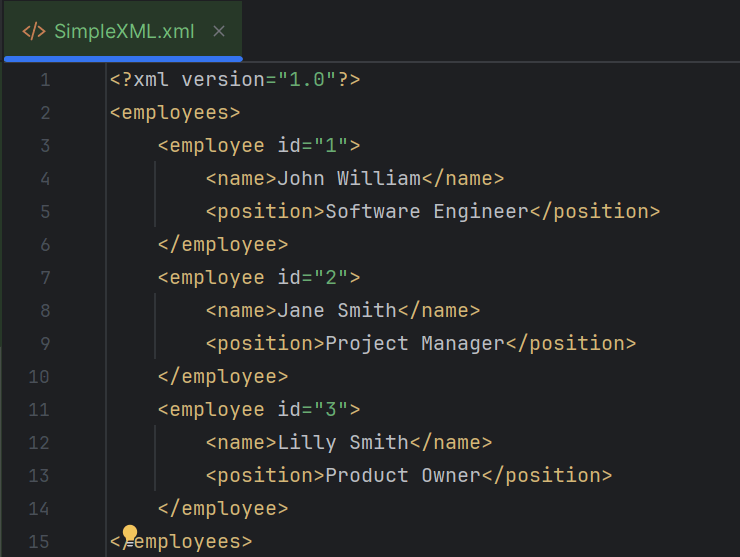
Below is the sample JSON which is used as an example . I have saved this file in resources/Payloads as SimpleXML.xml.
package XML.DOM;
import org.w3c.dom.Document;
import org.w3c.dom.Element;
import org.w3c.dom.NodeList;
import org.xml.sax.SAXException;
import javax.xml.parsers.DocumentBuilder;
import javax.xml.parsers.DocumentBuilderFactory;
import javax.xml.parsers.ParserConfigurationException;
import java.io.File;
import java.io.IOException;
public class XMLParserTagNameExample {
public static void main(String[] args) {
try {
// Create a DocumentBuilderFactory
DocumentBuilderFactory factory = DocumentBuilderFactory.newInstance();
// Obtain a DocumentBuilder from the factory
DocumentBuilder builder = factory.newDocumentBuilder();
// Parse the XML file into a Document
Document document = builder.parse(new File("src/test/resources/Payloads/SimpleXML.xml"));
// Normalize XML structure
document.getDocumentElement().normalize();
// Get the root element
Element root = document.getDocumentElement();
System.out.println("Root Element: " + root.getNodeName());
System.out.println("-----------------------");
// Retrieve the first employee element for extracting tag names
NodeList nodeList = document.getElementsByTagName("employee");
if (nodeList.getLength() > 0) {
// If there is at least one employee, use it to print the element and attribute names
Element employee = (Element) nodeList.item(0);
// Print the tag names
System.out.println("Employee ID Attribute Name: id");
System.out.println("Name Tag: " + employee.getElementsByTagName("name").item(0).getNodeName());
System.out.println("Position Tag: " + employee.getElementsByTagName("position").item(0).getNodeName());
System.out.println("-----------------------");
}
} catch (ParserConfigurationException e) {
System.out.println("Parser configuration error occurred: " + e.getMessage());
} catch (SAXException e) {
System.out.println("SAX parsing error occurred: " + e.getMessage());
} catch (IOException e) {
System.out.println("IO error when loading XML file: " + e.getMessage());
} finally {
System.out.println("XML parsing operation completed.");
}
}
}
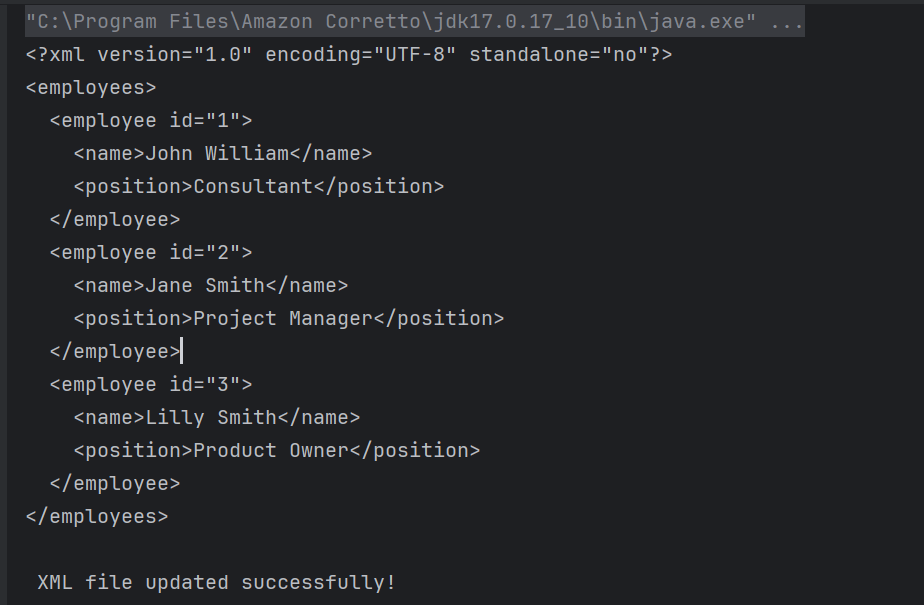
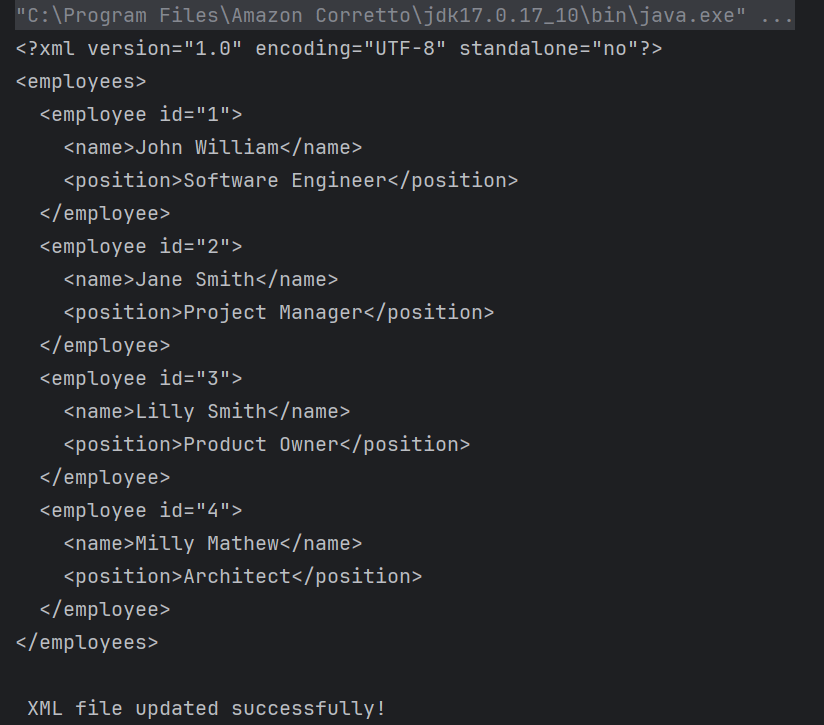
The output of the above program is
Explanation
1. Creating a DocumentBuilder Object
It has ‘newDocumentBuilder()’ method that creates an instance of the class ‘DocumentBuilder’. This DocumentBuilder class is used to get input in the form of streams, files, URLs and SAX InputSources.
DocumentBuilder created in above steps is used to parse the input XML file. It contains a method named parse() which accepts a file or input stream as a parameter and returns a DOM Document object. If the given file or input stream is NULL, this method throws an IllegalArgumentException.
The `normalize` method is called on the document’s root element. This step ensures that the XML structure is uniform, often by merging adjacent text nodes and removing empty ones.
document.getDocumentElement().normalize();
4. Get root node
We can use getDocumentElement() to get the root node and the element of the XML file.
Element root = document.getDocumentElement();
System.out.println("Root Element: " + root.getNodeName());
System.out.println("-----------------------");
5. Retrieving Root Element Name
A `NodeList` containing all elements with the tag name `employee` is obtained using `getElementsByTagName`. This list can be used to iterate over all employee entries in the XML.
NodeList nodeList = document.getElementsByTagName("employee");
if (nodeList.getLength() > 0) {
// If there is at least one employee, use it to print the element and attribute names
Element employee = (Element) nodeList.item(0);
// Print the tag names
System.out.println("Employee ID Attribute Name: id");
System.out.println("Name Tag: " + employee.getElementsByTagName("name").item(0).getNodeName());
System.out.println("Position Tag: " + employee.getElementsByTagName("position").item(0).getNodeName());
System.out.println("-----------------------");
}
}
getTagName() returns the name of the root element in the form of a string. Retrieve the first employee element for extracting tag names and print the tag names.
getNodeName() is used to get the name of the node. It returns the node name in the form of a string.
6. Implement Exception Handling
The program catches `ParserConfigurationException`, `SAXException`, and `IOException`, addressing specific issues that might occur during parsing. Each exception type is followed by a custom message that explains the nature of the error. At the end, a message is printed to confirm the completion of the XML parsing operation by using finally block.
The program loops through each node in the `NodeList`. Each node is checked if it is an `ELEMENT_NODE`. For each valid employee element, it extracts: – Attribute: The `id` attribute value using `getAttribute(“id”)`. – Text Content: The contents of child elements “name” and “position” using `getElementsByTagName(“name”).item(0).getTextContent()` and similarly for “position”.
for (int i = 0; i < nodeList.getLength(); i++) {
Node node = nodeList.item(i);
if (node.getNodeType() == Node.ELEMENT_NODE) {
Element employee = (Element) node;
// Get the attribute and text content
String id = employee.getAttribute("id");
String name = employee.getElementsByTagName("name").item(0).getTextContent();
String position = employee.getElementsByTagName("position").item(0).getTextContent();
System.out.println("Employee ID: " + id);
System.out.println("Name: " + name);
System.out.println("Position: " + position);
System.out.println("-----------------------");
}
}
}
getTextContent() is used to get the text content of elements.
7. Implement Exception Handling
This is same as the step 6 of the above program.
We are done! Congratulations on making it through this tutorial and hope you found it useful! Happy Learning!!
The JSON-simple is a light weight library which is used to process JSON objects. Using this you can read or, write the contents of a JSON document using a Java program.
JSON.simple is available at the Central Maven Repository. Maven users add this to the POM.
import com.github.cliftonlabs.json_simple.JsonArray;
import com.github.cliftonlabs.json_simple.JsonObject;
import com.github.cliftonlabs.json_simple.Jsoner;
import java.io.FileWriter;
import java.io.IOException;
public class WriteSimpleJson {
public static void main(String[] args) {
// JSON String
JsonObject jsonObject = new JsonObject();
jsonObject.put("Name", "Vibha");
jsonObject.put("Salary", 4500.00);
// JSON Array
JsonArray list = new JsonArray();
list.add("Monday");
list.add("Tuesday");
list.add("Wednesday");
jsonObject.put("Working Days", list);
System.out.println(Jsoner.serialize(jsonObject));
try (FileWriter fileWriter = new FileWriter("src/test/resources/Payloads/Employee.json")) {
Jsoner.serialize(jsonObject, fileWriter);
} catch (IOException e) {
throw new RuntimeException(e);
}
}
}
The output of the above program is
Explanation
1. Creating a JSON Object
A `JsonObject` named `jsonObject` is created to hold data. Using `put()`, the code adds a “Name” field with the value “Vibha” and a “Salary” field with the value `4500.00` to the JSON object.
JsonObject jsonObject = new JsonObject();
jsonObject.put("Name", "Vibha");
jsonObject.put("Salary", 4500.00);
2. Creating a JSON Array
A `JsonArray` named `list` is created to contain multiple values. The days “Monday”, “Tuesday”, and “Wednesday” are added to the `list`. The JSON array list is added to the jsonObject under the key “Working Days”.
JsonArray list = new JsonArray();
list.add("Monday");
list.add("Tuesday");
list.add("Wednesday");
jsonObject.put("Working Days", list);
3. Writing JSON to a File
A FileWriter is used to open the file src/test/resources/Payloads/Employee.json for writing. The Jsoner.serialize() method serializes the jsonObject and writes it to the file, capturing the constructed JSON structure.
try (FileWriter fileWriter = new FileWriter("src/test/resources/Payloads/Employee.json")) {
Jsoner.serialize(jsonObject, fileWriter);
}
Write Complex JSON to File using JSON.simple
Below is the complex JSON which will be generated.
import com.github.cliftonlabs.json_simple.JsonArray;
import com.github.cliftonlabs.json_simple.JsonObject;
import com.github.cliftonlabs.json_simple.Jsoner;
import java.io.FileWriter;
import java.io.IOException;
public class WriteComplexJson {
public static void main(String[] args) {
JsonObject jsonObject = new JsonObject();
//Name
JsonObject name = new JsonObject();
name.put("Forename", "Vibha");
name.put("Surname", "Singh");
jsonObject.put("Name", name);
//Salary
JsonObject salary = new JsonObject();
salary.put("Fixed", 4000.00);
//Bonus
JsonObject bonus = new JsonObject();
bonus.put("Monthly", 45.00);
bonus.put("Quaterly", 125.00);
bonus.put("Yearly", 500.00);
salary.put("Bonus", bonus);
jsonObject.put("Salary", salary);
// JSON Array
JsonArray list = new JsonArray();
list.add("Monday");
list.add("Tuesday");
list.add("Wednesday");
jsonObject.put("Working Days", list);
System.out.println(Jsoner.serialize(jsonObject));
try (FileWriter fileWriter = new FileWriter("src/test/resources/Payloads/EmployeeDetails.json")) {
Jsoner.serialize(jsonObject, fileWriter);
} catch (IOException e) {
throw new RuntimeException(e);
}
}
}
The output of the above program is
I have saved this file in resources/Payloads as EmployeeDetails.json.
Explanation
1.Creating JSON Objects
Serves as the root JSON object to encapsulate all the other JSON objects and arrays
JsonObject jsonObject = new JsonObject();
2. Name Object
A JsonObjectnamed name is created. It contains two properties: “Forename” with the value “Vibha” and “Surname” with the value “Singh”. This nameobject is then added to the root jsonObjectunder the key “Name”.
JsonObject name = new JsonObject();
name.put("Forename", "Vibha");
name.put("Surname", "Singh");
jsonObject.put("Name", name);
3. Salary Object
A `JsonObject` named `salary` is created with a property “Fixed” representing a fixed salary amount of 4000.00.
//Salary
JsonObject salary = new JsonObject();
salary.put("Fixed", 4000.00);
4. Bonus Object
A `JsonObject` named `bonus` is created. It contains properties for different types of bonuses: “Monthly” (45.00), “Quarterly” (125.00), and “Yearly” (500.00).
The `bonus` object is then added as a property of the `salary` object under the key “Bonus”.
The complete `salary` object, now including the bonus details, is added to the root `jsonObject` under the key “Salary”.
A `JsonArray` named `list` is created to represent the working days. The days “Monday”, “Tuesday”, and “Wednesday” are added to this array. This `list` is added to the root `jsonObject` under the key “Working Days”.
// JSON Array
JsonArray list = new JsonArray();
list.add("Monday");
list.add("Tuesday");
list.add("Wednesday");
jsonObject.put("Working Days", list);
6. Serialization of JSON
The entire `jsonObject` is serialized using `Jsoner.serialize()` and printed to the console, which converts the Java JSON structure into a JSON string.
The `try-with-resources` statement is used to ensure the `FileWriter` is closed automatically. A `FileWriter` writes the serialized JSON object to a file at `src/test/resources/Payloads/EmployeeDetails.json`.
try (FileWriter fileWriter = new FileWriter("src/test/resources/Payloads/Employee.json")) {
Jsoner.serialize(jsonObject, fileWriter); }
We are done! Congratulations on making it through this tutorial and hope you found it useful! Happy Learning!!
Welcome to the Java Quiz! This blog post features 25 multiple-choice questions that explore the concepts of Arrays in Java.
1. What is an array in Java?
a) A data structure that can hold elements of different types b) A class that allows storing single data type elements in a contiguous memory location c) A collection of elements in no specific order d) A method for sorting elements
Answer 1
b) A class that allows storing single data type elements in a contiguous memory location
Arrays in Java are used to store multiple values of the same data type in a contiguous memory location.
2. How do you instantiate an array of integers with 10 elements in Java?
a) int[] arr = new int[10]; b) int arr = new int(10); c) int arr[10] = new int[]; d) int(10) arr = new int[];
Answer 2
a) int[] arr = new int[10];
3. What is the default value of an element in an int array in Java?
Choose one option
a) 1 b) 0 c) null d) Undefined
Answer 3
b) 0
In Java, arrays of primitive types like int are initialized to their default values. The default value for int is 0
4. What will be the output of the following Java program?
class array_output
{
public static void main(String args[])
{
int array_variable [] = new int[10];
for (int i = 0; i < 10; ++i)
{
array_variable[i] = i;
System.out.print(array_variable[i] + " ");
i++;
}
}
}
When an array is declared using new operator then all of its elements are initialized to 0 automatically. for loop body is executed 5 times as whenever controls comes in the loop i value is incremented twice, first by i++ in body of loop then by ++i in increment condition of for loop.
5. What is the maximum number of dimensions an array can have in Java?
a) 1 b) 255 c) 2 d) No theoretical limit
Answer 5
b) 255
Java allows arrays to have up to 255 dimensions.
6. What will be the output of the following Java program?
public class array_output {
public static void main(String args[])
{
char array_variable [] = new char[10];
for (int i = 0; i < 10; ++i)
{
array_variable[i] = 'i';
System.out.print(array_variable[i] + "");
}
}
}
Choose one option
a) 1 2 3 4 5 6 7 8 9 10 b) 0 1 2 3 4 5 6 7 8 9 10 c) i j k l m n o p q r d) i i i i i i i i i i
Answer 6
d) i i i i i i i i i i
When an array is declared using the new operator, all of its elements are automatically initialized to default values—0 for numeric types, null for reference types, and ‘\0’ (null character) for char.
7. What will be the output of the following Java program?
public class array_output {
public static void main(String args[])
{
double num[] = {5.5, 10.1, 11, 12.8, 56.9, 2.5};
double result;
result = 0;
for (int i = 0; i < 6; ++i)
result = result + num[i];
System.out.print(result/6);
}
}
Choose one option
a) 16.34 b) 16.566666644 c) 16.46666666666667 d) 16.46666666666666
Answer 7
c) 16.46666666666667
8. What happens if you try to access an index of an array that is out of bounds?
Choose one option
a) Compile-time error b) Returns null c) Throws ArrayIndexOutOfBoundsException d) None of the above
Answer 8
c) Throws ArrayIndexOutOfBoundsException
9. How do you declare an array of strings?
a) String[] arr; b) String arr[]; c) String arr(); d) String arr{};
Answer 9
a) String[] arr;
This is the standard way of declaring an array of strings in Java.
10. Which of the following is a valid declaration and initialization of String array in Java
a) String[] names ={“Tim”,”Mark”,”Charlie”} b) String names[] ={“Tim”,”Mark”,”Charlie”} c) String[3] names ={“Tim”,”Mark”,”Charlie”} d) Both a) and b) e) Both a) and c)
Answer 10
d) Both a) and b)
String[3] names = {“Tim”, “Mark”, “Charlie”};` is incorrect because Java does not allow specifying the size of the array within square brackets during initialization in this manner.
11. What will be the output?
public class Test {
public static void main(String[] args) {
String[] arr = {"Java", "Python", "C++"};
System.out.println(arr[1]);
}
}
Choose one option
a) Java b) Python c) C++ d) Compilation error
Answer 11
b) Python
arr[1]accesses the second element of the array, which is “Python”.
12. Which of the following statements is true?
Choose one option
a) Arrays are immutable b) Arrays are objects c) Arrays store elements of any data type d) Arrays automatically grow
Answer 12
b) Arrays are objects
In Java, arrays are objects and are part of the java.lang package.
13. What is the primary use of the `System.arraycopy()` method in Java?
Choose one option
a) To copy one array to another b) To reverse an array c) To sort an array d) To find an element in an array
Answer 13
a) To copy one array to another
System.arraycopy() is used to copy elements from one array to another.
14. What is printed by the following code snippet?
public class Test {
public static void main(String[] args) {
int[] arr = new int[5];
System.out.println(arr[1]);
}
}
Choose one option
a) 0 b) null c) undefined d) Compilation error
Answer 14
a) 0
Integer arrays are initialized to 0 by default.
15. What will be the result of this program?
public class array_output {
public static void main(String args[])
{
int[] arr = {1, 2, 3, 4};
System.out.println(arr.length);
}
}
Choose one option
a) 0 b) 3 c) 4 d) Compilation error
Answer 15
c) 4
arr.lengthreturns the number of elements in the array, which is 4.
16. What exception is thrown by Java code when trying to store values in a sufficiently large dimension of an array but with the wrong data type?
Choose one option
a) ArrayIndexOutOfBoundsException b) IllegalArgumentException c) ClassCastException d) ArrayStoreException
Answer 16
d) ArrayStoreException
ArrayStoreException occurs when attempting to store incorrect types into arrays of object types.
17. Which of the following is not a valid way to declare a two-dimensional array in Java?
Choose one option
a) int[][] arr = new int[3][3]; b) int arr[][] = new int[3][3]; c) int[] arr = new int[3][]; d) int[][] arr = new int[][];
Answer 17
d) int[][] arr = new int[][];
Option D is invalid because while it declares a two-dimensional array, it does not specify the size of either dimension at the time of declaration.
18. What is the correct way to iterate over a Java array using an enhanced for loop?
a) for (int i : arr) b) for (int i = 0; i < arr.length; i++) c) for (arr : int i) d) for (arr i : int)
Answer 18
a) for (int i : arr)
The enhanced for loop in Java is written as for (type variable : array).
19. What will happen if you try to store a double value into an int array?
a) The value will be rounded b) The value will be truncated c) A ClassCastException will be thrown d) A compile-time error
Answer 19
d) A compile-time error
You cannot store a double value in an int array without explicit casting, leading to a compile-time error.
20. What is the output of the following code?
public class array_output {
public static void main(String args[])
{
int[] arr = {2, 4, 6, 8};
System.out.println(arr[arr.length]);
}
}
Choose one option
a) 8 b) 4 c) 0 d) ArrayIndexOutOfBoundsException
Answer 20
d) ArrayIndexOutOfBoundsException
Since array indices are 0-based, accessing arr[arr.length] is out of bounds. The valid indices for this array are from 0 to arr.length – 1.
21. What is the output of the following code?
public class array_output {
public static void main(String args[]) {
int[] arr = {1, 2, 3, 4, 5};
for (int i = 0; i < arr.length; i++) {
arr[i] = arr[i] * 2;
}
System.out.println(arr[2]);
}
}
Choose one option
a) 3 b) 6 c) 8 d) 10
Answer 21
b) 6
The loop multiplies each element by 2. Therefore, arr[2] becomes 3 * 2 = 6.
22. What will be the output of the below program?
public class array_output {
public static void main(String args[]) {
int[] arr = {10, 20, 30, 40};
System.out.println(arr[1] + arr[2]);
}
}
Choose one option
a) 30 b) 50 c) 60 d) 70
Answer 22
b) 50
arr[1] is 20 and arr[2] is 30, so the sum is 20 + 30 = 50.
23. Can you resize an array in Java after it is created?
Choose one option
a) Yes b) No
Answer 23
b) No
24. How can you access the element at the second row and third column of a two-dimensional array “matrix”?
a) matrix[3][2] b) matrix[2, 3] c) matrix[1][2] d) matrix[2:3]
Answer 24
c) matrix[1][2]
Array indexing starts at 0 in Java, so the second row is index 1, and the third column is index 2.
25. What will be the default value of the elements in a two-dimensional array of type `int[][]` in Java?
a) null b) 0 c) undefined d) Compilation error
Answer 25
b) 0
For arrays of primitive data types like int, the default value of the elements is 0.
We would love to hear from you! Please leave your comments and share your scores in the section below
3. The code accesses the nested “store” object using jsonObject.get(“store”) and casts it to a JsonObject. It then retrieves specific fields from this “store” object.
JsonObject store = (JsonObject) jsonObject.get("store");
4. Extracts the “book” field and casts it to a String, then prints it.
String book = (String) store.get("book");
System.out.println("Book: " + book);
5. Extracts the “author” field and casts it to a String, then prints it.
3. The code assumes that within the “store” object, there is a key “book” which corresponds to a JSON array. It retrieves this array and stores it in a JsonArray variable named books.
// Accessing the "store" object
JsonObject store = (JsonObject) jsonObject.get("store");
// Accessing the "book" array
JsonArray books = (JsonArray) store.get("book");
4. A for-each loop iterates over each element in the books array. Each element is considered an object, and it’s cast to JsonObject named book. Within each iteration, several attributes of the book JSON object are accessed like category, author, title, price
5. The code accesses the nested “bicycle” object using jsonObject.get(“bicycle”) and casts it to a JsonObject. It then retrieves specific fields from this “bicycle” object. Extracts the “color” and “price” field and casts it to a String and BigDecimal, then prints it.
// Accessing the "bicycle" object
JsonObject bicycle = (JsonObject) store.get("bicycle");
String color = (String) bicycle.get("color");
BigDecimal bicyclePrice = (BigDecimal) bicycle.get("price");
System.out.println("Bicycle: Color - " + color + ", Price - " + bicyclePrice);
6. Extracts the “expensive” field and casts it to a BigDecimal, then prints it.
ETL testing is a critical phase. It ensures the integrity and reliability of data within data warehouses. It also plays a vital role in business intelligence systems. This article explores essential methodologies and best practices in ETL testing. It highlights ETL testing’s role in driving high-quality data management and reliable analytical outcomes in organizations.
Extract/transform/load (ETL) is a data integration approach. It pulls information from various sources. It transforms the information into defined formats and styles. Finally, it loads the data into a database, a data warehouse, or some other destination.
What is ETL testing and why do we need it?
ETL Testing stands for Extract, Transform, and Load Testing, which is a process used to ensure that the data is correctly extracted from a source system, transformed according to business rules, and loaded accurately into a target system, typically a data warehouse. This testing is crucial for ensuring data integrity, accuracy, and reliability.
It is important to use ETL testing in the following situations:
1. Initial Data Load into a New Data Warehouse: Validate that the entire dataset is accurately transferred, transformed, and loaded into the data warehouse during the initial setup.
2. Adding a New Data Source to an Existing Data Warehouse: Assess compatibility between new data sources and existing systems, ensuring proper integration without quality loss.
3. Data Migration: Validate that all data from old systems is completely and accurately migrated to the new system.
4. High Data Quality for Analytics or Decision-Making: Quality assurance is crucial before using data for analytics and business intelligence. Conduct thorough audits for data quality, check for consistency, accuracy, validity, and correctness across different data sources, and ensure transformations align with business requirements.
Stages of ETL Testing LifeCycle
1. Identifying data sources and gathering business requirements: The first step is to understand expectations and the scope of the project. This process includes gathering and analyzing ETL process requirements, including source data, transformation logic, and target data specifications. It’s important to clearly define and document the data model as it will act as a reference for the Quality Assurance (QA) team.
2.Test Planning: This step involves developing a comprehensive test plan outlining the scope of testing, objectives, resources, timelines, and risk factors. Here, we choose the appropriate testing tools and frameworks that will be used for automation or manual testing.
3. Test Design: The next step is designing ETL mapping for various scenarios. The design contains creating detailed test cases and test scenarios based on the requirements defined in the previous steps. The testing team is also required to write SQL scripts and define the transformational rules.
4. Test Environment Setup: This step involves preparing the test environment, which includes setting up the required source and target systems, configuring the ETL tools, and ensuring data accessibility. Make sure that necessary permissions and network configurations are in place.
5. Validating extracted data: The first step of ETL is extraction, and at this stage, the testers ensure that all the data have been extracted cleanly and completely. It’s essential to detect defects and fix bugs at the initial stage to lessen the chances of a misleading analysis.
6. Validating data transformation: The transformed data matches the schema of the target repository. The QA team makes sure that the data type syncs with the mapping document.
7. Verifying loaded data: The data is taken from the primary source system and converted into the desired format. After conversion, it is loaded to the target warehouse. Here, the testers reconcile the data and check for data integrity.
8. Preparing summary report: After the test, the QA team prepares a summary report. It contains all the findings of the tests and documents bugs and errors that were detected during the testing process.
9. Test Closure: Filing and submitting ETL test closure report.
Different types of testing involved in an ETL process
1.Source to target count testing – In this testing, we verifies that the number of records loaded into the target database matches the expected record count.
2. Source to target data testing – It ensures projected data is added to the target system without loss or truncation, and that the data values meet expectations after transformation.
3. Metadata testing – It performs data type, length, index, and constraint checks of ETL application metadata (load statistics, reconciliation totals, and data quality metrics).
4. Data Transformation Testing – It ensures that all transformations applied to the source data are accurate and correctly implemented according to the business requirements.
5. Data quality testing – It runs syntax tests (invalid characters, pattern, case order) and reference tests (number, date, precision, null check) to make sure the ETL application accepts default values and rejects and reports invalid data.
6. Data integration testing – It confirms that the data from all sources has loaded to the target data warehouse correctly and checks threshold values.
7. Performance Testing – Assesses the performance of the ETL process, ensuring that it completes within acceptable time limits and that the system can handle expected data volumes and loads.
8. Data Integration Testing – Validates that data from different sources is integrated as expected and that relationships among data entities are maintained correctly in the target system.
9. Scalability Testing – Evaluates the ETL system’s ability to scale up and handle increased data volumes and loads without performance degradation.
10. End-to-End Testing – Validates the entire ETL process from data extraction to loading and ensures the integration of data across the full data pipeline.
11. Report testing – It reviews data in summary report, verifying layout and functionality are as expected, and makes calculations.
Various ETL Testing Tools
1. Informatica Data Validation:Informaticais a widely used tool. It provides automated testing capabilities for data validation and transformation. This ensures data integrity within the ETL process.
2. QuerySurge:QuerySurgeleverage AI to automate and scale data validation process. QuerySurge uses AI-powered test creation. It employs a scalable architecture and offers seamless CI/CD integration. These features ensure data integrity at every stage of the pipeline. They accelerate delivery, reduce risk, and drive confident decision-making.
3. Talend Open Studio for Data Integration:Talendis a powerful ETL tool. It also supports testing functionalities. Users can build and automate data pipelines. They can verify data transformations and integrations.
4. Tricentis Tosca:Tricentis is known for its model-based testing approach. Tosca enables organizations to automate end-to-end testing processes, including ETL testing, and ensure comprehensive data quality checks.
5. ETL Validator: This tool is specifically designed for ETL testing. It automates ETL/ELT testing to ensure data integrity. It reduces migration time. It also improves quality with low-code, AI-driven validation across cloud and on-prem pipelines.
6. Datagaps ETL Validator: Datagaps ETL Validator is enterprise-grade tool offers extensive testing capabilities. It includes comparison of source and target data. It also validates transformation logic, which further ensures data accuracy after ETL processes.
7. IBM InfoSphere DataStage: DataStageis primarily an ETL tool. It provides integrated testing functionalities. These ensure data accuracy and consistency during ETL operations.
ETL testing challenges
Potential complexity of data transformations – Transformations of large datasets can be time-consuming and complex.
Data Quality Issues – Data is often messy and full of errors; ETL testing needs clean, accurate data to have healthy results.
Lack of Standardization – Different formats and standards across various source systems complicate the testing process, requiring extensive validation efforts.
Resource intensiveness – ETL testing can be resource intensive when dealing with large, complex source systems.
Data source changes – Changes to data sources impact the completeness and accuracy of data quality.
Complex processes – Complex data integrations and business processes can cause problems.
Slow performance – Slow processing or slow end-to-end performance caused by massive data volumes can impact data accuracy and completeness.
Resource Constraints – Difficulty finding people with skilled testing personnel and technical infrastructure and data health expertise.
Welcome to the ETL Testing Quiz! This blog post features 25 multiple-choice questions that exploretheconcepts of ETL Testing.
1. Using an ____ tool, data is extracted from multiple data sources, transformed, and loaded into a data warehouse after joining fields, calculating, and removing incorrect data fields.
a) ETL b) TEL c) LET d) LTE
Answer 1
a) ETL
2. Which phase of ETL testing involves comparing source data with target data?
a) Production Validation Testing b) Source to Target Count Testing c) Source to Target Data Testing d) Metadata Testing
Answer 2
c) Source to Target Data Testing
Source to Target Data Testing involves comparing the data in the source system with the data in the target system to ensure that all data has been correctly extracted, transformed, and loaded without any loss or corruption.
3. What is Data Profiling in ETL testing?
Choose one option
a) Creating user profiles for data access b) Analyzing source data to understand its content, structure, and quality c) Profiling the performance of ETL jobs d) Creating profiles of data warehouse users
Answer 3
b) Analyzing source data to understand its content, structure, and quality
This helps in identifying potential issues early in the ETL process and aids in designing appropriate transformation rules.
4. A performance test is conducted to determine if ETL systems can handle ____ at the same time.
Choose one option
a) Multiple Users b) Transactions c) Both a) and b) d) None of the above
Answer 4
c) Both a) and b)
A performance test is conducted to determine if ETL systems can handle multiple users and transactions at the same time.
.
5. Which type of testing checks that all data from the source system is loaded into the target system without any missing records?
a) Performance Testing b) Data Completeness Testing c) Security Testing d) Usability Testing
Answer 5
b) Data Completeness Testing
Data Completeness Testing verifies that all expected data is loaded from source systems to destination systems without any omissions.
6. Why is data profiling important in ETL testing?
Choose one option
a) It formats the output reports b) It identifies issues in data quality before loading c) It integrates with third-party tools d) It enhances user interface
Answer 6
b) It identifies issues in data quality before loading
Data profiling helps in understanding data structures, quality, and ensuring data accuracy and consistency before loading.
7. In ETL, what is a common method for handling inconsistent data?
Choose one option
a) Data Archiving b) Data Cleansing c) Data Encryption d) Data Mapping
Answer 7
b) Data Cleansing
Data cleansing involves procedures to correct or remove inaccurate, incomplete, and duplicate data to ensure data quality and consistency.
8. Before data is moved to the warehouse, the extracted data can be validated in the ____ area.
Choose one option
a) Staging b) Staggering c) Studying d) None
Answer 8
a) Staging
Before data is moved to the warehouse, the extracted data can be validated in the staging area.
9. Which of the following is/are the method(s) to extract the data?
a) FULL Extraction b) Partial Extraction – Without Update Notification c) Partial Extraction – With Update Notification d) All of the above
Answer 9
d) All of the above
10. Which of the following is/are the validation(s) using the extraction(s)?
a) Check the source data against the record b) Ensure that the data type is correct c) There will be a check to see if all the keys are there d) All of the above
Answer 10
d) All of the above
11. Which of the following is/are the type(s) of loading?
Choose one option
a) Initial Load b) Incremental Load c) Full Refresh d) All of the above
Answer 11
d) All of the above
12. With a ____, all tables are erased and reloaded with new information.
Choose one option
a) Full Load b) Incremental Load c) Full Refresh d) All of the above
Answer 12
c) Full Refresh
With a Full Refresh, all tables are erased and reloaded with new information.
13. The term is ETL now extended to ____ or Extract, Monitor, Profile, Analyze, Cleanse, Transform, and Load.
Choose one option
a) E-MPAC-TL b) E-PAC-TL c) E-MAP-TL d) E-MPAA-TL
Answer 13
a) E-MPAC-TL
The term is now extended to E-MPAC-TL or Extract, Monitor, Profile, Analyze, Cleanse, Transform, and Load.
14.In ____, analysis and validation of the data pattern and formats will be performed, as well as identification and validation of redundant data across data sources to determine the actual content, structure, and quality of the data.
Choose one option
a) Data Profiling b) Data Analysis c) Source Analysis d) Cleansing
Answer 14
a) Data Profiling
In data profiling, analysis and validation of the data pattern and formats will be performed, as well as identification and validation of redundant data across data sources to determine the actual content, structure, and quality of the data.
15. ETL testing is also known as –
Choose one option
a) Table balancing b) Product Reconciliation c) Both a) and b) d) None of the above
Answer 15
c) Both a) and b)
ETL testing is sometimes referred to as table balancing and product reconciliation as it involves ensuring that the data transferred from the source to the destination is accurate and consistent, essentially “balancing” or reconciling between systems.
16. Which tool is not typically used for ETL Testing?
Choose one option
a) Informatica b) Apache JMeter c) Oracle Data Integrator d) Microsoft SSIS
Answer 16
b) Apache JMeter
JMeter is primarily used for performance testing, not specifically for ETL testing, which deals with data processes and transformations.
17. What does NULL value testing check for in ETL?
Choose one option
a) The presence of empty strings b) The correct handling of NULL values during transformation c) The speed of processing NULL values d) The number of NULL values in the source data
Answer 17
b) The correct handling of NULL values during transformation
NULL value testing in ETL checks for the correct handling of NULL values during the transformation process. It ensures that NULL values are properly recognized, transformed, and loaded into the target system according to the defined business rules.
18. What is the purpose of Incremental ETL Testing?
a) To test only new or updated data since the last ETL run b) To gradually increase the volume of test data c) To test the ETL process in small increments d) To incrementally improve the ETL process
Answer 18
a) To test only new or updated data since the last ETL run
Incremental ETL Testing is performed to test only the new or updated data since the last ETL run. This type of testing is crucial for ensuring that ongoing data updates are correctly processed and integrated into the target system without affecting existing data.
19. What is the main purpose of Performance Testing in ETL?
a) To test the user interface performance b) To measure and optimize the speed and efficiency of ETL processes c) To check the performance of database queries d) To test the network performance
Answer 19
b) To measure and optimize the speed and efficiency of ETL processes
20. You are testing the ETL process for a financial institution that deals with sensitive customer data. What security measures should you consider during ETL testing to ensure data protection?
Choose one option
a) Implementing data encryption during extraction b) Disabling firewalls to facilitate data flow c) Using publicly accessible APIs for data transfer d) Storing sensitive data in plain text format
Answer 20
a) Implementing data encryption during extraction
Implementing data encryption during extraction ensures the protection of sensitive data. This protection occurs while transferring data from source to target. It mitigates the risk of unauthorized access.
21. During ETL testing, you notice that duplicate records are being loaded into the target database. What ETL test scenario could help identify and prevent such occurrences?
Choose one option
a) Testing data transformations with small datasets b) Testing with production-sized datasets c) Testing data quality constraints d) Testing data load performance
Answer 21
C) Testing data quality constraints
Testing data quality constraints, such as uniqueness constraints, can help identify and prevent the loading of duplicate records into the target database.
22. While testing the ETL process, you encounter a situation where the source system undergoes a schema change. How should you approach this situation in terms of ETL testing?
Choose one option
a) Ignore the schema change and proceed with testing b) Pause testing until the schema change is reverted c) Modify ETL mappings to accommodate the new schema d) Notify the stakeholders and discontinue testing
Answer 22
c) Modify ETL mappings to accommodate the new schema
23. You are conducting ETL testing on a procedure that involves transferring data from a flat file into a database. However, the data loading stage is slower than anticipated, and the system resources are not being fully utilized. What measures could you take to enhance the performance of the data loading process?
Choose one option
a) Increase database server capacity b) Optimize SQL queries c) Increase the file size for faster loading d) Disable data validation during loading
Answer 23
b) Optimize SQL queries
Optimizing SQL queries can significantly improve data loading performance by reducing query execution time. This can lead to better resource utilization and faster ETL processing.
24. While conducting ETL testing, you face a scenario where the source system has intermittent outages. How can you maintain data integrity and consistency despite these outages?
a) Pause the ETL process until the source system is stable b) Implement retry mechanisms for data extraction c) Skip the affected data during extraction d) Disable error handling temporarily
Answer 24
b) Implement retry mechanisms for data extraction
Implementing retry mechanisms for data extraction helps ensure that data is eventually extracted successfully, even if the source system experiences intermittent outages. This helps maintain data integrity and consistency.
25. What distinguishes a dimensional data model used in ETL processes?
a) High normalization levels b) Use of rows and columns c) Use of fact and dimension tables d) Complex security features
Answer 25
c) Use of fact and dimension tables
Dimensional models use fact and dimension tables to organize and represent data for analytical purposes effectively.
We would love to hear from you! Please leave your comments and share your scores in the section below
Welcome to the ETL Testing Quiz! This blog post features 25 multiple-choice questions that explore basic concepts of ETL Testing.
1. What is the full form of ETL?
a) Extract, Transformation and Load b) Extract, Transformation and Lead c) Extract, Transfusion and Load d) Extract, Transfusion and Lead
Answer 1
a) Extract, Transformation and Load
2. To fetch data from one database and place it in another, ETL combines all ____ database functions into one tool.
a) One b) Two c) Three d) Four
Answer 2
c) Three
To fetch data from one database and place it in another, ETL combines all three database functions into one tool.
3. What is the main purpose of ETL Testing?
Choose one option
a) To test application UI b) To ensure data is extracted, transformed, and loaded correctly c) To verify API endpoints d) To check database installation
Answer 3
b) To ensure data is extracted, transformed, and loaded correctly
4. Which of the following is NOT an ETL tool?
Choose one option
a) Informatica b) Talend c) QlikView d) DataStage
Answer 4
c) QlikView
QlikView is a reporting/visualization tool, not an ETL tool.
5. Data in ETL testing is usually extracted from
a) Flat files b) Databases c) APIs d) All of the above
Answer 5
d) All of the above
6. In ETL testing, surrogate keys are
Choose one option
a) Natural business keys b) System-generated unique identifiers c) Duplicate keys d) Encrypted passwords
Answer 6
b) System-generated unique identifiers
7. Getting information from a database is called ___
Choose one option
a) Extracting b) Transforming c) Loading d) None
Answer 7
a) Extracting
8. The process of ____ data involves converting it from one form to another.
Choose one option
a) Extracting b) Transforming c) Loading d) None
Answer 8
b) Transforming
9. Writing data into a database is called ___
a) Extracting b) Transforming c) Loading d) None
Answer 9
c) Loading
10. ETL is often used to build a –
a) Data Center b) Data Warehouse c) Data Care Center d) Data Set
Answer 10
b) Data Warehouse
11. In today’s environment, ETL is becoming more and more necessary for many reasons, including:
Choose one option
a) In order to make critical business decisions, companies use ETL to analyze their business data. b) Data warehouses are repositories where data is shared. c) In ETL, data is moved from a variety of sources into a data warehouse. d) All of the above
Answer 11
d) All of the above
12. What is the main challenge in ETL Testing?
Choose one option
a) Verifying UI elements b) Handling large volumes of data c) Testing mobile devices d) Validating screen layouts
Answer 12
b) Handling large volumes of data
13. Which is a popular open-source ETL tool?
Choose one option
a) Informatica b) Talend c) DataStage d) Ab Initio
Answer 13
b) Talend
14. In ETL testing, reconciliation reports are used for
Choose one option
a) Matching UI data b) Comparing source and target data counts c) API validation d) Security audit
Answer 14
b) Comparing source and target data counts
15. What is Incremental Load in ETL?
Choose one option
a) Loading full data every time b) Loading only new/changed records c) Reloading only primary keys d) Reloading metadata only
Answer 15
b) Loading only new/changed records
16. What does CDC stand for in ETL?
Choose one option
a) Change Data Capture b) Central Data Collection c) Clean Data Conversion d) Core Data Copy
Answer 16
a) Change Data Capture
17. Which SQL command is used to modify existing data in a table?
Choose one option
a) Alter b) Update c) Modify d) Change
Answer 17
b) Update
The UPDATE statement is used to modify existing data in a table based on specified conditions.
18. You are testing an ETL process that extracts customer data from a source system and loads it into a data warehouse. During testing, you notice that some customer records have not been properly transformed, resulting in missing information. What could be the potential causes of this issue?
a) Inaccurate data mapping b) Transformation logic errors c) Data type mismatches d) Insufficient data profiling
Answer 18
a) Inaccurate data mapping
19. While testing an ETL process, you encounter duplicate records in the target database. What strategies can you employ to identify and eliminate these duplicates?
a) Implement deduplication logic in the transformation phase b) Utilize SQL queries with DISTINCT keyword c) Perform data profiling to identify duplicate patterns d) Leverage hashing algorithms for record comparison
Answer 19
a) Implement deduplication logic in the transformation phase and c) Perform data profiling to identify duplicate patterns
20. During ETL testing, you encounter data quality issues, such as missing values and inconsistencies. How can you ensure data quality is maintained throughout the ETL process?
Choose one option
a) Implement data validation checks at each stage b) Use data profiling to identify anomalies c) Perform data cleansing before transformation d) Employ referential integrity constraints
Answer 20
a) Implement data validation checks at each stage
21. Which is NOT a challenge in ETL testing?
Choose one option
a) Large volume of data b) Data quality issues c) Testing across multiple systems d) GUI responsiveness
Answer 21
d) GUI responsiveness
22. Which of the following checks record counts between source and target?
Choose one option
a) Data Completeness Testing b) Data Transformation Testing c) Regression Testing d) Negative Testing
Answer 22
a) Data Completeness Testing
23. Data transformation in ETL testing may include
Choose one option
a) Aggregations b) Data type conversions c) Business rule application d) All of the above
Answer 23
d) All of the above
24. A star schema consists of
a) Fact table and dimension tables b) Only fact tables c) Only dimension tables d) Normalized tables
Answer 24
a) Fact table and dimension tables
25. In ETL testing, ‘mapping document’ is used to
a) Define schema design b) Describe transformation rules c) Maintain test cases d) Automate test execution
Answer 25
b) Describe transformation rules
We would love to hear from you! Please leave your comments and share your scores in the section below
Welcome to the Java Quiz! This blog post features 25 multiple-choice questions that explore the concepts of Strings in Java.
1. What is the primary characteristic of strings in Java?
a) Mutable b) Immutable c) Dynamic d) External
Answer 1
b) Immutable
Strings in Java are immutable, meaning their values cannot be changed once created.
2. What is the correct way to declare a String in Java?
a) String str = ‘Hello’; b) String str = new String(“Hello”); c) String str = String(“Hello”); d) String str = Hello;
Answer 2
b) String str = new String(“Hello”);
Strings in Java are declared using String str = new String(“Hello”); or simply String str = “Hello”;.
3. What is the default value of an element in an int array in Java?
Choose one option
a) 1 b) 0 c) null d) Undefined
Answer 3
b) 0
In Java, arrays of primitive types like int are initialized to their default values. The default value for int is 0
4. What will be the output of the following Java program?
class Test
{
public static void main(String args[])
{
int array_variable [] = new int[10];
for (int i = 0; i < 10; ++i)
{
array_variable[i] = i;
System.out.print(array_variable[i] + " ");
i++;
}
}
}
When an array is declared using new operator then all of its elements are initialized to 0 automatically. for loop body is executed 5 times as whenever controls comes in the loop i value is incremented twice, first by i++ in body of loop then by ++i in increment condition of for loop.
5. Why are Strings immutable in Java?
a) To improve performance b) To allow modifications in-place c) To ensure thread safety and security d) Because Java does not support mutable objects
Answer 5
c) To ensure thread safety and security
String immutability ensures that once created, a String cannot be modified, making it thread-safe and secure.
6. What will be the output of the following Java program?
public class Test {
public static void main(String args[]) {
String obj = "I" + "like" + "Java";
System.out.println(obj);
}
}
Choose one option
a) I b) like c) Java d) IlikeJava
Answer 6
d) IlikeJava
Java defines an operator +, it is used to concatenate strings.
7. What will be the output of the following Java program?
public class Test {
public static void main(String args[]) {
String obj = "I LIKE JAVA";
System.out.println(obj.charAt(3));
}
}
Choose one option
a) I b) L c) K d) E
Answer 7
a) I
charAt() is a method of class String which gives the character specified by the index. obj.charAt(3) gives 4th character
8. What will be the output of the following Java program?
public class Test {
public static void main(String args[]) {
String obj = "I LIKE JAVA";
System.out.println(obj.length());
}
}
Choose one option
a) 9 b) 10 c) 11 d) 12
Answer 8
c) 11
The string “I LIKE JAVA” contains 11 characters, including the spaces. The length() method returns the total number of characters in the string. So, the output is 11.
9. What will be the output of the following Java program?
public class Test {
public static void main(String args[]) {
String obj = "hello";
String obj1 = "world";
String obj2 = obj;
obj2 = " world";
System.out.println(obj + " " + obj2);
}
}
a) hello hello b) world world c) hello world d) world hello
Answer 9
c) hello world
This is the standard way of declaring an array of strings in Java.
10. Which of the following is a valid declaration and initialization of String array in Java
public class Test {
public static void main(String args[]) {
String obj = "hello";
String obj1 = "world";
String obj2 = "hello";
System.out.println(obj.equals(obj1) + " " + obj.equals(obj2));
}
}
a) false false b) true true b) true false d) false true
Answer 10
d) false true
equals() is method of class String, it is used to check equality of two String objects, if they are equal, true is retuned else false.
11. What will be the output?
public class Test {
public static void main(String args[]) {
System.out.println("Hello World".indexOf('W'));
}
}
Choose one option
a) 0 b) 5 c) 6 d) -1
Answer 11
c) 6
The indexOf() method returns the index of the first occurrence of the specified character.
12. How do you compare two strings in Java?
Choose one option
a) == b) equals() c) compareTo() d) Both b) and c)
Answer 12
d) Both b) and c)
Use equals() for value comparison and compareTo() for lexicographical order.
13. Which of the following will return a substring from a string?
Choose one option
a) str.sub() b) str.substring() c) str.slice() d) str.split()
Answer 13
b) str.substring()
The substring() method extracts a substring from the string.
14. What is printed by the following code snippet?
public class Test {
public static void main(String args[]) {
System.out.println("Java".compareTo("Java"));
}
}
Choose one option
a) 0 b) 1 c) -1 d) Compilation error
Answer 14
a) 0
The compareTo() method returns 0 if the two strings are equal.
15. What will be the result of this expression?
public class Test {
public static void main(String args[]) {
System.out.println("abc".substring(1, 3));
}
}
Choose one option
a) ab b) abc c) bc d) a
Answer 15
c) bc
The substring(start, end) method returns the substring from start index to end-1.
16. How can you check if a string is empty?
Choose one option
a) str.isEmpty() b) str.length() == 0 c) Both a) and b) d) str.equals(“”)
Answer 16
c) Both a) and b)
Both methods can be used to check if a string is empty.
17. What does the StringBuilder class do?
Choose one option
a) It creates immutable strings. b) It creates mutable strings. c) It converts strings to numbers. d) It is not a class in Java.
Answer 17
b) It creates mutable strings.
StringBuilder allows for the creation of mutable strings, which can be modified.
18. Which method would you use to split a string into an array based on a delimiter?
a) split() b) divide() c) slice() d) substring()
Answer 18
a) split()
The split() method splits a string into an array based on a specified delimiter.
19. Which of the following will convert a string to a number?
a) parseInt() b) valueOf() c) toNumber() d) Both a) and b)
Answer 19
d) Both a) and b)
Both parseInt() and valueOf() can convert a string to a number.
20. What is the output of the following code?
public class Test {
public static void main(String args[]) {
System.out.println("abc".repeat(3));
}
}
Choose one option
a) abcabcabc b) abc abc abc c) abcabc abc d) Compilation Error
Answer 20
a) abcabcabc
The repeat(int) method returns a string whose value is the concatenation of the specified string repeated the given number of times.
21. What is the output of the following code?
public class Test {
public static void main(String args[]) {
System.out.println("Hello".replace('e', 'a'));
}
}
Choose one option
a) Hallo b) Hello c) Halla d) Hella
Answer 21
a) Hallo
The replace() method replaces the specified character with another character.
22. What will be the output of the following program
public class Test {
public static void main(String args[]) {
String s1 = new String("Hello");
String s2 = new String("Hello");
System.out.println(s1 == s2);
}
}
Choose one option
a) true b) false c) Compilation error d) Runtime error
Answer 22
b) false
The == operator compares object references, not values. Since s1and s2are two different objects, it returns false.
23. Which of these methods can be used to check if two strings are equal, ignoring case considerations?
Choose one option
a) equals() b) equalsIgnoreCase() c) compareTo() d) compareIgnoreCase()
Answer 23
b) equalsIgnoreCase()
The equalsIgnoreCase() method compares two strings, ignoring case differences.
24. What will be the result if you try to modify an existing string?
a) The string will be changed b) A new string will be created c) An exception will be thrown d) Compilation error
Answer 24
b) A new string will be created
Strings in Java are immutable, so any modification creates a new string.
25. Which method checks if a string starts with a specified prefix?
a) beginsWith() b) start() c) startsWith() d) prefix()
Answer 25
c) startsWith()
The startsWith() method checks if the string begins with the specified prefix.
We would love to hear from you! Please leave your comments and share your scores in the section below