In this tutorial, we will add environment details to the Python Allure Report.
Prerequisite:
- Python is installed on the machine
- PIP is installed on the machine
- PyCharm or other Python Editor is installed on the machine
If you need help in installing Python, please refer to this tutorial – How to Install Python on Windows 11.
If you need help in installing PyCharms, please refer to this tutorial – How to install PyCharms on Windows 11.
If you need to know the steps to generate an Allure Report, please refer to this tutorial – How to create Python Allure Report for Rest API.
For the main page of the report, you can collect various information about the environment in which the tests were executed.
For example, it is a good idea to use this to remember the OS version and Python version. This may help the future reader investigate bugs that are reproducible only in some environments.
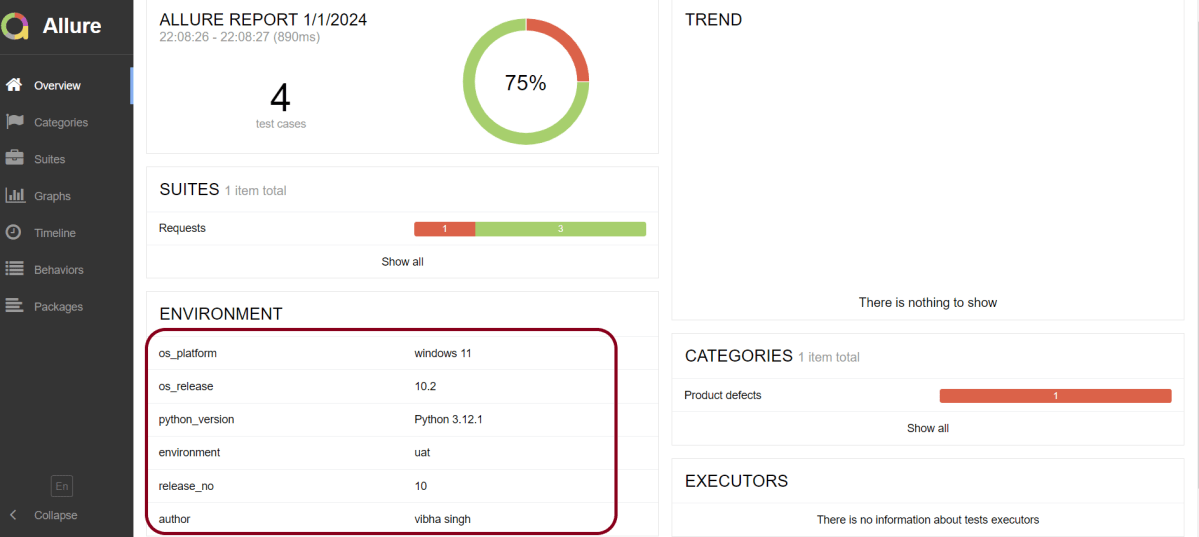
os_platform = windows 11
os_release = 10.2
python_version = Python 3.12.1
environment = uat
release_no = 10
author = vibha singh
To provide environment information, put a file named environment.properties into the allure-results directory after running the tests.
In our case, we have the AllureReport directory that will contain the files in JSON format needed to generate the Allure Report.

Below is an example of Allure Report with environment details.
That’s it! Congratulations on making it through this tutorial and hope you found it useful! Happy Learning!!
 QA Automation Expert