What is the Background in Cucumber?
The background is used in Cucumber to define a step or series of steps that are shared by all the tests in the feature file. This helps to reduce redundancy and makes the feature file cleaner and easier to read.
A Background provides context for the scenarios that follow it. It may include one or more Given steps, which are executed before each scenario but after any Before hooks.
A Background is placed at the same level of indentation as the first Scenario/Example.
Background steps cannot carry scenario outlines and examples: they are limited to the given steps specified.
Below is an example of a Background in a Feature file.
Feature: Login to HRM Application

  Background:
    Given User is on HRMLogin page "https://opensource-demo.orangehrmlive.com/"

  @ValidCredentials
  Scenario: Login with valid credentials

    When User enters username as "Admin" and password as "admin123"
    Then User should be able to login successfully and new page open

  @MissingUsername
  Scenario: Login with blank username

    When User enters username as " " and password as "admin123"
    Then User should be able to see a message "Required" below Username
In the above example, we have two different scenarios, where a user is successfully able to log in to the application and an unsuccessful attempt to log in. But the common step is to open the website for both scenarios. This is why we created another Scenario for opening the browser but named it Background rather than a Scenario. So that it executes for both Scenarios.
import io.cucumber.java.en.Given;
import io.cucumber.java.en.Then;
import io.cucumber.java.en.When;

public class LoginPageDefinitions {

    @Given("User is on HRMLogin page {string}")
    public void loginTest(String url) {

        System.out.println("I am in Login Page");

    }

    @When("User enters username as {string} and password as {string}")
    public void goToHomePage(String userName, String passWord) {

        System.out.println("Go to Home Page");

    }

    @Then("User should be able to login successfully and new page open")
    public void verifyLogin() {

        System.out.println("Home Page is opened");

    }

    @Then("User should be able to see a message {string} below Username")
    public void verifyMissingUsernameMessage(String message) {

        System.out.println("Login failed with an error message");
    }

}
We need a runner class to execute the feature file. Below is an example of the Runner class.
import io.cucumber.testng.AbstractTestNGCucumberTests;
import io.cucumber.testng.CucumberOptions;

@CucumberOptions(tags = "", features = "src/test/resources/features/LoginPage.feature", glue = "org.example.definitions",
        plugin = {})
public class CucumberRunnerTests extends AbstractTestNGCucumberTests {
}
The output of the above program is

Background with Hooks
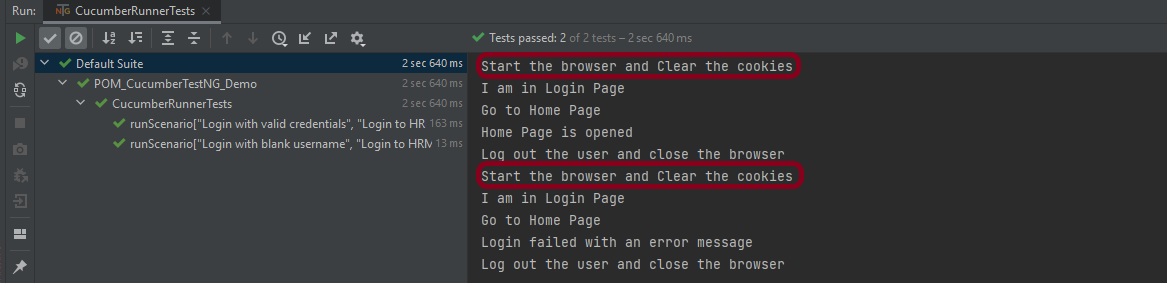
Background can contain one or more Given steps, which are run before each scenario, but after any Before hooks.
Below is an example of the background with hooks. The feature file is the same. I’m just adding the hooks to the Step Definition class.
import io.cucumber.java.en.Given;
import io.cucumber.java.en.Then;
import io.cucumber.java.en.When;

public class LoginPageDefinitions {

    @Before()
    public void beforeScenario(){
        System.out.println("Start the browser and Clear the cookies");
    }

    @Given("User is on HRMLogin page {string}")
    public void loginTest(String url) {

        System.out.println("I am in Login Page");

    }

    @When("User enters username as {string} and password as {string}")
    public void goToHomePage(String userName, String passWord) {

        System.out.println("Go to Home Page");

    }

    @Then("User should be able to login successfully and new page open")
    public void verifyLogin() {

        System.out.println("Home Page is opened");

    }

    @Then("User should be able to see a message {string} below Username")
    public void verifyMissingUsernameMessage(String message) {

        System.out.println("Login failed with an error message");
    }

  @After()
    public void afterScenario(){
        System.out.println("Log out the user and close the browser");
    }

}
The output of the above program is
Points to remember
- The background should not be used to create complicated states unless the client requires that information.
For example, if the client doesn’t care about the user and site names, use a higher-level step like Given I am logged in as a site owner
- Keep the Background section brief.
When reading the scenarios, the client must remember this information. Consider moving some of the irrelevant details into higher-level steps if the Background is longer than four lines.
- Make your background section stand out
Use interesting names and try to tell a story. The human brain remembers stories much better than it remembers names like “User A,” “User B,” “Site 1,” and so on.
That’s it! Congratulations on making it through this tutorial and hope you found it useful! Happy Learning!!
 QA Automation Expert