How to parameterize Tests in JUnit5

HOME

JUnit5  enables us to execute a single test method multiple times with a different sets of data. This is called Parameterization. Parameterized Tests are declared just like regular @Test methods but use the @ParameterizedTest annotation.

This article shows you how to run a test multiple times with different arguments, so-called ‘Parameterized Tests’, let’s see the following ways to provide arguments to the test:

  • @ValueSource
  • @EnumSource
  • @MethodSource
  • @CsvSource
  • @CsvFileSource
  • @ArgumentsSource

We need to add junit-jupiter-params to support parameterized tests. In the case of Maven, add the dependency to POM.xml

<dependency>
    <groupId>org.junit.jupiter</groupId>
    <artifactId>junit-jupiter-params</artifactId>
    <version>5.8.2</version>
    <scope>test</scope>
</dependency>

In case of Gradle, add the dependency as

testCompile("org.junit.jupiter:junit-jupiter-params:5.8.2")

1. @ValueSource

Let us start with a simple example. The following example demonstrates a parameterized test that uses the @ValueSource annotation to specify an integer array as the source of arguments. The following @ParameterizedTest method will be invoked three times, with the values 5,6, and 0 respectively.

@ParameterizedTest
@ValueSource(ints = {5, 6, 0})
void test_int_arrays(int b) {

    int a= 5;
    int sum = a + b;
    assertTrue(sum>8);
 }

When executing the above-parameterized test method, each invocation will be reported separately.

The output of the above program is:

One of the limitations of value sources is that they only support these types:

  • short (with the shorts attribute)
  • byte (bytes attribute)
  • int (ints attribute)
  • long (longs attribute)
  • float (floats attribute)
  • double (doubles attribute)
  • char (chars attribute)
  • java.lang.String (strings attribute)
  • java.lang.Class (classes attribute)

Also, we can only pass one argument to the test method each time.

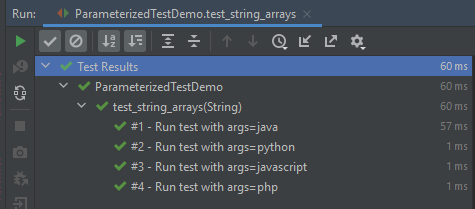
In the below example, an array of strings is passed as the argument to the Parameterized Test.

@ParameterizedTest(name = "#{index} - Run test with args={0}")
@ValueSource(strings = {"java", "python", "javascript","php"})
void test_string_arrays(String arg) {
        assertTrue(arg.length() > 1);
}

The output of the above program is:
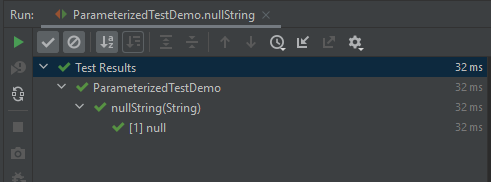
@NullSource

It provides a single null an argument to the annotated @ParameterizedTest method.

    @ParameterizedTest()
    @NullSource
    void nullString(String text) {
        assertTrue(text == null);
    }
    

The output of the above program is:
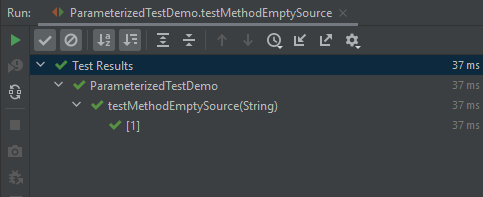
@EmptySource

It provides a single empty argument to the annotated @ParameterizedTest method of the following types:

  • java.lang.String
  • java.util.List
  • java.util.Set
  • java.util.Map
  • primitive arrays (e.g. int[])
  • object arrays (e.g. String[])
 @ParameterizedTest
    @EmptySource
    void testMethodEmptySource(String argument) {
        assertTrue(StringUtils.isEmpty(argument));
        assertTrue(StringUtils.isBlank(argument));
    }

The output of the above program is:
@NullAndEmptySource

We can pass empty or null values into the test via @EmptySource, @NullSource, or @NullAndEmptySource (since JUnit 5.4).

Let’s see the following example to test an isEmpty() method.

import org.junit.jupiter.params.ParameterizedTest;
import org.junit.jupiter.params.provider.EmptySource;
import org.junit.jupiter.params.provider.NullSource;
import org.junit.jupiter.params.provider.ValueSource;
import static org.junit.jupiter.api.Assertions.*;

public class ParameterizedTestDemo {

    @ParameterizedTest(name = "#{index} - isEmpty()? {0}")
    @NullSource
    @EmptySource
    @ValueSource(strings = { " ", "   ", "\t", "\n","a"})
    void nullEmptyAndBlankStrings(String text) {
        assertTrue(text == null || text.trim().isEmpty());
    }
}

The parameterized test method result in seven invocations: 1 for null, 1 for the empty string, 4 for the explicit blank strings supplied via @ValueSource, and 1 non-blank string “a” supplied via @ValueSource.

The output of the above program is:

2. @EnumSource

@EnumSource provides a convenient way to use Enum constants.

public class EnumParameterizedTest {

    enum Error {
         Request_Invalid,
         Request_Timeout,
         RequestHeader_Invalid,
         Concurrency_Failed,
         ExternalCall_Failed,
         Schema_Invalid,
         Authentication_Failed;
    }

    @ParameterizedTest
    @EnumSource(Error.class)
    void test_enum(Error error) {
       assertNotNull(error);
    }
}

The output of the above program is:

The annotation provides an optional names attribute that lets you specify which constants shall be used, like in the following example. If omitted, all constants will be used.

    @ParameterizedTest(name = "#{index} - Is Error contains {0}?")
    @EnumSource(value = Error.class, names = {"Request_Invalid", "ExternalCall_Failed", "Concurrency_Failed", "Authentication_Failed"})
    void test_enum_include(Error error) {
       assertTrue(EnumSet.allOf(Error.class).contains(error));
    }

The output of the above program is:

The @EnumSource annotation also provides an optional mode attribute that enables fine-grained control over which constants are passed to the test method. For example, you can exclude names from the enum constant pool or specify regular expressions as in the following examples.

 @ParameterizedTest
 @EnumSource(value = Error.class, mode = EnumSource.Mode.EXCLUDE, names = {"Request_Invalid", "Request_Timeout", "RequestHeader_Invalid"})
    void test_enum_exclude(Error error) {
        EnumSet<Error> excludeRequestRelatedError = EnumSet.range(Error.Concurrency_Failed, Error.Authentication_Failed);
        assertTrue(excludeRequestRelatedError.contains(error));
  }

The output of the above program is:
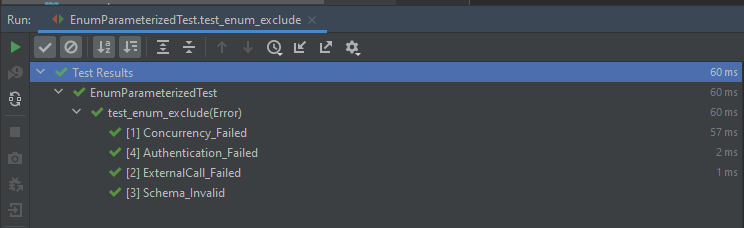
EnumSource.Mode.EXCLUDE – It selects all declared enum constants except those supplied via the names attribute.

EnumSource.Mode.MATCH_ALL – It selects only those enum constants whose names match any pattern supplied via the names attribute.

  @ParameterizedTest
    @EnumSource(mode = EnumSource.Mode.MATCH_ALL, names = "^.*Invalid")
    void test_match(Error error) {
        assertTrue(error.name().contains("Invalid"));
    }

The output of the above program is

3. @MethodSource

@MethodSource allows you to refer to one or more factory methods of the test class or external classes.

Factory methods within the test class must be static unless the test class is annotated with @TestInstance(Lifecycle.PER_CLASS); whereas, factory methods in external classes must always be static. In addition, such factory methods must not accept any arguments.

If you only need a single parameter, you can return a Stream of instances of the parameter type as demonstrated in the following example.

   @ParameterizedTest(name = "#{index} - Test with String : {0}")
    @MethodSource("stringProvider")
    void test_method_string(String arg) {
        assertNotNull(arg);
    }

    // this need static
    static Stream<String> stringProvider() {
        return Stream.of("java", "junit5", null);
    }

The output of the above program is

If you do not explicitly provide a factory method name via @MethodSource, JUnit Jupiter will search for a factory method that has the same name as the current @ParameterizedTest method by convention. This is demonstrated in the following example.

    @ParameterizedTest(name = "#{index} - Test with String : {0}")
    @MethodSource
    void test_no_factory_methodname(String arg) {
        assertNotNull(arg);
    }

    static Stream<String> test_no_factory_methodname() {
        return Stream.of("java", "junit5", null);
    }

The output of the above program is

Streams for primitive types (DoubleStream, IntStream, and LongStream) are also supported as demonstrated by the following example.

 @ParameterizedTest(name = "#{index} - Test with Int : {0}")
    @MethodSource("rangeProvider")
    void test_method_int(int arg) {
        assertTrue(arg < 6);
    }
    
    static IntStream rangeProvider() {
        return IntStream.range(0, 6);
    }

The output of the above program is

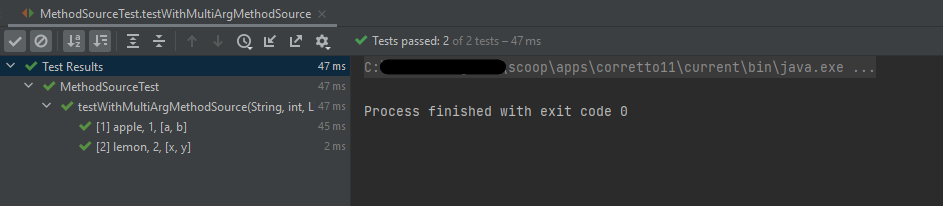
If a parameterized test method declares multiple parameters, you need to return a collection, stream, or array of Arguments instances or object arrays as shown below.

    @ParameterizedTest
    @MethodSource("stringIntAndListProvider")
    void testWithMultiArgMethodSource(String str, int num, List<String> list) {
        assertEquals(5, str.length());
        assertTrue(num >=1 && num <=2);
        assertEquals(2, list.size());
    }

    static Stream<Arguments> stringIntAndListProvider() {
        return Stream.of(
                arguments("apple", 1, Arrays.asList("a", "b")),
                arguments("lemon", 2, Arrays.asList("x", "y"))
        );
    }

The output of the above program is
4. @CsvSource

@CsvSource allows you to express argument lists as comma-separated values (i.e., CSV String literals). Each string provided via the value attribute in @CsvSource represents a CSV record and results in one invocation of the parameterized test.

import org.junit.jupiter.params.ParameterizedTest;
import org.junit.jupiter.params.provider.CsvSource;
import static org.junit.jupiter.api.Assertions.assertEquals;

public class CSVParameterizedTest {

    @ParameterizedTest
    @CsvSource({
            "java,      4",
            "javascript,   7",
            "python,    6",
            "HTML,    4",
    })


    void test(String str, int length) {
        assertEquals(length, str.length());
    }
}

The output of the above program is

5. @CsvFileSource

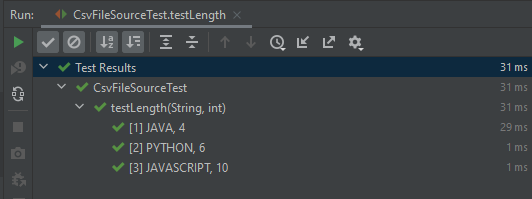
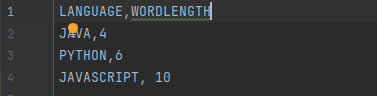
@CsvFileSource lets us use comma-separated value (CSV) files from the classpath or the local file system. Each record from a CSV file results in one invocation of the parameterized test. The first record may optionally be used to supply CSV headers.

csvdemo.csv

    @ParameterizedTest
    @CsvFileSource(resources = "/csvdemo.csv")

    void testLength(String str, int length) {
        Assertions.assertEquals(length, str.length());
    }

The output of the above program is
csv file with the heading
JUnit can ignore the headers via the numLinesToSkip attribute.

    @ParameterizedTest
    @CsvFileSource(files = "src/test/resources/csvdemo.csv",numLinesToSkip = 1)

    void testStringLength(String str, int length) {
        Assertions.assertEquals(length, str.length());
    }

The output of the above program is
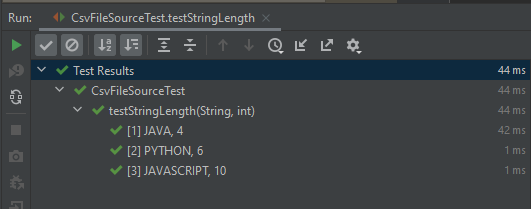
If you would like the headers to be used in the display names, you can set the useHeadersInDisplayName attribute to true. The examples below demonstrate the use of useHeadersInDisplayName.

 @ParameterizedTest(name = "[{index}] {arguments}")
    @CsvFileSource(files = "src/test/resources/csvdemo.csv",useHeadersInDisplayName = true)

    void testStringLength1(String str, int length) {
        assertEquals(length, str.length());
    }

The output of the above program is
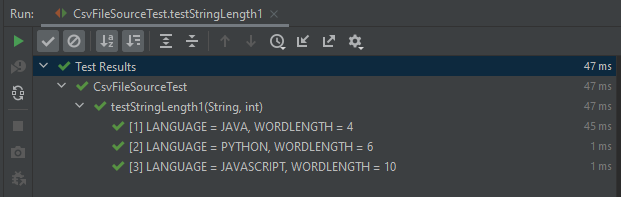
6. @ArgumentsSource

@ArgumentsSource can be used to specify a custom, reusable ArgumentsProvider. Note that an implementation of ArgumentsProvider must be declared as either a top-level class or as a static nested class.

import org.junit.jupiter.api.extension.ExtensionContext;
import org.junit.jupiter.params.provider.Arguments;
import org.junit.jupiter.params.provider.ArgumentsProvider;
import java.util.stream.Stream;

public class CustomArgumentsProvider implements ArgumentsProvider {

    @Override
    public Stream<? extends Arguments>
    provideArguments(ExtensionContext extensionContext) throws Exception {
        return Stream.of("java", "junit5", "junit4", null).map(Arguments::of);
    }
}
import org.junit.jupiter.params.ParameterizedTest;
import org.junit.jupiter.params.provider.ArgumentsSource;
import static org.junit.jupiter.api.Assertions.assertNotNull;

public class ArgumentsSourceTest {

    @ParameterizedTest
    @ArgumentsSource(CustomArgumentsProvider.class)
    void test_argument_custom(String arg) {
        assertNotNull(arg);
    }
}

The output of the above program is

Congratulation. We have understood parameterization in JUnit5 tests. Happy Learning!!
How to run JUnit5 tests in order

HOME

The general practices say that automated tests should be able to run independently and with no specific order, as well as the result of the test should not depend on the results of previous tests. But there are situations where a specific order of test execution can be justified, especially in integration or end-to-end tests. The test methods don’t follow a specific order by default to execute the tests. The test cases need not necessarily execute in the order in which they have been written.

There are different ways or modes to set the order of execution for the test cases.  This article shows how to control the JUnit 5 test execution order via the following MethodOrderer classes:

  • DisplayName – sorts test methods alphanumerically based on their display names
  • MethodName – sorts test methods alphanumerically based on their names and formal parameter lists
  • Alphanumeric – sorts test methods alphanumerically based on their names and formal parameter lists. This is deprecated from JUnit Version 5.7 onwards
  • OrderAnnotation – sorts test methods numerically based on values specified via the @Order annotation
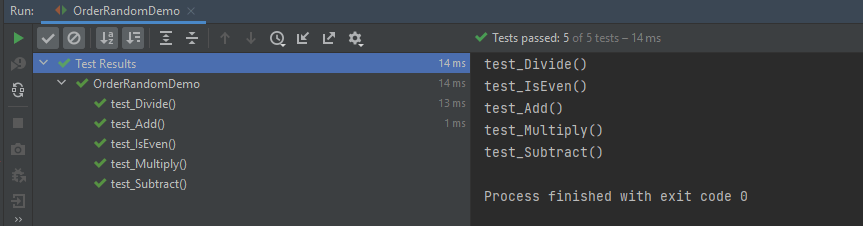
  • Random – orders test methods pseudo-randomly and support the configuration of a custom seed
  • Custom Order – A custom ordering sequence can be implemented by the interface MethodOrderer and providing it as the argument to @TestMethodOrder.

Let us create JUnit5 Tests and execute them.

public class OrderRandomDemo {

    @Test
    void test_Add() {

        System.out.println("test_Add()");
        assertEquals(10, 3 + 7);
    }

    @Test
    void test_Subtract() {

        System.out.println("test_Subtract()");
        assertEquals(10, 14 - 4);
    }

    @Test
    void test_Multiply() {

        System.out.println("test_Multiply()");
        assertEquals(10, 5 * 2);
    }

    @Test
    void test_Divide() {

        System.out.println("test_Divide()");
        assertEquals(10, 30 / 3);
    }

    @Test
    void test_IsEven() {

        System.out.println("test_IsEven()");
        assertEquals(0, 10%2);
    }

}

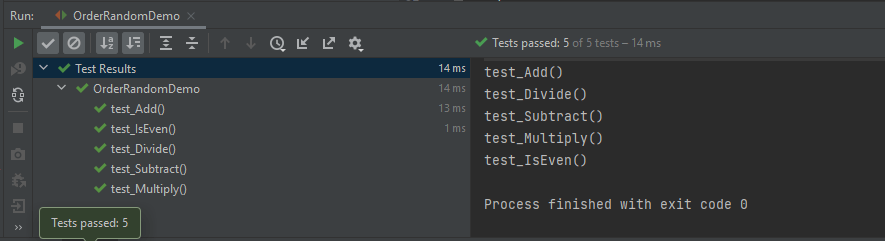
The output of the above program

1. DisplayName

It sorts test methods alphanumerically based on their display names. Test Method can be anything annotated with @Test, @RepeatedTest, @ParameterizedTest, @TestFactory, or @TestTemplate.

@TestMethodOrder(MethodOrderer.DisplayName.class)

@TestMethodOrder is a type-level annotation that is used to configure a MethodOrderer for the test methods of the annotated test class or test interface.

MethodOrderer defines the API for ordering the test methods in a given test class.

Test Method – It is any method annotated with @Test, @RepeatedTest, @ParameterizedTest, @TestFactory, or @TestTemplate.

DisplayName.class – MethodOrderer that sorts methods alphanumerically based on their names using String.compareTo(String).
If two methods have the same name, String representations of their formal parameter lists will be used as a fallback for comparing the methods.

An example of sorting the tests based on their display names.

import org.junit.jupiter.api.DisplayName;
import org.junit.jupiter.api.MethodOrderer;
import org.junit.jupiter.api.Test;
import org.junit.jupiter.api.TestMethodOrder;
import static org.junit.jupiter.api.Assertions.assertEquals;

@TestMethodOrder(MethodOrderer.DisplayName.class)
public class DisplayNameOrderedTests {

    @DisplayName("C")
    @Test
    void test_Add() {

        System.out.println("test_Add()");
        assertEquals(10, 3 + 7);
    }


    @DisplayName("E")
    @Test
    void test_Multiply() {

        System.out.println("test_Multiply()");
        assertEquals(10, 5 * 2);
    }

    @DisplayName("A")
    @Test
    void test_Divide() {

        System.out.println("test_Divide()");
        assertEquals(10, 30 / 3);
    }


    @DisplayName("D")
    @Test
    void test_Subtract() {

        System.out.println("test_Subtract()");
        assertEquals(10, 18 - 8);
    }

    @DisplayName("B")
    @Test
    void test_IsEven() {

        System.out.println("test_IsEven()");
        assertEquals(0, 18%2);
    }
}

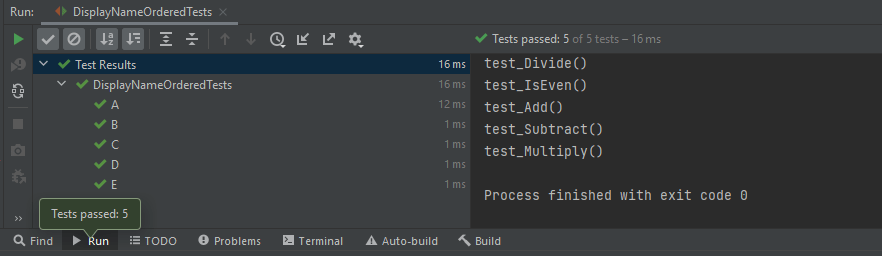
We can see that the test methods are sorted alphanumerically based on their display name starting from A to E. The output of the above program

2. MethodName

This annotation sorts methods alphanumerically based on their names using String.compareTo(String).
If two methods have the same name, String representations of their formal parameter lists will be used as a fallback for comparing the methods.

@TestMethodOrder(MethodOrderer.MethodName.class)

Let us see an example of MethodName.

import org.junit.jupiter.api.MethodOrderer;
import org.junit.jupiter.api.Test;
import org.junit.jupiter.api.TestMethodOrder;
import static org.junit.jupiter.api.Assertions.assertEquals;

@TestMethodOrder(MethodOrderer.MethodName.class)
class MethodNameOrderedTests {

    @Test
    void testE() {

        System.out.println("testE");
        assertEquals(10, 3 + 7);
    }

    @Test
    void testA() {

        System.out.println("testA");
        assertEquals(10, 14 - 4);
    }

    @Test
    void testC() {
        System.out.println("testC");
        assertEquals(10, 5 * 2);
    }

    @Test
    void testB() {
        System.out.println("testB");
        assertEquals(10, 30 / 3);
    }

    @Test
    void testD() {
        System.out.println("testD");
        assertEquals(10, 10 + 0);
    }

}

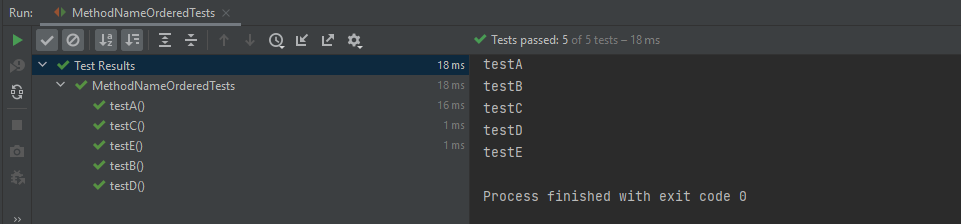
The output of the above program

3. OrderAnnotation

This sorts test method numerically based on values specified via the @Order annotation.
Any methods that are assigned the same order value will be sorted arbitrarily adjacent to each other.
When any method is not annotated with @Order, it will be assigned the default order value, which will effectively cause them to appear at the end of the sorted list.

@TestMethodOrder(MethodOrderer.OrderAnnotation.class)

Let us see an example of OrderAnnotation.

import org.junit.jupiter.api.MethodOrderer;
import org.junit.jupiter.api.Order;
import org.junit.jupiter.api.Test;
import org.junit.jupiter.api.TestMethodOrder;
import static org.junit.jupiter.api.Assertions.assertEquals;

@TestMethodOrder(MethodOrderer.OrderAnnotation.class)
public class OrderAnnotationDemo {

    @Test
    @Order(3)
    void test_Add() {

        System.out.println("test_Add()");
        assertEquals(10, 3 + 7);
    }

    @Test
    @Order(4)
    void test_IsOdd() {
        System.out.println("test_IsOdd()");
        assertEquals(1, 11%2);
    }

    @Test
    void test_Subtract() {
        System.out.println("test_Subtract()");
        assertEquals(10, 14 - 4);
    }

    @Test
    @Order(1)
    void test_Multiply() {
        System.out.println("test_Multiply()");
        assertEquals(10, 5 * 2);
    }

    @Test
    @Order(4)
    void test_Divide() {
        System.out.println("test_Divide()");
        assertEquals(10, 30 / 3);
    }

    @Test
    @Order(2)
    void test_IsEven() {
        System.out.println("test_IsEven()");
        assertEquals(0, 10%2);
    }
}

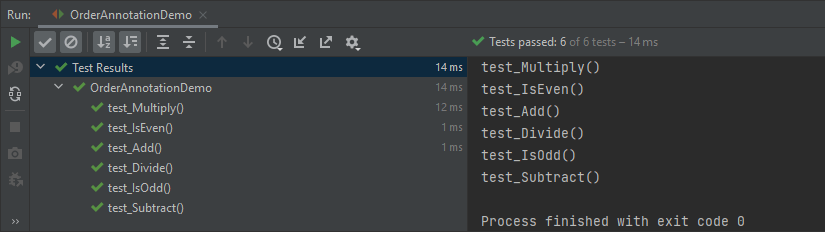
Here, test_Subtract() is not assigned any order value, so it is displayed as the last one in the last.

4. Random

These sorts of test methods are pseudo-randomnly.

@TestMethodOrder(MethodOrderer.Random.class)

Let us create a program to show the random order of tests in JUnit5.

import org.junit.jupiter.api.MethodOrderer;
import org.junit.jupiter.api.Test;
import org.junit.jupiter.api.TestMethodOrder;
import static org.junit.jupiter.api.Assertions.assertEquals;

@TestMethodOrder(MethodOrderer.Random.class)
public class OrderRandomDemo {

    @Test
    void test_Add() {

        System.out.println("test_Add()");
        assertEquals(10, 3 + 7);
    }

    @Test
    void test_Subtract() {

        System.out.println("test_Subtract()");
        assertEquals(10, 14 - 4);
    }

    @Test
    void test_Multiply() {

        System.out.println("test_Multiply()");
        assertEquals(10, 5 * 2);
    }

    @Test
    void test_Divide() {

        System.out.println("test_Divide()");
        assertEquals(10, 30 / 3);
    }

    @Test
    void test_IsEven() {

        System.out.println("test_IsEven()");
        assertEquals(0, 10%2);
    }
}

The output of the above program

5. Custom Order

We can define our own custom ordering sequence by implementing the interface MethodOrderer and providing it as the argument to @TestMethodOrder.

Here, the tests are arranged in descending method order.

import org.junit.jupiter.api.MethodDescriptor;
import org.junit.jupiter.api.MethodOrderer;
import org.junit.jupiter.api.MethodOrdererContext;

public class DescendingMethodOrder implements MethodOrderer {

    @Override
    public void orderMethods(MethodOrdererContext context) {
        context.getMethodDescriptors().sort((MethodDescriptor m1, MethodDescriptor m2) ->
                m2.getMethod().getName().compareTo(m1.getMethod().getName()));
    }
    
}

Now, test the above custom order.

import org.junit.jupiter.api.Test;
import org.junit.jupiter.api.TestMethodOrder;
import static org.junit.jupiter.api.Assertions.assertEquals;

@TestMethodOrder(DescendingMethodOrder.class)
public class CustomOrderTests {

    @Test
    void test_Add() {
        System.out.println("test_Add()");
        assertEquals(10 , 4 + 6);
    }

    @Test
    void test_Subtract() {
        System.out.println("test_Subtract()");
        assertEquals(10 , 17 - 7);
    }

    @Test
    void test_Multiply() {
        System.out.println("test_Multiply()");
        assertEquals(10 , 5 * 2);
    }

    @Test
    void test_Divide() {
        System.out.println("test_Divide()");
        assertEquals(10 , 20/2);
    }

    @Test
    void test_IsEven() {
        System.out.println("test_IsEven()");
        assertEquals(0 , 20%2);
    }
}

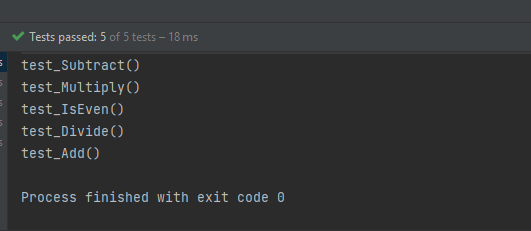
Notice the test output. The tests are executed in descending order. The result of the above program is

Test Classes Ordering

  1. ClassName: sorts test classes alphanumerically based on their fully qualified class names.
  2. DisplayName: sorts test classes alphanumerically based on their display names (see display name generation precedence rules).
  3. OrderAnnotation: sorts test classes numerically based on values specified via the @Order annotation.
  4. Random: orders test classes pseudo-randomly and support the configuration of a custom seed.

The configured ClassOrderer will be applied to all top-level test classes (including static nested test classes) and @Nested test classes.

1. ClassName

The Test Classes are sorted alphanumerically based on their fully qualified class names.

package JUnit5;

import org.junit.jupiter.api.ClassOrderer;
import org.junit.jupiter.api.Nested;
import org.junit.jupiter.api.Test;
import org.junit.jupiter.api.TestClassOrder;

import static org.junit.jupiter.api.Assertions.assertEquals;

@TestClassOrder(ClassOrderer.ClassName.class)
public class ClassNameOrderTests {

    @Nested
    class Addition {

        @Test
        void test_Add() {
            System.out.println("test_Add()");
            assertEquals(10, 3 + 7);
        }
    }

    @Nested
    class IsEven {

        @Test
        void test_IsEven() {
            System.out.println("test_IsEven()");
            assertEquals(0, 10 % 2);
        }
    }

    @Nested
    class Subtraction {

        @Test
        void test_Subtract() {
            System.out.println("test_Subtract()");
            assertEquals(9, 14 - 5);
        }
    }

    @Nested
    class Multiply {

        @Test
        void test_Multiply() {
            System.out.println("test_Multiply()");
            assertEquals(10, 5 * 2);
        }
    }
}

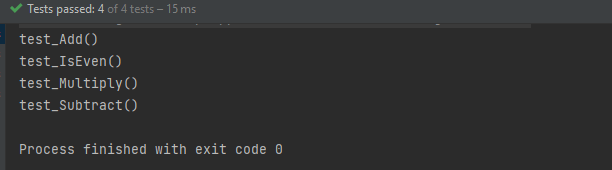
The result of the above program is

2. DisplayName

It sorts test classes alphanumerically based on their display names.

package JUnit5;

import org.junit.jupiter.api.*;

import static org.junit.jupiter.api.Assertions.assertEquals;

@TestClassOrder(ClassOrderer.DisplayName.class)
public class ClassDisplayNameTests {

    @Nested
    @DisplayName("B")
    class AppFlowTests {

        @Test
        void test_Add() {
            System.out.println("test_Add()");
            assertEquals(10, 6 + 4);
        }
    }

    @Nested
    @DisplayName("C")
    class TearDownTests {

        @Test
        void test_Subtract() {
            System.out.println("test_Subtract()");
            assertEquals(10, 15 - 5);

        }
    }

    @Nested
    @DisplayName("A")
    class SetupTests {

        @Test
        void test_Multiply() {
            System.out.println("test_Multiply()");
            assertEquals(10, 5 * 2);
        }
    }
}

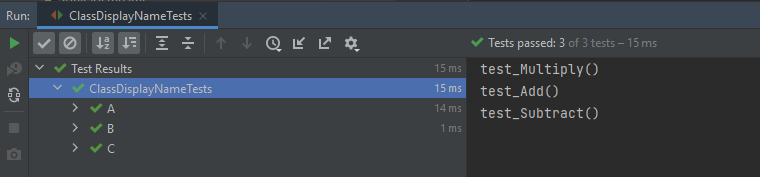
The result of the above program is

3. OrderAnnotation in Class

The test classes are sorted numerically based on values specified via the @Order annotation.

import org.junit.jupiter.api.*;

import static org.junit.jupiter.api.Assertions.assertEquals;

@TestClassOrder(ClassOrderer.ClassName.class) //sorts test classes alphanumerically based on their fully qualified class names.
public class ClassOrderedTests {

    @Nested
    @Order(2)
    class AppFlowTests {

        @Test
        void test_Add() {
            System.out.println("test_Add()");
            assertEquals(10, 3 + 7);
        }
    }

    @Nested
    @Order(3)
    class TearDownTests {

        @Test
        void test_Subtract() {
            System.out.println("test_Subtract()");
            assertEquals(9, 14 - 5);
        }
    }

    @Nested
    @Order(1)
    class SetupTests {

        @Test
        void test_Multiply() {
            System.out.println("test_Multiply()");
            assertEquals(10, 5 * 2);
        }
    }
}

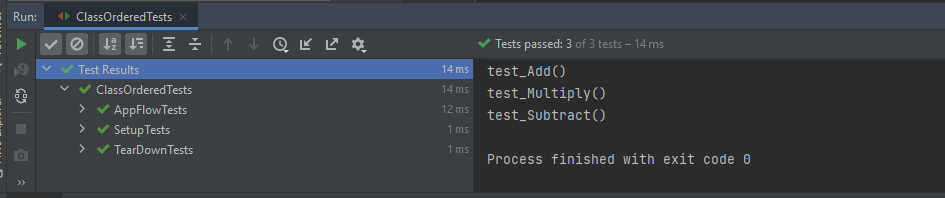
The result of the above program is

4. Random

The test classes are sorted pseudo-randomly and support the configuration of a custom seed.

import org.junit.jupiter.api.*;
import static org.junit.jupiter.api.Assertions.assertEquals;

@TestClassOrder(ClassOrderer.Random.class)
public class ClassRandomTests {

    @Nested
    class Addition {

        @Test
        void test_Add() {
            System.out.println("test_Add()");
            assertEquals(10, 3 + 7);
        }
    }

    @Nested
    class IsEven {

        @Test
        void test_IsEven() {
            System.out.println("test_IsEven()");
            assertEquals(0, 10 % 2);
        }
    }

    @Nested
    class Subtraction {

        @Test
        void test_Subtract() {
            System.out.println("test_Subtract()");
            assertEquals(9, 14 - 5);
        }
    }

    @Nested
    class Multiply {

        @Test
        void test_Multiply() {
            System.out.println("test_Multiply()");
            assertEquals(10, 5 * 2);
        }
    }
}

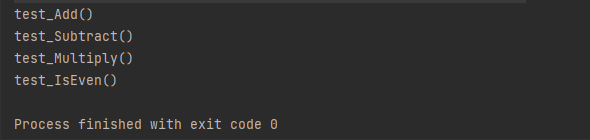
The result of the above program is

Congratulation!! We have gone through different types of ordering in JUnit5. Happy Learning!!

How to run JUnit5 tests through Command Line

HOME

The previous tutorial explains to configure Junit in IntelliJ and run the tests as JUnit Tests. This tutorial shows the steps to run the tests through command line. We can ask, why we need to run the tests through command line?? There are many reasons, one of the reason is to achieve CI/CD. To run the tests in pipeline, they need to be run through command line. Another reason is that we don’t need to open the IDE to run the tests. Third reason is that many reports are only generated (Serenity, Cucumber), if the tests run through command line.

Below is a JUnit5 test.

import io.github.bonigarcia.wdm.WebDriverManager;
import org.junit.jupiter.api.*;
import org.openqa.selenium.WebDriver;
import org.openqa.selenium.chrome.ChromeDriver;
import org.openqa.selenium.chrome.ChromeOptions;

public class Demo {

    WebDriver driver;

    @BeforeEach
    public void setUp() {
        WebDriverManager.chromedriver().setup();
        ChromeOptions chromeOptions = new ChromeOptions();
        driver = new ChromeDriver(chromeOptions);
        driver.manage().window().fullscreen();
    }

    @Test
    public void Junit5Test() {
        driver.get("http://automationpractice.com/index.php");
        System.out.println("Title of Page :" + driver.getTitle());
        System.out.println("Page URL : " + driver.getCurrentUrl());
        Assertions.assertEquals("My Store",driver.getTitle());

    }

    @AfterEach
    public void tearDown() {
        driver.close();
    }
}

Let us see what happens when we try to run the JUnit tests through Command Line. This command is used to run the tests present in Demo class.

mvn clean test -Dtest=Demo

The output generated by the test is shown below

This shows that surefire-plugin is need to be add to the project to run t he tests successfully through command line.

Add surefire-plugin to the project

Go back to the Apache Maven Project and copy the code.

 <dependencies>

        <dependency>
            <groupId>org.junit.jupiter</groupId>
            <artifactId>junit-jupiter-engine</artifactId>
            <version>5.8.2</version>
            <scope>test</scope>
        </dependency>

        <dependency>
            <groupId>org.junit.jupiter</groupId>
            <artifactId>junit-jupiter-api</artifactId>
            <version>5.8.2</version>
            <scope>test</scope>
        </dependency>
 
</dependencies>       
    
<build>
        <plugins>
            <plugin>
                <groupId>org.apache.maven.plugins</groupId>
                <artifactId>maven-surefire-plugin</artifactId>
                <version>3.0.0-M5</version>
                <dependencies>
                    <dependency>
                        <groupId>org.junit.jupiter</groupId>
                        <artifactId>junit-jupiter-engine</artifactId>
                        <version>5.8.2</version>
                    </dependency>
                </dependencies>
            </plugin>
        </plugins>
    </build>

Again run the tests through command line using the command mentioned above. Now, will see that the tests are executed successfully.

Congratulations. We can see that JUnit5 tests are executed through command line. Happy Learning!!
JUnit5 Assertions Example

HOME

JUnit5 contains the assertions available as in JUnit 4 Assertions as well there are a few additional new asserts too. In this post, let’s discuss each new assertion in JUnit5 works in detail with examples.

1. assertIterableEquals

The assertIterableEquals() asserts that the expected and the actual iterables are deeply equal. In order to be equal, both iterable must return equal elements in the same order and it isn’t required that the two iterables are of the same type in order to be equal.

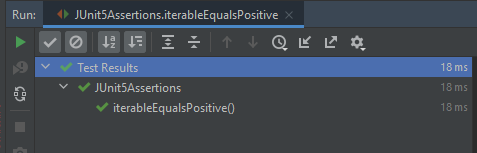
Example 1 – In this example, the number of elements as well as the sequence of elements is in the same order in both Iterables. It is not mandatory to have Iterables of the same type, so we can see as one of the Iterable is ArrayList whereas another Iteratble is of type LinkedList.

@Test
void iterableEqualsPositive() {
     Iterable<String> iterat1 = new ArrayList<>(asList("Java", "Junit", "Test"));
     Iterable<String> iterat2 = new LinkedList<>(asList("Java", "Junit", "Test"));

     assertIterableEquals(iterat1, iterat2);
  }

The assertion passes as the sequence and number of elements in both Iterables are the same.

Example 2 – In the below example, the ordering of elements in the Iterables is different.

@Test
void iterableEqualsNegative() {
     Iterable<String> iterat1 = new ArrayList<>(asList("Java", "Junit", "Test"));
     Iterable<String> iterat2 = new ArrayList<>(asList("Java","Test","Junit" ));

     assertIterableEquals(iterat1, iterat2);
 }

Here, we can see that the sequence of elements in Iterable are different, so the assertion fails.

Example 3 – In the below example, the number of elements is different in the Iterables. Iterable 1 has 3 elements whereas Iterable 2 has 4 elements.

@Test
void iterableEqualsNegative1() {
     Iterable<String> iterat1 = new ArrayList<>(asList("Java", "Junit", "Test"));
     Iterable<String> iterat2 = new LinkedList<>(asList("Java", "Junit", "Test","Junit5"));

     assertIterableEquals(iterat1, iterat2);
 }

As both Iterables do not have same number of elements, so the Assertion has failed.

Note:- There are no assertions like assertNotIterableEquals() or assertIterableNotEquals().

2. assertLinesMatch

This Assertion asserts that the expected list of Strings matches the actual list of String.
This method differs from other assertions that effectively only check String.equals(Object), in that it uses the following staged matching algorithm:
For each pair of expected and actual lines do
a) check if expected.equals(actual) – if yes, continue with next pair
b) otherwise treat expected as a regular expression and check via String.matches(String) – if yes, continue with the next pair
c) otherwise check if an expected line is a fast-forward marker, if yes apply to fast-forward actual lines accordingly (see below) and goto 1.

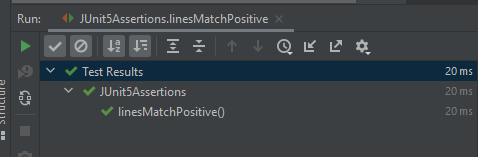
Example 1 – In the below example, expected has a regular expression that matches with the elements of actual.

@Test
void linesMatchPositive() {
    List<String> expected = asList("Java", "\\d+", ".*");
    List<String> actual = asList("Java", "11", "JUnit");

    assertLinesMatch(expected, actual);
}

As the regular expression of elements matches, the assertion passes.

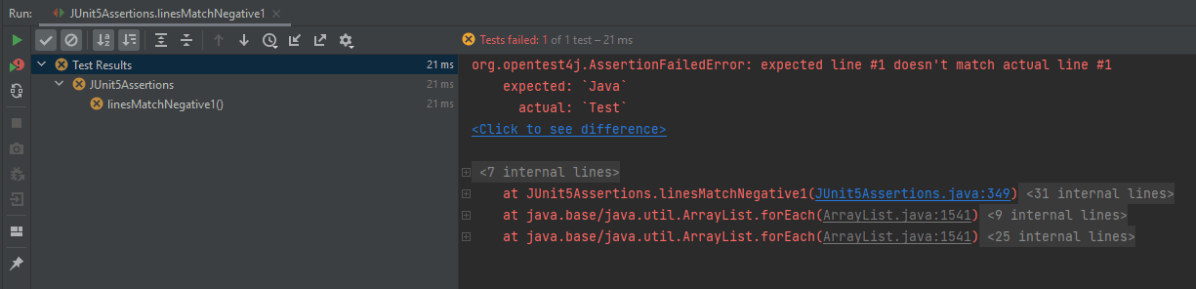
Example 2 – In the below example, the elements in the lists are different.

@Test
void linesMatchNegative1() {
   List<String> expected = asList("Java", "\\d+", ".*");
   List<String> actual = asList("Test","Java", "11");

   assertLinesMatch(expected, actual);
}

The assertion fails as the elements are different in actual and expected.

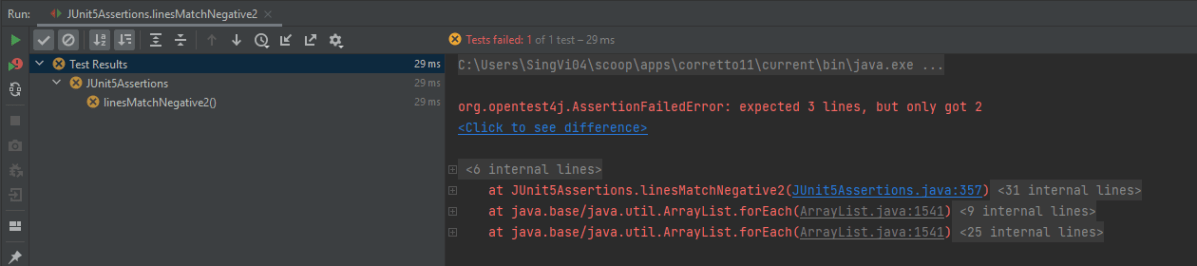
Example 3 – In the below example, the number of elements is different in expected and actual lists.

@Test
void linesMatchNegative2() {
    List<String> expected = asList("Java", "\\d+", ".*");
    List<String> actual = asList("Java", "11");

    assertLinesMatch(expected, actual);
}

The assertion fails as the number of elements in expected is 3 whereas 2 elements are available in actual list.

3. assertThrows

The new assertThrows() assertion allows us a clear and a simple way to assert if an executable throws the specified exception type.

Example 1 – In the below example, the length of string arr is null, so it throws a NullPointerException

@Test
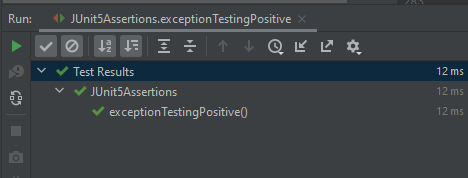
void exceptionTestingPositive() {

    String arr = null;
    Exception exception = assertThrows(NullPointerException .class, () -> arr.length() );
    assertEquals(null, exception.getMessage());
 }

Result

Example 2 – In the below example, the exception thrown by String arr is NullPointerException. But, we are asserting it with ArithmeticException.

@Test
 void exceptionTestingNegative() {

     String arr = null;
     Exception exception = assertThrows(ArithmeticException .class, () -> arr.length() );
     assertEquals("Arithmetic Exception", exception.getMessage());
 }

Result

4. assertTimeout

When we want to assert that execution of the supplied executable completes before the given timeout, we can use assertTimeout().

Example 1 – In the below example, assertTimeout() is 2 sec, which means the assertion should be completed within 2 secs. We are waiting for 1 sec and then perform the assertion.

 @Test
     void assertTimeoutPositive() {
       int a = 4;
       int b= 5;
        assertTimeout(
                ofSeconds(2),
                () -> {
                    // code that requires less then 2 seconds to execute
                    Thread.sleep(1000);
                }
        );
        assertEquals(9, (a + b));
    }

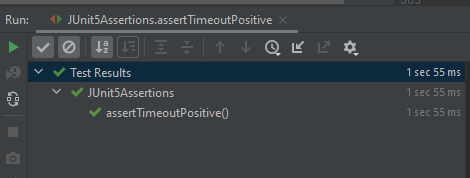
As the assertion is within the specified time of assertTimeout(), the timeout assertion passes and the test passes.

Example 2 – In the below example, assertTimeout() is 2 sec whereas are waiting for 5 sec and then performing the assertion.

  @Test
   void assertTimeoutNegative() {
        int a = 4;
        int b= 5;
        assertTimeout(
                ofSeconds(2),
                () -> {
                    // code that requires less then 2 seconds to execute
                    Thread.sleep(5000);
                }
        );
        assertEquals(9, (a + b));
    }

As the assertion is outside the specified time of assertTimeout(), so the test fails. The assertion fails with an error message similar to: “execution exceeded timeout of 2000 ms by 3010 ms”.

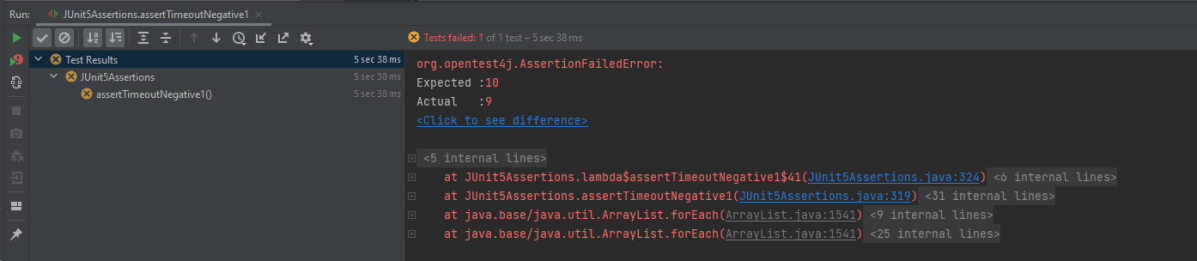
Example 3 – In the below example, the assertion is mentioned just after

The executable will be executed in the same thread as that of the calling code. Consequently, execution of the executable will not be preemptively aborted if the timeout is exceeded.

@Test
 void assertTimeoutNegative1() {
    int a = 4;
    int b= 5;
    assertTimeout(
        ofSeconds(2),
        () -> {
                // code that requires less then 2 seconds to execute
                 Thread.sleep(5000);
                 assertEquals(10, (a + b));
              }
        );
    }

This shows that the assertion assertEquals() is still executed after the timeout also.

5. assertTimeoutPreemptively()

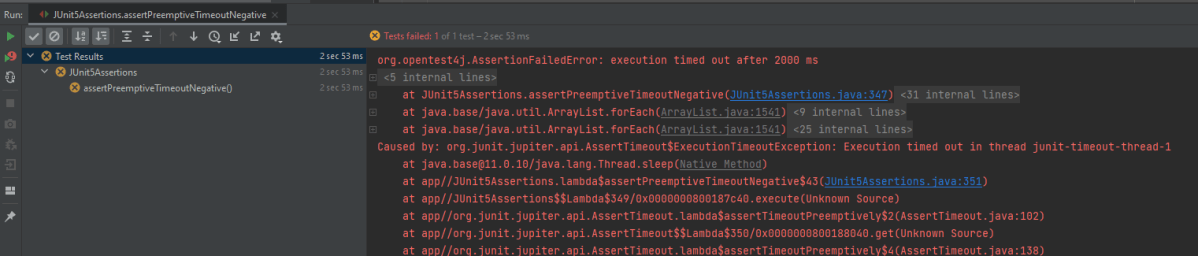
This assertion works just like assertTimeout(). When we want to assert that the execution of the supplied executable completes before the given timeout, we can use assertTimeoutPreemptively(). The only difference is that here the executable will be executed in a different thread than that of the calling code, whereas in assertTimeout() the executable will be executed in the same thread as that of the calling code. Furthermore, execution of the executable will be preemptively aborted if the timeout is exceeded here as contrary to assertTimeout() where the executable will not be preemptively aborted.

@Test
    void assertPreemptiveTimeoutNegative() {
        int a = 4;
        int b= 5;
        assertTimeoutPreemptively(
                ofSeconds(2),
                () -> {
                    // code that requires less then 2 seconds to execute
                    Thread.sleep(5000);
                    assertEquals(9, (a + b));
                }
        );
    }

Result

There is another very famous assertion called assertAll() [Group Assertions]. This is discussed in another tutorial.

In this post, We saw that JUnit Jupiter comes with many of the assertion methods that JUnit 4 has and adds a few that lend themselves well to being used with Java 8 lambdas. All JUnit Jupiter assertions are static methods in the org.junit.jupiter.api.Assertions class.