ArrayList is a part of collection framework and is present in java.util package. It provides us dynamic arrays in Java. ArrayList is a resizable-array implementation of the List interface. In this tutorial, we will cover the below topics:-
Table of Contents
- What is the difference between Array and ArrayList?
- How to create an ArrayList?
- How to add elements to an ArrayList?
- How to remove elements from ArrayList?
- ArrayList SizeMethod
- Method to iterate through ArrayList
1) What is the difference between Array and ArrayList?
Array has fixed length, so if it is full we cannot add more elements, similarly if we delete few elements from the array, there will not be any change in the memory consumption. Whereas ArrayList can grow dynamically. We can add elements as well can delete the elements and this will make changes in the memory consumption. The size of an array cannot modified (if you want to add or remove elements to/from an array, we have to create a new one). While elements can added and removed from an ArrayList.
2) How to create an ArrayList?
This statement creates an ArrayList with the name Companies with type “String”.
import java.util.ArrayList; // import the ArrayList class
ArrayListCompanies = new ArrayList(); // Create an ArrayList object
3) How to add elements to an ArrayList?
We can add element to an ArrayList by using add() method. There are many ways to add elements.
1) To add the element at the end of the List.
Companies.add("Samsung");
2) To add the element at the specified location in ArrayList, we can specify the index in the add method like this.
Companies.add(2,"Microsoft");
4) How to remove elements from ArrayList?
1) To remove the element with name.
Companies.remove("MI");
2) To remove the element at the specified location in ArrayList, we can specify the index in the remove method.
Companies.remove(1);
5) ArrayList SizeMethod
To find out how many elements an ArrayList have, use the size() method.
Companies.size();
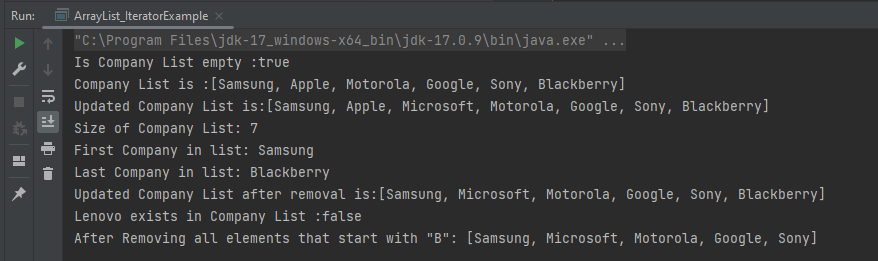
Let me show how to add and remove elements from an ArrayList with the help of an example.
package com.example.definitions;

import java.util.ArrayList;
import java.util.function.Predicate;

public class ArrayList_IteratorExample {

    public static void main(String[] args) {

        //Create ArrayList of String
        ArrayList<String> Companies = new ArrayList();

        // Check if an ArrayList is empty
        System.out.println("Is Company List empty :"+Companies.isEmpty());

        // Adding new elements to the ArrayList
        Companies.add("Samsung");
        Companies.add("Apple");
        Companies.add("Motorola");
        Companies.add("Google");
        Companies.add("Sony");
        Companies.add("Blackberry");
        System.out.println("Company List is :"+Companies);

        // Adding an element at a particular index in an ArrayList
        Companies.add(2,"Microsoft");
        System.out.println("Updated Company List is:"+Companies);

        // Find the size of an ArrayList
        System.out.println("Size of Company List: "+Companies.size());

        // Retrieve the element at a given index
        System.out.println("First Company in list: "+Companies.get(0));

        // Retrieve the last element from ArrayList
        String LastCompany = Companies.get(Companies.size()-1);
        System.out.println("Last Company in list: "+LastCompany);

        // Remove the element
        Companies.remove("MI");

        // Remove the element at index '1'
        Companies.remove(1);
        System.out.println("Updated Company List after removal is:"+Companies);

        // Remove first occurrence of the given element from the ArrayList
        // (The remove() method returns false if the element does not exist in the ArrayList)
        boolean isRemoved = Companies.remove("Lenovo");
        System.out.println("Lenovo exists in Company List :"+isRemoved);

        // Remove all the elements that satisfy the given predicate
        Predicate<String> newCompanies = company -> company.startsWith("B");
        Companies.removeIf(newCompanies);

        System.out.println("After Removing all elements that start with \"B\": " + Companies);
    }
}
The output of the above program is
6) Method to iterate through ArrayList
There are various methods to iterate through ArrayList. We will discuss few of the methods.
1) Iterator interface
2) For -each loop
3) For loop
4) While loop
package com.example.definitions;

import java.util.ArrayList;

public class ArrayList_IteratorExample {

    public static void main(String[] args) {

        //Creating arraylist
        ArrayList<String> Companies = new ArrayList();

        // Adding new elements to the ArrayList
        Companies.add("Samsung");
        Companies.add("Apple");
        Companies.add("Motorola");
        Companies.add("Google");
        Companies.add("Sony");
        Companies.add("Blackberry");

        //Traversing list through Iterator
        for(String a:Companies)
            System.out.println(a);
        System.out.println("------------------------------------------");

        //Traversing list through for loop
        for(int i=0;i<Companies.size();i++)
        {
            System.out.println(Companies.get(i));
        }
        System.out.println("------------------------------------------");

        // Traversing list through For-Each loop
        for(String a:Companies)
            System.out.println(a);
    }
}
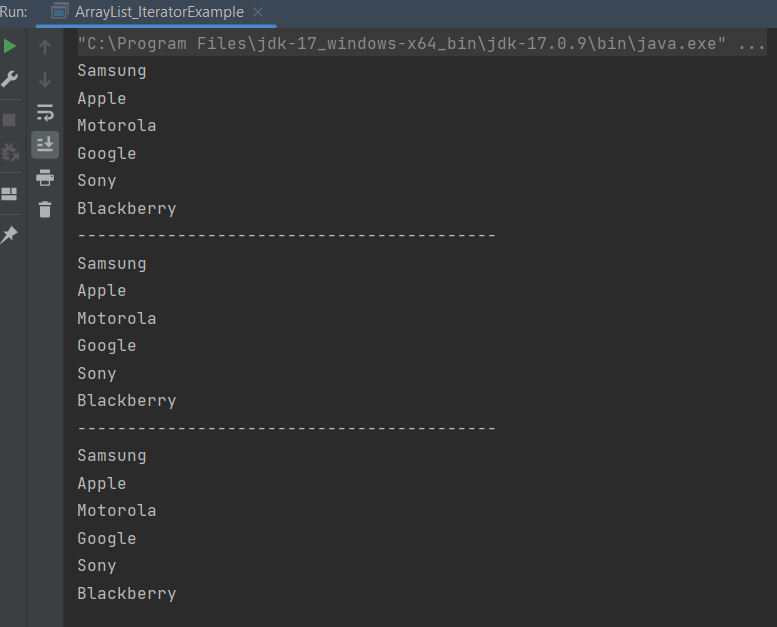
The output of the above program is
Congratulations on making it through this tutorial and hope you found it useful! Happy Learning!! Cheers!!
 QA Automation Expert