An Array is a dynamically created object where we store similar elements. By declaring an array, memory space is allocated for values of a particular type. At the time of creation, the length of the array must be specified and remains constant.
A Java array variable can also be declared like other variables with [] after the data type.
The variables in the array are ordered and each have an index beginning from 0.
| 12 | 56 | 66 | 15 | 89 | 47 | 33 | 69 |
Index ->0 1 2 3 4 5 6 7
Array Length = 8
First Index=0
Last Index = 7
How to declare an Array??
ArrayDataType[] ArrayName;
String[] days;
ArrayDataType – can be Int, Float
ArrayName – name assigned to array
Creating an Array
You can create array by using new operator.
arrayRefVar = new dataType[arraySize];
Declaring an array variable, creating an array, and assigning the reference of the array to the variable can be combine in one statement, as shown below:
dataType[] arrayRefVar = new dataType[arraySize];
Alternatively, you can create arrays as follows:
dataType[] arrayRefVar = {value0, value1, ..., valuek};
The array elements are access through the index.
Array indices are 0-based; that is, they start from 0 to arrayRefVar.length-1.
Assigning values to an Array
How to initialize an array during declaration.
ArrayType [] ArrayName = New ArrayType [Size of an Array];

String[] Days = new String[6];
Days[0] = "Monday";
Days[1]="Tuesday";
Days[2]="Wednesday";
Days[3]="Thursday";
Days[4]="Friday";
Days[5]="Saturday";
Days[6]="Sunday";
Another way
String[] Days = {"Monday","Tuesday","Wednesday","Thursday","Friday","Saturday","Sunday"}
| Mon Day[0] | Tues Day[1] | Wed Day[2] | Thurs Day[3] | Fri Day[4] | Sat Day[5] | Sun Day[6] |
Below is an example of creating an array and accessing the data in the array.
public class Array_Example {

    public static void main(String[] args) {

        String[] Days= {"Monday","Tuesday","Wednesday","Thursday","Friday","Saturday","Sunday"};

        //Length of Array
        int len=Days.length;

        //Access first element
        System.out.println("First element in Array: "+Days[0]);

        //Last element
        System.out.println("First element in Array: "+Days[len-1]);

        //Print values
        for(int i=0;i<len-1;i++)
        {
            System.out.println("Value stored at position "+i+" is "+Days[i]);
        }
    }
}
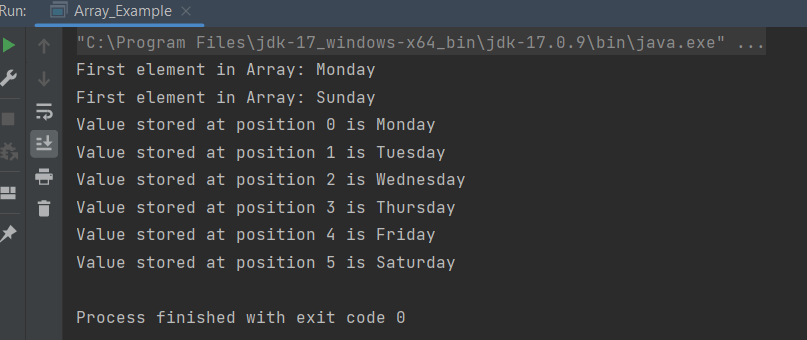
The output of the above program is
Passing an Array to a Method
Array can be passed easily to a method as parameters, just as if we pass integers and strings to methods.
Below is an example of passing array to a method.
public class Array_Example {

    public static void main(String[] args) {

        String[] Days= {"Winter","Spring","Summer","Autumn"};

        //Pass array as method
        print_arrays(Days);
    }

    public static void print_arrays(String[]array) {
        int len=array.length;
        System.out.println("Length of array :" + len);

        //Print values
        for(int i=0;i<=len-1;i++)
        {
            System.out.println("Value stored at position "+i+" is "+array[i]);
        }
    }
}
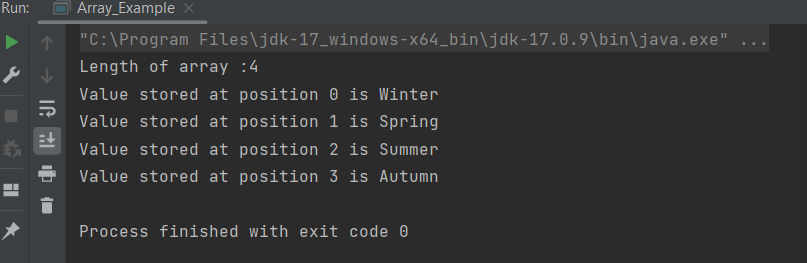
The output of the above program is
Multi Dimensional Arrays
It is also possible to create an array of arrays known as multidimensional array. For example,
int[][] a = new int[3][4];
int[][] a = { {1, 2, 3},{4, 5, 6, 9},{7}};
| Column1 | Column 2 | Column 3 | Column 4 | |
| Row 1 | 1 a[0][0] | 2 a[0][1] | 3 a[0][2] | a[0][3] |
| Row 2 | 4 a[1][0] | 5 a[1][1] | 6 a[1][2] | 9 a[1][3] |
| Row 3 | 7 a[2][0] | a[2][1] | a[2][2] | a[2][3] |
Below is an example of multi-dimensional array.
public class Multidimensional_Array {

    public static void main(String[] args) {

        int a[][] = {{1,2,3},
                {4,5,6,9},
                {7}};

        //print length of columns
        System.out.println("Length of Row 1 is :"+a[0].length);
        System.out.println("Length of Row 2 is :"+a[1].length);
        System.out.println("Length of Row 3 is :"+a[2].length);
        System.out.println("----------------------");

        //Print all elements of array
        for (int i=0;i<a.length;i++)
        {
            for (int j=0;j<a[i].length;j++)
            {
                System.out.println("Value of row " + i + " and column " + j + " is " + a[i][j]);
            }
        }
    }
}
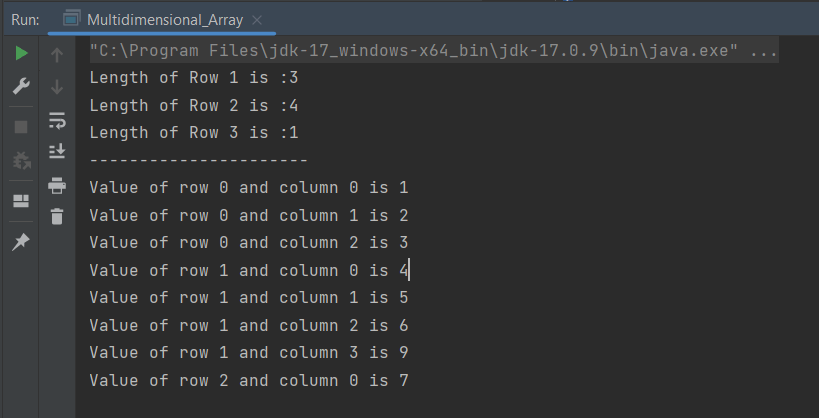
The output of the above program is
What is the difference between array and string?
- Arrays can have any data type of any length while strings are usually ASCII characters that are terminated with a null character ‘\0’.
- An array of characters is mutable, in other words, you can replace a character in an array of characters by overwriting the memory location for that character.
- A String is not mutable, in other words, to “replace” a character in a String, you must build a new String with the desired character in place (copying the non-changing parts from the old String).
- All string literals are stored in the String constant pool. They remain in the pool until they became eligible for the garbage collection, while a Character array is stored in heap memory.
- Character array is preferred over string for storing passwords in java. As string is immutable, it makes string vulnerable for storing passwords, as we cannot get rid of passwords after use until garbage collector collects it.
 QA Automation Expert
It has helped me to clear my doubts regarding arrays. Can you explain about functions too in simple words
LikeLike
Function is the concept of C language. In Java, it is called methods. To know more about methods, please go through below linkhttps://configureselenium.blogspot.com/2019/04/methods-in-java.html
LikeLike