How to update XML Documents Using Java DOM Parser

HOME

package XML.DOM;

import org.w3c.dom.Document;
import org.w3c.dom.Element;
import org.w3c.dom.Node;
import org.w3c.dom.NodeList;
import org.xml.sax.SAXException;

import javax.xml.parsers.DocumentBuilder;
import javax.xml.parsers.DocumentBuilderFactory;
import javax.xml.parsers.ParserConfigurationException;
import javax.xml.transform.OutputKeys;
import javax.xml.transform.Transformer;
import javax.xml.transform.TransformerException;
import javax.xml.transform.TransformerFactory;
import javax.xml.transform.dom.DOMSource;
import javax.xml.transform.stream.StreamResult;
import java.io.File;
import java.io.IOException;

public class DOM_ModifyXMLDemo {

    public static void main(String[] args) {

        try {

            //Create a DocumentBuilderFactory and DocumentBuilder
            DocumentBuilderFactory factory = DocumentBuilderFactory.newInstance();
            DocumentBuilder builder = factory.newDocumentBuilder();

            // Parse the XML file into a Document
            Document document = builder.parse(new File("src/test/resources/Payloads/SimpleXML.xml"));

            // Normalize XML structure
            document.getDocumentElement().normalize();

            // Step 3: Update the XML content
            NodeList nodeList = document.getElementsByTagName("employee");

            for (int i = 0; i < nodeList.getLength(); i++) {
                Element employee = (Element) nodeList.item(i);
                String id = employee.getAttribute("id");

                if ("1".equals(id)) {
                    Element position = (Element) employee.getElementsByTagName("position").item(0);
                    position.setTextContent("Consultant");
                }
            }

            //Traverse the nodes to normalize spaces in text nodes
            Node rootNode = document.getDocumentElement();
            normalizeSpace(rootNode);

            //Write changes back to the XML file
            TransformerFactory transformerFactory = TransformerFactory.newInstance();
            Transformer transformer = transformerFactory.newTransformer();
            transformer.setOutputProperty(OutputKeys.INDENT, "yes");
            transformer.setOutputProperty("{http://xml.apache.org/xslt}indent-amount", "2");

            //Writing updated content into the file
            DOMSource domSource = new DOMSource(document);

            StreamResult fileResult = new StreamResult(new File("src/test/resources/Payloads/UpdatedXML.xml"));
            transformer.transform(domSource, fileResult);

            // Print updated XML to console
            StreamResult consoleResult = new StreamResult(System.out);
            transformer.transform(domSource, consoleResult);

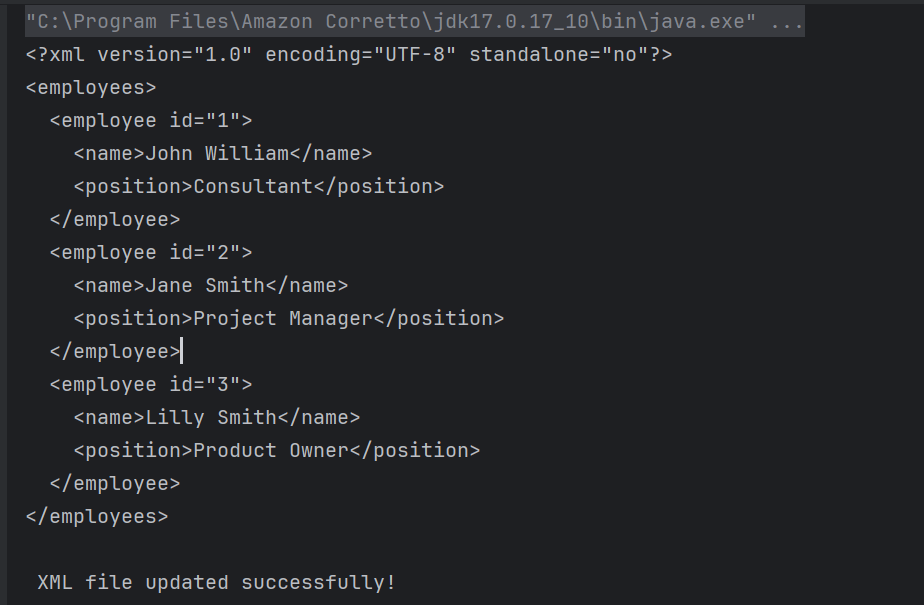
            System.out.println("\n XML file updated successfully!");

        } catch (ParserConfigurationException | TransformerException | IOException e) {
            e.printStackTrace();
        } catch (SAXException e) {
            throw new RuntimeException(e);
        }
    }

    private static void normalizeSpace(Node node) {
        if (node.getNodeType() == Node.TEXT_NODE) {
            String trimmedText = node.getTextContent().trim().replaceAll("\\s+", " ");
            node.setTextContent(trimmedText);
        }
        NodeList children = node.getChildNodes();
        for (int i = 0; i < children.getLength(); i++) {
            normalizeSpace(children.item(i));
        }
    }
}

DocumentBuilderFactory factory = DocumentBuilderFactory.newInstance();
DocumentBuilder builder = factory.newDocumentBuilder();
Document document = builder.parse(new File("src/test/resources/Payloads/SimpleXML.xml"));
 document.getDocumentElement().normalize();
  NodeList nodeList = document.getElementsByTagName("employee");

            for (int i = 0; i < nodeList.getLength(); i++) {
                Element employee = (Element) nodeList.item(i);
                String id = employee.getAttribute("id");

                if ("1".equals(id)) {
                    Element position = (Element) employee.getElementsByTagName("position").item(0);
                    position.setTextContent("Consultant");
                }
            }
private static void normalizeSpace(Node node) {
        if (node.getNodeType() == Node.TEXT_NODE) {
            String trimmedText = node.getTextContent().trim().replaceAll("\\s+", " ");
            node.setTextContent(trimmedText);
        }
        NodeList children = node.getChildNodes();
        for (int i = 0; i < children.getLength(); i++) {
            normalizeSpace(children.item(i));
        }
    }

TransformerFactory transformerFactory = TransformerFactory.newInstance();
Transformer transformer = transformerFactory.newTransformer();

transformer.setOutputProperty(OutputKeys.INDENT, "yes"); // Pretty print the XML
transformer.setOutputProperty("{http://xml.apache.org/xslt}indent-amount", "4");

DOMSource domSource = new DOMSource(document);

 // Write XML to file
 StreamResult fileResult = new StreamResult(new File("src/test/resources/Payloads/UpdatedXML.xml"));
transformer.transform(domSource, fileResult);

StreamResult consoleResult = new StreamResult(System.out);
transformer.transform(domSource, consoleResult);
try {
 } catch (ParserConfigurationException | TransformerException | IOException e) {
            e.printStackTrace();
        } catch (SAXException e) {
            throw new RuntimeException(e);
        }
    }

package XML.DOM;

import org.w3c.dom.Document;
import org.w3c.dom.Element;
import org.w3c.dom.Node;
import org.w3c.dom.NodeList;
import org.xml.sax.SAXException;

import javax.xml.parsers.DocumentBuilder;
import javax.xml.parsers.DocumentBuilderFactory;
import javax.xml.parsers.ParserConfigurationException;
import javax.xml.transform.OutputKeys;
import javax.xml.transform.Transformer;
import javax.xml.transform.TransformerException;
import javax.xml.transform.TransformerFactory;
import javax.xml.transform.dom.DOMSource;
import javax.xml.transform.stream.StreamResult;
import java.io.File;
import java.io.IOException;

import static org.apache.commons.lang3.StringUtils.normalizeSpace;

public class DOM_ModifyXMLAddElementsDemo {

    public static void main(String[] args) {

        try {

            //Create a DocumentBuilderFactory and DocumentBuilder
            DocumentBuilderFactory factory = DocumentBuilderFactory.newInstance();
            DocumentBuilder builder = factory.newDocumentBuilder();

            // Parse the XML file into a Document
            Document document = builder.parse(new File("src/test/resources/Payloads/SimpleXML.xml"));

            // Normalize XML structure
            document.getDocumentElement().normalize();

            //Locate the root element
            Element rootElement = document.getDocumentElement();

            // Create a new employee element
            Element employee = document.createElement("employee");
            employee.setAttribute("id", "4");

            // Create name element
            Element name = document.createElement("name");
            name.appendChild(document.createTextNode("Milly Mathew"));
            employee.appendChild(name);

            // Create position element
            Element position = document.createElement("position");
            position.appendChild(document.createTextNode("Architect"));
            employee.appendChild(position);

            //Append the new employee node to the root element
            rootElement.appendChild(employee);

            //Traverse the nodes to normalize spaces in text nodes
            Node rootNode = document.getDocumentElement();
            normalizeSpace(rootNode);

            //Write changes back to the XML file
            TransformerFactory transformerFactory = TransformerFactory.newInstance();
            Transformer transformer = transformerFactory.newTransformer();
            transformer.setOutputProperty(OutputKeys.INDENT, "yes");
            transformer.setOutputProperty("{http://xml.apache.org/xslt}indent-amount", "2");

            //Writing updated content into the file
            DOMSource domSource = new DOMSource(document);

            StreamResult fileResult = new StreamResult(new File("src/test/resources/Payloads/UpdatedXML1.xml"));
            transformer.transform(domSource, fileResult);

            // Print updated XML to console
            StreamResult consoleResult = new StreamResult(System.out);
            transformer.transform(domSource, consoleResult);

            System.out.println("\n XML file updated successfully!");

        } catch (ParserConfigurationException | TransformerException | IOException e) {
            e.printStackTrace();
        } catch (SAXException e) {
            throw new RuntimeException(e);
        }
    }

    private static void normalizeSpace(Node node) {
        if (node.getNodeType() == Node.TEXT_NODE) {
            String trimmedText = node.getTextContent().trim().replaceAll("\\s+", " ");
            node.setTextContent(trimmedText);
        }
        NodeList children = node.getChildNodes();
        for (int i = 0; i < children.getLength(); i++) {
            normalizeSpace(children.item(i));
        }
    }

}

Element rootElement = document.getDocumentElement();
 // Create a new employee element
 Element employee = document.createElement("employee");
employee.setAttribute("id", "4");

// Create name element
Element name = document.createElement("name");
name.appendChild(document.createTextNode("Milly Mathew"));
employee.appendChild(name);

// Create position element
Element position = document.createElement("position");
position.appendChild(document.createTextNode("Architect"));
employee.appendChild(position);

//Append the new employee node to the root element
rootElement.appendChild(employee);

We are done! Congratulations on making it through this tutorial and hope you found it useful! Happy Learning!!

How to create XML Documents Using Java DOM Parser

HOME

An XML file contains data between the tags. This makes it complex to read compared to other file formats like docx and txt. There are two types of parsers which parse an XML file:

import org.w3c.dom.Document;
import org.w3c.dom.Element;

import javax.xml.parsers.DocumentBuilder;
import javax.xml.parsers.DocumentBuilderFactory;
import javax.xml.parsers.ParserConfigurationException;
import javax.xml.transform.Transformer;
import javax.xml.transform.TransformerException;
import javax.xml.transform.TransformerFactory;
import javax.xml.transform.dom.DOMSource;
import javax.xml.transform.stream.StreamResult;
import java.io.File;
import javax.xml.transform.OutputKeys;

public class CreateXMLDocument {

    public static void main(String[] args) {
        try {

            // Step 1: Create a DocumentBuilderFactory and DocumentBuilder
            DocumentBuilderFactory factory = DocumentBuilderFactory.newInstance();
            DocumentBuilder builder = factory.newDocumentBuilder();

            // Step 2: Create a new Document
            Document document = builder.newDocument();

            // Step 3: Create and append root element
            Element root = document.createElement("employees");
            document.appendChild(root);

            // Step 4: Create and append employee elements
            Element employee1 = document.createElement("employee");
            employee1.setAttribute("id", "1");
            Element name1 = document.createElement("Name");
            name1.appendChild(document.createTextNode("Jimmy Buffet"));
            Element id1 = document.createElement("Employee_Id");
            id1.appendChild(document.createTextNode(String.valueOf(10342256)));
            Element salary1 = document.createElement("Salary");
            salary1.appendChild(document.createTextNode(String.valueOf(5000.00)));
            employee1.appendChild(name1);
            employee1.appendChild(id1);
            employee1.appendChild(salary1);
            root.appendChild(employee1);

            Element employee2 = document.createElement("employee");
            employee2.setAttribute("id", "2");
            Element name2 = document.createElement("name");
            name2.appendChild(document.createTextNode("Jane Smith"));
            Element position2 = document.createElement("position");
            position2.appendChild(document.createTextNode("Project Manager"));
            employee2.appendChild(name2);
            employee2.appendChild(position2);
            root.appendChild(employee2);

            // Step 5: Write the content into an XML file
            TransformerFactory transformerFactory = TransformerFactory.newInstance();
            Transformer transformer = transformerFactory.newTransformer();

            transformer.setOutputProperty(OutputKeys.INDENT, "yes"); // Pretty print the XML
            transformer.setOutputProperty("{http://xml.apache.org/xslt}indent-amount", "4");

            DOMSource domSource = new DOMSource(document);

            // Write XML to file
            StreamResult fileResult = new StreamResult(new File("src/test/resources/Payloads/output.xml"));
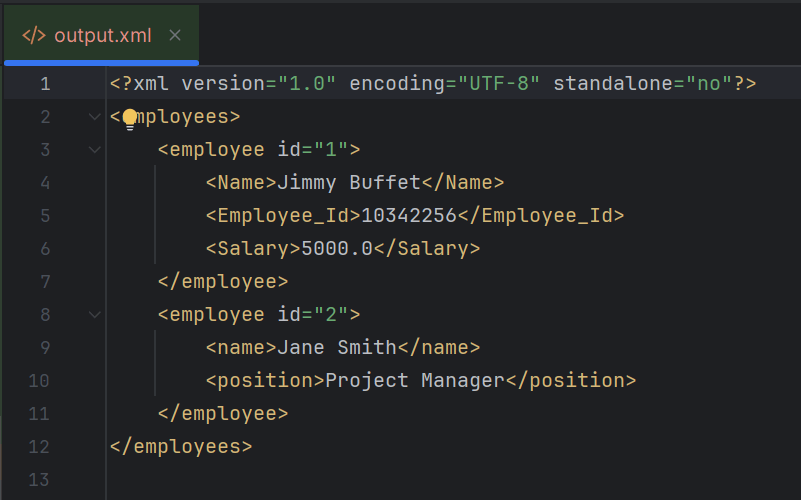
            transformer.transform(domSource, fileResult);

           // Print XML to console
            StreamResult consoleResult = new StreamResult(System.out);
            transformer.transform(domSource, consoleResult);

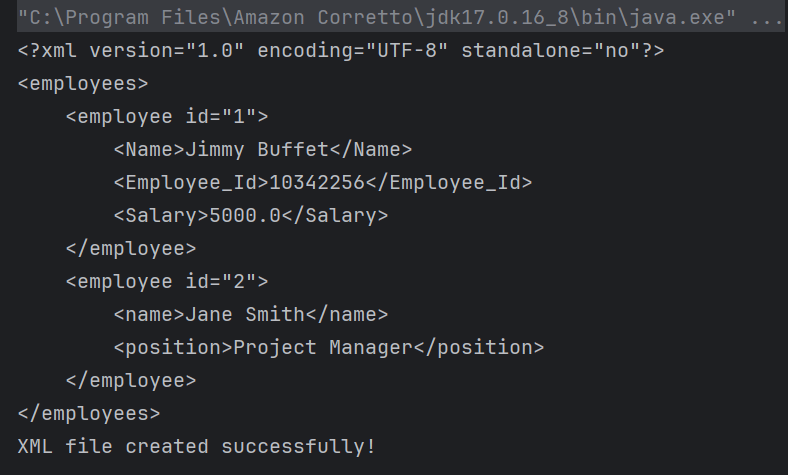
            System.out.println("XML file created successfully!");

        } catch (ParserConfigurationException | TransformerException e) {
            e.printStackTrace();
        }
    }
}

DocumentBuilderFactory factory = DocumentBuilderFactory.newInstance();
DocumentBuilder builder = factory.newDocumentBuilder();
 Document document = builder.newDocument();
Element root = document.createElement("employees");
document.appendChild(root);
Element employee1 = document.createElement("employee");
employee1.setAttribute("id", "1");
Element name1 = document.createElement("Name");
name1.appendChild(document.createTextNode("Jimmy Buffet"));
Element id1 = document.createElement("Employee_Id");
id1.appendChild(document.createTextNode(String.valueOf(10342256)));
Element salary1 = document.createElement("Salary");
salary1.appendChild(document.createTextNode(String.valueOf(5000.00)));
employee1.appendChild(name1);
employee1.appendChild(id1);
employee1.appendChild(salary1);
root.appendChild(employee1);

Element employee2 = document.createElement("employee");
employee2.setAttribute("id", "2");
Element name2 = document.createElement("name");
name2.appendChild(document.createTextNode("Jane Smith"));
Element position2 = document.createElement("position");
position2.appendChild(document.createTextNode("Project Manager"));
employee2.appendChild(name2);
employee2.appendChild(position2);
root.appendChild(employee2);
TransformerFactory transformerFactory = TransformerFactory.newInstance();
Transformer transformer = transformerFactory.newTransformer();

transformer.setOutputProperty(OutputKeys.INDENT, "yes"); // Pretty print the XML
transformer.setOutputProperty("{http://xml.apache.org/xslt}indent-amount", "4");

DOMSource domSource = new DOMSource(document);

 // Write XML to file
 StreamResult fileResult = new StreamResult(new File("src/test/resources/Payloads/output.xml"));
transformer.transform(domSource, fileResult);

StreamResult consoleResult = new StreamResult(System.out);
transformer.transform(domSource, consoleResult);

We are done! Congratulations on making it through this tutorial and hope you found it useful! Happy Learning!!

XML Handling and manipulation

HOME

How to read XML using Java DOM Parser

HOME

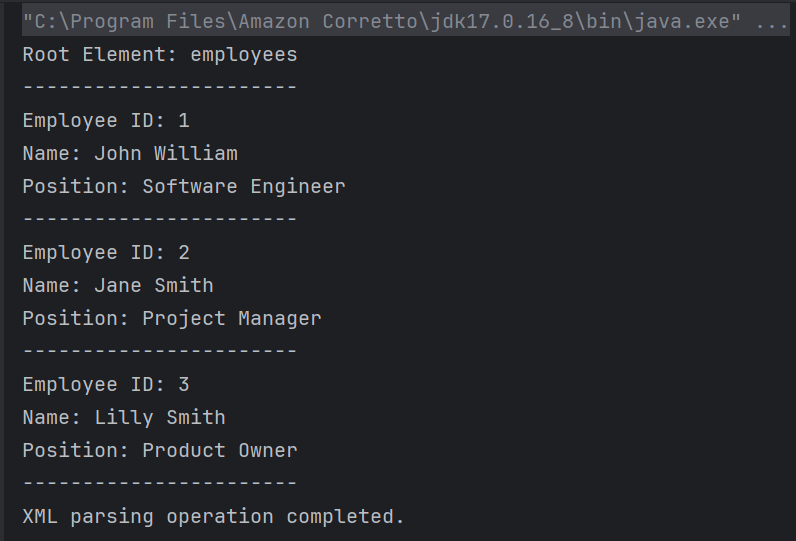
An XML file contains data between the tags. This makes it complex to read compared to other file formats like docx and txt. There are two types of parsers which parse an XML file:

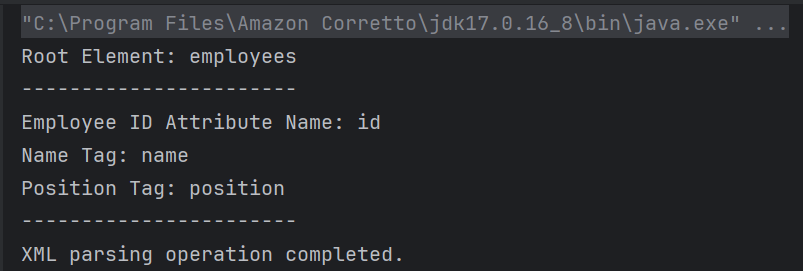
How to retrieve tag name from XML?

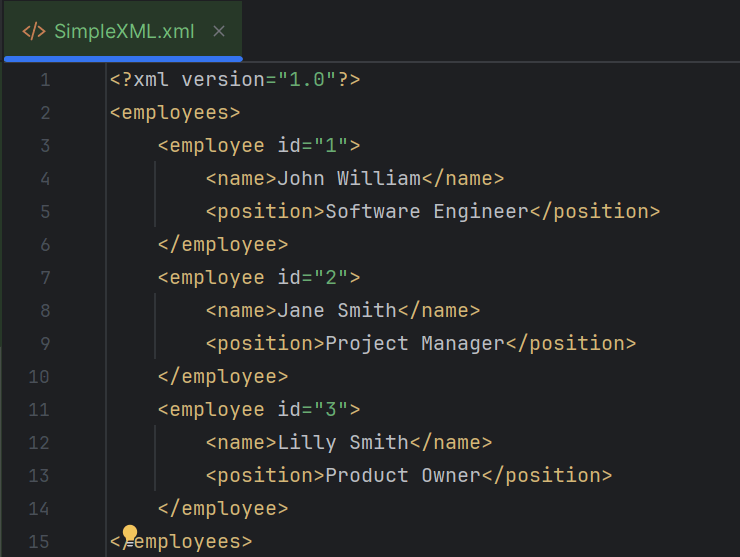
<?xml version="1.0"?>
<employees>
    <employee id="1">
        <name>John William</name>
        <position>Software Engineer</position>
    </employee>
    <employee id="2">
        <name>Jane Smith</name>
        <position>Project Manager</position>
    </employee>
    <employee id="3">
        <name>Lilly Smith</name>
        <position>Product Owner</position>
    </employee>
</employees>

package XML.DOM;

import org.w3c.dom.Document;
import org.w3c.dom.Element;
import org.w3c.dom.NodeList;
import org.xml.sax.SAXException;

import javax.xml.parsers.DocumentBuilder;
import javax.xml.parsers.DocumentBuilderFactory;
import javax.xml.parsers.ParserConfigurationException;
import java.io.File;
import java.io.IOException;

public class XMLParserTagNameExample {

    public static void main(String[] args) {
        try {
            // Create a DocumentBuilderFactory
            DocumentBuilderFactory factory = DocumentBuilderFactory.newInstance();

            // Obtain a DocumentBuilder from the factory
            DocumentBuilder builder = factory.newDocumentBuilder();

            // Parse the XML file into a Document
            Document document = builder.parse(new File("src/test/resources/Payloads/SimpleXML.xml"));

            // Normalize XML structure
            document.getDocumentElement().normalize();

            // Get the root element
            Element root = document.getDocumentElement();
            System.out.println("Root Element: " + root.getNodeName());
            System.out.println("-----------------------");

            // Retrieve the first employee element for extracting tag names
            NodeList nodeList = document.getElementsByTagName("employee");
            if (nodeList.getLength() > 0) {
                // If there is at least one employee, use it to print the element and attribute names
                Element employee = (Element) nodeList.item(0);

                    // Print the tag names
                    System.out.println("Employee ID Attribute Name: id");
                    System.out.println("Name Tag: " + employee.getElementsByTagName("name").item(0).getNodeName());
                    System.out.println("Position Tag: " + employee.getElementsByTagName("position").item(0).getNodeName());
                    System.out.println("-----------------------");
            }
        } catch (ParserConfigurationException e) {
            System.out.println("Parser configuration error occurred: " + e.getMessage());
        } catch (SAXException e) {
            System.out.println("SAX parsing error occurred: " + e.getMessage());
        } catch (IOException e) {
            System.out.println("IO error when loading XML file: " + e.getMessage());
        } finally {
            System.out.println("XML parsing operation completed.");
        }
    }
}

DocumentBuilderFactory factory = DocumentBuilderFactory.newInstance();
DocumentBuilder builder = factory.newDocumentBuilder();
 Document document = builder.parse(new File("src/test/resources/Payloads/SimpleXML.xml"));
document.getDocumentElement().normalize();
Element root = document.getDocumentElement();
System.out.println("Root Element: " + root.getNodeName());
System.out.println("-----------------------");
NodeList nodeList = document.getElementsByTagName("employee");
            if (nodeList.getLength() > 0) {
                // If there is at least one employee, use it to print the element and attribute names
                Element employee = (Element) nodeList.item(0);

                    // Print the tag names
                    System.out.println("Employee ID Attribute Name: id");
                    System.out.println("Name Tag: " + employee.getElementsByTagName("name").item(0).getNodeName());
                    System.out.println("Position Tag: " + employee.getElementsByTagName("position").item(0).getNodeName());
                    System.out.println("-----------------------");
            }
        }

catch (ParserConfigurationException e) {
            System.out.println("Parser configuration error occurred: " + e.getMessage());
        } catch (SAXException e) {
            System.out.println("SAX parsing error occurred: " + e.getMessage());
        } catch (IOException e) {
            System.out.println("IO error when loading XML file: " + e.getMessage());
        } finally {
            System.out.println("XML parsing operation completed.");
        }

package XML.DOM;

import javax.xml.parsers.DocumentBuilder;
import javax.xml.parsers.DocumentBuilderFactory;
import javax.xml.parsers.ParserConfigurationException;

import org.w3c.dom.Document;
import org.w3c.dom.Element;
import org.w3c.dom.Node;
import org.w3c.dom.NodeList;
import org.xml.sax.SAXException;

import java.io.File;
import java.io.IOException;

public class SimpleXMLParserExample {

    public static void main(String[] args) {
        try {
            // Create a DocumentBuilderFactory
            DocumentBuilderFactory factory = DocumentBuilderFactory.newInstance();

            // Obtain a DocumentBuilder from the factory
            DocumentBuilder builder = factory.newDocumentBuilder();

            // Parse the XML file into a Document
            Document document = builder.parse(new File("src/test/resources/Payloads/SimpleXML.xml"));

            // Normalize XML structure
            document.getDocumentElement().normalize();

            // Get the root element
            Element root = document.getDocumentElement();
            System.out.println("Root Element: " + root.getNodeName());
            System.out.println("-----------------------");

            // Retrieve all employee nodes
            NodeList nodeList = document.getElementsByTagName("employee");

            // Iterate over the employee nodes
            for (int i = 0; i < nodeList.getLength(); i++) {
                Node node = nodeList.item(i);

                if (node.getNodeType() == Node.ELEMENT_NODE) {
                    Element employee = (Element) node;

                    // Get the attribute and text content
                    String id = employee.getAttribute("id");
                    String name = employee.getElementsByTagName("name").item(0).getTextContent();
                    String position = employee.getElementsByTagName("position").item(0).getTextContent();

                    System.out.println("Employee ID: " + id);
                    System.out.println("Name: " + name);
                    System.out.println("Position: " + position);
                    System.out.println("-----------------------");
                }
            }
        } catch (ParserConfigurationException e) {
            System.out.println("Parser configuration error occurred: " + e.getMessage());
        } catch (SAXException e) {
            System.out.println("SAX parsing error occurred: " + e.getMessage());
        } catch (IOException e) {
            System.out.println("IO error when loading XML file: " + e.getMessage());
        } finally {
            System.out.println("XML parsing operation completed.");
        }
    }
}
NodeList nodeList = document.getElementsByTagName("employee");
 for (int i = 0; i < nodeList.getLength(); i++) {
                Node node = nodeList.item(i);

                if (node.getNodeType() == Node.ELEMENT_NODE) {
                    Element employee = (Element) node;

                    // Get the attribute and text content
                    String id = employee.getAttribute("id");
                    String name = employee.getElementsByTagName("name").item(0).getTextContent();
                    String position = employee.getElementsByTagName("position").item(0).getTextContent();

                    System.out.println("Employee ID: " + id);
                    System.out.println("Name: " + name);
                    System.out.println("Position: " + position);
                    System.out.println("-----------------------");
                }
            }
        }

We are done! Congratulations on making it through this tutorial and hope you found it useful! Happy Learning!!

How to parse XML in Java

HOME

<?xml version = "1.0"?>
<department>
    <employee id = "10001">
        <firstname>Tom</firstname>
        <lastname>Mathew</lastname>
        <salary>25000</salary>
        <age>21</age>
    </employee>

    <employee id = "20001">
        <firstname>Katherine</firstname>
        <lastname>Jason</lastname>
        <salary>15000</salary>
        <age>20</age>
    </employee>

    <employee id = "30001">
        <firstname>David</firstname>
        <lastname>Mathew</lastname>
        <salary>35000</salary>
        <age>25</age>
    </employee>

    <employee id = "40001">
        <firstname>Berry</firstname>
        <lastname>Brian</lastname>
        <salary>50000</salary>
        <age>30</age>
    </employee>
</department>
DocumentBuilderFactory dbFactory = DocumentBuilderFactory.newInstance();
DocumentBuilder dBuilder = dbFactory.newDocumentBuilder();
Document doc = dBuilder.parse(inputFile);
doc.getDocumentElement().normalize();
NodeList nodeList = doc.getElementsByTagName("employee");
System.out.println("Node Length :" + nodeList.getLength());
for (int temp = 0; temp < nodeList.getLength(); temp++) {

        Node node = nodeList.item(temp);
        System.out.println("\nCurrent Element :" + node.getNodeName());

        if (node.getNodeType() == Node.ELEMENT_NODE) {
            Element eElement = (Element) node;

             //returns specific attribute
              System.out.println("Employee Id : " + eElement.getAttribute("id"));

            //returns a list of subelements of specified name
             System.out.println("First Name: " + eElement.getElementsByTagName("firstname").item(0).getTextContent());
             System.out.println("Last Name: " + eElement.getElementsByTagName("lastname").item(0).getTextContent());
             System.out.println("Salary: " + eElement.getElementsByTagName("salary").item(0).getTextContent());
             System.out.println("Age: " + eElement.getElementsByTagName("age").item(0).getTextContent());

    }

import org.w3c.dom.Document;
import org.w3c.dom.Element;
import org.w3c.dom.Node;
import org.w3c.dom.NodeList;
import org.xml.sax.SAXException;

import javax.xml.parsers.DocumentBuilder;
import javax.xml.parsers.DocumentBuilderFactory;
import javax.xml.parsers.ParserConfigurationException;
import java.io.File;
import java.io.IOException;

public class XMLParser {

    public static void main(String[] args) {

        try {

            //Create a DocumentBuilder
            File inputFile = new File("src/test/resources/testData/test.xml");
            System.out.println("Request :" + inputFile);
            DocumentBuilderFactory dbFactory = DocumentBuilderFactory.newInstance();
            DocumentBuilder dBuilder = dbFactory.newDocumentBuilder();
            Document doc = dBuilder.parse(inputFile);
            doc.getDocumentElement().normalize();

            //Extract the root element
            System.out.println("Root element :" + doc.getDocumentElement().getNodeName());

            NodeList nodeList = doc.getElementsByTagName("employee");
            System.out.println("Node Length :" + nodeList.getLength());

            for (int temp = 0; temp < nodeList.getLength(); temp++) {

                Node node = nodeList.item(temp);
                System.out.println("\nCurrent Element :" + node.getNodeName());

                if (node.getNodeType() == Node.ELEMENT_NODE) {
                    Element eElement = (Element) node;

                    //returns specific attribute
                    System.out.println("Employee Id : " + eElement.getAttribute("id"));

                    //returns a list of subelements of specified name
                    System.out.println("First Name: " + eElement.getElementsByTagName("firstname").item(0).getTextContent());
                    System.out.println("Last Name: " + eElement.getElementsByTagName("lastname").item(0).getTextContent());
                    System.out.println("Salary: " + eElement.getElementsByTagName("salary").item(0).getTextContent());
                    System.out.println("Age: " + eElement.getElementsByTagName("age").item(0).getTextContent());

                }
            }

        } catch (ParserConfigurationException | SAXException | IOException e) {
            e.printStackTrace();
        }
    }

}

<?xml version = "1.0"?>
<cars>
    <sportscar company = "Porsce">
        <carname type = "formula one">Porsche 718 Boxster</carname>
        <carname type = "sports car">Porsche 718 Cayman</carname>
        <carname type = "sports car">2024 Porsche Panamera</carname>
    </sportscar>

    <supercars company = "Lamborgini">
        <carname>Lamborghini Aventador</carname>
        <carname>Lamborghini Reventon</carname>
        <carname>Lamborghini Gallardo</carname>
    </supercars>

    <supercars company = "Audi">
        <carname>Audi R8</carname>
        <carname>Audi Q8</carname>
        <carname>Audi Q6 e-tron</carname>
    </supercars>
</cars>

package com.example.XML;

import org.w3c.dom.Document;
import org.w3c.dom.Element;
import org.w3c.dom.Node;
import org.w3c.dom.NodeList;
import org.xml.sax.SAXException;

import javax.xml.parsers.DocumentBuilder;
import javax.xml.parsers.DocumentBuilderFactory;
import javax.xml.parsers.ParserConfigurationException;
import java.io.File;
import java.io.IOException;

public class ComplexXMLParser {

    public static void main(String[] args) {

        try {

            //Create a DocumentBuilder
            File inputFile = new File("src/test/resources/testData/test4.xml");
            System.out.println("Request :" + inputFile);
            DocumentBuilderFactory dbFactory = DocumentBuilderFactory.newInstance();
            DocumentBuilder dBuilder = dbFactory.newDocumentBuilder();
            Document doc = dBuilder.parse(inputFile);
            doc.getDocumentElement().normalize();

            //Extract the root element
            System.out.println("Root element :" + doc.getDocumentElement().getNodeName());

            NodeList sportscarNodeList = doc.getElementsByTagName("sportscar");
           // System.out.println("Node Length :" + nodeList.getLength());

            for (int temp = 0; temp < sportscarNodeList.getLength(); temp++) {

                Node node = sportscarNodeList.item(temp);
                System.out.println("\nCurrent Element :" + node.getNodeName());

                if (node.getNodeType() == Node.ELEMENT_NODE) {
                    Element eElement = (Element) node;

                    //returns specific attribute
                    System.out.println("sportscar : " + eElement.getAttribute("company"));

                    NodeList sportcarNameList = eElement.getElementsByTagName("carname");

                    for (int count = 0; count < sportcarNameList.getLength(); count++) {
                        Node node1 = sportcarNameList.item(count);

                        if (node1.getNodeType() == node1.ELEMENT_NODE) {
                            Element car = (Element) node1;

                            System.out.print("\ncar type : " + car.getAttribute("type"));
                            System.out.print("\ncar name : " + car.getTextContent());

                        }
                    }
                }

            }

            System.out.println("\n====================================================");
            NodeList supercarsNodeList = doc.getElementsByTagName("supercars");
            // System.out.println("Node Length :" + nodeList.getLength());

            for (int temp = 0; temp < supercarsNodeList.getLength(); temp++) {

                Node node1 = supercarsNodeList.item(temp);
                System.out.println("\nCurrent Element :" + node1.getNodeName());

                if (node1.getNodeType() == Node.ELEMENT_NODE) {
                    Element eElement = (Element) node1;

                    //returns specific attribute
                    System.out.println("supercars : " + eElement.getAttribute("company"));

                    NodeList supercarsNameList = eElement.getElementsByTagName("carname");

                    for (int count = 0; count < supercarsNameList.getLength(); count++) {
                        Node node2 = supercarsNameList.item(count);

                        if (node1.getNodeType() == node2.ELEMENT_NODE) {
                            Element car = (Element) node2;

                            System.out.print("car name : " + car.getTextContent()+"\n");

                        }
                    }
                }

            }

        } catch (ParserConfigurationException | SAXException | IOException e) {
            e.printStackTrace();
        }
    }

}

How to retrieve XML Child Nodes in Java

HOME

<?xml version = "1.0"?>
<department>
    <employee>
        <firstname>Tom</firstname>
        <lastname>Mathew</lastname>
        <salary>25000</salary>
        <age>21</age>
    </employee>
</department>
DocumentBuilderFactory dbFactory = DocumentBuilderFactory.newInstance();
DocumentBuilder dBuilder = dbFactory.newDocumentBuilder();
Document doc = dBuilder.parse(inputFile);
doc.getDocumentElement().normalize();
NodeList nodeList = doc.getElementsByTagName("employee");
System.out.println("Node Length :" + nodeList.getLength());
for (int temp = 0; temp < nodeList.getLength(); temp++) {
                Node node = nodeList.item(temp);
                System.out.println("\nCurrent Element :" + node.getNodeName());
  NodeList childNodes = node.getChildNodes();
                for (int i = 0; i < childNodes.getLength(); i++) {
                    Node childNode = childNodes.item(i);
                    if (childNode.getNodeType() == Node.ELEMENT_NODE) {
                        System.out.println("Child node name " + i + ":" + childNode.getNodeName());
                        System.out.println("Child node value: " + i + ":" + childNode.getTextContent());

                    }
                }

package com.example.XML;

import org.w3c.dom.Document;
import org.w3c.dom.Element;
import org.w3c.dom.Node;
import org.w3c.dom.NodeList;
import org.xml.sax.SAXException;

import javax.xml.parsers.DocumentBuilder;
import javax.xml.parsers.DocumentBuilderFactory;
import javax.xml.parsers.ParserConfigurationException;
import java.io.File;
import java.io.IOException;

public class ChildNodes {

    public static void main(String[] args) {

        try {
            //Create a DocumentBuilder
            File inputFile = new File("src/test/resources/testData/test1.xml");
            DocumentBuilderFactory dbFactory = DocumentBuilderFactory.newInstance();
            DocumentBuilder dBuilder = dbFactory.newDocumentBuilder();
            Document doc = dBuilder.parse(inputFile);
            doc.getDocumentElement().normalize();

            //Extract the root element
            System.out.println("Root element :" + doc.getDocumentElement().getNodeName());

            NodeList nodeList = doc.getElementsByTagName("employee");
            System.out.println("Node Length :" + nodeList.getLength());

            for (int temp = 0; temp < nodeList.getLength(); temp++) {
                Node node = nodeList.item(temp);
                System.out.println("\nCurrent Element :" + node.getNodeName());

                NodeList childNodes = node.getChildNodes();
                for (int i = 0; i < childNodes.getLength(); i++) {
                    Node childNode = childNodes.item(i);
                    if (childNode.getNodeType() == Node.ELEMENT_NODE) {
                        System.out.println("Child node name " + i + ":" + childNode.getNodeName());
                        System.out.println("Child node value: " + i + ":" + childNode.getTextContent());

                    }
                }
            }
        } catch (ParserConfigurationException | SAXException | IOException e) {
            e.printStackTrace();
        }

    }
}

<?xml version = "1.0"?>
<department>
    <employee>
        <firstname>Tom</firstname>
        <lastname>Mathew</lastname>
        <salary>25000</salary>
        <age>21</age>
    </employee>

    <employee id = "429">
        <firstname>Erika</firstname>
        <lastname>David</lastname>
        <salary>
                <fixed>
                    <fixed1>350000</fixed1>
                    <fixed2>200000</fixed2>
                </fixed>
                <bonus>5000</bonus>
        </salary>
        <age>29</age>
        <type>Permanent</type>
    </employee>
</department>

package com.example.XML;

import org.w3c.dom.Document;
import org.w3c.dom.Node;
import org.w3c.dom.NodeList;
import org.xml.sax.SAXException;

import javax.xml.parsers.DocumentBuilder;
import javax.xml.parsers.DocumentBuilderFactory;
import javax.xml.parsers.ParserConfigurationException;
import java.io.File;
import java.io.IOException;

public class ComplexChildNodes {

    public static void main(String[] args) {

        try {
            //Create a DocumentBuilder
            File inputFile = new File("src/test/resources/testData/test2.xml");
            DocumentBuilderFactory dbFactory = DocumentBuilderFactory.newInstance();
            DocumentBuilder dBuilder = dbFactory.newDocumentBuilder();
            Document doc = dBuilder.parse(inputFile);
            doc.getDocumentElement().normalize();

            //Extract the root element
            System.out.println("Root element :" + doc.getDocumentElement().getNodeName());

            NodeList nodeList = doc.getElementsByTagName("employee");
            System.out.println("Node Length :" + nodeList.getLength());

            for (int temp = 0; temp < nodeList.getLength(); temp++) {
                Node node = nodeList.item(temp);
                System.out.println("\nCurrent Element :" + node.getNodeName());

                NodeList childNodes = node.getChildNodes();
                for (int i = 0; i < childNodes.getLength(); i++) {
                    Node childNode = childNodes.item(i);

                    if (childNode.getNodeType() == Node.ELEMENT_NODE) {
                        System.out.println("Child node name " + i + ":" + childNode.getNodeName());
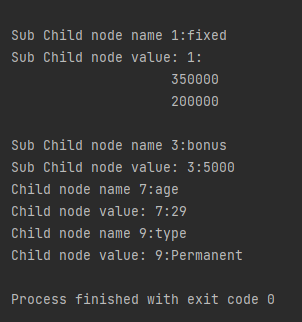
                        System.out.println("Child node value: " + i + ":" + childNode.getTextContent());

                        for (int j = 0; j < childNode.getChildNodes().getLength(); j++) {
                            Node subChildNode = childNode.getChildNodes().item(j);
                            if (subChildNode.getNodeType() == Node.ELEMENT_NODE) {
                                {
                                    System.out.println("Sub Child node name " + j + ":" + subChildNode.getNodeName());
                                    System.out.println("Sub Child node value: " + j + ":" + subChildNode.getTextContent());
                                }
                            }
                        }
                    }

                }
            }

        } catch (ParserConfigurationException | SAXException | IOException e) {
            e.printStackTrace();
        }

    }
}

UnMarshalling- How to convert XML to Java Objects using JAXB

HOME

This tutorial explains how to use JAXB (Java Architecture for XML Binding) to convert an XML document to Java Objects.

The previous tutorial has explained the conversion of Java Objects to XML.

As of Java 11, JAXB is not part of the JRE anymore, and you need to configure the relevant libraries via your dependency management system, for example, either Maven or Gradle.

Configure the Java compiler level to be at least 11 and add the JAXB dependencies to your pom file.

<?xml version="1.0" encoding="UTF-8"?>
 
<project xmlns="http://maven.apache.org/POM/4.0.0" xmlns:xsi="http://www.w3.org/2001/XMLSchema-instance"
  xsi:schemaLocation="http://maven.apache.org/POM/4.0.0 https://maven.apache.org/xsd/maven-4.0.0.xsd">
  <modelVersion>4.0.0</modelVersion>
 
  <groupId>org.example</groupId>
  <artifactId>JAXBDemo</artifactId>
  <version>0.0.1-SNAPSHOT</version>
 
  <name>JAXBDemo</name>
  <url>http://www.example.com</url>
 
  <properties>  
 
    <project.build.sourceEncoding>UTF-8</project.build.sourceEncoding>
    <maven.compiler.source>11</maven.compiler.source>
    <maven.compiler.target>11</maven.compiler.target>
  </properties>
 
  <dependencies>
    <dependency>
      <groupId>junit</groupId>
      <artifactId>junit</artifactId>
      <version>4.13.2</version>
      <scope>test</scope>
  </dependency>
     
 <dependency>
    <groupId>com.sun.xml.bind</groupId>
    <artifactId>jaxb-impl</artifactId>
    <version>2.3.3</version>
   </dependency>
 </dependencies>
    
</project>

Sample XML Structure

<?xml version="1.0" encoding="UTF-8" standalone="yes"?>
<EmployeeDetails>
    <firstName>Terry</firstName>
    <lastName>Mathew</lastName>
    <gender>female</gender>
    <age>30</age>
    <maritalStatus>married</maritalStatus>
    <designation>Manager</designation>
    <contactNumber>+919999988822</contactNumber>
    <emailId>abc@test.com</emailId>
    <GrossSalary>75000.0</GrossSalary>
</EmployeeDetails>

Un-marshalling provides a client application the ability to convert XML data into JAXB-derived Java objects.

Let’s see the steps to convert XML document into java object.

  1. Create POJO Class
  2. Create the JAXBContext object
  3. Create the Unmarshaller objects
  4. Call the unmarshal method
  5. Use getter methods of POJO to access the data

Now, let us create the Java Objects (POJO) for the above XML.

import javax.xml.bind.annotation.XmlAccessType;
import javax.xml.bind.annotation.XmlAccessorType;
import javax.xml.bind.annotation.XmlElement;
import javax.xml.bind.annotation.XmlRootElement;
import javax.xml.bind.annotation.XmlType;

@XmlRootElement(name = "EmployeeDetails")
@XmlAccessorType(XmlAccessType.FIELD)

//Define the order in which the fields are written in XML
@XmlType(propOrder = { "firstName", "lastName", "gender", "age", "maritalStatus", "designation", "contactNumber","emailId", "salary" })

public class Employee {

	private String firstName;
	private String lastName;
	private int age;

	@XmlElement(name = "GrossSalary")
	private double salary;
	private String designation;
	private String contactNumber;
	private String emailId;
	private String gender;
	private String maritalStatus;

	public Employee() {
		super();

	}

	// Getter and setter methods
	public String getFirstName() {
		return firstName;
	}

	public void setFirstName(String firstName) {
		this.firstName = firstName;
	}

	public String getLastName() {
		return lastName;
	}

	public void setLastName(String lastName) {
		this.lastName = lastName;
	}

	public int getAge() {
		return age;
	}

	public void setAge(int age) {
		this.age = age;
	}

	public double getSalary() {
		return salary;
	}

	public void setSalary(double salary) {
		this.salary = salary;
	}

	public String getDesignation() {
		return designation;
	}

	public void setDesignation(String designation) {
		this.designation = designation;
	}

	public String getContactNumber() {
		return contactNumber;
	}

	public void setContactNumber(String contactNumber) {
		this.contactNumber = contactNumber;
	}

	public String getEmailId() {
		return emailId;
	}

	public void setEmailId(String emailId) {
		this.emailId = emailId;
	}

	public String getGender() {
		return gender;
	}

	public void setGender(String gender) {
		this.gender = gender;
	}

	public String getMaritalStatus() {
		return maritalStatus;
	}

	public void setMaritalStatus(String maritalStatus) {
		this.maritalStatus = maritalStatus;
	}

	@Override
	public String toString() {
		return "Employee [FirstName=" + firstName + ", LastName=" + lastName + ", Age=" + age + ", Salary=" + salary
				+ ", Designation=" + designation + ", ContactNumber=" + contactNumber + ", EmailId=" + emailId
				+ ", Gender=" + gender + ", MaritalStatus=" + maritalStatus + "]";
	}
}

Create the following test program for reading the XML file. The XML file is present under src/test/resources.

Let’s use JAXB Unmarshaller to unmarshal our JAXB_XML back to a Java object:

import java.io.File;
import javax.xml.bind.JAXBContext;
import javax.xml.bind.JAXBException;
import javax.xml.bind.Unmarshaller;
import org.junit.Test;

public class JAXBDeserialization {
	
	@Test
	public void JAXBUnmarshalTest() {

		try {

			String userDir = System.getProperty("user.dir");
			File file = new File(userDir + "\\src\\test\\resources\\JAXB_XML.xml");
			JAXBContext jaxbContext = JAXBContext.newInstance(Employee.class);

			Unmarshaller jaxbUnmarshaller = jaxbContext.createUnmarshaller();
			Employee employee = (Employee) jaxbUnmarshaller.unmarshal(file);

			System.out.println("FirstName: " + employee.getFirstName());
			System.out.println("LastName: " + employee.getLastName());
			System.out.println("Age: " + employee.getAge());
			System.out.println("Salary: " + employee.getSalary());
			System.out.println("Contact Number: " + employee.getContactNumber());
			System.out.println("Designation: " + employee.getDesignation());
			System.out.println("Gender: " + employee.getGender());
			System.out.println("EmailId: " + employee.getEmailId());
			System.out.println("MaritalStatus: " + employee.getMaritalStatus());

		} catch (JAXBException e) {
			e.printStackTrace();
		}

	}

	}

When we run the code above, we may check the console output to verify that we have successfully converted XML data into a Java object:

The output of the above program is

There is another simple way of unmarshalling the XML to Java Objects.

    @Test
	public void JAXBUnmarshalTest1() {

		try {

			String userDir = System.getProperty("user.dir");
			File file = new File(userDir + "\\src\\test\\resources\\JAXB_XML.xml");

			JAXBContext jaxbContext = JAXBContext.newInstance(Employee.class);
			Unmarshaller jaxbUnmarshaller = jaxbContext.createUnmarshaller();
			Employee emp = (Employee) jaxbUnmarshaller.unmarshal(file);

			System.out.println(emp);

		} catch (JAXBException e) {
			e.printStackTrace();
		}
	}

When we run the code above, we may check the console output to verify that we have successfully converted XML data into a Java object:

The output of the above program is

We are done! Congratulations on making it through this tutorial and hope you found it useful! Happy Learning!!

How To Send A JSON/XML File As Payload To Request using Rest Assured

HOME

In this tutorial, I will explain to pass a JSON or XML file as a payload to the request. This is needed when the payload is static or there is minimal change in the request payload. This can be done by using the body() method, which accepts “File” as an argument. This is elaborated in Javadoc.

RequestSpecification body(File body)

This specifies file content that’ll be sent with the request. This only works for the POST, PATCH and PUT HTTP methods. Trying to do this for the other HTTP methods will cause an exception to be thrown.

<dependency>
    <groupId>io.rest-assured</groupId>
    <artifactId>rest-assured</artifactId>
    <version>5.5.1</version>
    <scope>test</scope>
</dependency>

Pass JSON file as payload

Step 1 – Create a .json file and write the payload in that. Keep the file in the “src/test/resources” folder.

Step 2 – Create a File in Java using the “File” and pass it to body() method.

import static io.restassured.RestAssured.given;
import static org.hamcrest.Matchers.equalTo;
import java.io.File;
import org.junit.Test;
import io.restassured.http.ContentType;

public class passJsonAsPayload {


    @Test
    public void createUser() {

        // Creating a File instance
        File jsonData = new File("src/test/resources/Payloads/jsondemo.json");

        // GIVEN
        given()
                .baseUri("https://reqres.in")
                .contentType(ContentType.JSON)
                .body(jsonData)

                // WHEN
                .when()
                .post("/api/users")

                // THEN
                .then()
                .assertThat()
                .statusCode(201)
                .body("name", equalTo("Json_Test"))
                .body("job", equalTo("Leader"))
                .log().all();

    }
}

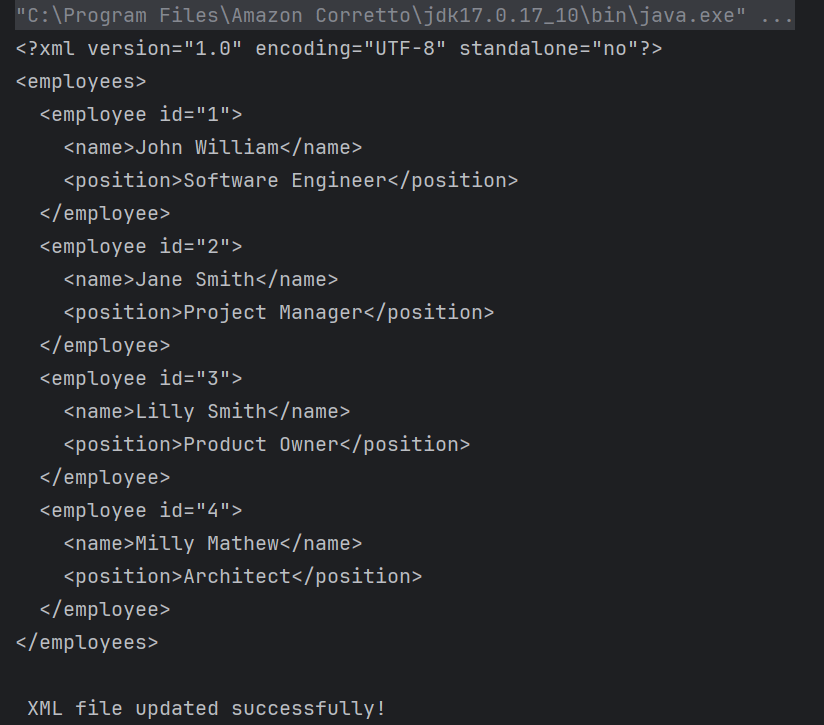
The output of the above program is
Similarly, we can pass an XML as a payload to request. The file passed within the body() method should be of type .xml.

<?xml version="1.0" encoding="utf-8"?>
<soap:Envelope xmlns:soap="http://schemas.xmlsoap.org/soap/envelope/">
    <soap:Body>
        <NumberToWords xmlns="http://www.dataaccess.com/webservicesserver/">
            <ubiNum>500</ubiNum>
        </NumberToWords>
    </soap:Body>
</soap:Envelope>
@Test
    public void getNumber() {

        // Creating a File instance
        File xmlData = new File("src/test/resources/Payloads/xmlDemo.xml");

        // GIVEN
         RestAssured.given()
                .baseUri("https://www.dataaccess.com")
                .header("Content-Type", "text/xml")
                .body(xmlData)

                // WHEN
                .when()
                .post("/webservicesserver/NumberConversion.wso")

                // THEN
                .then()
                .assertThat()
                .statusCode(200)
                 .body("Envelope.Body.NumberToWordsResponse.NumberToWordsResult", equalToCompressingWhiteSpace("five hundred"))
                .log().all();

    }

Congrats. You have learned how to pass a JSON as a payload to the request. Happy Learning !!

Deserialization – How to convert XML to Java Objects using Jackson API

HOME

The previous tutorials have explained the conversion of Java Objects to XML using Jackson API. This tutorial explains parsing the XML document to Java objects using Jackson API.

To parse the XML, we will use the Jackson library. Use the latest Jackson library.

<dependency>
    <groupId>com.fasterxml.jackson.dataformat</groupId>
    <artifactId>jackson-dataformat-xml</artifactId>
    <version>2.16.0</version>
</dependency>

Jackson allows us to read the contents of an XML file and deserialize the XML back into a Java object. In our example, we will read an XML document containing details about an Employee, and use Jackson to extract this data and use it to create Java objects containing the same information.

First, let us create an XML document matching our class to read from.

Create deserialize.xml with the following contents:

<Employee>
  <firstName>Vibha</firstName>
  <lastName>Singh</lastName>
  <age>35</age>
  <salary>135000.0</salary>
  <designation>Manager</designation>
  <contactNumber>+919999988822</contactNumber>
  <emailId>abc@test.com</emailId>
  <gender>female</gender>
  <maritalStatus>married</maritalStatus>
</Employee>

Deserialization – It is the reverse of serializing. In this process, we will read the Serialized byte stream from the file and convert it back into the Class instance representation. Here, we are converting a XML to an Employee class object.

Let us add a deserializeFromXML() function to deserialize the XML file above into a Java object:

import com.fasterxml.jackson.core.exc.StreamReadException;
import com.fasterxml.jackson.databind.DatabindException;
import com.fasterxml.jackson.dataformat.xml.XmlMapper;
import org.example.simple.Employee;
import org.junit.Test;

import java.io.File;
import java.io.IOException;

public class DeserializeXMLTest {
    @Test
    public void deserializeFromXML() {

        XmlMapper xmlMapper = new XmlMapper();
        String userDir = System.getProperty("user.dir");

        // Converting Employee XML to Employee class object
        try {
            Employee emp = xmlMapper.readValue(new File(userDir + "\\src\\test\\resources\\XMLExample.xml"),
                    Employee.class);

            System.out.println("Deserialized data: ");
            System.out.println("First Name of employee : " + emp.getFirstName());
            System.out.println("Last Name of employee : " + emp.getLastName());
            System.out.println("Age of employee : " + emp.getAge());
            System.out.println("Salary of employee : " + emp.getSalary());
            System.out.println("Designation of employee : " + emp.getDesignation());
            System.out.println("Contact Number of employee : " + emp.getContactNumber());
            System.out.println("EmailId of employee : " + emp.getEmailId());
            System.out.println("Marital Status of employee : " + emp.getMaritalStatus());
            System.out.println("Gender of employee : " + emp.getGender());

        } catch (StreamReadException e) {
            e.printStackTrace();
        } catch (DatabindException e) {
            e.printStackTrace();
        } catch (IOException e) {
            e.printStackTrace();
        }
    }
}

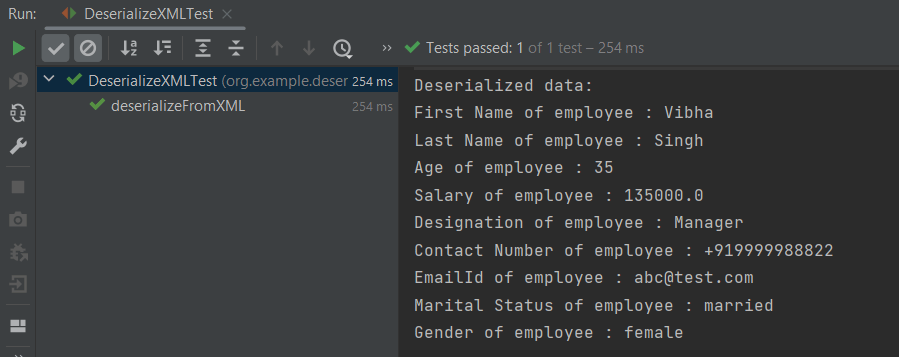
The output of the above program is shown below:

Manipulating Nested Elements in XML

Let us enhance our XML file to add nested elements and loops, and modify our code to deserialize the following updated structure.

<Employees>
  <name>
    <firtsname>John</firtsname>
    <middlename>Dave</middlename>
    <lastname>William</lastname>
  </name>
  <contactdetails>
    <deskNumber>00-428507</deskNumber>
    <mobileNumber>+917823561231</mobileNumber>
    <emergencyDetails>
      <emergency_no1>+91 1212898920</emergency_no1>
      <emergency_no2>+91 9997722123</emergency_no2>
      <emergency_no3>+91 8023881245</emergency_no3>
    </emergencyDetails>
  </contactdetails>
  <age>30</age>
  <salary>75000.0</salary>
  <designation>Manager</designation>
  <emailId>abc@test.com</emailId>
  <gender>female</gender>
  <maritalStatus>married</maritalStatus>
</Employees>

There will be a slight change in the deserializeFromXML() method for the nested XML Structure.

import com.fasterxml.jackson.core.exc.StreamReadException;
import com.fasterxml.jackson.databind.DatabindException;
import com.fasterxml.jackson.dataformat.xml.XmlMapper;
import org.example.complex.Employees;
import org.example.simple.Employee;
import org.junit.Test;
import java.io.File;
import java.io.IOException;

public class DeserializeComplexXMLTest {
    @Test
    public void deserializeFromXML() {

        XmlMapper xmlMapper = new XmlMapper();

        String userDir = System.getProperty("user.dir");

        // Converting Employee XML to Employee class object
        try {
            Employees employee2 = xmlMapper
                    .readValue(new File(userDir + "\\src\\test\\resources\\NestedXMLExample.xml"), Employees.class);
            System.out.println("Deserialized data: ");
            System.out.println("First Name of employee : " + employee2.getName().getFirtsname());
            System.out.println("Middle Name of employee : " + employee2.getName().getMiddlename());
            System.out.println("Last Name of employee : " + employee2.getName().getLastname());
            System.out.println("Age of employee : " + employee2.getAge());
            System.out.println("Salary of employee : " + employee2.getSalary());
            System.out.println("Designation of employee : " + employee2.getDesignation());
            System.out.println("Desk Number of employee : " + employee2.getContactdetails().getDeskNumber());
            System.out.println("Mobile Number of employee : " + employee2.getContactdetails().getMobileNumber());
            System.out.println("Emergency Number1 of employee : "
                    + employee2.getContactdetails().getEmergencyDetails().getEmergency_no1());
            System.out.println("Emergency Number2 of employee : "
                    + employee2.getContactdetails().getEmergencyDetails().getEmergency_no2());
            System.out.println("Emergency Number3 of employee : "
                    + employee2.getContactdetails().getEmergencyDetails().getEmergency_no3());
            System.out.println("EmailId of employee : " + employee2.getEmailId());
            System.out.println("Gender of employee : " + employee2.getGender());
            System.out.println("Marital Status of employee : " + employee2.getMaritalStatus());

        } catch (StreamReadException e) {
            e.printStackTrace();
        } catch (DatabindException e) {
            e.printStackTrace();
        } catch (IOException e) {
            e.printStackTrace();
        }
    }
}

The output of the above program is shown below:

Here, you can see that when we need to serialize the nested attributes like Firstname, we have called the first Name class and then getFirstName().

System.out.println("First Name of employee : " + employee2.getName().getFirtsname());

To know about Serialization – Conversion of Java Objects to XML, you can refer to this tutorial – Serialization – How to convert Java Objects to XML using Jackson API.

We are done! Congratulations on making it through this tutorial and hope you found it useful! Happy Learning!!
Serialization – How to convert Java Objects to XML using Jackson API

HOME

The previous tutorials have explained the conversion of Java Objects to JSON payload and vice versa, i.e. conversion of JSON payload to Java Objects using Jackson API.

This tutorial explains parsing the XML document to Java objects using Jackson API.

To parse the above XML, we will use the Jackson library. Use the latest Jackson Library.

<dependency>
      <groupId>com.fasterxml.jackson.dataformat</groupId>
      <artifactId>jackson-dataformat-xml</artifactId>
      <version>2.16.0</version>
</dependency>

We are going to parse the following XML.

<Employee>
  <firstName>Vibha</firstName>
  <lastName>Singh</lastName>
  <age>35</age>
  <salary>135000.0</salary>
  <designation>Manager</designation>
  <contactNumber>+919999988822</contactNumber>
  <emailId>abc@test.com</emailId>
  <gender>female</gender>
  <maritalStatus>married</maritalStatus>
</Employee>

We will create an XML from POJO and vice versa now, which is generally called serialization and deserialization using Jackson APIs.

XmlMapper is a subclass of ObjectMapper which is used in JSON serialization. However, it adds some XML-specific tweaks to the parent class.

XmlMapper xmlMapper = new XmlMapper();

We can now look at how to use it to do the actual serialization. Let’s create a Java class first:

Below is the sample code of the Employee table, which contains the data members needed for Employee XML and their corresponding getter and setter methods.

public class Employee {

	// Data members of POJO class
	private String firstName;
	private String lastName;
	private int age;
	private double salary;
	private String designation;
	private String contactNumber;
	private String emailId;
	private String gender;
	private String maritalStatus;

	// Getter and setter methods
	public String getFirstName() {
		return firstName;
	}

	public void setFirstName(String firstName) {
		this.firstName = firstName;
	}

	public String getLastName() {
		return lastName;
	}

	public void setLastName(String lastName) {
		this.lastName = lastName;
	}

	public int getAge() {
		return age;
	}

	public void setAge(int age) {
		this.age = age;
	}

	public double getSalary() {
		return salary;
	}

	public void setSalary(double salary) {
		this.salary = salary;
	}

	public String getDesignation() {
		return designation;
	}

	public void setDesignation(String designation) {
		this.designation = designation;
	}

	public String getContactNumber() {
		return contactNumber;
	}

	public void setContactNumber(String contactNumber) {
		this.contactNumber = contactNumber;
	}

	public String getEmailId() {
		return emailId;
	}

	public void setEmailId(String emailId) {
		this.emailId = emailId;
	}

	public String getGender() {
		return gender;
	}

	public void setGender(String gender) {
		this.gender = gender;
	}

	public String getMaritalStatus() {
		return maritalStatus;
	}

	public void setMaritalStatus(String maritalStatus) {
		this.maritalStatus = maritalStatus;
	}

}

Writing XML is done using the various writeValue() methods that Jackson exposes.

import com.fasterxml.jackson.core.JsonProcessingException;
import com.fasterxml.jackson.dataformat.xml.XmlMapper;
import org.junit.Test;

public class EmployeeXMLTest {

    @Test
    public void serializationTest() {

        // Create an object of POJO class
        Employee employee = new Employee();

        employee.setFirstName("Vibha");
        employee.setLastName("Singh");
        employee.setAge(35);
        employee.setSalary(135000);
        employee.setDesignation("Manager");
        employee.setContactNumber("+919999988822");
        employee.setEmailId("abc@test.com");
        employee.setMaritalStatus("married");
        employee.setGender("female");

        // Converting a Java class object to XML
        XmlMapper xmlMapper = new XmlMapper();

        try {
            String employeeXml = xmlMapper.writerWithDefaultPrettyPrinter().writeValueAsString(employee);
            System.out.println(employeeXml);
        } catch (JsonProcessingException e) {
            e.printStackTrace();
        }

    }
}

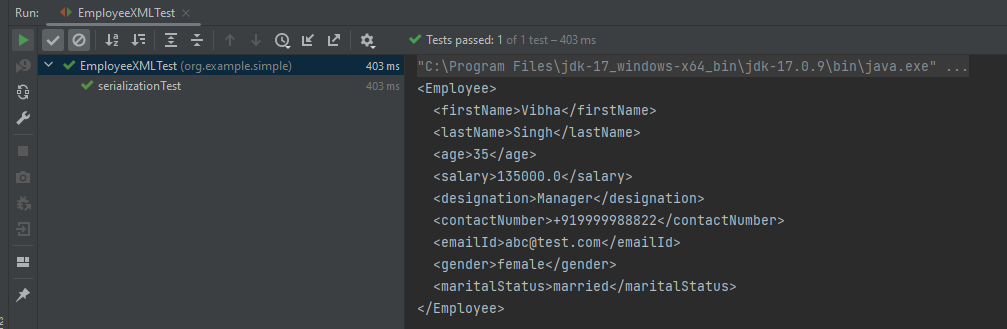
The output of the above program is

Nested Elements in XML

Let us create a complex XML now as shown below.

<Employees>
  <name>
    <firtsname>John</firtsname>
    <middlename>Dave</middlename>
    <lastname>William</lastname>
  </name>
  <contactdetails>
    <deskNumber>00-428507</deskNumber>
    <mobileNumber>+917823561231</mobileNumber>
    <emergencyDetails>
      <emergency_no1>+91 1212898920</emergency_no1>
      <emergency_no2>+91 9997722123</emergency_no2>
      <emergency_no3>+91 8023881245</emergency_no3>
    </emergencyDetails>
  </contactdetails>
  <age>30</age>
  <salary>75000.0</salary>
  <designation>Manager</designation>
  <emailId>abc@test.com</emailId>
  <gender>female</gender>
  <maritalStatus>married</maritalStatus>
</Employees>

Here, In this new structure, we have introduced a nested name element as well as contactdetails element which is further nested to emergencyDetails elements. With our current code, we cannot extract or create the new nested section. So, along with creating a POJO class for Employees, will create a POJO class for name, contactDetails, and emergencyDetails.

Employees

public class Employees {

	Name name;
	ContactDetails contactdetails;

	private int age;
	private double salary;
	private String designation;
	private String emailId;
	private String gender;
	private String maritalStatus;

	// Getter and setter methods
	public Name getName() {
		return name;
	}

	public void setName(Name name) {
		this.name = name;
	}

	public ContactDetails getContactdetails() {
		return contactdetails;
	}

	public void setContactdetails(ContactDetails contactdetails) {
		this.contactdetails = contactdetails;
	}

	public int getAge() {
		return age;
	}

	public void setAge(int age) {
		this.age = age;
	}

	public double getSalary() {
		return salary;
	}

	public void setSalary(double salary) {
		this.salary = salary;
	}

	public String getDesignation() {
		return designation;
	}

	public void setDesignation(String designation) {
		this.designation = designation;
	}

	public String getEmailId() {
		return emailId;
	}

	public void setEmailId(String emailId) {
		this.emailId = emailId;
	}

	public String getGender() {
		return gender;
	}

	public void setGender(String gender) {
		this.gender = gender;
	}

	public String getMaritalStatus() {
		return maritalStatus;
	}

	public void setMaritalStatus(String maritalStatus) {
		this.maritalStatus = maritalStatus;
	}

}

Name

public class Name {

	private String firtsname;
	private String middlename;
	private String lastname;

	public String getFirtsname() {
		return firtsname;
	}

	public void setFirtsname(String firtsname) {
		this.firtsname = firtsname;
	}

	public String getMiddlename() {
		return middlename;
	}

	public void setMiddlename(String middlename) {
		this.middlename = middlename;
	}

	public String getLastname() {
		return lastname;
	}

	public void setLastname(String lastname) {
		this.lastname = lastname;
	}

}

ContactDetails -As you can see that EmergencyDetails element which contains emergency_no1, emergency_no2, and emergency_no3 are nested within ContactDetails, so we have created a separate POJO class for EmergencyDetails.

public class ContactDetails {

	private String deskNumber;
	private String mobileNumber;

	EmergencyDetails emergencyDetails;

	public EmergencyDetails getEmergencyDetails() {
		return emergencyDetails;
	}

	public void setEmergencyDetails(EmergencyDetails emergencyDetails) {
		this.emergencyDetails = emergencyDetails;
	}

	public String getDeskNumber() {
		return deskNumber;
	}

	public void setDeskNumber(String deskNumber) {
		this.deskNumber = deskNumber;
	}

	public String getMobileNumber() {
		return mobileNumber;
	}

	public void setMobileNumber(String mobileNumber) {
		this.mobileNumber = mobileNumber;
	}

}

EmergencyDetails

public class EmergencyDetails {

	private String emergency_no1;
	private String emergency_no2;
	private String emergency_no3;

	public String getEmergency_no1() {
		return emergency_no1;
	}

	public void setEmergency_no1(String emergency_no1) {
		this.emergency_no1 = emergency_no1;
	}

	public String getEmergency_no2() {
		return emergency_no2;
	}

	public void setEmergency_no2(String emergency_no2) {
		this.emergency_no2 = emergency_no2;
	}

	public String getEmergency_no3() {
		return emergency_no3;
	}

	public void setEmergency_no3(String emergency_no3) {
		this.emergency_no3 = emergency_no3;
	}

}

Next, we create our serializeToXML() method:

import com.fasterxml.jackson.core.JsonProcessingException;
import com.fasterxml.jackson.core.exc.StreamWriteException;
import com.fasterxml.jackson.databind.DatabindException;
import com.fasterxml.jackson.dataformat.xml.XmlMapper;
import org.junit.Test;
import java.io.File;
import java.io.IOException;

public class ComplexEmployeeXMLTest {
    @Test
    public void serializationXML() {

        Employees employee = new Employees();

        Name empname = new Name();
        empname.setFirtsname("John");
        empname.setMiddlename("Dave");
        empname.setLastname("William");

        employee.setName(empname);
        employee.setAge(35);
        employee.setSalary(1355000);
        employee.setDesignation("Manager");

        ContactDetails contdetails = new ContactDetails();
        contdetails.setDeskNumber("00-428507");
        contdetails.setMobileNumber("+917823561231");

        EmergencyDetails emergency = new EmergencyDetails();
        emergency.setEmergency_no1("+91 1212898920");
        emergency.setEmergency_no2("+91 9997722123");
        emergency.setEmergency_no3("+91 8023881245");
        contdetails.setEmergencyDetails(emergency);

        employee.setContactdetails(contdetails);

        employee.setEmailId("abc@test.com");
        employee.setMaritalStatus("married");
        employee.setGender("female");

        XmlMapper xmlMapper = new XmlMapper();

        try {
            String employeeXml = xmlMapper.writerWithDefaultPrettyPrinter().writeValueAsString(employee);
            System.out.println(employeeXml);
        } catch (JsonProcessingException e) {
            e.printStackTrace();
        }

        //To save the XML in a file and place under the project
        String userDir = System.getProperty("user.dir");
        try {
            xmlMapper.writerWithDefaultPrettyPrinter()
                    .writeValue(new File(userDir + "\\src\\test\\resources\\NestedXMLExample.xml"), employee);
        } catch (StreamWriteException e) {
            e.printStackTrace();
        } catch (DatabindException e) {
            e.printStackTrace();
        } catch (IOException e) {
            e.printStackTrace();
        }
    }
}

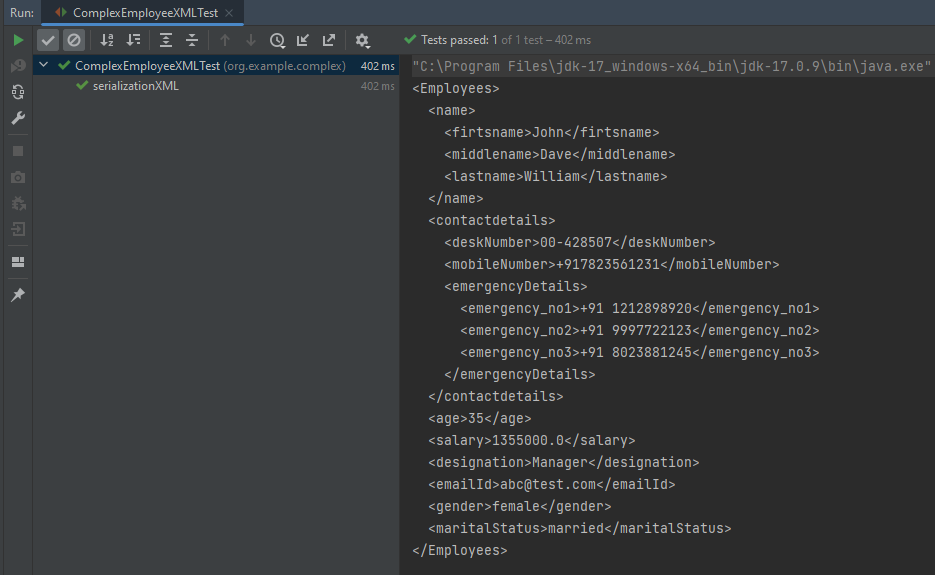
The output of the above program is

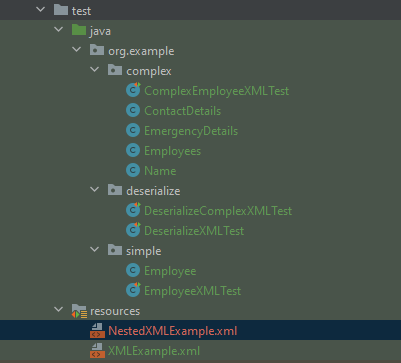
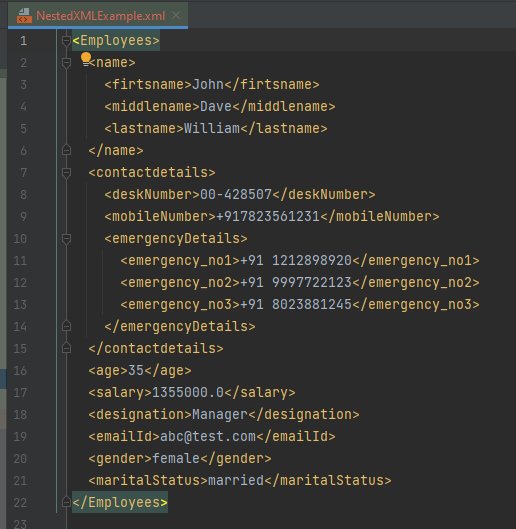
The file is saved under src/test/resources as NestedXMLExample.

There is another way to do the same job of converting Java Object to a complex XML, but which looks more sophisticated and less a number of lines of code.

I’ll use the same complex XML structure.

In this method, we will create a default constructor as well as a parametrized Constructor to pass the arguments for each POJO Class.

Employees

public class Employees {

	Name name;
	ContactDetails contactdetails;

	private int age;
	private double salary;
	private String designation;
	private String emailId;
	private String gender;
	private String maritalStatus;

	public Employees() {
		super();
	}

	public Employees(Name name, ContactDetails contactdetails, int age, double salary, String designation,
			String emailId, String gender, String maritalStatus) {

		this.name = name;
		this.contactdetails = contactdetails;
		this.age = age;
		this.salary = salary;
		this.designation = designation;
		this.emailId = emailId;
		this.gender = gender;
		this.maritalStatus = maritalStatus;
	}

	// Getter and setter methods
	public Name getName() {
		return name;
	}

	public void setName(Name name) {
		this.name = name;
	}

	public ContactDetails getContactdetails() {
		return contactdetails;
	}

	public void setContactdetails(ContactDetails contactdetails) {
		this.contactdetails = contactdetails;
	}

	public int getAge() {
		return age;
	}

	public void setAge(int age) {
		this.age = age;
	}

	public double getSalary() {
		return salary;
	}

	public void setSalary(double salary) {
		this.salary = salary;
	}

	public String getDesignation() {
		return designation;
	}

	public void setDesignation(String designation) {
		this.designation = designation;
	}

	public String getEmailId() {
		return emailId;
	}

	public void setEmailId(String emailId) {
		this.emailId = emailId;
	}

	public String getGender() {
		return gender;
	}

	public void setGender(String gender) {
		this.gender = gender;
	}

	public String getMaritalStatus() {
		return maritalStatus;
	}

	public void setMaritalStatus(String maritalStatus) {
		this.maritalStatus = maritalStatus;
	}

}

Name

public class Name {

	private String firtsname;
	private String middlename;
	private String lastname;

	public Name() {
		super();
	}

	public Name(String firtsname, String middlename, String lastname) {
		super();
		this.firtsname = firtsname;
		this.middlename = middlename;
		this.lastname = lastname;
	}

	public String getFirtsname() {
		return firtsname;
	}

	public void setFirtsname(String firtsname) {
		this.firtsname = firtsname;
	}

	public String getMiddlename() {
		return middlename;
	}

	public void setMiddlename(String middlename) {
		this.middlename = middlename;
	}

	public String getLastname() {
		return lastname;
	}

	public void setLastname(String lastname) {
		this.lastname = lastname;
	}
}

ContactDetails

public class ContactDetails {

	private String deskNumber;
	private String mobileNumber;
	EmergencyDetails emergencyDetails;

	public ContactDetails() {
		super();
	}

	public ContactDetails(String deskNumber, String mobileNumber, EmergencyDetails emergencyDetails) {
		super();
		this.deskNumber = deskNumber;
		this.mobileNumber = mobileNumber;
		this.emergencyDetails = emergencyDetails;
	}

	public EmergencyDetails getEmergencyDetails() {
		return emergencyDetails;
	}

	public void setEmergencyDetails(EmergencyDetails emergencyDetails) {
		this.emergencyDetails = emergencyDetails;
	}

	public String getDeskNumber() {
		return deskNumber;
	}

	public void setDeskNumber(String deskNumber) {
		this.deskNumber = deskNumber;
	}

	public String getMobileNumber() {
		return mobileNumber;
	}

	public void setMobileNumber(String mobileNumber) {
		this.mobileNumber = mobileNumber;
	}
}

EmergencyDetails

public class EmergencyDetails {

	private String emergency_no1;
	private String emergency_no2;
	private String emergency_no3;

	public EmergencyDetails() {
		super();
	}

	public EmergencyDetails(String emergency_no1, String emergency_no2, String emergency_no3) {
		super();
		this.emergency_no1 = emergency_no1;
		this.emergency_no2 = emergency_no2;
		this.emergency_no3 = emergency_no3;
	}

	public String getEmergency_no1() {
		return emergency_no1;
	}

	public void setEmergency_no1(String emergency_no1) {
		this.emergency_no1 = emergency_no1;
	}

	public String getEmergency_no2() {
		return emergency_no2;
	}

	public void setEmergency_no2(String emergency_no2) {
		this.emergency_no2 = emergency_no2;
	}

	public String getEmergency_no3() {
		return emergency_no3;
	}

	public void setEmergency_no3(String emergency_no3) {
		this.emergency_no3 = emergency_no3;
	}
}

Now, let us create a Serialization Test.

import com.fasterxml.jackson.core.JsonProcessingException;
import com.fasterxml.jackson.dataformat.xml.XmlMapper;
import org.junit.Test;

import java.io.File;
import java.io.FileWriter;
import java.io.IOException;

public class XmlSerializationDemo2 {
    @Test
    public void serializationTest() {

        try {

            EmergencyDetails emergency = new EmergencyDetails("+91 894132345", "+91 8888221102", "+91 7223156288");
            ContactDetails contdetails = new ContactDetails("00-428507", "+917823561231", emergency);
            Name empname = new Name("Trina", "Sophia", "William");

            // Converting a Java class object to a XML
            XmlMapper xmlMapper = new XmlMapper();

            String xmlString = xmlMapper.writerWithDefaultPrettyPrinter().writeValueAsString(new Employees(empname,
                    contdetails, 35, 1450000.00, "Director", "trina@test.com", "female", "married"));
            System.out.println(xmlString);

            // write XML string to file
            String userDir = System.getProperty("user.dir");
            File xmlOutput = new File(userDir + "\\src\\test\\resources\\XMLExample.xml");
            FileWriter fileWriter = new FileWriter(xmlOutput);
            fileWriter.write(xmlString);
            fileWriter.close();

        } catch (JsonProcessingException e) {
            e.printStackTrace();
        } catch (IOException e) {
            e.printStackTrace();
        }
    }
}

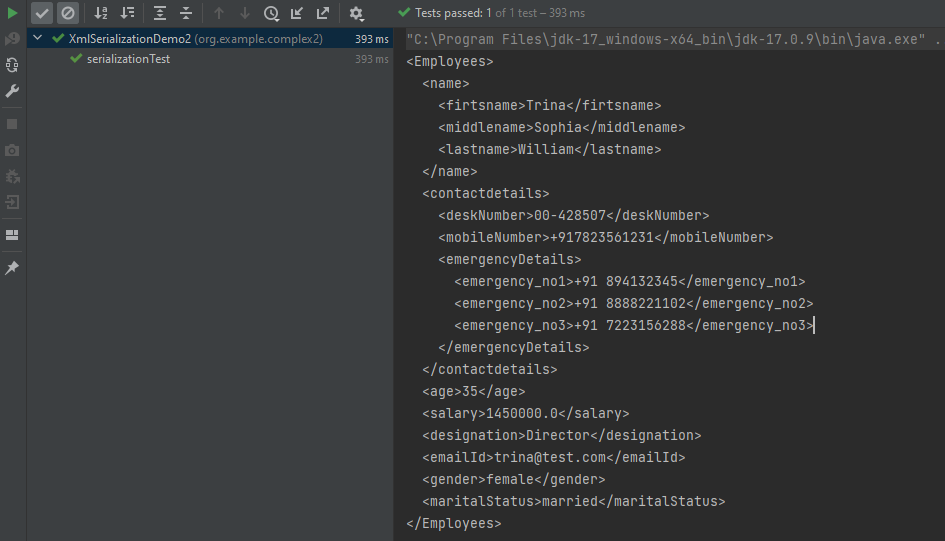
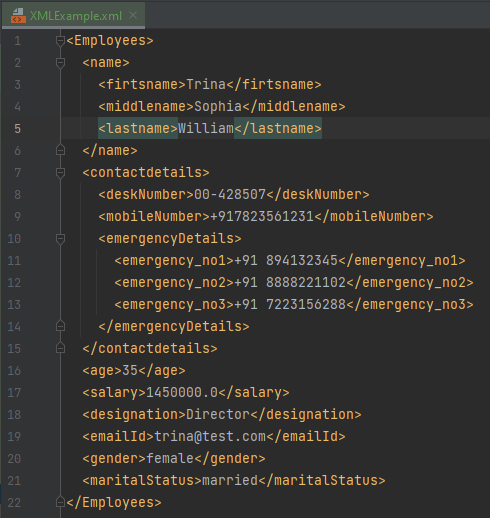
The output of the above program is

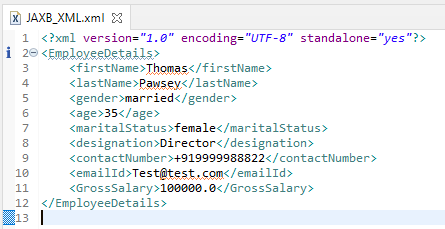
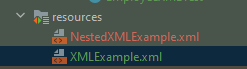
The newly created XML file is saved under src/test/resources as shown in the below image.

We have successfully serialized our Java object into XML and written it into an XML file.

In our serializationTest() function, we create an XmlMapper object, which is a child class to the ObjectMapper class used in JSON serialization. This class converts our Java Object into an XML output that we can now write to a file.

Hope it is useful. Happy Learning !!