
Table of Contents
- What is Playwright?
- Features of Playwright
- Disadvantages of Playwright
- Why choose Playwright Automation?
What is Playwright?
Playwright is a modern and powerful end-to-end testing framework developed by Microsoft, specifically designed for the automation of web applications. It supports programming languages like Java, Python, C#, and NodeJS. Playwright comes with Apache 2.0 License and is most popular with NodeJS with Javascript/Typescript.

Playwright was created by the same engineering team that built Puppeteer. The Playwright team created Playwright to extend Puppeteer’s UI automation capabilities to all rendering engines, no longer just supporting Chromium.
Features of Playwright
Cross-Browser Support:
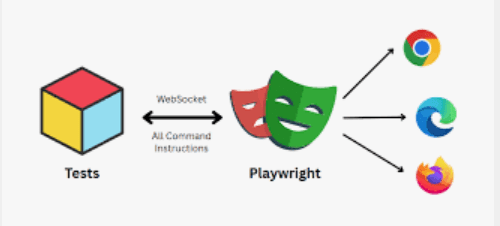
Playwright can automate web pages across all major browsers. This includes Chromium, which is used by Google Chrome, Firefox, and WebKit, which is used by Safari. These capabilities allow for extensive cross-browser testing.
2. Multi-Language Support:
Playwright is available in several programming languages, including JavaScript, TypeScript, Python, .NET, and Java, making it accessible to a wide range of developers.
3. Multi-Platform Compatibility:
It supports running tests on various operating systems, including Windows, macOS, and Linux.
4. Auto-Waiting
Playwright waits for elements to be actionable prior to performing actions. It also has a rich set of introspection events. The combination of the two eliminates the need for artificial timeouts – the primary cause of flaky tests.
5. Mobile Emulation
Playwright allows you to emulate mobile devices, such as iPhones and iPads. You can test how your web application behaves on different screen sizes and orientations.
6. Headless Mode
Playwright run tests in visible or headless mode efficiently. It allows testing in headless mode, that means executing browser actions without displaying the UI. This method is faster and suitable for CI/CD pipelines.
7. Video Recording
Playwright automatically records videos of your tests, which can be useful for debugging and for creating visual regression tests.
8. Built-in Test Assertions and Features
Playwright supports assertions and various testing features directly integrated within its framework, allowing testers to verify results seamlessly. Checks are automatically retried until the necessary conditions are met.
9. Visual and Screenshot Testing
Playwright supports visual and screenshot testing helping you capture full-page screenshots, element snapshots, and video recordings.
10. Network Interception and Customization
It allows manipulation and interception of network requests. This feature can be used for testing API calls in isolation. Additionally, it helps in simulating network conditions like offline mode.
11. Code Generation
Playwright includes a code generator. It can generate code for your tests. This feature saves you time and reduces the risk of errors.
12. Shadow DOM and iframe support
Playwright selectors can pierce deep DOM structures and handle nested frames seamlessly.
13. Browser contexts
Playwright creates a browser context for each test. Browser context is equivalent to a brand new browser profile. This delivers full test isolation with zero overhead. Creating a new browser context only takes a handful of milliseconds.
14. Authentication state reuse
Save the authentication state of the context and reuse it in all the tests. This bypasses repetitive log-in operations in each test, yet delivers full isolation of independent tests.
15. Accessibility testing
It includes tools for testing web accessibility, helping ensure that web applications are usable by people with disabilities.
Disadvantages of Playwright
1.Community and Ecosystem
The Playwright ecosystem and community are growing. However, they are smaller compared to more established tools like Selenium. This size difference can affect the availability of plugins and extensions.
2. Learning Curve:
Playwright’s API can be somewhat complex for users new to web testing frameworks. The ability to handle multiple contexts and browsers simultaneously might be overwhelming for beginners who are more familiar with simpler tools.
3. Resource Consumption
Running tests across multiple browsers simultaneously can be resource-intensive. Ensuring that the testing environment can handle the load without affecting performance might require additional infrastructure or optimizations.
4. Rapid Development Changes
As Playwright is actively developed, frequent changes and version updates are necessary. These changes help to keep up with the latest features and fixes. However, they can potentially impact long-term project stability.
5. Limited Built-in Integrations
Compared to some other tools like Cypress, Playwright has fewer out-of-the-box integrations with third-party services (e.g., dashboards).
6. Debugging Complexity
Debugging may require deeper knowledge of asynchronous code, especially where modern applications have complex behaviors needing careful handling within tests.
Why choose Playwright Automation?
Deciding when to use the Playwright framework for web testing involves evaluating several factors. These factors relate to your project’s specific requirements. You should also consider the capabilities of Playwright and your existing infrastructure.
As of end of 2025, the current snapshot of Microsoft Playwright on Github:
- Active Users: 426.0k
- Forks (copy of a repository that you manage): 4.8k
- Releases: 154 (This shows how active they are in fixing and releasing new features)
Ease of Installation and Setup
Playwright’s setup is straightforward. It includes automatic download of compatible browsers. This reduces initial configuration overhead. Other frameworks require manual installation of browser drivers.
Cross-Browser Testing Needs
Playwright offers robust support for Chromium, Firefox, and WebKit, enabling comprehensive cross-browser testing from a single API. If this is critical for your project, Playwright is a strong candidate.
Parallel execution
Playwright’s ability to run tests in parallel across isolated browser contexts significantly reduces execution time.
CI/CD Integration Support
Playwright supports CI/CD integration. It even provides docker images for some language bindings.
To know more about Playwright, please refer to this website – https://playwright.dev/.
 QA Automation Expert