Security testing involves evaluating a computing system’s security features. This ensures they function properly. It also protects the application’s users and data.
SQL injection vulnerabilities may affect any website or application that uses an SQL database. These databases include MySQL, Oracle, and SQL Server. Malicious actors may use them to gain unauthorized access to sensitive information. This can include customer information, personal data, and trade secrets.
Understanding SQLi’s particular vulnerability is vital for protecting your systems, products, and security infrastructure.
SQL injection is a security vulnerability. It allows an attacker to interfere with the queries an application makes to its database. Attackers can use SQL Injection vulnerabilities to bypass application security measures. They can go around authentication and authorization of a web page or web application and retrieve the content of the entire SQL database. It usually occurs when untrusted data is improperly sanitized and then inserted into a SQL query. This can lead to unauthorized viewing of data, deletion of data, or other harmful activities.
SQL Injection attacks are one of the oldest, most prevalent, and most dangerous web application vulnerabilities. The OWASP organization (Open Web Application Security Project) lists injections in their OWASP Top 10 2017 document as the number one threat to web application security.
How does SQL Injection works?
SQL injection typically occurs when user input is directly concatenated into a SQL query without proper validation or escaping.
Consequences of SQL Injection
1. Data Manipulation– Attackers can use SQL Injections to find the credentials of other users in the database. They can then impersonate these users. The impersonated user may be a database administrator with all database privileges.
2. Denial of Service (DoS) – Malicious queries can overload the database server. This results in a denial of service. It makes the application unresponsive to legitimate users.
3. Unauthorized Changes – SQL also lets you alter data in a database and add new data. For example, in a financial application, an attacker can use SQL Injection to alter balances. They void transactions or transfer money to their account.
4. Data Loss – You can use SQL to delete records from a database, even drop tables. Even if the administrator makes database backups, deletion of data could affect application availability until the database is restored.
5. Backup Corruption – Attackers may also tamper with backups, making data recovery extremely difficult after an attack.
6. Access to Operating System – Advanced SQL injection attacks can provide access to the underlying operating system, allowing attackers to execute system commands.
7. Regulatory Fines – Non-compliance with data protection regulations like GDPR, HIPAA, or CCPA due to data breaches can result in hefty fines.
SQL Injection Example
In-band SQLi (Classic) SQL Injection Example
Below is a script in Java that tries to authenticate a user by querying the database:
String username = request.getParameter("username");
String forename = request.getParameter("forename");

String sql = "SELECT * FROM users WHERE username = '" + username + "' AND forename = '" + forename + "'";

Connection conn = DriverManager.getConnection(url, username, forename);
Statement stmt = conn.createStatement();
ResultSet result = stmt.executeQuery(sql);
if (result.next()) {
    // User is authenticated
    String status = result.getString("success");
    System.out.println("Login to the application");
} else {
    // Authentication failed
  System.out.println("Unable to Login");
}
Original SQL
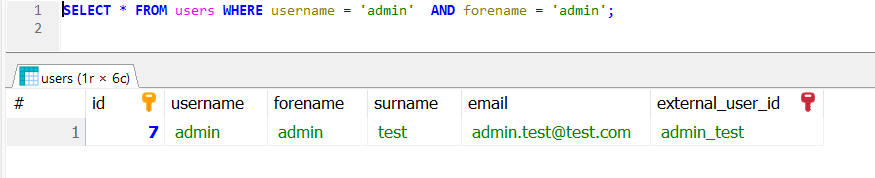
SELECT * FROM users WHERE username = 'admin' AND forename = 'admin';
If a malicious user inputs the username as ‘admin’ — AND forename as ‘admin’ fields:
SELECT * FROM users WHERE username = 'admin' -- AND forename = 'admin';
The `—` is a comment marker in SQL, causing the rest of the query to be ignored. This effectively becomes:
SELECT * FROM users WHERE username = 'admin'
If there is a user with the username `admin`, the attacker would be logged in without providing the correct forename.
To prevent SQL injection, it is essential to use parameterized queries or prepared statements, which safely handle user input and separate SQL code from data.
String username = request.getParameter("username");
String forename = request.getParameter("forename");

String sql = "SELECT * FROM users WHERE username = ? AND forename = ?";

Connection conn = DriverManager.getConnection(url, username, forename);
PreparedStatement preparedStatement = conn.prepareStatement(sql);
preparedStatement.setString(1, username);
preparedStatement.setString(2, forename);
ResultSet result = preparedStatement.executeQuery();
if (result.next()) {
    // User is authenticated
       String status = result.getString("success");
       System.out.println("Login to the application");
} else {
    // Authentication failed
    System.out.println("Unable to Login");
}
In this example, the `?` placeholders are used in the SQL query, and setStringsafely assigns the user input to the query parameters, ensuring that special characters are correctly escaped and handled.
Example of a Union-Based SQL Injection
SELECT ProductName, ProductDescription, ProductCost
FROM Products
WHERE ProductId = '100' UNION SELECT Username, Password FROM Users;
Using the UNION SELECT statement, this query combines the request for item 100’s name and description and cost with another that pulls names and passwords for every user in the database.
Types of SQL Injection
SQL injections typically fall under three categories: In-band SQLi (Classic), Inferential SQLi (Blind) and Out-of-band SQLi.
In-band SQL Injection
In-band SQL injection is the most common type of attack. With this type of SQL injection attack, a malicious user uses the same communication channel for the attack. The same channel is used to gather results.
Error-based SQL Injection:This technique allows attackers to gain information about the database structure. They achieve this by using a SQL command to generate an error message from the database server. Error messages are useful during the development of a web application or web page. However, they can be a vulnerability later. This is because they expose information about the database. Attackers intentionally force the application to generate errors through malformed queries.
Union-based SQL injection: This technique involves attackers using the UNION SQL operator. They combine multiple select statements to return a single HTTP response. An attacker can use this technique to extract information from the database.
Inferential SQL Injection
Inferential SQL injection is also called blind SQL injection because the website database doesn’t transfer data to the attacker like with in-band SQL injection. Instead, a malicious user can learn about the structure of the server by sending data payloads and observing the response.
Boolean injection: With this technique, attackers send a SQL query to the database and observe the result. Using true/false statements to infer database information based on the application’s behavior.
Time-based injection: With this technique, attackers send a SQL query to the database. The query makes the database wait a specific number of seconds before responding. Attackers can determine if the result is true or false. They analyze how many seconds elapse before a response. For example, a hacker could use a SQL query. It commands a delay if the first letter of the first database’s name is A. Then, if the response is delayed, the attacker knows the query is true.
Out-of-Band SQL Injection
This type is less common but can be effective when other methods are not feasible. In this type of SQL injection attack, malicious users employ different communication channels. They use one channel for the attack and another to gather results. Attackers use this method if a server is too slow or unstable to use inferential SQL injection or in-band SQL injection.
Best Practices to Protect Your Database from SQL Injection
Install the latest software and security patches from vendors when available.
Conduct regular security testing, including penetration testing and code reviews, to identify and fix vulnerabilities before they are exploited
Always use prepared statements or parameterized queries that separate SQL code from data, ensuring user inputs are handled securely.
Configure error reporting instead of sending error messages to the client web browser.
Use stored procedures to build SQL statements with parameters that are stored in the database and called from the application.
Use allowlist input validation to prevent unvalidated user input from being added to query.
JSON Web Token (JWT) is an open standard (RFC 7519) that defines a compact and self-contained way for securely transmitting information between parties as a JSON object. This information can be verified and trusted because it is digitally signed. JWTs can be signed using a secret (with the HMAC algorithm) or a public/private key pair using RSA or ECDSA.
What is the JSON Web Token structure?
JSON Web Tokens consist of three parts separated by dots (.), which are:
Header: Contains metadata about the token, such as the algorithm used.
 {
    "typ":"JWT",
    "alg":"HS256"
 }
Payload: Contains claims, like subject, issuer, expiration, etc.
1. The JWT.decode() method from the auth0 library decodes the token into its components without verifying the signature.
DecodedJWT decodedJWT = JWT.decode(jwtToken);
2. Retrieving Components:
Header: The Base64Url-encoded header. Payload: The Base64Url-encoded payload. Signature: The cryptographic signature. getSubject() extracts the sub claim (subject). getIssuer() extracts the iss claim (issuer).
3. The Base64.getUrlDecoder() decodes the Base64Url-encoded header and payload into human-readable JSON strings.
String decodedHeader = new String(java.util.Base64.getUrlDecoder().decode(header));
String decodedPayload = new String(java.util.Base64.getUrlDecoder().decode(payload));
1. The DecodedJWT.getSubject() and DecodedJWT.getIssuer() methods already extract and decode the claims. The attempt to decode them manually as Base64 will fail. They are not separately Base64-encoded. They are JSON values embedded in the payload.
2. The header and payload are Base64Url-encoded, so you we decode them to get the full JSON structures.
3. The signature cannot be “decoded” because it is a hash. It can only be validated using the appropriate cryptographic key.
JSON Web Token (JWT) is an open standard (RFC 7519) that defines a compact and self-contained way for securely transmitting information between parties as a JSON object. This information can be verified and trusted because it is digitally signed. JWTs can be signed using a secret (with the HMAC algorithm) or a public/private key pair using RSA or ECDSA.
What is the JSON Web Token structure?
JSON Web Tokens consist of three parts separated by dots (.), which are:
Header: Contains metadata about the token, such as the algorithm used.
 {
    "typ":"JWT",
    "alg":"HS256"
 }
Payload: Contains claims, like subject, issuer, expiration, etc.
1. Stateless Authentication: JWTs allow for stateless authentication, meaning the server doesn’t need to store user session information. This scalability and reduced server-side storage make JWTs advantageous for distributed systems.
2. Performance: Since JWTs are stateless, server-side lookup is eliminated. It Reduces server load and Improves response times for authenticated requests.
3. Interoperability: JWTs are designed to work across different technologies and systems. This interoperability is particularly useful in microservices architectures, where services may be implemented in different languages.
4. Cross-Domain Authentication: JWTs work well for Single Sign-On (SSO) and cross-domain authentication since they are independent of the application’s storage mechanisms.Users can log in once and access multiple applications without repeatedly authenticating.
5. Secure Data Transfer: The use of signatures in JWTs ensures that the data has not been tampered with during transmission. This provides a level of security when exchanging information between the client and server. Ensures token integrity with algorithms like HS256 (HMAC) or RS256 (RSA).
6. Expiration and Revocation: JWTs include an exp (expiration) claim and can include a revocation mechanism via blacklists. Tokens expire automatically after a set time.
7. Flexibility with Custom Claims: JWT allows adding custom claims like user roles, permissions, or metadata. Tailor the token to your application’s needs.
2. To create a JWT, we use the JWT.create() method. The method returns an instance of the JWTCreator.Builder class. We will use this Builder class to build the JWT token by signing the claims using the Algorithm instance:
Explanation of Claims and Methods:
withIssuer(“QA_Automation”): Adds the iss (issuer) claim, identifying the source of the token.
withSubject(“QA_Automation Details”): Adds the sub (subject) claim, describing the token’s purpose or context (e.g., user or system identity).
withIssuedAt(new Date()): Sets the iat (issued at) claim to the current timestamp, indicating when the token was created.
withExpiresAt(new Date(System.currentTimeMillis() + 10000L)): Sets the exp (expiration) claim to 10 seconds from the current time. After this, the token will no longer be valid.
withJWTId(UUID.randomUUID().toString()): Adds a unique identifier (jti claim) for the token using a random UUID.
withNotBefore(new Date(System.currentTimeMillis() + 100L)): Adds the nbf (not before) claim, setting the token to be valid 100 milliseconds in the future.



 QA Automation Expert