Reading data from Excel files is a common practice in software development and testing. Excel provides a tabular format which is easy to understand and navigate. Data can be read from Excel for manipulation, analysis and visualization using Java, Python, R and soon. There are several ways to read the data from Excel in Python, but we will discuss openpyxl.
Prerequisite:
Python is installed
PIP is installed
PyCharms is installed
Sample Excel

Implementation Steps
Step 1 – Install openpyxl
Openpyxl can be installed using pip
pip install openpyxl

Step 2 – Load the workbook
workbook = load_workbook("C:\\Users\\Vibha\\Automation\\SearchInBing.xlsx")
Step 3 – Select the active worksheet
sheet = workbook.active
Step 4 – Read the Excel (.xlsx) file
for row in sheet.iter_rows(min_row=1, max_row=sheet.max_row, min_col=1, max_col=sheet.max_column):
    for cell in row:
        print(cell.value)
The complete program is
from openpyxl import load_workbook
from tabulate import tabulate

#Load the workbook
workbook = load_workbook("C:\\Users\\Vibha\\Automation\\SearchInBing.xlsx")

#Select the active worksheet
sheet = workbook.active

#Iterate over rows and columns
for row in sheet.iter_rows(min_row=1, max_row=sheet.max_row, min_col=1, max_col=sheet.max_column):
    for cell in row:
        print(cell.value)
The output of the above program is
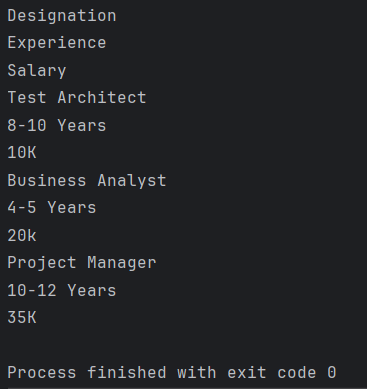
sheet.iter_rows() is used to iterate over the specified rows and columns
cell.value extracts the data from the each cell.
As we can see that the output is not displayed in structured format.
To display the output in the structure format, use the below program:
from openpyxl import load_workbook
from tabulate import tabulate

#Load the workbook
workbook = load_workbook("C:\\Users\\Vibha\\Automation\\SearchInBing.xlsx")

#Select the active worksheet
sheet = workbook.active

#Display data in a structured format
for row in sheet.iter_rows(min_row=1, max_row=sheet.max_row, min_col=1, max_col=sheet.max_column):
    row_data =[]
    for cell in row:
        row_data.append((cell.value))
    print(row_data)
The output of the above program is
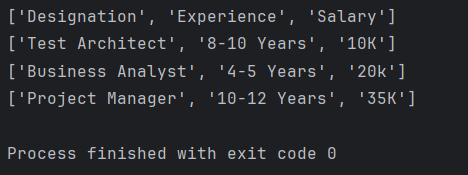
Display the Excel data in Tabular Format
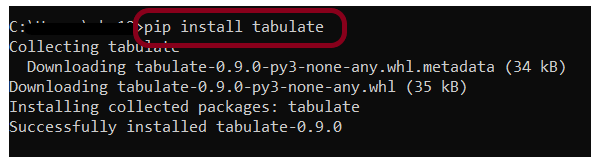
Install the tabulate library
pip install tabulate
Below is the complete program:
from openpyxl import load_workbook
from tabulate import tabulate

#Load the workbook
workbook = load_workbook("C:\\Users\\Vibha\\Automation\\SearchInBing.xlsx")

#Select the active worksheet
sheet = workbook.active

#Display data in a tabular format
data =[]
for row in sheet.iter_rows(values_only = True):
    data.append(list(row))

print(tabulate(data, headers='firstrow', tablefmt='grid'))
sheet.iter_rows(values_only = True) reads the rowss in the sheet and values_only=True ensures that we get the cell values only. Collect the data onto a list of lists.
tabulate(data, headers=’firstrow’, tablefmt=’grid’) is used to print the data nicely in grid format. headers=firstrow uses the first row as headers and tablefmt=grid sets the format to a grid style.
The output of the above program is

We are done! Congratulations on making it through this tutorial and hope you found it useful! Happy Learning!!
 QA Automation Expert