Serialization – How to create JSON Payload from Java Object – Jackson API

HOME

In this tutorial, I will explain the creation of JSON Object Payload with the help of POJO (Plain Old Java Object).

What is POJO?

POJO stands for Plain Old Java Object. It is a very simple object, and it has no bounds or we can say that it has no restrictions other than the Java language specification. Also, it does not require any classpath.

A big advantage of POJO is it increases the readability and reusability of our project code and developers find it easy when understanding the code. Also, POJO is easy to write and anyone can understand them easily.

Now let’s deep dive into some technical terms about the POJO. Below are a few points about the POJO are:

  1. A POJO should not have to extend prespecified classes.
  2. Secondly, a POJO should not have implemented any prespecified interface.
  3. Lastly, POJO should not contain prespecified annotations

A POJO class can follow some rules for better usability. These rules are:-

  1. Each variable should be declared as private just to restrict direct access.
  2. Each variable that needs to be accessed outside class may have a getter, a setter, or both methods. If the value of a field is stored after some calculations, then we must not have any setter method for that.
  3. It Should have a default public constructor.
  4. Can override toString(), hashcode, and equals() methods.

POJO classes are extensively used for creating JSON and XML payloads for API.

In the below example, let me create a simple JSON with some nodes which is actually a 1:1 mapping i.e. each key has a single value, and the type of values is mixed.

{
  "firstName" : "Vibha",
  "lastName" : "Singh",
  "age" : 30,
  "salary" : 75000.0,
  "designation" : "Manager",
  "contactNumber" : "+91999996712",
  "emailId" : "abc123@test.com"
}

Let us create variables in the POJO class now for the above JSON. Now, a class name Employee will be created with the private data members as mentioned in the above JSON. Since we have created all variables as private, then there should be a way to manipulate or retrieve these data. So we create the corresponding getter and setter methods for these data members.

It is very tedious to create getter and setter methods for all the data members for big JSON strings.  Every IDE gives you a shortcut to generate getter and setter methods.  Here, I am using Eclipse and creating these getter and setter methods.

Select all the data members and Right-click on the page. Then select Source and then select Generate Getter and Setter methods.

This opens a new screen as shown below.
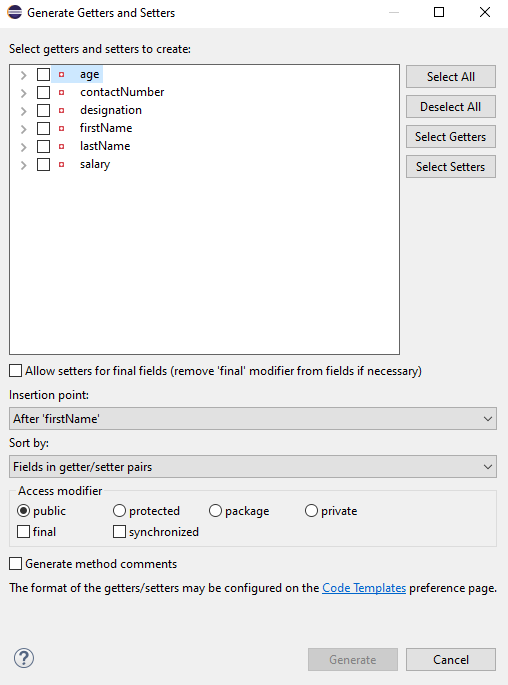
You can select the data member for which you want to create the getter and setter method. I want to create the getter and setter methods for all the data members, so click on Select All and then click on the Generate Button. This will generate the getter and setter methods for all the data members.

Below is the sample code of the Employee table, which contains the data members needed for Employee JSON and their corresponding getter and setter methods.

public class Employee {

	// private variables or data members of POJO class
	private String firstName;
	private String lastName;
	private int age;
	private double salary;
	private String designation;
	private String contactNumber;
	private String emailId;

	// Getter and setter methods
	public String getFirstName() {
		return firstName;
	}

	public void setFirstName(String firstName) {
		this.firstName = firstName;
	}

	public String getLastName() {
		return lastName;
	}

	public void setLastName(String lastName) {
		this.lastName = lastName;
	}

	public int getAge() {
		return age;
	}

	public void setAge(int age) {
		this.age = age;
	}

	public double getSalary() {
		return salary;
	}

	public void setSalary(double salary) {
		this.salary = salary;
	}

	public String getDesignation() {
		return designation;
	}

	public void setDesignation(String designation) {
		this.designation = designation;
	}
	
	public String getContactNumber() {
		return contactNumber;
	}

	public void setContactNumber(String contactNumber) {
		this.contactNumber = contactNumber;
	}

	public String getEmailId() {
		return emailId;
	}

	public void setEmailId(String emailId) {
		this.emailId = emailId;
	}

}

Using the above POJO class, you can create any number of custom Employee objects and each object can be converted into a JSON Object and Each JSON object can be parsed into Employee POJO.

We will create a JSON object from POJO and vice versa now, which is generally called serialization and deserialization using Jackson APIs.

Serialization – Serialization is a process where you convert an Instance of a Class (Object of a class) into a Byte Stream. Here, we are converting Employee class object to JSON representation or Object

Deserialization – It is the reverse of serializing. In this process, we will read the Serialized byte stream from the file and convert it back into the Class instance representation. Here, we are converting a JSON Object to an Employee class object.

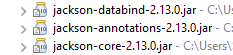
We are using Jackson API for Serialization and Deserialization. So, add the Jackson dependency to the project.

<dependency>
    <groupId>com.fasterxml.jackson.core</groupId>
    <artifactId>jackson-databind</artifactId>
    <version>2.13.0</version>
</dependency>
What is ObjectMapper ?

ObjectMapper provides functionality for reading and writing JSON, either to and from basic POJOs (Plain Old Java Objects), or to and from a general-purpose JSON Tree Model (JsonNode), as well as related functionality for performing conversions. It is also highly customizable to work both with different styles of JSON content and to support more advanced object concepts such as polymorphism and object identity.

Now, let us create a Test Class to show Serialization.

public class EmployeeTest {

	@Test
	public void serializationTest()  {

		Employee employee = new Employee();
		employee.setFirstName("Vibha");
		employee.setLastName("Singh");
		employee.setAge(30);
		employee.setSalary(75000);
		employee.setDesignation("Manager");

		// Converting a Java class object to a JSON payload as string
		ObjectMapper mapper = new ObjectMapper();
		String employeeJson = mapper.writeValueAsString(employee);
		String employeePrettyJson = mapper.writerWithDefaultPrettyPrinter().writeValueAsString(employee);
		System.out.println(employeeJson);
		System.out.println(employeePrettyJson);
   }
}try {
			String employeeJson = mapper.writeValueAsString(employee);
			System.out.println(employeeJson);
			String employeePrettyJson = mapper.writerWithDefaultPrettyPrinter().writeValueAsString(employee);
			System.out.println(employeePrettyJson);
		} catch (JsonProcessingException e) {
			e.printStackTrace();
		}	
	}

The output of the above program is

Here, ObjectMapper from fasterxml.jackson.databind is used for Serialization.

writeValueAsString() is a method that can be used to serialize any Java value as a String.

writerWithDefaultPrettyPrinter() is used to pretty-print the JSON output. It is a Factory method for constructing ObjectWriter that will serialize objects using the default pretty printer for indentation.

I hope this has helped to clear your doubts regarding POJO and how to create JSON objects using POJO.

We are done! Congratulations on making it through this tutorial and hope you found it useful! Happy Learning!!

Rest Assured – @JsonIgnore Annotation in Jackson API

HOME

This tutorial will show how to ignore certain fields when serializing an object to JSON using Jackson 2.x.

This is very useful when the Jackson defaults aren’t enough, and we need to control exactly what gets serialized to JSON – and there are several ways to ignore properties. One of the most common ways is the use of @JsonIgnore Annotation.

To start off, add Jackson’s databind dependency to the project. Always add the latest dependency to your project.

<dependency>
    <groupId>com.fasterxml.jackson.core</groupId>
    <artifactId>jackson-databind</artifactId>
    <version>2.13.0</version>
</dependency>

@JsonIgnore is used at field level to mark a property or list of properties to be ignored.

The Jackson’s @JsonIgnore annotation can be placed on fields, getters/setters and constructor parameters mark a property to be ignored during the serialization to JSON (or deserialization from JSON).  If @JsonIgnore is the only annotation associated with a property, it will also cause the whole property to be ignored: that is, if setter has this annotation and getter has no annotations, the getter is also effectively ignored.

Let us have an Employee JSON as shown below.

{
  "firstName" : "Vibha",
  "lastName" : "Singh",
  "age" : 30,
  "salary" : 75000.0,
  "designation" : "Manager",
  "contactNumber" : "+919999988822",
  "emailId" : "abc@test.com",
  "gender" : "female",
  "maritalStatus" : "married"
}

To learn about Serialization and Deserialization of a JSON Object using Jackson API, refer to this

To create a POJO of the above JSON, we need to create a class with the name Employee. Create private data members corresponding to these JSON nodes, and then create the corresponding getter and setter methods.

Here, I have assigned emailId and gender as @JsonIgnore.

public class Employee {

	// private variables or data members of pojo class
	private String firstName;
	private String lastName;
	private int age;
	private double salary;
	private String designation;
	private String contactNumber;

	@JsonIgnore
	private String emailId;

	@JsonIgnore
	private String gender;

	private String maritalStatus;

	// Getter and setter methods
	public String getFirstName() {
		return firstName;
	}

	public void setFirstName(String firstName) {
		this.firstName = firstName;
	}

	public String getLastName() {
		return lastName;
	}

	public void setLastName(String lastName) {
		this.lastName = lastName;
	}

	public int getAge() {
		return age;
	}

	public void setAge(int age) {
		this.age = age;
	}

	public double getSalary() {
		return salary;
	}

	public void setSalary(double salary) {
		this.salary = salary;
	}

	public String getDesignation() {
		return designation;
	}

	public void setDesignation(String designation) {
		this.designation = designation;
	}

	public String getContactNumber() {
		return contactNumber;
	}

	public void setContactNumber(String contactNumber) {
		this.contactNumber = contactNumber;
	}

	public String getEmailId() {
		return emailId;
	}

	public void setEmailId(String emailId) {
		this.emailId = emailId;
	}

	public String getGender() {
		return gender;
	}

	public void setGender(String gender) {
		this.gender = gender;
	}

	public String getMaritalStatus() {
		return maritalStatus;
	}

	public void setMaritalStatus(String maritalStatus) {
		this.maritalStatus = maritalStatus;
	}

}

Now, let us create a SerializationTest with the above-mentioned POJO.

	@Test
	public void serializationTest() {

		Employee employee = new Employee();
		employee.setFirstName("Vibha");
		employee.setLastName("Singh");
		employee.setAge(30);
		employee.setSalary(75000);
		employee.setDesignation("Manager");
		employee.setContactNumber("+919999988822");
		employee.setEmailId("abc@test.com");
		employee.setMaritalStatus("married");
		employee.setGender("female");

		// Converting a Java class object to a JSON payload as string
		ObjectMapper mapper = new ObjectMapper();

		try {
			String employeePrettyJson = mapper.writerWithDefaultPrettyPrinter().writeValueAsString(employee);
			System.out.println(employeePrettyJson);
		} catch (JsonProcessingException e) {
			e.printStackTrace();
		}

		System.out.println("########################################");

	}

Output

As you can see here that emailId and gender nodes are not present in this JSON payload.

Now, let us see an example of deserialization where nodes that are assigned as @JsonIgnore return null values.

@Test
	public void deserializationTest() throws JsonMappingException, JsonProcessingException  {

		String employeeString = "{\r\n"
				+ "  \"firstName\" : \"Deserialization\",\r\n"
				+ "  \"lastName\" : \"Test\",\r\n"
				+ "  \"age\" : 30,\r\n"
				+ "  \"salary\" : 75000.0,\r\n"
				+ "  \"designation\" : \"Manager\",\r\n"
				+ "  \"contactNumber\" : \"+919999988822\",\r\n"
				+ "  \"emailId\" : \"abc@test.com\",\r\n"
				+ "  \"gender\" : \"female\",\r\n"
				+ "  \"maritalStatus\" : \"married\"\r\n"
				+ " }";
		
	
		// Converting a Java class object to a JSON payload as string
		ObjectMapper mapper = new ObjectMapper();

		Employee employee2 = mapper.readValue(employeeString, Employee.class);
		System.out.println("First Name of employee : " + employee2.getFirstName());
		System.out.println("Last Name of employee : " + employee2.getLastName());
		System.out.println("Age of employee : " + employee2.getAge());
		System.out.println("Salary of employee : " + employee2.getSalary());
		System.out.println("Designation of employee : " + employee2.getDesignation());
		System.out.println("Contact Number of employee : " + employee2.getContactNumber());
		System.out.println("EmailId of employee : " + employee2.getEmailId());
		System.out.println("Marital Status of employee : " + employee2.getMaritalStatus());
		System.out.println("Gender of employee : " + employee2.getGender());

	}

Output

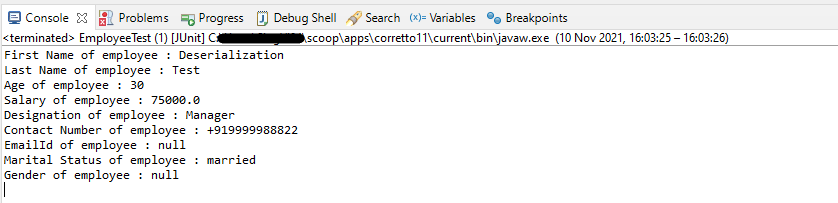
We have values for fields emailId and gender in JSON, but it has not been deserialized as you can see it has default values, not from JSON.

I hope this has helped you to understand @JsonIgnore. Cheers!! Have happy learning!!

Rest Assured – How to test JSON Request using Jackson API

HOME

This tutorial focuses on the testing of a REST API (with JSON payload). We will use Jackson API to serialize the request.

It is suggested to go through these tutorials to understand about creating a JSON Object Payload using POJO (Plain Old Java Object).

How to create JSON Object Payload using POJO – Jackson API

How to create JSON Array Payload using POJO – Jackson API

How to create Nested JSON Object using POJO – Jackson API

To start with, we need to add Jackson Maven’s Dependency to the POM. Always add the latest version of Jackson dependency to your project.

<dependency>
    <groupId>com.fasterxml.jackson.core</groupId>
    <artifactId>jackson-databind</artifactId>
    <version>2.17.2</version>
</dependency>

The complete POM.xml will look like this, as shown below:

<?xml version="1.0" encoding="UTF-8"?>
<project xmlns="http://maven.apache.org/POM/4.0.0"
         xmlns:xsi="http://www.w3.org/2001/XMLSchema-instance"
         xsi:schemaLocation="http://maven.apache.org/POM/4.0.0 http://maven.apache.org/xsd/maven-4.0.0.xsd">
    <modelVersion>4.0.0</modelVersion>

    <groupId>com.example</groupId>
    <artifactId>RestAssured_JUnit4_Demo</artifactId>
    <version>1.0-SNAPSHOT</version>

    <properties>
        <rest-assured.version>5.3.0</rest-assured.version>
        <junit.version>4.13.2</junit.version>
        <jackson.version>2.17.2</jackson.version>
        <maven.compiler.source>11</maven.compiler.source>
        <maven.compiler.target>11</maven.compiler.target>
    </properties>

    <dependencies>

        <!-- Rest-Assured Dependency -->
        <dependency>
            <groupId>io.rest-assured</groupId>
            <artifactId>rest-assured</artifactId>
            <version>${rest-assured.version}</version>
            <scope>test</scope>
        </dependency>

        <!-- JUnit4 Dependency -->
        <dependency>
            <groupId>junit</groupId>
            <artifactId>junit</artifactId>
            <version>${junit.version}</version>
            <scope>test</scope>
        </dependency>

        <!-- Jackson Dependency -->
        <dependency>
            <groupId>com.fasterxml.jackson.core</groupId>
            <artifactId>jackson-databind</artifactId>
            <version>${jackson.version}</version>
        </dependency>

        <!-- Hamcrest Dependency -->
        <dependency>
            <groupId>org.hamcrest</groupId>
            <artifactId>hamcrest-all</artifactId>
            <version>1.3</version>
            <scope>test</scope>
        </dependency>

    </dependencies>

</project>

This dependency will also transitively add the following libraries to the classpath:

  1. jackson-annotations
  2. jackson-core

In the below example, let us assume that we need to create a new Employee (POST Request). To start with, we need to create a POJO class of the JSON payload (EmployeeDetails). This POJO class should contain the data members corresponding to the JSON nodes and their corresponding getter and setter methods.

public class EmployeeDetails {

	// private variables or data members of pojo class
	private String name;
	private double salary;
	private int age;

    // Getter and Setters
	public String getName() {
		return name;
	}

	public void setName(String name) {
		this.name = name;
	}

	public double getSalary() {
		return salary;
	}

	public void setSalary(double salary) {
		this.salary = salary;
	}

	public int getAge() {
		return age;
	}

	public void setAge(int age) {
		this.age = age;
	}

}

Now that we have our POJO class, we can start writing some REST Assured Serialization tests!

Let’s start with REST Assured Serialization with JSON. I want to send a POST request to my EmployeeDetails API that will add a new Employee to the database. I will send a POJO of the employee in the request body. This is what the code looks like in the test class:

import com.fasterxml.jackson.core.JsonProcessingException;
import com.fasterxml.jackson.databind.ObjectMapper;
import io.restassured.http.ContentType;
import org.junit.Test;
import static io.restassured.RestAssured.given;
import static org.hamcrest.Matchers.equalTo;

public class EmployeeTests {

    @Test
    public void createEmployee() {

        // Create an object of POJO class
        EmployeeDetails emp = new EmployeeDetails();
        emp.setName("Vibha");
        emp.setSalary(75000);
        emp.setAge(30);

        // Converting a Java class object to a JSON payload as string
        ObjectMapper mapper = new ObjectMapper();
        String employeePrettyJson = null;
        try {
            employeePrettyJson = mapper.writerWithDefaultPrettyPrinter().writeValueAsString(emp);
        } catch (JsonProcessingException e) {
            e.printStackTrace();
        }
        System.out.println("Request");
        System.out.println(employeePrettyJson);
        System.out.println("=========================================");
        System.out.println("Response");

        // GIVEN
        given().baseUri("https://dummy.restapiexample.com/api").contentType(ContentType.JSON).body(emp)

                // WHEN
                .when().post("/v1/create")

                // THEN
                .then().assertThat().statusCode(200).body("data.name", equalTo("Vibha"))
                .body("message", equalTo("Successfully! Record has been added.")).log().body();

    }

}

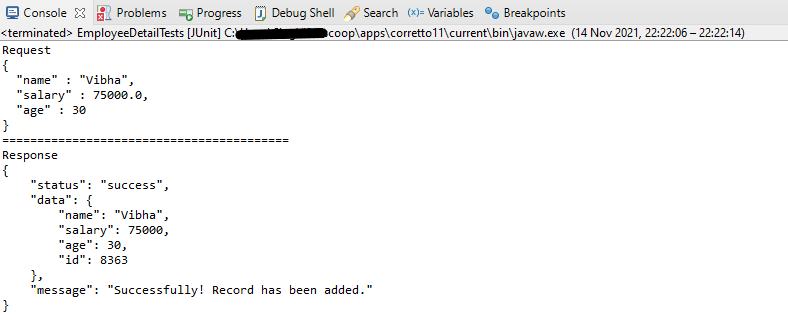
The output of the above program is

If you want to see the structure of the Request, then add the below in the test code.

ObjectMapper mapper = new ObjectMapper();
String employeePrettyJson = mapper.writerWithDefaultPrettyPrinter().writeValueAsString(emp);
System.out.println(employeePrettyJson);

REST Assured Serialization with Jackson handled all the serialization work for us. Great! See, this has become so simple with the help of Jackson API.

We are done! Congratulations on making it through this tutorial and hope you found it useful! Happy Learning!!