When you are doing API testing, sometimes the APIs or endpoints are protected. This means you need to be authenticated and authorized to perform certain actions. REST assured supports several authentication schemes, for example, OAuth, digest, certificate, form, and pre-emptive basic authentication.
In this post, we’ll look at how to pass the authorization token in the header in REST Assured.
What is an authorization token?
An authorization token, often referred to as an access token, is a piece of data or credential that is used to authenticate and authorize access to protected resources or operations in a system.
Add the below-mentioned dependencies to the Maven project.
 <dependencies>

       <!-- Rest Assured Dependency -->
      <dependency>
         <groupId>io.rest-assured</groupId>
        <artifactId>rest-assured</artifactId>
        <version>5.4.0</version>
        <scope>test</scope>
      </dependency>

        <!-- TestNG Dependency-->
      <dependency>
          <groupId>org.testng</groupId>
         <artifactId>testng</artifactId>
         <version>7.8.0</version>
         <scope>test</scope>
       </dependency>

</dependencies>

Sending Basic Auth Header in REST Assured
import io.restassured.http.ContentType;
import io.restassured.response.Response;
import org.testng.Assert;
import org.testng.annotations.Test;
import static io.restassured.RestAssured.given;

public class BasicAuth_Demo {


    @Test
    public void createUser() {
        Response response = given()
                .auth()
                .preemptive()
                .header("Authorization", "Token")
                .header("Accept", "application/json")
                .contentType(ContentType.JSON)
                .body(validRequest)
                .when()
                .post("http://localhost:8080/users")
                .then()
                .extract()
                .response();

        int statusCode = response.getStatusCode();

        Assert.assertEquals(statusCode,200);
    }
}
Below is an example of passing an authorization token in Postman.
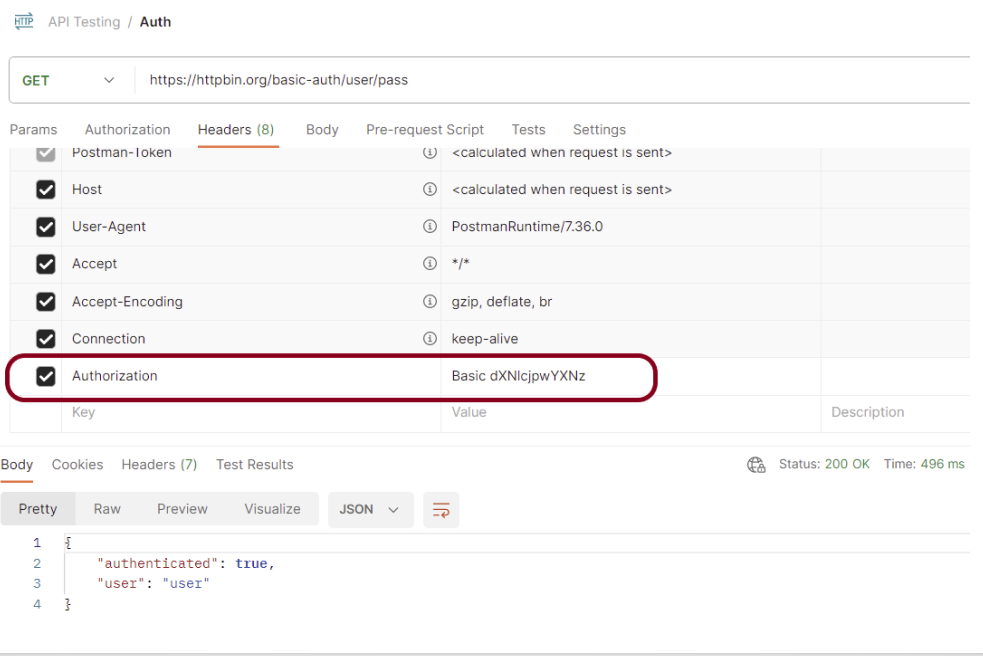
Let us create the test for the above example using Rest Assured.
package org.example;

import io.restassured.http.ContentType;
import io.restassured.response.Response;
import org.junit.Before;
import org.junit.Test;

import static io.restassured.RestAssured.given;
import static org.hamcrest.MatcherAssert.assertThat;
import static org.hamcrest.Matchers.equalTo;

public class BasicAuth_Demo {

    private static final String BASE_URL = "https://httpbin.org/basic-auth/user/pass";
    private static final String TOKEN = "Basic dXNlcjpwYXNz";

    @Before
    public void setup() {
        given().baseUri(BASE_URL);
    }

    @Test
    public void validateToken() {

        Response response = given()
                .header("Accept", "application/json")
                .header("Authorization",TOKEN)
                .contentType(ContentType.JSON)
                .when()
                .get("https://httpbin.org/basic-auth/user/pass")
                .then()
                .log().all()
                .extract()
                .response();

        assertThat(response.getStatusCode(),equalTo(200));

    }

}
The output of the above program is
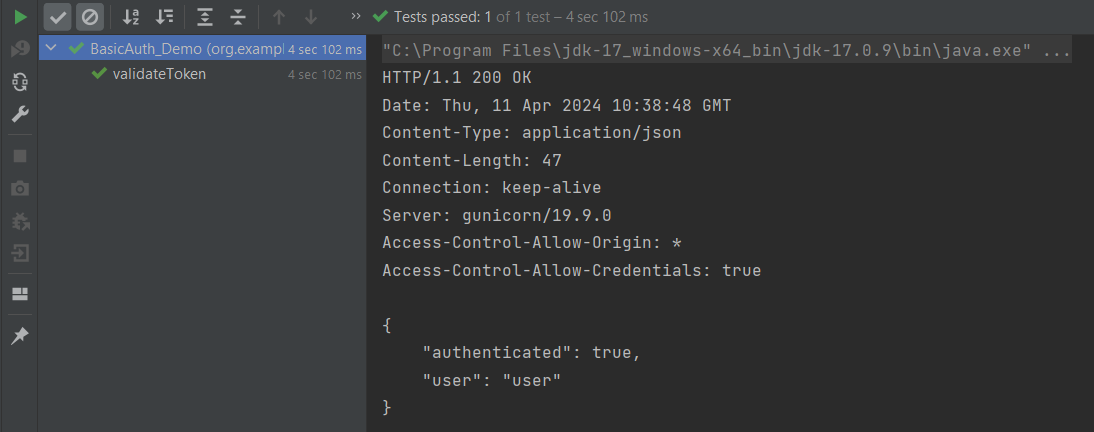
Summary
This code is testing a basic authentication mechanism using Rest-Assured in Java. The key points:
- A GET request is sent to an endpoint that requires authentication.
- Basic Authentication credentials (user:pass) are encoded and sent in the Authorization header.
- The response is verified to ensure that the status code is 200, which indicates successful authentication.
Congratulations on making it through this tutorial and hope you found it useful! Happy Learning!! Cheers!!
 QA Automation Expert