In this blog, we will discuss Classes and Objects. Java is an Object-Oriented Programming language. Class, Objects, Variables, Methods, and Constructors are the building blocks of Object-Oriented language.
What is a Class?
A class is a user-defined template or prototype that is used to create objects and define object data types and methods.
What is an Object?
An object is an instance of a class. An entity that has state and behaviour.
Let us consider the Phone as the object. The state of the Phone is coloured grey, and black, and types like IPhone, Samsung, and behaviour is calling, sending messages, and internet browsing.
How to create a class?
To create a class, a keyword class is used.
Here, I am creating a class with the name Student with the variable Name.
public class Student {
          String Name;
}
How to create an Object?
To create an object, specify a class name like Student, an object name like stud, and use a new keyword.
Student stud = new Student();
Let us create a class and an object of its class and print the value of the variable name.
public class Student {

    String Name = "Tom";
    public static void main(String[] args)

    {
        Student stud = new Student();
        System.out.println("Name of Student :"+stud.Name);
    }
}
The output of the above program is

Multiple Objects of a Class
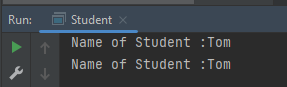
We can create multiple objects of a class. In the below example, we have created 2 objects of class Student.
public class Student {

    String Name = "Tom";
    public static void main(String[] args)
    {
        Student stud1 = new Student();
        Student stud2 = new Student();
        System.out.println("Name of Student :"+stud1.Name);
        System.out.println("Name of Student :"+stud2.Name);
    }
}
The output of the above program is
Multiple Classes
We can create a class and then create an object of that class in another class. Like, here, we have created a class called Student.java and another class is Student_Demo.java where we will create the object of class Student. This is a better approach than the previous one.
public class Student {
          String Name = "Tom";
}


public class Student_Test{
    public static void main(String[] args)
    {
        Student stud = new Student();
        System.out.println("Name of Student :"+stud.Name);
    }
}
There are multiple ways to initialize the classes and objects.
1) Initialize through reference
Here, initializing an object means storing data in the object. Let’s see a simple example where we are going to initialize the object through a reference variable.
public class Student {
          String Name ;
          int Age;
}

public class Student_Test {
    public static void main(String[] args)
    {
        Student stud = new Student();
        stud.Name ="Tom";
        stud.Age=35;
        System.out.println("Name of Student :"+stud.Name);
        System.out.println("Age of Student :"+stud.Age);
    }
}
The output of the above program is

2) Initializing through method
We are creating the two objects of the Student class and initializing the value to these objects by invoking the InsertData() method. Here, we are displaying the state (data) of the objects by invoking the DisplayData() method.
public class Student {
	String Name;
	int Age;

	void InsertData(String n, int a) {
		Name = n;
		Age = a;
	}

	void DisplayData() {
		System.out.println("Name of Student :" + Name);
		System.out.println("Age of Student :" + Age);
	}
}


public class Student_Test {

    public static void main(String[] args) {
        Student stud = new Student();
        stud.InsertData("Tom", 34);
        stud.DisplayData();
    }
}
The output of the above program is

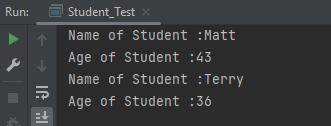
We can create multiple objects
public class Student {
          String Name ;
          int Age;

          void InsertData(String n, int a)
          {
                   Name =n;
                   Age = a;
          }

          void DisplayData()
          {
                   System.out.println("Name of Student :"+Name);
                   System.out.println("Age of Student :"+Age);
          }
    }


public class Student_Test {

    public static void main(String[] args) {

            Student stud1 = new Student();
            Student stud2 = new Student();
            stud1.InsertData("Matt",43);
            stud1.DisplayData();
            stud2.InsertData("Terry",36);
            stud2.DisplayData();
    }
 }
The output of the above program is
We are done! Congratulations on making it through this tutorial and hope you found it useful! Happy Learning!!
 QA Automation Expert