Method Overloading
Java – Multiple Choice Questions and Answers – Method, Overloading, Overriding
Welcome to the Java Quiz! This blog post features 25 multiple-choice questions that explore concepts of Methods, Method Overloading and Method Overriding in Java.
1. Which method can be defined only once in a program?
a) main method
b) finalize method
c) static method
d) private method
Answer 1
a) main method
main() method can be defined only once in a program. Program execution begins from the main() method by java runtime system.
2. What is the return type of a method that does not return any value?
a) int
b) float
c) void
d) double
Answer 2
c) void
Return type of a method must be made void if it is not returning any value.
3. What will be the output of the following Java code?
class box
    {
        int width;
        int height;
        int length;
        int volume;
        void volume(int height, int length, int width)
        {
             volume = width*height*length;
        }
    }
    class Prameterized_method
    {
        public static void main(String args[])
        {
            box obj = new box();
            obj.height = 1;
            obj.length = 5;
            obj.width = 5;
            obj.volume(3,2,1);
            System.out.println(obj.volume);
        }
     }
Choose one option
a) 0
b) 1
c) 6
d) 25
Answer 3
c) 6
The volume() method calculates the product of the parameters passed to it (3, 2, 1) and assigns it to the object’s volume field. Hence, the output is 3 * 2 * 1 = 6.

4. What will be the output of the following Java program?
 class equality
    {
        int x;
        int y;
        boolean isequal()
        {
            return(x == y);
        }
    }
    class Output
    {
        public static void main(String args[])
        {
            equality obj = new equality();
            obj.x = 5;
            obj.y = 5;
            System.out.println(obj.isequal());
        }
    }
Choose one option
a) true
b) Runtime error
c) false
d) 0
Answer 4
a) true
The method isequal() compares x and y using ==. Since both are set to 5, the condition x == y is true, so the method returns true, which gets printed.

5. Which of the following is a method having same name as that of it’s class?
a) finalize
b) delete
c) class
d) constructor
Answer 5
d) constructor
A constructor is a method that initializes an object immediately upon creation. It has the same name as that of class in which it resides.
6. What will be the output of the following Java program?
 class overload
    {
        int x;
 	int y;
        void add(int a)
        {
            x =  a + 1;
        }
        void add(int a, int b)
        {
            x =  a + 2;
        }
    }
    class Overload_methods
    {
        public static void main(String args[])
        {
            overload obj = new overload();
            int a = 0;
            obj.add(6);
            System.out.println(obj.x);
        }
   }
Choose one option
a) 5
b) 6
c) 7
d) Runtime error
Answer 6
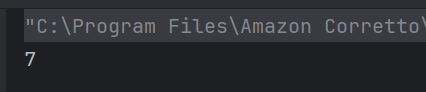
c) 7
Due to method overloading when the add() method is called with a single argument the value of x is set to argument passed i.e. 6 + 1 is returned. Hence the result is 7.
7. What will be the output of the following Java program?
class overload
    {
        int x;
 	    int y;

       void add(int a)
        {
            x =  a + 1;
        }
        void add(int a , int b)
        {
            x =  a + 2;
        }
    }
    class Overload_methods
    {
        public static void main(String args[])
        {
            overload obj = new overload();
            int a = 0;
            obj.add(6, 7);
            System.out.println(obj.x);
        }
    }
Choose one option
a) 6
b) 7
c) 8
d) 9
Answer 7
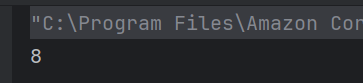
c) 8
Due to method overloading when the add() method is called with two arguments the value of x is set to the first argument passed i.e. 6 + 2 is returned. Hence the result is 8.
8. What will be the output?
class overload
   {
        int x;
 	    double y;
        void add(int a , int b)
        {
            x = a + b;
        }
        void add(double c , double d)
        {
            y = c + d;
        }
        overload()
        {
            this.x = 0;
            this.y = 0;
        }
    }
    class Overload_methods
    {
        public static void main(String args[])
        {
            overload obj = new overload();
            int a = 2;
            double b = 3.2;
            obj.add(a, a);
            obj.add(b, b);
            System.out.println(obj.x + " " + obj.y);
        }
   }
Choose one option
a) 6 6
b) 6.4 6.4
c) 6.4 6
d) 4 6.4
Answer 8
d) 4 6.4
For obj.add(a,a); ,the function in line number 4 gets executed and value of x is 4. For the next function call, the function in line number 7 gets executed and value of y is 6.4.

9. Which of the following best defines method overloading in Java?
a) Redefining a method with the same name and same parameters in child class.
b) Defining multiple methods with the same name but different parameter lists in the same class.
c) Using a method of the parent class in the child class.
d) Declaring a method as static multiple times.
Answer 9
b) Defining multiple methods with the same name but different parameter lists in the same class.
Overloading occurs when methods have the same name but different parameter lists (number or type).
10. Which of the following is NOT a valid way to overload methods in Java?
a) Different number of parameters.
b) Different types of parameters.
c) Different return types only.
d) Different order of parameters.
Answer 10
c) Different return types only
Overloading cannot be achieved by changing only the return type
11. What will be the output?
class area
    {
        int width;
        int length;
        int volume;
        area()
        {
           width=5;
           length=6;
        }
        void volume()
        {
             volume = width*length*height;
        }
    }
    class cons_method
    {
        public static void main(String args[])
        {
            area obj = new area();
            obj.volume();
            System.out.println(obj.volume);
        }
    }
Choose one option
a) 0
b) 30
c) 1
d) error
Answer 11
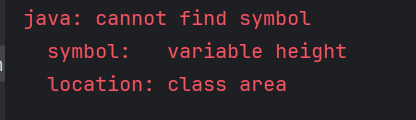
d) error
Variable height is not defined
12. Which of the following allows method overriding?
Choose one option
a) Same method name and parameter list in subclass.
b) Same method name but different parameters in subclass.
c) Same method name but different return type in subclass.
d) Static methods in subclass.
Answer 12
a) Same method name and parameter list in subclass
Overriding requires the same method signature (name + parameters) in superclass and subclass
13. What is the default return type of a method in Java if not specified?
Choose one option
a) int
b) void
c) Object
d) Compilation error
Answer 13
d) Compilation error
Java requires an explicit return type. If omitted, it results in a compilation error.
14. What will be the output of the following code?
 class test
    {
        int a;
        int b;
        test(int i, int j)
        {
            a = i;
            b = j;
        }
        void meth(test o)
        {
            o.a *= 2;
            o.b /= 2;
        }
    }
    class Output
    {
        public static void main(String args[])
        {
            test obj = new test(10 , 20);
            obj.meth(obj);
            System.out.println(obj.a + " " + obj.b);
        }
    }
Choose one option
a) 20 10
b) 10 20
c) 20 40
d) 40 20
Answer 14
a) 20 10
Class objects are always passed by reference, therefore changes done are reflected back on original arguments. obj.meth(obj) sends object obj as parameter whose variables a & b are multiplied and divided by 2 respectively by meth() function of class test. a & b becomes 20 & 10 respectively.

15. What will be the result of this expression?
class Output {
    public static int sum(int... x) {
        int total = 0;
        for (int num : x) {
            total += num;
        }
        return total;
    }

    public static void main(String args[]) {
        System.out.println(sum(10));
        System.out.println(sum(10, 20));
        System.out.println(sum(10, 20, 30));
        System.out.println(sum(10, 20, 30, 40));
    }
}
Choose one option
a) only sum(10)
b) only sum(10,20)
c) only sum(10) & sum(10,20)
d) all of the mentioned
Answer 15
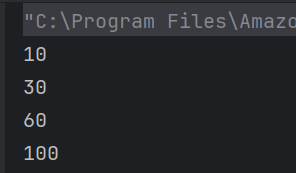
d) all of the mentioned
sum is a variable argument method and hence it can take any number as an argument.
16. What is the result of the following code snippet?
class Test
{
 public void m1 (int i,float f)
 {
  System.out.println(" int float method");
 }

 public void m1(float f,int i)
  {
  System.out.println("float int method");
  }

  public static void main(String[]args)
  {
    Test test =new Test();
       test.m1(20,20);
   }
}
Choose one option
a) int float method
b) float int method
c) compile time error
d) run time error
Answer 16
c) compile time error
While resolving overloaded method, compiler automatically promotes if exact match is not found. But in this case, which one to promote is an ambiguity.

17. What will be printed?
class Test {
    void show(int a) {
        System.out.println("int method: " + a);
    }

    void show(double a) {
        System.out.println("double method: " + a);
    }

    public static void main(String[] args) {
        Test obj = new Test();
        obj.show(10);      // Line 1
        obj.show(10.5);    // Line 2
        obj.show('A');     // Line 3
    }
}
Choose one option
a) int method: 10
double method: 10.5
int method: 65
b) int method: 10
double method: 10.5
double method: 65.0
c) Compilation error
d) Runtime error
Answer 17
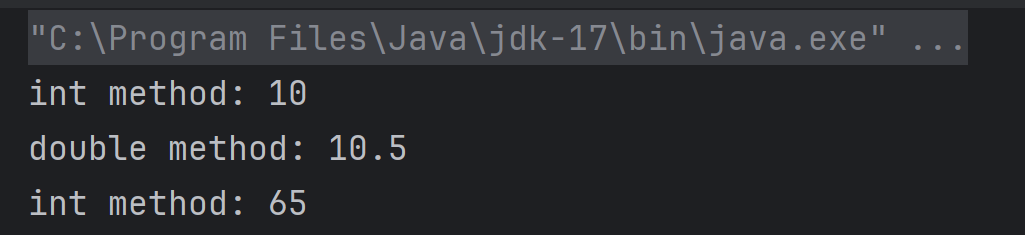
a) int method: 10
double method: 10.5
int method: 65
obj.show('A') → 'A' is a char (ASCII 65). Char can be promoted to int, so it calls show(int) and prints 65.
18. Which principle of OOP is demonstrated by method overriding?
a) Encapsulation
b) Abstraction
c) Polymorphism
d) Inheritance only
Answer 18
c) Polymorphism
19. If a class has two methods: void add(int a, int b) and int add(int x, int y), what happens?
a) Valid overloading
b) Compile-time error
c) Runtime error
d) Both methods are executed
Answer 19
b) Compile-time error
Same parameter list but different return type only results in compile-time error
20. What is the output of the following code?
class Derived
{
    public void getDetails()
    {
        System.out.printf("Derived class ");
    }
}

public class Test extends Derived
{
    public void getDetails()
    {
        System.out.printf("Test class ");
        super.getDetails();
    }
    public static void main(String[] args)
    {
        Derived obj = new Test();
        obj.getDetails();
    }
}
Choose one option
a) Test class Derived class
b) Derived class Test class
c) Runtime error
d) Compilation error
Answer 20
a) Test class Derived class
Since getDetails() is overridden in the Test class and super.getDetails() is called inside it, both methods are executed in order.

21. What is the output of this switch statement?
import java.io.IOException;

class Derived {
    public void getDetails() throws IOException { // Line 4
        System.out.println("Derived class");
    }
}

public class Test extends Derived {
    public void getDetails() throws Exception { // Line 10
        System.out.println("Test class");
    }

    public static void main(String[] args) throws IOException { // Line 14
        Derived obj = new Test();
        obj.getDetails();
    }
}
a) Compilation error due to line 4
b) Compilation error due to line 10
c) Compilation error due to line 14
d) All the above
Answer 21
b) Compilation error due to line 10
The exception thrown by the overriding method should not be new or more broader checked exception.

22. What will be the output of this while loop?
class Derived
{
    protected final void getDetails()
    {
        System.out.println("Derived class");
    }
}

public class Test extends Derived
{
    protected final void getDetails()
    {
        System.out.println("Test class");
    }
    public static void main(String[] args)
    {
        Derived obj = new Derived();
        obj.getDetails();
    }
}
a) Derived class
b) Test class
c) Runtime error
d) Compilation error
Answer 22
d) Compilation error
Final and static methods cannot be overridden.

23. What is the output of the following if-else block?
public class Test
{
    public int getData(String temp) throws IOException
    {
        return 0;
    }
    public int getData(String temp) throws Exception
    {
        return 1;
    }
    public static void main(String[] args)
    {
        Test obj = new Test();
        System.out.println(obj.getData("Happy"));
    }
}
a) 0
b) 1
c) Compilation error
d) Runtime error
Answer 23
c) Compilation error
Methods that throws different exceptions are not overloaded as their signature are still the same.

24. Can constructors be overridden in Java?
a) Yes
b) No
c) Only in abstract classes
d) Only for default constructors
Answer 24
b) No
Constructors cannot be inherited, hence cannot be overridden.
25. Which of these statements is correct?
a) Overloading is runtime polymorphism, overriding is compile-time.
b) Overloading is compile-time polymorphism, overriding is runtime.
c) Both overloading and overriding are compile-time polymorphism.
d) Both are runtime polymorphism.
Answer 25
b) Overloading is compile-time polymorphism, overriding is runtime.
We would love to hear from you! Please leave your comments and share your scores in the section below
Polymorphism in Java
In this tutorial, I’ll explain about Polymorphism in Java. It is one of the four concepts of OOPs. It is a concept where we can perform a single action in multiple ways. Poly means many and morphs means form. Polymorphism allows us to define one interface and have multiple implementations. An example of polymorphism is that there are different forms of communication like calls, SMS, picture messages, etc.
There are 2 types of polymorphism:-
- Method Overloading in Java – This is an example of compile time (or static polymorphism)
- Method Overriding in Java – This is an example of runtime time (or dynamic polymorphism)
Complie Time Polymorphism
It is also known as static polymorphism. Method Overloading is an example of static polymorphism. It is a feature that allows a class to have more than one method having the same name if their argument lists are different. Error if any occur, resolved during compile time.
Below is an example of static polymorphism.
Calculation
public class Calculation {

	void sum(int a, int b) {
		System.out.println("Sum of 2 numbers :" + (a + b));
	}

	void sum(int x, int y, int z) {
		System.out.println("Sum of 3 numbers :" + (x + y + z));
	}

}
PolymorphismTest
public class PolymorphismTest {

	public static void main(String[] args) {

		Calculation cal = new Calculation();
		cal.sum(10, 5);
		cal.sum(2, 6, 4);

	}
}
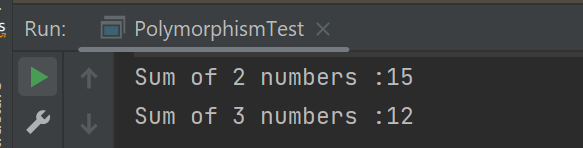
The output of the above program is
Dynamic Polymorphism
It is also known as Dynamic Method Dispatch. In this, the call to the overridden method happens at the runtime. This type of polymorphism is achieved by Method Overriding. Declaring a method in sub class that is already present in the parent class is known as method overriding.
Below is an example of dynamic polymorphism
Parent Class
public class Bank {

	 //Overridden method
	public void getRateOfInterest() {

		System.out.println("getRateOfInterest() method of parent class");
		System.out.println("Interest Rate of Bank :" + 0);

	}
}
Child 1 Class
public class BOI extends Bank {

    // Overriding method
	public void getRateOfInterest() {

		System.out.println("getRateOfInterest() method of child 1 class");
		System.out.println("Interest Rate of BOI Bank :" + 4.1);

	}

}
Child 2 Class
public class BoFA extends Bank {

    // Overriding method
	public void getRateOfInterest() {

		System.out.println("getRateOfInterest() method of child 2 class");
		System.out.println("Interest Rate of BofA Bank :" + 3.2);

	}

}
Child 3 Class
public class SBI extends Bank {

	// Overriding method
	public void getRateOfInterest() {

		System.out.println("getRateOfInterest() method of child 3 class");
		System.out.println("Interest Rate of SBI Bank :" + 5.3);

	}
}
Test Class
public class StaticPolTest {

	public static void main(String[] args) {

		Bank bank1 = new Bank();
		bank1.getRateOfInterest();

		BOI bank2 = new BOI();
		bank2.getRateOfInterest();

		BofA bank3 = new BofA();
		bank3.getRateOfInterest();

		SBI bank4 = new SBI();
		bank4.getRateOfInterest();
	}

}
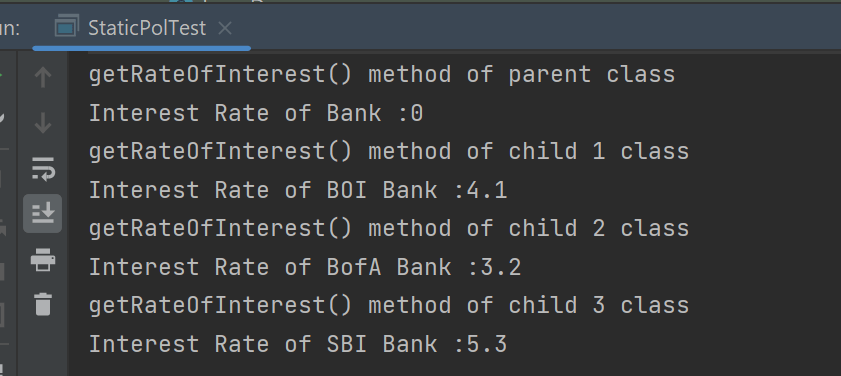
The output of the above program is
Points to note for Method Overriding:-
- The argument list of the overriding method (method of subclass) must match the overridden method (the method of parent class). The data types of the arguments and their sequence should exactly match.
- The access Modifier of the overriding method (method of a subclass) cannot be more restrictive than the overridden method of the parent class.
Suppose, I have changed the access modifier of SBI class from public to protected and then run the StaticPolTest program. In that case, I’ll get a compile-time error.
getRateOfInterest() method of parent class
Interest Rate of Bank :0
getRateOfInterest() method of child 1 class
Interest Rate of BOI Bank :4.1
getRateOfInterest() method of child 2 class
Interest Rate of BofA Bank :3.2
Exception in thread "main" java.lang.Error: Unresolved compilation problem:
	Cannot reduce the visibility of the inherited method from Bank

	at JavaDemo.Polymorphism.SBI.getRateOfInterest(SBI.java:6)
	at JavaDemo.Polymorphism.StaticPolTest.main(StaticPolTest.java:17)
Method Overloading in Java
What is Method Overloading?
It is a feature that allows a class to have more than one method of the same name, but different parameters. The method can be overloaded if:-
- No of parameters are different in two methods
- Type of parameters are different
- Sequence of parameters are different
Note:- If two methods have same name, same no of parameters, same sequence of parameters and same type of parameters but different return type, then the methods are not overloaded. It will show compile time error.
Why do we need Method Overloading?
If we need to perform the same kind of operation with different data inputs, we go for method overloading. Below is an example of an addition operation with different inputs to explain method overloading. It is an example of static polymorphism early binding or compile time binding. Here, the binding of the method call to its definition happens at compile time.
Below is an example of method overloading.
public class MethodOverloading_Demo {

    public void Calculation(int a, float b) {
        System.out.println("Sum of 2 numbers :" + (a + b));
    }

    //Different type of parameters
    public void Calculation(float x, float y) {
        System.out.println("Sum of 2 numbers :" + (x + y));
    }

    //Different number of parameters
    public void Calculation(int i, int j, int k) {
        System.out.println("Sum of 3 numbers :" + (i + j + k));
    }

    //Different sequence of parameters
    public void Calculation(float p, int r) {
        System.out.println("Sum of 3 numbers :" + (p + r));
    }

    public static void main(String[] args) {

        MethodOverloading_Demo add = new MethodOverloading_Demo();

        //Call overloaded methods
        add.Calculation(5, 12f);
        add.Calculation(13f, 12.0f);
        add.Calculation(22, 33, 50);
        add.Calculation(11f, 10);
    }

}
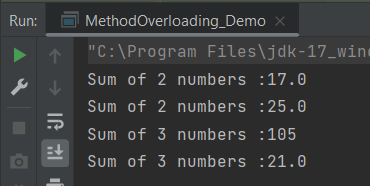
The output of the above program is
What is Type Promotion?
When a data type of smaller type, promote to bigger type, it called type promotion. Suppose a method has double data type and object provides float, then the program works fine. Float will be promote to double.
Let us explain this with an example. In the below example, object has provided float data type, but method has double data type, so there is type promotion.
public class Addition {

    public void Calculation(int a, int b)  {
        System.out.println("Sum of 2 numbers :"+(a+b));
    }

    public void Calculation(int x, double y)   {
        System.out.println("Sum of 2 numbers :"+(x+y));
    }

    public static void main(String[] args) {
        Addition add = new Addition();
        //Type Promotion method
        add.Calculation(5,12);
        add.Calculation(13,12f);
    }
}
The output of the above program is

We are done! Congratulations on making it through this tutorial and hope you found it useful! Happy Learning!!
Methods in Java
A method is a block of code that is use to perform certain actions. Method runs when it called. Method allow us to reuse the code. Methods are essentially functions within a class that define the behavior of the class or objects created from that class.
Types of methods in Java
- Standard Library methods
- User defined methods
Standard Library Method
They are built-in Java methods are readily available to use. For example, sqrt() is a Method of Math and returns square root of a number.
User-defined Method
User can define a method inside a class as per his/her wish.
How to create a Method?
modifier returnType nameOfMethod (Parameter List) {
   // method body  }
Here,
- modifier − It defines the access type of the method like public, protected, default, private
- returnType − Method may return a value or not. Void does not return any value.
- nameOfMethod − This is the method name. The method signature consists of the method name and the parameter list.
- Parameter List − The list of parameters, it is the type, order, and number of parameters of a method. These are optional, method may contain zero parameters.
- method body − The method body defines what the method does with the statements.
public static int methodName(int a, int b) {
      // body
   }
Below is an example of method.
public class Method_Example {

    public static void main(String[] args) {

        //Standard Library Method
        System.out.println("Square root of 9 is : " + Math.sqrt(9));

        //User defined Method
        MyMethod();
    }

    public static void MyMethod()
    {
        System.out.println("My User defined Method");
    }
}
The output of the above program is

Java Methods with Arguments and Return Value
A Java method can have zero or more parameters, and they may return a value.
public class Min_Method {

    public static void main(String[] args) {
        int a = 10;
        int b = 5;
        int c = minMethod(a,b);
                System.out.println("Minimum value is :" + c);
    }

    //Define function min_function
    public static int minMethod(int x, int y)
    {
        int min;
        if (x>y)
            min =y;
        else
            min = x;
        //return value
        return min;
    }
}
The output of the above program is
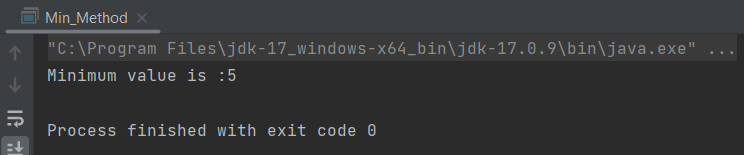
In the above example, minMethod() method is if return type int and returning the value of variable min.
Void Keyword
The void keyword allows us to create methods that do not return a value. When a method’s return type is void, it means that the method performs some operation or task but does not produce any result that needs to be returned to the caller.
public class Min_Method {

    public static void main(String[] args) {

        int a = 10;
        int b = 5;

        //Call function
        minMethod(a,b);
    }

    //Define function min_function
    public static void minMethod(int x, int y)
    {
        int min;
        if(x>y)
            min =y;
        else
            min = x;
        System.out.println("Minimum value is :" + min);
    }
}
The output of the above program is

In the above example, minMethod() method is if return type void, so it is not returning any value.
Method Overloading
When a class has two or more methods by the same name but different parameters, it known as method overloading. To know more about method overloading, click here.
public class Overloading_Example {

        public static void main(String[] args) {

            int a= 10;
            int b = 24;
            double c = 12.0;
            double d = 13.0;
            min_function(a, b);
            min_function(c,d);
        }

        public static void min_function(int x, int y)
        {
            int min;
            if(x>y)
                min = y;
            else
                min = x;

            System.out.println("Minimum value for integer is :"+ min);
        }

        public static void min_function(double m, double n)
        {
            double min;
            if(m>n)
                min=n;
            else
                min=m;
            System.out.println("Minimum value for integer is :"+ min);
        }
    }
The output of the above program is

What is main method in Java?
The main()method is the entry point into the application. The signature of the method is always: public static void main(String[] args).
public: The main method is typically declared as public so that it can be accessed from outside the class.
static: The main method is declared as static because it belongs to the class rather than any specific instance of the class.
void: The main method does not return any value.
String[] args: The main method accepts an array of strings as arguments, which can be used to pass command-line arguments to the Java program.
 QA Automation Expert