Welcome to the Java Quiz! This blog post features 25 multiple-choice questions that explore the exception handling in Java.
1. What is Exception in Java
a) An error that occurs during runtime
b) An error that occurs during compilation
c) A warning issued by the compiler
d) A type of loop
Answer 1
a) An error that occurs during runtime
2. Which of the following is the root class of the exception hierarchy in Java?
a) Exception
b) Throwable
c) Error
d) RuntimeException
Answer 2
b) Throwable
The root class of the Java exception hierarchy is Throwable. Both Exception and Error are subclasses of Throwable.
3. What will be the output of the following Java code?
public class QAAutomation {

     public static void main(String[] args) {
        try {
            System.out.println("Inside try");
            throw new RuntimeException("Error");
        } finally {
            System.out.println("Inside finally");
        }
    }
}
Choose one option
a) Inside try
b) Inside try Inside finally
c) Inside try Inside finally RuntimeException
d) Compilation Error
Answer 3
c) Inside try Inside finally RuntimeException
The finally block executes even after an exception is thrown.

4. What will be the output of the following Java program?
 public class QAAutomation {

    static void method() throws Exception {
        throw new Exception("Error occurred");
    }

    public static void main(String[] args) {
        method();
    }
}
Choose one option
a) Compilation Error
b) Runtime error
c) Exception: Error occurred
d) Program runs successfully
Answer 4
a) Compilation Error
The method() declares throws Exception, but main() does not handle it, leading to a compilation error.

5. What is the difference between throw and throws?
a) throw is used to declare exceptions, throws is used to throw exceptions
b) throws is used to declare exceptions, throw is used to throw exceptions
c) Both are used to declare exceptions
d) Both are used to throw exceptions
Answer 5
b) throws is used to declare exceptions, throw is used to throw exceptions
throw is used inside a method to throw an exception, while throws is used in the method signature to declare possible exceptions.
6. What will be the output of the following Java program?
 class CustomException extends Exception {
    public CustomException(String message) {
        super(message);
    }
}

public class Test {
    public static void main(String[] args) {
        try {
            throw new CustomException("Custom error occurred");
        } catch (CustomException e) {
            System.out.println(e.getMessage());
        }
    }
}
Choose one option
a) Custom error occurred
b) Compilation Error
c) No Output
d) Runtime Exception
Answer 6
a) Custom error occurred
A custom exception is thrown and caught, and e.getMessage() prints the error message.

7. What will be the output of the following Java program?
public class Test {

    public static void main(String args[]) {
        try {
            int a, b;
            b = 0;
            a = 5 / b;
            System.out.print("A");
        } catch (ArithmeticException e) {
            System.out.print("B");
        } finally {
            System.out.print("C");
        }
    }
}
Choose one option
a) A
b) B
c) AC
d) BC
Answer 7
d) BC
The variable a is set to 0, in expression b = 5/a refers to dividing an int{5} with an int{0} which results in an ArithmeticException, which is caught by the catch statement and “B” is printed. Since the final block must be executed in any case . Hence “C” also prints after “B”.

8. What will be the output of the following Java program?
public class Test {
    public static void main(String args[])
    {
        try
        {
            int i, sum;
            sum = 10;
            for (i = -1; i < 3 ;++i)
                sum = (sum / i);
        }
        catch(ArithmeticException e)
        {
            System.out.print("0");
        }
        System.out.print(sum);
    }
}
Choose one option
a) 0
b) 05
c) Compilation Error
d) Runtime Error
Answer 8
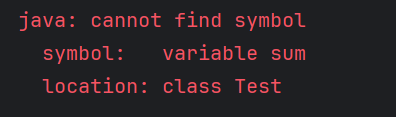
c) Compilation Error
sum variable is declared in try block, but trying to access it outside the try-catch block.
9. Which of the following can be declared in a method’s `throws` clause?
a) RuntimeException
b) Error
c) IOException
d) None of the above
Answer 9
c) IOException
Checked exceptions like IOException must be declared in a method’s throws clause if not caught. RuntimeException and Error are typically not declared.
10. What happens if an exception is not caught in a Java program?
a) The program continues running as normal
b) The program stops execution
c) The exception is ignored
d) None of the above
Answer 10
b) The program stops execution
If an exception is not caught, program execution will halt, and the JVM will likely display an error message.
11. What will be the output?
public class Test{
    public static void main(String[] args) {
        try {
            System.exit(0);
        } finally {
            System.out.println("Finally executed");
        }
    }
}
Choose one option
a) Finally executed
b) No Output
c) Runtime Error
d) Compilation Error
Answer 11
b) No Output
System.exit(0) terminates the JVM, so the finally block does not execute.

12. How many catch blocks can be associated with one try block?
Choose one option
a) Only one
b) One or more
c) None
d) Exactly two.
Answer 12
b) One or more
A try block can have multiple catch blocks to handle different types of exceptions.
13. Which block is always executed whether an exception is handled or not?
Choose one option
a) try
b) catch
c) finally
d) throw
Answer 13
c) finally
The finally block is always executed after the try and catch blocks, regardless of whether an exception was handled.
14. What will be the output of the following code?
  public class Test {
         public static void main(String[] args) {
             String str = null;
             try {
                 System.out.println(str.length());
             } catch (NullPointerException e) {
                 System.out.println("Caught a NullPointerException");
             }
         }
     }
Choose one option
a) NullPointerException
b) Caught a NullPointerException
c) IllegalArgumentException
d) IOException
Answer 14
b) Caught a NullPointerException
This exception is thrown when a program attempts to use an object reference that has not been properly initialized.

15. What will be the result of this expression?
import java.io.File;
import java.io.FileReader;
import java.io.IOException;

public class Test {
    public static void readFile() throws IOException {
        File file = new File("example.txt");
        FileReader reader = new FileReader(file);
        reader.close();
    }

    public static void main(String[] args) {
        try {
            readFile();
        } catch (IOException e) {
            System.out.println("IOException handled");
        }
    }
}
Choose one option
a) RuntimeException
b) NullPointerException
c) IOException handled
d) ArithmeticException
Answer 15
c) IOException handled
Checked exceptions, such as IOException, must be declared or handled explicitly.

16. What is the result of the following code snippet?
public class Test {

    public static void main(String[] args) {

        try {
            int[] numbers = {1, 2, 3};
            System.out.println(numbers[3]);
            int division = 10 / 0;
        } catch (ArrayIndexOutOfBoundsException e) {
            System.out.println("Array index is out of bounds");
        } catch (ArithmeticException e) {
            System.out.println("Cannot divide by zero");
        } finally {
            System.out.println("Finally block executed");
        }
        System.out.println("Rest of the program");
    }
}
Choose one option
a) Array index is out of bounds
Finally block executed
Rest of the program
b) Cannot divide by zero
Finally block executed
Rest of the program
c) Finally block executed
Cannot divide by zero
Rest of the program
d) Cannot divide by zero
Rest of the program
Answer 16
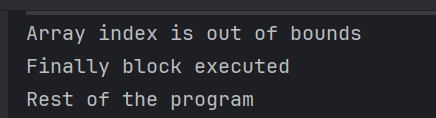
a) Array index is out of bounds
Finally block executed
Rest of the program
The code tries to access the fourth element (index 3) of a three-element array, which causes an ArrayIndexOutOfBoundsException. This is caught by the first catch block, which prints “Array index is out of bounds.” The finally block is always executed, so “Finally block executed” is printed next. The program then continues with “Rest of the program.”
17. What will be the output of the below program?
public class Test {
    public static void main(String args[])
    {
        try
        {
            System.out.print("Hello" + " " + 1 / 0);
        }
        catch(ArithmeticException e)
        {
            System.out.print("World");
        }
    }
}
Choose one option
a) Hello
b) World
c) HelloWorld
d) Hello World
Answer 17
b) World
System.out.print() function first converts the whole parameters into a string and then prints, before “Hello” goes to output stream 1 / 0 error is encountered which is cached by catch block printing just “World”.

18. What does the `throws` keyword do?
a) It throws an exception
b) It declares that a method can throw exceptions
c) It defines a new exception
d) None of the above
Answer 18
b) It declares that a method can throw exceptions
The throws keyword is used in a method signature to declare that the method can throw specified exceptions.
19. Which exception is thrown when an object is attempted to be cast into a subclass it is not an instance of?
a) IllegalArgumentException
b) IndexOutOfBoundsException
c) ClassCastException
d) ClassNotFoundException
Answer 19
c) ClassCastException
ClassCastException is thrown to indicate that the code has attempted to cast an object to a class of which it is not an instance.
20. What is the output of the following code?
public class Test {

    public static void main(String[] args) {
        try {
            throw new Exception("First Exception");
        } catch (Exception e) {
            try {
                throw new Exception("Second Exception");
            } catch (Exception ex) {
                System.out.println(ex.getMessage());
            }
        }
    }
}
Choose one option
a) First Exception
b) Second Exception
c) First Exception followed by Second Exception
d) Second Exception followed by First Exception
Answer 20
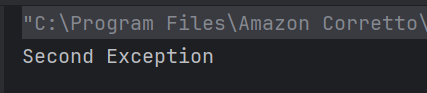
b) Second Exception
The code throws the first exception, catches it, and then throws the second exception, which is caught and its message is printed.
21. What is the output of the below program?
public class Test {
    public static void main(String[] args) {
        try {
            throw new Error("Fatal error");
        } catch (Exception e) {
            System.out.println("Exception");
        } catch (Error e) {
            System.out.println("Error");
        }
    }
}
a) Exception
b) Error
c) Compiler error
d) The code will not compile.
Answer 21
b) Error
The code explicitly throws an Error with the message “Fatal error”. Since Error is a subclass of Throwable, it matches the catch block for Error, and “Error” is printed.

22. What will be the output of the below program?
public class Test {
    public static void main(String[] args) {
        try {
            int[] array = new int[5];
            System.out.println(array[5]);
        } catch (ArrayIndexOutOfBoundsException e) {
            System.out.println("ArrayIndexOutOfBoundsException");
        } finally {
            System.out.println("Finally block executed.");
        }
    }
}
a) ArrayIndexOutOfBoundsException
Finally block executed.
b) ArrayIndexOutOfBoundsException
c) Finally block executed.
d) The code will not compile.
Answer 22
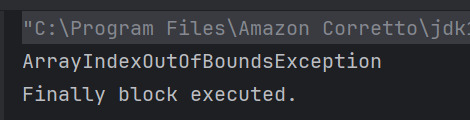
a) ArrayIndexOutOfBoundsException
Finally block executed.
The code attempts to access an element at index 5 in the array which is not available. Hence it raises an ArrayIndexOutOfBoundsException. The catch block is executed, and then the finally block is executed.
23. What is the output of the following program?
public class Test {
    public static void main(String[] args) {
        try {
            throw new NullPointerException();
        } catch (RuntimeException e) {
            System.out.println("RuntimeException");
        } catch (Exception e) {
            System.out.println("Exception");
        }
    }
}
a) RuntimeException
b) Exception
c) NullPointerException
d) The code will not compile.
Answer 23
a) RuntimeException
The code explicitly throws a NullPointerException, which is a subclass of RuntimeException. Since the catch block for RuntimeException is defined first, it is executed.
24. Which of the following is true about custom exceptions?
a) Custom exceptions cannot extend Exception class
b) Custom exceptions are always checked exceptions
c) Custom exceptions can extend Exception or RuntimeException
d) Custom exceptions do not require a constructor
Answer 24
c) Custom exceptions can extend Exception or RuntimeException
Custom exceptions can extend Exception (checked) or RuntimeException (unchecked).
25. Which of the following exception must be either caught or declared to be thrown in Java?
a) NullPointerException
b) ArrayIndexOutOfBoundsException
c) FileNotFoundException
d) ArithmeticException
Answer 25
c) FileNotFoundException
FileNotFoundException is a checked exception in Java, hence it must be either caught or declared to be thrown.
We would love to hear from you! Please leave your comments and share your scores in the section below














 QA Automation Expert