Welcome to the Performance Testing Quiz! This blog post features 25 multiple-choice questions that explore basic concepts of Performance Testing.
1. What is the primary goal of performance testing?
a) To identify issues in navigation flow b) To ensure that an application performs well under expected load c) To validate user interface design d) To test security vulnerabilities
Answer 1
b) To ensure that an application performs well under expected load
Performance testing evaluates how an application behaves under expected or stress conditions to ensure it meets performance criteria.
2. Which tool is commonly used for Performance Testing?
a) Selenium b) Apache JMeter c) Visual Studio Code d) Postman
Answer 2
b) Apache JMeter
Apache JMeter is a popular open-source tool for performing load and performance testing.
3. What is Throughput in Performance Testing?
Choose one option
a) Number of lines of code executed b) Response time of the system c) Number of transactions processed in a given timeframe d) Number of errors per second
Answer 3
c) Number of transactions processed in a given timeframe
Throughput measures the number of transactions or requests processed in a given period.
4. What type of performance testing aims to find out how a system operates under heavy loads?
Choose one option
a) Load Testing b) Stress Testing c) Soak Testing d) Security Testing
Answer 4
c) Stress Testing
Stress testing determines how a system performs under peak or extreme conditions, beyond normal operational capacity.
5. What is the main objective of load testing?
a) To break the system b) To evaluate software scalability c) To test the system’s reaction under varying traffic loads d) To check system breaches
Answer 5
c) To test the system’s reaction under varying traffic loads
Load testing evaluates how a software application behaves when it is subjected to varying loads, usually simulating multiple users.
6. Performance Testing is a type of
Choose one option
a) Functional Testing b) Non-Functional Testing c) Security Testing d) None of the above
Answer 6
b) Non-Functional Testing
7. Performance is concerned with achieving ………………… that meet the performance objectives for the project or product
Choose one option
a) Response times, Throughput, and Stress levels b) Response times, Throughput, and Resource-utilization levels c) Reason times, Throughput, and Resource-utilization levels d) Response times, Click-through, and Resource-utilization levels
Answer 7
b) Response times, Throughput, and Resource-utilization levels
8. What is Spike Testing in Performance Testing?
Choose one option
a) Sudden large increases in system load b) Gradually increasing system load c) Reducing system performance d) Testing system updates
Answer 8
a) Sudden large increases in system load
Spike testing measures how a system reacts to sudden and significant increases in load.
9. What is endurance testing?
a) Testing the system’s ability to handle high traffic during peak hours b) Testing the system’s compatibility with different operating systems c) Testing the system’s performance under normal conditions d) Testing the system’s ability to handle an increasing load over an extended period
Answer 9
d) Testing the system’s ability to handle an increasing load over an extended period
Endurance testing involves testing a system over a prolonged period to determine its ability to perform under sustained load without performance degradation.
10. What is the purpose of a baseline test in performance testing?
a) To test under maximum load b) To establish a benchmark for future tests c) To identify security issues d) To simulate network failures
Answer 10
b) To establish a benchmark for future tests
11. What is transaction response time?
Choose one option
a) Time to write transaction b) Time to complete entire business transaction c) Time to start transaction d) Time to log transaction
Answer 11
b) Time to complete entire business transaction
12. Which of the following is NOT a goal of performance testing?
Choose one option
a) Detecting memory leakage b) Determining system sustainability c) Evaluating error handling d) Reducing hardware requirements
Answer 12
d) Reducing hardware requirements
13. What does KPI stand for in the context of performance testing?
Choose one option
a) Key Performance Indicator b) Knowledge Program Initiative c) Key Process Integration d) Kernel Performance Index
Answer 13
a) Key Performance Indicator
14. When should performance testing be conducted?
Choose one option
a) Only after code changes b) Regularly throughout the development lifecycle c) After production deployment d) Only during the initial phases of development
Answer 14
b) Regularly throughout the development lifecycle
15. Which of the following can impact performance testing results?
Choose one option
a) Developer skill levels b) Network capacity and configuration c) HR policies d) Office location
Answer 15
b) Network capacity and configuration
16. What does ‘Think Time’ refer to in Load Testing?
Choose one option
a) The delay between user actions b) Time required for machine learning predictions c) AI decision-making time d) Load balancing wait time
Answer 16
a) The delay between user actions
17. What is the primary concern of resource utilization testing?
Choose one option
a) Adequate electricity supply b) Efficient use of time during testing c) The impact of an application on system resources d) Cost of the software tools
Answer 17
c) The impact of an application on system resources
18. What does ‘concurrency’ refer to in performance testing?
a) Parallel software development processes b) Simultaneous execution of multiple tasks c) Single user testing multiple features d) Continuous testing cycles
Answer 18
b) Simultaneous execution of multiple tasks
19. Which of the following is true about cloud performance testing?
a) It is more cost-effective than traditional methods b) It cannot simulate real-world traffic c) It requires dedicated on-premise hardware d) It doesn’t support network latency measurements
Answer 19
a) It is more cost-effective than traditional methods
20. Which metric is used to measure the speed at which a system returns to a steady state after a particular load?
Choose one option
a) Response time b) Throughput c) Recovery time d) Load time
Answer 20
c) Recovery time
21. Which factors impact system performance during Performance Testing?
Choose one option
a) Only font sizes and text placement b) Browser color schemes and UI themes c) User location and screen resolution d) CPU, Memory, Database, Network latency
Answer 21
d) CPU, Memory, Database, Network latency
22. Which of the following is not a type of performance test?
Choose one option
a) Endurance testing b) Load testing c) Compatibility testing d) Stress testing
Answer 22
c) Compatibility testing
23. Performance Testing environment should be scaled at least up to 50% of the production environment?
Choose one option
a) Yes b) No
Answer 23
a) Yes
24. Which metric is NOT typically measured in performance testing?
a) Response time b) Throughput c) Code coverage d) Resource utilization
Answer 24
c) Code coverage
25. What is steady state in performance testing?
a) System startup phase b) Period of constant load c) System shutdown phase d) Error state
Answer 25
b) Period of constant load
We would love to hear from you! Please leave your comments and share your scores in the section below
Welcome to the Java Quiz! This blog post features 25 multiple-choice questions that explore the concepts of Arrays in Java.
1. What is an array in Java?
a) A data structure that can hold elements of different types b) A class that allows storing single data type elements in a contiguous memory location c) A collection of elements in no specific order d) A method for sorting elements
Answer 1
b) A class that allows storing single data type elements in a contiguous memory location
Arrays in Java are used to store multiple values of the same data type in a contiguous memory location.
2. How do you instantiate an array of integers with 10 elements in Java?
a) int[] arr = new int[10]; b) int arr = new int(10); c) int arr[10] = new int[]; d) int(10) arr = new int[];
Answer 2
a) int[] arr = new int[10];
3. What is the default value of an element in an int array in Java?
Choose one option
a) 1 b) 0 c) null d) Undefined
Answer 3
b) 0
In Java, arrays of primitive types like int are initialized to their default values. The default value for int is 0
4. What will be the output of the following Java program?
class array_output
    {
        public static void main(String args[])
        {
            int array_variable [] = new int[10];
	        for (int i = 0; i < 10; ++i)
            {
                array_variable[i] = i;
                System.out.print(array_variable[i] + " ");
                i++;
            }
        }
   }
When an array is declared using new operator then all of its elements are initialized to 0 automatically. for loop body is executed 5 times as whenever controls comes in the loop i value is incremented twice, first by i++ in body of loop then by ++i in increment condition of for loop.
5. What is the maximum number of dimensions an array can have in Java?
a) 1 b) 255 c) 2 d) No theoretical limit
Answer 5
b) 255
Java allows arrays to have up to 255 dimensions.
6. What will be the output of the following Java program?
public class array_output {

    public static void main(String args[])
    {
        char array_variable [] = new char[10];
        for (int i = 0; i < 10; ++i)
        {
            array_variable[i] = 'i';
            System.out.print(array_variable[i] + "");
        }
    }
}
Choose one option
a) 1 2 3 4 5 6 7 8 9 10 b) 0 1 2 3 4 5 6 7 8 9 10 c) i j k l m n o p q r d) i i i i i i i i i i
Answer 6
d) i i i i i i i i i i
When an array is declared using the new operator, all of its elements are automatically initialized to default values—0 for numeric types, null for reference types, and ‘\0’ (null character) for char.
7. What will be the output of the following Java program?
public class array_output {
    public static void main(String args[])
    {
        double num[] = {5.5, 10.1, 11, 12.8, 56.9, 2.5};
        double result;
        result = 0;
        for (int i = 0; i < 6; ++i)
            result = result + num[i];
            System.out.print(result/6);

    }
}
Choose one option
a) 16.34 b) 16.566666644 c) 16.46666666666667 d) 16.46666666666666
Answer 7
c) 16.46666666666667
8. What happens if you try to access an index of an array that is out of bounds?
Choose one option
a) Compile-time error b) Returns null c) Throws ArrayIndexOutOfBoundsException d) None of the above
Answer 8
c) Throws ArrayIndexOutOfBoundsException
9. How do you declare an array of strings?
a) String[] arr; b) String arr[]; c) String arr(); d) String arr{};
Answer 9
a) String[] arr;
This is the standard way of declaring an array of strings in Java.
10. Which of the following is a valid declaration and initialization of String array in Java
a) String[] names ={“Tim”,”Mark”,”Charlie”} b) String names[] ={“Tim”,”Mark”,”Charlie”} c) String[3] names ={“Tim”,”Mark”,”Charlie”} d) Both a) and b) e) Both a) and c)
Answer 10
d) Both a) and b)
String[3] names = {“Tim”, “Mark”, “Charlie”};` is incorrect because Java does not allow specifying the size of the array within square brackets during initialization in this manner.
11. What will be the output?
public class Test {
    public static void main(String[] args) {
        String[] arr = {"Java", "Python", "C++"};
       System.out.println(arr[1]);
    }
}
Choose one option
a) Java b) Python c) C++ d) Compilation error
Answer 11
b) Python
arr[1]accesses the second element of the array, which is “Python”.
12. Which of the following statements is true?
Choose one option
a) Arrays are immutable b) Arrays are objects c) Arrays store elements of any data type d) Arrays automatically grow
Answer 12
b) Arrays are objects
In Java, arrays are objects and are part of the java.lang package.
13. What is the primary use of the `System.arraycopy()` method in Java?
Choose one option
a) To copy one array to another b) To reverse an array c) To sort an array d) To find an element in an array
Answer 13
a) To copy one array to another
System.arraycopy() is used to copy elements from one array to another.
14. What is printed by the following code snippet?
public class Test {
    public static void main(String[] args) {
       int[] arr = new int[5];
      System.out.println(arr[1]);
    }
}
Choose one option
a) 0 b) null c) undefined d) Compilation error
Answer 14
a) 0
Integer arrays are initialized to 0 by default.
15. What will be the result of this program?
public class array_output {
    public static void main(String args[])
    {
        int[] arr = {1, 2, 3, 4};
        System.out.println(arr.length);
    }
}
Choose one option
a) 0 b) 3 c) 4 d) Compilation error
Answer 15
c) 4
arr.lengthreturns the number of elements in the array, which is 4.
16. What exception is thrown by Java code when trying to store values in a sufficiently large dimension of an array but with the wrong data type?
Choose one option
a) ArrayIndexOutOfBoundsException b) IllegalArgumentException c) ClassCastException d) ArrayStoreException
Answer 16
d) ArrayStoreException
ArrayStoreException occurs when attempting to store incorrect types into arrays of object types.
17. Which of the following is not a valid way to declare a two-dimensional array in Java?
Choose one option
a) int[][] arr = new int[3][3]; b) int arr[][] = new int[3][3]; c) int[] arr = new int[3][]; d) int[][] arr = new int[][];
Answer 17
d) int[][] arr = new int[][];
Option D is invalid because while it declares a two-dimensional array, it does not specify the size of either dimension at the time of declaration.
18. What is the correct way to iterate over a Java array using an enhanced for loop?
a) for (int i : arr) b) for (int i = 0; i < arr.length; i++) c) for (arr : int i) d) for (arr i : int)
Answer 18
a) for (int i : arr)
The enhanced for loop in Java is written as for (type variable : array).
19. What will happen if you try to store a double value into an int array?
a) The value will be rounded b) The value will be truncated c) A ClassCastException will be thrown d) A compile-time error
Answer 19
d) A compile-time error
You cannot store a double value in an int array without explicit casting, leading to a compile-time error.
20. What is the output of the following code?
public class array_output {
    public static void main(String args[])
    {
        int[] arr = {2, 4, 6, 8};
        System.out.println(arr[arr.length]);
    }
}
Choose one option
a) 8 b) 4 c) 0 d) ArrayIndexOutOfBoundsException
Answer 20
d) ArrayIndexOutOfBoundsException
Since array indices are 0-based, accessing arr[arr.length] is out of bounds. The valid indices for this array are from 0 to arr.length – 1.
21. What is the output of the following code?
public class array_output {
    public static void main(String args[]) {
        int[] arr = {1, 2, 3, 4, 5};
        for (int i = 0; i < arr.length; i++) {
            arr[i] = arr[i] * 2;
        }
        System.out.println(arr[2]);
    }
}
Choose one option
a) 3 b) 6 c) 8 d) 10
Answer 21
b) 6
The loop multiplies each element by 2. Therefore, arr[2] becomes 3 * 2 = 6.
22. What will be the output of the below program?
public class array_output {

    public static void main(String args[]) {
        int[] arr = {10, 20, 30, 40};
        System.out.println(arr[1] + arr[2]);
    }
}
Choose one option
a) 30 b) 50 c) 60 d) 70
Answer 22
b) 50
arr[1] is 20 and arr[2] is 30, so the sum is 20 + 30 = 50.
23. Can you resize an array in Java after it is created?
Choose one option
a) Yes b) No
Answer 23
b) No
24. How can you access the element at the second row and third column of a two-dimensional array “matrix”?
a) matrix[3][2] b) matrix[2, 3] c) matrix[1][2] d) matrix[2:3]
Answer 24
c) matrix[1][2]
Array indexing starts at 0 in Java, so the second row is index 1, and the third column is index 2.
25. What will be the default value of the elements in a two-dimensional array of type `int[][]` in Java?
a) null b) 0 c) undefined d) Compilation error
Answer 25
b) 0
For arrays of primitive data types like int, the default value of the elements is 0.
We would love to hear from you! Please leave your comments and share your scores in the section below
Welcome to the Java Quiz! This blog post features 25 multiple-choice questions that explore the concepts of Strings in Java.
1. What is the primary characteristic of strings in Java?
a) Mutable b) Immutable c) Dynamic d) External
Answer 1
b) Immutable
Strings in Java are immutable, meaning their values cannot be changed once created.
2. What is the correct way to declare a String in Java?
a) String str = ‘Hello’; b) String str = new String(“Hello”); c) String str = String(“Hello”); d) String str = Hello;
Answer 2
b) String str = new String(“Hello”);
Strings in Java are declared using String str = new String(“Hello”); or simply String str = “Hello”;.
3. What is the default value of an element in an int array in Java?
Choose one option
a) 1 b) 0 c) null d) Undefined
Answer 3
b) 0
In Java, arrays of primitive types like int are initialized to their default values. The default value for int is 0
4. What will be the output of the following Java program?
class Test
    {
        public static void main(String args[])
        {
            int array_variable [] = new int[10];
	        for (int i = 0; i < 10; ++i)
            {
                array_variable[i] = i;
                System.out.print(array_variable[i] + " ");
                i++;
            }
        }
   }
When an array is declared using new operator then all of its elements are initialized to 0 automatically. for loop body is executed 5 times as whenever controls comes in the loop i value is incremented twice, first by i++ in body of loop then by ++i in increment condition of for loop.
5. Why are Strings immutable in Java?
a) To improve performance b) To allow modifications in-place c) To ensure thread safety and security d) Because Java does not support mutable objects
Answer 5
c) To ensure thread safety and security
String immutability ensures that once created, a String cannot be modified, making it thread-safe and secure.
6. What will be the output of the following Java program?
public class Test {

    public static void main(String args[]) {
        String obj = "I" + "like" + "Java";
        System.out.println(obj);
    }
}
Choose one option
a) I b) like c) Java d) IlikeJava
Answer 6
d) IlikeJava
Java defines an operator +, it is used to concatenate strings.
7. What will be the output of the following Java program?
public class Test {

    public static void main(String args[]) {
        String obj = "I LIKE JAVA";
        System.out.println(obj.charAt(3));
    }
}
Choose one option
a) I b) L c) K d) E
Answer 7
a) I
charAt() is a method of class String which gives the character specified by the index. obj.charAt(3) gives 4th character
8. What will be the output of the following Java program?
public class Test {

    public static void main(String args[]) {
        String obj = "I LIKE JAVA";
        System.out.println(obj.length());
    }
}
Choose one option
a) 9 b) 10 c) 11 d) 12
Answer 8
c) 11
The string “I LIKE JAVA” contains 11 characters, including the spaces. The length() method returns the total number of characters in the string. So, the output is 11.
9. What will be the output of the following Java program?
public class Test {

    public static void main(String args[]) {
        String obj = "hello";
        String obj1 = "world";
        String obj2 = obj;
        obj2 = " world";
        System.out.println(obj + " " + obj2);
    }
}
a) hello hello b) world world c) hello world d) world hello
Answer 9
c) hello world
This is the standard way of declaring an array of strings in Java.
10. Which of the following is a valid declaration and initialization of String array in Java
public class Test {

    public static void main(String args[]) {
        String obj = "hello";
        String obj1 = "world";
        String obj2 = "hello";
        System.out.println(obj.equals(obj1) + " " + obj.equals(obj2));
    }
}
a) false false b) true true b) true false d) false true
Answer 10
d) false true
equals() is method of class String, it is used to check equality of two String objects, if they are equal, true is retuned else false.
11. What will be the output?
public class Test {

    public static void main(String args[]) {
        System.out.println("Hello World".indexOf('W'));
    }
}
Choose one option
a) 0 b) 5 c) 6 d) -1
Answer 11
c) 6
The indexOf() method returns the index of the first occurrence of the specified character.
12. How do you compare two strings in Java?
Choose one option
a) == b) equals() c) compareTo() d) Both b) and c)
Answer 12
d) Both b) and c)
Use equals() for value comparison and compareTo() for lexicographical order.
13. Which of the following will return a substring from a string?
Choose one option
a) str.sub() b) str.substring() c) str.slice() d) str.split()
Answer 13
b) str.substring()
The substring() method extracts a substring from the string.
14. What is printed by the following code snippet?
public class Test {

    public static void main(String args[]) {
        System.out.println("Java".compareTo("Java"));
    }
}
Choose one option
a) 0 b) 1 c) -1 d) Compilation error
Answer 14
a) 0
The compareTo() method returns 0 if the two strings are equal.
15. What will be the result of this expression?
public class Test {

    public static void main(String args[]) {
        System.out.println("abc".substring(1, 3));
    }
}
Choose one option
a) ab b) abc c) bc d) a
Answer 15
c) bc
The substring(start, end) method returns the substring from start index to end-1.
16. How can you check if a string is empty?
Choose one option
a) str.isEmpty() b) str.length() == 0 c) Both a) and b) d) str.equals(“”)
Answer 16
c) Both a) and b)
Both methods can be used to check if a string is empty.
17. What does the StringBuilder class do?
Choose one option
a) It creates immutable strings. b) It creates mutable strings. c) It converts strings to numbers. d) It is not a class in Java.
Answer 17
b) It creates mutable strings.
StringBuilder allows for the creation of mutable strings, which can be modified.
18. Which method would you use to split a string into an array based on a delimiter?
a) split() b) divide() c) slice() d) substring()
Answer 18
a) split()
The split() method splits a string into an array based on a specified delimiter.
19. Which of the following will convert a string to a number?
a) parseInt() b) valueOf() c) toNumber() d) Both a) and b)
Answer 19
d) Both a) and b)
Both parseInt() and valueOf() can convert a string to a number.
20. What is the output of the following code?
public class Test {

    public static void main(String args[]) {
        System.out.println("abc".repeat(3));
    }
}
Choose one option
a) abcabcabc b) abc abc abc c) abcabc abc d) Compilation Error
Answer 20
a) abcabcabc
The repeat(int) method returns a string whose value is the concatenation of the specified string repeated the given number of times.
21. What is the output of the following code?
public class Test {

    public static void main(String args[]) {
        System.out.println("Hello".replace('e', 'a'));
    }
}
Choose one option
a) Hallo b) Hello c) Halla d) Hella
Answer 21
a) Hallo
The replace() method replaces the specified character with another character.
22. What will be the output of the following program
public class Test {

    public static void main(String args[]) {
        String s1 = new String("Hello");
        String s2 = new String("Hello");
        System.out.println(s1 == s2);
    }
}
Choose one option
a) true b) false c) Compilation error d) Runtime error
Answer 22
b) false
The == operator compares object references, not values. Since s1and s2are two different objects, it returns false.
23. Which of these methods can be used to check if two strings are equal, ignoring case considerations?
Choose one option
a) equals() b) equalsIgnoreCase() c) compareTo() d) compareIgnoreCase()
Answer 23
b) equalsIgnoreCase()
The equalsIgnoreCase() method compares two strings, ignoring case differences.
24. What will be the result if you try to modify an existing string?
a) The string will be changed b) A new string will be created c) An exception will be thrown d) Compilation error
Answer 24
b) A new string will be created
Strings in Java are immutable, so any modification creates a new string.
25. Which method checks if a string starts with a specified prefix?
a) beginsWith() b) start() c) startsWith() d) prefix()
Answer 25
c) startsWith()
The startsWith() method checks if the string begins with the specified prefix.
We would love to hear from you! Please leave your comments and share your scores in the section below
Welcome to the Java Quiz! This blog post features 25 multiple-choice questions that explore the concepts of Inheritance & Polymorphism in Java.
1. What is inheritance in Java?
a) A mechanism where one class acquires the properties of another b) A way to allow multiple classes to have the same method names c) A class that implements an interface d) None of the above
Answer 1
a) A mechanism where one class acquires the properties of another
2. Which keyword is used for inheritance in Java?
a) implements b) extends c) inherits d) uses
Answer 2
b) extends
The extendskeyword is used to indicate that a class is inheriting from another class.
3. What will be the output of the following Java code?
 class Apple {
       public void print() { System.out.println("Apple"); }
   }
   class Banana extends Apple {
       public void print() { System.out.println("Banana"); }
   }
   public class Test {
       public static void main(String[] args) {
           Apple  apple = new Banana();
           apple.print();
       }
   }
Choose one option
a) Apple b) Banana c) No Output d) Compilation Error
Answer 3
b) Banana
This is an example of dynamic method dispatch (polymorphism). The type of the object, not the reference type, determines which method is called.
4. If a class extends another class, which of the following members are inherited?
Choose one option
a) Only public methods b) Public and protected members c) Private methods d) All members including private
Answer 4
b) Public and protected members
A subclass can inherit public and protected members of the superclass but not private members.
5. Which of these is correct way of inheriting class A by class B?
a) class B + class A {} b) class B inherits class A {} c) class B extends A {} d) class B extends class A {}
Answer 5
c) class B extends A {}
The correct syntax for inheritance in Java is class B extends A {}. The extends keyword is used, and we refer to the superclass by name, not with the keyword class.
6. What will be the output of the following Java program?
 class Apple {
       public void print() { System.out.println("Apple"); }
   }
   class Banana extends Apple {
       public void print() { System.out.println("Banana"); }
   }
   public class Test {
       public static void main(String[] args) {
           Apple  apple = new Apple();
           apple.print();
       }
   }
Choose one option
a) Apple b) Banana c) No Output d) Compilation Error
Answer 6
a) Apple
7. What will be the output of the following Java program?
class A {
    A(int x) { }
}

class B extends A {
    B(int x) {
        System.out.println("Constructor B");
    }
}

public class Test {
    public static void main(String[] args) {
        B obj = new B(10);
    }
}
Choose one option
a) It compiles without error. b) It causes a compilation error. c) It throws a runtime error. d) It prints “Constructor B”
Answer 7
b) It causes a compilation error.
The constructor in B needs to explicitly call the constructor of A using super(x). This is required because A doesn’t have a no-argument constructor.
8. What will be the output?
class Parent {
    void method() {
        System.out.println("Parent method");
    }
}

class Child extends Parent {
}

public class Test {
    public static void main(String[] args) {
        Child obj = new Child();
        obj.method();
    }
}
Choose one option
a) Parent method b) Child method c) Compilation Error d) Runtime Error
Answer 8
a) Parent method
Child doesn’t override method(), it inherits method() from Parent.
9. Which of the following statements about inheritance is false?
a) Java supports single inheritance. b) Java allows multiple class inheritance using extends. c) Interfaces can be used to achieve multiple inheritance. d) The super keyword can be used to invoke the parent class constructor.
Answer 9
b) Java allows multiple class inheritance using extends.
Java does not allow multiple class inheritance using extends to avoid ambiguity issues. Instead, interfaces provide an alternative for multiple inheritance.
10. Which type of inheritance is demonstrated when a class inherits from a class that already inherits from another class?
a) Single inheritance b) Multiple inheritance c) Multilevel inheritance d) Hierarchical inheritance
Answer 10
c) Multilevel inheritance
The type of inheritance demonstrated when a class inherits from a class that already inherits from another class is called multilevel inheritance. In this type of inheritance, a class is derived from a derived class, effectively creating a hierarchy of classes.
11. What is the keyword used in Java to prevent a class from being inherited?
Choose one option
a) abstract b) final c) static d) private
Answer 11
b) final
The finalkeyword in Java is used to prevent a class from being inherited. When a class is declared as final, it cannot be extended by any other class.
12. What is the purpose of using the `super` keyword in Java?
Choose one option
a) To create a new object instance b) To call a constructor of the subclass c) To refer to the current object’s superclass d) To hide inherited methods
Answer 12
c) To refer to the current object’s superclass
The super keyword is used to access the superclass’s constructor or methods and can be used to invoke the superclass version of an overridden method.
13. Which of the following statements about the super keyword in Java is true?
Choose one option
a) The super keyword is used to call the parent class constructor. b) The super keyword is used to access the methods and properties of the parent class. c) The super keyword is used to create an instance of a child class. d) The super keyword is not supported in Java.
Answer 13
b) The super keyword is used to access the methods and properties of the parent class.
The super keyword in Java is used to access the methods and properties of the parent class. It is often used to invoke the overridden methods of the parent class in the child class.
14. What will be the output of the following code?
  class Parent {
    public void print() {
        System.out.println("Parent");
    }
}

class Child extends Parent {
    public void print() {
        System.out.println("Child");
        super.print();
    }
}

public class Main {
    public static void main(String[] args) {
        Child child = new Child();
        child.print();
    }
}
Choose one option
a) Parent Child b) Child Parent c) Parent d) Child
Answer 14
b) Child Parent
This exception is thrown when a program attempts to use an object reference that has not been properly initialized.
15. What will be the result of the following code?
package pack1;
public class A {
    public void display() {
        System.out.println("Hello from A");
    }
}

package pack2;
import pack1.A;
public class B {
    public static void main(String args[]) {
        A obj = new A();
        obj.display();
    }
}
Choose one option
a) No output b) Hello from A c) Compiler error d) Runtime error
Answer 15
b) Hello from A
Since class A is public and properly imported in pack2, there is no issue accessing it.
16. What is the result of the following code snippet?
class A
    {
        int i;
        void display()
        {
            System.out.println(i);
        }
    }

    class B extends A
    {
        int j;
        void display()
        {
            System.out.println(j);
        }
    }

   class Test
    {
        public static void main(String args[])
        {
            B obj = new B();
            obj.i=1;
            obj.j=2;
            obj.display();
        }
   }
Choose one option
a) 0 b) 1 c) 2 d) Compilation Error
Answer 16
c) 2
Class A & class B both contain display() method, class B inherits class A, when display() method is called by object of class B, display() method of class B is executed rather than that of Class A.
17. What will be printed?
 class A
    {
        int i;
    }

    class B extends A
    {
        int j;
        void display()
        {
            super.i = j + 1;
            System.out.println(j + " " + i);
        }
    }

    class Test
    {
        public static void main(String args[])
        {
            B obj = new B();
            obj.i=1;
            obj.j=2;
            obj.display();
        }
   }
Choose one option
a) Hello a) 2 2 b) 3 3 c) 2 3 d) 3 2
Answer 17
c) 2 3
Class A and Class B both contain a display() method. Class B inherits Class A. When the display() method is called by an object of Class B, the display() method of Class B is executed rather than that of Class A. The value of i is updated in the display() method using the super keyword.
18. What is polymorphism in Java?
a) A feature that allows a class to be abstract b) A feature that allows one interface to be used for a general class of actions c) A type of inheritance in Java d) A way to modularize the code
Answer 18
b) A feature that allows one interface to be used for a general class of actions
Polymorphism allows methods to do different things based on the object it is acting upon, using a general interface for different underlying forms (data types).
19. How can you achieve polymorphism in Java?
a) By method overloading only b) By method overriding only c) By both method overloading and overriding d) By using final classes
Answer 19
c) By both method overloading and overriding
Polymorphism can be achieved through method overloading (compile-time polymorphism) and method overriding (run-time polymorphism).
20. Which of the following statements about multiple inheritance of interfaces is true?
Choose one option
a) It is allowed in Java b) It is not allowed in Java c) It leads to ambiguity d) Only one interface can be inherited
Answer 20
a) It is allowed in Java
Java allows a class to implement multiple interfaces, enabling multiple inheritance of method signatures.
21. What is the output of the below program?
public class Parent {
    void m1(String x) {
        System.out.println("One");
    }
}

public class Derived extends Parent{
    public void m1(String x) {
        System.out.println("Two");
        super.m1(null);
    }
}

public class Test {
    public static void main(String[] args){
        Parent obj = new Derived();
        obj.m1(null);
    }
}
a) Two, One b) One, Two c) Compiler error d) Runtime error
Answer 21
a) Two, One
The m1 method of Derived is executed first because Derived overrides m1. It prints “Two”. Then, super.m1(null) is executed within the m1 method of Derived, which calls the m1 method of the Parent class, printing “One”.
22. What will be the output of this program?
public class Test{

    void m1(String x){
        System.out.println("One");
    }

    protected void m1(String x, String y){
        System.out.println("Two");
    }

    public static void main(String[] args){
        Test obj = new Test();
        obj.m1("ABC");
        obj.m1("PQR", "XYZ");
    }
}
a) Two One b) One Two c) Compile time error d) Runtime error
Answer 22
b) One Two
23. What is the output of the following program?
public class PolymorphismDemoClass {
    void add(int x, int y){
        System.out.println("1. Addition is: " +(x+y));
    }

   void add(int y, int x){
        System.out.println("2. Addition is: " +(x+y));
    }

   public static void main(String[] args){
        PolymorphismDemoClass obj = new PolymorphismDemoClass();
        obj.add(20, 30);
    }
}
a) Prints 2. Addition of two numbers: 50 b) Prints 1. Addition of two numbers: 50 c) Compile time error d) Runtime error
Answer 23
c) Compile time error
24. What is the key difference between compile-time and runtime polymorphism in Java?
a) Compile-time polymorphism is implemented using method overriding, while runtime polymorphism is implemented using method overloading. b) Compile-time polymorphism is determined during compilation, while runtime polymorphism is resolved at runtime. c) Runtime polymorphism is faster than compile-time polymorphism. d) Compile-time polymorphism is achieved using interfaces.
Answer 24
b) Compile-time polymorphism is determined during compilation, while runtime polymorphism is resolved at runtime.
Compile-time polymorphism (method overloading) is resolved at compile-time, while runtime polymorphism (method overriding) is determined during execution via dynamic method dispatch.
25. What will happen if two classes in different packages have the same name and are imported in a Java file?
a) Compilation error due to ambiguity. b) The last imported class is used. c) The first imported class is used. d) Java automatically renames one class.
Answer 25
a) Compilation error due to ambiguity.
Java does not allow ambiguity in class names across packages. Fully qualified names must be used in such cases.
We would love to hear from you! Please leave your comments and share your scores in the section below
Welcome to the Java Quiz! This blog post features 25 multiple-choice questions that explore the exception handling in Java.
1. What is Exception in Java
a) An error that occurs during runtime b) An error that occurs during compilation c) A warning issued by the compiler d) A type of loop
Answer 1
a) An error that occurs during runtime
2. Which of the following is the root class of the exception hierarchy in Java?
a) Exception b) Throwable c) Error d) RuntimeException
Answer 2
b) Throwable
The root class of the Java exception hierarchy is Throwable. Both Exception and Error are subclasses of Throwable.
3. What will be the output of the following Java code?
public class QAAutomation {

     public static void main(String[] args) {
        try {
            System.out.println("Inside try");
            throw new RuntimeException("Error");
        } finally {
            System.out.println("Inside finally");
        }
    }
}
Choose one option
a) Inside try b) Inside try Inside finally c) Inside try Inside finally RuntimeException d) Compilation Error
Answer 3
c) Inside try Inside finally RuntimeException
The finally block executes even after an exception is thrown.
4. What will be the output of the following Java program?
 public class QAAutomation {

    static void method() throws Exception {
        throw new Exception("Error occurred");
    }

    public static void main(String[] args) {
        method();
    }
}
Choose one option
a) Compilation Error b) Runtime error c) Exception: Error occurred d) Program runs successfully
Answer 4
a) Compilation Error
The method() declares throws Exception, but main() does not handle it, leading to a compilation error.
5. What is the difference between throw and throws?
a) throw is used to declare exceptions, throws is used to throw exceptions b) throws is used to declare exceptions, throw is used to throw exceptions c) Both are used to declare exceptions d) Both are used to throw exceptions
Answer 5
b) throws is used to declare exceptions, throw is used to throw exceptions
throw is used inside a method to throw an exception, while throws is used in the method signature to declare possible exceptions.
6. What will be the output of the following Java program?
 class CustomException extends Exception {
    public CustomException(String message) {
        super(message);
    }
}

public class Test {
    public static void main(String[] args) {
        try {
            throw new CustomException("Custom error occurred");
        } catch (CustomException e) {
            System.out.println(e.getMessage());
        }
    }
}
Choose one option
a) Custom error occurred b) Compilation Error c) No Output d) Runtime Exception
Answer 6
a) Custom error occurred
A custom exception is thrown and caught, and e.getMessage() prints the error message.
7. What will be the output of the following Java program?
public class Test {

    public static void main(String args[]) {
        try {
            int a, b;
            b = 0;
            a = 5 / b;
            System.out.print("A");
        } catch (ArithmeticException e) {
            System.out.print("B");
        } finally {
            System.out.print("C");
        }
    }
}
Choose one option
a) A b) B c) AC d) BC
Answer 7
d) BC
The variable a is set to 0, in expression b = 5/a refers to dividing an int{5} with an int{0} which results in an ArithmeticException, which is caught by the catch statement and “B” is printed. Since the final block must be executed in any case . Hence “C” also prints after “B”.
8. What will be the output of the following Java program?
public class Test {
    public static void main(String args[])
    {
        try
        {
            int i, sum;
            sum = 10;
            for (i = -1; i < 3 ;++i)
                sum = (sum / i);
        }
        catch(ArithmeticException e)
        {
            System.out.print("0");
        }
        System.out.print(sum);
    }
}
Choose one option
a) 0 b) 05 c) Compilation Error d) Runtime Error
Answer 8
c) Compilation Error
sum variable is declared in try block, but trying to access it outside the try-catch block.
9. Which of the following can be declared in a method’s `throws` clause?
a) RuntimeException b) Error c) IOException d) None of the above
Answer 9
c) IOException
Checked exceptions like IOExceptionmust be declared in a method’s throwsclause if not caught. RuntimeExceptionand Errorare typically not declared.
10. What happens if an exception is not caught in a Java program?
a) The program continues running as normal b) The program stops execution c) The exception is ignored d) None of the above
Answer 10
b) The program stops execution
If an exception is not caught, program execution will halt, and the JVM will likely display an error message.
11. What will be the output?
public class Test{
    public static void main(String[] args) {
        try {
            System.exit(0);
        } finally {
            System.out.println("Finally executed");
        }
    }
}
Choose one option
a) Finally executed b) No Output c) Runtime Error d) Compilation Error
Answer 11
b) No Output
System.exit(0) terminates the JVM, so the finally block does not execute.
12. How many catch blocks can be associated with one try block?
Choose one option
a) Only one b) One or more c) None d) Exactly two.
Answer 12
b) One or more
A try block can have multiple catch blocks to handle different types of exceptions.
13. Which block is always executed whether an exception is handled or not?
Choose one option
a) try b) catch c) finally d) throw
Answer 13
c) finally
The finallyblock is always executed after the try and catch blocks, regardless of whether an exception was handled.
14. What will be the output of the following code?
  public class Test {
         public static void main(String[] args) {
             String str = null;
             try {
                 System.out.println(str.length());
             } catch (NullPointerException e) {
                 System.out.println("Caught a NullPointerException");
             }
         }
     }
Choose one option
a) NullPointerException b) Caught a NullPointerException c) IllegalArgumentException d) IOException
Answer 14
b) Caught a NullPointerException
This exception is thrown when a program attempts to use an object reference that has not been properly initialized.
15. What will be the result of this expression?
import java.io.File;
import java.io.FileReader;
import java.io.IOException;

public class Test {
    public static void readFile() throws IOException {
        File file = new File("example.txt");
        FileReader reader = new FileReader(file);
        reader.close();
    }

    public static void main(String[] args) {
        try {
            readFile();
        } catch (IOException e) {
            System.out.println("IOException handled");
        }
    }
}
Choose one option
a) RuntimeException b) NullPointerException c) IOException handled d) ArithmeticException
Answer 15
c) IOException handled
Checked exceptions, such as IOException, must be declared or handled explicitly.
16. What is the result of the following code snippet?
public class Test {

    public static void main(String[] args) {

        try {
            int[] numbers = {1, 2, 3};
            System.out.println(numbers[3]);
            int division = 10 / 0;
        } catch (ArrayIndexOutOfBoundsException e) {
            System.out.println("Array index is out of bounds");
        } catch (ArithmeticException e) {
            System.out.println("Cannot divide by zero");
        } finally {
            System.out.println("Finally block executed");
        }
        System.out.println("Rest of the program");
    }
}
Choose one option
a) Array index is out of bounds Finally block executed Rest of the program
b) Cannot divide by zero Finally block executed Rest of the program
c) Finally block executed Cannot divide by zero Rest of the program
d) Cannot divide by zero Rest of the program
Answer 16
a) Array index is out of bounds Finally block executed Rest of the program
The code tries to access the fourth element (index 3) of a three-element array, which causes an ArrayIndexOutOfBoundsException. This is caught by the first catch block, which prints “Array index is out of bounds.” The finally block is always executed, so “Finally block executed” is printed next. The program then continues with “Rest of the program.”
17. What will be the output of the below program?
public class Test {
    public static void main(String args[])
    {
        try
        {
            System.out.print("Hello" + " " + 1 / 0);
        }
        catch(ArithmeticException e)
        {
            System.out.print("World");
        }
    }
}
Choose one option
a) Hello b) World c) HelloWorld d) Hello World
Answer 17
b) World
System.out.print() function first converts the whole parameters into a string and then prints, before “Hello” goes to output stream 1 / 0 error is encountered which is cached by catch block printing just “World”.
18. What does the `throws` keyword do?
a) It throws an exception b) It declares that a method can throw exceptions c) It defines a new exception d) None of the above
Answer 18
b) It declares that a method can throw exceptions
The throwskeyword is used in a method signature to declare that the method can throw specified exceptions.
19. Which exception is thrown when an object is attempted to be cast into a subclass it is not an instance of?
a) IllegalArgumentException b) IndexOutOfBoundsException c) ClassCastException d) ClassNotFoundException
Answer 19
c) ClassCastException
ClassCastExceptionis thrown to indicate that the code has attempted to cast an object to a class of which it is not an instance.
20. What is the output of the following code?
public class Test {

    public static void main(String[] args) {
        try {
            throw new Exception("First Exception");
        } catch (Exception e) {
            try {
                throw new Exception("Second Exception");
            } catch (Exception ex) {
                System.out.println(ex.getMessage());
            }
        }
    }
}
Choose one option
a) First Exception b) Second Exception c) First Exception followed by Second Exception d) Second Exception followed by First Exception
Answer 20
b) Second Exception
The code throws the first exception, catches it, and then throws the second exception, which is caught and its message is printed.
21. What is the output of the below program?
public class Test {
    public static void main(String[] args) {
        try {
            throw new Error("Fatal error");
        } catch (Exception e) {
            System.out.println("Exception");
        } catch (Error e) {
            System.out.println("Error");
        }
    }
}
a) Exception b) Error c) Compiler error d) The code will not compile.
Answer 21
b) Error
The code explicitly throws an Error with the message “Fatal error”. Since Error is a subclass of Throwable, it matches the catch block for Error, and “Error” is printed.
22. What will be the output of the below program?
public class Test {
    public static void main(String[] args) {
        try {
            int[] array = new int[5];
            System.out.println(array[5]);
        } catch (ArrayIndexOutOfBoundsException e) {
            System.out.println("ArrayIndexOutOfBoundsException");
        } finally {
            System.out.println("Finally block executed.");
        }
    }
}
a) ArrayIndexOutOfBoundsException Finally block executed. b) ArrayIndexOutOfBoundsException c) Finally block executed. d) The code will not compile.
Answer 22
a) ArrayIndexOutOfBoundsException Finally block executed.
The code attempts to access an element at index 5 in the array which is not available. Hence it raises an ArrayIndexOutOfBoundsException. The catch block is executed, and then the finally block is executed.
23. What is the output of the following program?
public class Test {
    public static void main(String[] args) {
        try {
            throw new NullPointerException();
        } catch (RuntimeException e) {
            System.out.println("RuntimeException");
        } catch (Exception e) {
            System.out.println("Exception");
        }
    }
}
a) RuntimeException b) Exception c) NullPointerException d) The code will not compile.
Answer 23
a) RuntimeException
The code explicitly throws a NullPointerException, which is a subclass of RuntimeException. Since the catch block for RuntimeException is defined first, it is executed.
24. Which of the following is true about custom exceptions?
a) Custom exceptions cannot extend Exception class b) Custom exceptions are always checked exceptions c) Custom exceptions can extend Exception or RuntimeException d) Custom exceptions do not require a constructor
Answer 24
c) Custom exceptions can extend Exception or RuntimeException
Custom exceptions can extend Exception (checked) or RuntimeException (unchecked).
25. Which of the following exception must be either caught or declared to be thrown in Java?
a) NullPointerException b) ArrayIndexOutOfBoundsException c) FileNotFoundException d) ArithmeticException
Answer 25
c) FileNotFoundException
FileNotFoundException is a checked exception in Java, hence it must be either caught or declared to be thrown.
We would love to hear from you! Please leave your comments and share your scores in the section below
Welcome to the Java Quiz! This blog post features 25 multiple-choice questions that explore concepts of Methods, Method Overloading and Method Overriding in Java.
1. Which method can be defined only once in a program?
a) main method b) finalize method c) static method d) private method
Answer 1
a) main method
main() method can be defined only once in a program. Program execution begins from the main() method by java runtime system.
2. What is the return type of a method that does not return any value?
a) int b) float c) void d) double
Answer 2
c) void
Return type of a method must be made void if it is not returning any value.
3. What will be the output of the following Java code?
class box
    {
        int width;
        int height;
        int length;
        int volume;
        void volume(int height, int length, int width)
        {
             volume = width*height*length;
        }
    }
    class Prameterized_method
    {
        public static void main(String args[])
        {
            box obj = new box();
            obj.height = 1;
            obj.length = 5;
            obj.width = 5;
            obj.volume(3,2,1);
            System.out.println(obj.volume);
        }
     }
Choose one option
a) 0 b) 1 c) 6 d) 25
Answer 3
c) 6
The volume() method calculates the product of the parameters passed to it (3, 2, 1) and assigns it to the object’s volume field. Hence, the output is 3 * 2 * 1 = 6.
4. What will be the output of the following Java program?
 class equality
    {
        int x;
        int y;
        boolean isequal()
        {
            return(x == y);
        }
    }
    class Output
    {
        public static void main(String args[])
        {
            equality obj = new equality();
            obj.x = 5;
            obj.y = 5;
            System.out.println(obj.isequal());
        }
    }
Choose one option
a) true b) Runtime error c) false d) 0
Answer 4
a) true
The method isequal() compares x and y using ==. Since both are set to 5, the condition x == y is true, so the method returns true, which gets printed.
5. Which of the following is a method having same name as that of it’s class?
a) finalize b) delete c) class d) constructor
Answer 5
d) constructor
A constructor is a method that initializes an object immediately upon creation. It has the same name as that of class in which it resides.
6. What will be the output of the following Java program?
 class overload
    {
        int x;
 	int y;
        void add(int a)
        {
            x =  a + 1;
        }
        void add(int a, int b)
        {
            x =  a + 2;
        }
    }
    class Overload_methods
    {
        public static void main(String args[])
        {
            overload obj = new overload();
            int a = 0;
            obj.add(6);
            System.out.println(obj.x);
        }
   }
Choose one option
a) 5 b) 6 c) 7 d) Runtime error
Answer 6
c) 7
Due to method overloading when the add() method is called with a single argument the value of x is set to argument passed i.e. 6 + 1 is returned. Hence the result is 7.
7. What will be the output of the following Java program?
class overload
    {
        int x;
 	    int y;

       void add(int a)
        {
            x =  a + 1;
        }
        void add(int a , int b)
        {
            x =  a + 2;
        }
    }
    class Overload_methods
    {
        public static void main(String args[])
        {
            overload obj = new overload();
            int a = 0;
            obj.add(6, 7);
            System.out.println(obj.x);
        }
    }
Choose one option
a) 6 b) 7 c) 8 d) 9
Answer 7
c) 8
Due to method overloading when the add() method is called with two arguments the value of x is set to the first argument passed i.e. 6 + 2 is returned. Hence the result is 8.
8. What will be the output?
class overload
   {
        int x;
 	    double y;
        void add(int a , int b)
        {
            x = a + b;
        }
        void add(double c , double d)
        {
            y = c + d;
        }
        overload()
        {
            this.x = 0;
            this.y = 0;
        }
    }
    class Overload_methods
    {
        public static void main(String args[])
        {
            overload obj = new overload();
            int a = 2;
            double b = 3.2;
            obj.add(a, a);
            obj.add(b, b);
            System.out.println(obj.x + " " + obj.y);
        }
   }
Choose one option
a) 6 6 b) 6.4 6.4 c) 6.4 6 d) 4 6.4
Answer 8
d) 4 6.4
For obj.add(a,a); ,the function in line number 4 gets executed and value of x is 4. For the next function call, the function in line number 7 gets executed and value of y is 6.4.
9. Which of the following best defines method overloading in Java?
a) Redefining a method with the same name and same parameters in child class. b) Defining multiple methods with the same name but different parameter lists in the same class. c) Using a method of the parent class in the child class. d) Declaring a method as static multiple times.
Answer 9
b) Defining multiple methods with the same name but different parameter lists in the same class.
Overloading occurs when methods have the same name but different parameter lists (number or type).
10. Which of the following is NOT a valid way to overload methods in Java?
a) Different number of parameters. b) Different types of parameters. c) Different return types only. d) Different order of parameters.
Answer 10
c) Different return types only
Overloading cannot be achieved by changing only the return type
11. What will be the output?
class area
    {
        int width;
        int length;
        int volume;
        area()
        {
           width=5;
           length=6;
        }
        void volume()
        {
             volume = width*length*height;
        }
    }
    class cons_method
    {
        public static void main(String args[])
        {
            area obj = new area();
            obj.volume();
            System.out.println(obj.volume);
        }
    }
Choose one option
a) 0 b) 30 c) 1 d) error
Answer 11
d) error
Variable height is not defined
12. Which of the following allows method overriding?
Choose one option
a) Same method name and parameter list in subclass. b) Same method name but different parameters in subclass. c) Same method name but different return type in subclass. d) Static methods in subclass.
Answer 12
a) Same method name and parameter list in subclass
Overriding requires the same method signature (name + parameters) in superclass and subclass
13. What is the default return type of a method in Java if not specified?
Choose one option
a) int b) void c) Object d) Compilation error
Answer 13
d) Compilation error
Java requires an explicit return type. If omitted, it results in a compilation error.
14. What will be the output of the following code?
 class test
    {
        int a;
        int b;
        test(int i, int j)
        {
            a = i;
            b = j;
        }
        void meth(test o)
        {
            o.a *= 2;
            o.b /= 2;
        }
    }
    class Output
    {
        public static void main(String args[])
        {
            test obj = new test(10 , 20);
            obj.meth(obj);
            System.out.println(obj.a + " " + obj.b);
        }
    }
Choose one option
a) 20 10 b) 10 20 c) 20 40 d) 40 20
Answer 14
a) 20 10
Class objects are always passed by reference, therefore changes done are reflected back on original arguments. obj.meth(obj) sends object obj as parameter whose variables a & b are multiplied and divided by 2 respectively by meth() function of class test. a & b becomes 20 & 10 respectively.
15. What will be the result of this expression?
class Output {
    public static int sum(int... x) {
        int total = 0;
        for (int num : x) {
            total += num;
        }
        return total;
    }

    public static void main(String args[]) {
        System.out.println(sum(10));
        System.out.println(sum(10, 20));
        System.out.println(sum(10, 20, 30));
        System.out.println(sum(10, 20, 30, 40));
    }
}
Choose one option
a) only sum(10) b) only sum(10,20) c) only sum(10) & sum(10,20) d) all of the mentioned
Answer 15
d) all of the mentioned
sum is a variable argument method and hence it can take any number as an argument.
16. What is the result of the following code snippet?
class Test
{
 public void m1 (int i,float f)
 {
  System.out.println(" int float method");
 }

 public void m1(float f,int i)
  {
  System.out.println("float int method");
  }

  public static void main(String[]args)
  {
    Test test =new Test();
       test.m1(20,20);
   }
}
Choose one option
a) int float method b) float int method c) compile time error d) run time error
Answer 16
c) compile time error
While resolving overloaded method, compiler automatically promotes if exact match is not found. But in this case, which one to promote is an ambiguity.
17. What will be printed?
class Test {
    void show(int a) {
        System.out.println("int method: " + a);
    }

    void show(double a) {
        System.out.println("double method: " + a);
    }

    public static void main(String[] args) {
        Test obj = new Test();
        obj.show(10);      // Line 1
        obj.show(10.5);    // Line 2
        obj.show('A');     // Line 3
    }
}
Choose one option
a) int method: 10 double method: 10.5 int method: 65
b) int method: 10 double method: 10.5 double method: 65.0
c) Compilation error d) Runtime error
Answer 17
a) int method: 10 double method: 10.5 int method: 65
obj.show('A') → 'A' is a char (ASCII 65). Char can be promoted to int, so it calls show(int) and prints 65.
18. Which principle of OOP is demonstrated by method overriding?
a) Encapsulation b) Abstraction c) Polymorphism d) Inheritance only
Answer 18
c) Polymorphism
19. If a class has two methods: void add(int a, int b) and int add(int x, int y), what happens?
a) Valid overloading b) Compile-time error c) Runtime error d) Both methods are executed
Answer 19
b) Compile-time error
Same parameter list but different return type only results in compile-time error
20. What is the output of the following code?
class Derived
{
    public void getDetails()
    {
        System.out.printf("Derived class ");
    }
}

public class Test extends Derived
{
    public void getDetails()
    {
        System.out.printf("Test class ");
        super.getDetails();
    }
    public static void main(String[] args)
    {
        Derived obj = new Test();
        obj.getDetails();
    }
}
Choose one option
a) Test class Derived class b) Derived class Test class c) Runtime error d) Compilation error
Answer 20
a) Test class Derived class
Since getDetails() is overridden in the Test class and super.getDetails() is called inside it, both methods are executed in order.
21. What is the output of this switch statement?
import java.io.IOException;

class Derived {
    public void getDetails() throws IOException { // Line 4
        System.out.println("Derived class");
    }
}

public class Test extends Derived {
    public void getDetails() throws Exception { // Line 10
        System.out.println("Test class");
    }

    public static void main(String[] args) throws IOException { // Line 14
        Derived obj = new Test();
        obj.getDetails();
    }
}
a) Compilation error due to line 4 b) Compilation error due to line 10 c) Compilation error due to line 14 d) All the above
Answer 21
b) Compilation error due to line 10
The exception thrown by the overriding method should not be new or more broader checked exception.
22. What will be the output of this while loop?
class Derived
{
    protected final void getDetails()
    {
        System.out.println("Derived class");
    }
}

public class Test extends Derived
{
    protected final void getDetails()
    {
        System.out.println("Test class");
    }
    public static void main(String[] args)
    {
        Derived obj = new Derived();
        obj.getDetails();
    }
}
a) Derived class b) Test class c) Runtime error d) Compilation error
Answer 22
d) Compilation error
Final and static methods cannot be overridden.
23. What is the output of the following if-else block?
public class Test
{
    public int getData(String temp) throws IOException
    {
        return 0;
    }
    public int getData(String temp) throws Exception
    {
        return 1;
    }
    public static void main(String[] args)
    {
        Test obj = new Test();
        System.out.println(obj.getData("Happy"));
    }
}
a) 0 b) 1 c) Compilation error d) Runtime error
Answer 23
c) Compilation error
Methods that throws different exceptions are not overloaded as their signature are still the same.
24. Can constructors be overridden in Java?
a) Yes b) No c) Only in abstract classes d) Only for default constructors
Answer 24
b) No
Constructors cannot be inherited, hence cannot be overridden.
25. Which of these statements is correct?
a) Overloading is runtime polymorphism, overriding is compile-time. b) Overloading is compile-time polymorphism, overriding is runtime. c) Both overloading and overriding are compile-time polymorphism. d) Both are runtime polymorphism.
Answer 25
b) Overloading is compile-time polymorphism, overriding is runtime.
We would love to hear from you! Please leave your comments and share your scores in the section below
Welcome to the Java Quiz! This blog post features 25 multiple-choice questions that explore basic concepts of Java.
1. Which statement is true about Java?
a) Java is a sequence-dependent programming language b) Java is a code dependent programming language c) Java is a platform-dependent programming language d) Java is a platform-independent programming language
Answer 1
d) Java is a platform-independent programming language
2. Which component is used to compile, debug and execute the java programs?
a) JRE b) JIT c) JDK d) JVM
Answer 2
c) JDK
JDK is a core component of Java Environment and provides all the tools, executables and binaries required to compile, debug and execute a Java Program.
3. What will be the output of the following Java code?
class increment {
        public static void main(String args[])
        {
             int g = 3;
             System.out.print(++g * 8);
        }
    }
Choose one option
a) 32 b) 33 c) 24 d) 25
Answer 3
a) 32
Operator ++ has more preference than *, thus g becomes 4 and when multiplied by 8 gives 32.
4. What will be the output of the following Java program?
class variable_scope
    {
        public static void main(String args[])
        {
            int x;
            x = 5;
            {
	        int y = 6;
	        System.out.print(x + " " + y);
            }
            System.out.println(x + " " + y);
        }
    }
Choose one option
a) Compilation error b) Runtime error c) 5 6 5 6 d) 5 6 5
Answer 4
a) Compilation error
Second print statement doesn’t have access to y , scope y was limited to the block defined after initialization of x.
5. How do you insert COMMENTS in Java code?
a) /* This is a comment b) # This is a comment c) // This is a comment d) None
Answer 5
c) // This is a comment
6. What will be the output of the following Java program?
public class Test {
    public static void main(String[] args) {
        int x = 5;
        System.out.println(x++);
    }
}
Choose one option
a) 5 b) 6 c) Compilation error d) Runtime error
Answer 6
a) 5
x++ is a post-increment operator, so the current value of x (5) is printed first, and then x is incremented.
7. What will be the output of the following Java program?
public class Test {
    public static void main(String[] args) {
        String s1 = "Java";
        String s2 = new String("Java");
        System.out.println(s1 == s2);
    }
}
Choose one option
a) true b) false c) Compilation error d) Runtime error
Answer 7
b) false
== compares references, and s1 and s2 refer to different objects. Use .equals() to compare string contents.
8. What will be the output?
public class Test {
    public static void main(String[] args) {
        System.out.println(10 + 20 + "30");
    }
}
Choose one option
a) 3030 b) 102030 c) 30 d) None
Answer 8
a) 3030
10 + 20 is 30 (integer addition), then 30 + “30” converts 30 to string and concatenates to “30”, resulting in “3030”.
9. Which of the following data types is NOT primitive in Java?
a) int b) boolean c) String d) char
Answer 9
c) String
String is an object, not a primitive type.
10. What is the default value of a boolean variable in Java?
a) true b) false c) null d) 0
Answer 10
b) false
Default value of boolean is false
11. What will be the output?
public class Test {
    public static void main(String[] args) {
        int a = 10;
        int b = 20;
        System.out.println(a > b ? a : b);
    }
}
Choose one option
a) 10 b) 20 c) true d) false
Answer 11
b) 20
Ternary operator returns a if a > b else returns b.
12. What does the % operator do in Java
Choose one option
a) Division b) Modulus – gives remainder c) Multiplication d) Raises to power
Answer 12
b) Modulus – gives remainder
% returns the remainder after division.
13. Which operator has the highest precedence in Java?
Choose one option
a) + b) * c) = d) ()
Answer 13
d) ()
Parentheses have the highest precedence to control evaluation order.
14. What will be the output of the following code?
public class Test {
    public static void main(String[] args) {
        int a = 10;
        int b = 5;
        System.out.println(a + b * 2);
    }
}
Choose one option
a) 30 b) 20 c) 25 d) 15
Answer 14
b) 20
According to operator precedence, multiplication is done before addition: 5 * 2 = 10, then 10 + 10 = 20.
15. What will be the result of this expression?
int x = 10;
int y = 3;
System.out.println(x / y);
Choose one option
a) 3.333 b) 3 c) 4 d) Compilation error
Answer 15
b) 3
Integer division truncates the decimal part. So 10 / 3 = 3.
16. What is the result of the following code snippet?
int a = 5;
System.out.println(a++);
System.out.println(a);
Choose one option
a) 5 5 b) 5 6 c) 6 5 d) 6 6
Answer 16
b) 5 6
a++ prints 5 (post-increment), then a becomes 6.
17. What will be printed?
int x = 4;
System.out.println((x > 3) || (x < 2));
Choose one option
a) true b) false c) Compilation error d) Runtime error
Answer 17
a) true
x > 3 is true, so || (logical OR) returns true without checking the second condition (short-circuiting).
18. Which keyword is used to import a package from the Java API library?
a) import b) package c) getlib d) lib
Answer 18
a) import
19. Which of these is the correct way to declare a method that returns an integer?
a) public void method() {} b) public int method() { return 1; } c) public int method() {} d) public method() { return 1; }
Answer 19
b) public int method() { return 1; }
Method declared to return int must return an int value.
20. What is the output of the following code?
public class Test {
    public static void main(String[] args) {
        int x = 5;
        if (x < 5)
            System.out.println("Less");
        else if (x == 5)
            System.out.println("Equal");
        else
            System.out.println("More");
    }
}
Choose one option
a) Less b) Equal c) More d) Compilation error
Answer 20
b) Equal
x == 5, so the second condition matches and “Equal” is printed.
21. What is the output of this switch statement?
public class Test {
    public static void main(String[] args) {
        int num = 2;
        switch(num + 1) {
            case 1: System.out.println("One");
            case 2: System.out.println("Two");
            case 3: System.out.println("Three");
            default: System.out.println("Default");
        }
    }
}
Choose one option
a) Three b) Three Default c) Two Default d) Two Three Default
Answer 21
b) Three Default
switch(3) matches case 3, no break used, so it also executes default.
22. What will be the output of this while loop?
public class Test {
    public static void main(String[] args) {
        int i = 1;
        while (i <= 3) {
            System.out.print(i + " ");
            i++;
        }
    }
}
Choose one option
a) 1 2 3 b) 1 2 3 4 c) Infinite loop d) 1 2
Answer 22
a) 1 2 3
Loop runs while i <= 3, printing 1 to 3
23. What is the output of the following if-else block?
public class Test {
    public static void main(String[] args) {
        int x = 4;
        if (x % 2 == 0)
            if (x % 3 == 0)
                System.out.println("Divisible by 6");
            else
                System.out.println("Divisible by 2 but not by 3");
    }
}
Choose one option
a) Divisible by 6 b) Divisible by 3 c) Divisible by 2 but not by 3 d) Compilation error
Answer 23
c) Divisible by 2 but not by 3
4 is divisible by 2 but not by 3
24. Which statement is used to stop a loop?
a) break b) return c) exit d) stop
Answer 24
a) break
25. Which of these are selection statements in Java?
a) break b) continue c) for() d) if()
Answer 25
d) if()
Continue and break are jump statements, and for is a looping statement.
We would love to hear from you! Please leave your comments and share your scores in the section below
In this tutorial, you will see the various questions related to Exception Handling.
Example1
1. Find the output of the following program.
public class ExceptionHandlingDemo {

	public static void main(String[] args) {

		try {
			int a[] = new int[5];
			a[5] = 30 / 0;
		} catch (ArithmeticException e) {
			System.out.println("Arithmetic Exception occurs");
		} catch (ArrayIndexOutOfBoundsException e) {
			System.out.println("ArrayIndexOutOfBounds Exception occurs");
		} catch (Exception e) {
			System.out.println("Parent Exception occurs");
		}
		System.out.println("Continue the program..");
	}
}
A. Arithmetic Exception occurs, Continue the program.. B. Continue the program.. C. Parent Exception occurs, Continue the program.. D. Continue the program..
Answer A. Arithmetic Exception occurs, Continue the program..
Here, we have multiple catch blocks with different types of exceptions. 30 is divided by 0 which throws ArithmeticException. So, the catch block for ArithmeticException is executed. Once the try-catch block is executed, the program runs in normal flow.
The output of the above program is
Example2
2. Find the output of the following program.
public class ExceptionHandlingDemo {

	public static void main(String[] args) {

		try {
			int a[] = new int[5];
			a[5] = 30 / 15;
		} catch (ArithmeticException e) {
			System.out.println("Arithmetic Exception occurs");
		} catch (ArrayIndexOutOfBoundsException e) {
			System.out.println("ArrayIndexOutOfBounds Exception occurs");
		} catch (Exception e) {
			System.out.println("Parent Exception occurs");
		}
		System.out.println("Continue the program..");
	}
}
A. ArrayIndexOutOfBounds Exception occurs , Continue the program.. B. Continue the program.. C. Parent Exception occurs, Continue the program.. D. ArrayIndexOutOfBounds Exception occurs
Answer A. ArrayIndexOutOfBounds Exception occurs , Continue the program..
Here, we are trying to access a[5] where index 5 is out of range, which throws ArrayIndexOutOfBoundsException. So, the catch block for ArrayIndexOutOfBoundsException is executed. Once the try-catch block is executed, the program runs in normal flow.
The output of the above program is
Example3
3. Find the output of the following program.
public class ExceptionHandlingDemo {

	public static void main(String[] args) {
		try {
			int a[] = new int[5];

			System.out.println(a[7]);
		} catch (ArithmeticException e) {
			System.out.println("Arithmetic Exception occurs");
		} catch (ArrayIndexOutOfBoundsException e) {
			System.out.println("ArrayIndexOutOfBounds Exception occurs");
		} catch (Exception e) {
			System.out.println("Parent Exception occurs");
		}
		System.out.println("Continue the program..");
	}
}

Output
ArrayIndexOutOfBounds Exception occurs
Continue the program..
A. ArrayIndexOutOfBounds Exception occurs , Continue the program.. B. Continue the program.. C. Parent Exception occurs, Continue the program.. D. ArrayIndexOutOfBounds Exception occurs
Answer A. ArrayIndexOutOfBounds Exception occurs , Continue the program..
Here, we are trying to access a[7] where index 7 is out of range, which throws ArrayIndexOutOfBoundsException. So, the catch block for ArrayIndexOutOfBoundsException is executed. Once the try-catch block is executed, the program runs in normal flow.
The output of the above program is
Example4
4. Find the output of the following program.
public class ExceptionHandlingDemo {

	public static void main(String[] args) {
		try {
			int a[] = new int[5];
			a[5] = 30 / 0;
			System.out.println(a[10]);
		} catch (ArithmeticException e) {
			System.out.println("Arithmetic Exception occurs");
		} catch (ArrayIndexOutOfBoundsException e) {
			System.out.println("ArrayIndexOutOfBounds Exception occurs");
		} catch (Exception e) {
			System.out.println("Parent Exception occurs");
		}
		System.out.println("Continue the program..");
	}
}
A. Arithmetic Exception occurs , Continue the program.. B. ArrayIndexOutOfBounds Exception occurs , Continue the program.. C. Parent Exception occurs, Continue the program.. D. ArrayIndexOutOfBounds Exception occurs
Answer A. Arithmetic Exception occurs , Continue the program..
Here, the try block contains two exceptions. But at a time only one exception occurs and its corresponding catch block is executed. So, the first exception is 30 divided by 0 which throws an ArithmeticException. So, the catch block for ArithmeticException is executed. Once the corresponding catch block is executed, the program runs in normal flow.
The output of the above program is
Example5
5. Find the output of the following program.
public class ExceptionHandlingDemo {

    public static void main(String[] args) {
        try {
            String name = null;
            System.out.println(name.length());
        } catch (ArithmeticException e) {
            System.out.println("Arithmetic Exception occurs");
        } catch (ArrayIndexOutOfBoundsException e) {
            System.out.println("ArrayIndexOutOfBounds Exception occurs");
        } catch (Exception e) {
            System.out.println("Parent Exception occurs");
        }
        System.out.println("Continue the program..");
    }
}
A. NullPointerException , Continue the program.. B. ArrayIndexOutOfBounds Exception occurs , Continue the program.. C. Parent Exception occurs, Continue the program.. D. ArrayIndexOutOfBounds Exception occurs
Answer C. Parent Exception occurs, Continue the program..
Here, the try block contains NullPointerException. But, there is no NullPointerException present in any of the catch blocks. In such a case, the catch block containing the parent exception class Exception will be invoked.
The output of the above program is
Example6
6. Find the output of the following program.
public class ExceptionHandlingDemo {

	public static void main(String[] args) {
		try {
			int a[] = new int[5];
			a[5] = 30 / 0;
		} catch (Exception e) {
			System.out.println("common task completed");
		} catch (ArithmeticException e) {
			System.out.println("Arithmetic Exception occurs");
		} catch (ArrayIndexOutOfBoundsException e) {
			System.out.println("ArrayIndexOutOfBounds Exception occurs");
		}
		System.out.println("Continue the program..");
	}
}
A. Continue the program.. B. ArrayIndexOutOfBounds Exception occurs , Continue the program.. C. Parent Exception occurs, Continue the program.. D. Compile Time error
Answer D. Compile Time error
Here, the order of exceptions is not maintained like most specific to general exceptions. The exception is the parent exception, so should be mentioned as the last exception. As a result, there is a compile-time error.
The output of the above program is
Example7
7. Find the output of the following program.
public class ExceptionHandlingDemo {

    public static void main(String args[]) {
        int x = 0;
        int y = 10;
        int z = y/x;
    }
}
Here, ArithmeticException is an unchecked exception that is not checked at a compiled time. So the program compiles fine but throws ArithmeticException.
The output of the above program is
Example8
8. Find the output of the following program.
public class ExceptionHandlingDemo {

    public static void main(String[] args) {
        try {
            int a[] = { 1, 2, 3, 4 };
            for (int i = 1; i <= 4; i++) {
                System.out.println("a[" + i + "]=" + a[i]);
            }
        }

        catch (Exception e) {
            System.out.println("error = " + e);
        }

        catch (ArrayIndexOutOfBoundsException e) {
            System.out.println("ArrayIndexOutOfBounds Exception occured");
        }
    }
}
Here, ArrayIndexOutOfBoundsException has been already caught by the base class Exception. When a subclass exception is mentioned after the base class exception, then an error occurs.
The output of the above program is
Example9
9. Find the output of the following program.
public class Example9 {

	public static void main(String[] args) {
		try {
			int a[] = { 1, 2, 3, 4 };
			for (int i = 1; i <= 4; i++) {
				System.out.println("a[" + i + "]=" + a[i]);
			}
		}

		catch (ArrayIndexOutOfBoundsException e) {
			System.out.println("ArrayIndexOutOfBounds Exception occured");
		}

		catch (Exception e) {
			System.out.println("error = " + e);
		}
	}
}
Here, the try block prints a[1] to a[3] and then throws ArrayIndexOutOfBoundsException which is handled by the corresponding catch block.
The output of the above program is
Example10
10. Find the output of the following program.
public class ExceptionHandlingDemo {

	public static void main(String[] args) {

		// outer try block
		try {

			// inner try and catch block 1
			try {
				System.out.println("going to divide by 0");
				int b = 40 / 0;
			}
			catch (ArithmeticException e) {
				System.out.println(e);
			}

			// inner try and catch block 2
			try {
				int a[] = new int[5];

				// assigning the value out of array bounds
				a[5] = 4;
			}
			catch (ArrayIndexOutOfBoundsException e) {
				System.out.println(e);
			}

			System.out.println("No more inner try catch block");
		}

		// catch block of outer try block
		catch (Exception e) {
			System.out.println("Handled the exception of outer try");
		}

		System.out.println("Continue the program..");
	}
}
Here, the first inner try-catch block is executed. Then second inner try-catch block is executed and at last outer try-catch block is executed. Post all these, the program runs in normal flow.
The output of the above program is
Example11
11. Find the output of the following program.
public class ExceptionHandlingDemo {

	public static void main(String[] args) {

        // outer try block
        try {

            // inner try block 1
            try {

                // inner try block 2
                try {
                    int x = 25 / 0;
                    System.out.println("Value of x :" + x);
                }

                // to handles ArrayIndexOutOfBoundsException
                catch (ArrayIndexOutOfBoundsException e) {
                    System.out.println("Arithmetic exception");
                    System.out.println(" inner try block 2");
                }
            }

            // to handle ArrayIndexOutOfBoundsException
            catch (ArrayIndexOutOfBoundsException e) {
                System.out.println("Arithmetic exception");
                System.out.println("inner try block 1");
            }
        }

        // to handle ArithmeticException
        catch (ArithmeticException e) {
            System.out.println(e);
            System.out.println("Outer try block");
        } catch (Exception e) {
            System.out.print("Exception");
            System.out.println("Handled in main try block");
        }
    }
}
Here, the try block within the nested try block (inner try block 2) does not handle the exception. The control is then transferred to its parent try block (inner try block 1) and it also does not handle the exception, then the control is transferred to the main try block (outer try block) where the appropriate catch block handles the exception.
The output of the above program is
Example12
12. Find the output of the following program.
public class ExceptionHandlingDemo {

	public static void main(String[] args) {

		// outer try block
		try {

			// inner try block 1
			try {

				// inner try block 2
				try {
					int x = 25 / 0;
					System.out.println(x);
				}

				// to handles ArrayIndexOutOfBoundsException
				catch (ArrayIndexOutOfBoundsException e) {
					System.out.println("Arithmetic exception");
					System.out.println(" inner try block 2");
				}
			}

			// to handle ArithmeticException
			catch (ArithmeticException e) {
				System.out.println("Arithmetic exception");
				System.out.println("inner try block 1");
			}
		}

		// to handle ArithmeticException
		catch (ArithmeticException e) {
			System.out.print(e);
			System.out.println("Outer try block");

		} catch (Exception e) {
			System.out.print("Exception");
			System.out.println("Handled in main try block");
		}
	}
}
Here, the try block within the nested try block (inner try block 2) does not handle the exception. The control is then transferred to its parent try block (inner try block 1) and it does handle the exception, so the catch block of inner try block 1 handles the exception.
The output of the above program is
Example13
13. Find the output of the following program.
public class ExceptionHandlingDemo {

	public static void main(String[] args) {
		try {
			// below code do not throw any exception
			int data = 25 / 5;
			System.out.println(data);
		}

		// catch won't be executed
		catch (NullPointerException e) {
			System.out.println(e);
		}

		// This is executed whether exception occurs or not
		finally {
			System.out.println("finally block is always executed");
		}

		System.out.println("Continue the Program ..");
	}
}

Output
5
finally block is always executed
Continue the Program ..
Here, no exception is thrown, so the catch block is not executed. finally block is always executed irrespective the catch block is executed or not.
The output of the above program is
Example14
14. Find the output of the following program.
public class ExceptionHandlingDemo {

	public static void main(String[] args) {
		try {

			System.out.println("Inside the try block");

			// below code throws divide by zero exception
			int data = 25 / 0;
			System.out.println(data);
		}

		catch (NullPointerException e) {
			System.out.println("Exception handled");
			System.out.println(e);
		}

		// executes regardless of exception occurred or not
		finally {
			System.out.println("finally block is always executed");
		}

		System.out.println("Continue the Program ..");
	}
}
Here, the code throws an exception, however, the catch block cannot handle it. Despite this, the finally block is executed after the try block and then the program terminates abnormally.
The output of the above program is
Example15
15. Find the output of the following program.
public class ExceptionHandlingDemo {

	public static void main(String[] args) {

       try {

			System.out.println("Inside try block");

			// below code throws divide by zero exception
			int data = 25 / 0;
			System.out.println(data);
		}

		// handles the Arithmetic Exception
		catch (ArithmeticException e) {
			System.out.println("Exception is handled");
			System.out.println(e);
		}

		// executes regardless of exception occured or not
		finally {
			System.out.println("finally block is always executed");
		}

		System.out.println("Continue the Program ..");
	}
}
Here, the code throws an exception and the catch block handles the exception. Later the finally block is executed after the try-catch block. Further, the rest of the code is also executed normally.
The output of the above program is
Example16
16. Find the output of the following program.
public class ExceptionHandlingDemo {

	public static void main(String[] args) {
		try {
			int a = 0;
			System.out.println("a = " + a);
			int b = 20 / a;
			System.out.println("b = " + b);
		}

		catch (ArithmeticException e) {
			System.out.println("Divide by zero error");
		}

		finally {
			System.out.println("inside the finally block");
		}
	}
}
Here, a is printed. Then, 20 is divided by 0, which throws ArithmeticException and control goes inside the catch block. Also, the finally block is always executed whether an exception occurs or not.
The output of the above program is
Example 17
17. Find the output of the following program.
public class ExceptionHandlingDemo {

	public static void main(String[] args) {
		int data = 50 / 0; // may throw exception

		System.out.println("rest of the code");
	}

}
Here, there is no try-catch block. So, the error is thrown.
The output of the above program is
Example 18
18. Find the output of the following program.
public class ExceptionHandlingDemo  {

	public static void main(String[] args) {
		try {
			int data1 = 50 / 0;

		}
		catch (Exception e) {
			// generating the exception in catch block
			String name = null;
			System.out.println(name.length());

		}
		System.out.println("Continue the Program ..");
	}

}

Output
Exception in thread "main" java.lang.NullPointerException
Here, the catch block didn’t contain the exception code. So, enclose the exception code within a try block and use a catch block only to handle the exceptions.
The output of the above program is
Example 19
19. Find the output of the following program.
public class ExceptionHandlingDemo {

	static void checkEligibilty(int age, int marks) {
		if (age < 18 && marks < 90) {
			throw new ArithmeticException("Student is not eligible for admission");
		} else {
			System.out.println("Student Entry is Valid!!");
		}
	}

	public static void main(String[] args) {
		System.out.println("Welcome to the Admission process!!");
		checkEligibilty(17, 80);
		System.out.println("Continue the Program ..");
	}
}
Here, an unchecked exception was thrown and it is not handled, so the program halts.
The output of the above program is
Example 20
20. Find the output of the following program.
public class ExceptionHandlingDemo {

	public static void myMethod(int testnum) throws Exception {
		System.out.println("start - myMethod");
		if (testnum < 100)
			throw new Exception();
		System.out.println("end - myMethod");
		return;
	}

	public static void main(String args[]) {
		int testnum = 90;
		try {
			System.out.println("try - first statement");
			myMethod(testnum);
			System.out.println("try - last statement");
		} catch (Exception ex) {
			System.out.println("An Exception");
		} finally {
			System.out.println("finally");
		}
		System.out.println("Out of try/catch/finally - statement");
	}
}
Here, an exception is thrown in the try block, which is handled by the catch block. A finally block is executed, and then the program continues as usual.
The output of the above program is
Example 21
21. Find the output of the following program.
public class ExceptionHandlingDemo {

   public static void main(String args[]) {
      try {
         throw 10;
      }
      catch(int e) {
         System.out.println("Got the  Exception " + e);
      }
  }
}
In Java, only throwable objects (Throwable objects are instances of any subclass of the Throwable class) can be thrown as exceptions. So basic data types can not be thrown at all.
The output of the above program is
Example 22
22. Find the output of the following program.
public class ExceptionHandlingDemo {

	public static void main(String[] args) {

      try {
			throw new Test();
		} catch (Test t) {
			System.out.println("Got the Test Exception");
		} finally {
			System.out.println("Inside finally block ");
		}
	}
}
The output of the above program is
Example 23
23. Find the output of the following program.
class Base extends Exception {
}

class Derived extends Base {
}

 class ExceptionHandlingDemo  {

    public static void main(String[] args) {
        try {

            throw new Derived();
        } catch (Base b) {
            System.out.println("Caught base class exception");
        } catch (Derived d) {
            System.out.println("Caught derived class exception");
        }
    }
}
‘throw’ keyword is used to explicitly throw an exception. Call to method C() throws an exception. Thus, control goes to the catch block of method B() which again throws an exception. Then finally block is always executed even when an exception occurs. Now, control goes to the catch block of method A().
The output of the above program is
Example 25
25. Find the output of the following program.
public class ExceptionHandlingDemo {

	 void m() {
        int data = 50 / 0;
    }

    void n() {
        m();
    }

    void p() {
        try {
            n();
        } catch (Exception e) {
            System.out.println("Exception Handled");
        }
    }

    public static void main(String args[]) {
        ExceptionHandlingDemo obj = new ExceptionHandlingDemo();
        obj.p();
        System.out.println("Continue the program..");
    }
}
Here, the exception occurs in the m() method where it is not handled, so it is propagated to the previous n() method where it is not handled, again it is propagated to the p() method where the exception is handled.
The output of the above program is
Example 26
26. Find the output of the following program.
public class ExceptionHandlingDemo {

	void m() {
        throw new IOException("device error");// checked exception
    }

    void n() {
        m();
    }

    void p() {
        try {
            n();
        } catch (Exception e) {
            System.out.println("Exception Handled");
        }
    }

    public static void main(String args[]) {
        ExceptionHandlingDemo obj = new ExceptionHandlingDemo();
        obj.p();
        System.out.println("Continue the program..");
    }
}
Here, the exception occurs in the m() method where it is not handled, so it is propagated to the previous n() method where it is not handled, it is propagated to the p() method where the exception is supposed to be handled, but as it is checked Exception which can not be handled by Exception.
The output of the above program is
Example 27
27. Find the output of the following program.
public class ExceptionHandlingDemo {

    void m() {
        throw new ArithmeticException("Arithmetic Exception occured ");
    }

    void n() {
        m();
    }

    void p() {
        try {
            n();
        } catch (Exception e) {
            System.out.println("Exception handled");
        }
    }

    public static void main(String args[]) {
        ExceptionHandlingDemo obj = new ExceptionHandlingDemo();
        obj.p();
        System.out.println("Continue the program..");
    }
}
a) Arithmetic Exception b) Exception Handled, Continue the program.. c) Runtime Exception d) Compile Time Error
Answer b) Exception Handled, Continue the program..
Here, the exception occurs in the m() method – ArithmeticException where it is not handled, so it is propagated to the previous n() method where it is not handled, again it is propagated to the p() method where the exception is handled.
The output of the above program is
Example 28
28. Find the output of the following program.
public class ExceptionHandlingDemo {

	public static void main(String args[]) {
		try {
			int i, sum;
			sum = 10;
			for (i = -1; i < 3; ++i)
				sum = (sum / i);
		} catch (ArithmeticException e) {
			System.out.print("0");
		}
		System.out.print(sum);
	}
}
a) 0 b) -1 c) Runtime Exception d) Compile Time Error
Answer c) Runtime Exception
Here, the value of the variable sum is printed outside of the try block, the sum is declared only in the try block, and outside try block it is undefined.
The output of the above program is
Example 29
29. Find the output of the following program.
public class ExceptionHandlingDemo {

	public static void main(String args[]) {
		try {
			String str = "beginnersbook";
			System.out.println(str.length());
			char c = str.charAt(0);
			c = str.charAt(40);
			System.out.println(c);
		} catch (StringIndexOutOfBoundsException e) {
			System.out.println("StringIndexOutOfBoundsException!!");
		}
	}
}
Here, an exception occurred because the referenced index was not present in the String.
The output of the above program is
Example 30
30. Find the output of the following program.
public class ExceptionHandlingDemo {

    public static void main(String[] args) {

            try {
                int num = Integer.parseInt("XYZ");
                System.out.println(num);
            } catch (StringIndexOutOfBoundsException e) {
                System.out.println("String IndexOutOfBounds Exception occurred!!");
            } catch (NumberFormatException e) {
                System.out.println("Number format exception occurred");
            } catch (Exception e) {
                System.out.println("Exception occurred");
            }
        }
    }
a) String IndexOutOfBounds Exception occurred!! b) Number format exception occurred c) Exception occurred d) None
Answer b) Number format exception occurred
Here, an exception is not of type StringIndexOutOfBounds, so moved to the next catch where the exception is handled.



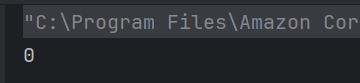
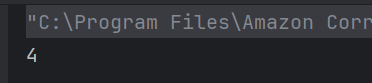

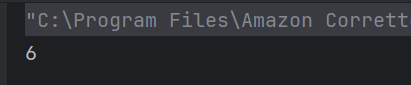
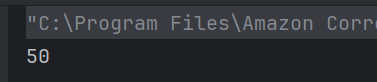
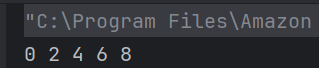
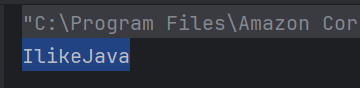
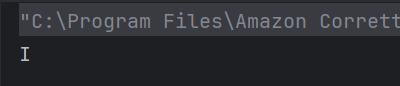
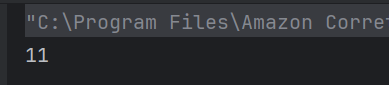

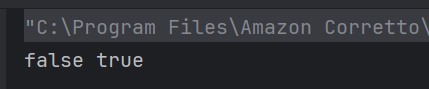
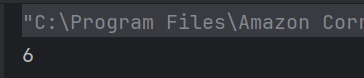
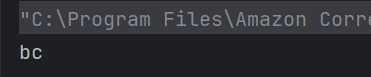
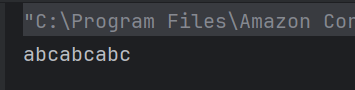
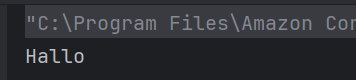
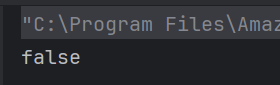
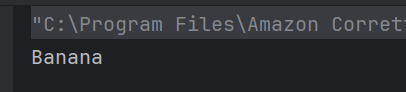
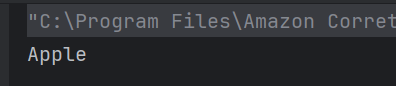

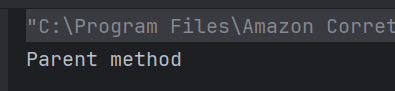
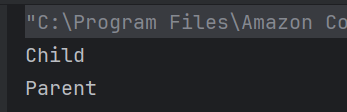
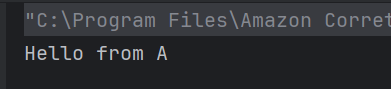
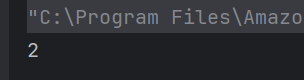
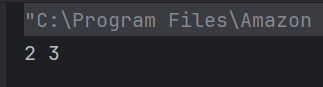
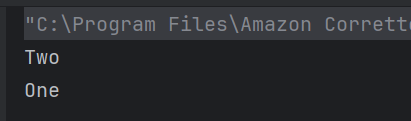






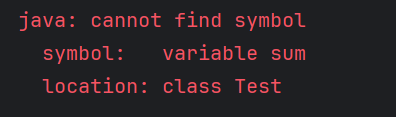



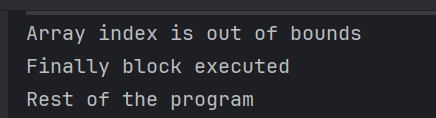

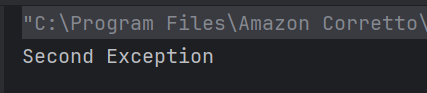

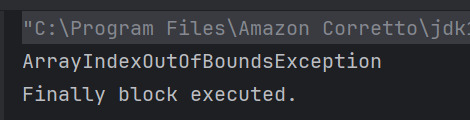


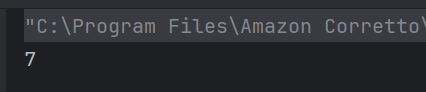
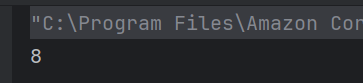

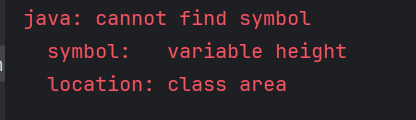

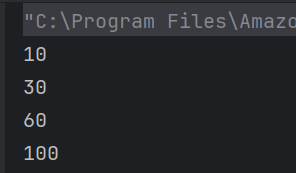

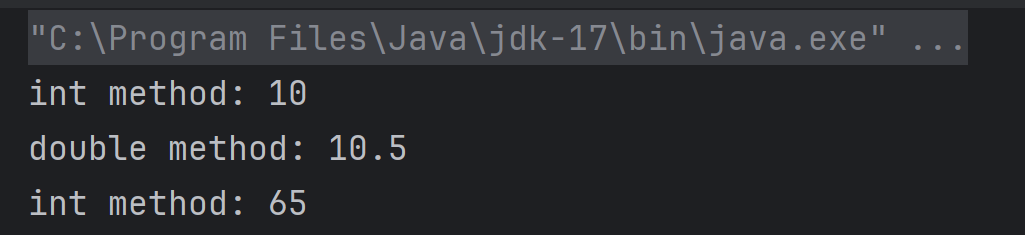





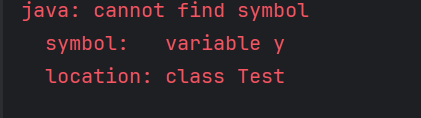
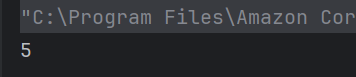


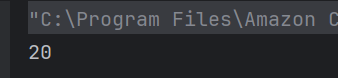
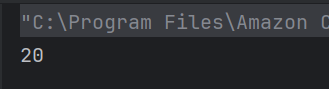
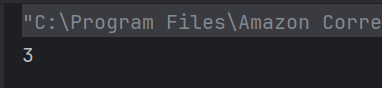
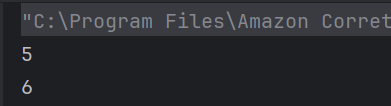
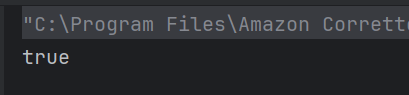
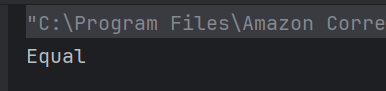
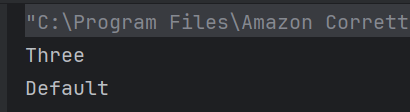

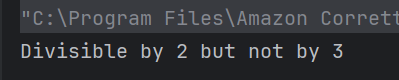
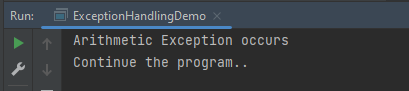
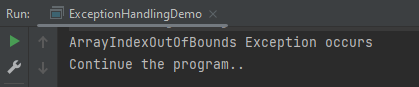
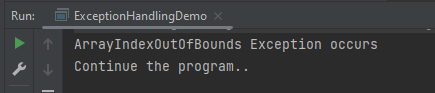
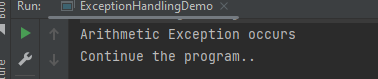
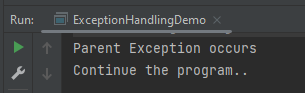



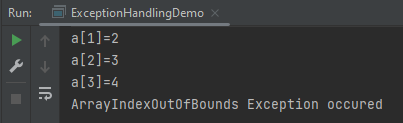
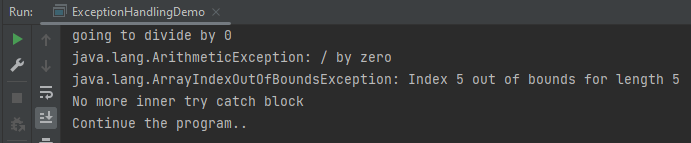
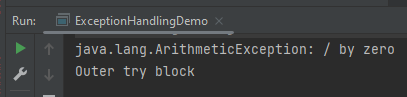
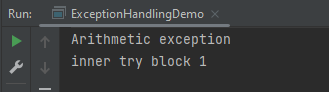
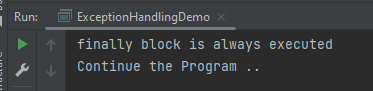

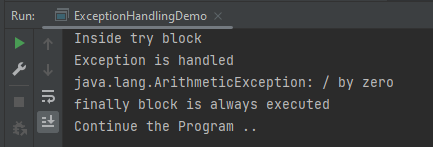
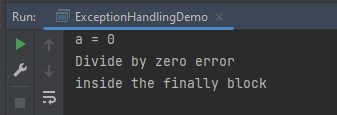



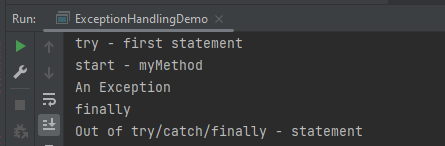




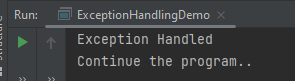

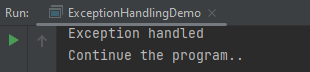

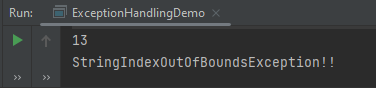

 QA Automation Expert