In this article, you’ll learn how to use Jsoup for web scraping in Java.
Table of Contents
- What is HTML?
- What is Jsoup?
- Key Features of Jsoup
- Parsing HTML From a String
- Parsing HTML from a local HTML file
- Parsing HTML From a URL and retrieving tags
What is HTML?
HTML, short for HyperText Markup Language, is the standard language used to create and design web pages. It forms the basic structure of websites. It is also one of the core technologies of the World Wide Web, alongside CSS (Cascading Style Sheets) and JavaScript.
<!DOCTYPE html>
<html>
<head>
    <title>Login Page</title>
</head>
<body>
    <h1>Welcome to My Website</h1>
    <p>This is a paragraph of text.</p>
    <a href="https://qaautomation.expert">Visit QA Automation Expert</a>
</body>
</html>
What is Jsoup?
Jsoup is a powerful Java library designed specifically for working with real-world HTML. It provides a very convenient API for extracting and manipulating data, using the best of DOM, CSS, and jquery-like methods.
Key Features of Jsoup
- Parse and clean HTML from URLs, files, or strings.
- Extract data using DOM traversal or CSS-like selectors.
- Manipulate the HTML content.
- Automatically clean untrusted HTML.
- Provides support for cookies, POST requests, and session handling.
We need to add Jsoup to the project. If we’re using Maven, include the latest dependency in your pom.xml:
<dependency>
    <groupId>org.jsoup</groupId>
    <artifactId>jsoup</artifactId>
    <version>1.19.1</version>
</dependency>
To use jsoup in your Gradle build, add the following dependency to your build.gradle file.
// https://mvnrepository.com/artifact/org.jsoup/jsoup
implementation("org.jsoup:jsoup:1.19.1")
Parsing HTML From a String
Below is an example of parsing HTML from a string.
package com.example;

import org.jsoup.Jsoup;
import org.jsoup.nodes.Document;

import java.io.File;
import java.io.IOException;

public class Read_HTMLString {

    public static void main(String[] args) {

        String htmlString = "<html><head><title>HTML Scrapping</title></head>"
                + "<body>This page is demo HTML Page. This page is used for web scrapping.</body></html>";
        Document document = Jsoup.parse(htmlString);
        System.out.println("Title : " + document.title());
        System.out.println("Body: " + document.body().text());
    }
The output of the above program is

Explanation
This string contains simple HTML data.
String htmlString = "<html><head><title>HTML Scrapping</title></head>"
                + "<body>This page is demo HTML Page. This page is used for web scrapping.</body></html>";
With the Jsoup’s parse() method, we parse the HTML string. The method returns an HTML document.
Document document = Jsoup.parse(htmlString);
The document’s title() method gets the string contents of the document’s title element.
System.out.println("Title : " + document.title());
The document’s body() method returns the body element; its text() method gets the text of the element.
System.out.println("Body: " + document.body().text());
Parsing HTML from a local HTML file
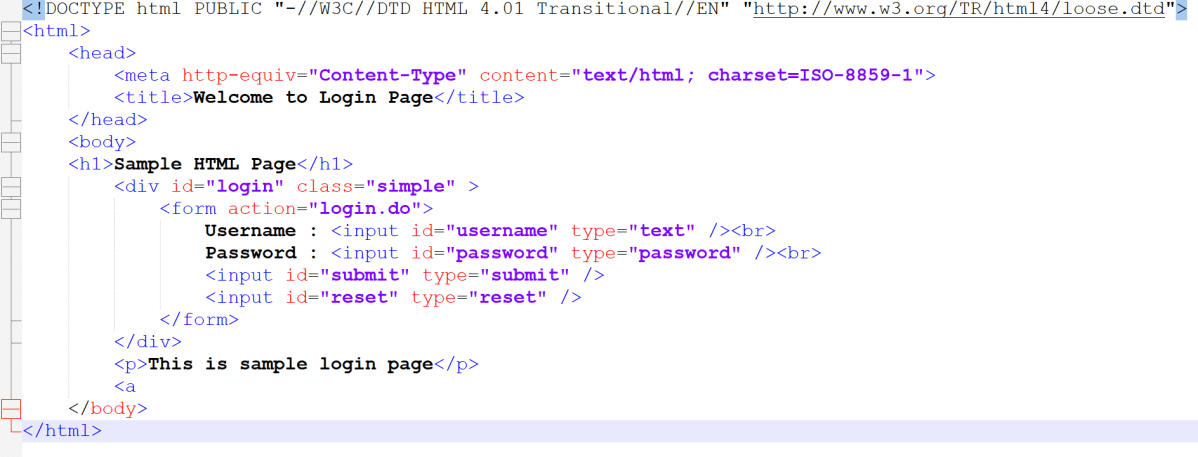
In the second example, we are going to parse a local HTML file. We use the overloaded Jsoup.parse() method that takes a File object as its first parameter.
package com.example;

import org.jsoup.Jsoup;
import org.jsoup.nodes.Document;

import java.io.File;
import java.io.IOException;

public class Read_HTMLFile {

    public static void main(String args[]) {
        Document document = null;
        try {
            document = Jsoup.parse(new File("C:\\Users\\vibha\\OneDrive\\Desktop\\Login.html"), "ISO-8859-1");
        } catch (IOException e) {
            e.printStackTrace();
        }

        String title = document.title();
        String divClass = document.getElementById("login").className();

        System.out.println("Jsoup can also parse HTML file directly");
        System.out.println("Title : " + title);
        System.out.println("Class of div tag : " + divClass);
        System.out.println("Heading: " + document.select("h1").text());
        System.out.println("Paragraph: " + document.select("p").text());
    }
}
The output of the above program is

Explanation
We parse the HTML file with the Jsoup.parse() method.
document = Jsoup.parse(new File("C:\\Users\\vibha\\OneDrive\\Desktop\\Login.html"), "ISO-8859-1");
With the document’s getElementById() method, we get the element by its ID.
String divClass = document.getElementById("login").className();
The text of the tag is retrieved with the element’s text() method.
System.out.println("Heading: " + document.select("h1").text());
Parsing HTML From a URL and retrieving tags
In the following example, we scrape and parse a web page and retrieve the content of the title element.
package com.example;

import org.jsoup.Jsoup;
import org.jsoup.nodes.Document;
import org.jsoup.nodes.Element;
import org.jsoup.select.Elements;

import java.io.File;
import java.io.IOException;

public class Read_URL {

    public static void main(String[] args) throws IOException {
        String url = "http://qaautomation.expert";
        Document document = Jsoup.connect(url).get();
        System.out.println("Title: " + document.title());

        Elements links = document.select("a[href]"); // Select all <a> tags with href attribute
        for (Element link : links) {
            System.out.println("Link: " + link.attr("href"));
            System.out.println("Text: " + link.text());
        }
    }

}
The output of the above program is

Explanation
The Jsoup’s connect() method creates a connection to the given URL. The get() method executes a GET request and parses the result; it returns an HTML document.
Document document = Jsoup.connect(url).get();
With the document’s title() method, we get the title of the HTML document.
System.out.println("Title: " + document.title());
To get a list of links, we use the document’s select() method.
Elements links = document.select("a[href]");
Summary:
- Jsoup.parse(htmlString): Parses a HTML string directly.
- Jsoup.connect(url): Connects to a URL to fetch and parse the HTML document.
- Jsoup.parse(new File(“C:\Users\vibha\OneDrive\Desktop\Login.html”), “ISO-8859-1”): Jsoup reads the HTML content from the specified file using the given encoding and returns a
Documentobject representing the parsed HTML. - Document: Represents the parsed HTML document.
- document.select(“a[href]”): Identifies all anchor elements with an
hrefattribute.
That’s it! Congratulations on making it through this tutorial and hope you found it useful! Happy Learning!!
 QA Automation Expert