JSON Handling and manipulation

HOME

How to Read JSON with JSON.simple

HOME

This article shows how to read JSON using JSON.simple.

JSON.simple is available at the Central Maven Repository. Maven users add this to the POM.

<!-- https://mvnrepository.com/artifact/com.github.cliftonlabs/json-simple -->
<dependency>
    <groupId>com.github.cliftonlabs</groupId>
    <artifactId>json-simple</artifactId>
    <version>4.0.1</version>
</dependency>

If the project is Gradle, add the below dependency in build.gradle.

// https://mvnrepository.com/artifact/com.github.cliftonlabs/json-simple
implementation("com.github.cliftonlabs:json-simple:4.0.1")

Read Simple JSON from File using JSON.simple

{
  "store": {
    "book": "Harry Potter",
    "author": "J K Rowling",
    "price": 100
  }
}

import com.github.cliftonlabs.json_simple.JsonException;
import com.github.cliftonlabs.json_simple.JsonObject;
import com.github.cliftonlabs.json_simple.Jsoner;

import java.io.IOException;
import java.math.BigDecimal;
import java.nio.file.Files;
import java.nio.file.Paths;

public class SimpleJsonExample {

    public static void main(String args[]) throws IOException {

        String jsonString = new String(Files.readAllBytes(Paths.get("src/test/resources/Payloads/simple.json")));
        try {
            JsonObject jsonObject = (JsonObject) Jsoner.deserialize(jsonString);

            // Accessing the "store" object
            JsonObject store = (JsonObject) jsonObject.get("store");

            // Accessing the "book" object
            String book = (String) store.get("book");
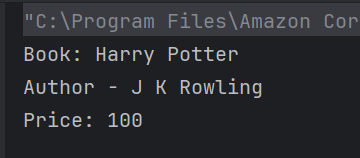
            System.out.println("Book: " + book);

            // Accessing the "author" object
            String author = (String) store.get("author");
            System.out.println("Author - " + author);

            // Accessing the "price" field
            BigDecimal price = (BigDecimal) store.get("price");
            System.out.println("Price: " + price);

        } catch (JsonException e) {
            throw new RuntimeException(e);
        }
    }
}

String jsonString = new String(Files.readAllBytes(Paths.get("src/test/resources/Payloads/simple.json")));
JsonObject jsonObject = (JsonObject) Jsoner.deserialize(jsonString);
 JsonObject store = (JsonObject) jsonObject.get("store");
String book = (String) store.get("book");
System.out.println("Book: " + book);
String author = (String) store.get("author");
System.out.println("Author - " + author);
BigDecimal price = (BigDecimal) store.get("price");
System.out.println("Price: " + price);

public class ComplexJsonExample {

    public static void main(String args[]) throws IOException {

        String jsonString = new String(Files.readAllBytes(Paths.get("src/test/resources/Payloads/complex.json")));
        try {
            JsonObject jsonObject = (JsonObject) Jsoner.deserialize(jsonString);

            // Accessing the "store" object
            JsonObject store = (JsonObject) jsonObject.get("store");

            // Accessing the "book" array
            JsonArray books = (JsonArray) store.get("book");
            for (Object bookObj : books) {
                JsonObject book = (JsonObject) bookObj;
                String category = (String) book.get("category");
                String author = (String) book.get("author");
                String title = (String) book.get("title");
                BigDecimal price = (BigDecimal) book.get("price");

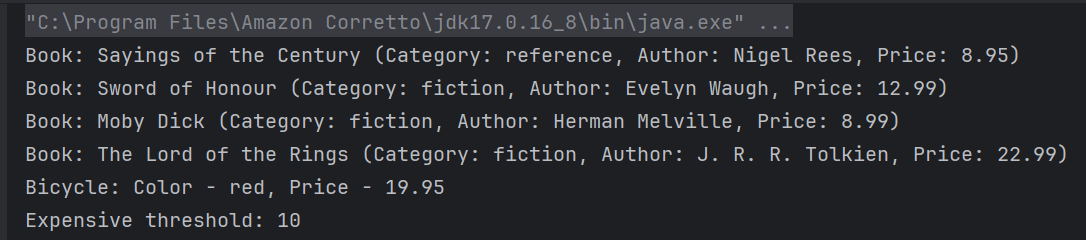
                System.out.println("Book: " + title + " (Category: " + category + ", Author: " + author + ", Price: " + price + ")");
            }

            // Accessing the "bicycle" object
            JsonObject bicycle = (JsonObject) store.get("bicycle");
            String color = (String) bicycle.get("color");
            BigDecimal bicyclePrice = (BigDecimal) bicycle.get("price");
            System.out.println("Bicycle: Color - " + color + ", Price - " + bicyclePrice);

            // Accessing the "expensive" field
            BigDecimal expensiveValue = (BigDecimal) jsonObject.get("expensive");
            System.out.println("Expensive threshold: " + expensiveValue);

        } catch (JsonException e) {
            throw new RuntimeException(e);
        }
    }
}
String jsonString = new String(Files.readAllBytes(Paths.get("src/test/resources/Payloads/complex.json")));
JsonObject jsonObject = (JsonObject) Jsoner.deserialize(jsonString);
 // Accessing the "store" object
JsonObject store = (JsonObject) jsonObject.get("store");

// Accessing the "book" array
JsonArray books = (JsonArray) store.get("book");
 for (Object bookObj : books) {
       JsonObject book = (JsonObject) bookObj;
       String category = (String) book.get("category");
       String author = (String) book.get("author");
       String title = (String) book.get("title");
       BigDecimal price = (BigDecimal) book.get("price");

        System.out.println("Book: " + title + " (Category: " + category + ", Author: " + author + ", Price: " + price + ")");
      }
 // Accessing the "bicycle" object
 JsonObject bicycle = (JsonObject) store.get("bicycle");
String color = (String) bicycle.get("color");
BigDecimal bicyclePrice = (BigDecimal) bicycle.get("price");
System.out.println("Bicycle: Color - " + color + ", Price - " + bicyclePrice);
BigDecimal expensiveValue = (BigDecimal) jsonObject.get("expensive");
System.out.println("Expensive threshold: " + expensiveValue);

We are done! Congratulations on making it through this tutorial and hope you found it useful! Happy Learning!!

How to compare JSON File with JSON Response

HOME

<dependencies>
    <dependency>
      <groupId>junit</groupId>
      <artifactId>junit</artifactId>
      <version>4.13.2</version>
      <scope>test</scope>
    </dependency>

    <dependency>
      <groupId>io.rest-assured</groupId>
      <artifactId>rest-assured</artifactId>
      <version>5.4.0</version>
      <scope>test</scope>
    </dependency>

    <dependency>
    <groupId>com.fasterxml.jackson.core</groupId>
    <artifactId>jackson-databind</artifactId>
    <version>2.11.3</version>
    </dependency>
</dependencies>

package com.example;

import io.restassured.RestAssured;
import io.restassured.response.Response;
import com.fasterxml.jackson.databind.JsonNode;
import com.fasterxml.jackson.databind.ObjectMapper;
import org.junit.Assert;
import org.junit.Test;

import java.io.File;
import java.io.IOException;

public class JsonFileComparison {

    @Test
    public void compareResponse() throws IOException {

        // Path to the JSON file
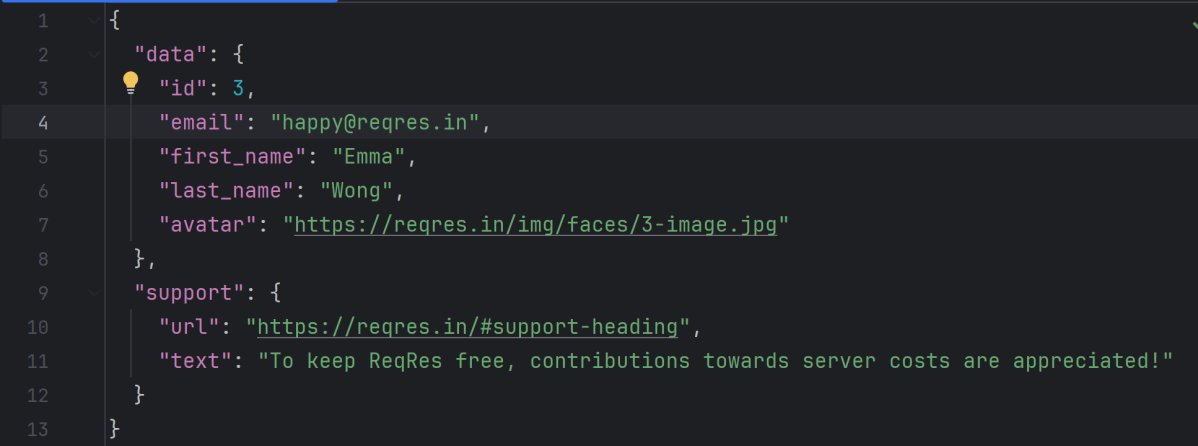
        File jsonFile = new File("src/test/resources/expectedUser.json");

        // Read JSON content from file
        ObjectMapper objectMapper = new ObjectMapper();
        JsonNode jsonFromFile = objectMapper.readTree(jsonFile);

        // Make an API call
        Response response = RestAssured.given().when().get("https://reqres.in/api/users/3").then().extract().response();
        String expectedResponse = response.getBody().asString();
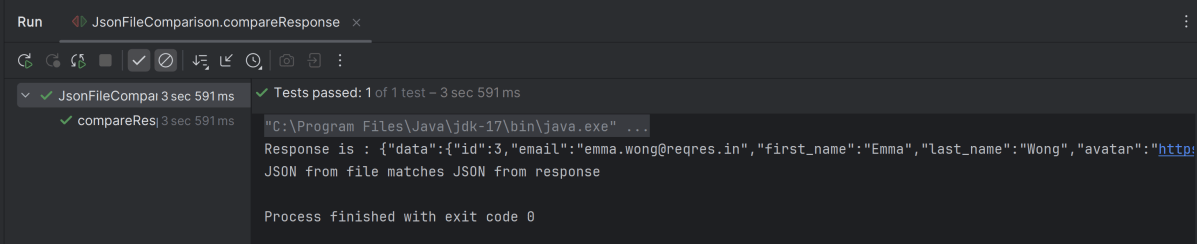
        System.out.println("Response is : " + expectedResponse);

        // Verify the status code
        response.then().statusCode(200);

        // Read JSON content from response
        JsonNode jsonFromResponse = objectMapper.readTree(expectedResponse);

        Assert.assertEquals(jsonFromFile, jsonFromResponse);

        // Compare JSON content
        if (jsonFromFile.equals(jsonFromResponse)) {
            System.out.println("JSON from file matches JSON from response");
        } else {
            System.out.println("JSON content does not match");
        }
    }
}

ObjectMapper objectMapper = new ObjectMapper();
JsonNode jsonFromFile = objectMapper.readTree(jsonFile);

Response response = RestAssured.given().when().get("https://reqres.in/api/users/3").then().extract().response();
String expectedResponse = response.getBody().asString();
System.out.println("Response is : " + expectedResponse);

// Verify the status code
response.then().statusCode(200);

JsonNode jsonFromResponse = objectMapper.readTree(expectedResponse);
 Assert.assertEquals(jsonFromFile, jsonFromResponse);

How To Send A JSON/XML File As Payload To Request using Rest Assured

HOME

In this tutorial, I will explain to pass a JSON or XML file as a payload to the request. This is needed when the payload is static or there is minimal change in the request payload. This can be done by using the body() method, which accepts “File” as an argument. This is elaborated in Javadoc.

RequestSpecification body(File body)

This specifies file content that’ll be sent with the request. This only works for the POST, PATCH and PUT HTTP methods. Trying to do this for the other HTTP methods will cause an exception to be thrown.

<dependency>
    <groupId>io.rest-assured</groupId>
    <artifactId>rest-assured</artifactId>
    <version>5.5.1</version>
    <scope>test</scope>
</dependency>

Pass JSON file as payload

Step 1 – Create a .json file and write the payload in that. Keep the file in the “src/test/resources” folder.

Step 2 – Create a File in Java using the “File” and pass it to body() method.

import static io.restassured.RestAssured.given;
import static org.hamcrest.Matchers.equalTo;
import java.io.File;
import org.junit.Test;
import io.restassured.http.ContentType;

public class passJsonAsPayload {


    @Test
    public void createUser() {

        // Creating a File instance
        File jsonData = new File("src/test/resources/Payloads/jsondemo.json");

        // GIVEN
        given()
                .baseUri("https://reqres.in")
                .contentType(ContentType.JSON)
                .body(jsonData)

                // WHEN
                .when()
                .post("/api/users")

                // THEN
                .then()
                .assertThat()
                .statusCode(201)
                .body("name", equalTo("Json_Test"))
                .body("job", equalTo("Leader"))
                .log().all();

    }
}

The output of the above program is

Similarly, we can pass an XML as a payload to request. The file passed within the body() method should be of type .xml.

<?xml version="1.0" encoding="utf-8"?>
<soap:Envelope xmlns:soap="http://schemas.xmlsoap.org/soap/envelope/">
    <soap:Body>
        <NumberToWords xmlns="http://www.dataaccess.com/webservicesserver/">
            <ubiNum>500</ubiNum>
        </NumberToWords>
    </soap:Body>
</soap:Envelope>
@Test
    public void getNumber() {

        // Creating a File instance
        File xmlData = new File("src/test/resources/Payloads/xmlDemo.xml");

        // GIVEN
         RestAssured.given()
                .baseUri("https://www.dataaccess.com")
                .header("Content-Type", "text/xml")
                .body(xmlData)

                // WHEN
                .when()
                .post("/webservicesserver/NumberConversion.wso")

                // THEN
                .then()
                .assertThat()
                .statusCode(200)
                 .body("Envelope.Body.NumberToWordsResponse.NumberToWordsResult", equalToCompressingWhiteSpace("five hundred"))
                .log().all();

    }

Congrats. You have learned how to pass a JSON as a payload to the request. Happy Learning !!

Compare JSON Arrays using JSONAssert Library

HOME

  <dependency>
      <groupId>org.skyscreamer</groupId>
      <artifactId>jsonassert</artifactId>
      <version>1.5.1</version>
      <scope>test</scope>
    </dependency>

import org.json.JSONArray;
import org.junit.Test;
import org.skyscreamer.jsonassert.JSONAssert;
import org.skyscreamer.jsonassert.JSONCompareMode;

public class JsonArrayAssertDemo {

    @Test
    public void sameArray() {

        // same no of elements, values and in same order
        String jsonArray1 = "[\"Vibha\",\"Abha\",\"Nysha\"]";
        String jsonArray2 = "[\"Vibha\",\"Abha\",\"Nysha\"]";

        JSONAssert.assertEquals(jsonArray1, jsonArray2, JSONCompareMode.LENIENT);
   }
}

    @Test
    public void sameArrayDifferentOrder() {

        // Same no of elements but different order
        String jsonArray1 = "[\"Vibha\",\"Abha\",\"Nysha\"]";
        String jsonArray2 = "[\"Nysha\",\"Vibha\",\"Abha\"]";

        JSONAssert.assertEquals(jsonArray1, jsonArray2, JSONCompareMode.LENIENT);
    }

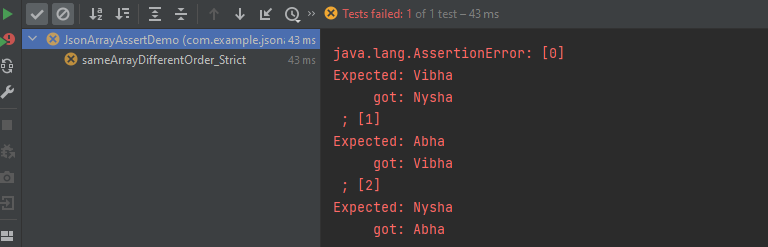
    @Test
    public void sameArrayDifferentOrder_Strict() {

        // same no of elements, values and in same order
        String jsonArray1 = "[\"Vibha\",\"Abha\",\"Nysha\"]";
        String jsonArray2 = "[\"Nysha\",\"Vibha\",\"Abha\"]";

        JSONAssert.assertEquals(jsonArray1, jsonArray2, JSONCompareMode.STRICT);
    }

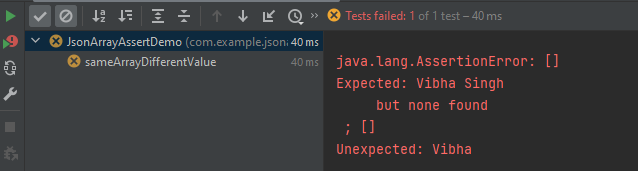
    @Test
    public void sameArrayDifferentValue() {

        // Same no of elements but different values
        String jsonArray1 = "[\"Vibha Singh\",\"Abha\",\"Nysha\"]";
        String jsonArray2 = "[\"Vibha\",\"Abha\",\"Nysha\"]";

        JSONAssert.assertEquals(jsonArray1, jsonArray2, JSONCompareMode.LENIENT);
    }

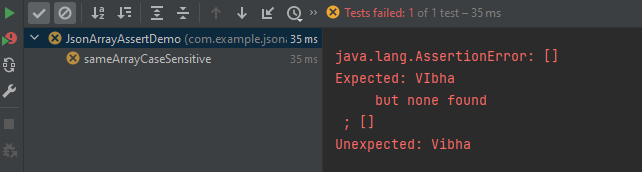
   @Test
    public void sameArrayCaseSensitive() {

        // case sensitive
        String jsonArray1 = "[\"VIbha\",\"Abha\",\"Nysha\"]";
        String jsonArray2 = "[\"Vibha\",\"Abha\",\"Nysha\"]";

        JSONAssert.assertEquals(jsonArray1, jsonArray2, JSONCompareMode.LENIENT);
    }

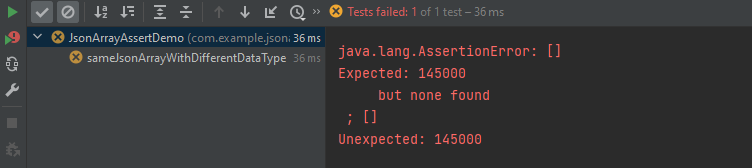
    @Test
    public void sameJsonArrayWithDifferentDataType() {

        String jsonArray1 = "[\"Vibha\",\"Abha\",\"145000\"]";
        String jsonArray2 = "[\"Vibha\",\"Abha\",145000]";


        JSONAssert.assertEquals(jsonArray1, jsonArray2, JSONCompareMode.LENIENT);
    }

   @Test
    public void sameArrayDifferentNumber() {
        
        String jsonArray1 = "[\"Vibha\",\"Abha\",\"Nysha\", \"Pooja\"]";
        String jsonArray2 = "[\"Vibha\",\"Abha\",\"Nysha\"]";

        JSONAssert.assertEquals(jsonArray1, jsonArray2, JSONCompareMode.LENIENT);
    }

    @Test
    public void sameArrayDifferentNumber() {

        String jsonArray1 = "[\"Vibha\",\"Abha\",\"Nysha\", \"Pooja\"]";
        String jsonArray2 = "[\"Vibha\",\"Abha\",\"Nysha\"]";

        JSONAssert.assertEquals(jsonArray1, jsonArray2, JSONCompareMode.STRICT);
    }

        JSONAssert.assertEquals(jsonArray1, jsonArray2, JSONCompareMode.LENIENT);
        JSONAssert.assertEquals(jsonArray1, jsonArray2, false);

        JSONAssert.assertEquals(jsonArray1, jsonArray2, JSONCompareMode.STRICT);
        JSONAssert.assertEquals(jsonArray1, jsonArray2, true);

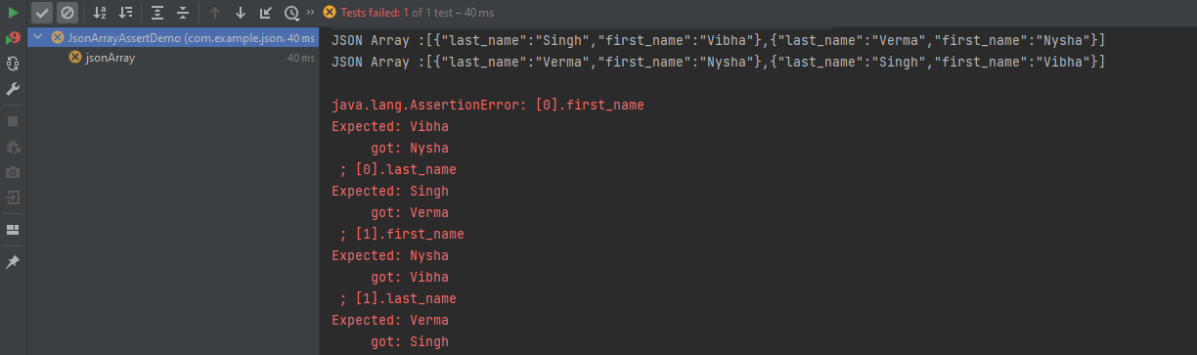
 @Test
    public void jsonArray() {

        JSONObject data1 = new JSONObject();
        data1.put("first_name", "Vibha");
        data1.put("last_name", "Singh");

        JSONObject data2 = new JSONObject();
        data2.put("first_name", "Nysha");
        data2.put("last_name", "Verma");


        // Creating JSON array to add both JSON objects
        JSONArray array1 = new JSONArray();
        array1.put(data1);
        array1.put(data2);

        System.out.println("JSON Array :" + array1);

       //Second JSON Array

        JSONObject data3 = new JSONObject();
        data3.put("first_name", "Nysha");
        data3.put("last_name", "Verma");

        JSONObject data4 = new JSONObject();
        data4.put("first_name", "Vibha");
        data4.put("last_name", "Singh");

        // Creating JSON array to add both JSON objects
        JSONArray array2 = new JSONArray();
        array2.put(data3);
        array2.put(data4);

        System.out.println("JSON Array :" + array2);

        JSONAssert.assertEquals(array1, array2, JSONCompareMode.STRICT);
    }

Compare JSON Objects using JSONAssert Library

HOME

  <dependency>
      <groupId>org.skyscreamer</groupId>
      <artifactId>jsonassert</artifactId>
      <version>1.5.1</version>
      <scope>test</scope>
    </dependency>

import org.json.JSONObject;
import org.junit.Test;
import org.skyscreamer.jsonassert.JSONAssert;
import org.skyscreamer.jsonassert.JSONCompareMode;

public class JsonAssertDemo {

    @Test
    public void exactSameJson() {

        String jsonObject1 = "{ " +
                "\"first_name\" : \"Vibha\"," +
                "\"last_name\": \"Singh\"" +
                "}";

        String jsonObject2 = "{ " +
                "\"first_name\" : \"Vibha\"," +
                "\"last_name\": \"Singh\"" +
                "}";

        // Lenient mode - extensible and no strict ordering
        JSONAssert.assertEquals(jsonObject1, jsonObject2, JSONCompareMode.LENIENT);
    }

   @Test
    public void sameJsonWithDifferentOrder() {

        String jsonObject1 = "{ " +
                "\"first_name\" : \"Vibha\"," +
                "\"last_name\": \"Singh\"" +
                "}";

        String jsonObject2 = "{ " +
                "\"last_name\": \"Singh\"," +
                "\"first_name\" : \"Vibha\"" +
                "}";

      
        JSONAssert.assertEquals(jsonObject1, jsonObject2, JSONCompareMode.LENIENT);
    }

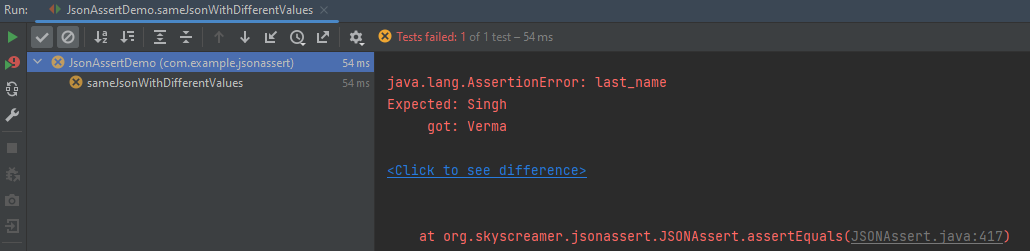
    @Test
    public void sameJsonWithDifferentValues() {

        String jsonObject1 = "{ " +
                "\"first_name\" : \"Vibha\"," +
                "\"last_name\": \"Singh\"" +
                "}";

        String jsonObject2 = "{ " +
                "\"first_name\" : \"Vibha\"," +
                "\"last_name\": \"Verma\"" +
                "}";

        JSONAssert.assertEquals(jsonObject1, jsonObject2, JSONCompareMode.LENIENT);
    }

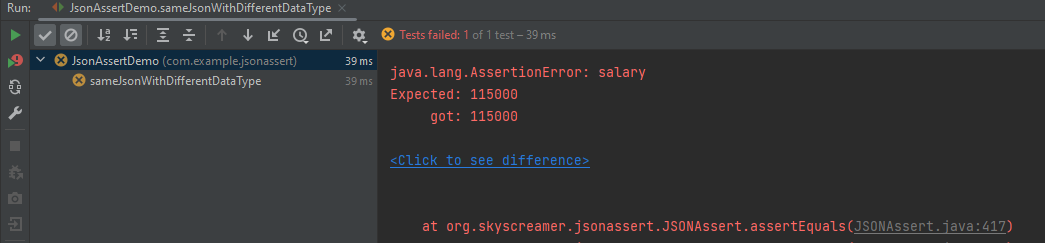
  @Test
    public void sameJsonWithDifferentDataType() {

        String jsonObject1 = "{ " +
                "\"first_name\" : \"Vibha\"," +
                "\"last_name\": \"Singh\"," +
                "\"salary\": 115000" +
                "}";

        String jsonObject2 ="{ " +
                "\"first_name\" : \"Vibha\"," +
                "\"last_name\": \"Singh\"," +
                "\"salary\": \"115000\"" +
                "}";

        JSONAssert.assertEquals(jsonObject1, jsonObject2, JSONCompareMode.LENIENT);
    }

 @Test
    public void differentJson() {

        String jsonObject1 = "{ " +
                "\"first_name\" : \"Vibha\"," +
                "\"last_name\": \"Singh\"" +
                "}";

        String jsonObject2 ="{ " +
                "\"first_name\" : \"Vibha\"," +
                "\"last_name\": \"Singh\"," +
                "\"salary\": \"115000\"" +
                "}";

        JSONAssert.assertEquals(jsonObject1, jsonObject2, JSONCompareMode.LENIENT);
    }

    @Test
    public void differentJson() {

        String jsonObject1 = "{ " +
                "\"first_name\" : \"Vibha\"," +
                "\"last_name\": \"Singh\"" +
                "}";

        String jsonObject2 ="{ " +
                "\"first_name\" : \"Vibha\"," +
                "\"last_name\": \"Singh\"," +
                "\"salary\": \"115000\"" +
                "}";

        JSONAssert.assertEquals(jsonObject2, jsonObject1, JSONCompareMode.LENIENT);
    }

  @Test
    public void differentJsonWithStrict() {

        String jsonObject1 = "{ " +
                "\"first_name\" : \"Vibha\"," +
                "\"last_name\": \"Singh\"" +
                "}";

        String jsonObject2 ="{ " +
                "\"first_name\" : \"Vibha\"," +
                "\"last_name\": \"Singh\"," +
                "\"salary\": \"115000\"" +
                "}";

        JSONAssert.assertEquals("JSONs are not equal",jsonObject1, jsonObject2, JSONCompareMode.STRICT);
    }

        JSONAssert.assertEquals(jsonObject2, jsonObject1, JSONCompareMode.LENIENT);
        JSONAssert.assertEquals(jsonObject2, jsonObject1, false);

        JSONAssert.assertEquals(jsonObject2, jsonObject1, JSONCompareMode.STRICT);
        JSONAssert.assertEquals(jsonObject2, jsonObject1, true);

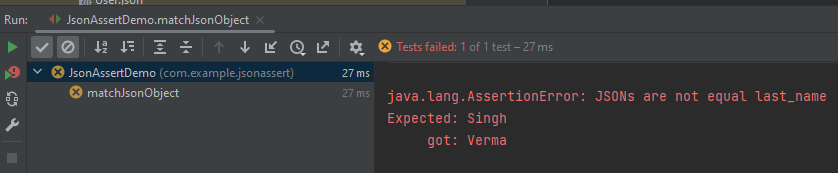
 @Test
    public void matchJsonObject()  {

        JSONObject jsonObject1 = new JSONObject();
        jsonObject1.put("first_name", "Vibha");
        jsonObject1.put("last_name", "Singh");

        JSONObject jsonObject2 = new JSONObject();
        jsonObject2.put("first_name", "Vibha");
        jsonObject2.put("last_name", "Verma");

        JSONAssert.assertEquals("JSONs are not equal", jsonObject1, jsonObject2, false);
    }

How to validate JSON body in Rest Assured?

HOME

 <dependency>
      <groupId>io.rest-assured</groupId>
      <artifactId>json-schema-validator</artifactId>
      <version>5.3.2</version>
 </dependency>

{
  "data": {
    "id": 3,
    "email": "emma.wong@reqres.in",
    "first_name": "Emma",
    "last_name": "Wong",
    "avatar": "https://reqres.in/img/faces/3-image.jpg"
  },
  "support": {
    "url": "https://reqres.in/#support-heading",
    "text": "To keep ReqRes free, contributions towards server costs are appreciated!"
  }
}

import static io.restassured.module.jsv.JsonSchemaValidator.

import org.junit.Test;
import java.io.IOException;
import static io.restassured.RestAssured.given;
import static io.restassured.module.jsv.JsonSchemaValidator.matchesJsonSchemaInClasspath;

public class JsonCompare {

    @Test
    public void verifyGreaterResponseTime() throws IOException {

        // Given
        given()

                // When
                .when()
                .get("https://reqres.in/api/users/3")

                // Then
                .then()

                .assertThat()
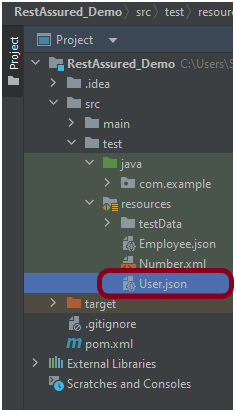
                .body(matchesJsonSchemaInClasspath("User.json"));
    }
}

How to print pretty JSON using org.json library in Java?

HOME

public java.lang.String toString(int indentFactor)

import org.json.JSONArray;
import org.json.JSONObject;
import org.junit.Test;


public class Json_Demo {

    @Test
    public void passBodyAsJsonArray1() {

        // Creating JSON array to add first JSON object
        JSONArray array1 = new JSONArray();
        array1.put(new JSONObject().put("firstname", "Tom").put("lastname", "Mathew").put("age", 59).put("salary",
                720000));

        // Creating JSON array
        JSONArray array2 = new JSONArray();
        array2.put(new JSONObject().put("firstname", "Perry").put("lastname", "David").put("age", 32).put("salary",
                365000));

        // Create JSON Object to add JSONArrays
        JSONObject data1 = new JSONObject();
        data1.put("employee1", array1);
        data1.put("employee2", array2);

        System.out.println(data1);

    }
}

import org.json.JSONArray;
import org.json.JSONObject;
import org.junit.Test;

public class Json_Demo {

    @Test
    public void passBodyAsJsonArray1() {

        // Creating JSON array to add first JSON object
        JSONArray array1 = new JSONArray();
        array1.put(new JSONObject().put("firstname", "Tom").put("lastname", "Mathew").put("age", 59).put("salary",
                720000));

        // Creating JSON array
        JSONArray array2 = new JSONArray();
        array2.put(new JSONObject().put("firstname", "Perry").put("lastname", "David").put("age", 32).put("salary",
                365000));

        // Create JSON Object to add JSONArrays
        JSONObject data1 = new JSONObject();
        data1.put("employee1", array1);
        data1.put("employee2", array2);

        System.out.println(data1.toString(4));

    }
}